Google Local Services Ads vs Google Business Profile: What Each Does and When to Use Both

If a client has asked why they're paying for Local Services Ads and for Business Profile work at the same time, it's because the two do different jobs on one shared foundation. Google Local Services Ads are pay-per-lead ads, and your Google Business Profile is the free listing behind the map pack.
LSAs now require that profile and show its reviews. For most eligible law firms and trades that can answer their phones, the answer is to run both, with the profile first. You'll leave with a side-by-side comparison, Google's current charging rules, and a lead-handling checklist and report template you can use this week.
What Is the Difference Between Local Services Ads and a Google Business Profile?
Local Services Ads (LSAs) are pay-per-lead ads that let customers call, message or book a screened, eligible business straight from Google, while a Google Business Profile (formerly Google My Business) is the free listing that appears in the local pack, on Maps and on Search. Google's Local Services Ads product page says you pay for leads (calls, messages or booking requests), not clicks. Standard Google Ads Search campaigns charge per click.
The biggest difference is money. Budget is a listed LSA ranking factor. Google's "Tips to improve your local ranking" page, as quoted in 2026 trade coverage, says there's no way to request or pay for a better local ranking.
The table below compares the 2 products on 9 points that matter to an agency, as of November 2026. It draws on Google's help, product and eligibility pages and Google's Business Profile community guides, with trade reporting for the placement and credits rows.
Attribute | Local Services Ads | Google Business Profile |
|---|---|---|
Cost | Per valid lead | Free |
Customer actions | Call, message or booking request | Call, direction request or website click |
Where it shows | Search and Maps, as ads | Local pack, Maps and Search |
Who can use it | Eligible categories in eligible cities | Businesses with in-person customer contact during stated hours |
Prerequisite | An affiliated public Business Profile | None |
Budget is a ranking factor | Yes, budget is a listed factor | No |
Reviews | Displays the profile's reviews | Collects and stores the reviews |
Bad leads | Automated credits since July 2024 | Not applicable |
Risk if neglected | Missed calls may hurt responsiveness | Outdated details customers see |
The reviews row explains most of the confusion clients bring to agencies. The 2 products are billed and ranked separately but share one reputation, so the review work you do on the profile shows up in both places.
How Do Local Services Ads Connect to Your Google Business Profile?
Local Services Ads connect to the Business Profile in 3 documented ways:
- Google requires an affiliated public profile before you can advertise.
- Every LSA review is managed through that profile.
- Google's Local Services Ads product page refers to displaying the Google Verified badge on the Business Profile.
Budgets, bids, leads and access stay on the ads side. The sections below explain the connections and what stays separate.
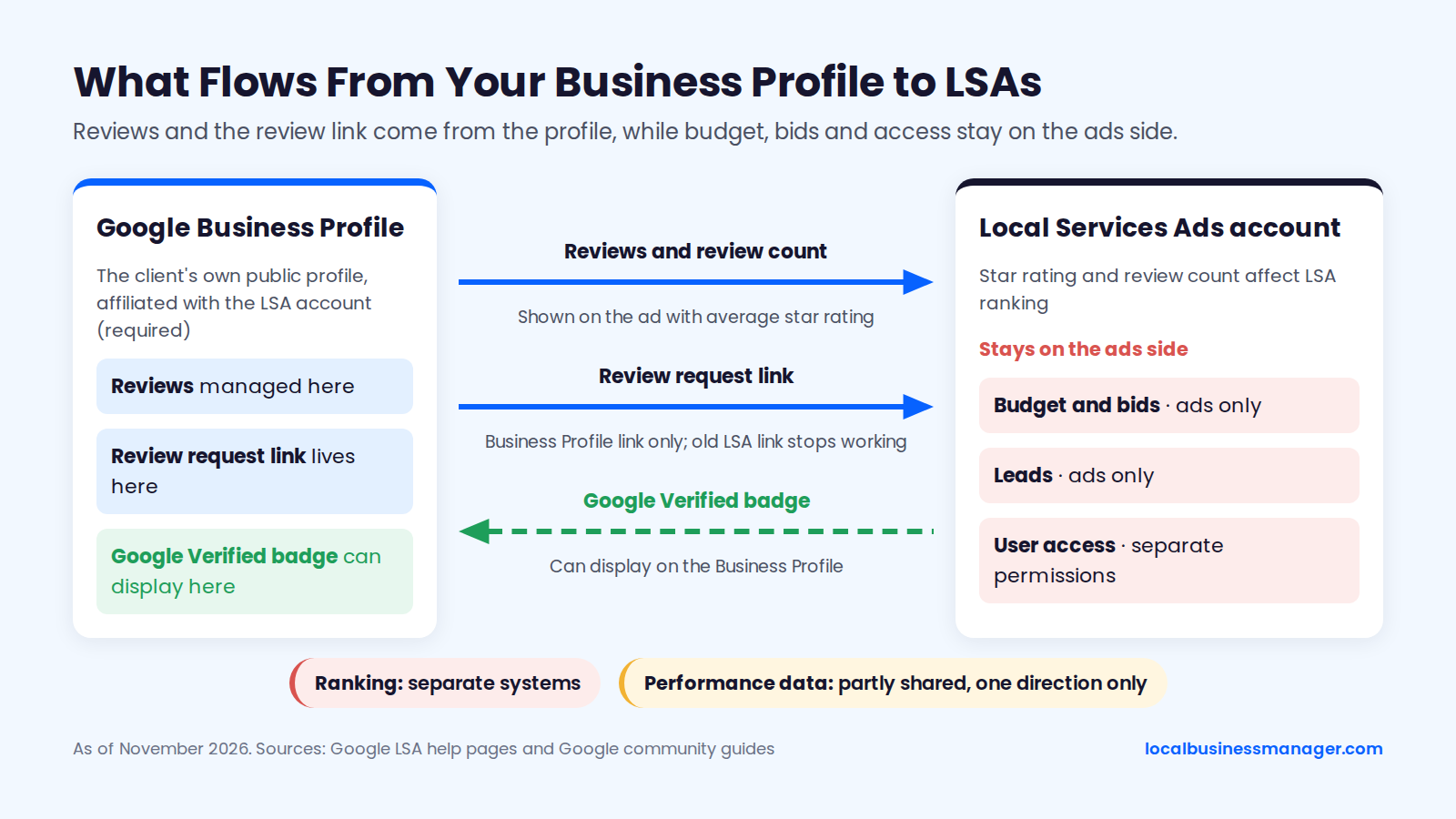
What moves from the Business Profile to Local Services Ads, and what stays separate, as of November 2026.
Reviews Come From Your Business Profile
Google's Local Services Ads overview says your ad's reviews include the reviews from your Google Business Profile, and every ad shows an average star rating. A Google Business Profile community guide describes how LSA reviews have worked since July 11, 2025:
- All LSA customer reviews are managed through the Business Profile, not the LSA account.
- Google said it would check existing LSA reviews against Maps review policies and remove ones that don't comply.
- New review requests must use the Business Profile review link. Search Engine Roundtable reported Google's email telling advertisers the old LSA link would stop working.
Google's Reviews and Ratings help page for LSAs says star rating and number of reviews affect how a business ranks within Local Services Ads. One compliant review program now feeds both placements. Our guide to compliant review requests covers the process step by step.
For personal-injury firms, I send review requests by text or email. Ask every client the same way when their matter closes. For clients who recovered, that moment is after payout. Asking only the clients who won would be selective solicitation, which Google's review policy bans. Send review-request texts only to clients who have agreed to receive them.
Linking a Profile During Setup
Linking means affiliating the client's own public Business Profile with the LSA account, which Google requires of every advertiser. Search Engine Roundtable reports Google began requiring profiles for LSA accounts in October 2023. A community-written guide in the Business Profile help forum describes the 2 as separate but closely connected products. Before you link, check 3 things:
- The right profile: the profile you affiliate is the client's own public profile, not a duplicate or an old listing.
- Profile access: the person setting up the ads also has access to that profile. The same guide notes that someone can have LSA access without Business Profile access.
- Existing links: the client's profile isn't already affiliated with an LSA account you don't control.
In 2024, Search Engine Land reported a case where a competitor connected a business's profile to a fake LSA account, and the business's own ads disappeared. Google called it an isolated incident.
Our reading, not a Google statement: because the ads need that profile, a profile that gets suspended can take the ads down with it. Keep Business Profile suspension risks in mind before any sensitive profile edit.
What Does Not Carry Over
Reviews and the review link flow from the profile to the ads, and the badge can display on the profile. Ranking, budgets and access stay separate, and performance data overlaps in one direction only.
The table is sorted from most shared to least, as of November 2026.
Item | Shared between LSAs and the Business Profile? | Source |
|---|---|---|
Reviews and review count | Yes, shown on the ad | Google LSA overview |
Review request link | Yes, the Business Profile link only | Google community guide |
Google Verified badge | Can display on the Business Profile | Google LSA product page |
Performance data | Partly: profile data includes Google Ads actions | Google Business Profile help |
Ranking | No, separate systems | Google LSA and local ranking help pages |
Budget and bids | No, ads only | Google Ads help |
User access | No, separate permissions | Community-written Business Profile help forum guide |
Where Do Local Services Ads and the Business Profile Appear on Google?
Local Services Ads appear on Google Search and Maps. Neither their position nor the number of ads shown is fixed. Google's LSA overview says ad formats change and some formats show more or less information. The Business Profile appears in the local pack, on Maps and as a profile on Search.
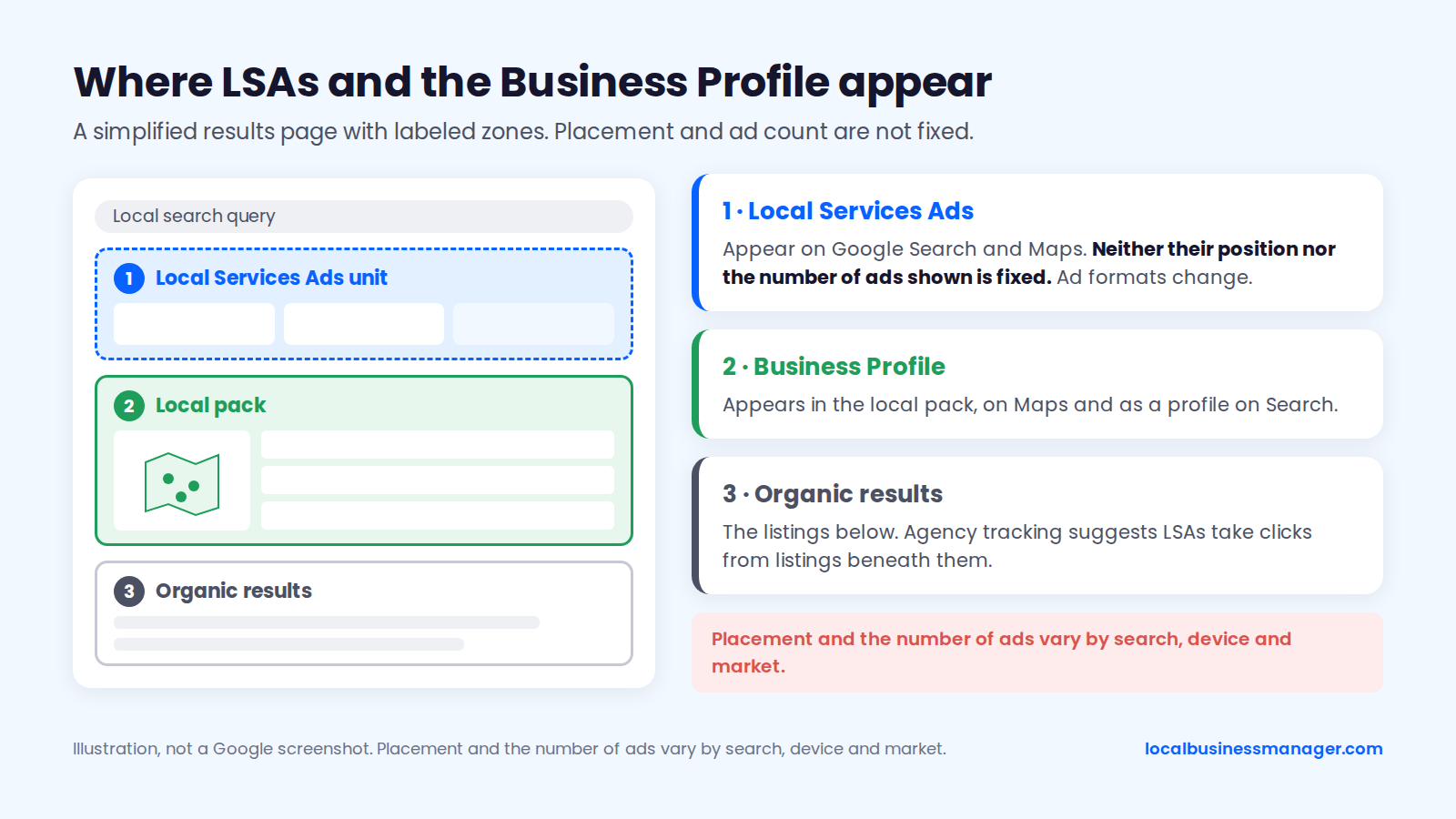
Illustration, not a Google screenshot. Placement and the number of ads vary by search, device and market.
Two agency measurements show LSAs appearing more often and taking clicks from the listings below them:
- Frequency: Sterling Sky tracked LSAs on about 11% of local queries at the start of 2025 and about 31% by November 2025, according to its State of Local SEO 2026 data as cited by Pareto Legal. That's agency tracking, not a controlled study.
- Click loss: in December 2020, Sterling Sky compared 110 lawyer Business Profile listings before and after the September 2020 lawyer LSA launch. Lower click-through cost the average listing about 5.11 actions per month.
Both figures count appearances or clicks, so neither tells you how many signed cases moved. No public study measures how many LSA callers would otherwise have called the firm from its map-pack listing, and Google publishes nothing on that overlap.
How Much Do Local Services Ads Cost, and How Does Google Charge You?
Google charges per valid lead (a call, message or booking request), at a price set by your bids, within the budget you set. There's no fixed market price and no reliable public benchmark. The sections below cover what gets charged, budgets and bidding, credits, and how to set a bid from your own numbers.
What Counts as a Charged Lead
Google charges for valid leads: phone calls, messages and booking requests. Google's Manage leads help page says message leads typically cost less than phone leads.
Missed calls now cost money too. Agency write-ups of Google's August 24, 2026 notice to advertisers, including Workshop Digital's October 2026 summary, describe the rules from October 1, 2026:
- An unanswered call during business hours and the ad schedule is billed as a lead if the caller stays on the line for more than 20 seconds, including calls that go to voicemail.
- Calls of 20 seconds or less are not charged.
- A repeat contact about the same job within 15 days is not charged.
- Unanswered calls outside business hours or the ad schedule are not charged.
These rules come from third-party summaries of Google's notice, not a Google help page, so check the current Google Ads help text before you quote the 20-second threshold to a client. Step 5 below covers matching the ad schedule to staffed hours.
Budgets and Bidding Options
The budget unit depends on whether the account has moved into Google Ads. In July 2026, Google announced that Local Services Ads are moving into Google Ads as Performance Max campaigns with pay-per-lead goals. Search Engine Journal reports the move started in August 2026 and runs gradually through 2027. Google's transition page describes the budget change:
- Before migration: a weekly budget.
- After migration: a daily budget equal to the old weekly budget divided by 7.
- Monthly cap: Search Engine Roundtable reports that monthly spend is capped at the average daily budget à 30.4.
Google's LSA help, as quoted by Mindflow Marketing, recommends a minimum budget of 10 leads per week with automated bidding.
Google documents 3 bid modes, and only 2 survive migration. Max Per Lead is a hard cap: Google's example is that a $15 cap never bids on a $16 lead, even if the average cost would have stayed around $15. Target Cost Per Lead, added in September 2024, is an optional target inside Maximize Leads. In Google's pilot, advertisers who switched from Max Per Lead to Target Cost Per Lead got more leads, and those who switched from Maximize Leads got fewer.
Bid mode | How it bids | Available after migration | Google's recommendation |
|---|---|---|---|
Maximize Leads | Fully automated | Yes | Recommended |
Target Cost Per Lead | Optional target inside Maximize Leads | As a campaign-level Target CPA | Not the recommended mode |
Max Per Lead | Manual hard cap | No | Not the recommended mode |
Google's only evidence for Maximize Leads is its own pilot, which published no numbers. Rankings.io argues Maximize Leads mainly helps Google earn more from you, and Dnovo Group says many lawyers prefer setting max rates to keep control. Both are agency opinions, and no published test compares bid modes for law firms versus trades.
How Lead Credits Work Now
Google automatically reviews every Local Services Ads lead and credits the ones it judges invalid, usually within 30 days. Search Engine Land reported this change in June 2024, effective from July 2024, and manual disputes ended with it.
One older Google help page still describes manual disputes, so expect clients to find conflicting advice. What to know about credits now:
- No opt-out: advertisers can't opt out of automated credits, and health-care verticals and advertisers in Europe, the Middle East and Africa get no credits at all, per Search Engine Roundtable. Google said the new system would credit "the same or more leads on average."
- Unserved job types and areas: leads for a job type or area the business doesn't serve are no longer credited, per PILMMA's August 2024 summary for law firms.
- Duplicates: practitioner write-ups say a repeat contact about the same job within 15 days is treated as a duplicate.
- Lead feedback: Google's Ads Liaison asked advertisers to rate every lead through the lead feedback survey.
- Bonus credit: Workshop Digital's October 2026 reading of Google's help page says rating leads may earn a bonus credit.
Each lead now shows one of 4 charge statuses: Charged, Not charged, In review or Credited, per Search Engine Roundtable's report on Google's updated How leads work help page. Agencies disagree on whether calls from existing clients get credited, and none lists "already represented" as its own credit reason. That makes the job-type and service-area settings in Step 2 your main budget protection.
How to Set a Max Bid From Job or Case Value
Set your bid ceiling from what one charged lead is worth: profit per job (or fee per case) multiplied by the share of charged leads that turn into paid work. The numbers below are hypothetical. They show the math and are not benchmarks.
Worked example for an HVAC repair business (hypothetical numbers):
- Average gross profit per repair job: $400.
- Share of charged leads that book a job: 40%.
- Break-even cost per lead: $400 Ã 0.40 = $160.
- Keep half the profit as margin: target about $80 per lead.
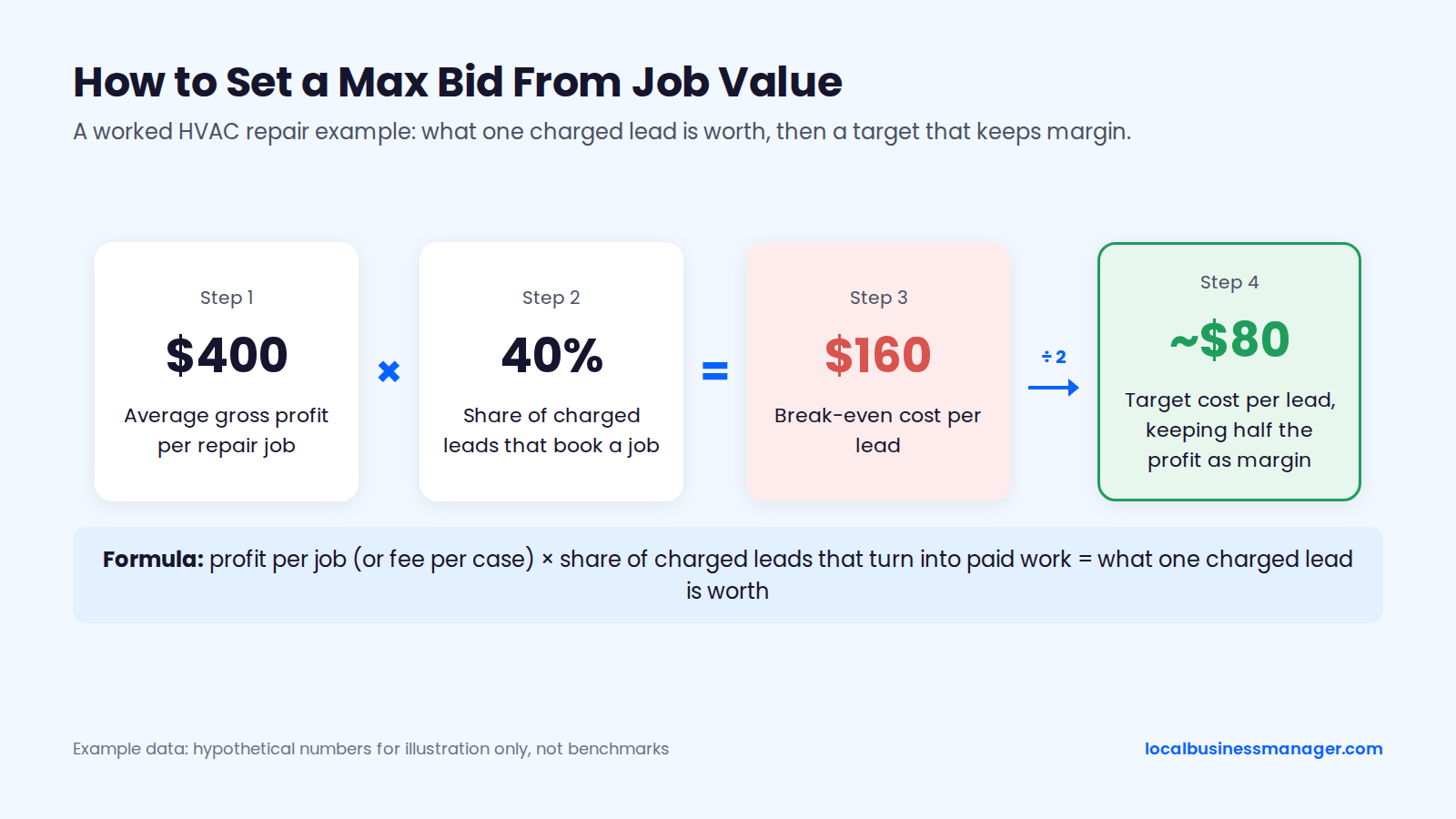
Hypothetical numbers for illustration only.
For a law firm, the same formula uses the average fee per signed case times the share of charged leads that sign. Published personal-injury figures show why the inputs should be your own.
OptimizeMyFirm's January 2022 sample of 15 personal-injury accounts averaged $240 per undisputed lead, from $140 in Kentucky to $344 in Los Angeles. Rankings.io reported $150 to $225 per PI lead and $71 to $107 per family-law lead in one market in January 2026. Both are single-agency samples from different years, so build the bid from your own numbers.
Where you enter the number depends on migration:
- Unmigrated accounts: use it as a Max Per Lead cap or a Target Cost Per Lead.
- Migrated accounts: use it as the campaign-level Target CPA. Ignite Visibility notes that a business wanting different targets for different services, such as plumbing and HVAC, may need separate campaigns.
Who Can Run Local Services Ads, and What Does Google Verified Require?
Local Services Ads are open only to eligible categories in eligible cities, and a business must pass Google's screening for its category to earn the Google Verified badge. Requirements differ for law firms and trades, and some categories can start with pre-badge ads after preliminary checks.
Check Eligibility for Your Category and City
Eligibility is set by country, city and business category, so a copied list goes stale fast. Start from Google's Getting started with Local Services Ads page, which sets out the requirements, and check the specific category and city with Google before promising a client anything. Lawyer categories appear on Google's own LSA pages.
Eligibility has a second layer: the Business Profile the ads depend on. Google's Business Profile eligibility guidelines require in-person contact with customers during stated hours, so a business that can't hold a compliant profile can't run LSAs either. Check both layers in the same call with the client, before anyone quotes a budget or starts collecting documents.
Verification Checklist for Law Firms (Professional Verticals)
Law firms go through checks on each attorney as well as on the firm. FirmPilot's 2026 guide for personal-injury lawyers, written around the retired Google Screened badge, lists 4 checks, and Google's Getting started page adds headshots for professional categories. Google said verified advertisers moved to Google Verified automatically, so treat this as the likely document set and confirm it in Google's current flow:
- Bar license details for each attorney, for the license check
- Government ID for the ID check
- Background check details (Google's third-party providers run the check)
- Proof of insurance
- Headshots (Google's professional-category requirement)
Add 2 decisions to the same list, though they aren't verification documents: the firm's state-bar position on paid advertising and lead generation (see For Law Firms below), and which practice areas to switch on (see How Lead Credits Work Now).
We don't quote verification timelines, because the ones circulating online are practitioner estimates, not Google figures.
Verification Checklist for Trades (Standard Verticals)
Trades start with a license, or business registration where a license isn't required, per Google's Getting started page, plus an acknowledgement that the business holds all required licenses. Requirements vary by category and city, so Google's eligibility tool has the final word. A typical document set:
- Trade license, or business registration where no license is required
- Acknowledgement that the business holds all required licenses (Google's standard-category requirement)
- Reviews on the Business Profile, plus billing and budget setup (Google's listed requirements)
- Proof of insurance and background check details, if the category and city call for them
Also write down the job types and service areas the business actually covers. You'll use that list in Step 2.
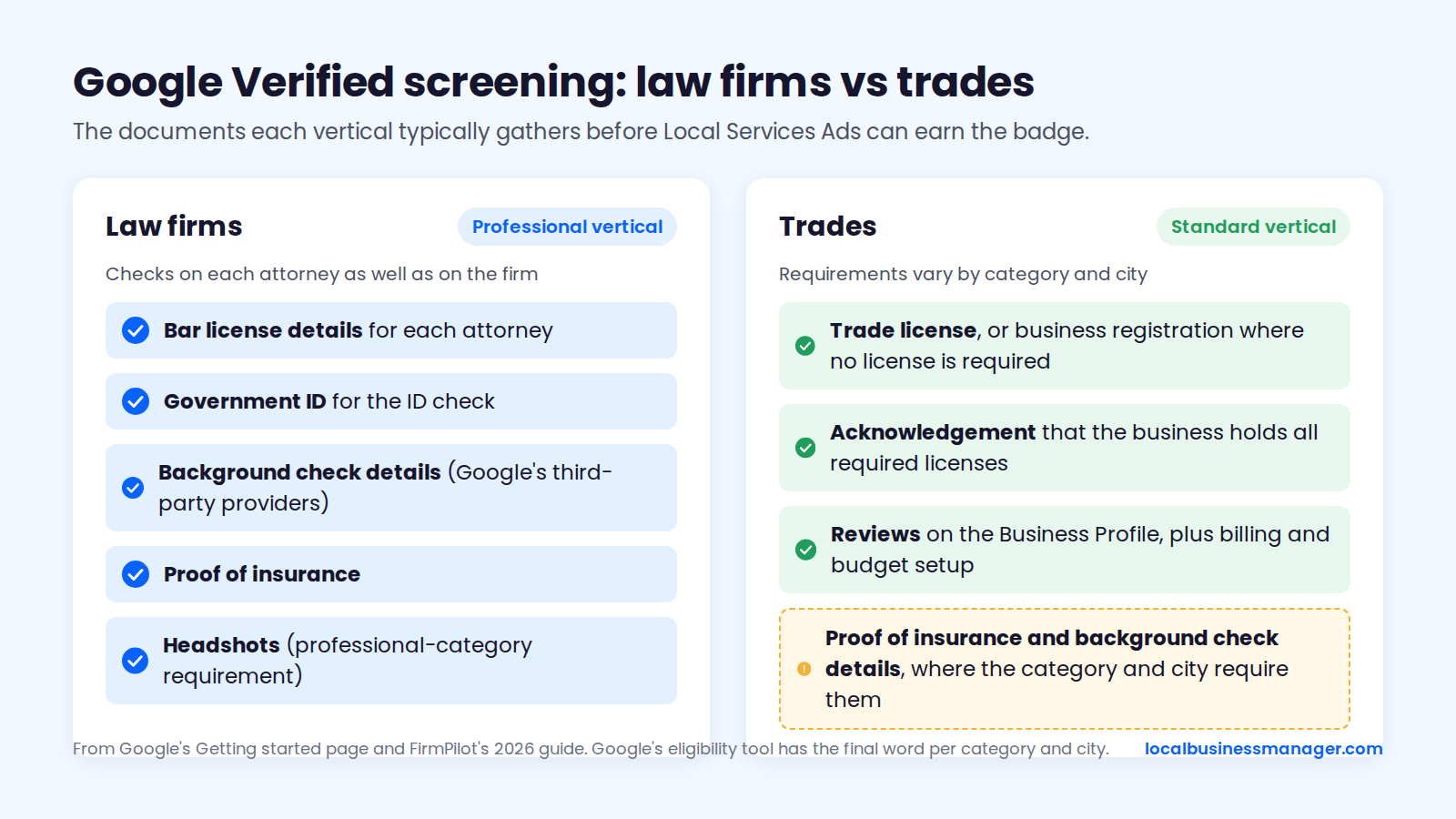
Screening documents by vertical, from Google's requirements and FirmPilot's 2026 guide. Google's eligibility tool has the final word per category and city.
Pre-Badge Ads
Pre-badge ads let a business receive leads after passing preliminary checks while it finishes onboarding, according to Google's Getting started page. Google places pre-badge listings below providers who have completed all requirements and earned the badge. The requirements differ by vertical:
- Standard (trades): a license or business registration, acknowledging you hold all required licenses, reviews, and billing and budget setup.
- Professional (law firms): a license or registration, headshots, reviews, and billing and budget setup.
Pre-badge ads aren't available for garage door services, health care categories or locksmiths, per the same Google page. For every other eligible category, plan the launch around lower placement until the badge clears.
What Happened to Google Guaranteed and Google Screened?
Google replaced Google Guaranteed, Google Screened, License Verified by Google and the Money Back Guarantee with a single Google Verified badge, according to Google's August 2025 announcement on its blog. Google's blog said the change would start in October, and Coalmarch gives the effective date as October 20, 2025. What that means for clients:
- No action was needed: eligible advertisers who had completed LSA verification automatically became eligible for the Google Verified badge, as WebProNews reported from Google's announcement.
- The old badges are gone: if a client searches "how to become Google Screened" or asks for the Google Guaranteed logo, both were retired in October 2025, and the only path now is Google Verified.
- The guarantee ended: Google's About Google Verified badge help page says the Money Back Guarantee was discontinued. Consumers could request reimbursement only for services booked through Local Services Ads before December 7, 2025, within 30 days of the service being completed.
How Does Google Rank Local Services Ads Compared With the Map Pack?
Google ranks the 2 with separate systems: LSAs on proximity, reviews, responsiveness, an updated Business Profile, budget and badge status, and the local pack on relevance, distance and prominence. That's why a business can lead one and be missing from the other.
Only reviews and location count in both systems, and budget counts only for LSAs. The table reflects November 2026 with shared factors first. LSA cells come from Google's LSA help pages and its business.google.com LSA guide, and local pack cells from Google's local ranking help page. The review row's local pack cell comes from the Local Search Ranking Factors survey (as summarized December 2025), and the last row from former Googler Eric Levine.
Factor | Local Services Ads | Local pack |
|---|---|---|
Star rating and review count | Yes | Top signal group in the survey |
Proximity or distance | Yes | Yes |
Relevance to the search | Not on Google's LSA list | Yes |
Prominence | Not on Google's LSA list | Yes |
Responsiveness to calls and messages | Yes | Not documented |
Updated Business Profile | Yes | Not one of Google's 3 named factors |
Budget | Yes | No |
Badge status | Yes | Not applicable |
Review velocity, recency, messaging opt-in | Practitioner view | Not documented |
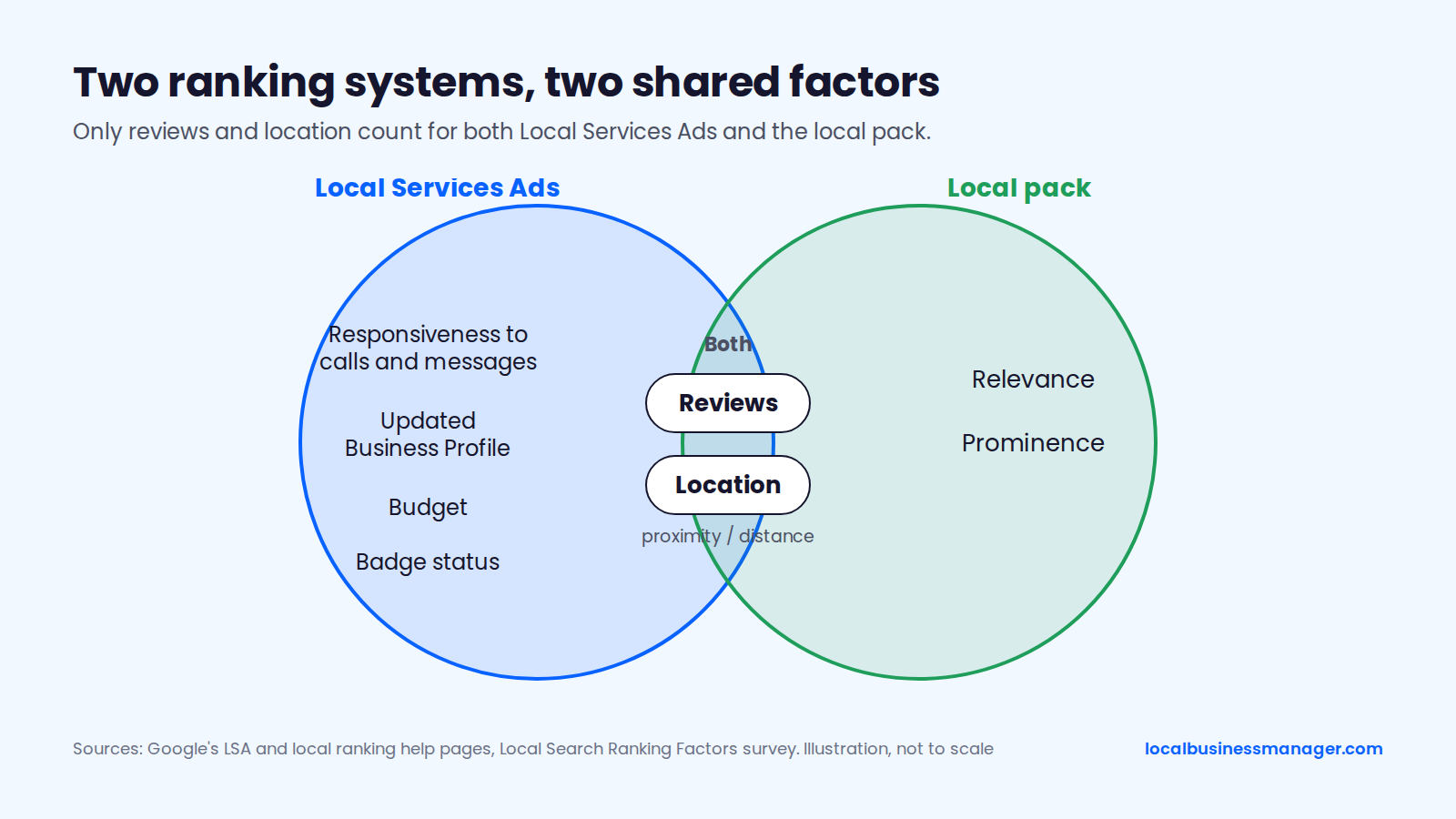
Where the 2 ranking systems overlap, from Google's documentation and the Local Search Ranking Factors survey.
The badge row reflects Google's statement that pre-badge listings rank below verified providers. The last row comes from a 2026 Near Media interview, in which Eric Levine described reviews and responsiveness as the "moving targets" of LSA ranking, alongside messaging opt-in. His list comes from his own experience rather than Google's documentation.
No published test shows whether switching LSAs on or off moves a firm's map pack rankings or profile calls. On a November 2026 Near Media podcast, guests argued LSAs may now charge for leads the profile used to deliver free, though they shared no data to back it.
Should You Run Local Services Ads, Invest in Your Business Profile, or Both?
For an eligible business that can answer its phones, Google's own requirements point to running both, with the Business Profile first in priority: LSAs can't run without the profile, and both systems rank on its reviews. That's reasoning from Google's documentation, not a tested result. The matrix below sorts common situations. The sections after it add law-firm and trade details and the cases where LSAs are the wrong move.
Every row keeps the Business Profile. What changes is when LSAs start. The matrix was built in November 2026 from Google's documented requirements and ranking factors, and it's sorted from least to most ready for LSAs.
Situation | Eligible for LSAs in category and city | Reviews vs top 3 map-pack average | Calls answered live during ad hours | Start with | Add LSAs when |
|---|---|---|---|---|---|
Category or city not eligible | No | Any | Any | Business Profile | Category and city become eligible |
Phones go unanswered | Yes | Any | No | Business Profile | Intake covers every ad hour |
Law firm, bar question unchecked | Yes | Any | Yes | Business Profile | State bar position is confirmed |
Verification still pending | Yes | Any | Yes | Business Profile | Preliminary checks pass |
Few reviews | Yes | Well below | Yes | Review push on the profile | Now, alongside the review push |
Strong reviews | Yes | Near or above | Yes | Business Profile | Now |
The review column uses my working goal for any profile: match the average review count of the top 3 map-pack results, then keep going. Our reading: since Google says review count affects LSA ranking too, a profile below that line is likely weak in both places.
For Law Firms
Law firms can run LSAs in Google's lawyer categories, but the state bar check comes before the launch. This is marketing guidance, not legal advice. Three checks matter most for firms:
- State bar position: ABA Model Rule 7.2(b) bars a lawyer from giving or promising anything of value to a person for recommending the lawyer's services, with listed exceptions such as the cost of advertising. Whether your state treats pay-per-lead ads as advertising for this purpose is for your state bar to answer.
- Practice areas: Lucrative Legal notes that a firm with general lawyer leads switched on can be charged for an inquiry about any legal matter, so a personal-injury firm could pay for a divorce call. Switch on only the practice areas the firm takes.
- Service areas: match them to where the firm takes cases, since out-of-area leads are no longer credited.
When a PI firm misses the 3-pack, the 2 causes I see most are the firm's name and too little review flow. The name fix I recommend, and have taken many clients through, makes a descriptive trade name the firm's real name: check the state bar's trade-name rule, register the DBA, use that name everywhere, then change the Business Profile name last.
Adding keywords to a name the firm doesn't use still breaks Google's rules. Google can also challenge or suspend a renamed profile, and some state bars restrict or ban trade names, so read keyword business names and DBAs before filing and local SEO for law firms for the full playbook.
For Trades and Home Services
Trades follow the same Business Profile playbook as law firms, plus tighter control of job types, service areas and phone coverage on the ads side. I've ranked pages for home-service businesses across most of the common trades at agencies I worked for, and the profile work doesn't change by industry. What changes with LSAs is the operational exposure.
Imagine a plumber with 3 vans whose owner answers the phone from under a sink. Under the missed-call billing rules described in the cost section, that plumber either covers the phone or narrows the ad schedule.
On the ads side, 3 settings deserve the time:
- Job types: list every job type the business actually does and none it doesn't.
- Service areas: match them to where the vans really go.
- Separate targets: after migration, set up separate campaigns if, say, drain cleaning and water-heater installs need different cost targets.
When LSAs Are the Wrong Move
LSAs are the wrong move in the first 4 rows of the matrix above: an ineligible category or city, unanswered phones, an unchecked state bar question, or pending verification without pre-badge access. Wait or skip in 3 more situations:
- The business is in a health-care vertical and is counting on credits it won't get.
- The Business Profile is suspended or at risk (see Linking a Profile During Setup).
- The client expects LSAs to lift map pack rankings, which the ranking comparison above rules out.
How to Set Up Local Services Ads
New advertisers still sign up on Google's Local Services Ads sign-up page, because Google says campaigns with pay-per-lead goals can't yet be created directly in Google Ads. Existing accounts are moving into Google Ads. The steps below describe what each one decides rather than every click path, because the interface is changing during the 2026 to 2027 migration.
Step 1: Check Eligibility
Confirm the category and city are eligible (see Check Eligibility for Your Category and City) and that the client already has a public Business Profile in good standing. If the business doesn't qualify, stop here and put the budget into the profile and website.
Settle profile ownership at the same time. My practice is that the client is the primary owner of the Business Profile, and the agency is added as a manager. We accept invites through one agency organization account, never personal or shared logins.
Step 2: Create the Account, Then Choose Job Types and Service Areas
Sign up and create the LSA account in the client's name, with the agency linked as a manager. Practitioner guides such as ClicksGeek recommend this so the client keeps the data and history if the agency leaves. That's agency advice, not a Google rule. From Google's help pages:
- Access levels: the LSA access help page lists 5 permission levels: Email-only, Billing-only, Read-only, Standard and Administrative.
- Manager accounts: manager accounts are created and edited in Google Ads, and linking one is required for consolidated monthly billing.
- Policy sharing: Google's LSA policy says third parties managing accounts must share the LSA policies with the advertiser and tell them to comply.
If the client already has an account, its administrators get an email 14 days before the scheduled move into Google Ads, and banners appear in the LSA dashboard, according to WSI's summary of Google's guidance. Then add every job type and service area from the list you built during screening, and none the business doesn't serve. One account per client keeps leads, reviews and credits in one place.
Step 3: Link Your Business Profile and Reviews
Affiliate the profile you checked earlier (see Linking a Profile During Setup), then confirm the affiliation is the one you expect. Google's LSA reviews help page says reviews are managed in Business Profile Manager and places the review link under Business Verifications > Google Business Profile. That path may move during migration, so confirm it in the current interface.
Before launch, confirm 3 things:
- The person running the ads can also access the profile.
- The review link the client sends is the Business Profile link, not the retired LSA link.
- The client's review request goes to every customer in the same words, with nothing offered in return.
Step 4: Complete Verification
Submit the documents from the law-firm or trades checklist above, in the names Google will check: each attorney for law firms, and the business plus anyone the category requires for trades. Where the category offers pre-badge ads, see Pre-Badge Ads above for how those listings rank until verification finishes.
Because Google says review count affects LSA ranking, a business with few reviews should expect modest placement at first. Set that expectation with the client at launch.
Step 5: Set Budget, Bidding and Ad Schedule
Set a daily budget (in migrated accounts), a bid mode and an ad schedule that matches staffed hours. Show the client the monthly cap from the budget section, not just the daily figure. For bidding, Google recommends Maximize Leads, and migrated accounts can add a campaign-level Target CPA using the number from the worked example above.
Set business hours as carefully as the budget. Google's Manage leads page says average message response time is measured only within business hours over the last 90 days, with recent leads weighted more. Practitioners recommend that Business Profile hours, LSA hours and the ad schedule all match the hours someone can actually answer, which also keeps missed after-hours calls off the bill.
Step 6: Turn the Ads On
Turn the ads on once verification, budget and schedule are set, and walk the client's intake person through the daily checklist in the lead-handling section below before the first lead arrives. Leads land in Google Ads for migrated accounts and in the LSA dashboard for unmigrated ones (see where to log in, in the FAQs).
In the first week, check 3 things:
- Lead delivery: calls and messages reach the person who answers them, during the hours you scheduled.
- Charge status: each lead shows Charged, Not charged, In review or Credited, and the mix makes sense for the calls you saw.
- Reviews on the ad: the ad shows the profile's star rating and review count, which confirms the right profile is affiliated.
How Do I Turn Off Local Services Ads?
In a migrated account, open the Settings tab on the Campaigns page in Google Ads, select the campaign and switch its status to Paused, according to Google Ads help on the move to Performance Max campaigns with pay-per-lead goals. Google's current help page gives that path only for migrated accounts. Unmigrated accounts are still managed in the separate LSA dashboard, so check Google's Local Services help for its current controls.
When an agency relationship ends, do 3 things in order:
- Export reports: PPC Land reported that historical reports were cut at migration, and Search Engine Land reported in November 2026 that historical LSA reports can now be downloaded.
- Move billing: a Google Ads handover guide by consultant Lionel Z warns that if the agency's manager account pays through monthly invoicing, unlinking it stops the ads.
- Remove your access: unlink the manager account. When a client leaves, my practice is that the agency also removes itself from the Business Profile.
How to Handle LSA Leads So Your Ranking Doesn't Drop
Of the LSA ranking factors Google lists, responsiveness is the one an agency can act on every day. Google's Manage leads help page "highly recommends" replying to leads as soon as they come in and says a consistently fast response time could improve ad ranking. Google publishes no reply-time target, so set the business's own and hold to it.
Google's guidance adds 2 facts that shape the routine. Once a business has 2 or more message leads in 90 days, its estimated response time may appear in the ad, per Google's Manage leads page. Third-party write-ups also quote Google's LSA rankings page as saying "Missed calls may negatively affect your responsiveness."
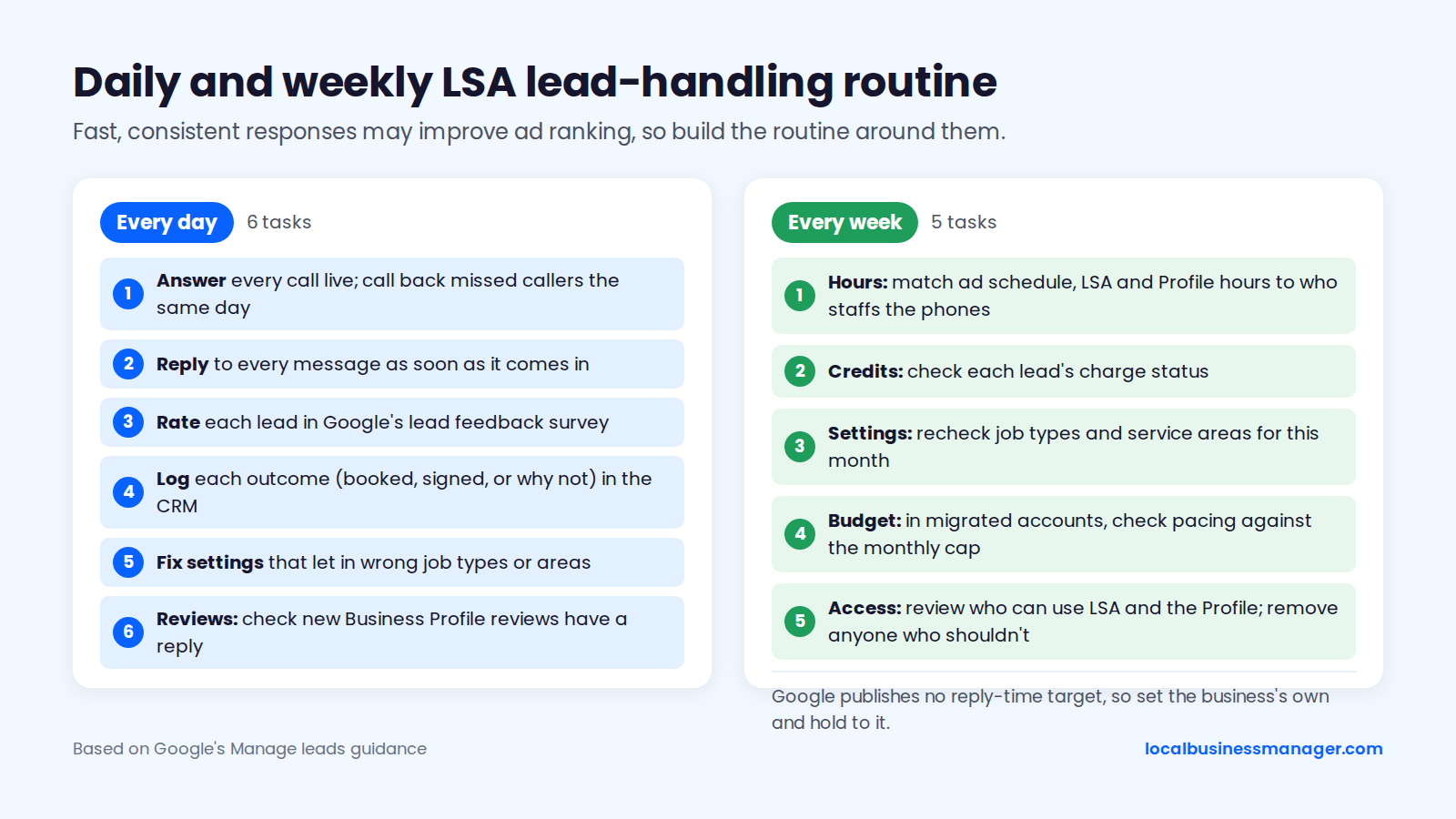
A daily and weekly lead-handling routine built from Google's Manage leads guidance.
Daily lead-handling checklist (6 tasks):
- Answer every call live during the ad schedule, and call back any missed caller the same day.
- Reply to every message as soon as it comes in, so the response-time average stays fast.
- Rate each lead in Google's lead feedback survey.
- Log each lead's outcome (booked job or signed case, or why not) in the client's CRM or intake sheet.
- Flag leads for job types or areas the business doesn't serve, and fix the settings that let them through.
- Check that new Business Profile reviews have a reply.
Weekly checklist (5 tasks):
- Compare the ad schedule, LSA hours and Business Profile hours with who is actually staffing the phones.
- Check each lead's charge status to see which leads Google credited.
- Recheck job types and service areas against what the business does this month.
- In migrated accounts, check budget pacing against the monthly cap.
- Check who has access to the LSA account and the Business Profile, and remove anyone who shouldn't.
What Should an Agency Report Each Month for LSAs and the Business Profile?
A combined monthly report should put calls and rankings first, then LSA charged leads, spend and cost per booked job or signed case, then directions, website clicks and reviews. Google's reports supply the profile and lead metrics. Local pack rankings come from your own rank tracking, and booked jobs and signed cases come from the client's intake records.
In my reports, calls and rankings lead, and the 12 lines below follow that order on the page. Sources are Google's Business Profile performance report, Google Ads lead reports, your rank tracking and the client's own records, as of November 2026.
Metric | Source | What it shows the client |
|---|---|---|
Business Profile calls | Business Profile performance report | Taps on the call button, including ad-driven taps |
Local pack rankings across the service area | Your rank tracking | Where the profile shows beyond one address |
LSA charged leads | Google Ads lead reports | Leads the client paid for |
LSA leads by type | Google Ads historical lead report | Phone, message and booking mix |
LSA lead spend | Google Ads lead reports | Total paid for leads |
Cost per charged lead | Spend ÷ charged leads | Price of a conversation, not a customer |
Leads not charged or credited | Lead charge statuses in Google Ads | Leads Google didn't bill or credited back |
Booked jobs or signed cases | Client's CRM or intake records | The outcome Google can't see |
Cost per booked job or signed case | Spend ÷ booked jobs or signed cases | What a customer actually cost |
Direction requests | Business Profile performance report | Requests for directions to the business |
Website clicks | Business Profile performance report | Traffic from the profile |
Review count and average rating | Business Profile | The shared input for both rankings |
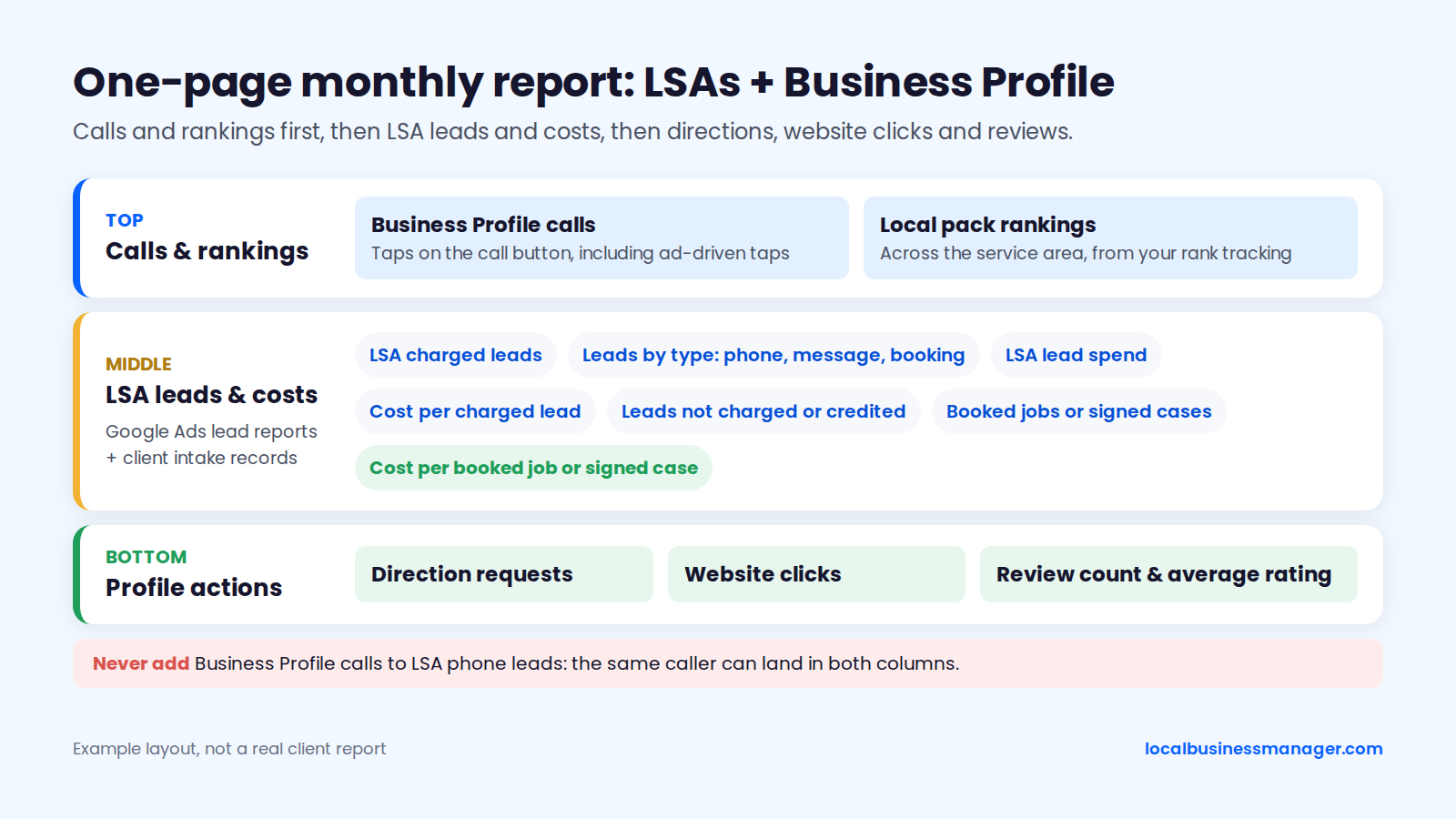
Example layout with example data, not a real client report.
The cost line needs a clear definition. In 3 US home-service accounts ppc.io reviewed for July to October 2026, Google charged for 89 of 149 leads (60%). That put spend at $51 per charged lead versus $30 per lead overall, so say which one your report uses.
Never add Business Profile calls to LSA phone leads. Google defines profile calls as button taps and says profile data includes Google Ads actions, so the same caller can land in both columns. My practice is to put a call-tracking number as the profile's primary number, with no secondary number. Our guide to monthly local SEO reporting covers the rest.
Common Local Services Ads Mistakes
Check these 7 mistakes first in any LSA account. Start with review gating, because it breaks Google's review policy, then unanswered phones, because responsiveness feeds LSA ranking.
- Review gating: asking only happy customers for reviews. Google's Maps user-generated content policy bans selectively soliciting positive reviews, discouraging negative ones and incentivized reviews. The FTC's Consumer Reviews and Testimonials Rule, in effect since October 21, 2024, bans incentives conditioned on a review's sentiment and bans suppressing negative reviews.
- Staff review quotas or staff-name requests: PPC Land reported that Google added bans on both on April 17, 2026.
- Set-and-forget: treating LSAs as low-maintenance once live, including running ads during hours nobody answers.
- Wrong job types: switching on job types or practice areas the business doesn't serve, including general lawyer leads for a PI firm.
- Unchecked affiliation: running more than one LSA account for a client, or never checking which accounts the profile is affiliated with.
- Expecting a map pack lift: selling LSAs to a client as a way to raise local pack rankings.
- Unlinking before moving billing: unlinking the agency's manager account before billing has moved, which stops the ads.
FAQs
Why Do I Need Google Ads If I Run Local Services Ads?
You don't need standard search ads to run Local Services Ads: LSAs charge per lead, while Google Ads Search campaigns charge per click, per Google's Local Services Ads product page. Google Ads comes up anyway because LSAs are moving into it as Performance Max campaigns with pay-per-lead goals, gradually through 2027 per Search Engine Journal. The two also share policy risk: Google's LSA requirements say LSAs follow standard Google Ads policies, and an account suspended for several violations or a serious one stops all its Local Services Ads.
Where Do I Log In to Local Services Ads Now?
Migrated accounts are managed in Google Ads, with leads under Goals > Leads, and unmigrated accounts use the Local Services Ads dashboard until they move. Google says the old dashboard redirects to Google Ads once an account migrates, per Search Engine Land. Brand-new advertisers don't start in Google Ads. Google says pay-per-lead campaigns can't yet be created there directly, so sign-up still runs through the Local Services Ads sign-up page.
What to Do First
Before anyone touches a bid, get the client's phones answered during every hour the ads will run, because Google counts responsiveness toward LSA ranking. Then put the review effort into the Business Profile, since that's where both rankings get their reviews.
Local Business Manager is in early access for agencies and multi-location businesses: join the early-access list.