Google Business Profile Suspended: Causes and Reinstatement

A suspended Google Business Profile usually comes back when you read the exact decision in Google's appeals tool, fix that one problem, and submit a single appeal with documents that match the profile word for word. Most agencies know the call: "our profile got hit," and the client is already editing the listing.
This guide covers 6 things:
- a 5-minute status check
- a cause, fix and evidence matrix
- appeal wording for 4 causes
- a video shot list
- what to do if the appeal is denied
- what to do if the profile still looks suspended after approval
It's the same process people still search as GMB reinstatement, since Google Business Profile was formerly Google My Business.
What Does It Mean When a Google Business Profile Is Suspended?
A suspended Google Business Profile is one Google has taken action against, either on the profile itself or on the Google account that manages it. The label you see decides where you appeal, and the slang used in forums doesn't match Google's labels.
Suspended vs Disabled vs Account Restricted
Google uses "suspended" and "disabled" for actions on a profile, and "restricted" for actions on a Google account. Google's help page "Fix suspended or disabled profiles" covers both profile states and sends both to the same appeals tool. Google doesn't publish a side-by-side definition of the two words, so treat them as two labels for a profile-level decision.
An account restriction works differently. According to the same Google help page:
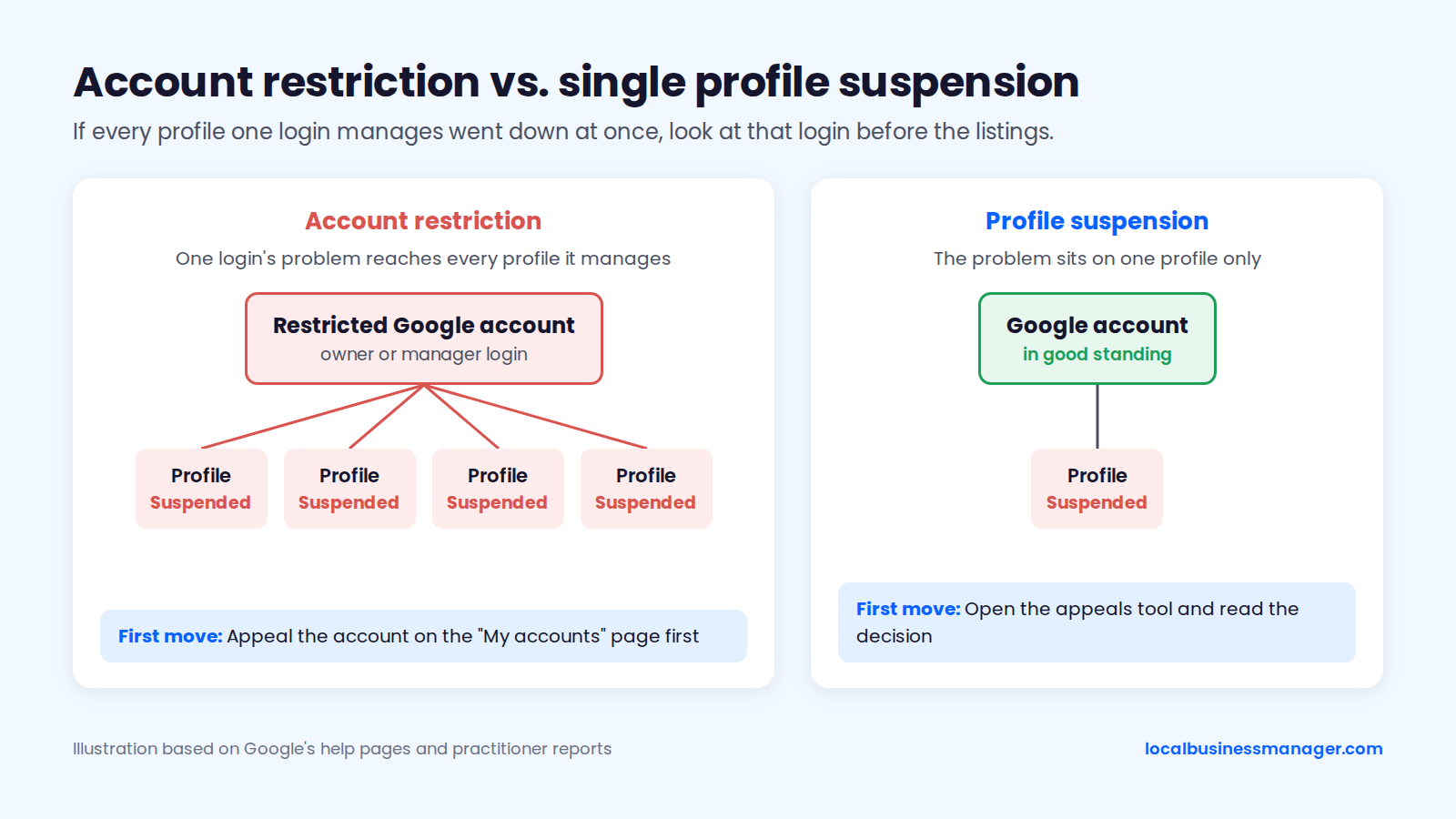
- When a Google account is restricted, the Business Profiles it manages are suspended.
- A restricted account can't create or claim other profiles.
- You appeal the account first, on the "My accounts" page, and only then each profile.
Google's policy overview adds that a restriction on an account for another Google product, such as Google Ads, can suspend a profile created through that account. That other account has to be reinstated first. An unverified profile or one with limited features isn't suspended; the diagnosis table below shows how to tell them apart.
What "Soft" and "Hard" Suspension Mean
"Soft" and "hard" suspension are practitioner terms that describe what the public sees; Google doesn't use either word. You won't find them in the appeals tool, so use Google's on-screen label when you write the appeal or talk to a client.
A soft suspension means the owner loses management access but the listing stays live. Sterling Sky's 2026 analysis saw no ranking impact from it, and a Google Product Expert guide in the official Help Community describes the same state as a profile that stays visible but can't be edited. A hard suspension removes the listing from Maps and Search, so customers can't find it at all.
How Do You Tell Which Kind of Suspension You Have?
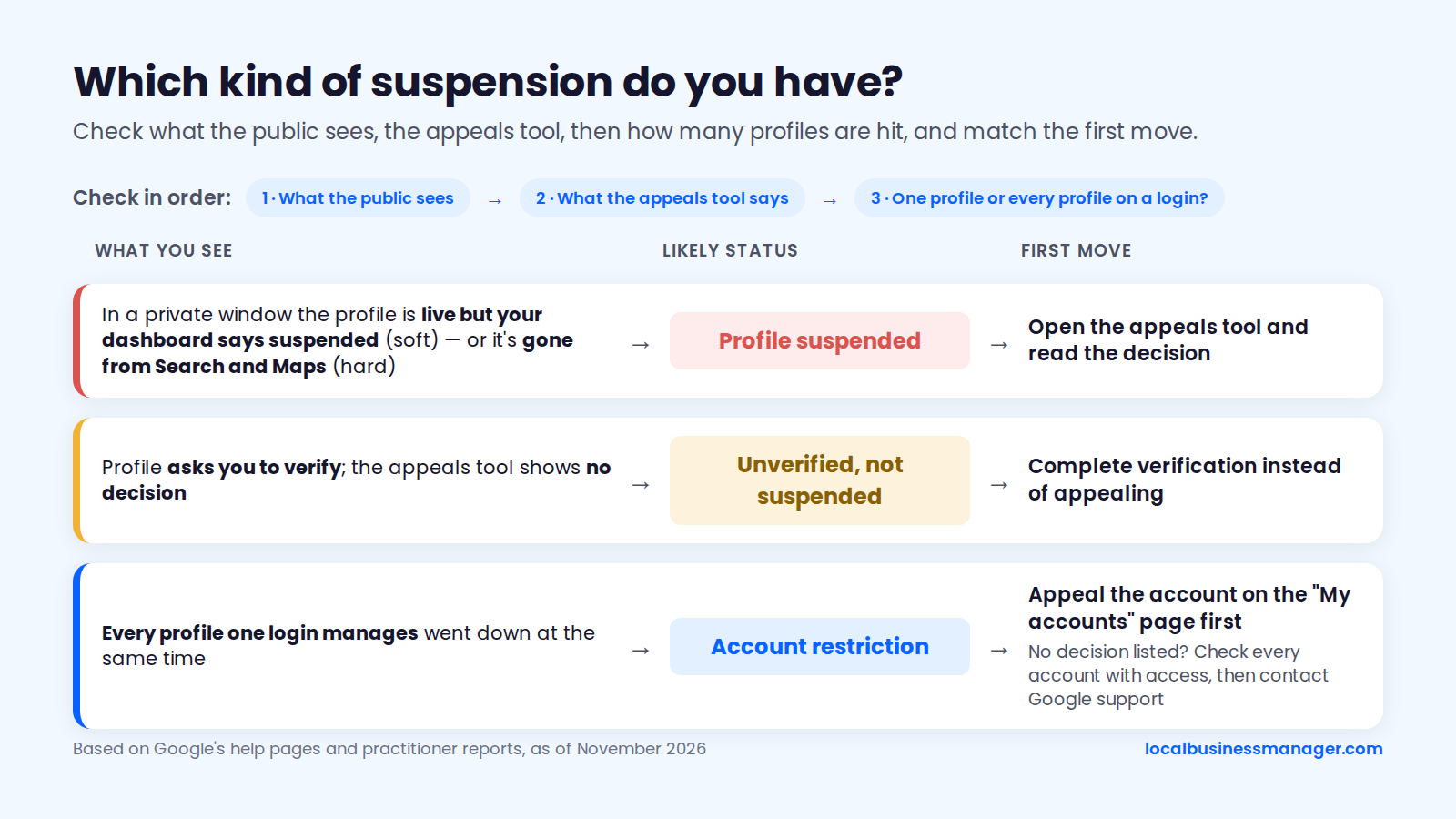
You can usually identify the status in about 5 minutes by checking 3 things in order:
- What the public sees.
- What the appeals tool says.
- Whether one profile or every profile on a login is affected.
The right first move depends mostly on whether the problem sits on the profile or on the Google account. The table below maps 6 common situations, as of November 2026. It's based on Google's help pages for suspended profiles and account restrictions plus practitioner reports, and runs from profile-level problems to account-level ones.
What you see | Likely status | First move |
|---|---|---|
Profile is live in a private window, but your dashboard says suspended or won't let you edit | Profile suspended, still public ("soft") | Open the appeals tool and read the decision |
Profile is gone from Maps and Search in a private window | Profile suspended or disabled, not public ("hard") | Open the appeals tool and read the decision |
Profile asks you to verify; the appeals tool shows no decision | Unverified, not suspended | Complete verification instead of appealing |
Decision shows the profile can't be appealed | Non-appealable decision | Read the linked policy; see the denial section below |
Every profile one login manages went down at the same time | Account restriction | Appeal the account on the "My accounts" page first |
Profiles are suspended, but the appeals tool lists no decision | Possible account restriction the tool doesn't report | Check every account with access, then contact Google support |
Check From Outside: Has the Business Disappeared From Google?
Start with what customers see, because that tells you how much business is at stake today.
- Open a private or incognito browser window, signed out of every Google account.
- Search the exact business name plus the city on Google Search.
- Run the same search on Google Maps.
If the profile appears with its reviews, it's still public and you're likely dealing with a management-level suspension. If it's gone in both places, treat it as a hard suspension.
Write down what you saw and the time, and take a screenshot. You'll want that record if the profile is reinstated but still looks wrong, or if the client asks when it went down.
Read the Decision in the Appeals Tool
Google's appeals tool shows the date of each decision, the reason, a link to the policy involved, and whether you can appeal it. Whatever the email or dashboard notice says, the linked policy is the detail to act on.
- Sign in with the account that owns or manages the profile.
- Open the Business Profile appeals tool.
- Select the profile.
- Look at each decision listed.
Screenshot the whole decision before you touch anything, and save the policy link with it, because your fix has to satisfy that policy. Step 5 below explains the 5 status values the tool shows.
Is It Your Google Account, or the Profile?
The fastest signal is the pattern: if every profile one login manages went down at once, look at that login before the listings. Google says a restricted account suspends the Business Profiles it manages, and Sterling Sky's 2026 guide adds that when an owner account is restricted, every profile it owns is suspended.
Practitioner reports show how far one account's problem can reach:
- In 2021, one Sterling Sky employee's Google Workspace suspension caused soft suspensions on about 2 dozen listings and a hard suspension of the agency's own profile.
- In 2025, an agency on Local Search Forum reported about 20 client profiles suspended together after its newly created agency account was suspended.
- A 2023 Local Search Forum explanation says profiles stay suspended while any user with access still has problems, and profiles managed only by other users aren't affected.
Sterling Sky reports that removing the restricted user from the profiles before appealing is often faster, and that the appeals tool sometimes fails to show an account restriction at all.
Why Do Google Business Profiles Get Suspended?
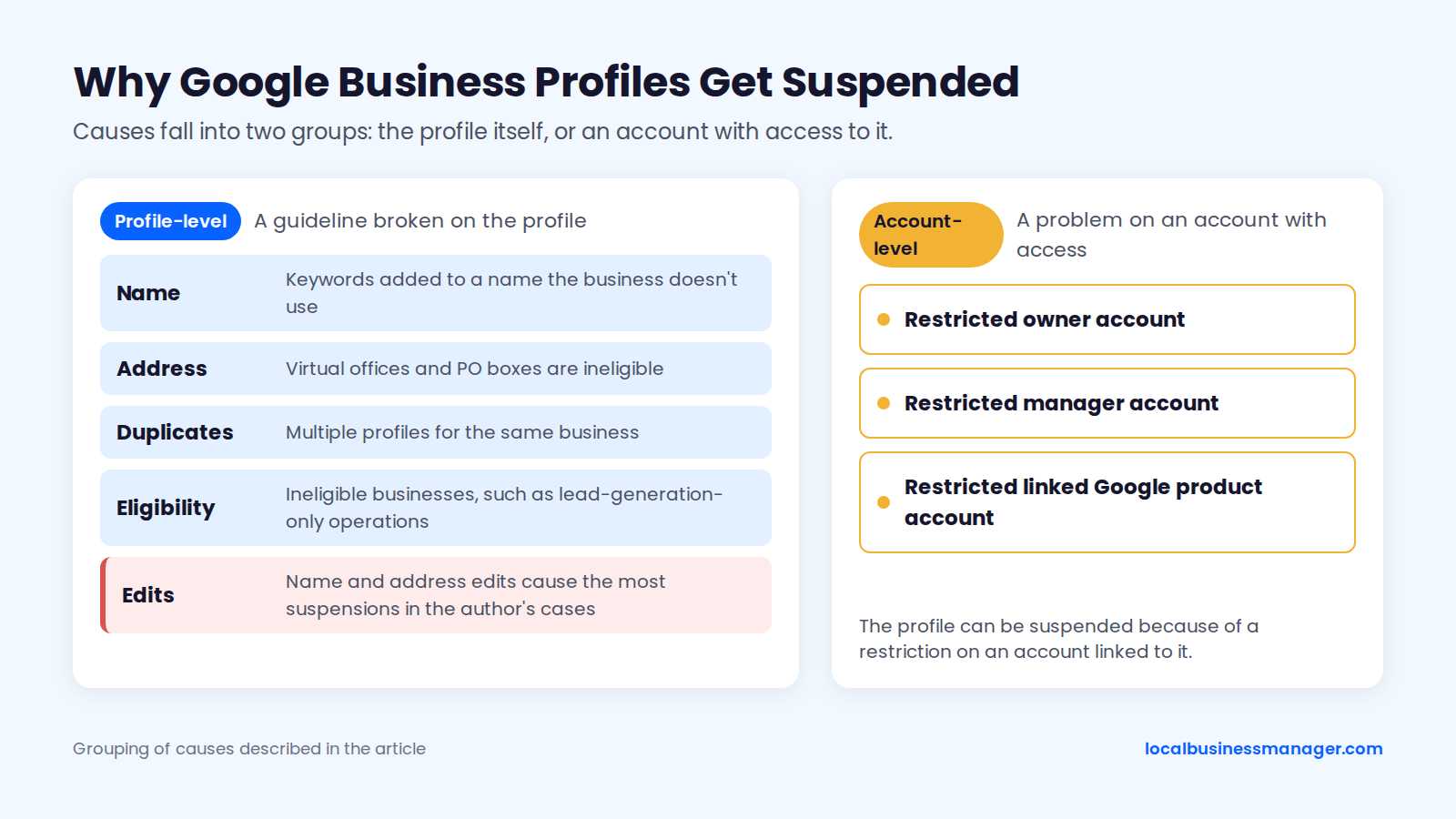
A Google Business Profile is usually suspended for breaking a guideline on the name, the address, eligibility or duplicates, or because of a problem on an account with access. Each cause below carries its certainty level, and a matrix at the end ties each cause to its fix and evidence.
In the cases I've handled, name edits and address edits cause the most suspensions.
Business Name
Google's guidelines say the profile name must match the business's real-world name: the name used consistently on the storefront, website and stationery, as customers know it. That rule is in Google's guidelines for representing your business. The same guidelines require real-world proof such as signage, business cards or invoices for special characters or legal terms in the name.
Adding service or city keywords to a name the business doesn't use is the classic trigger. Sterling Sky studied about 50 businesses, mostly law firms, that repeatedly added keywords to their names. The case study, published around 2019, found 3 outcomes:
- a soft suspension in 20% of cases
- a hard suspension in another 20%
- one business that added keywords back to its name as many as 8 times after they were removed, without a warning or soft suspension
The study is old and small, but it shows enforcement is inconsistent.
Keyword Names and DBAs
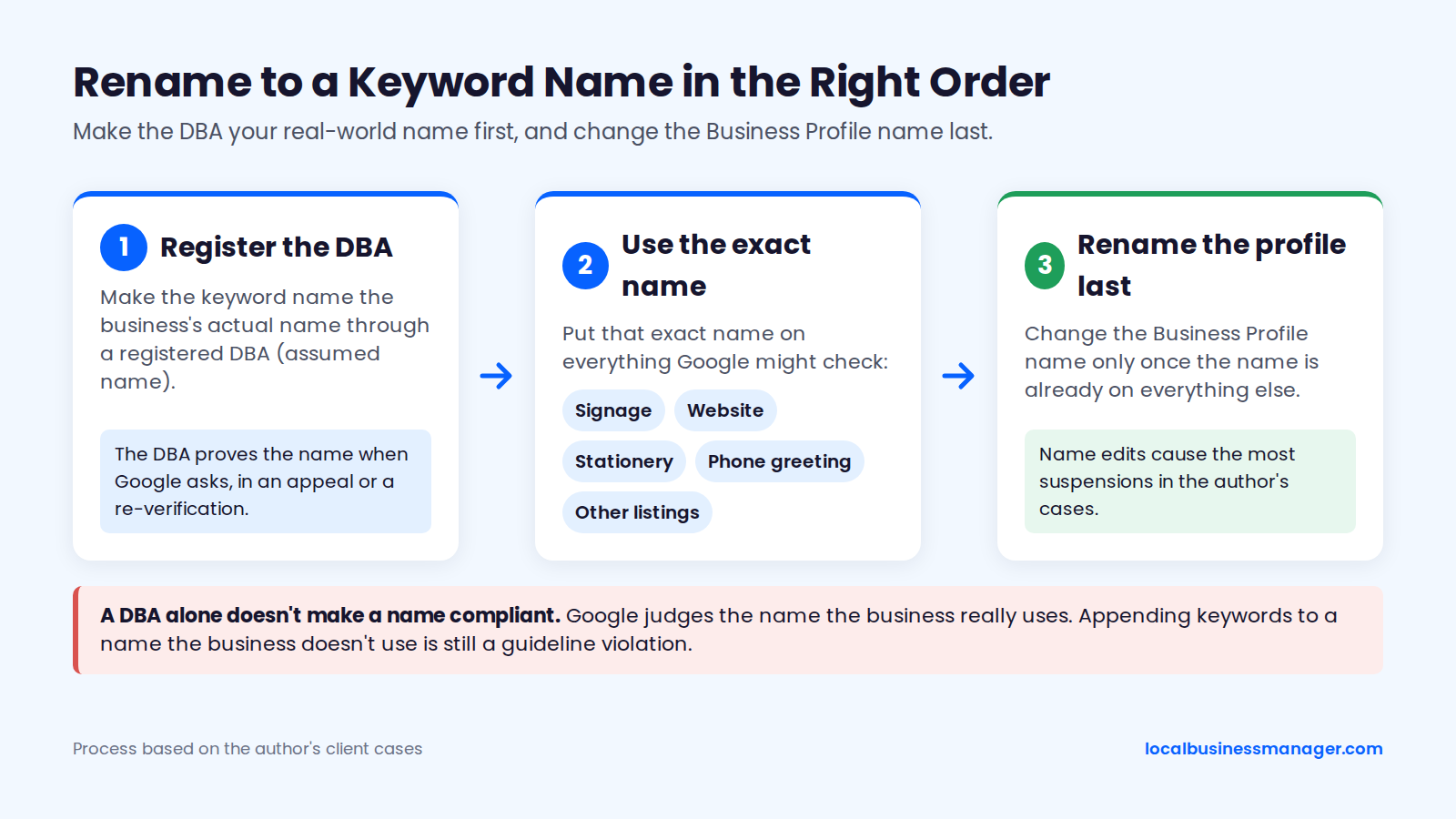
I recommend keyword business names only when the keyword name becomes the business's actual name through a registered DBA (assumed name). I've taken many clients through this process, and the order matters:
- Register the DBA first.
- Put that exact name on the signage, website, stationery, phone greeting and other listings.
- Change the Business Profile name last.
The rename goes last because, in my cases, name edits cause the most suspensions, and by then the name is already on everything Google might check. A DBA document alone doesn't make a name compliant. Google judges the name the business really uses and can still challenge or suspend the profile; the DBA is what proves the name when Google asks, in an appeal or a re-verification.
The 2026 Local Search Ranking Factors survey lists keyword names among the top suspension risk factors, and the same survey finds keyword names correlate with higher local-pack rank. Appending keywords to a name the business doesn't use stays a guideline violation. Law firms also have to clear their state bar's trade-name rule, covered in the evidence section.
Address and Service Area
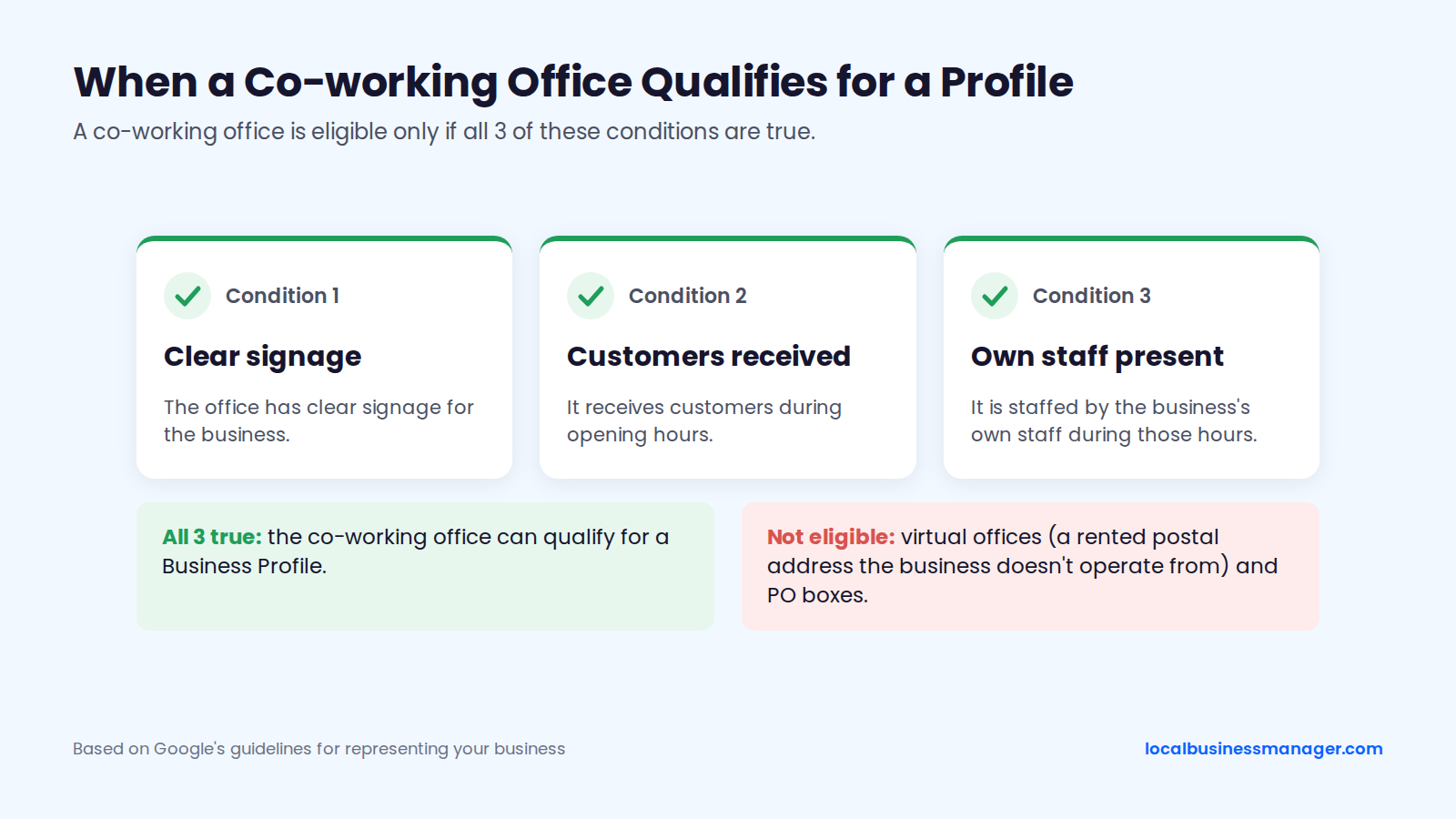
Google's guidelines make virtual offices and PO boxes ineligible for any Business Profile, including service-area businesses. Google defines a virtual office as a rented postal address the business doesn't operate from. A co-working office qualifies only if all 3 of these are true:
- it has clear signage
- it receives customers during opening hours
- it is staffed by the business's own staff during those hours
Service-area businesses that don't serve customers at their address should hide it; Google uses that address for verification only. Advice that a service-area business must show its address, or that hiding it causes suspension, contradicts Google's guidelines.
Duplicate Profiles
Multiple profiles for the same business are a documented suspension trigger. Sterling Sky's 2026 list of top reasons includes multiple listings for one business, and a Product Expert guide in Google's Help Community lists duplicate listings among common triggers. Duplicates often come from previous agencies, or from an owner creating a "new" profile while the old one is suspended.
Duplicate listings are one of the problems I inherit from previous agencies, along with bad naming, no review campaigns, and no services or products set up on the profile. For law firms, Google's guidelines treat lawyers as individual practitioners: a lawyer should have their own profile only if they're public-facing and can be contacted directly at the verified location during stated hours.
Ineligible Businesses and High-Scrutiny Industries
Some businesses are suspended because of what they are, so check eligibility before spending time on an appeal. The Product Expert guide in Google's Help Community lists businesses that aren't eligible at all, such as lead-generation-only operations, and extra scrutiny for sensitive verticals among its suspension categories.
Search Engine Journal reported in 2024 that lawyers, locksmiths and plumbers can be suspended simply for being in a high-spam industry. That's a practitioner observation, not a Google statement.
Review Practices
Review cleanup before an appeal is policy hygiene rather than a documented suspension cause. None of the Google help pages or practitioner sources cited in this guide tie a review-policy violation directly to a profile suspension. Google's review policies still prohibit:
- fake, bought, incentivized or employee-written reviews
- review gating, meaning asking only happy customers
- discounts in exchange for reviews
Remove any of these from how the business asks for reviews before you appeal. Reviews matter afterwards too: Google's help page on missing or delayed reviews says reviews might be removed after a profile is reinstated, covered in the after-reinstatement section below.
Edits, Ownership Changes and Account Security
Rapid edits to the name, category or address are a common trigger, according to the Product Expert guide in Google's Help Community. My rule: after a name, address or category edit, wait a day or two before the next sensitive edit.
Access and account security cause the rest of this group:
- A suspension on another Google product account, such as Google Ads, can suspend the linked profile.
- A 2025 Local Search Forum thread describes account-level suspensions that came from a manager's account, not the business.
- Google says it never asks businesses for a one-time password or PIN and never charges to verify or reinstate a profile, so anyone asking for either isn't Google.
Suspensions With No Clear Cause
Some suspensions follow no edit and no obvious violation. A local SEO software company's 2025 guide describes automated algorithmic sweeps as the most common cause and the hardest to troubleshoot, which is practitioner observation, not a Google statement.
Sterling Sky notes that any Google user can report a profile, and a report can lead to a suspension. Even then, the appeals tool usually names a reason and links a policy, so check the profile against that policy line by line before deciding nothing is wrong.
Cause, Fix and Evidence at a Glance
Every suspension cause has one fix to make before appealing and one set of documents that proves it. The matrix below covers 10 causes as of November 2026, ordered from profile-level causes to account-level ones. It uses Google's evidence list (registration, license, tax certificates, utility bills) plus the DBA, lease and signage photos that reinstatements usually need in my experience.
Cause | Fix before appealing | Evidence to attach |
|---|---|---|
Keywords in the name that the business doesn't use | Change the name to the real-world name | Registration and a signage photo under that name |
Keyword name backed by a DBA | Confirm the DBA is used everywhere | DBA filing and a signage photo under that name |
Virtual office or PO box | Move to a real address the business operates from: shown for storefronts, hidden for service-area businesses | Lease and utility bill at the real address |
Co-working space without staff or signage | Move to a real address the business operates from: shown for storefronts, hidden for service-area businesses | Lease and utility bill at the real address |
Service-area business showing its address | Hide the address and set the service area | Registration and utility bill at the verification address |
Duplicate profile | Keep one profile per real location | Registration for the location you're keeping |
Rapid edits to name, address or category | Stop editing; confirm the current details are true | Registration and utility bill matching current details |
Ineligible business type | Check eligibility under Google's guidelines before appealing | Only worth gathering once eligibility is confirmed |
Account restriction | Appeal the account first, or remove the restricted user | Whatever the account appeal requests |
Cause unknown | Audit against the linked policy | Registration, license and utility bill |
What Should You Do in the First 24 Hours?
In the first 24 hours, gather facts and stop changes, because reinstatement runs only through the appeals tool and the appeal comes after the fix. Google doesn't publish a first-day checklist, so this one combines Google's help pages with Product Expert and practitioner guidance.
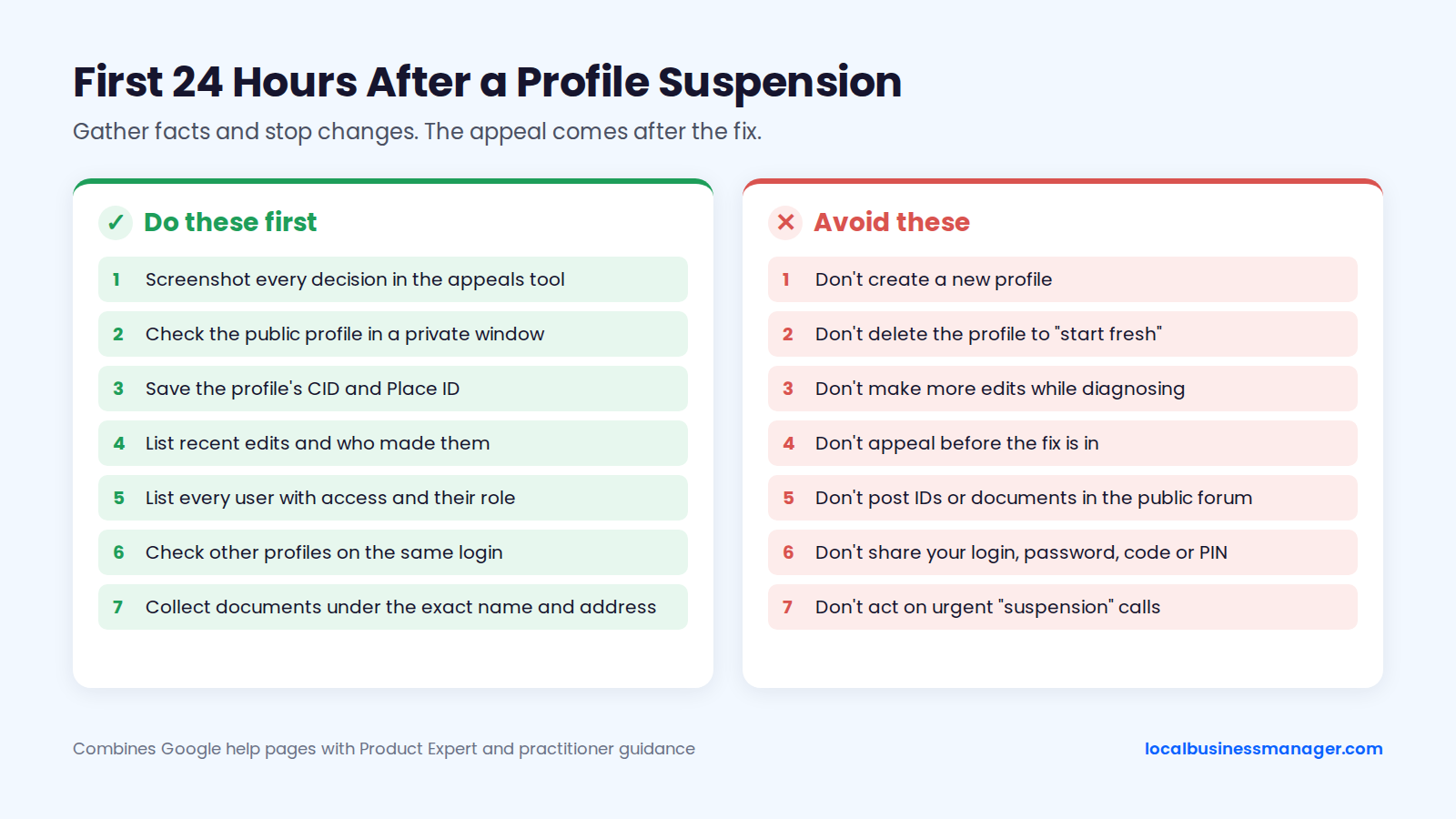
Do these 7 things first:
- Screenshot every decision in the appeals tool: date, reason, policy link and appealability.
- Check the public profile in a private window and note what customers see.
- Save the profile's CID and Place ID, so you can tell later whether reinstatement created a new profile.
- List every edit made in recent weeks and who made it.
- List every user with access, with their role.
- Check whether other profiles on the same login are also down.
- Start collecting documents under the profile's exact name and address.
Avoid these 7 things:
- Don't create a new profile. Google's suspended-profiles help page tells owners not to create a new Business Profile for the same business, and duplicate listings are a documented suspension trigger.
- Don't delete the profile to "start fresh". That's the replacement-profile route in another form.
- Don't make more edits while you're still diagnosing.
- Don't submit an appeal before the fix is in. The Product Expert guide advises against resubmitting without changes.
- Don't post EINs, IDs, leases or bank statements in the public Help Community forum. The Product Expert guide says to share them only through Google's own tools.
- Don't share your login, password, one-time code or PIN with anyone offering help.
- Don't act on urgent calls about your "suspension". Google says it never charges to reinstate a profile, and a 2026 Prospect Genius ScamWatch post documents scam calls that use urgent suspension threats.
How to Get a Suspended Google Business Profile Reinstated
Reinstatement runs through one route: the Business Profile appeals tool, which Sterling Sky reports has been the only way to reinstate a suspended profile since February 2024. Google says businesses in the EEA may have other ways to challenge a decision, covered in the denial section below.
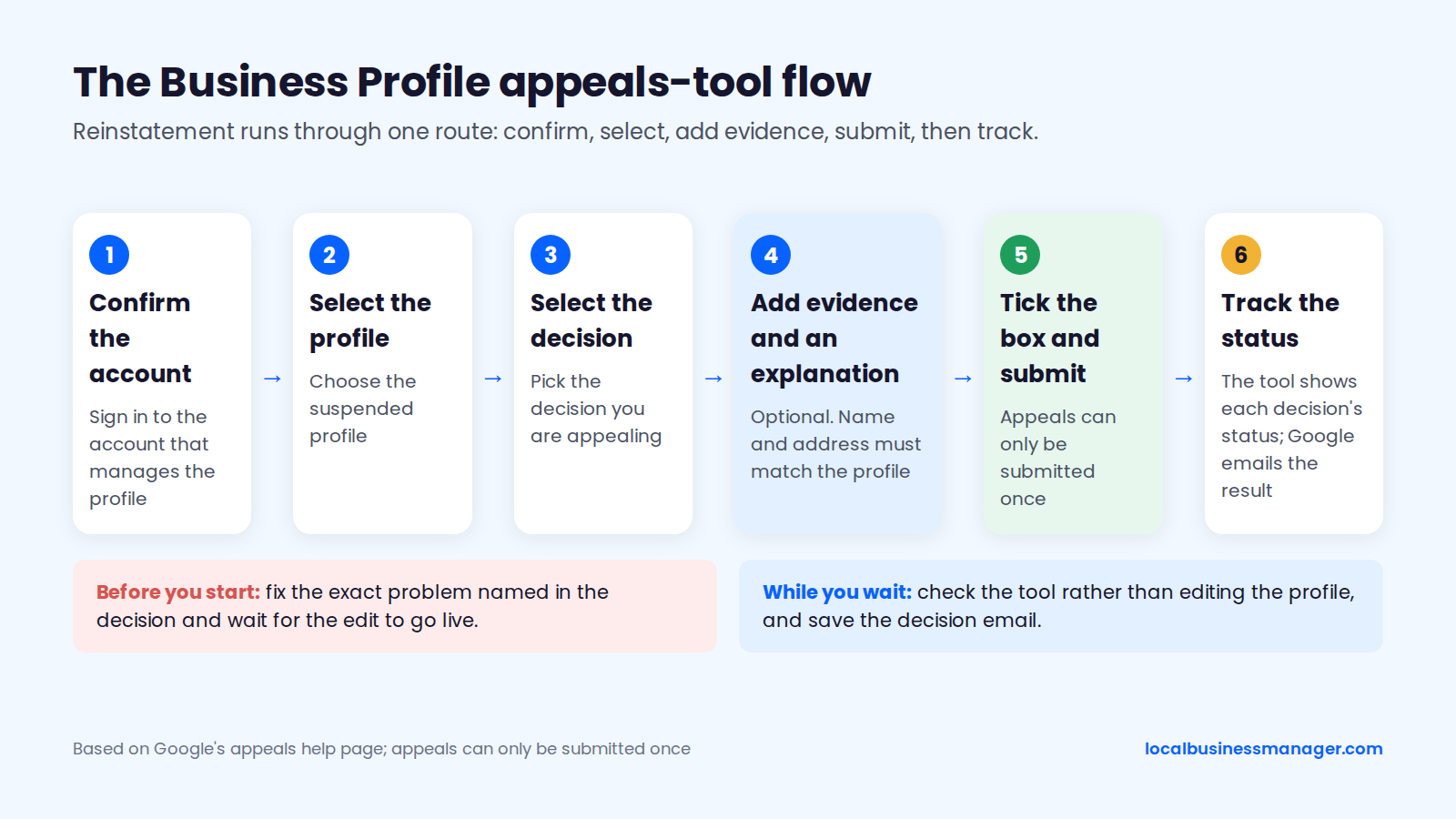
According to Google's appeals help page, a suspended profile must be reinstated before you can appeal any content decisions on it. The current flow has 6 parts:
- Confirm the account.
- Select the profile.
- Select the decision.
- Add optional evidence and an explanation.
- Tick the confirmation box.
- Submit.
Step 1: Fix the Violation First
Fix the exact problem named in the decision before you open the appeal. Typical fixes by cause:
- Name: change it to the real-world name, or confirm the DBA is in use everywhere.
- Address: replace a virtual office, PO box or unstaffed co-working desk with a real address the business operates from; service-area businesses then hide that address.
- Duplicates: keep one profile per real location.
- Reviews: remove any review incentive or gating from how the business asks for reviews.
- Account restriction: appeal the account on the "My accounts" page, or remove the restricted user.
Make the fix once, check it in a private window, then stop editing. Google's help page "Understand what happens to your Business Profile edits" says Google reviews edits to verified profiles against its guidelines. Review usually takes about 10 minutes but can take up to 30 days, and the edit shows as "Pending" until then, so wait for the fix to go live before you submit.
Step 2: Gather Matching Evidence
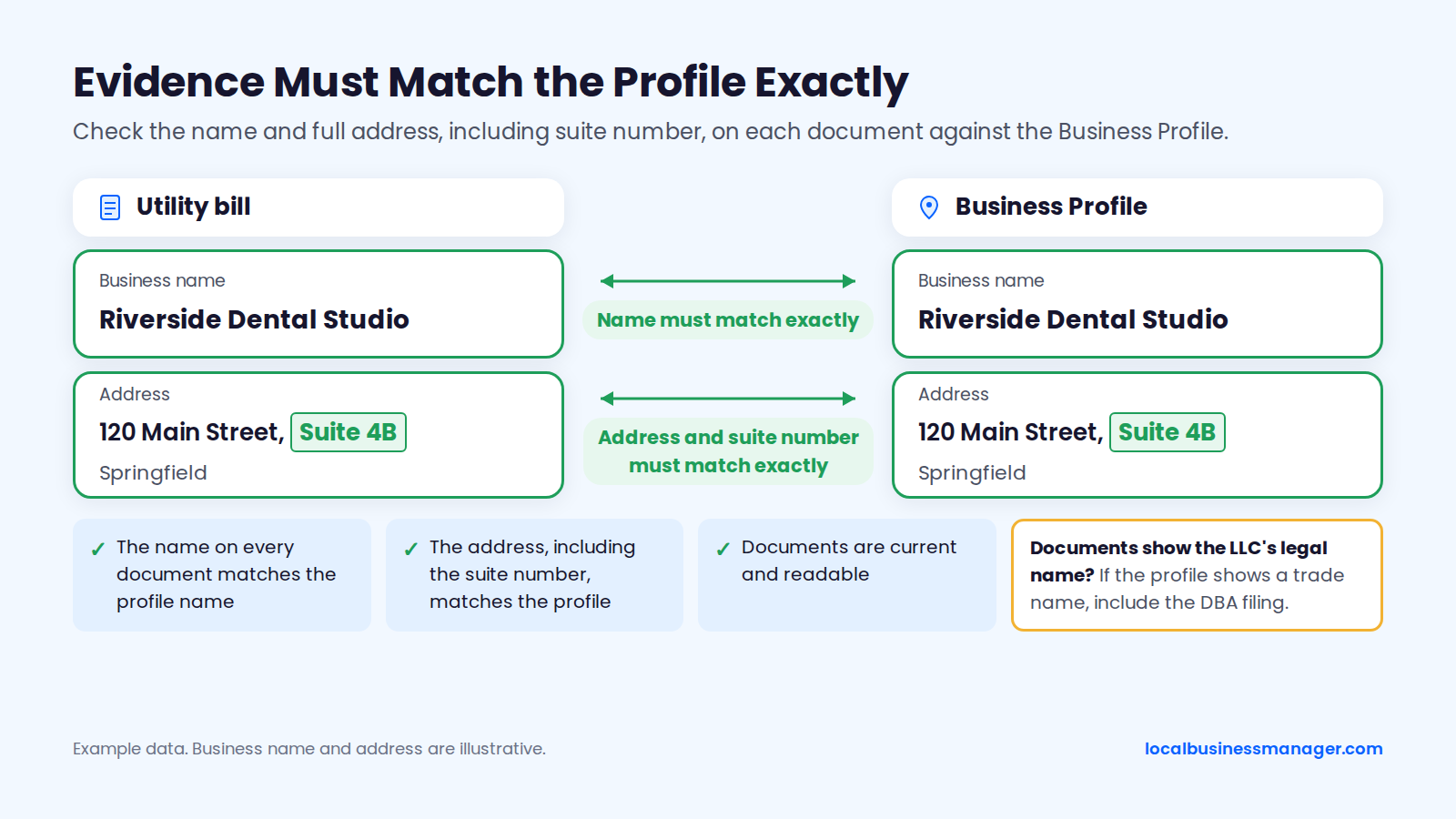
Google lists 4 types of evidence that can strengthen an appeal: official business registration, a business license, tax certificates and utility bills. Google also says the name and address on those documents should match the profile. If your documents carry the LLC's legal name and the profile shows a trade name, a March 2025 Local Search Forum thread advises including the DBA filing that shows the LLC registered that name.
Check these before you upload:
- The name on every document matches the profile name.
- The address, including the suite number, matches the profile.
- Documents are current and readable.
In my experience, reinstatement usually needs documents such as the DBA, the lease agreement and photos of the office with signage, or a video recording the storefront and office. Have everything ready before you open the form: one version of Google's "Fix suspended or disabled profiles" page described a separate evidence form that had to be submitted within 60 minutes, and Digital Applied reported that on July 8, 2026 uploads moved into the appeal form itself, so check which version you see.
Step 3: Write the Explanation
The explanation box is optional, and Google gives no example wording or guidance on how much weight reviewers give the text. SearchLab Digital's 2026 guide recommends a short, logical description of what you fixed, leaving out emotional appeals, the profile's age and the business's ad spend.
These 4 templates are starting points, not wording with a tested success rate. Fill in the brackets and keep each to 2 to 4 sentences:
- Name fix: "The profile name is now [exact name], the name on our [state] business registration, our storefront sign and our website. The previous name included words that aren't part of our business name. The attached registration and signage photo show the name exactly as it appears on the profile."
- Address fix: "We corrected the address to [street address, suite], where our staff serve customers during the hours on the profile. The previous address was [for example, a mailing address we don't operate from]. The attached lease and utility bill show our business name at this address."
- Service-area fix: "We are a service-area business and don't serve customers at our address, so we have hidden it and set our service area to [areas]. The attached registration and utility bill show our business name at the address used for verification."
- Cause unknown: "We checked the profile against the linked policy and the Business Profile guidelines. The name matches our registration and signage, and the address is our staffed location, open during the listed hours. The attached registration, license and utility bill confirm the name and address on the profile."
Step 4: Submit the Appeal Once
Google's appeals help page says appeals can only be submitted once. Treat the first submission as your best shot and include every piece of evidence you have.
- Recheck that the fix is live in a private window.
- Confirm the evidence matches the profile's name and address.
- Paste in the explanation.
- Tick the confirmation box.
- Submit.
Assign one person to submit. On agency accounts, that prevents two people filing for the same decision.
Step 5: Track the Status
Google emails the decision, and the appeals tool shows the current status of each decision. Log the submission date in a tracking sheet, check the tool rather than editing the profile while you wait, and save the decision email when it arrives. You may need to reply to it later if the profile is suspended again.
The appeals tool uses 5 status values. The table below gives the next move for each, in the order an appeal usually progresses, based on Google's appeals help pages and practitioner reports as of November 2026.
Status | What it means | Next move |
|---|---|---|
Eligible for appeal | The decision can be appealed | Fix, then appeal once; if already submitted, wait, because a 2025 Local Search Forum report describes backlogs holding appeals at this status |
Submitted | Google has received the appeal | Wait; don't edit or refile |
Approved | The profile is reinstated | Run the post-reinstatement checklist |
Not Approved | The appeal was denied | Request an additional review with new evidence |
Can't be appealed | The tool won't accept an appeal on this decision | Read the linked policy and confirm the business is eligible |
What Evidence Does Google Accept?
Google accepts official documents that show the profile's exact name at the profile's address, and what that looks like depends on the business type. A storefront proves a public location, a service-area business proves a real business behind a hidden address, and a DBA or law firm also has to prove the name.
Storefronts
For a storefront, the strongest evidence is a document from Google's list plus proof the location is real. A typical set:
- business registration or license
- utility bill or lease at the exact address, including the suite
- photos of permanent exterior signage, which practitioner guides commonly recommend
Watch for mismatches: if the lease says "Suite 200" and the profile says "#200", fix one to match the other before you upload. If Google asks for a video instead, use the shot list later in this section.
Service-Area and Home-Based Businesses
A service-area business proves it's real with documents tied to its verification address. Google's guidelines tell service-area businesses that don't serve customers at their address to hide it, and the address is used for verification only. Useful evidence includes:
- business registration and license
- a utility bill or tax certificate in the business name at the verification address
- vehicle signage and equipment, if Google asks for a video
Google's video verification rules tell service-area businesses not to film empty land or places without clear markers. If the utility bills at a home address are in the owner's personal name, look for a registration, license or tax document that carries the business name at that address.
Businesses Using a DBA or Trade Name
A business using a DBA should submit the DBA filing that ties the trade name to the registered entity, plus proof the name is used in public. A March 2025 Local Search Forum thread advises:
- roll the DBA out everywhere first
- edit the profile last
- keep the filing showing the LLC registered the name, ready for an appeal if the name edit triggers a suspension
Google's guidelines ask for real-world proof such as signage, business cards or invoices when a name includes special characters or legal terms; that rule isn't written for DBAs specifically. No published study gives success or failure rates for DBA-backed appeals.
Law Firms
For law firms, the trade name has to clear two sets of rules: Google's name guidelines and the state bar's trade-name rules. This is marketing guidance, not legal advice. Bar rules to check include:
- Under ABA Model Rule 7.1, Comment 5, a firm name must not be false or misleading.
- New York bans trade names under Rule 7.5(b).
- Texas requires state-bar approval of a trade name.
- New Jersey revised RPC 7.5(e) in August 2015 to allow law firm trade names within limits, including conditions on how the firm's lawyers are identified, according to a New Jersey Courts Notice to the Bar.
- Kentucky and Rhode Island also restrict trade names.
Check your own state bar before filing a DBA. For location proof, a law firm uses the same documents as a storefront: the lease for the firm's suite and photos of the office with signage.
Google's co-working rule applies to shared suites: signage, customers received during hours and the firm's own staff present. No reliable source covers multi-tenant buildings where the only sign is a lobby directory.
Evidence Checklist by Business Type
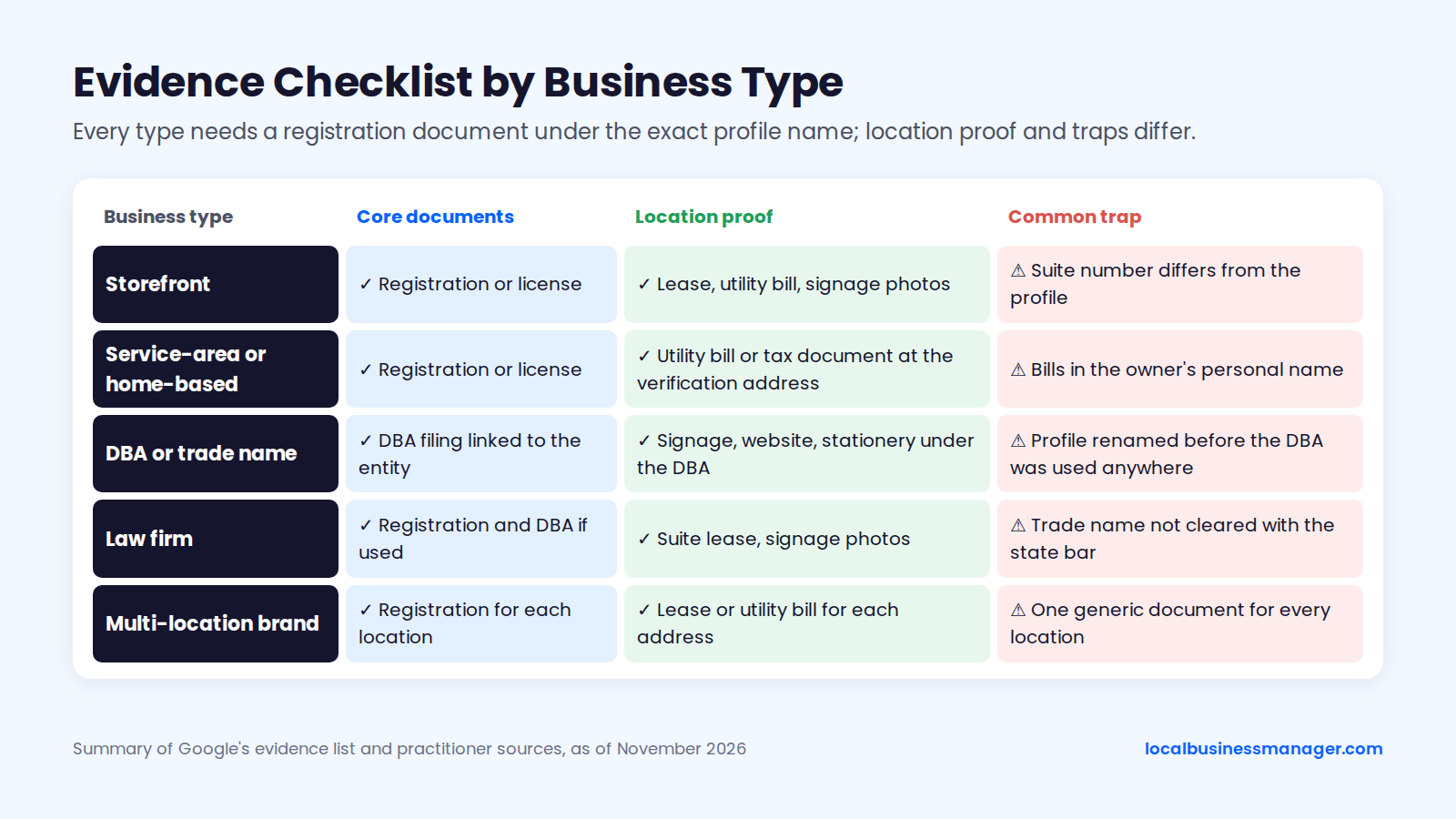
Every business type needs a registration document under the exact profile name; what changes is the location proof and the trap to avoid. This table summarizes the sections above for 5 business types, as of November 2026, based on Google's evidence list and the practitioner sources cited in this guide. It runs from the simplest case to the most complex.
Business type | Core documents | Location proof | Common trap |
|---|---|---|---|
Storefront | Registration or license | Lease, utility bill, signage photos | Suite number differs from the profile |
Service-area or home-based | Registration or license | Utility bill or tax document at the verification address | Bills in the owner's personal name |
DBA or trade name | DBA filing linked to the entity | Signage, website, stationery under the DBA | Profile renamed before the DBA was used anywhere |
Law firm | Registration and DBA if used | Suite lease, signage photos | Trade name not cleared with the state bar |
Multi-location brand | Registration for each location | Lease or utility bill for each address | One generic document for every location |
What to Show in a Verification Video
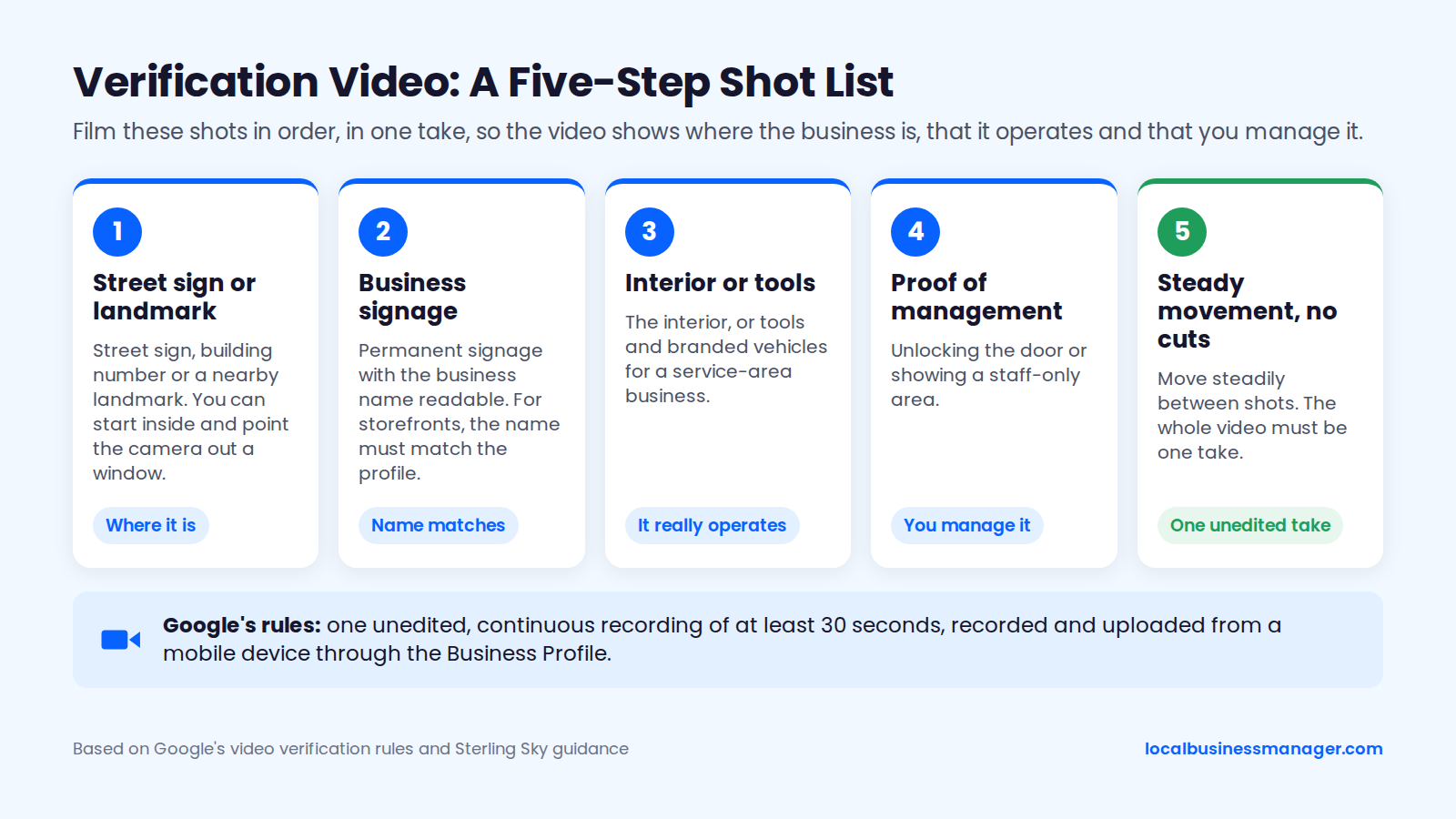
Google's video verification rules require one unedited, continuous recording of at least 30 seconds, recorded and uploaded from a mobile device through the Business Profile. For storefronts, the business name shown in the video must match the profile. If Google rejects a video, it shares the reasons, and the new video must include everything from the first one plus fixes for the listed issues.
Sterling Sky says a passing video proves 3 things: where the business is, that it really operates, and that the person filming manages it. A practical shot list, in order:
- The street sign, building number or a nearby landmark. You can start inside and point the camera out a window.
- Permanent signage with the business name readable.
- The interior, or tools and branded vehicles for a service-area business.
- Proof of management: unlocking the door, a staff-only area or the business's booking or billing software.
- Slow, steady movement throughout, with no cuts.
Google's appeal page lists documents, not video, and practitioners describe video as a verification step that often comes before or after reinstatement. In my practice, the client records the video alone, and the most common reason videos are rejected is that they don't show the signage, the street number or other proof of the location.
Practitioner guides also advise keeping bank details, tax IDs, personal documents and other people's faces out of the frame.
How Long Does Reinstatement Take, and What If the Appeal Is Denied?
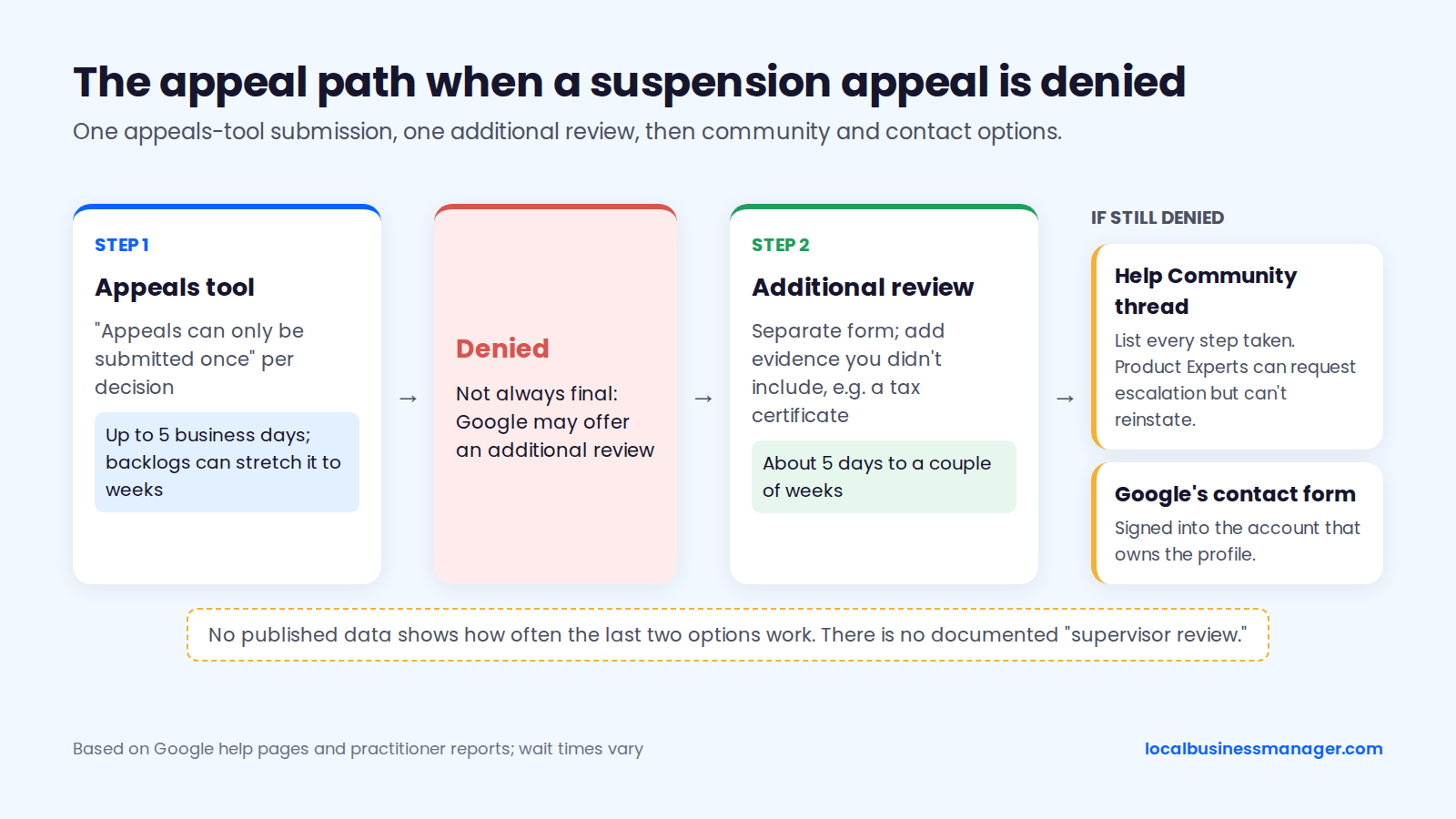
Google says appeal reviews can take up to 5 business days, though practitioners report much longer waits during backlogs. A denial isn't always final: Google may offer an additional review with new evidence, and the Help Community can request escalation in some cases.
Timeline
Google's appeals help page says reviews and decisions can take up to 5 business days. A practitioner on Local Search Forum reported waiting 6 weeks and 4 days for a response during a 2025 backlog, and the same thread noted the appeals tool shows only status messages, with no expected decision date.
Figures of "3 to 7 days" or "3 to 10 days" you may see elsewhere have no published source. Plan the client conversation around Google's 5-day figure, say upfront that backlogs can stretch it to weeks, and check the status every few days.
Additional Review After a Denial
The best reading of Google's two help pages is one appeals-tool submission per decision, followed by one additional-review request through a separate form if the appeal is denied. Google doesn't spell out how the two fit together:
- Google's appeals help page says "Appeals can only be submitted once."
- Google's "Fix suspended or disabled profiles" page says that if a reinstatement request is denied, Google may be able to do an additional review, and you can add evidence you didn't include the first time.
- Search Engine Roundtable reported in March 2024 that Google added the additional-review option after denied appeals.
Send more than you sent the first time. Search Engine Land suggested in May 2024 adding documents such as a tax certificate and allowing up to about 5 days, while a February 2025 Local Search Forum reply warns the wait can be a couple of weeks.
After a denial, what has worked for me is a second review with new evidence.
"Can't Be Appealed" and "Nothing to Appeal"
When the appeals tool shows that a decision can't be appealed, it won't accept an appeal on that decision, so read the linked policy and confirm the business is eligible at all. Businesses located in an EEA member state or territory can also refer an appeal to an out-of-court dispute settlement body under Google's EU Digital Services Act resolution options, according to Google's appeals help page.
"Nothing to appeal" is a different problem: the profile looks suspended, but the tool lists no decision. Sterling Sky reports the tool sometimes misses account restrictions, so check the "My accounts" page for every account with access, starting with owners. If the tool still shows nothing, Google's appeals help page says to contact its support team, which can confirm whether you're eligible for new appeals.
Help Community and Product Experts
After a denied additional review, a local SEO software company's recovery guide, updated in 2026, suggests asking Product Experts in the Google Business Profile Help Community, but Product Experts can't reinstate a profile. They're volunteers, not Google staff, who can request an escalation through the community process. There is no documented "supervisor review" you can request.
The same guide suggests posting a thread that lists every step already taken, and using Google's contact form while signed into the account that owns the profile. No published data shows how often either works.
How Do Account Restrictions and Bulk Appeals Work for Multi-Location Businesses?
A restricted owner or manager account has to be appealed on the "My accounts" page before its profiles can be, and 10 or more suspended locations can go through Google's bulk reinstatement request with a spreadsheet of profile IDs. Both need more record-keeping than a single-location appeal.
When the Owner or Manager Account Is Restricted
When an account is restricted, Google requires the account appeal on the "My accounts" page before any profile can be appealed, and the profiles it manages stay suspended until then. For a brand, Sterling Sky's 2026 guide notes that one restricted owner account can suspend every location it owns, so removing the restricted user first, as covered in the diagnosis section, is often the faster route.
Google recommends that agencies manage client profiles through a single organization account, and notes that an organization account can't directly own an individual profile.
Appealing 10 or More Locations at Once
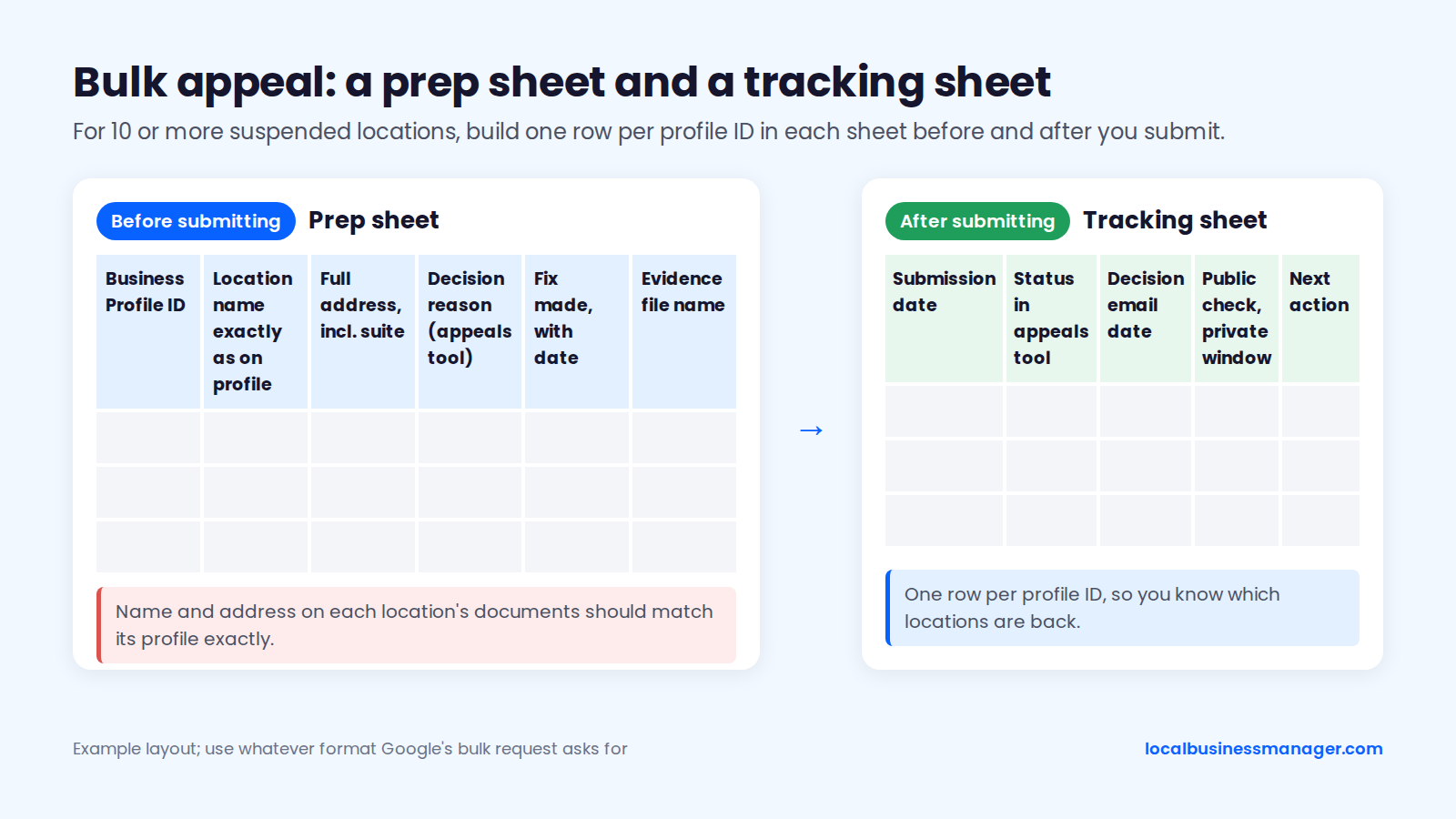
Google offers a bulk reinstatement request when you're appealing 10 or more suspended locations. It uses a spreadsheet of profile IDs plus evidence, and the name and address on each location's documents should match its profile exactly. Use whatever format the bulk request asks for, but build your own prep sheet first with these 6 columns:
- Business Profile ID
- Location name exactly as on the profile
- Full address, including suite
- Decision reason shown in the appeals tool
- Fix made, with the date
- Evidence file name for that location
Keep a separate tracking sheet so you know where every location stands; with dozens of profiles in one request, nobody remembers which ones are back. Use these 5 columns per profile ID:
- Submission date
- Status in the appeals tool
- Date of the decision email
- Public check in a private window, with the date
- Next action
What Happens After Your Profile Is Reinstated?
After reinstatement, confirm the profile is actually live, handle any re-verification request, compare reviews and rankings with your records, and hold edits. Practitioners report 4 common follow-ups:
- profiles that still look suspended
- requests to verify again
- missing reviews or lower rankings
- a second suspension days later
Profile Still Shows Suspended
Google doesn't publish an explanation for a reinstated profile that still shows suspended, so rule out the known causes before calling it a bug, and don't edit the profile while you check. Check 4 things, in this order:
- View the profile in a private window. It may be live even if the dashboard lags.
- Reopen the appeals tool and look for a second decision on the same profile.
- Check the "My accounts" page for a restriction on any account with access.
- Confirm you appealed from the account that manages the profile, and file only one appeal per issue (practitioner advice, not a Google rule).
Re-Verification Requests
Google can ask a profile to verify again, and Google's "Verify your business on Google" page says that's likely because business details such as the address or name were recently updated. Google doesn't single out reinstated profiles, but an appeal fix often changes exactly those details. If Google offers video verification, follow the shot list above and keep the same name and address as your appeal evidence.
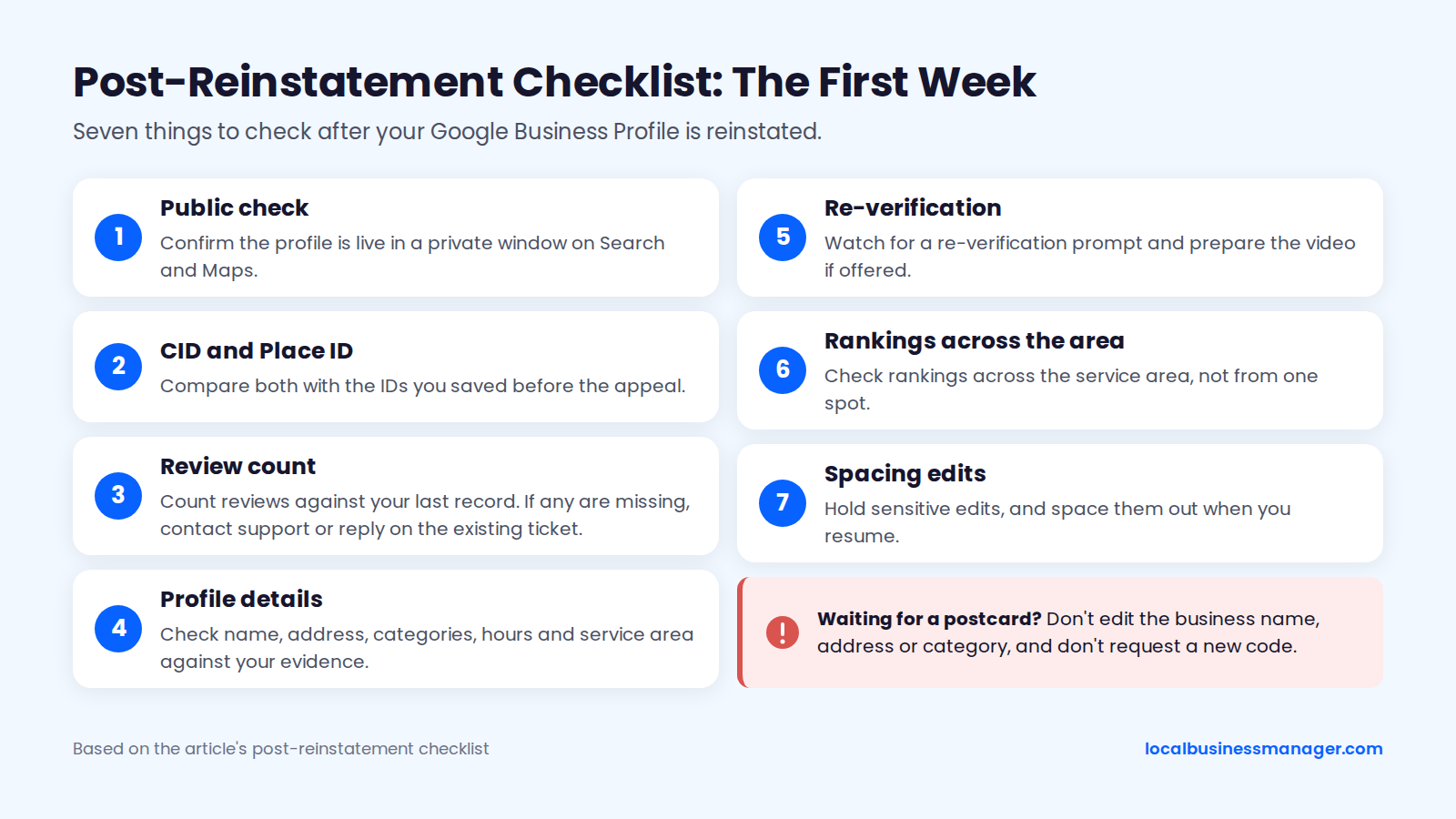
While you wait for a postcard, the same Google page says not to edit the business name, address or category, because the mailed code won't work if you do, and not to request a new code.
Reviews and Rankings
Google's help page on missing or delayed reviews says reviews might be removed after a profile is reinstated, and tells owners to contact support. Write-ups of an August 2026 Search Engine Roundtable report said Google is aware of the problem, told affected owners to reply on their existing support ticket, and gave no fix date.
On rankings, the evidence is mixed:
- Sterling Sky found that suspended listings usually return to their previous rankings once reinstated, especially when reinstatement is fairly quick, while long suspensions in competitive markets will likely rank differently.
- Joy Hawkins said in a 2023 comment reply that service-area businesses can take up to 2 weeks to recover.
- A 2025 Local Search Forum thread reports rankings that "dropped hard" and only partly recovered across the grid.
Search Engine Roundtable reported in 2019 that reinstatement sometimes created a new profile with a new CID or Place ID, and Ben Fisher advised documenting the CID beforehand, which is why the first-24-hours list says to save both IDs.
In my experience, rankings come back if you act fast, and I've never lost reviews in a reinstatement.
Suspended Again Days Later
Profiles can be suspended again within days of approval. In a 2023 Local Search Forum thread, a listing was suspended again 2 days after reinstatement; Ben Fisher advised replying to the original reinstatement email, and the listing was restored about a week later.
Joy Hawkins of Sterling Sky advises against making many major changes, such as name, phone and website, at the same time. The edit-spacing rule from the causes section applies here too.
Post-Reinstatement Checklist
In the week after reinstatement, check these 7 things:
- Confirm the profile is live in a private window on Search and Maps.
- Compare the CID and Place ID with the ones you saved before the appeal.
- Count reviews against your last record. If any are missing, contact support or reply on the existing ticket.
- Check the name, address, categories, hours and service area against your evidence.
- Watch for a re-verification prompt and prepare the video if offered.
- Check rankings across the service area, not from one spot.
- Hold sensitive edits, and space them out when you resume.
How Should Agencies Handle a Client's Suspended Profile?
Agencies need 3 things when a client profile goes down:
- a calm client conversation
- an access audit before the appeal
- one clear owner of the submission
The access audit matters most, because agency and staff accounts are a documented route to suspension. For the same reason, Business Profile naming and category selection are 2 jobs I never outsource: a name edit made by the wrong person is exactly the kind of change behind most suspensions I've handled.
The Client Call
The client call should explain what Google decided and what happens next, and it should never promise reinstatement. A script you can adapt:
- "Your profile was suspended on [date]. Google's reason is [reason], linked to its [policy name] policy."
- "Customers [can still see / currently can't see] the profile on Search and Maps."
- "We'll fix [the specific issue], then submit one appeal with your documents. Google allows one appeal per decision, so we're not rushing it."
- "I need [registration, lease, utility bill, signage photos] in the business's exact name and address by [date]."
- "Google says decisions take up to 5 business days. Backlogs can make it longer. We'll update you every [interval]."
- "Please don't create a new profile, edit the listing, or give anyone your login, even someone claiming to be Google. Google never charges to reinstate a profile."
- "Nobody can guarantee reinstatement, including us. If the first decision is no, Google may allow an additional review where we add new evidence."
Access Audit Before You Appeal
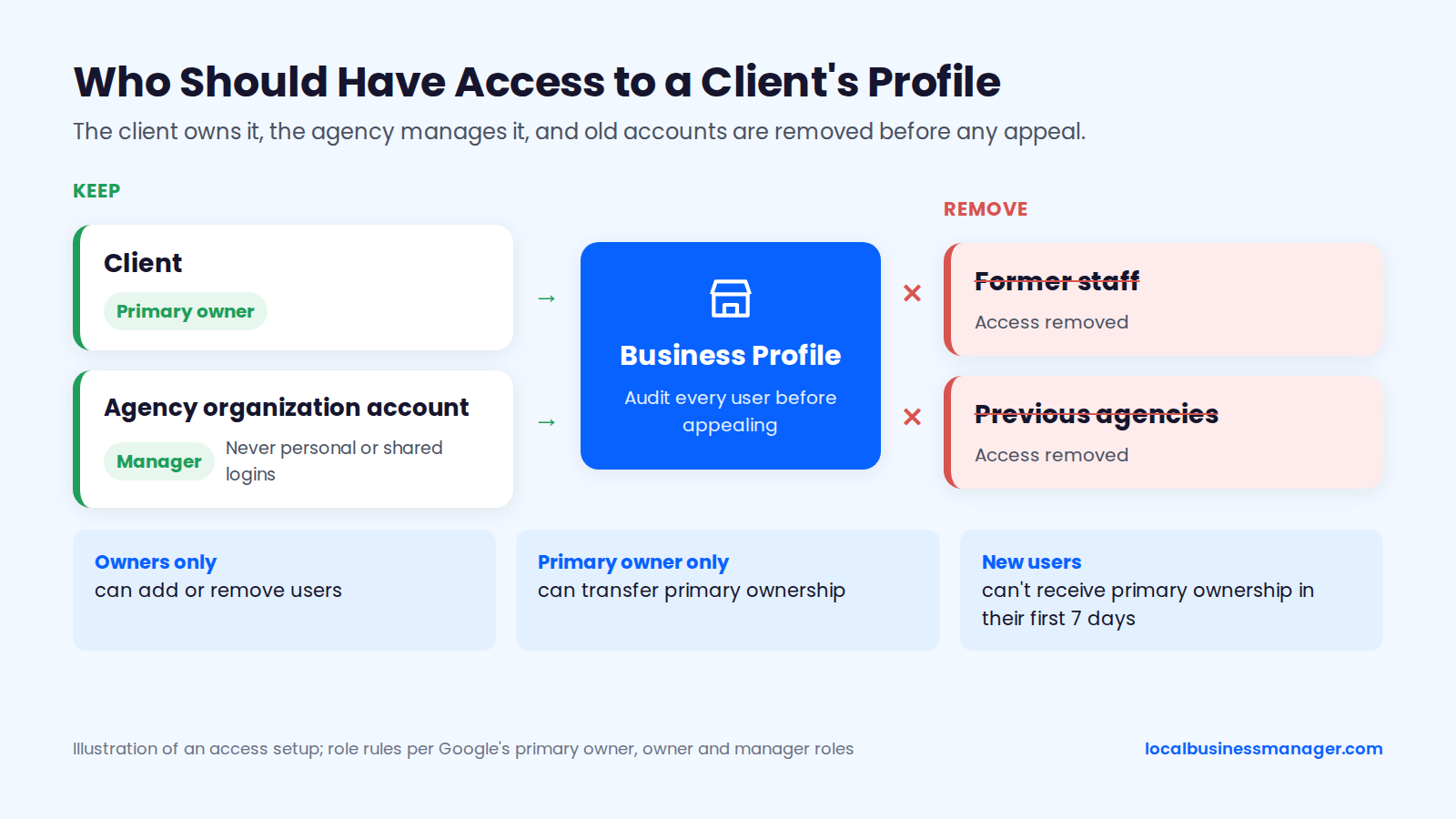
Audit every user on the profile before appealing, because one restricted account can keep a profile suspended. Google's roles are primary owner, owner and manager:
- Only owners can add or remove users.
- Only the primary owner can transfer primary ownership.
- A new user can't receive primary ownership in their first 7 days.
In my practice, the client is the primary owner, the agency is a manager, and we accept invites through one agency organization account, never personal or shared logins. Remove former staff and previous agencies; in my experience, getting a profile back from a former agency or ex-employee can be immediate or take a week or two, depending on the person.
After reinstatement, monitor profiles for unexpected edits. I check the name, attributes, services and other fields weekly.
Who Files the Appeal
One person should file the appeal, from an account that can see the decision in the appeals tool. If the client's owner account is the restricted one, that account's restriction has to be appealed first on the "My accounts" page, and that step belongs to the client.
Whoever files, the documents must be the client's own, under the exact profile name and address. Record the submission in the tracking sheet so nobody files a second time, and update the client at each status change.
How Do You Prevent Another Suspension?
Preventing a repeat mostly means keeping the profile true to the real business and keeping access tight. These 9 checks cover the causes above plus basic account hygiene:
- Name matches signage, website and documents; keyword names only through a DBA in real use.
- Address is a real, staffed location (see Address and Service Area).
- Service-area businesses hide their address and set their service area.
- One profile per real location; attorney profiles only where Google's practitioner rule allows.
- A day or two between sensitive edits to name, address or category. That's my practice; Google publishes no interval.
- Registration, license and utility documents kept current under the exact name.
- A quarterly access audit, removing anyone who no longer needs access. This is a practitioner suggestion; Google publishes no audit schedule.
- 2-step verification turned on for every account with access. That's general account hygiene; Google documents no link to suspensions.
- No incentivized reviews, no review gating, no employee-written reviews.
Posting frequency is not a documented protection against suspension. Some pages claim regular posts lower suspension risk, but Google documents no such link.
Should You Hire a Reinstatement Service?
A reinstatement service is optional, because the appeal itself is free through Google's appeals tool. Built With Dias compared paid services in September 2026 and found that no paid or free service can make Google's appeal review move faster.
Google says it never charges to verify or reinstate a profile. Google's third-party policy lets providers charge management fees, but they must:
- tell clients in writing that Business Profile is free
- never guarantee top placement
- never claim a profile will always appear
- never pose as Google or claim to be directly affiliated with it
In 2022, Google sued a company it accused of charging for free profiles, threatening deactivation unless owners paid (typically $99), selling fake reviews and promising first-page rankings.
Walk away from a service that:
- guarantees reinstatement
- asks for your password or a one-time code instead of manager access
- promises "supervisor escalation" or a direct line inside Google
- suggests creating a new profile
- claims to be Google or a Google partner
- offers reviews as part of the package
Ask these 5 questions before hiring:
- Will you work through manager access while I stay the owner?
- What fix will you make before appealing, and why?
- Which documents will you submit, and can I see them first?
- What happens if the appeal and the additional review are both denied?
- Do you charge if the profile isn't reinstated?
FAQs
Is There Still a Google Business Profile Reinstatement Form?
Not as a separate route: Sterling Sky reports the appeals tool has been the only way to reinstate a suspended profile since February 2024. Guides that tell you to fill in a reinstatement form or describe what your business does in a long form are describing the old process. After a denied appeal, the separate route is Google's additional-review form, not a reinstatement form.
Was My Profile or My Google Account Suspended for Suspicious Activity?
Check which one Google acted on: a Google Account restriction suspends every profile that account manages, while a profile decision appears in the appeals tool against one profile. For an account restriction, appeal on the "My accounts" page first, then each profile. Notice wording such as "suspicious activity" tells you little on its own; act on the decision and linked policy in the appeals tool. Secure the account too: Google says it never asks for a one-time password or PIN, so anyone asking isn't Google.
Why Did My Business Disappear From Google?
A hard suspension is one reason a business disappears from Google, because it takes the listing off Maps and Search. A soft suspension leaves the listing live and only blocks management, according to Sterling Sky and a Product Expert guide in Google's Help Community, so if customers can still see the profile, a suspension isn't hiding it. If the profile appears for its exact name in a private window but not for service searches, you're looking at a ranking drop rather than a suspension.
Can a Competitor Get My Profile Suspended?
A competitor can report your profile, and Sterling Sky notes that any Google user's report can lead to a suspension. A real name, an eligible address and no duplicates mean your evidence already matches the policy if a report does lead to one. Appeal that suspension the same way as any other, after checking the profile against the policy the decision links to.
Can I Edit My Profile While the Appeal Is Pending?
Avoid it. Google doesn't publish a rule, and in a soft suspension the profile can't be edited anyway. Practitioners link rapid edits to name, address and category with suspensions, and your evidence has to match what's on the profile. If a detail is genuinely wrong, it should have been fixed before you appealed; otherwise, leave the profile alone until the decision arrives.
Where to Start This Week
If you manage profiles for clients, run the access audit on every one of them this week, including the profiles that look fine. One restricted login can take a whole roster down at once, and it's a cause you can check before Google acts on it. Local Business Manager is building tools for agencies and multi-location brands that manage profiles at scale; if that's you, request early access.