Keywords in Your Google Business Name: Why It Gets Profiles Suspended

Adding keywords your business doesn't actually use to its Google Business Profile name breaks Google's guidelines, and Google warns that unnecessary words in the name could get the profile suspended. Keyword names also tend to rank better. That's why we've all seen an "Emergency Plumber Dallas 24/7" sitting above a compliant client in the map pack.
Below are Google's naming rules, what the ranking data does and doesn't show, and the one route I recommend for getting a keyword into the name: a registered DBA the business uses everywhere. After that come suspensions, law-firm trade names and stuffed competitors.
Can You Put Keywords in Your Google Business Profile Name?
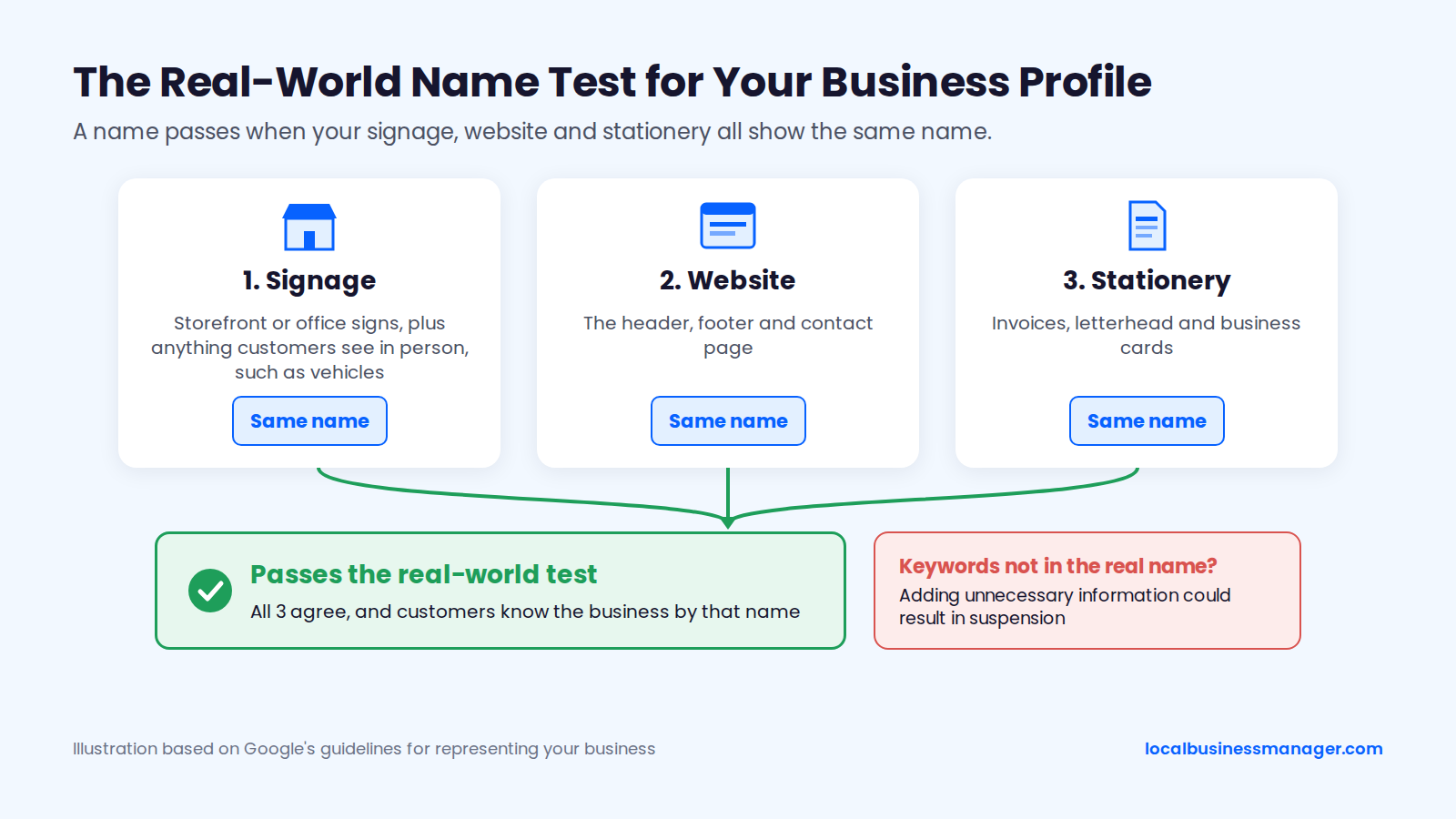
You can only if the words are part of the real-world name the business already uses on its storefront, website and stationery. Google's guidelines for representing your business say the Business Profile name (formerly the Google My Business name) must reflect the business's real-world name, used consistently and known to customers. They also warn that adding unnecessary information to the name could result in suspension.
A Business Profile has no keyword field, so relevance has to come from other parts of the profile. Google's "Tips to improve your local ranking" help page says complete, detailed business information helps relevance.
Google's real-world test checks 3 places, and customers should know the business by the name they show:
- The storefront or office signage.
- The website, including the header, footer and contact page.
- The stationery, such as letterhead and business cards.
Vehicles, uniforms and invoices aren't in Google's wording, but customers see them too, so keep the name identical there as well.
What Do Google Business Profile Name Guidelines Allow and Ban?
Google Business Profile name guidelines allow only the name the business uses in the real world. Descriptive words and legal suffixes are fine when the business really uses them. Anything added on top of that name is what Google rules out.
What's Not Allowed in the Name
Any word that isn't part of the real-world name breaks Google's rule, so these 8 common additions are out unless the business genuinely uses them in its name:
- Service or product keywords ("Water Heater Repair", "Car Accident Lawyer").
- Location information, such as a city, county or neighborhood.
- Taglines and marketing phrases ("Best in Town", "Licensed & Insured").
- Opening hours ("24/7", "Open Late").
- Phone numbers.
- Website URLs.
- Store codes or location numbers ("#214").
- Containment information, such as "inside Westfield Mall".
Keepers Digital, an agency, defines keyword stuffing as adding terms that aren't in the registered name in order to rank.
Which Names Break Google's Rules? 9 Examples
Every name in the left column adds something the business doesn't use as its real-world name, and the fix is always to cut the name back to what the business actually uses. The 9 examples of keywords and extras in a Google business name are invented local service businesses, grouped by the kind of addition they make.
Name entered in the profile | What was added | Compliant name |
|---|---|---|
Smith Plumbing - Emergency Plumber Dallas | Service keyword and city | Smith Plumbing |
Rivera Law Firm Car Accident Lawyer | Service keywords | Rivera Law Firm |
Cool Air HVAC Phoenix | City not part of the real name | Cool Air HVAC |
Bright Smile Dental - Best Dentist in Austin | Tagline | Bright Smile Dental |
Smith Plumbing 24/7 | Hours | Smith Plumbing |
Apex Roofing 555-010-2000 | Phone number | Apex Roofing |
ApexRoofing.com | URL used as the name | Apex Roofing |
Cool Air HVAC #214 | Store code | Cool Air HVAC |
Glow Med Spa (inside Westfield Mall) | Containment information | Glow Med Spa |
When Descriptive Words Are Allowed
Descriptive words are allowed when they are part of the brand the business really operates under. Keepers Digital's guide says a registered DBA or commonly used name with descriptive words is acceptable when the business actually operates under it and the name isn't stuffed.
Suppose a plumber's trucks, storefront sign, website header and invoices all say "Dallas Emergency Plumbing". Then "Dallas Emergency Plumbing" is the business's name, and the profile should match it.
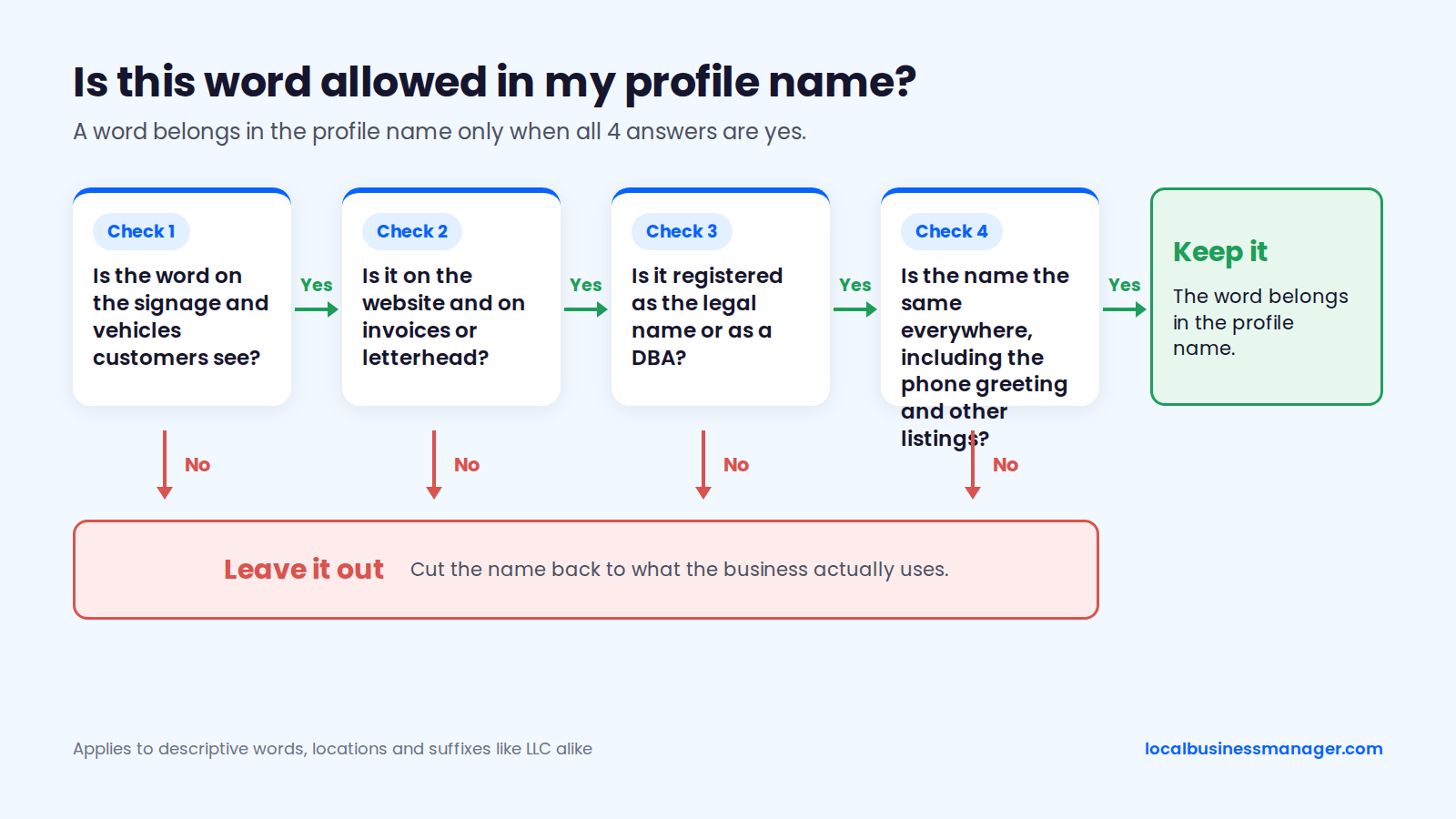
A word belongs in the profile name only when all 4 of these answers are yes:
- Is the word on the signage and vehicles customers see?
- Is it on the website (header, footer, contact page) and on invoices or letterhead?
- Is it registered, either as the legal name or as a DBA (assumed name)?
- Is the name the same everywhere, including the phone greeting and other listings?
Should I Put LLC in My Business Name on Google?
Add LLC or Inc. only if the business uses the suffix in its real-world name. Google's real-world name rule settles it: the profile name should match the name on the sign, website and stationery, so a suffix belongs in the profile only when customers see it there.
- If the website, letterhead and sign all say "Elite Plumbing LLC", the suffix can stay.
- If "LLC" only exists on the state filing and the business calls itself "Elite Plumbing" everywhere customers look, leave it off.
Why Are Keyword Names So Tempting? (Do They Actually Rank Better?)
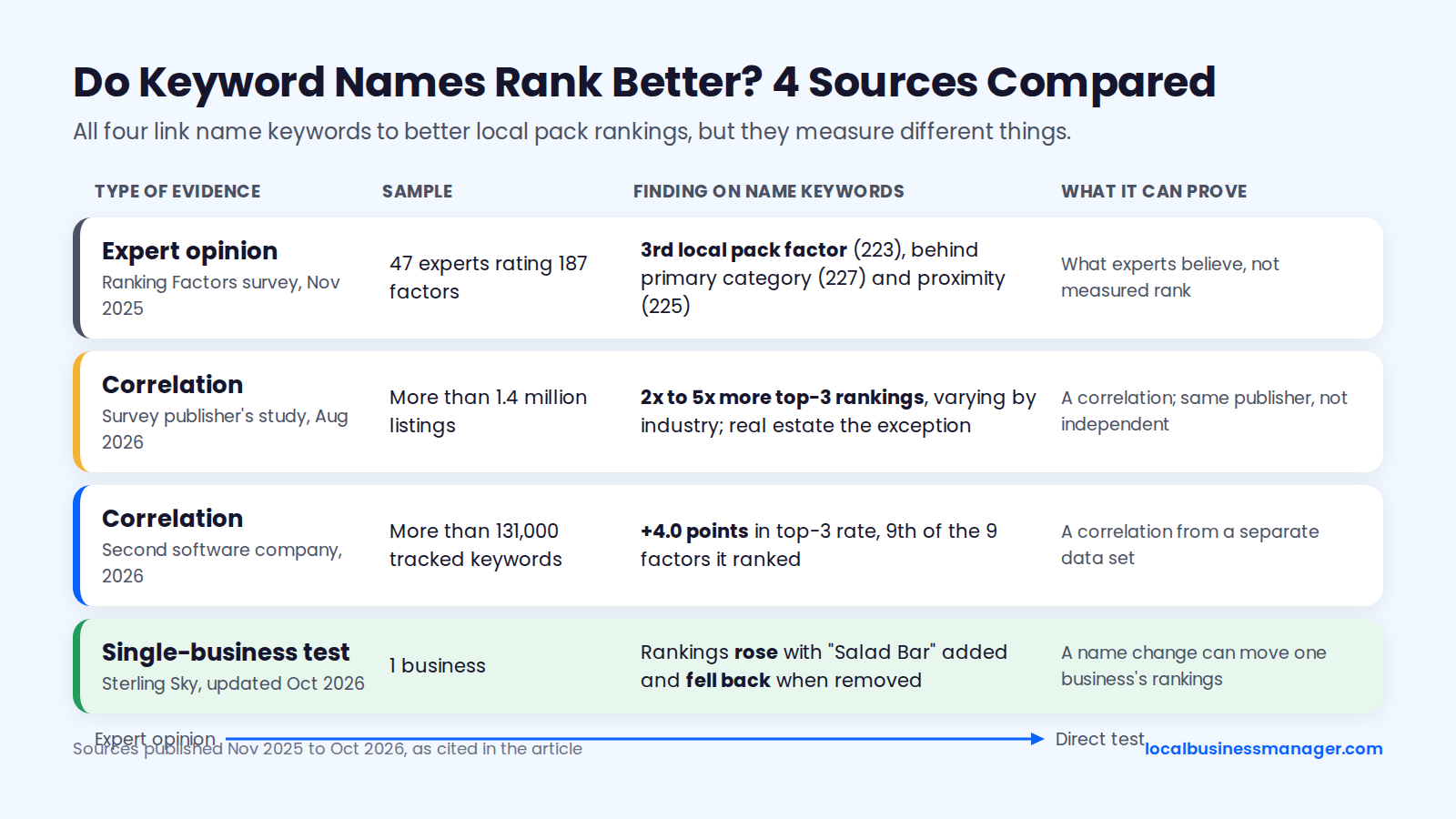
Keyword names are linked with better local pack rankings in all 4 sources below, though the size of the effect varies widely between them. Google's own "Tips to improve your local ranking" page only says local results are based mainly on relevance, distance and prominence. It says nothing about the name specifically.
What the Ranking Data Shows
The 2026 Local Search Ranking Factors survey was published in November 2025 and the 2 correlation studies below in 2026; the Sterling Sky test is older, and its page was last updated in October 2026. All 4 link name keywords with better local pack rankings, but they measure different things and report effects from a 4-percentage-point lift to 5 times more top-3 rankings. The table orders them by type of evidence, from expert opinion to a direct test.
Source | Type of evidence | Sample | Finding on name keywords | What it can prove |
|---|---|---|---|---|
2026 Local Search Ranking Factors survey (published November 2025) | Expert opinion | 47 experts rating 187 factors | 3rd local pack factor (score 223), behind primary category (227) and proximity (225) | What experts believe, not measured rank |
The survey publisher's business-name study (August 2026) | Correlation | More than 1.4 million listings | 2x to 5x more top-3 rankings, varying by industry; real estate the exception | A correlation; same publisher as the survey, so not independent confirmation |
A second local SEO software company's analysis (2026) | Correlation | More than 131,000 tracked keywords | +4.0 percentage points in top-3 rate, 9th of the 9 factors it ranked | A correlation from a separate data set |
Sterling Sky test (original test older; page updated October 2026) | Single-business test | 1 business | Rankings rose with "Salad Bar" added and fell back when removed | That a name change can move one business's rankings |
Has the Name Effect Weakened Since 2021?
Name keywords still correlate with better local pack rankings, but the effect appears weaker than before 2021. Sterling Sky reports that Google's Vicinity update (November to December 2021) reduced the impact of keywords in business names. Its single-business test still showed rankings moving with the name, often within hours. The survey publisher's August 2026 study of more than 1.4 million listings also still finds the correlation.
Nobody outside Google knows how much weight the name carries today.
What I've Seen With Law-Firm Clients
I've spent 15+ years in SEO, Google Ads, Meta Ads and Google Business Profile optimization, and I've ranked and served close to 100 US personal-injury law firms in Houston, Denver, Los Angeles and New York; when one of those firms isn't in the 3-pack, the 2 causes I find most often are a Business Profile name that isn't optimized and too few new reviews coming in.
>
In my experience, a single high-impact fix, such as getting the keyword into the profile name, can show ranking gains within about a month, though nothing about it is guaranteed. Once the basics are done, further gains come gradually.
>
I recommend keyword names, but only when the keyword becomes the business's real name.
Why Stuffed Competitors Still Outrank Compliant Profiles
Stuffed competitors tend to stay put because, on the evidence available, enforcement mostly depends on someone reporting the listing.
- Sterling Sky's 2019 review of 50 reported keyword-stuffing cases (mostly law firms) found no sign that Google catches keyword stuffing by algorithm. Reports fixed it; suggested edits never stopped the keywords coming back.
- Owners kept re-adding the keywords. In Sterling Sky's 2019 review, owners re-added them in every case, some up to 8 times with no action from Google.
- The agency Smith Digital, in a December 2025 opinion piece without data, describes enforcement as largely complaint-driven.
- Google hasn't published anything on whether its automated detection has improved since 2019, and reliable studies are lacking.
How Do Keyword Names Get a Profile Suspended?
A keyword name typically gets a profile suspended after something puts it in front of Google's reviewers, such as the owner's own name edit or a report. Google may then edit the name back, ask for re-verification or suspend the profile.
What Triggers a Review
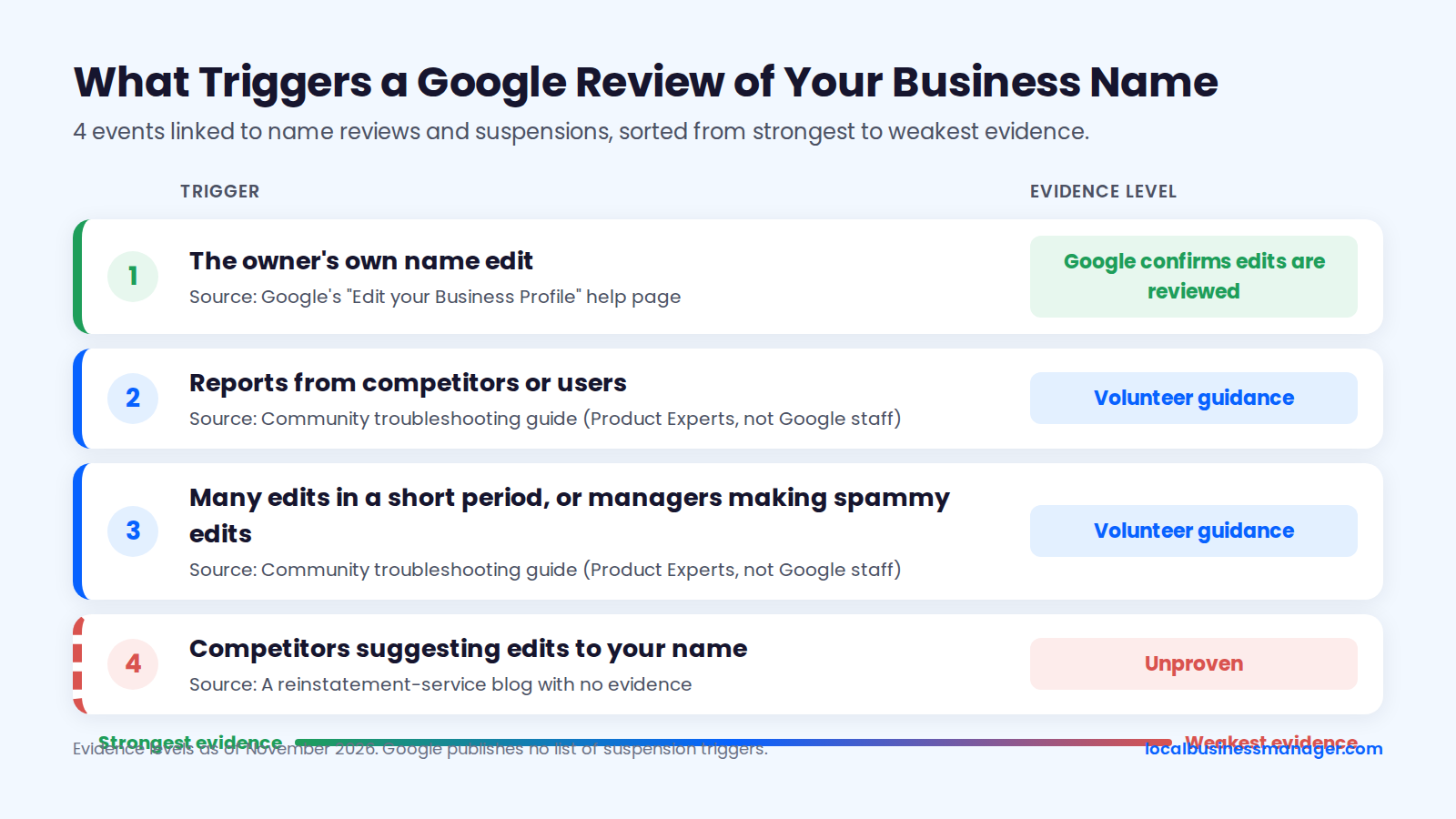
Google confirms only that name edits are reviewed before they go live; it publishes no list of suspension triggers. The table below sorts 4 events linked to name reviews and suspensions from strongest to weakest evidence, as of November 2026.
Trigger | Evidence level | Source |
|---|---|---|
The owner's own name edit | Google confirms edits are reviewed | Google's "Edit your Business Profile" help page |
Reports from competitors or users | Volunteer guidance | Google Business Profile Community troubleshooting guide (Product Experts, not Google staff) |
Many edits in a short period, or managers making spammy edits | Volunteer guidance | Google Business Profile Community troubleshooting guide (Product Experts, not Google staff) |
Competitors suggesting edits to your name | Unproven | A reinstatement-service blog with no evidence |
The Google Business Profile Community troubleshooting guide says keyword-stuffed names "can lead to reports and subsequent suspensions". Google doesn't say a name edit causes suspensions; that link is practitioner observation. Across the profiles I've managed, name edits and address edits cause the most suspensions.
Name edits also came up during a 2025 suspension bug, when users reported suspensions following edits that included the name. Sterling Sky's Joy Hawkins advised against making several major changes, such as the name, at once.
What a Suspension Looks Like
When Google acts on a keyword name, practitioner sources describe 3 outcomes, from mildest to most severe:
- Google edits the name back. A 2026 Local Search Forum thread reports Google's complaint form correcting extreme names without suspending the profiles.
- Google asks for re-verification. Sterling Sky's rebranding checklist warns that a name changed before it is visible on the website can be reverted or sent to re-verification.
- Google suspends the profile. In Sterling Sky's 2019 review of 50 reported cases, repeat offenders received a soft suspension about 20% of the time and a hard suspension about 20% of the time.
Sterling Sky reports that since February 2024 a suspended profile comes back only through Google's appeals tool, covered in the reinstatement section below. Google's own documentation is vague about which of the 3 outcomes applies when.
How to Add Keywords to Your Google Business Name the Compliant Way (DBA First)
My recommendation, and the process I've taken many clients through, is to make the keyword name the business's real name. That means registering the DBA, using the name everywhere, and changing the profile last. Sterling Sky also calls a legal rebrand or DBA filing the only guideline-compliant route. The suspension risk stays real even if you do everything right.
Step 1. Register the DBA (Assumed Name)
The first step is filing the keyword name as a DBA (assumed name) with the state or local office that registers business names where the business operates. Sterling Sky refers to this as a state-filed DBA. Keep the certificate: it's the document you'll show Google if the name is ever challenged.
2 kinds of business have an extra step:
- Law firms: the trade name must clear the state bar's rules before filing (see the law-firm section below).
- New businesses: once the DBA is registered and the name is already on the signage and website, set up the profile with the DBA name from day one. That's what I do, and it avoids a later name edit entirely. I've seen a brand-new profile in a competitive city take a month or two to show in the map pack for category searches, with no guarantee.
Before filing, ask the client one honest question: would they put this name on their trucks and answer the phone with it for years? A keyword DBA means rebranding the business under that name for good. If the answer is no, skip to the section on where keywords should go instead.
Step 2. Put the Name on Signage, Vehicles and Stationery
Google's guidelines name the storefront, website and stationery as the places where the real-world name must appear; vehicles and uniforms are worth adding because customers see them too. Update these places:
- Storefront or office signage, including door lettering.
- Vehicles and uniforms.
- Invoices, letterhead, business cards and email signatures.
Signage also matters for verification. In my practice the client records the verification video alone, and the most common reason a video gets rejected is that it doesn't show signage, the street number or other proof of the location.
Step 3. Update the Website, Phone Greeting and Other Listings
The website has to carry the new name before the profile changes. Sterling Sky's rebranding checklist says to make sure the new name is fully indexed on Google, especially on the website, before editing the Business Profile.
Change these next:
- The website header, footer, contact page and about page.
- The phone greeting.
- Facebook, Yelp and the industry directories the business is listed on.
- For lawyers, the state bar listing. Sterling Sky's checklist puts it before the profile name change.
A Local Search Forum practitioner describes the same order: website and other listings first, Business Profile last. No source gives a set waiting period. The test is whether Google already shows the new name on the website.
Step 4. Change the Business Profile Name Last
The profile name changes only after signage, website and listings all carry the DBA name. Once they do, I change the profile name immediately. I don't build in an extra waiting period.
Google's "Edit your Business Profile" help page gives 4 steps for changing the name on Google:
- Sign in to the Google Account linked to the profile.
- Find the Business Profile on Google Search or in the Google Maps app.
- Select "Edit profile".
- Update the business name.
The same help page says Google reviews edits before they go live, and that changing a verified name may mean verifying the business again. I have also seen re-verification after an office move. Have the DBA certificate and signage photos ready before you save, and read the rebranding section of Google's guidelines for representing your business to see how Google wants your change handled.
After the edit, 2 habits protect the name:
- Space out sensitive edits. After a name, address or category edit, I wait a day or two before making the next sensitive edit.
- Watch for reversions. I check weekly for changes to the name and other fields, whether or not we just made an edit.
The full walkthrough is in our guide to changing your business name or address on Google.
The DBA-First Rename Checklist
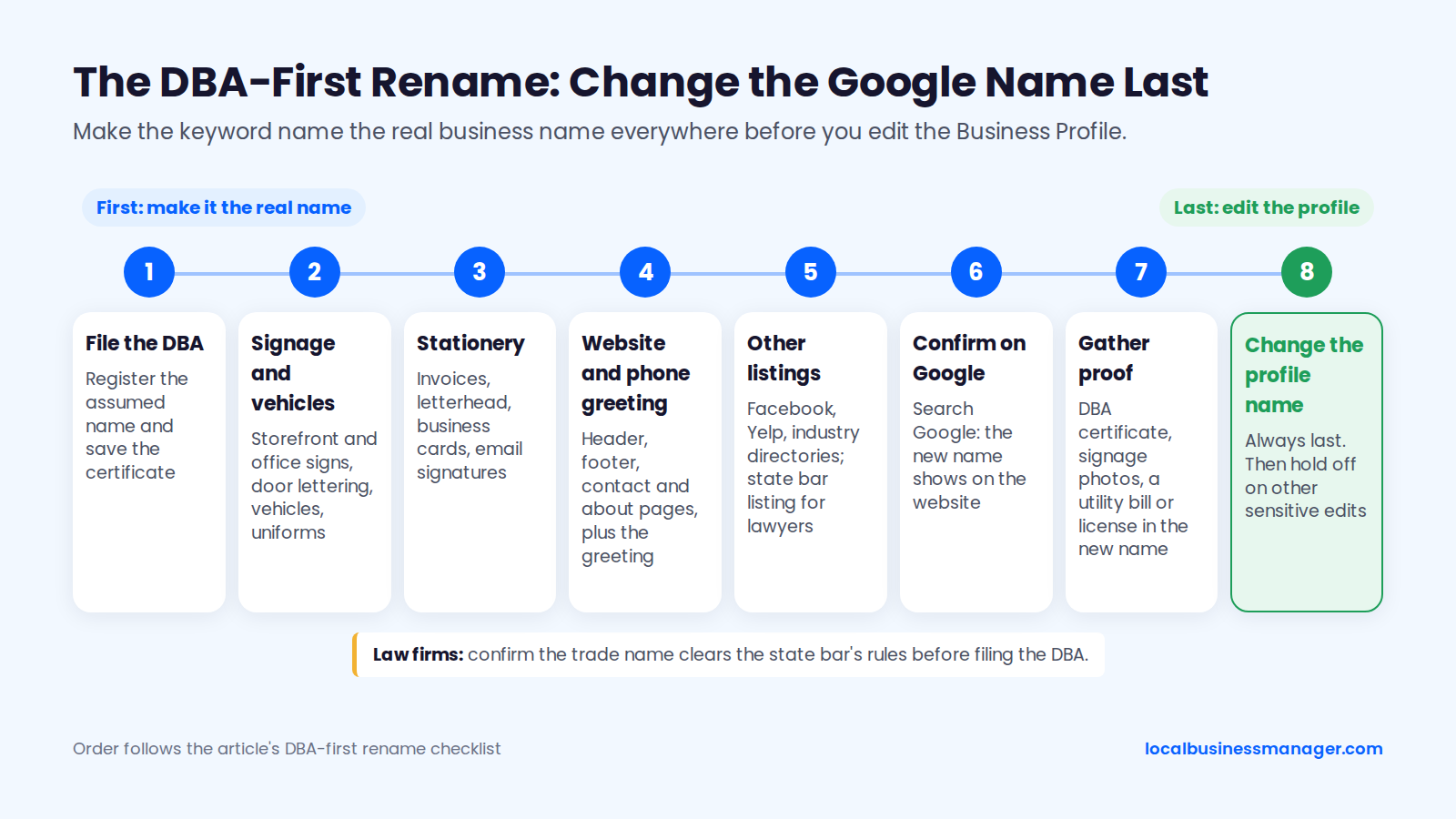
Work through these 11 steps in order. The Business Profile name change is always the final one:
- Law firms: confirm the trade name is allowed and not misleading under the state bar's rules.
- File the DBA and save the certificate.
- Update the storefront and office signage.
- Update vehicles and uniforms.
- Update invoices, letterhead, business cards and email signatures.
- Update the website header, footer, contact page and about page.
- Change the phone greeting.
- Update Facebook, Yelp, industry directories and, for lawyers, the state bar listing.
- Search Google to confirm the new name shows on the website.
- Gather proof: the DBA certificate, signage photos, and a utility bill or license in the new name.
- Change the Business Profile name, and hold off on other sensitive edits.
Why a DBA Filing Alone Isn't Enough
A DBA certificate doesn't make a name compliant on its own. Google judges the name the business actually uses, and it can challenge or suspend a name even with a DBA on file. The DBA is what proves the name when Google asks.
2 forum practitioners and 1 agency put limits on what a DBA does:
- A Local Search Forum reply notes that a DBA helps if a suspension happens but doesn't prevent one.
- Another Local Search Forum practitioner says a DBA won't hold up at suspension or re-verification unless signage, the website, marketing materials and utility bills also show the name.
- The agency CurveSEO argues that a DBA filed only to add service or city words isn't allowed, and that such changes often get reversed or suspended.
Watch the timing. If the profile name changes the same day the DBA is filed, while the sign and website still say the old name, the profile breaks the real-world rule just as clearly as one with no DBA.
Law Firms: Check Your State Bar Before Filing a Trade Name
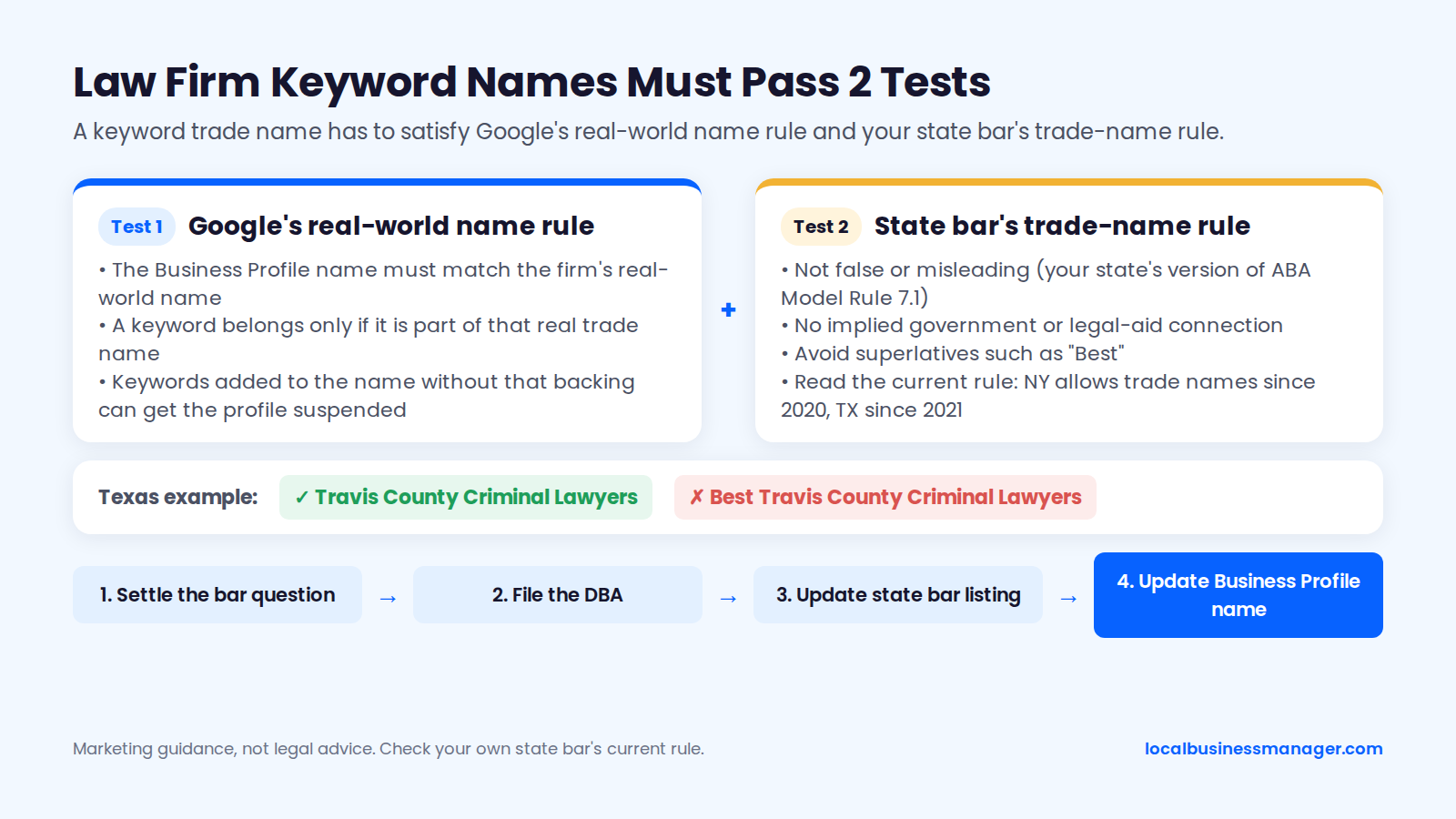
A law firm's keyword trade name has to pass 2 tests: Google's real-world name rule and the state bar's trade-name rule. This section is marketing guidance, not legal advice. Check your own state bar's current rule before filing anything.
What the ABA Model Rules Say
Under ABA Model Rule 7.1, Comment [5], as amended by the American Bar Association in August 2018, firm names and letterhead count as communications about a lawyer's services. A firm may use the names of current members, the names of deceased members where the firm continued as a successor, or a trade name "if it is not false or misleading."
Dentons' 2024 summary of the ABA text flags 2 risks for any trade name:
- An implied official connection: a name that suggests a link to a government agency or a public or charitable legal services organization.
- A misleading name: a name that breaks Rule 7.1's ban on false or misleading communications. The Jaffe PR example in the Texas section below shows how a single word like "Best" can cross that line.
The ABA moved firm-name rules from Rule 7.5 into Rule 7.1's comments in the 2018 amendments, which is why older summaries, including Dentons' 2024 guide, still cite Rule 7.5. The ABA rule is a model; each state adopts its own version, and the state's version is the one that binds the firm.
Can New York Law Firms Use Trade Names Now?
New York law firms may use trade names that aren't misleading. New York banned law-firm trade names under Rule 7.5(b) until a June 24, 2020 amendment removed the ban, according to New York State Bar Association Ethics Opinion 1230.
Summaries that still say New York bans trade names are out of date. Other states' rules vary, so check your state bar's current rule before filing.
What Does Texas Require for a Law-Firm Trade Name?
Texas now allows trade names that are not false or misleading, after banning them until 2021:
- Texas bar members approved the change in a March 2021 referendum. The ABA's Law Practice Magazine reported in January 2022 that 78% of those who voted were in favor, and that Texas was the last holdout state.
- The amended rules took effect July 1, 2021. Texas Rule 7.01(c) now says lawyers "may practice law under a trade name that is not false or misleading."
- A Texas Bar Journal ethics Q&A found "Business Forward Law" allowed.
- In a 2021 Jaffe PR article, a lawyer gave this example: "Travis County Criminal Lawyers" is acceptable, while "Best Travis County Criminal Lawyers" is not.
- Whether Texas requires state-bar approval of a trade name is unclear. The same 2021 Jaffe PR article says firms must still submit proposed trade names for approval, but the current rule text sets out no separate approval step.
- Texas Rule 7.04 requires firms to file advertisements with the Advertising Review Committee within 10 days after they first run, with an application and a fee.
- Pre-2021 Texas ethics opinions, such as Opinion 617, still show up in search results and no longer apply.
Until the bar confirms what applies to a firm name, ask the State Bar of Texas Advertising Review Department what it needs before filing the DBA.
What About Individual Attorney Profiles?
Google's guidelines for representing your business count lawyers as individual practitioners. When several attorneys work at one location, each attorney's profile title should contain only the attorney's name, without the firm's name and without keywords. A solo attorney at a branded firm gets a single profile in the format "[Firm]: [Attorney name]".
My intended approach, which I haven't tested in practice yet: give each attorney profile a different primary category from the firm's, so the profiles don't compete with each other.
Law-Firm Trade-Name Pre-Check
Run these 6 checks before a law firm files a keyword DBA:
- Find your state's current trade-name rule, not a pre-2021 opinion or an old summary.
- Confirm your state allows trade names under that current rule. New York changed its rule in 2020 and Texas in 2021.
- Check the name isn't false or misleading under your state's version of ABA Model Rule 7.1. Avoid superlatives such as "Best" and anything implying a government or legal-aid connection.
- Ask the state bar whether it reviews or approves trade names before use. In Texas, ask the Advertising Review Department and plan for the Rule 7.04 ad filing.
- File the DBA only after the bar question is settled.
- Update the state bar listing before the Business Profile name.
The rest of the law-firm playbook is in our guide to local SEO for lawyers.
Already Stuffed or Already Suspended? How to Fix It
Fix a stuffed or suspended name on the existing profile: take out the words the business doesn't use, or make them the real name through the DBA process, and appeal through Google's appeals tool if the profile is already suspended. Never create a replacement profile to escape a suspension.
Removing Keywords From a Non-Compliant Name
A stuffed name has 2 compliant fixes:
- Remove the words the business doesn't use on its signage, website and stationery.
- Make them the real name through the full DBA process above, and put them in the profile name only after the name is actually in use.
My own approach, and it carries real risk: when a client already has keywords in a name they don't use, I keep them while the DBA is being filed, then switch to the registered DBA name.
Until the DBA exists and the business actually uses the name on its sign, website and paperwork, a name that isn't the real-world name breaks Google's guidelines and risks a suspension or a forced name edit. Never add keywords that aren't part of the legal or DBA name.
For your own profile, remove any words the business doesn't use on its sign, website and stationery now. Put the keyword name back only after the DBA is registered and the name is actually in use.
Will Rankings Drop If You Remove Keywords From the Name?
In Sterling Sky's test and examples, rankings dropped when keywords came out of the name:
- Removing a keyword returned rankings to where they started before it was added.
- Rankings tied to the name can "fall off a cliff" once the keywords come out.
- Sterling Sky shows cases, including a lawyer's profile, where Google stripped keywords from the name and rankings suffered.
- No published source gives a recovery timeline after removal.
Plan for the drop with the client before the edit, and start the relevance work in the "Where Should Keywords Go Instead?" section at the same time.
Google Business Profile Reinstatement After a Name Suspension
A suspended profile is reinstated through Google's appeals tool. Google's help page on fixing suspended or disabled profiles describes the appeal and the evidence it accepts.
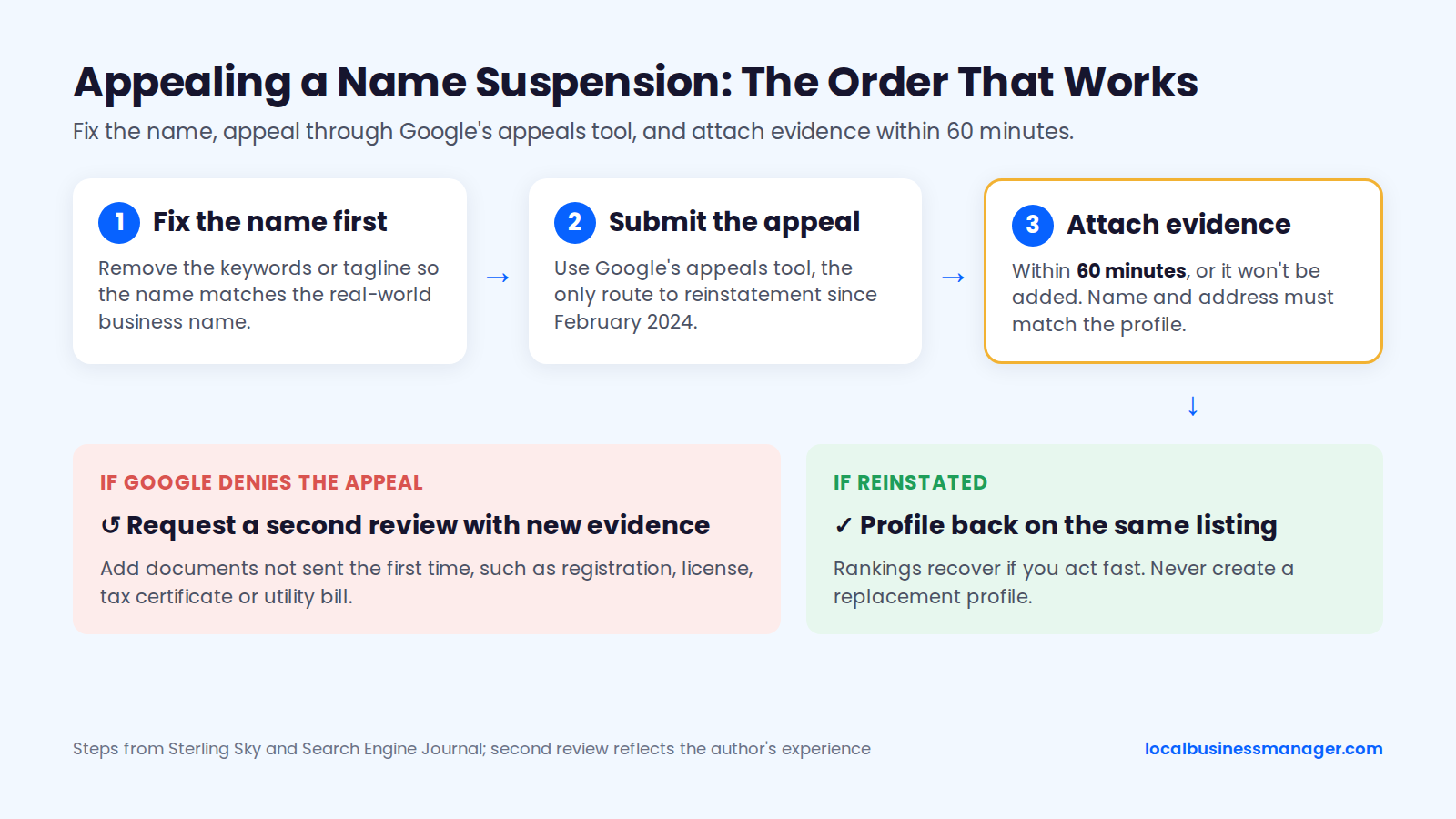
Follow this order:
- Fix the name first. In Search Engine Journal's walkthrough, the owner removes a tagline from her business name before appealing.
- Submit the appeal.
- Attach evidence within 60 minutes. Sterling Sky and Search Engine Journal both report that evidence must be attached within that window or it won't be added.
If Google denies the appeal, what worked for me was a second review with new evidence. Rankings have come back for my clients after reinstatement when we acted fast, and I have never lost reviews in a reinstatement.
The full process is in our guide to a suspended Google Business Profile.
Which Documents Does Google Accept as Proof of Your Name?
Google's "Fix suspended or disabled profiles" help page lists 4 kinds of evidence that can help an appeal: official business registration, a business license, tax certificates and utility bills (electricity, phone, water or internet). The business name and address on every document should match the profile being appealed.
Search Engine Journal adds that the utility bill should match the name and address on the registration or license. Adding evidence to an appeal is optional on Google's page, but a name suspension is hard to argue without it.
What Else to Gather Before an Appeal
Beyond Google's 4 document types, gather everything that shows the name in real use:
- DBA certificate showing the exact name.
- Lease agreement for the location.
- Photos of permanent exterior signage, the interior, and the entrance as seen from the street.
- A video recording the storefront and office.
- Stationery, such as letterhead, showing the name.
Stationery comes from Google's naming guidelines, which list it among the places the real-world name appears, and signage photos come from a community-written guide on Google's forum. No source shows which document gets profiles reinstated most often.
The DBA, lease, office signage photos and video reflect what reinstatement usually needs in my experience. When I set up a new profile, I also collect as many documents as I can from the client up front: the DBA filing, the business license, proof of address and signage photos.
How Do You Report a Competitor's Keyword-Stuffed Name?
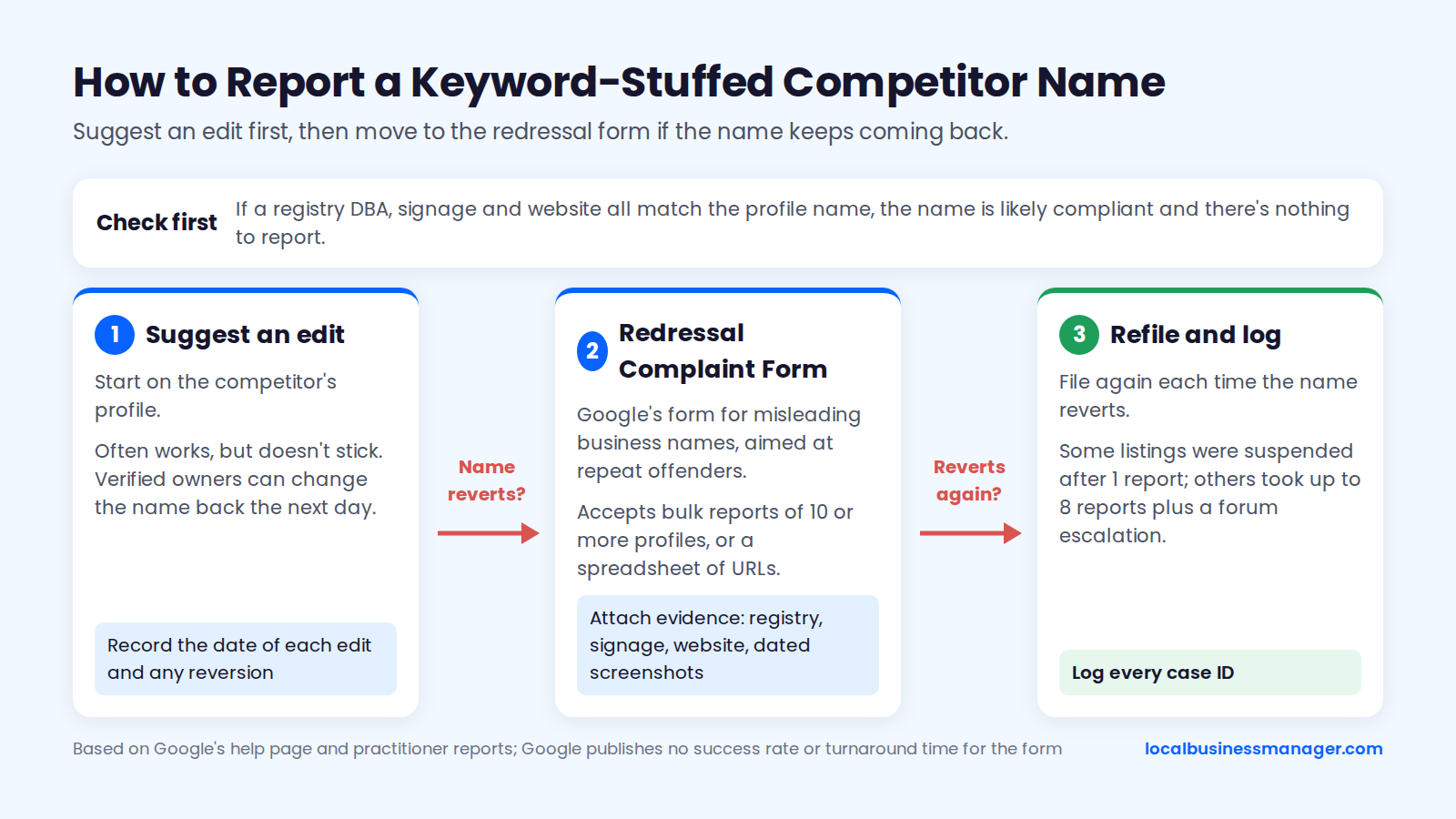
Start with "Suggest an edit" on the competitor's profile, and move to Google's Business Redressal Complaint Form if the name keeps coming back. Report only genuine violations, and check the evidence below first: if the competitor really uses the name, it isn't a violation.
Suggest an Edit vs the Business Redressal Complaint Form
Suggested edits often work but don't stick. Phil Rozek counted name-fix suggestions in a small 2021 to 2022 sample, and 63% were approved. That figure covers Suggest-an-Edit fixes only, not redressal-form reports, and it's now more than 4 years old. Sterling Sky notes that verified owners can change the name back the next day.
The Business Redressal Complaint Form is for repeat offenders. Google's Report a business on Google Maps help page points to the form for misleading business names. It also accepts bulk reports of 10 or more profiles, or a spreadsheet of URLs. Sterling Sky advises filing again when the name reverts and logging every case ID.
Google publishes no success rate or turnaround time for the form, and practitioner reports are mixed:
- Sterling Sky's 2019 review of 50 cases: some listings were suspended after 1 report, while others took up to 8 reports plus a forum escalation.
- A 2022 Local Search Forum thread on attorney marketing: responses took 3 or more weeks, and a firm reported several times was never fixed.
- A 2026 Local Search Forum thread: the form corrects extreme names but often does nothing about typical keyword stuffing.
Evidence to Gather Before You Report
A report is stronger when it shows Google the name the competitor really uses. Collect 7 things:
- A state business registry search showing the competitor's legal name and any registered DBAs.
- A photo or Street View screenshot of the competitor's signage.
- Screenshots of the competitor's website header, footer and contact page showing the name they use.
- Dated screenshots of the profile name as it appears on Google.
- Dates of earlier suggested edits and any reversions.
- Case IDs from earlier redressal reports.
- A spreadsheet of profile URLs if you're reporting 10 or more.
A registry DBA that matches the profile name, backed by the same name on the competitor's sign and website, usually means the name is compliant and there's nothing to report.
Where Should Keywords Go Instead?
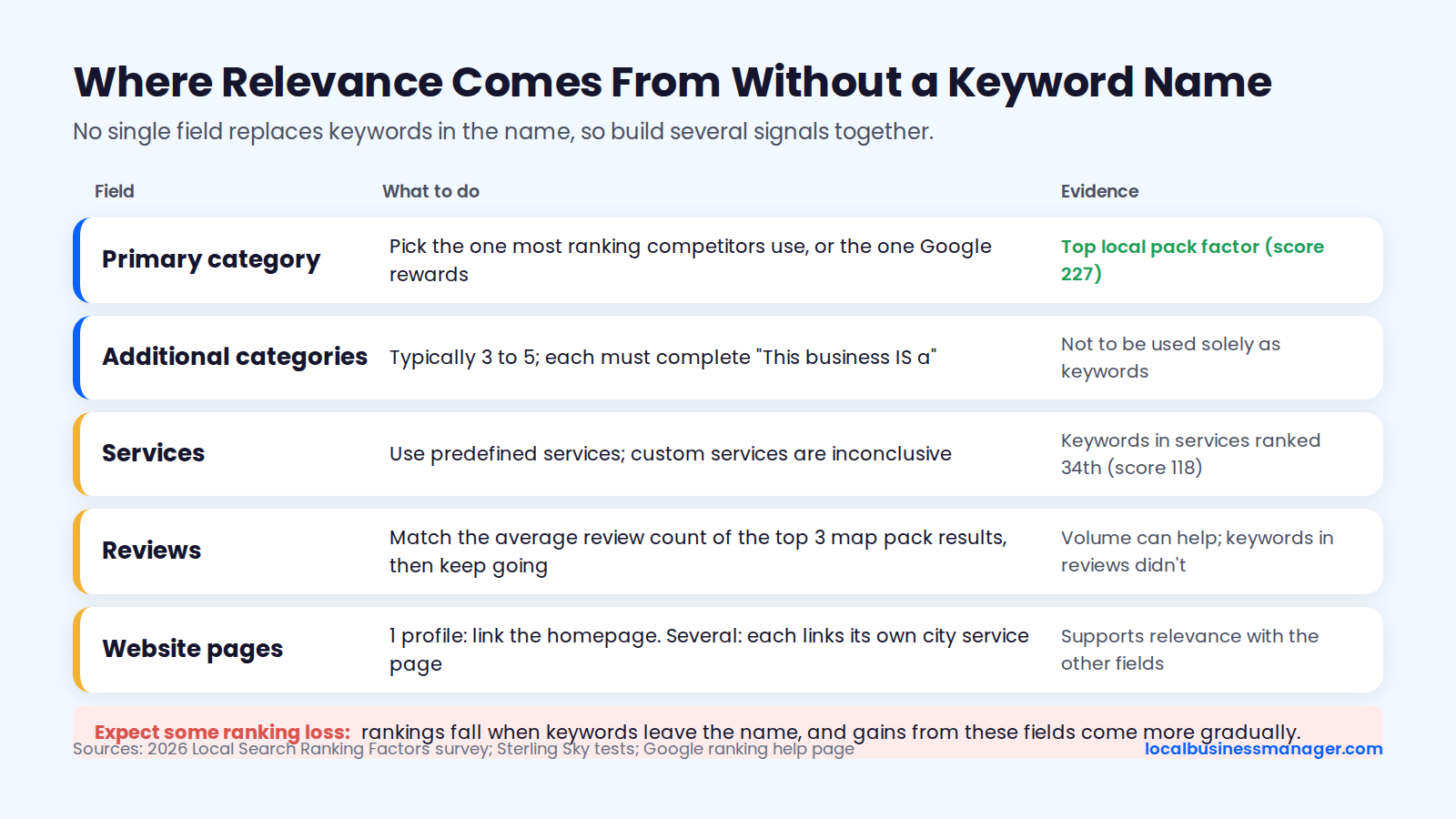
Without a keyword in the name, relevance has to come from categories, services, reviews and website pages. Expect some ranking loss compared with a keyword name, because no single field is known to replace it.
Primary and Additional Categories
In the 2026 Local Search Ranking Factors survey, primary category is rated the top local pack factor, above keywords in the name, with scores of 227 and 223.
Summaries of Google's category guidelines give 2 limits:
- A category should complete the sentence "This business IS a".
- Categories shouldn't be used solely as keywords.
I pick the primary category most of the ranking competitors use. If Google is rewarding a different category than the "logical" one, I use the one Google rewards. A typical profile I work on ends up with 3 to 5 additional categories.
The full process is in our guide to Google Business Profile categories.
Services, Description, Reviews and Website Pages
The other fields matter less, and 2 popular claims about them are unconfirmed.
- Services: Sterling Sky's 2019 test found that predefined services affect ranking for related keywords. Its tests of custom services are inconclusive. The 2026 Local Search Ranking Factors survey ranked keywords in services 34th (score 118).
- Description: No Google source confirms that keywords in the description affect rankings.
- Review keywords: In Sterling Sky's controlled test (January 2023, updated December 2024) on a single profile with 18 reviews, keywords in reviews didn't help, and rankings got worse at first. Review volume is different: Google's ranking help page says more reviews and positive ratings can help local ranking. My target is to match the average review count of the top 3 map pack results, then keep going.
- Website: With 1 profile, I link it to the homepage. With several, each profile links to its own city service page.
What to Tell a Client Who Wants Keywords Added
Use this script, adjusted to the client's trade, when a client asks you to "just add Plumber Dallas" to the name:
- "We can't add words to your Google name that you don't use. Google requires the name you actually use, and it warns that extra words in the name can get the profile suspended."
- "There is a legitimate way. You register the name as a DBA, put it on your trucks, sign, website and invoices, and we change the Google profile last."
- "That's a real rebrand, so only do it if you're happy being called that for years."
- "If you keep your current name, we'll build relevance through your categories, services, website pages and a steady flow of reviews. Those gains come more gradually."
- "A suspension would cost you far more than the ranking bump."
Can Multi-Location Brands Add the City to Each Location's Name?
Only if that location consistently uses a name that includes its city on its storefront, website or stationery. Google's guidelines for representing your business set 3 rules for chains:
- Chains follow the same real-world naming rule: every location uses the same name unless the business's real-world name consistently differs from one location to another.
- Each location normally uses the brand name, and the city goes in the address field.
- A location that consistently uses a different name, such as one that includes its city, on its storefront, website or stationery may use that name.
Service-area businesses follow the same name rules. Instead of adding the city to the name, give each location its own city page, and only for a place where the business genuinely serves customers; more on structure is in our guide to local SEO for multiple locations.
In my own setup, each office's profile links to its own city page, and that page carries the local details for that office.
What to Check This Week
Pull up every client's profile name and set it next to their sign, website and state registry record. Where they match, leave the name alone. Where they don't, fix the gap now, and plan a rebrand only for a client ready to put the new name on the sign, trucks and website before the profile changes. If you run local SEO for clients and want everything in one platform, join Local Business Manager's early access.