Local SEO for Multiple Locations and Franchises: The Complete Playbook

Most agencies know the call: the flagship ranks fine and the new branch is nowhere on the map. Local SEO for multiple locations means giving every eligible location its own complete Google Business Profile, its own local page and its own reviews, all fed from one master data sheet and owned under clear rules.
I've spent 15+ years in SEO and Business Profile work, including ranking and serving close to one hundred US personal-injury firms in Houston, Denver, Los Angeles and New York. Below is a system to run this week: account setup, a page template, schema code, review rules, an ownership table, a lifecycle playbook and a report.
What Makes Local SEO for Multiple Locations Different?
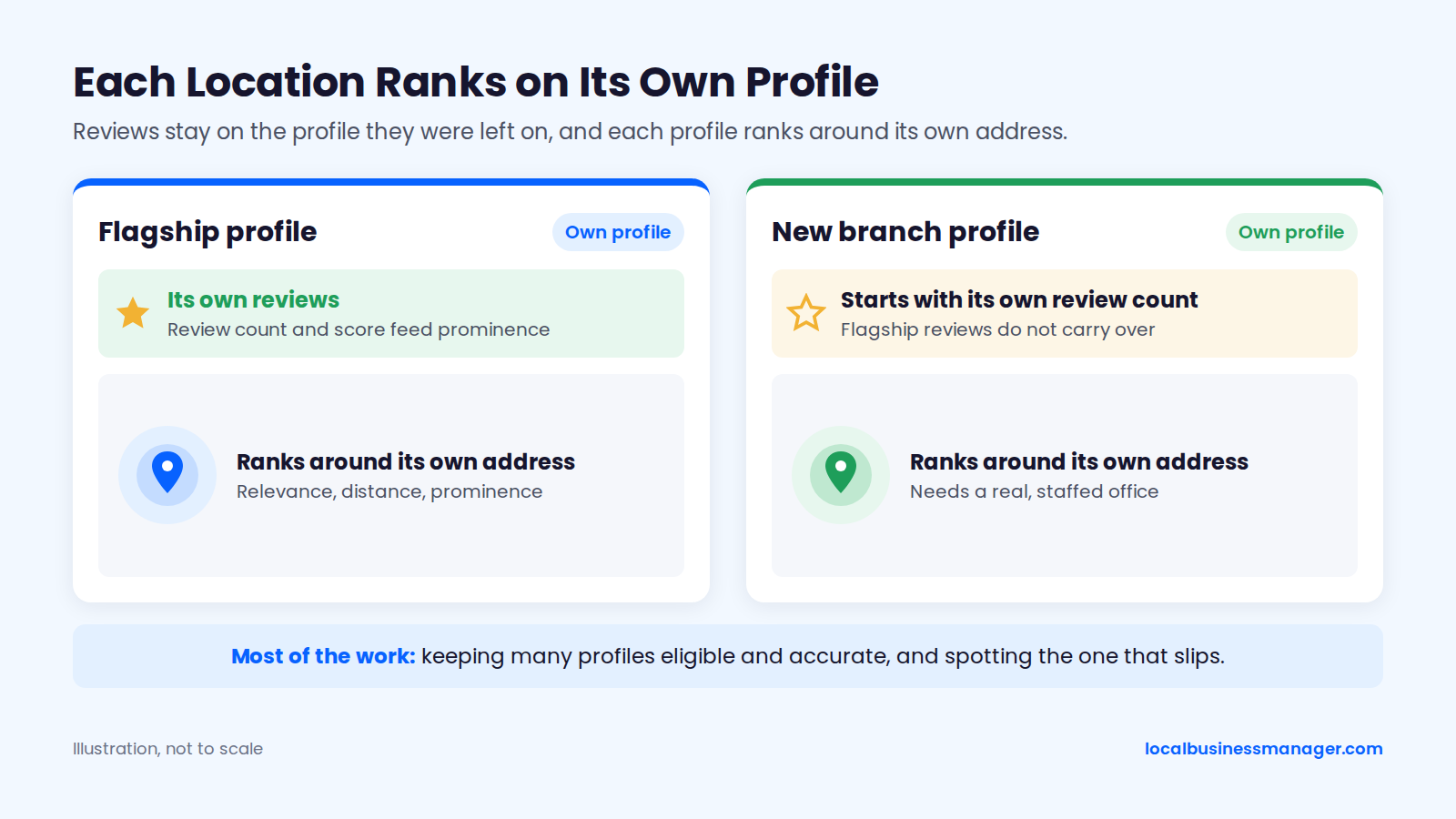
Local SEO for multiple locations is different because each location ranks on its own profile, around its own address. Most of the work is keeping many profiles eligible and accurate, and spotting the one that slips.
Google's help page on local ranking names 3 factors: relevance, distance and prominence. It also says review count and review score feed into prominence. Each location has its own profile, and reviews show on the profile they were left on, so a new branch starts with its own review count.
The 2026 Local Search Ranking Factors survey, published in November 2025 by a local SEO software company, scores factors by expert rating rather than measuring their effect. Its experts rate proximity to the searcher and a physical address in the city of search among the top local pack factors. Those are opinions, not measurements, but they point one way: a city the brand wants to compete in needs a real, staffed office, with a city page supporting it.
I use the same local SEO playbook in every niche. In my experience, when personal-injury firms miss the 3-pack, the cause is most often an unoptimized business name (fixed through a registered DBA, covered below) and too little review flow.
What to Set Centrally and What to Set per Location
Only the business name is fully central, following Google's guidelines for representing your business, and only the address and service area are fully local. Everything else in the recommended split below is a central rule filled in with local data.
Element | Set centrally | Set per location |
|---|---|---|
Business name | The brand's real-world name | No |
Primary category | Default per business type | Yes, when a location really differs |
Schema | Template and parent organization | Yes, that branch's details |
Citations | Master data sheet | Yes, each location's listings |
Website link | URL pattern and UTM template | Yes, the location's own page |
Phone number | Tracking setup and rules | Yes, the location's own line |
Hours and holiday hours | Holiday calendar | Yes, actual staffed hours |
Photos | Photo standards | Yes, real photos of that location |
Reviews | Request process and reply rules | Yes, that location's customers |
Address and service area | No | Yes |
Which Locations Can Have a Google Business Profile?
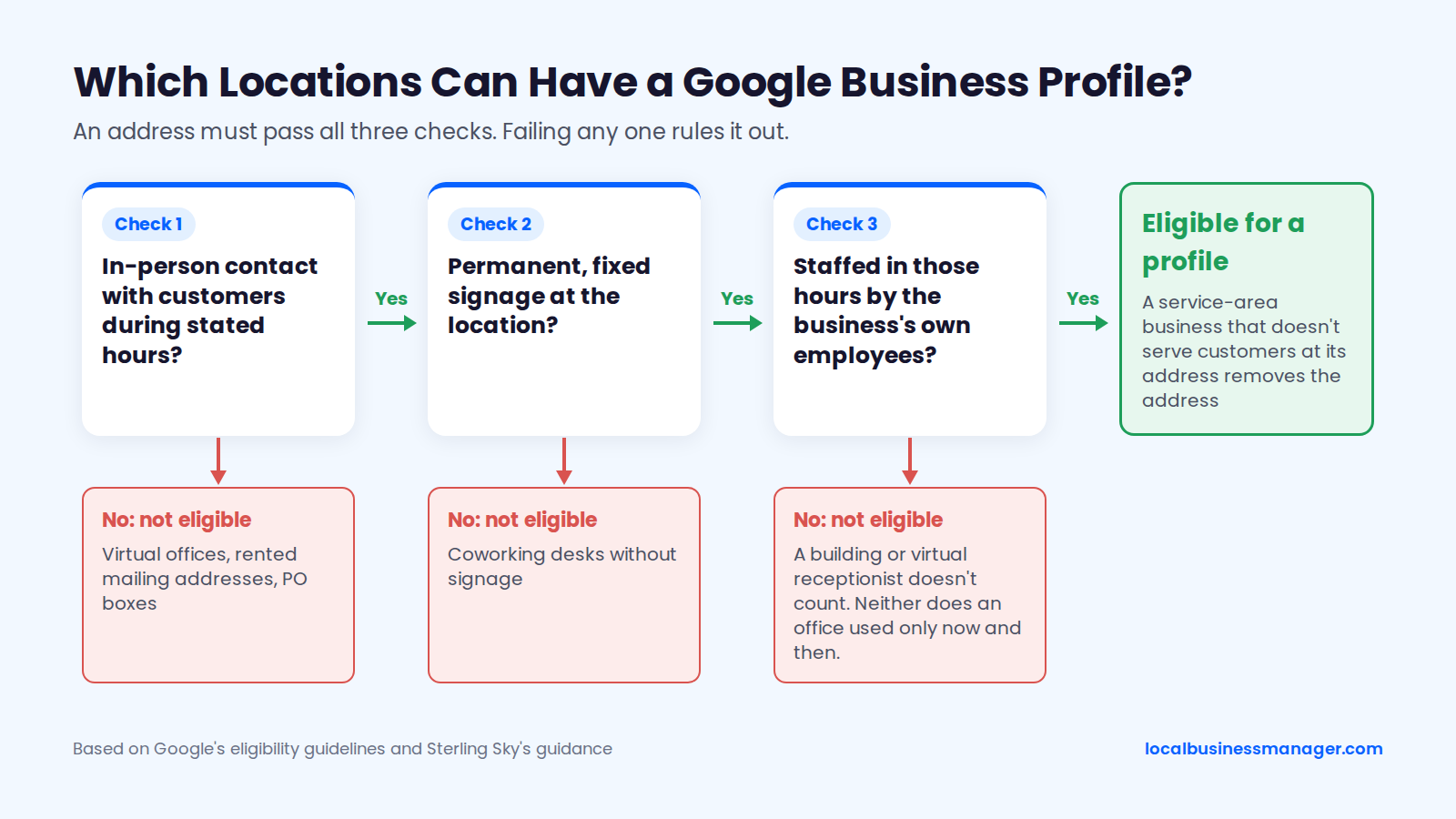
A location can have a profile only if the business has in-person contact with customers during its stated hours. Check eligibility before setup, because Google's rules decide which addresses can carry a profile at all. The 2 sections below cover what qualifies and what doesn't.
Storefronts vs Service-Area Locations
Storefronts show their address on the profile, while a service-area business that doesn't serve customers at its address removes the address, according to Google's help page on managing service areas. Many local SEOs hold that adding service areas doesn't extend a location's ranking reach, so a service-area unit's strength still comes from its real base; that's a practitioner view, and Google hasn't said either way.
Google's business eligibility guidelines require in-person contact with customers during stated hours, with 3 named exceptions:
- ATMs and drop boxes
- Seasonal businesses with permanent signage
- Delivery-only food brands
A Google Product Expert guide in the Business Profile community puts the storefront test this way: a physical location with permanent fixed signage that customers can visit during stated hours. Google's guidelines add that a service-area business can't list a virtual office unless that office is staffed during business hours, so each home-service franchise profile sits on a real base where the franchisee's people actually work.
For law firms, Joy Hawkins of Sterling Sky wrote in 2018 that a firm can have a profile for each staffed office, provided it has proper signs and customers can visit during open hours.
What Doesn't Qualify
Google's guidelines say a business that rents a mailing address but doesn't operate from it is not eligible. A coworking or executive-suite office qualifies only if it has clear signage, receives customers during business hours and is staffed in those hours by the business's own employees. Sterling Sky adds that a building receptionist or virtual receptionist service doesn't count as your staff.
4 kinds of address don't qualify:
- Virtual offices and rented mailing addresses
- PO boxes
- Coworking desks without signage and the business's own staff
- Offices used only now and then, such as a room booked for occasional client meetings
Appointment-only offices are a gray area. Google says businesses that operate only by appointment shouldn't list hours, and it doesn't publish a minimum number of staffed hours. Sterling Sky reads that narrowly: an occasional-use meeting office still isn't regularly staffed, so a law firm's satellite office used only for client meetings fails even with its hours removed. For genuinely appointment-based locations, Sterling Sky recommends the "Appointment Required" attribute.
How Do You Set Up and Manage Many Google Business Profiles at Once?
Manage many profiles from one organization account, grouped by location, with the brand as primary owner and everyone else given the narrowest role that lets them do their job. Bulk verification, a master data sheet, a fixed check routine and tools chosen on clear criteria do the rest.
Organization Accounts and Location Groups
Google's Business Profile API documentation describes organization accounts as containers for many listings and groups, intended for agencies and partners. Location groups let you run bulk tasks across a set of profiles, and user groups grant manager access across location groups. Together they're how you give a regional manager 12 profiles without giving them 200.
A structure that matches how multi-location businesses run:
- One organization account owned by the brand, or by the client when an agency manages it
- One location group per region, franchisee or brand line
- User groups for regional managers, each scoped to its own location group
- The agency added as a manager at group level, not location by location
- A naming convention for groups that matches the master sheet (region code, franchisee ID)
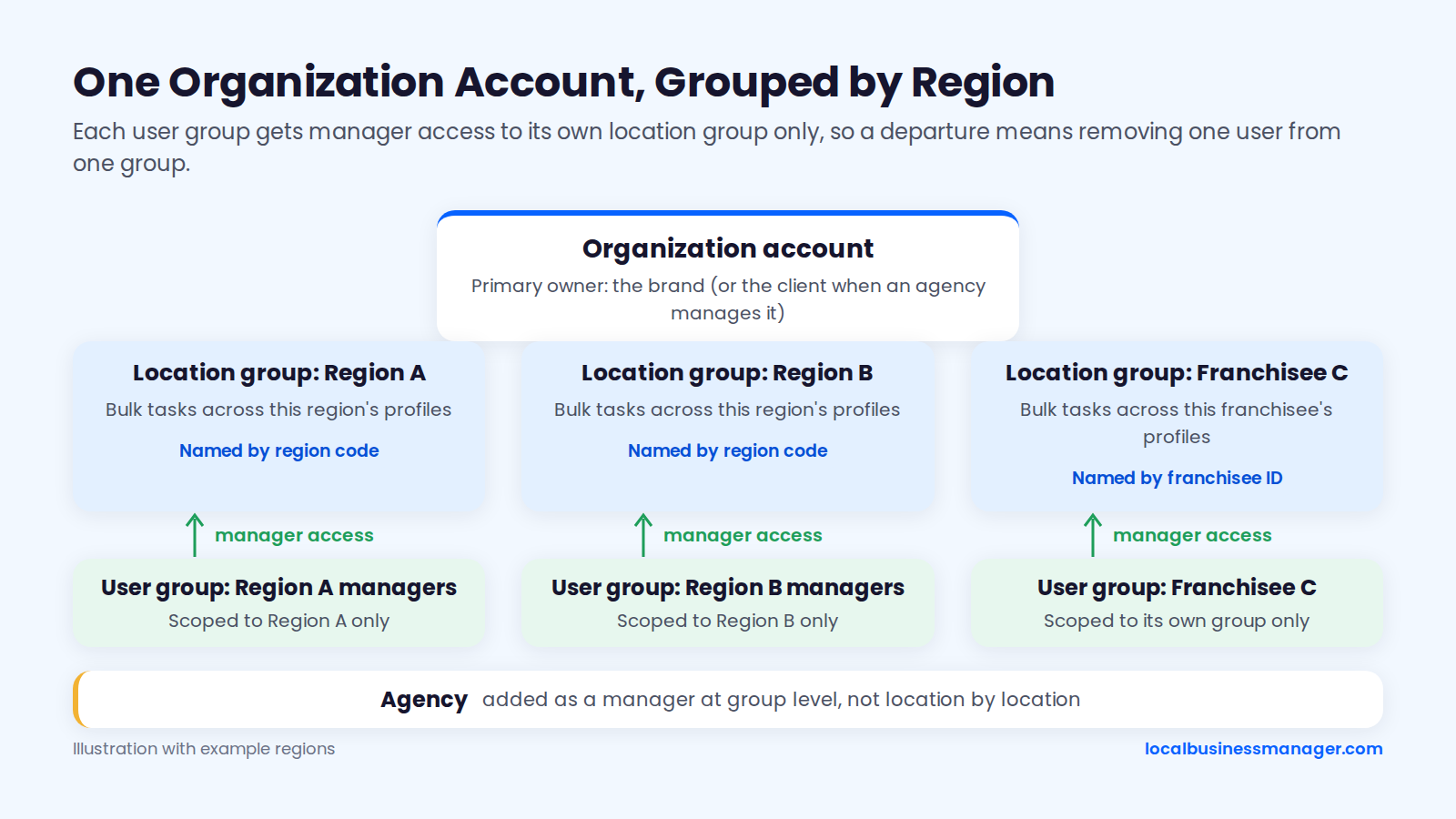
The same structure makes exits easier. When a regional manager or franchisee leaves, you remove one user from one group instead of hunting through 40 profiles.
Bulk Verification for 10 or More Locations
Bulk verification is for 10 or more brick-and-mortar locations of the same business, according to a 2024 Google Business Profile community guide. The same guide says service-area businesses, suspended profiles and profiles going through re-verification don't qualify, so a firm adding 2 or 3 offices verifies each one separately.
Do 5 things before you apply:
- Confirm every location passes the eligibility test above.
- Build the bulk upload spreadsheet from the master sheet, using each location's store code as its identifier.
- Load each location with the same name, address and phone that appear in the master sheet.
- Check that every location page is live and linked from its profile.
- Read Google's current bulk verification help article the day you apply, since the form and its requirements are set there.
Owners and Managers: Who Gets Which Role
Google's help page on managing owners and managers lists 2 roles for an individual profile, owner and manager. Business groups have their own pair, group owner and group manager, set out on a separate Google help page.
4 permission rules shape multi-location access:
- Only the primary owner can transfer primary ownership, per Google's help page on transferring primary ownership.
- Only owners can change other users' access, per the same page.
- Owners can add or remove users and remove the profile, while managers can edit details, reply to reviews and manage posts but can't add or remove users, according to a summary of Google's help pages.
- New owners and managers wait 7 days before they can remove users or transfer ownership, according to the same summary.
Give owner access to as few people as possible; in the suggested model below, only the brand needs it, and the permissions column follows that summary of Google's help pages.
Who | Role | Can remove other users | Typical tasks |
|---|---|---|---|
Brand or client (corporate) | Primary owner | Yes | Ownership, access, final say on name and categories |
Regional manager | Manager | No | Hours, holiday hours, posts across the region |
Location manager or franchisee | Manager | No | Photos, local updates, routine review replies |
Agency | Manager | No | Optimization, posts, reporting |
When an agency outsources part of the work, the vendor should work through the agency's own access. That way the client stays primary owner and no unknown manager appears on the profile. Franchises sometimes assign ownership to the franchisee; the ownership section below covers that choice.
Store Codes and the Master Location Sheet
The master location sheet is the single source of truth for every profile, location page, schema block and directory listing. Any change to a location's data goes into the sheet first and gets pushed out from there. Key each row by a store code that is never reused, even after a location closes.
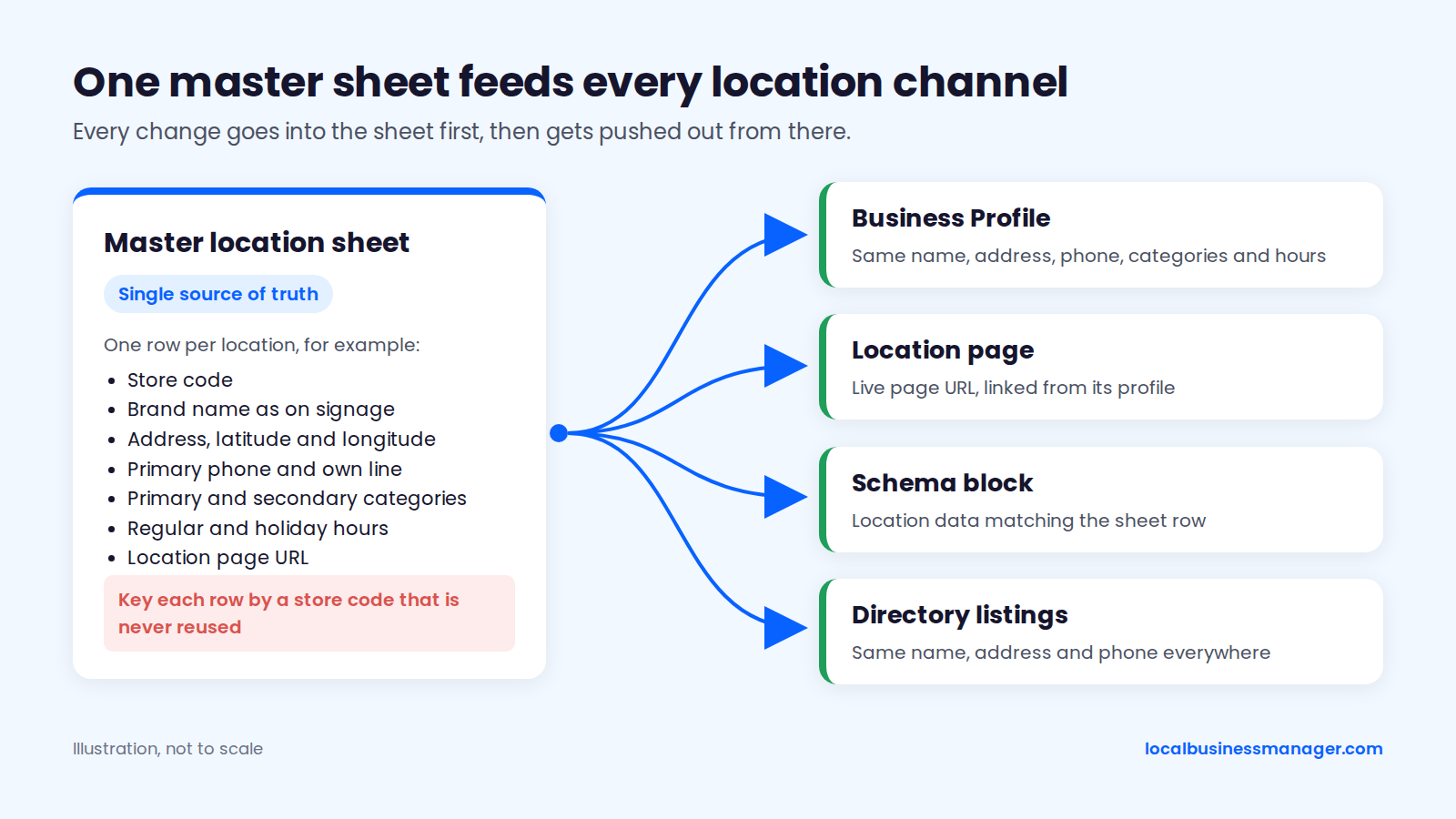
Master sheet columns:
- Store code
- Brand name exactly as it appears on signage
- Location page URL, plus its UTM-tagged version
- Street address, suite, city, state and ZIP
- Service areas (service-area locations only)
- Latitude and longitude
- Primary phone (tracking) and the location's own line
- Primary category and secondary categories
- Regular hours
- Holiday hours for the current year
- Services offered at this location
- Primary owner and managers on the profile
- Verification status and date
- Open date, plus move or close date
- Franchisee or office manager contact
- Last audit date
A Weekly and Monthly Profile Routine
My routine on every profile I manage has 2 rhythms. Weekly, I check the name, attributes, services and other fields for edits, whether Google or a third party made them. Monthly, I check rankings and the post schedule. In my experience, name and address edits cause the most suspensions.
The weekly check covers 5 fields:
- Business name
- Address or service area
- Primary and secondary categories
- Phone number and website link
- Services and attributes
When a profile does get suspended, reinstatement usually needs documents. In my experience that means the DBA filing, the lease agreement and photos of the office with signage, or a video recording the storefront and office. Keep a folder of those for every location before you need it, log each weekly check in the master sheet's "last audit date" column, and use our Google Business Profile suspension and reinstatement guide if a profile does go down.
Choosing Multi-Location Local SEO Tools
Shortlist only tools that fit the ownership and data model above, using these 4 tests:
- Connects through Google's own sign-in and API access, so nobody shares a password
- Supports location groups, so access and bulk edits follow regions or franchisees
- Exports profile data and metrics in bulk into the master sheet
- Runs on accounts the client owns, so access survives a change of agency
How Should Each Location's Profile Be Set Up?
Set up each location's profile with the brand's real name, the right primary category for that location, a number that reaches that location, and a link to that location's own page. The sections below give Google's rule and the practitioner setup for each field.
Business Name: Same Brand Name, No City
Google's guidelines for representing your business say the name should match the real-world name the business uses consistently, and should not include location information unless that information is part of the real-world name. That rules out putting "Brand - City" on every profile, a pattern that AI-generated summaries for this search still recommend.
Under that rule, every location of a chain carries the same brand name it uses on its signs, and the city goes in 3 other places:
- The profile's address or service area
- The location page's content
- The location page's title tag
Nearby same-name locations can filter each other in the map pack; the section on multiple locations in one city covers that, and the fix doesn't involve renaming. If you've ever found a franchisee's profile renamed "Brand Plumbing Best Plumber Denver" on a Friday afternoon, you know why the name belongs in the brand standards and the weekly check.
When a Keyword Name Is Worth the Risk
My recommendation is to use a keyword name only when the business makes it its actual name; I've taken many clients through this process. A DBA document alone doesn't make a name compliant: Google judges the name the business really uses and can still challenge or suspend it, and the DBA is what proves the name if Google asks during reinstatement or re-verification. Our keyword business names and DBA guide covers the filing in detail.
The order matters:
- Register the DBA (assumed name).
- Use that exact name on the signage, website, stationery, phone greeting and other listings.
- Change the Business Profile name last.
The 2026 Local Search Ranking Factors survey (November 2025, expert ratings rather than measured effects) lists keyword names among the top suspension risk factors, and its experts also rate keywords in the business name among the top local pack factors. For a brand with many locations, the name has to change at every location, and the profiles follow last.
Law firms have an extra gate:
- A trade name can't be false or misleading under the ABA's guidance on firm names, now in the comments to Model Rule 7.1.
- New York bans trade names (Rule 7.5(b)).
- Texas requires state-bar approval of a trade name.
- Kentucky, New Jersey and Rhode Island restrict trade names.
- Every firm should check its own state bar's rule before filing.
Categories: Choose the Primary per Location
The primary category is the top-rated local pack factor among the experts in the 2026 Local Search Ranking Factors survey. For multi-location brands, secondary sources recommend the same primary category for locations that do the same work, and a different one only where a location genuinely differs. No Google guideline text found in our research makes that a rule.
My approach is to pick the category most of the ranking competitors use. If Google is clearly rewarding a different category than the "logical" one, I use the category Google rewards. Our Google Business Profile categories guide covers secondary categories too. To apply that to one location:
- Search the main service from inside that location's area
- List the primary categories of the businesses in the top 3
- Note any category that wins repeatedly but isn't on your profile
- Record the decision in the master sheet
Phone Numbers and Call Tracking
Google's guidelines ask for a number that connects to the individual location, a local number instead of a central call-center line whenever possible, and a number under the business's direct control. They prohibit numbers that redirect users to numbers other than the business's own, and they allow additional phone numbers. The guidelines don't mention call tracking directly.
The documented practitioner setup puts the tracking number in the primary phone field and moves the location's own line to additional phone. Sterling Sky documents it, and Joy Hawkins wrote on Local Search Forum in 2020 that a tracking number as primary "is how we set up all our clients. It doesn't hurt ranking." She also advised keeping the real number on citations, and practitioners still disagree on tracking numbers in third-party directories. 3 practical points for multi-location setups:
- My setup: I put the call-tracking number as the primary number and don't add a secondary number. The documented setup keeps the location's real line as an additional number, which a local SEO software company's 2023 profile guide says avoids citation-consistency problems because the real number stays on the profile.
- Account ownership: because Google wants the number under the business's direct control, keep the tracking account in the client's name rather than the agency's. No published source tests this either way.
- Ads numbers: a separate "Google Ads phone number" field shows a tracking number only when the profile appears as an ad.
Website Link: Point to the Location Page With UTM Tags
Google's business links policy says that for businesses with multiple locations, action links must lead to a page for that specific location, not a general landing page or another location's page. I link each office's profile to its dedicated city page, and that page carries the local details for that office.
Tag the link so profile traffic shows up separately in GA4. Sterling Sky notes that Business Profile data can't be cleanly split into organic and paid, and it recommends UTM tracking, GA4 and call tracking alongside it. The UTM template for profile website links:
- Pattern:
https://www.example.com/locations/[state]/[city]/?utm_source=google&utm_medium=organic&utm_campaign=gbp-listing&utm_content=[store-code] utm_source=googleandutm_medium=organicstay the same on every locationutm_campaign=gbp-listingseparates profile clicks from other organic trafficutm_content=[store-code]ties each session to one row in the master sheet
The location page keeps a self-referencing canonical on its clean URL, so the tagged version doesn't compete with it.
Hours, Holiday Hours, Services, Photos and Posts
5 operating details need a location-level decision, 4 on the profile and 1 on the location page:
- Hours: list the hours the location is actually staffed. In December 2023, Google's Search Liaison Danny Sullivan said "openness" has long been part of local ranking and had recently become a stronger signal for non-navigational searches, as Search Engine Land reported on December 16, 2023. That tempts firms to pad hours; don't. Offices that operate only by appointment list no hours, but that doesn't make an occasionally used, unstaffed office eligible.
- Holiday hours: set them from the master sheet's holiday calendar at the start of each year, so every location updates together.
- Services: list the services each location actually offers. Profiles with no services or products set up are one of the problems I've inherited from previous agencies.
- Photos: use real photos of that location, including the exterior, signage, staff and interior.
- Location FAQs: put them on the location page, where they sit in the HTML and under your control.
On posts, I publish 3 times a week. I don't treat posting as a proven ranking factor: in my view the evidence that posts improve rankings is weak, and Google's local ranking help page names relevance, distance and prominence as its factors. I still see regular posting as a signal to Google that the business is active.
What Site Structure Works Best for Multiple Locations?
For most brands, the practical choice is location pages in subfolders on the main domain. Google treats subfolders and subdomains as equivalent, so the reason is operational: a single site is simpler to run. Whatever the structure, every location needs its own page.
Subfolders vs Subdomains vs Separate Franchisee Websites
Google's Search Central documentation, as quoted by Search Engine Journal, says to choose whichever structure is easiest to organize and manage. John Mueller said in a September 17, 2021 office-hours hangout that subdomains and subdirectories are equivalent.
Agency guides from Cybermark and Kharb Media recommend subfolders for shared authority and simpler management, and Kharb Media advises against separate domains unless legally required. Those are opinions; our research found no controlled test comparing the 3 structures for local results. With ranking treated as equal, the table compares operating cost: subfolders need 1 site and 1 template, while franchisee microsites need one of each per franchisee.
Structure | Example URL | Google's ranking view | Main operational risk |
|---|---|---|---|
Subfolders | example.com/locations/denver/ | Equivalent to subdomains | Thin pages if every page is a city swap |
Subdomains | denver.example.com | Equivalent to subfolders | Template and schema changes repeated per subdomain |
Separate franchisee sites | denverbrand.com | Not addressed in Google's statements | Inconsistent NAP and duplicated brand content |
A Locations Hub and Store Locator Google Can Crawl
A locations hub works when every location page is reachable through plain HTML links, not only through a JavaScript locator. A map-based locator can sit on top of the links for users. The structure runs from hub to state to city to store, and each level links down to the next and back up to its parent.
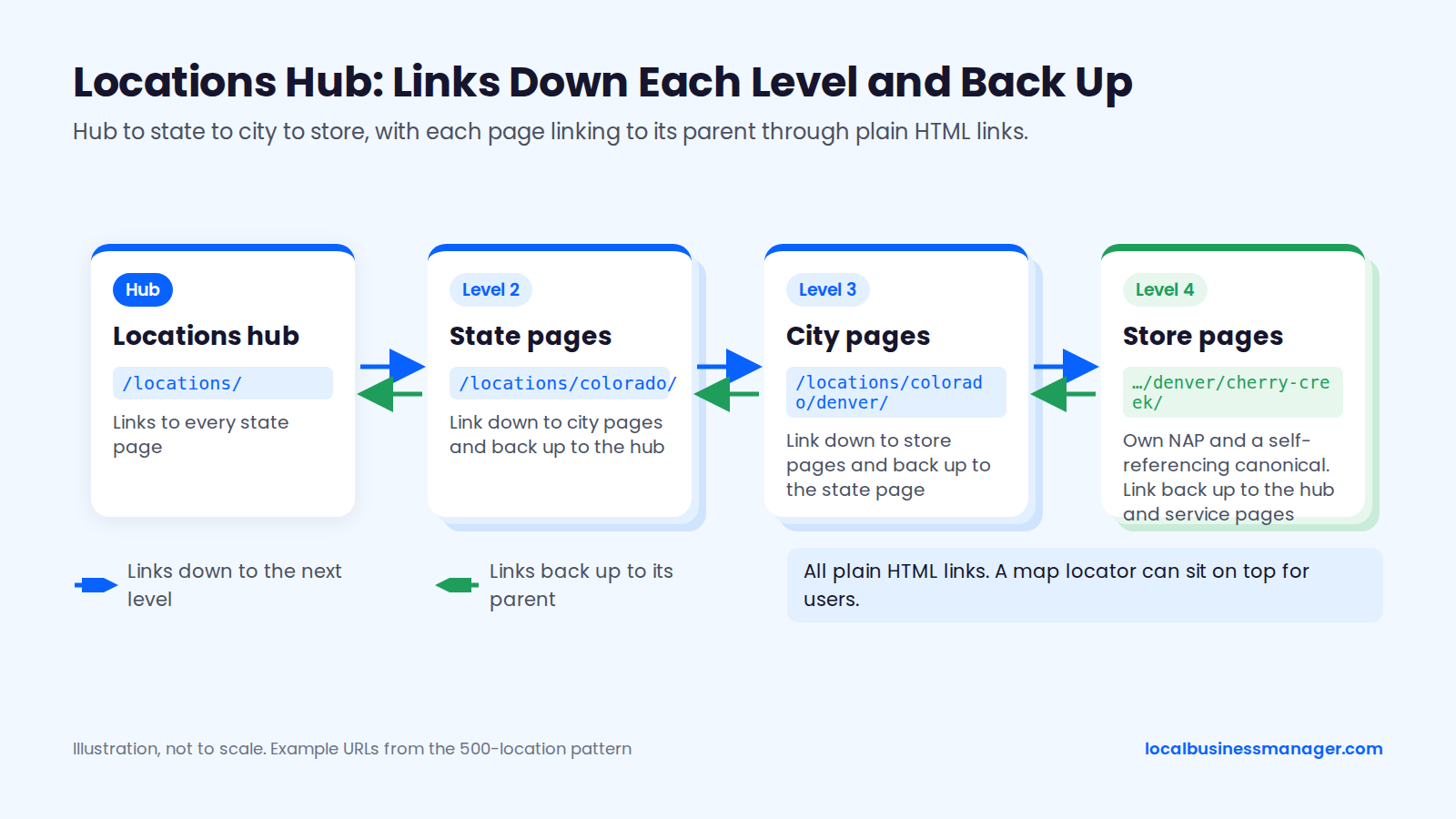
Technical rules for the hub and its pages:
- The hub at /locations/ links to every location or to state pages
- Each location page carries a self-referencing canonical
- Location pages are never canonicalized to each other, because a canonical pointing elsewhere asks Google to index the other page instead
- Every location page is in the XML sitemap
- Each location page links back to the hub and to the relevant service pages
- Each location's NAP sits on its own page, and the site-wide footer shows head-office details or none
Google's spam policies set no limit on how many location pages a site can have.
URL Patterns for 10, 50 and 500 Locations
Add a URL level only when the number of locations makes the hub hard to scan. As a rule of thumb rather than a Google requirement, that means 1 level at about 10 locations, a state level around 50, and state plus city plus store at 500.
Portfolio size (locations) | URL pattern | Hub pages needed | Example |
|---|---|---|---|
About 10 | /locations/city/ | 1 hub | /locations/denver/ |
About 50 | /locations/state/city/ | Hub plus state pages | /locations/colorado/denver/ |
About 500 | /locations/state/city/store/ | Hub, state and city pages | /locations/colorado/denver/cherry-creek/ |
Once a pattern is live, keep the URLs stable. If a URL has to change, 301-redirect the old one to the new page and update the profile's website link the same day.
What Should a Location Page Include So It Isn't a Doorway Page?
A location page avoids doorway status when it gives visitors information only that location can give: who works there, how to get there, what it offers and what its customers say. Google's spam policies list city pages that funnel users to one page as doorway abuse.
The Location Page Template
Google's spam policies give 2 doorway examples: pages targeted at specific regions or cities that funnel users to one page, and substantially similar pages that are closer to search results than a browseable hierarchy. In December 2019, John Mueller told an SEO planning 1,300 keyword-plus-city pages that the plan "sounds like doorway pages, not something I'd recommend," as reported by Search Engine Roundtable.
Fixed brand blocks (4, the same on every page):
- Brand introduction and what the business does
- Service descriptions linking to the main service pages
- Guarantees, licensing or brand-wide credentials
- Booking or contact form
Unique local blocks (9, required on every page):
- Title tag and H1 with the main service and city
- NAP and hours matching the profile exactly
- Staff at this location, with names and photos
- Written driving directions, parking and nearby landmarks
- Several real photos of this location
- Reviews from this location's customers
- Services offered here, including any differences from other locations
- Local proof, such as jobs or cases handled in this area
- Location FAQs and LocalBusiness schema
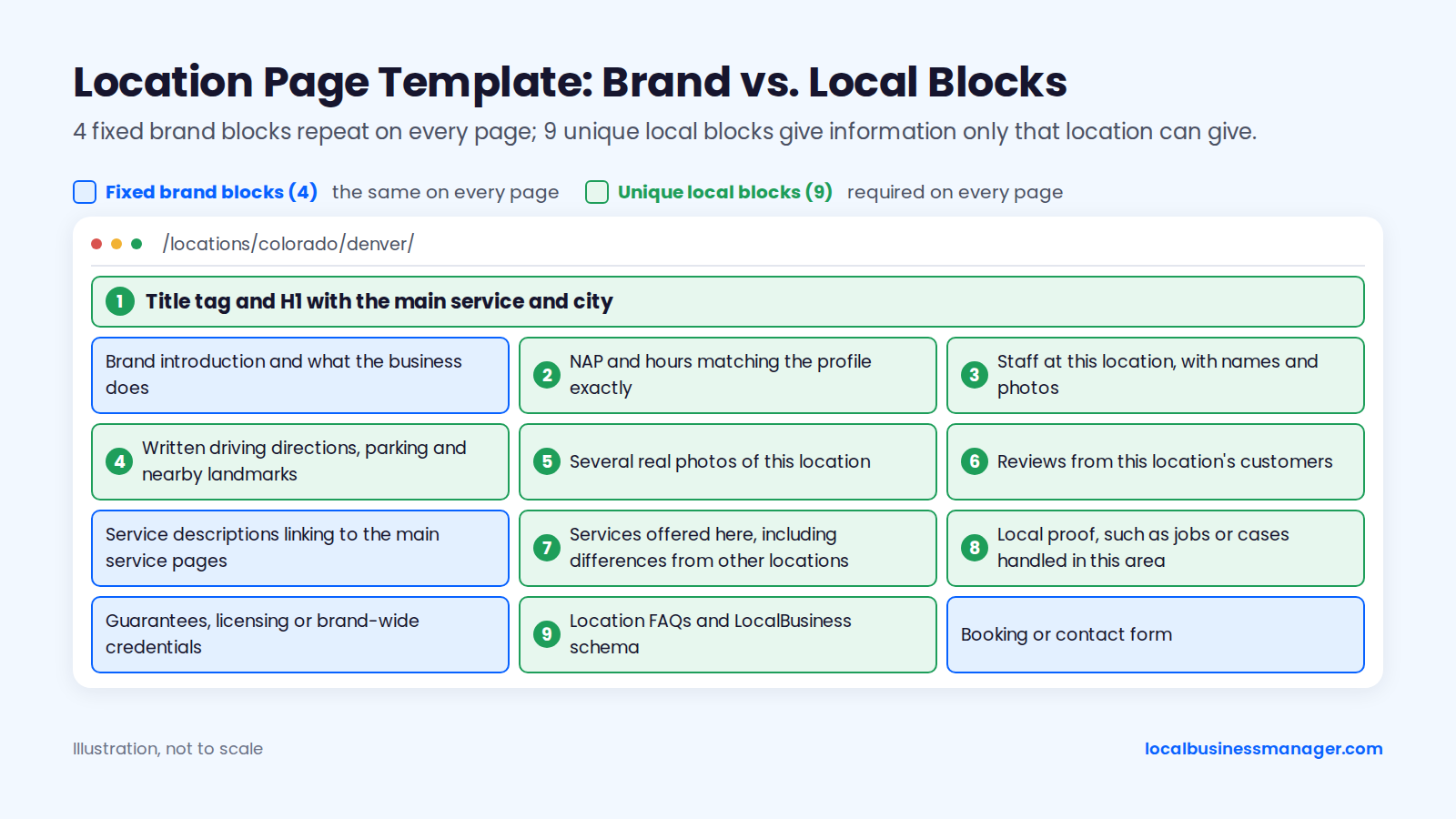
The experts in the 2026 Local Search Ranking Factors survey rate keywords in the title tag of the page a profile links to among the top local organic factors. We know of no Google documentation that treats an embedded map as a ranking or verification signal, so treat a map embed as a convenience for users.
Minimum Standard for Low-Priority Locations
No Google document or study sets a minimum word count or percentage of unique content for a location page. Sterling Sky's 2026 analysis found that Google filters identical pages competing for the same keyword rather than penalizing them, and service-area pages averaging 84% matching content still drove traffic because each targeted a different area. Sterling Sky also warns that Google can penalize scaled content, and its finding came from service-area pages, not same-city offices.
The minimum standard for a low-priority location covers 6 items:
- NAP and hours that match the profile
- At least 3 real photos of the location
- The name of the person who runs it
- Written directions and parking details
- The services offered at that location
- Reviews from that location, once it has some
For service-area city pages, my rule is that the business must actually serve that town; without that, the page shouldn't exist. Once it's true, case studies of jobs done in that town, job photos from there and reviews from customers there make the page stronger, and those reviews are a huge plus.
Avoiding Cannibalization Between Nearby Locations
Locations that offer the same service should all target that service, each paired with its own geography. If Denver and Aurora both fix water heaters, giving the term to only one of them, as the common "non-overlapping keywords" advice suggests, leaves the other without it.
Each page type on the site gets a different kind of keyword, so only location pages carry service-plus-city terms. The suggested map below uses example data for a fictional plumbing brand.
Page type | Keyword target | Example keyword |
|---|---|---|
Homepage | Brand plus main category | example plumbing |
Service page | The service, with no city | water heater repair |
Location page | Service plus city | plumber denver |
Location FAQ section | Long-tail local questions | emergency plumber open sunday denver |
Sterling Sky notes that offices of one brand compete for the same keywords, so unique local content and distinct geographies are what separate the location pages. The 3 example pages below, for the same fictional brand, show the pattern.
Location page | Primary keyword | Secondary keyword | Neighborhoods named on page |
|---|---|---|---|
/locations/colorado/denver/ | plumber denver | water heater repair denver | Capitol Hill, Highlands |
/locations/colorado/aurora/ | plumber aurora co | water heater repair aurora | Southlands, Saddle Rock |
/locations/colorado/lakewood/ | plumber lakewood co | water heater repair lakewood | Belmar, Green Mountain |
What Schema Should Each Location Page Use?
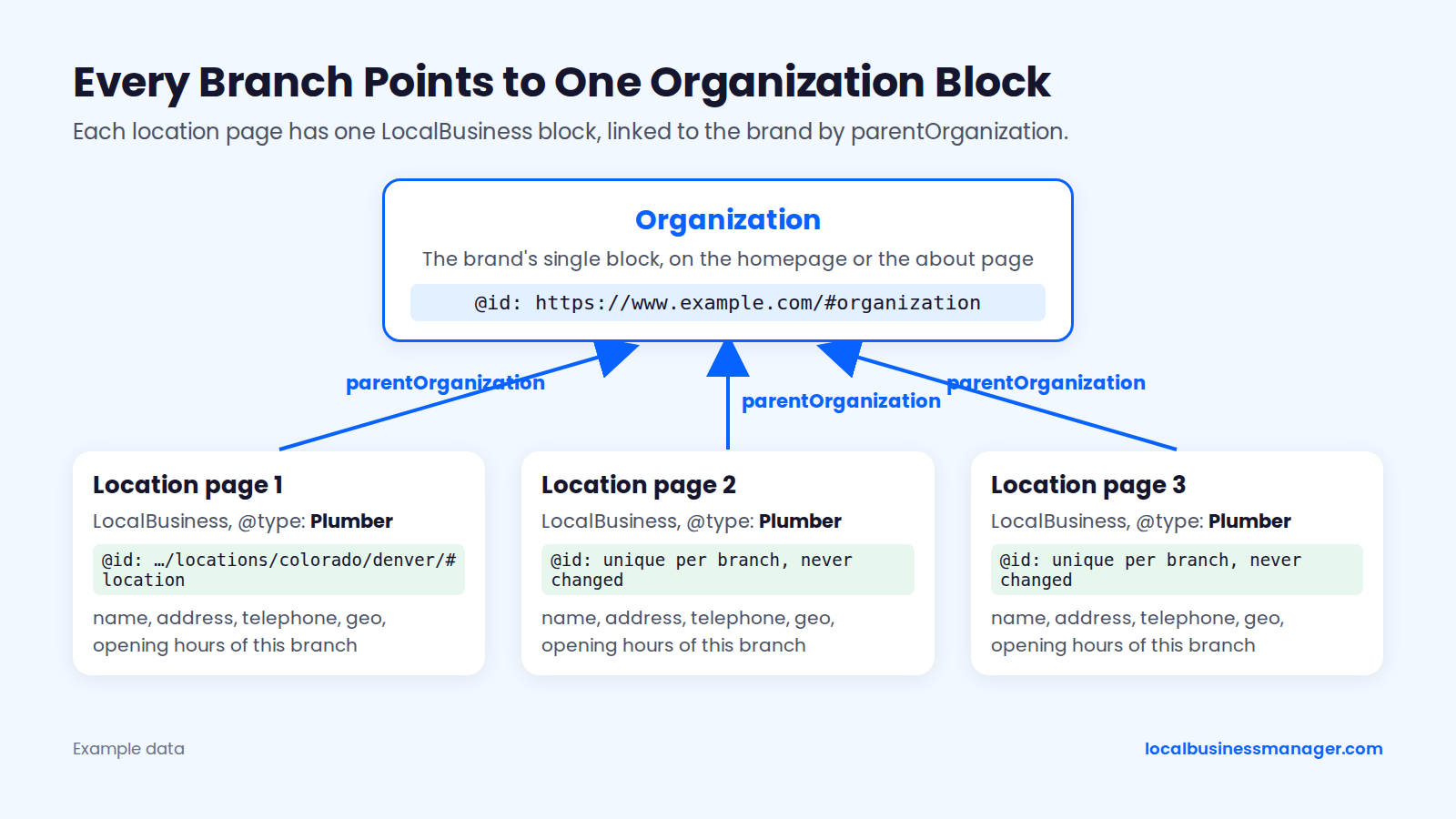
Each location page should carry one LocalBusiness block, using the most specific subtype, that describes that branch and points to the brand with parentOrganization. Google's LocalBusiness structured data documentation requires only name and address. In our view, schema helps Google understand the page rather than moving local pack rank, which Google's local ranking help page ties to relevance, distance and prominence.
Google's documentation requires 2 properties and recommends several more, among them url, telephone, openingHoursSpecification and geo. The @id and parentOrganization properties come from schema.org and connect the branch to the brand.
Property | Status in Google's docs | What to put |
|---|---|---|
name | Required | Brand name exactly as on the profile |
address | Required | This branch's full postal address |
url | Recommended | This location's own page |
telephone | Recommended | This location's number |
openingHoursSpecification | Recommended | This location's staffed hours |
geo | Recommended | This location's latitude and longitude |
@id | Not listed (schema.org) | A stable, unique identifier for this branch |
parentOrganization | Not listed (schema.org) | A reference to the brand's Organization @id |
Annotated example for one branch (example data):
{
  "@context": "https://schema.org",
  "@type": "Plumber",
  "@id": "https://www.example.com/locations/colorado/denver/#location",
  "name": "Example Plumbing",
  "url": "https://www.example.com/locations/colorado/denver/",
  "telephone": "+1-303-555-0100",
  "address": {
    "@type": "PostalAddress",
    "streetAddress": "123 Example St, Suite 200",
    "addressLocality": "Denver",
    "addressRegion": "CO",
    "postalCode": "80202",
    "addressCountry": "US"
  },
  "geo": {
    "@type": "GeoCoordinates",
    "latitude": 39.7392,
    "longitude": -104.9903
  },
  "openingHoursSpecification": [
    {
      "@type": "OpeningHoursSpecification",
      "dayOfWeek": ["Monday", "Tuesday", "Wednesday", "Thursday", "Friday"],
      "opens": "08:00",
      "closes": "18:00"
    }
  ],
  "parentOrganization": {
    "@id": "https://www.example.com/#organization"
  }
}
The brand's single Organization block sits on the homepage or the about page and carries the @id every branch points to (example data):
{
  "@context": "https://schema.org",
  "@type": "Organization",
  "@id": "https://www.example.com/#organization",
  "name": "Example Plumbing",
  "url": "https://www.example.com/",
  "logo": "https://www.example.com/logo.png",
  "sameAs": ["https://www.linkedin.com/company/example-plumbing"]
}
What the less obvious parts do:
- @type: the most specific LocalBusiness subtype that fits, such as Plumber, Dentist or LegalService
- @id: unique per branch and never changed, so every page that references the branch points to the same entity
- openingHoursSpecification: one entry per set of days with the same hours
- parentOrganization: points to the brand's Organization block by its @id
Leave review markup off location pages. Since September 2019, Google hasn't shown review rich results for LocalBusiness and Organization markup when the business controls the reviews about itself, including reviews embedded through a third-party widget on its own site, according to the Google Search Central blog post announcing the change.
How Do You Keep NAP and Citations Consistent Across Every Location?
Keep NAP consistent by changing every location's data in the master sheet first and pushing it out from there, then auditing the listings that matter most more often. In practitioner experience, small formatting differences rarely matter; duplicate listings and conflicting core data, such as an old address or a dead number, cause the real problems.
A workable starting cadence spends audit time in proportion to the tier: tier 1 monthly and after every change, tiers 2 and 3 quarterly, tier 4 twice a year.
Tier | Listings | Audit cadence | What to check |
|---|---|---|---|
1 | Google Business Profile, Apple Business Connect, Bing Places | Monthly and after every change | Name, address, phone, hours, link |
2 | Data aggregators and major platforms such as Yelp and Facebook | Quarterly | Duplicates and old addresses |
3 | Industry directories (legal, medical, home services) | Quarterly | Accuracy and duplicates |
4 | Everything else | Twice a year | Duplicates and closed locations still listed |
Tier 4 still gets a check because a closed location that's still listed sends customers to a closed site.
My view on cleanup is to fix all of them: the profile, the aggregators, the major platforms and the industry directories. When hours are tight, I fix the most serious issues first, working from Critical to High to Medium to Low. A suggested mapping of those levels:
- Critical: a duplicate listing, or a wrong address or phone number on a tier 1 listing
- High: an old address on an aggregator or major platform
- Medium: wrong hours or a wrong website link
- Low: formatting or abbreviation differences
How Do You Get and Manage Reviews Across Many Locations?
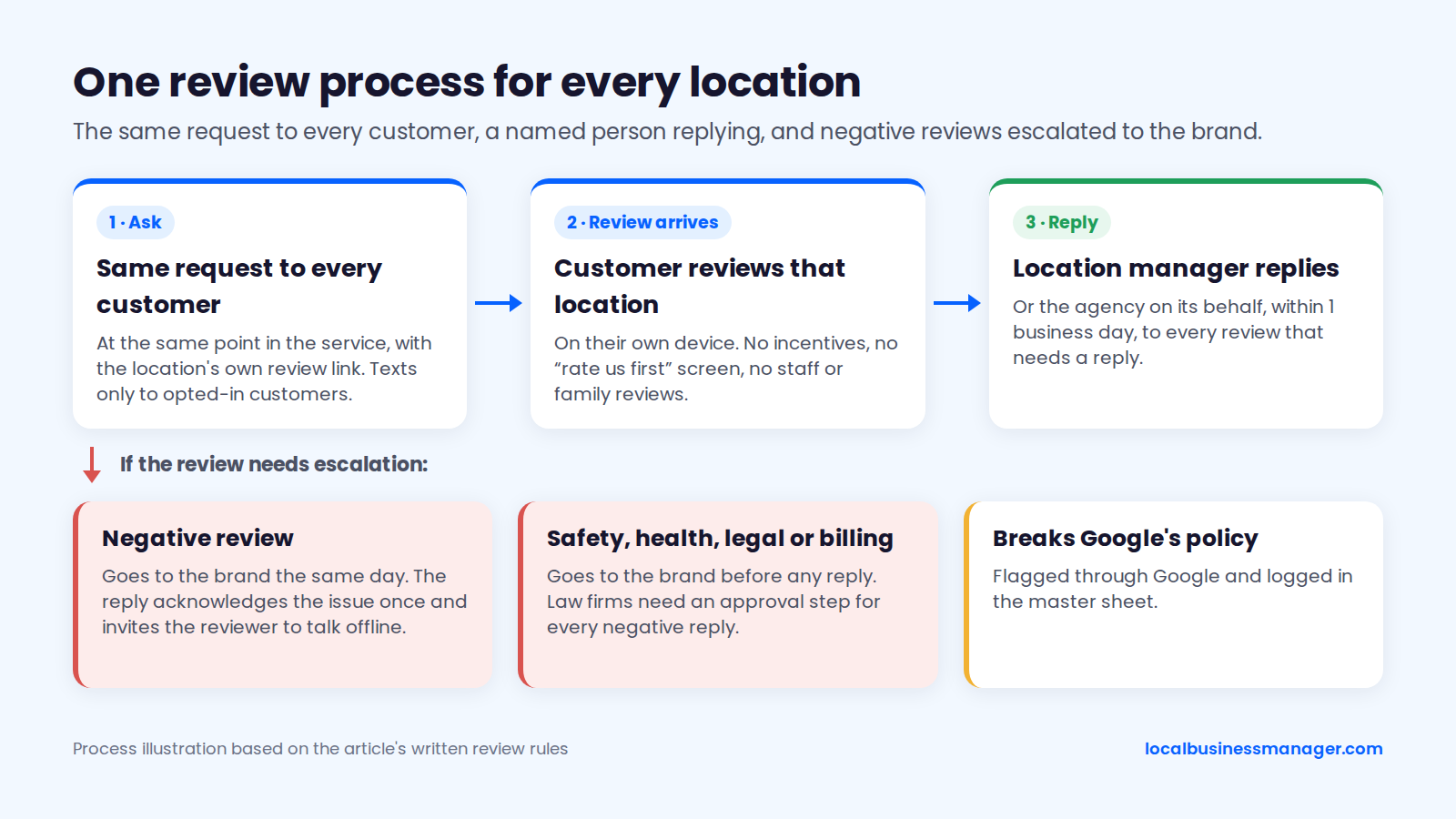
Run reviews as one written process that every location follows: the same request to every customer, texts only to opted-in customers, a named person replying at each location, and a written reply target. The 3 parts below cover asking, replying and fixing a weak location.
Asking for Reviews Without Breaking the Rules
Google's Maps user-contributed content policy bans fake engagement, including reviews paid for in cash or in kind, content posted from multiple accounts by or at the request of one person, discouraging negative reviews, and asking only happy customers for reviews. The FTC's final rule on fake reviews and testimonials, announced August 14, 2024 and in effect since October 21, 2024, bans buying or selling fake reviews and suppressing negative ones.
5 rules keep every location inside both:
- Ask every customer the same way, at the same point in the service
- Offer no discounts, gifts or prize entries for reviews
- Use no "rate us first" screen that routes happy customers to Google
- Accept no reviews from staff, owners, franchisees or their families
- Send texts only to customers who opted in
As a precaution of our own, let customers review on their own devices rather than on a tablet or kiosk at the location, so every review comes from the customer's own account.
Personal-injury firms should ask every client the same way when their matter closes. For clients who recovered, that moment comes after payout.
Request template, sent by each location with its own review link:
- "Hi [first name], thanks for choosing [Brand] in [city]. If you have a minute, would you share how it went? [location review link]. Reply STOP to opt out."
Who Replies, and How Fast
Google sets no reply deadline, so set your own in writing, with a named owner at every location. A suggested target: the location manager, or the agency on its behalf, replies within 1 business day to every review that needs a reply, and negative reviews go to the brand the same day.
Escalation steps for every location:
- The location manager or agency drafts replies within the written target.
- Negative reviews that mention safety, health, legal or billing issues go to the brand before any reply.
- The reply acknowledges the issue once and invites the reviewer to talk offline.
- Reviews that break Google's policy are flagged through Google and logged in the master sheet.
Google's reply tips are about tone: be professional, keep replies short, and personalize replies to negative reviews with the reviewer's name and a sign-off. Google's current help text also advises against sending the same "thank you" to every reviewer, and Google doesn't say reply speed is a ranking factor. Our guide on how to reply to Google reviews has templates for both positive and negative reviews.
Law firms need an approval step for every negative reply. ABA Formal Opinion 496 (January 2021) says a negative online review isn't a "controversy" that allows a lawyer to disclose confidential information, and it advises lawyers to seriously consider not responding or to post only an invitation to talk privately.
Handling a Weak Location
A weak location has to close its review gap with its own customers, because each profile carries its own review count.
Work through 5 checks at the weak location:
- Confirm staff there actually send the request, and to every customer
- Confirm the review link points to that location's profile and not the flagship's
- Compare its review count and rating with the 3 businesses ranking above it
- Read its negative reviews for a repeated theme and fix the cause
- Report its monthly review count separately so progress is visible
In my experience, gains from a strong review push come gradually. Set that expectation with the client before the push starts.
How Do You Build Local Links for Each Location?
Build brand-level links to the main site and location-level links to each location page, both earned from real relationships. A location's best links usually come from its own neighborhood: the teams, events and businesses around it.
Location-level link sources:
- Sponsorships of local teams, events and charities
- Local press for openings, moves and new hires
- Chambers of commerce and local business associations
- Partnerships with nearby, non-competing businesses
- Community events hosted at the location
Dropping links in forums and buying guest posts fit the link-spam patterns described in Google's spam policies, so leave both out of every location's plan.
Link building is the task I've outsourced in white-label work. I never hand off Business Profile naming or category selection.
How Do You Handle Tricky Multi-Location Cases?
Most multi-location problems that standard guides skip fall into 3 cases: offices in the same city, several practitioners or businesses at one address, and service-area franchises with overlapping territories. Google publishes little on any of them, so each section marks what's confirmed and what's practitioner observation.
Multiple Locations in the Same City
Google's guidelines for representing your business say there should be only one profile per business, and that a service business with separate locations, each with its own service area and staff, can have one profile per location. For storefronts, third-party guides quote Google's guidelines as saying not to create more than one profile per location, so two staffed offices in one metro can each have a profile, but being allowed 2 profiles doesn't guarantee both appear in the map pack.
Practitioners describe a local filter, often traced to an unconfirmed September 2016 update the industry named "Possum," which hides listings Google treats as near-duplicates. The judgment can rest on business name, URL, address or proximity. Sterling Sky's example is a Houston lawyer whose established Houston office ranked in Katy and filtered out his newer Katy office.
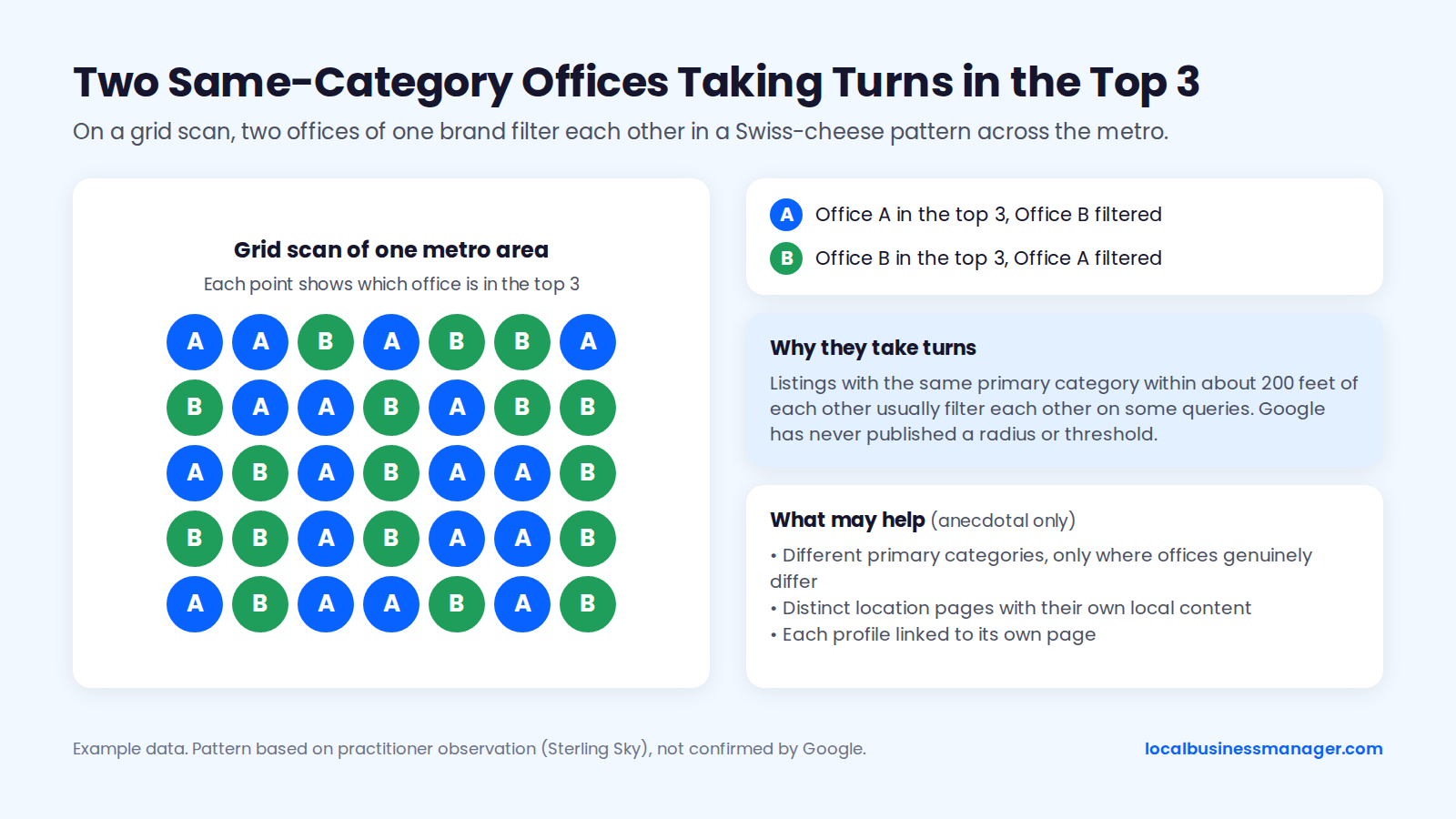
Sterling Sky also observes that listings with the same primary category within about 200 feet of each other usually filter each other on some queries, and on a grid scan the 2 listings take turns in a "Swiss-cheese" pattern. Joy Hawkins has written that Google support can't fix the filter because it's built into the algorithm, and that moving one location is the only dependable fix she knows of. Google has never published a radius or threshold.
What may help, based on anecdotal evidence only:
- Different primary categories, but only where the offices genuinely differ
- Distinct location pages with their own local content
- Each profile linked to its own page, never both to one page
Practitioners, Departments and Businesses at the Same Address
Individual practitioners at one address can have their own listings, but one firm can't have 2 listings at the same office, according to Sterling Sky's 2021 guide on practitioner listings and Joy Hawkins's 2018 comments for Sterling Sky.
3 cases come up at a shared address:
- Practitioners: individual attorneys can have practitioner listings, and Sterling Sky notes that practices with several practitioners can have one for each. Practitioner listings belong to the practitioners, not the firm, so the firm loses them when an attorney leaves.
- Departments: Sterling Sky has shown grid scans where a business's main profile and its department profile take turns filtering each other across a market.
- Separate businesses: in our reading of Google's eligibility rules, each needs its own signage, its own staff and its own in-person hours. Sterling Sky's 200-foot observation covers same-category listings in general, so separate businesses sharing a primary category may filter each other too, although our research found no test of that case.
My intended setup for attorney profiles is to give each one a different primary category from the firm's, so they don't compete with it. Use a different category only where it accurately describes that attorney's practice. I haven't used attorney profiles in practice yet, so treat that as an approach to test, not a proven result.
Service-Area and Home Service Franchises With Overlapping Territories
A home service franchise should map one profile to each franchisee's real, staffed base, with the service area set to that franchisee's territory. Towns without a base don't get a profile. Bulk verification doesn't cover service-area businesses, so each unit verifies on its own.
As of November 2026, Google's help page on managing service areas sets these 5 rules for every unit's profile:
Setting | Google's rule |
|---|---|
Business address | Remove it if you don't serve customers there |
Number of service areas | Up to 20 |
How areas are defined | Cities, postal codes or other areas |
Overall size | No more than about 2 hours' drive from the base |
Countries and states | Not added as service areas |
No Google page addresses overlapping territories directly; in our reading of the service-area rules, nothing stops 2 franchisees whose territories include the same town from both listing it. Because the experts in the 2026 Local Search Ranking Factors survey rate proximity to the searcher among the top local pack factors, expect the base closer to the searcher to have the edge. City pages follow the same rule as profiles: build one only where that franchisee actually serves.
Territory map columns to keep in the master sheet:
- Territory ID and franchisee
- Base address
- Service areas listed on the profile
- City pages assigned to this territory
- Overlap notes with neighboring territories
- Which franchisee handles leads from shared towns
What Do You Do When a Location Opens, Moves, Closes or Changes Hands?
Handle every lifecycle change by updating the existing profile and page instead of creating new ones, since Google's guidelines allow one profile per business, or one per separate staffed location. Plan for re-verification after core edits: Google's help page on editing a Business Profile says changing the business name or adding or editing a category may require verifying again, and moving to a new address requires it.
New-Location Rollout Checklist
Roll out a new location in this order:
- Confirm eligibility: permanent signage, the business's own staff and in-person hours.
- Add the location to the master sheet with a new store code.
- Publish the location page from the template, with a self-canonical, a sitemap entry and a hub link.
- Add the LocalBusiness schema block with the branch's @id.
- Set up the location's tracking number.
- Create the profile inside the right location group, with the brand as primary owner.
- Enter the name exactly as it appears on the signage, and pick the primary category after the competitor check.
- Link the profile to the location page with the UTM-tagged URL.
- Verify the profile, individually or through bulk verification at 10+ storefronts.
- Add services, hours, holiday hours and real photos.
- Update tier 1 listings, then aggregators and directories.
- Start review requests using the brand's compliant script.
- Add the location to reporting with a baseline grid scan and its profile metrics.
- Pitch the opening to local press and join the chamber.
Moving, Closing and Merging Locations
All 6 situations below work on the existing profile instead of creating a second one and keep the website pointing to a live page; the risk column is our assessment of what most often goes wrong in each case.
Situation | Business Profile action | Website action | What happens to reviews | Main risk |
|---|---|---|---|---|
New location | Create and verify one profile | Publish the page, add it to the hub and sitemap | Starts with none | Ineligible address |
Move | Edit the address on the existing profile, then re-verify | Update the page; 301 if the URL changes | Not published | Suspension after the address edit |
Closure | Mark the profile permanently closed | 301 to the nearest location or the hub | Stay on the closed profile, per secondary sources | Customers sent to a closed site |
Duplicate | Follow Google's help article on duplicate profiles | No change | Not published | Conflicting data across 2 profiles |
Rebrand | Edit the name after the signage changes; expect re-verification | Update the name sitewide and in schema | Likely stay, since the profile is edited, not recreated (our inference) | Suspension after the name edit |
Franchisee exit | Transfer primary ownership | Keep the page; update contacts | Kept through the ownership transfer | Losing the profile and its reviews |
For a closure, Google's help page on closing a business recommends marking the profile permanently closed, which keeps it on Maps and Search with a "Permanently closed" label. Removing the profile only takes it out of your account and doesn't mark the business closed. Before any move or rebrand, bring the location's reinstatement folder up to date.
When a Franchisee or Agency Leaves
Google's help page on transferring primary ownership calls the transfer the way to keep business information such as reviews when a business changes hands. Only the primary owner can make that transfer. If nobody on the brand side holds the owner role, the transfer depends entirely on the person who's leaving.
Exit steps:
- Confirm the brand or new operator already holds an owner role, allowing for the 7-day wait.
- Transfer primary ownership.
- Remove the departing users.
- Update the phone or tracking number and the contacts on the page.
- Audit every profile field for last-minute edits.
If access is already lost, Google's route is the Request Access form. Google's current help page says the owner has 3 days to respond, while an older Sterling Sky guide says 7.
A Google Product Expert guide lists 3 common access problems:
- An employee who left while still controlling a profile
- An agency that never gave the owner access
- A franchisor that won't release a location
In my experience, recovering a profile from a former agency or ex-employee is sometimes immediate and sometimes takes a week or two.
Who Owns What in a Franchise Local SEO Program?
A sensible default is that the franchisor holds primary ownership of every location's profile unless the franchise agreement assigns it to the franchisee, while agencies stay managers. Whichever model the brand picks, write it into the agreement and the brand standards.
Google doesn't say who should own a franchise location's profile, and a Google Product Expert guide states that no universal rule makes the franchisor, franchisee or agency the primary owner. Practitioners split: BuzzMaven says corporate should own every listing, another practitioner guide says the franchisee should own it, and a third notes that the franchise agreement usually decides.
The Responsibility Table
Most agencies have sat through a kickoff call where nobody can say whose Google account owns the profile. The suggested model below keeps the 3 things hardest to get back once lost (the profiles, the website and the master data) with the franchisor, and gives the franchisee what only a local operator knows.
Area | Franchisor | Franchisee | Agency |
|---|---|---|---|
Profile primary ownership | Holds it, unless the agreement assigns it | Manager, or owner if the agreement says so | Manager only |
Website and location pages | Owns the site and template | Supplies staff, photos and local news | Builds and updates pages |
Master data sheet | Owns it | Reports changes | Pushes changes to listings |
Name and categories | Sets the standard | Requests changes | Recommends and makes approved edits |
Hours and holiday hours | Sets the holiday calendar | Supplies actual hours | Publishes them |
Review requests | Sets the compliant process | Asks every customer | Monitors volume |
Review replies | Approves negative replies | Replies to routine reviews | Drafts and monitors |
Local links | Brand-level links | Sponsorships and chamber | Outreach |
Reporting | Receives the portfolio report | Receives its location report | Builds the reports |
A franchisee who can't edit the corporate site still has 3 levers: its own profile (as manager or owner), local links, and review flow from its own customers. Local news, staff photos and services sent to the franchisor then feed the location page the franchisee can't edit directly.
Brand Standards and Access Rules
The brand standards document covers 8 things:
- Name rules, including the keyword-name and DBA policy
- Approved primary categories per business type
- Photo standards
- The hours and holiday-hours process
- The review request script and policy limits
- Reply guidelines, the reply target and escalation
- Who may edit which profile fields
- The exit procedure, including the ownership transfer
4 access rules keep the brand from losing a profile:
- The primary owner is a brand-controlled account, not an employee's personal account
- A second brand-side owner acts as backup
- Agencies are managers, never primary owners
- Owner and manager lists are reviewed quarterly against the master sheet
How Do You Measure Local SEO for Each Location?
Measure every location with the same set of numbers, side by side, so a weak location stands out instead of hiding in a portfolio average. The KPIs, the map-ranking method and a report layout follow below.
The Per-Location KPIs
The Business Profile supplies 3 of the 8 metrics below; call tracking, GA4, intake records, Search Console and a grid scan cover what it can't measure: completed calls, leads, booked work, organic queries and rankings across the area.
Metric | Source | What it shows | Caveat |
|---|---|---|---|
Tracked calls | Call tracking | Completed calls | Needs a tracking number on the profile |
Qualified leads or booked appointments | CRM or intake records | Work the location actually won | Needs the lead source recorded at intake |
GBP sessions and conversions | GA4 with UTM tags | Leads from the profile link | Needs the UTM-tagged link |
Calls | Business Profile performance | Taps on the call button | Taps, not calls; includes Ads activity |
Website clicks | Business Profile performance | Clicks to the location page | Includes Ads activity |
Direction requests | Business Profile performance | Intent to visit | Origin map no longer in the standard report |
Organic queries | Search Console filtered by page URL | Searches reaching the location page | Organic web results only |
Map rankings | Grid scan | Rank across the location's area | A single point misleads |
Google's help pages say Business Profile performance data covers views, searches and actions from both organic results and Google Ads, and only verified profiles have it. Managers of several profiles can download performance data for many of them into one spreadsheet, and the Business Profile Performance API's fetchMultiDailyMetricsTimeSeries returns daily metrics such as CALLCLICKS and WEBSITECLICKS per location. Query data comes from Search Console, not GA4.
Tracking Map Rankings Across Each Location's Area
Grid-based rank tracking checks where a location ranks from many points across its area, with the grid centered on that location's own address. A single-point check shows one spot, often the office itself, and says little about the area around it. I don't use single-point checks for that reason.
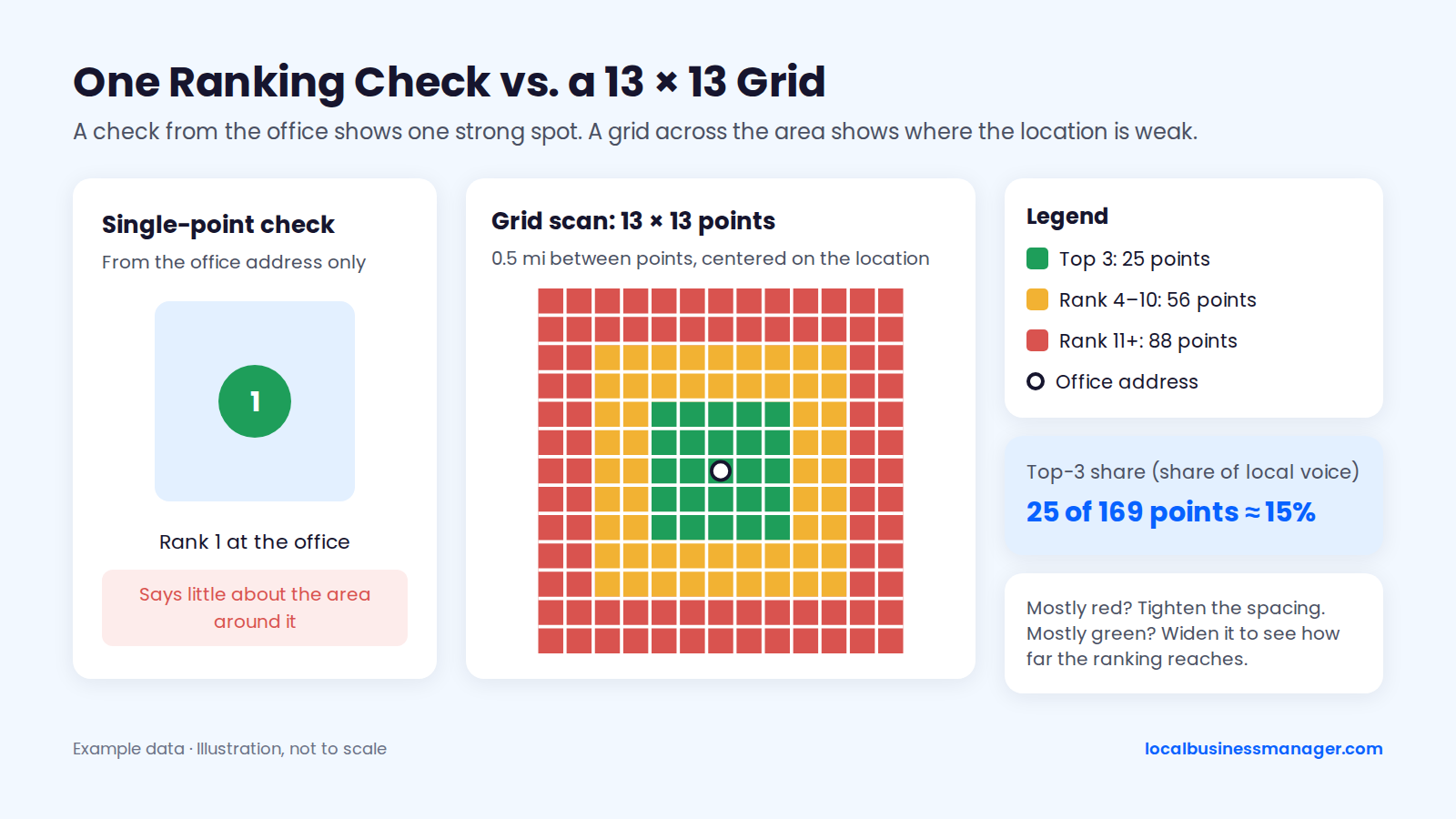
My scanning method:
- Run one scan first just to learn how the location ranks
- Start with a 13 Ã 13 grid with 0.5 mi between points
- If the grid comes back mostly green, widen the spacing to see how far the ranking reaches
- If it comes back mostly red, tighten the spacing
- Scan at least once a month, and daily only after an edit you want to measure
In my view, average rank is misleading on its own right now, because Google's results pages are volatile and an average is hard to read with confidence. A practitioner metric called share of local voice rolls a scan into the percentage of points where the location appears in the top 3, which gives one comparable number per location.
A Monthly Report That Shows Weak Locations First
In my reports, calls and rankings lead. In my view, rankings for the main terms are the minimum an SEO engagement must deliver, so they go at the top, next to the calls they produce.
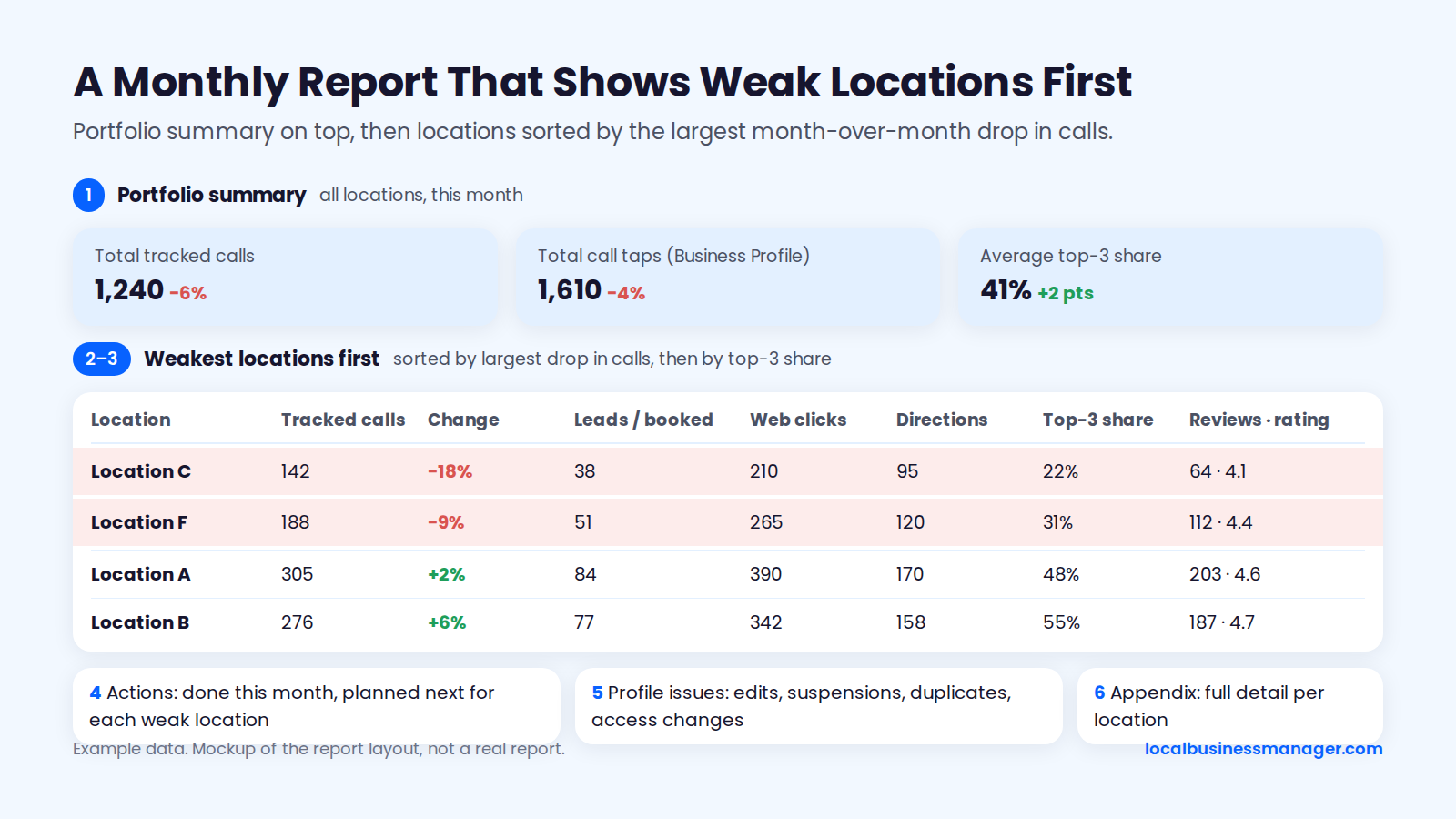
Per-location monthly report layout (our agency client report template covers the single-location version):
- Portfolio summary: total tracked calls, total call taps and the average top-3 share across all locations.
- Weakest locations first: sorted by the largest month-over-month drop in calls, then by top-3 share.
- Location table: one row per location with tracked calls, qualified leads or booked appointments, website clicks, direction requests, top-3 share, review count, rating and the change since last month.
- Actions: what was done this month and what's planned next for each weak location.
- Profile issues: edits detected, suspensions, duplicates and access changes.
- Appendix: full detail for every location.
Which Locations Should You Work on First?
Work first on locations where revenue potential is high and the gap to the 3-pack can realistically close. Score each location on 4 factors, then give flagship treatment to the top scores and the minimum standard to the rest.
My first checks on any new client run in this order:
- Local rankings across the area with a grid scan
- The business name compared with the names of the ranking competitors
- The primary category
- The website
Run the same 4 checks on each location; they feed the weakness and competition scores below. This scoring model is a starting point rather than a published benchmark: add the 4 scores for each location, then give 10 to 12 flagship treatment, 7 to 9 standard work, and 4 to 6 the minimum standard.
Factor | Score 1 | Score 2 | Score 3 |
|---|---|---|---|
Revenue potential | Low-value market | Average market | Top revenue or margin |
Fixable weakness | Already well optimized | Some gaps | Wrong category, missing services or weak page |
Review gap vs top 3 | Ahead of competitors | Slightly behind | Far behind, but closable |
Competition | Very crowded 3-pack | Moderate | Few strong competitors |
The tiers set how much work each location gets, and all 3 keep the weekly profile check.
Tier | Score | Location page | Rank tracking | Link work |
|---|---|---|---|---|
Flagship | 10 to 12 | Full template | Monthly, plus after edits | Active local outreach |
Standard | 7 to 9 | Full template | Monthly | Chamber and sponsorships |
Minimum | 4 to 6 | Minimum standard | Monthly | None until score rises |
How Do AI Answers Affect Multi-Location Brands?
For multi-location businesses, the part of AI answers you can control is making each location's data identical across its profile, its location page, its schema and the main directories, with its common questions answered in plain text on its page. No source in our research shows how AI assistants choose between a brand's locations, and no published data splits local AI results by location.
4 things are within reach:
- One answer everywhere: keep each location's name, address, phone, hours and services identical across the profile, the location page, the schema and the main directories. If those sources agree, an assistant has nothing conflicting to pick up, though nobody has measured the effect.
- Answers in plain text: put location questions and answers on the location page, readable in the HTML.
- A monthly check: for each flagship location, run the same 3 prompts (service plus city) in the AI assistants the client cares about, and log whether the location is named and which details appear.
- Directory presence: for law firms, I've seen some paid legal directories bring cases and also help firms get mentioned in AI Overviews.
When a client asks "are we showing up in ChatGPT?", start with that log and with whether each location's data is consistent across those sources.
Common Multi-Location Local SEO Mistakes
Run this list against any account you take over. The first 4 are problems I've inherited from previous agencies.
- Duplicate listings left live
- Bad naming on the profile
- No review campaign running at some locations
- No services or products set up on the profile
- A city or keywords added to a profile name the business doesn't really use
- Profiles for virtual offices, coworking desks or unstaffed rooms
- City-swap location pages with nothing local on them
- Location pages canonicalized to each other
- An agency or franchisee as primary owner, with no written agreement
- Gated or incentivized review requests
- Rankings judged from a single point
FAQ
The 3 answers below cover follow-up questions the sections above don't fully answer.
How Do I Add a Second Location to My Google Business Profile?
Add the second location as its own profile in the same account and verify it separately, because it doesn't attach to the first profile. It needs its own eligible address with signage, staff and in-person hours. Use the same brand name, link it to its own location page, and put it in the right location group so the brand's existing owners and managers cover it from day one.
How Long Does It Take a New Location to Rank?
No published study gives a ranking timeline for a brand-new location. My own timeline view applies to fixes on a profile that's already running: a single high-impact fix, such as getting the keyword into the profile name through a registered DBA, can show gains within about a month, and once the basics are done, further gains come gradually. Because the 2026 Local Search Ranking Factors survey's experts rate proximity so highly, expect a new location to show first near its own address.
Can a Service-Area Franchise Rank in Cities Where It Has No Office?
A service-area franchise can list towns without an office in its service area, but experts in the 2026 Local Search Ranking Factors survey rate proximity to the searcher among the top local pack factors. That points to stronger rankings near the staffed base than in distant towns. In my view, a city page belongs only where the franchise actually serves the town. For the map pack in a distant city, the compliant path is a new staffed base, never a virtual office.
Start With the Master Sheet
If you do one thing this week, build the master location sheet and compare every row with the live profile. Each name, address, phone or hours mismatch it finds becomes a fix with a clear owner. Local Business Manager is in early access for agencies and multi-location businesses: request early access.