How to Change Your Business Name or Address on Google

You change your business name or address on Google by opening Edit profile on Google Search or in the Google Maps app, editing the Business name or Business location field, and saving. If a client has rebranded and watched Google restore the old name a week later, you know the clicks aren't the hard part. The change sticks only if the new name or address already exists in the real world and on the website. After that, Google reviews the edit and may ask you to verify again. This guide gives the steps for both, which names Google approves, when to start a new profile, how to fix rejected edits, and an agency checklist with a client email script.
How Do You Change Your Business Name on Google?
You rename your business on Google in Edit profile, under Business information, in the Business name field, while signed in to the Google Account that owns or manages the profile. Google says some businesses might need to verify their Business Profile (formerly Google My Business) before they can change any of their info. The desktop and app routes come first, followed by the bulk route for 10 or more locations.
On Google Search (Desktop)
The desktop route to the Business name field takes 5 steps:
- Sign in to the Google Account that owns or manages the profile.
- Search Google for your business name, or search "my business", to bring up your profile.
- Click Edit profile.
- Under Business information, click the pencil icon next to Business name.
- Type the new name exactly as it appears on your signage and website, then click Save.
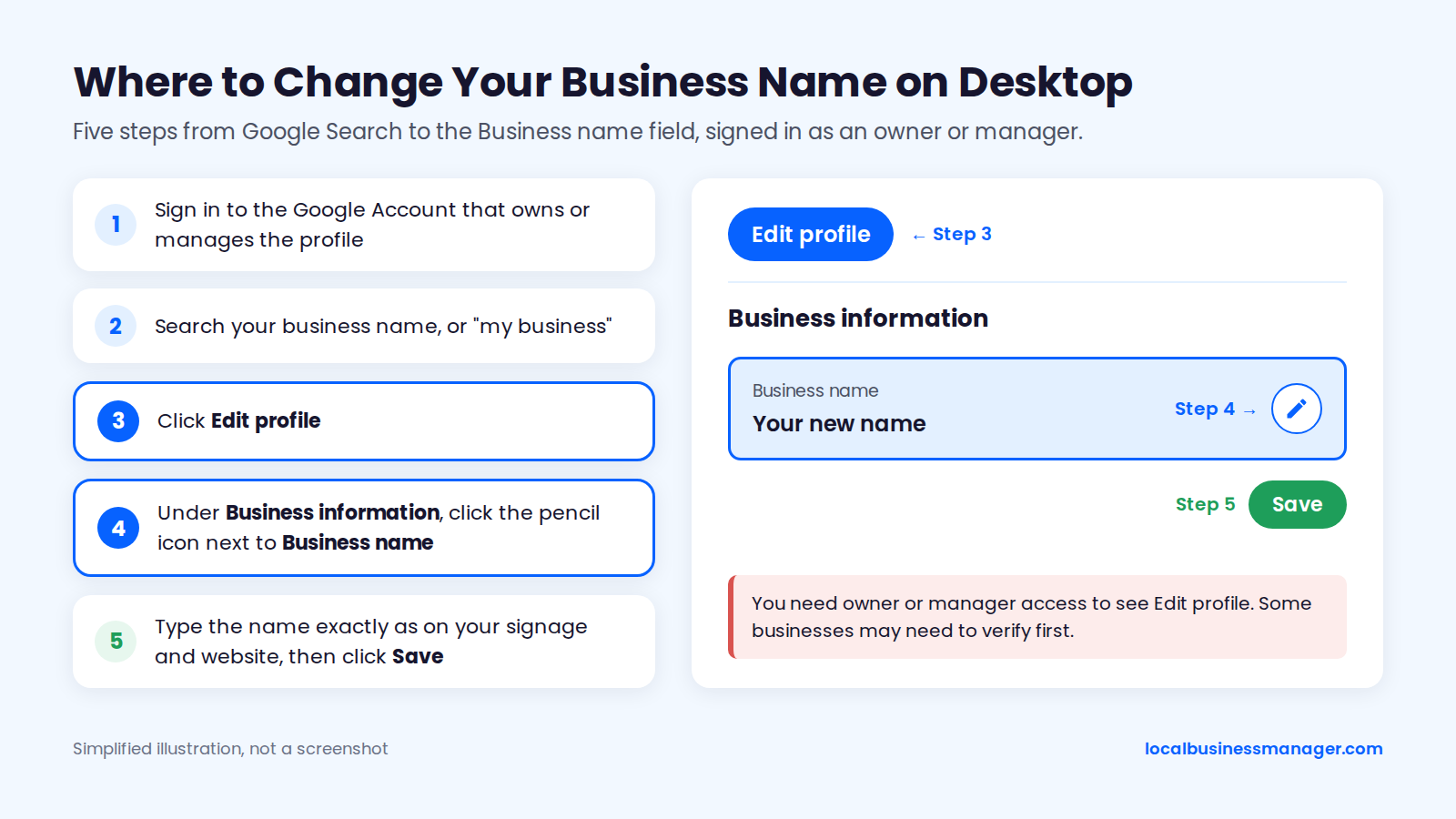
You need owner or manager access to see Edit profile. If you don't have it, the access question in the FAQs below explains how to get it.
In the Google Maps App
The Google Maps app reaches the same Business name field in 4 steps:
- Open Google Maps on your phone, signed in to the account that manages the profile.
- Tap your profile picture, then Your Business Profile. Some accounts show a Business tab at the bottom right instead.
- Tap Edit profile.
- Tap Business name, enter the new name, and tap Save.
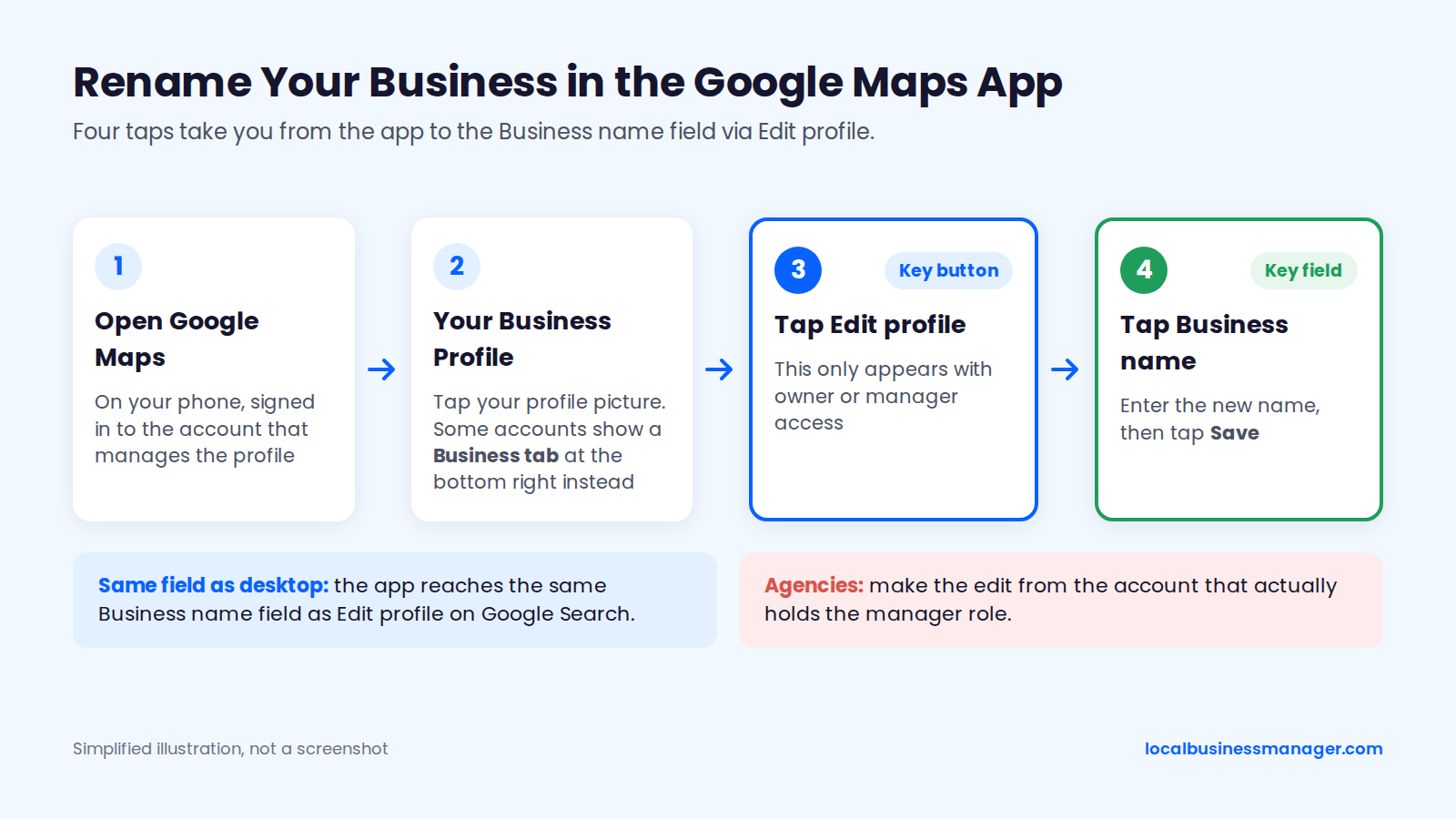
Agencies should make the edit from the account that actually holds the manager role. In my practice, I accept client invites through one agency organization account, never personal or shared logins.
If You Manage Multiple Locations
You change the name or address of many locations at once in Business Profile Manager at business.google.com, which Google provides for businesses with 10 or more locations. Google's bulk management help pages say you can edit locations in the dashboard or upload a revised spreadsheet, and the bulk upload spreadsheet includes business name and address fields. The retired dashboard paths in older guides, such as an "Info" menu or a card view and list view toggle, no longer apply.
Line up 4 things before a chain-wide edit:
- Partial rebrands: Google's guidelines include rebranding wording for businesses with several locations, and one Local Search Forum member read it as covering only a rebrand of every location at once (their example: Burger King becoming Burger Joint). If only some locations change names, treat it as the riskier case in the naming section below.
- Spacing: my practice is to wait a day or two after a name, address or category edit before making the next sensitive edit on the same location.
- Bulk appeals: Google's help page on suspended profiles offers a bulk appeal option for more than 10 profiles.
- City pages: in my setup, each office's profile links to its own city page carrying that office's local details. List those city pages alongside the profiles you're changing.
How Do You Change Your Business Address on Google?
You change your address in Edit profile, under Location, in Business location: edit the address, adjust the pin, and save. The right approach depends on what you're doing: correcting the current location, moving the business, or hiding the address as a service-area business.
Correcting a Wrong Address or Pin
Correcting the address on an existing profile takes 5 steps on desktop or in the Maps app:
- Open Edit profile while signed in to the owner or manager account.
- Go to Location, then Business location, and select Edit.
- Enter the complete street address, including the suite, floor or unit number.
- Use Adjust pin to place the marker on the building.
- Click Save.
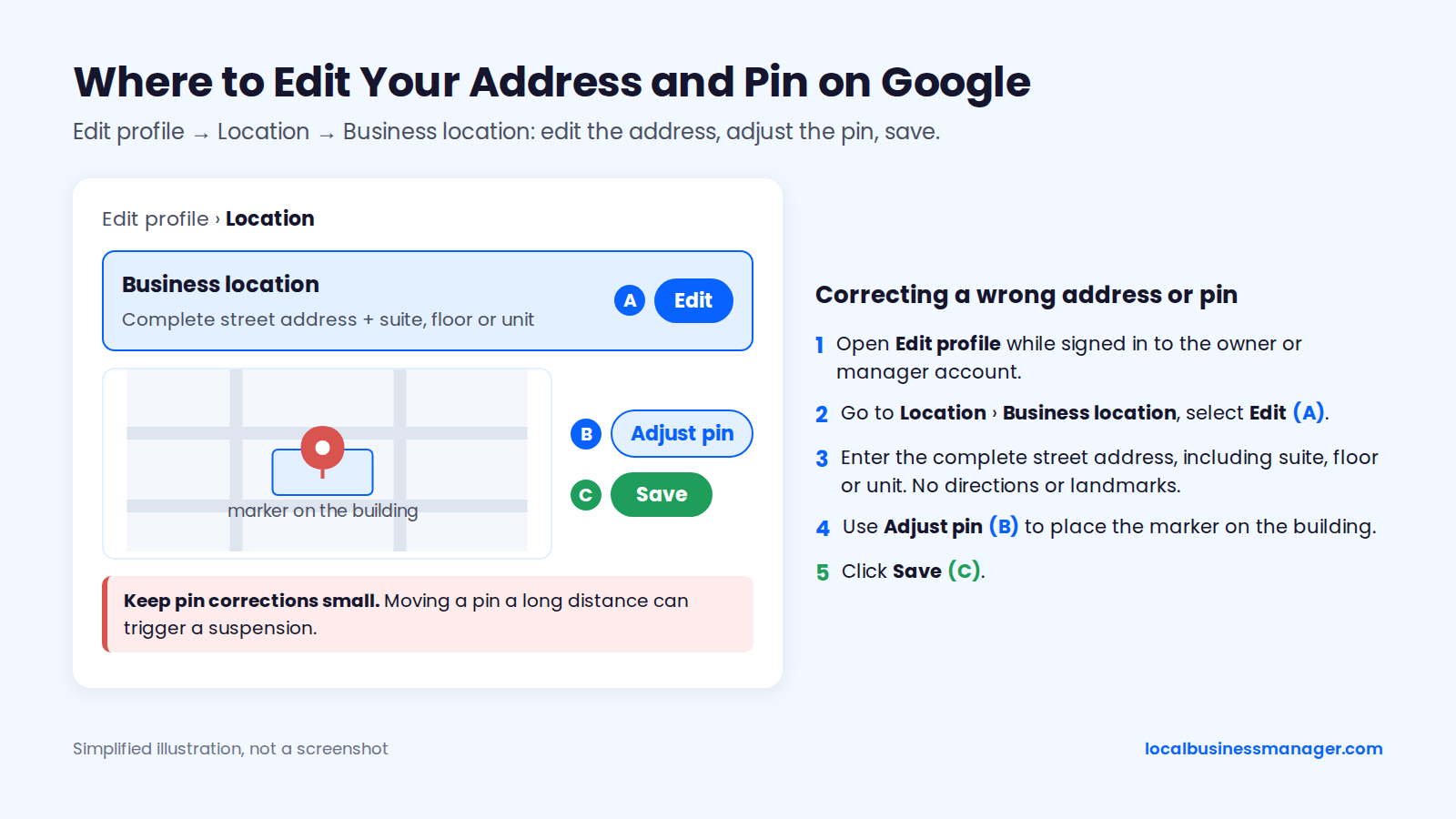
Google's address rules call for the precise street address, so leave out directions or landmark descriptions such as "across from the post office". A suite or unit number belongs in the address only when it's a real, staffed location. A mailbox number never does.
Keep pin corrections small. Sterling Sky reported in 2025 that a pin moved hours away tanked a client's rankings, and that moving a pin a long distance can trigger a suspension.
Moving to a New Address
When the same business moves, edit the address on the existing profile. Deleting the profile, or removing the place and adding a "new" one at the new address, throws away the reviews on the old profile and risks a duplicate listing.
A business that moves should expect Google to ask it to verify again. Plan the move so the new location can pass verification on day one:
- Permanent signage is up at the new address.
- The street number is visible from outside.
- The office is open and operating.
Never move a profile to a PO box, a mailbox-service address, a virtual office or a coworking desk; none of them is an allowed business location.
A service-area business that moves uses the same edit-and-reverify route. Sterling Sky describes an alternative for service-area businesses only: create a new profile with a local phone number, then ask Google support to mark the old listing as moved so the reviews carry over. Its reason is that editing a service-area business's address directly is more likely to cause a suspension, and it reports seeing service-area businesses that handled a move badly not rank anywhere for several months.
Hiding Your Address (Service-Area Businesses Only)
Hiding the address is only for service-area businesses, meaning businesses that serve customers at the customer's location and don't receive them at the business address. Google's "Manage your business address" help page says that if you don't serve customers at your address, you turn off Show business address to customers in the profile's address settings and list your service area instead.
Before you hide or remove an address, weigh 2 findings:
- Sterling Sky's testing, run by Colan Nielsen, found that the service area set on a Google Business Profile doesn't currently affect local rankings. Rankings are tied mainly to the physical address used to verify the business.
- The 2026 Local Search Ranking Factors survey, published in November 2025, notes a case where a profile's address was removed after a move and its rankings went back to the original verified address.
A storefront business that receives customers at its address keeps the address visible. Our guide to service-area business setup on Google covers the other case in full.
Which Business Names Will Google Approve?
Google approves a name that matches what the business is called in the real world, used consistently on its storefront, website and stationery. Rebrands, legal name changes and keyword names each test that rule in a different way, and law firms have a second rulebook to clear.
Google's Real-World Name Rule
Google's guidelines for representing your business say the profile name must reflect the business's real-world name, as used consistently on its storefront, website and stationery and as known to customers. Keywords, locations or taglines the business doesn't actually use don't meet that rule, and adding them risks a suspension.
Here are 4 examples for a business whose sign, website and phone greeting all say "Joe's Plumbing":
- Allowed: "Joe's Plumbing", the name the business uses everywhere.
- Not allowed: "Joe's Best Emergency 24/7 Plumbing", because the business isn't called that.
- Not allowed: "Joe's Plumbing | Plumber Denver", a city and service added as a tagline.
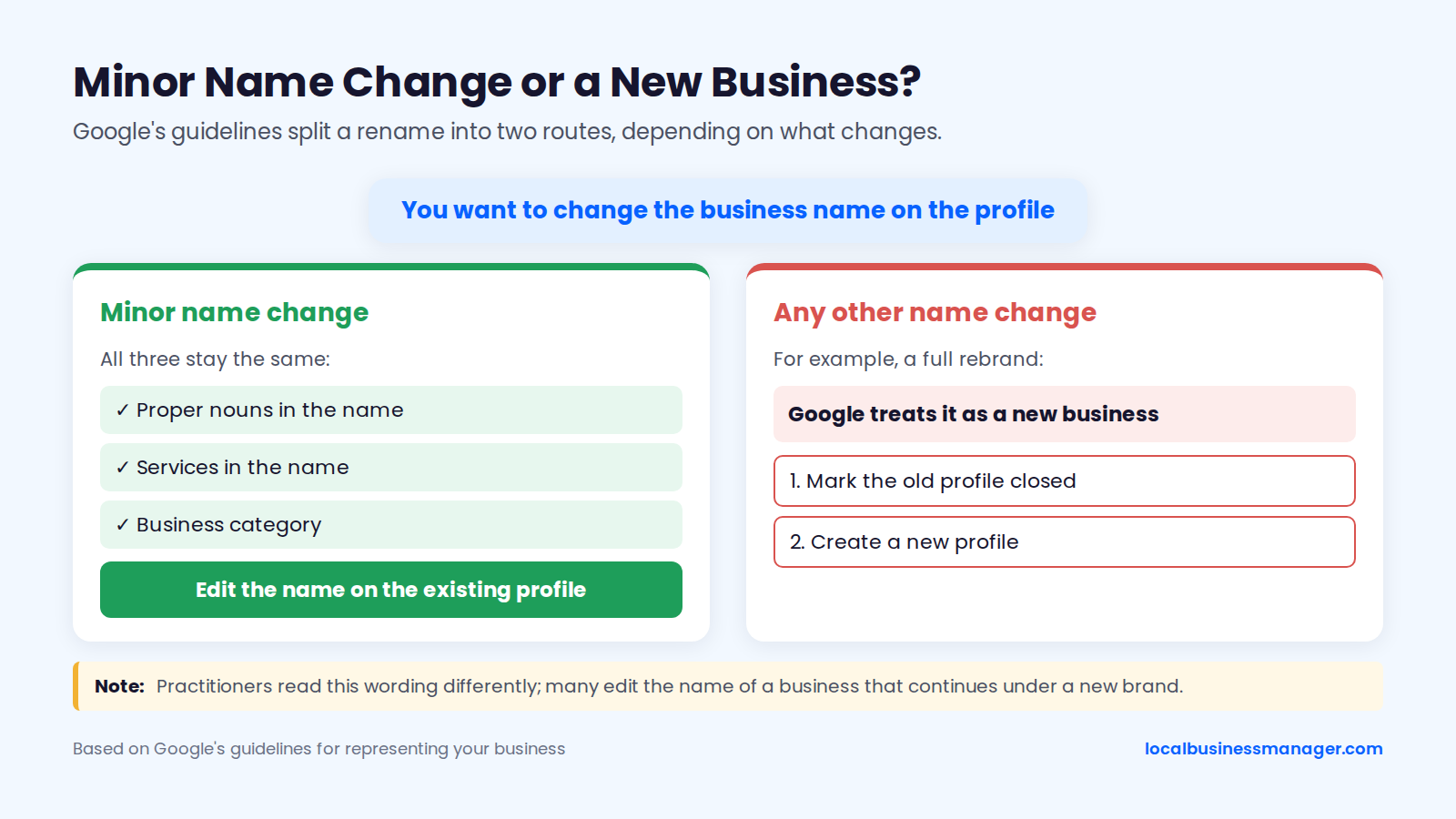
- Allowed on the existing profile: a minor change where the proper nouns, the services in the name and the category stay the same. A full rebrand is a new business under Google's guidelines.
The rule also applies on camera. Google's video verification help page says the business name shown in the video must match the name on the profile.
Rebrands and Legal Name Changes
Google's guidelines allow a rename on the existing profile only for a minor name change, meaning the proper nouns and the services in the name stay the same and the category doesn't change. The same page says any other change makes it a new business: the owner marks the old profile closed and creates a new one.
Practitioners don't all apply that wording literally. A Local Search Forum thread from around 2023 shows members reading it differently, and many edit the name of a business that continues under a new brand.
A legal entity name change that leaves the public brand alone needs no profile edit. Google's guidelines say legal terms like LLC or Inc. aren't allowed in the profile name unless real-world proof shows them as part of the name.
Whichever route you take, change the real world first. Sterling Sky's 2025 rebranding checklist starts by updating the website, including a logo that shows the new name, and changes the profile name near the end, after the major data providers. The checklist warns that if the new name isn't indexed on the website before the edit, Google may change it back or ask you to re-verify.
Keyword Names: Only as a Registered DBA You Actually Use
A keyword business name is compliant only when it is the business's actual name; appending keywords to a name the business doesn't use stays prohibited, DBA or not. I recommend keyword names for local businesses, and I've taken many clients through this process, but only in this order:
- Register the DBA (assumed name).
- Put that exact name on the signage, website, stationery and phone greeting.
- Update the other listings to the same name.
- Change the Business Profile name last.
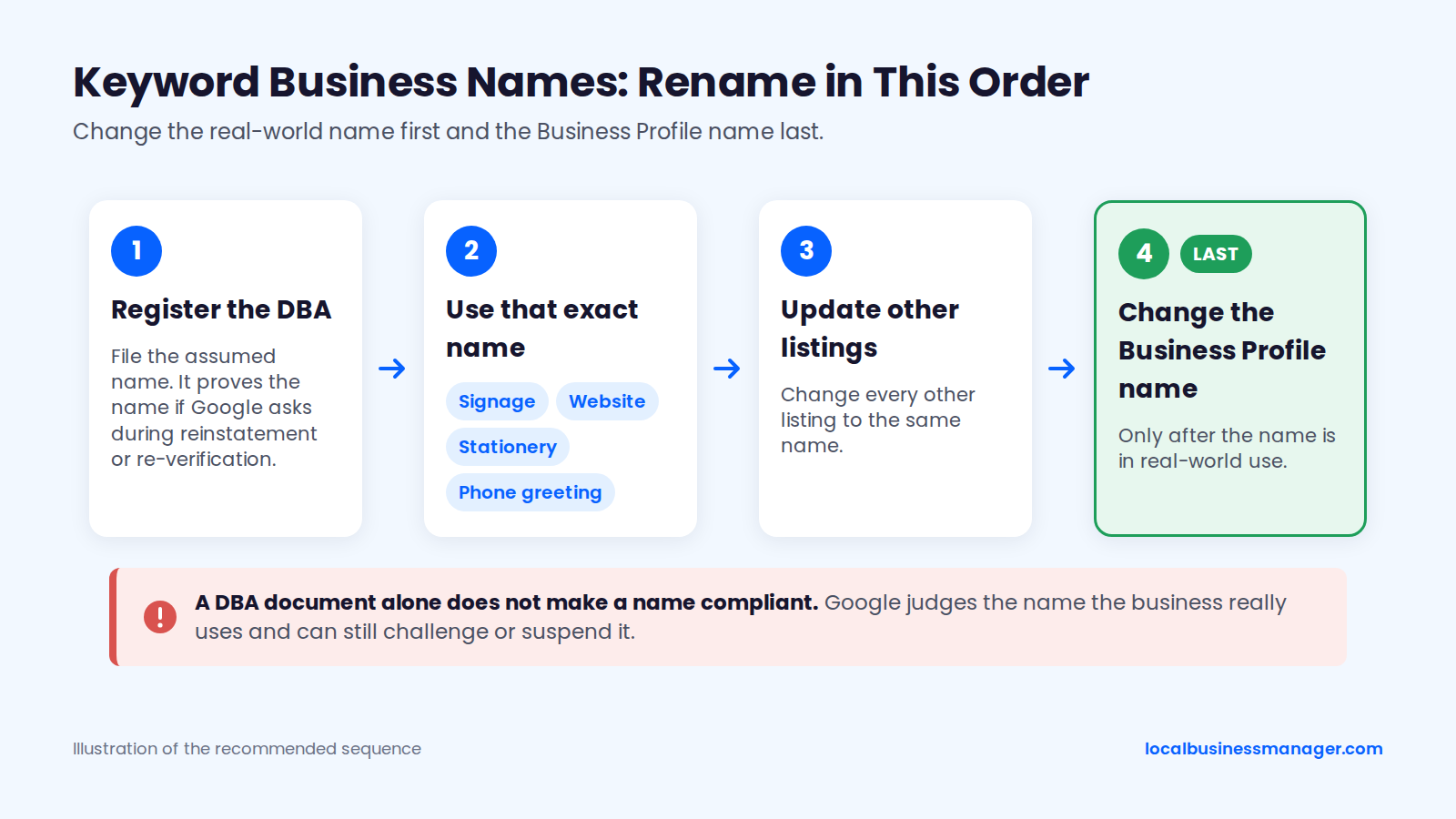
A DBA document alone does not make a name compliant. Google judges the name the business really uses and can still challenge or suspend it. The DBA is what proves the name if Google asks during reinstatement or re-verification.
The name matters for rankings. When a personal-injury firm misses the 3-pack, the 2 causes I see most often are a business name that isn't optimized and too little review flow.
A keyword DBA that adds a service to the name also goes beyond Google's written rebranding rule, which allows a rename on the existing profile only when the services in the name stay the same. The 2026 Local Search Ranking Factors survey, published in November 2025, ranks keyword names among the top suspension risk factors and also finds they correlate with higher local-pack rank. Our guide to keyword business names and DBAs covers the filing in more detail.
Law Firms: Check Your State Bar First
Law firms settle the firm name under their state bar's rules before anyone touches the profile. What follows is marketing guidance, not legal advice. Check these 5 rules first:
- ABA Model Rule 7.1, Comment 5 allows a firm name made of current members, of deceased members where the firm's identity continued, or a trade name that isn't false or misleading.
- Comment 8 of ABA Model Rule 7.1 says using the name of a lawyer holding public office is misleading while that lawyer isn't actively and regularly practicing with the firm.
- New York Rule 7.5(b) bans trade names but lets a firm keep the names of deceased or retired members, as New York State Bar Association Ethics Opinion 869 explains.
- Texas has allowed non-misleading trade names since a 2021 amendment to Rule 7.01, and a trade name there needs state-bar approval; confirm the current process with the State Bar of Texas.
- Kentucky, New Jersey and Rhode Island restrict trade names.
Check your own state bar's rule before filing a DBA.
Law Firms: When a Named Partner Leaves
ABA Model Rule 7.1, Comment 5 sets the boundary for a departing named partner: a firm name is misleading if it implies a connection with a lawyer who isn't associated with the firm. New York's Rule 7.5(b) lets a firm keep a retired member's name, which is a different situation from a partner who now practices elsewhere.
The marketing steps run in this order:
- The firm confirms its approved name with its ethics counsel.
- The firm updates its signage, letterhead and website to that exact name.
- The firm updates its state bar listing (Sterling Sky's rebranding checklist includes the state bar website for legal clients).
- The agency mirrors the exact approved name on the Business Profile, last.
A dropped partner name changes a proper noun, so check the name-change table below before editing the profile.
Should You Edit Your Profile or Create a New One?
Edit the existing profile when the same business continues. Treat it as a new business when a different business takes over or the name changes completely. The hard cases sit in between: full rebrands, acquisitions, mergers and service-area moves. The 2 tables below split name changes from moves, ownership changes and closures.
Name Changes: Edit or Start Over?
Google's guidelines answer 3 of these 7 name scenarios directly: a typo fix, a legal-entity change behind an unchanged brand, and a full rebrand. Sources as of November 2026: Google's guidelines, a 2025 Local Search Forum case and my own practice.
Scenario | What to do | Reviews or documented outcome | Basis |
|---|---|---|---|
Typo or spelling fix in the name | Edit the name | Stay on the profile | Google guidelines (minor change) |
Legal entity name changes, public brand stays | Leave the profile name alone | Stay on the profile | Google guidelines (real-world name) |
Full rebrand with new proper nouns | Google: mark closed and create a new profile | Edited profile keeps them; a new profile starts with none | Google guidelines; many practitioners edit instead |
Named partner leaves a law firm | Confirm the name with ethics counsel first | Not documented | Google guidelines read literally treat it as a new business; practitioners differ |
Same business adopts a registered DBA it uses everywhere | Edit the name last, after real-world use | Stay on the profile | My practice; goes beyond Google's minor-change rule; suspension risk applies |
Buyer renames an acquired business to its own brand | Don't rename the acquired profile | Profile suspended; appeal denied in a 2025 forum case | Local Search Forum case (2025) |
Two firms merge under a new name | Decide the firm name first, then ask Google support | Not documented | No published Google rule for mergers |
In the 2025 Local Search Forum case, a client who changed the name on an acquired business's profile to their own was suspended, and Google denied the appeal. The reply in that thread summed up the rule as one business, one profile.
Moves, Ownership Changes and Closures
Google's help pages or guidelines cover 5 of these 7 scenarios. Sources as of November 2026: Google's help pages and Community guide, Joy Hawkins and Sterling Sky.
Scenario | What to do | Reviews or documented outcome | Basis |
|---|---|---|---|
Storefront business moves to a new address | Edit the address, then verify again | Stay on the profile | Google help page; Joy Hawkins, Search Engine Land (2015, since updated) |
Service-area business moves | Edit the address, then verify again | Stay on the profile | Google help page on moves; Sterling Sky describes a new-profile alternative |
Business opens an additional location | Keep the existing profile; add a new profile for the new site | Existing profile keeps them; the new one starts with none | Google guidelines and help pages |
Business closes permanently | Mark the profile permanently closed | Profile shows Permanently closed on Search and Maps | Google help page |
Different business opens at the same address | New profile; old one marked closed | Not documented | Google guidelines (new business) |
Owner sells, business keeps its name | Transfer primary ownership | Not documented by Google | Google Business Profile Community guide |
Duplicate profiles for one business at one location | Ask Google support to merge | Support can merge them | Sterling Sky |
Google's "Mark your business as closed" help page puts the closing option under Edit profile, Hours, Permanently closed. For a new location, Google's guidelines say profiles are created for actual, real-world locations, and Google offers an Add a new Business Profile option, or Business Profile Manager for 10 or more locations.
Ownership transfers and merges have their own limits. Google's Business Profile Community guide says only the current primary owner can transfer primary ownership, and new owners or managers must wait 7 days before they can receive it. Google merges two profiles only when they represent the same business at the same location, according to Sterling Sky.
What Happens After You Save a Name or Address Change?
After you save, Google reviews the edit before it goes live, and a name or address change can send the profile back through verification. The sections below cover Google's published timing and status labels, re-verification, and a verification video shot list.
How Long Edits Take
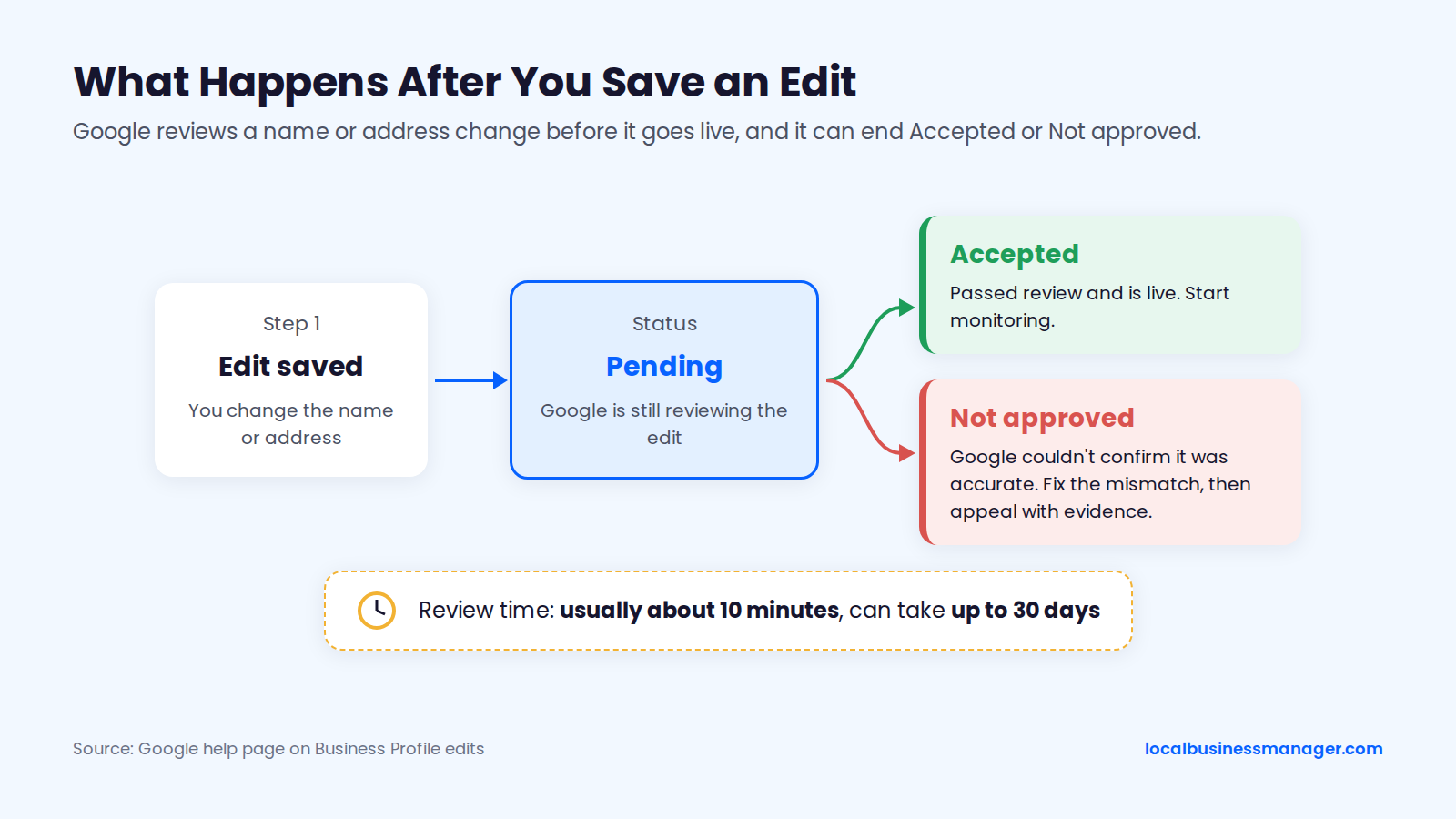
Google's help page on what happens to your edits says a review usually takes about 10 minutes and can take up to 30 days. Older guides quote 3 days, 60 days or "a couple of days" with no source. Google's 10-minutes-to-30-days range is the only published figure.
Edits can also be rejected. Google marks an edit Not approved when it can't confirm the change is accurate, so a long wait isn't the only outcome to plan for.
Google publishes no figure for how long rankings take to settle after a move. The rankings section below covers what practitioners have observed.
Edit Statuses and What They Mean
Google uses 3 statuses for your own edits (Accepted, Pending and Not approved), and 3 other notices can appear after a name or address change. Sources as of November 2026: Google's help pages and Sterling Sky.
Status or notice | What it means | What to do |
|---|---|---|
Pending | Google is still reviewing the edit | Wait for the review to finish |
Accepted | The edit passed review and is live | Start the monitoring routine below |
Not approved | Google couldn't confirm the edit was accurate | Fix the mismatch, then appeal with evidence |
Google update alert in Edit profile | Google changed the profile based on other sources | Review it and reject wrong changes |
Suggested edit notification | A Maps user proposed a change | Accept or reject it promptly |
Review issues | A verification video was rejected | Read the reasons and record again |
Google's page Understand what happens to your Business Profile edits explains these statuses. It also says rejected business-information edits may be appealable.
If Google Asks You to Verify Again
Google's "Edit your Business Profile" help page says that if you change your name after verification you might need to verify again, and if you move to a new address after verification you must verify again. The wording differs between language versions of the page, so treat re-verification as possible after any name or address edit. Our Google Business Profile verification guide covers each method.
Once Google asks for verification, keep these 4 points from Google's pages and Sterling Sky's video verification guidance in mind:
- Google assigns the verification method. Don't plan on the postcard that older guides describe as the usual route.
- When Google offers video verification, you generally can't request a different method.
- You may not be notified when a video is rejected. A Review issues warning is the sign.
- Google's verification help page says not to edit the business name, address or category during video verification.
Verification Video Shot List
Google's video verification help page requires one continuous, unedited video, recorded and uploaded from a mobile device through the Business Profile. For storefront and hybrid businesses, the video must show the location, proof the business exists and proof of management. This shot list follows those requirements, plus Search Engine Journal's advice to film the outside first:
- Start outside with a street sign or the building number in frame.
- Pan to the neighboring businesses and across the street, so Google can cross-check Maps and Street View.
- Film the permanent exterior signage, with a name that matches the profile name exactly.
- Open the door with your keys.
- Walk inside and film the reception, showroom or workspace with business signage.
- Show an employee-only area, such as a back office, storage room or cash register.
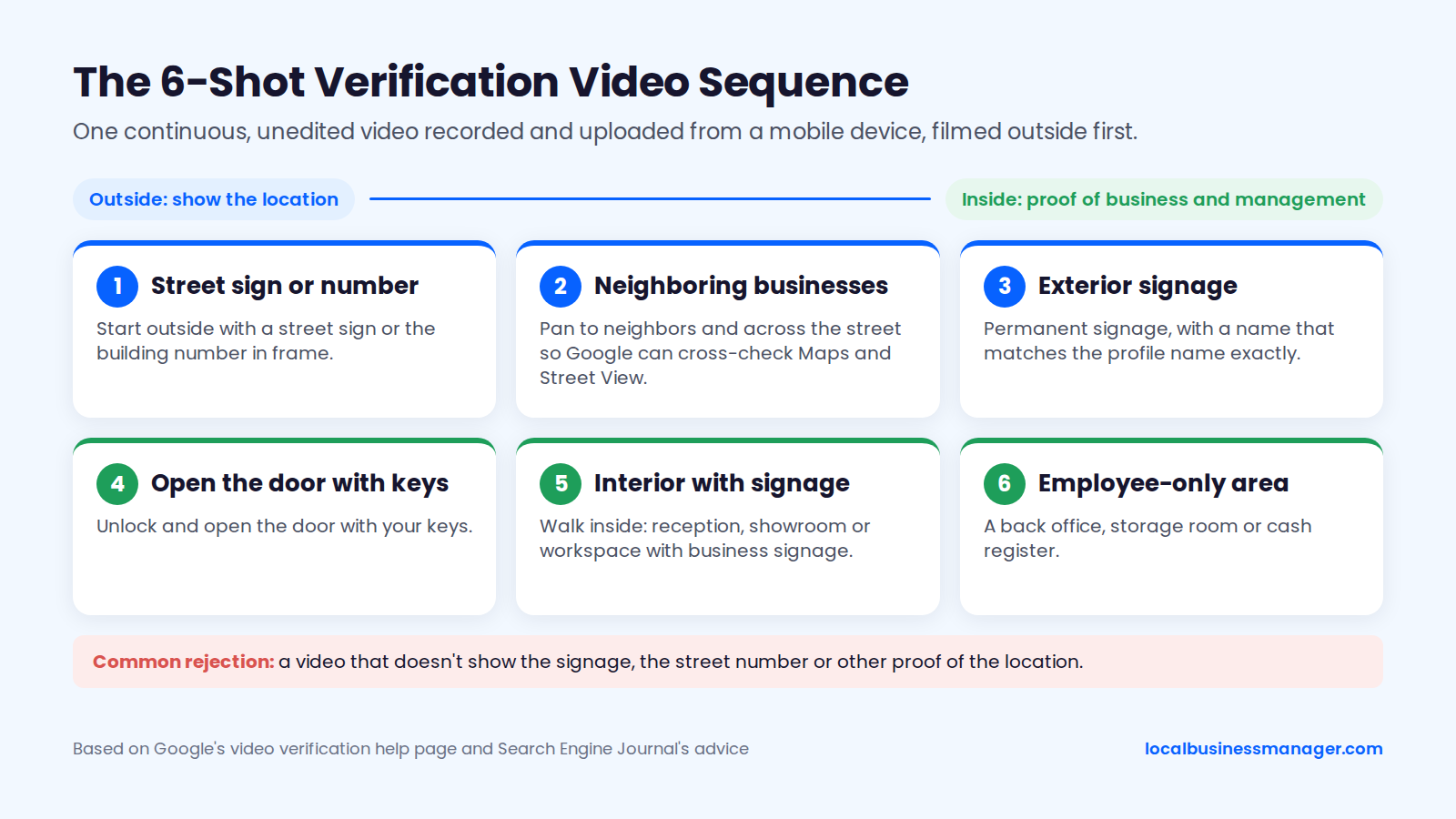
My clients record the video themselves, on site. The most common rejection I see is a video that doesn't show the signage, the street number or other proof of the location. Google's page doesn't address offices in multi-tenant buildings with only a lobby directory, so show the strongest permanent signage you have.
Why Can't I Change My Business Name or Address on Google?
A name or address change usually fails because Google couldn't confirm it was accurate, which is what Google's help page says Not approved means. The fix is to make the real world prove the change, then appeal through the right channel with the right documents.
Common Reasons Edits Are Rejected
The table covers 7 symptoms after a name or address change, from least to most serious; in 5 of them, the fix comes down to proving the new details with the website, signage or documents. Sources as of November 2026: Google's help pages, Sterling Sky and Local Search Forum. A mismatch between the profile and the website, signage or other listings is a cause practitioners observe, not one Google lists.
Symptom | Likely cause | Fix |
|---|---|---|
Edit stays Pending | Google is still reviewing the edit | Wait for the review to finish |
Verification requested | A move requires it; a name change might | Complete the method Google assigns |
Name edit Not approved | New name not on website or signage yet | Update website and signage, then appeal |
Address edit Not approved | Address unconfirmed or not a real staffed location | Appeal with lease or utility bill |
Name changed back by Google | New name not indexed on the website | Reject the update; fix the website first |
Video rejected (Review issues) | Missing signage, street number or proof of management | Record again using the shot list |
Profile suspended after the edit | Google publishes no cause for edit-related suspensions | Appeal in Google's appeals tool with documents |
In my experience, name edits and address edits cause more suspensions than any other change. Google's help pages don't say that edits cause suspensions, and no practitioner source publishes a rate.
What Proof to Have Ready
Google's help page on fixing suspended or disabled profiles lists business registration, licenses, tax certificates and utility bills as supporting evidence. Have these ready before you edit, all showing the new name or address:
- The DBA certificate or business registration in the new name.
- A business license and tax certificate.
- A utility bill at the new address.
- A lease agreement for the new location.
- Photos of the office with the new permanent signage.
- The website pages that show the new name and address.
For a suspension, I usually need documents like the DBA, the lease agreement and photos of the office with signage, or a video recording the storefront and office. When a suspension appeal was denied, what worked for me was a second review with new evidence. Our guide to Google Business Profile suspension and reinstatement covers the full appeal.
A rejected edit follows a different rule. Google's appeals help page says an appeal of a rejected edit can be submitted only once, so attach everything the first time. Google's Business Profile Community suspension FAQ also advises documenting any address change thoroughly and providing those records during reinstatement.
How to Contact Official Google Support
Google's help page on appeals sends rejected edits through 2 routes. Businesses in the UK and the EEA use the Appeals tool. Everywhere else, including the US, uses the Contact Us form ("Appeal rejected business information edits"). Practitioners on Local Search Forum reported in April 2026 that the US route is inconsistent: some were sent to the Appeals tool, some to an Edit Rejection Appeal Form, and one found nothing to appeal in the tool.
Use only these official channels:
- Google's Business Profile contact form and the support options inside your Business Profile.
- The Business Profile Help Center.
- The Business Profile Help Community.
- The appeals tool for suspensions. Sterling Sky reports it has been the only way to get a suspended profile reinstated since February 2024.
Never give anyone account access through a "support number". The phone FAQ below explains why.
Will You Lose Reviews or Rankings After the Change?
You keep your reviews when you edit the existing profile, and rankings can move in either direction, mainly after a move. No controlled data shows how far rankings move or for how long.
Reviews
An address edit keeps the reviews. In her Search Engine Land guide to moving offices (first published in 2015, since updated), Joy Hawkins notes that Google keeps the same profile and its reviews when a business edits its address. A name edit also changes the existing profile rather than creating a new one, so the reviews stay attached to it, although Google's help pages don't state this directly. A new profile starts with no reviews unless Google support transfers or merges them, as Sterling Sky describes for service-area moves and duplicates.
Local Services Ads are the documented exception. Sterling Sky's rebranding checklist warns that a rebrand can unlink LSA reviews, and relinking them needs proof such as a DBA. A suspension is a different risk, and in my experience it hasn't cost reviews: I've never lost reviews in a reinstatement, and rankings recovered when we acted fast.
Rankings After a Rename
Google lists relevance, distance and prominence as its 3 local ranking factors on its "How to improve your local ranking" help page. Google doesn't say how a rename is weighed; relevance is the factor a name change could plausibly affect.
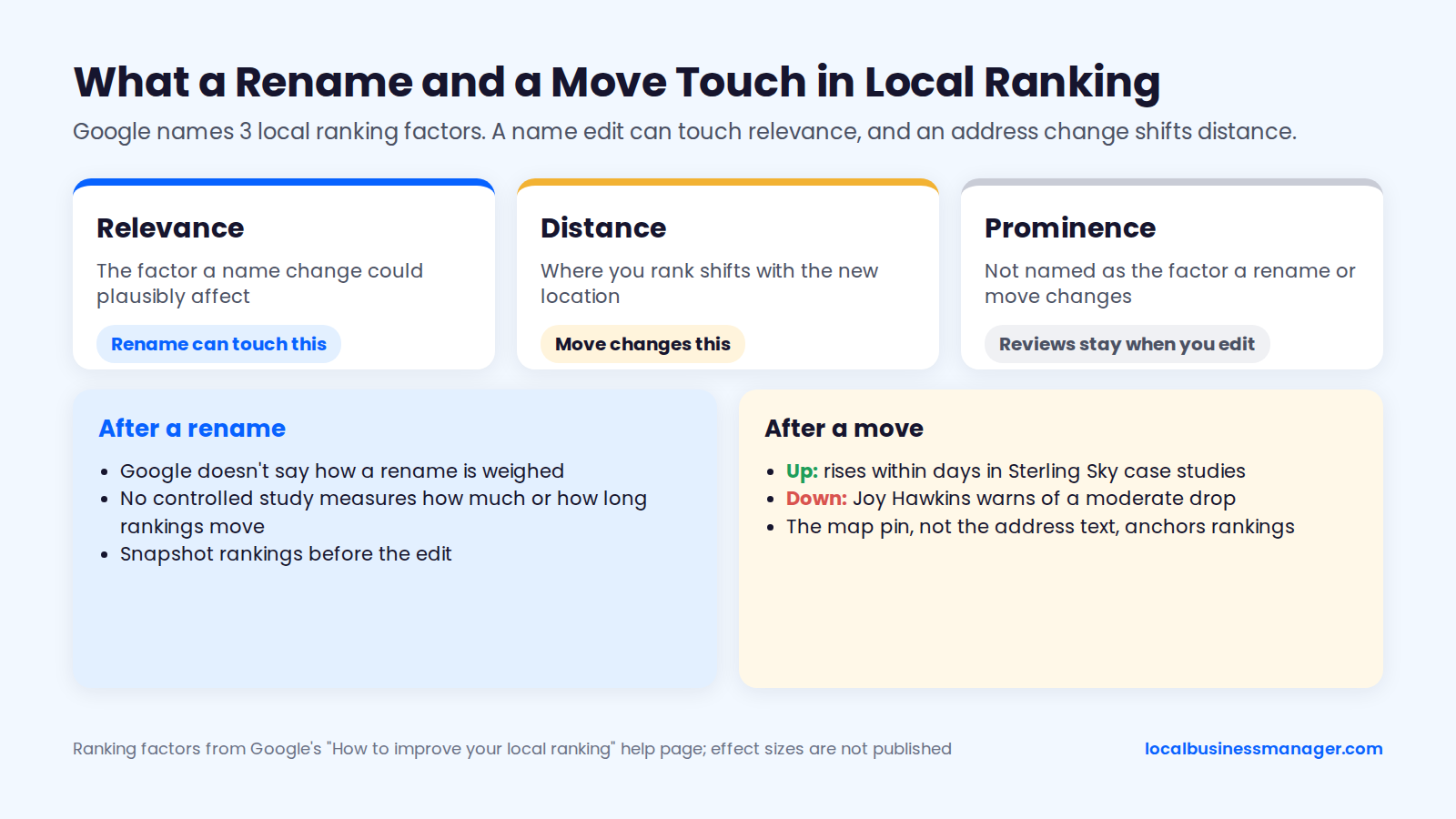
No controlled study measures how much rankings move, or for how long, after a name change alone. Vendor blogs that promise a "short dip" offer no data. Sterling Sky lists an edited business name as one of the things to check after a ranking drop, which is a good reason to snapshot rankings before the edit.
In my experience, a single high-impact fix can show ranking gains within about a month, for example getting a keyword into the profile name through a DBA. Once the basics are done, further gains (from a strong review push, for example) come gradually, and the suspension risk covered in the naming section comes with the keyword route.
Rankings After a Move
A move changes the distance factor, so where you rank shifts with the new location. The published evidence points both ways:
- Up: Sterling Sky's case studies show rankings rising within days of the address update, in one case the day after. A home-services business moved about half a mile closer to the city center, and a lawyer moved out of a building shared with competing attorneys.
- Down: Joy Hawkins' Search Engine Land guide warns of a moderate ranking drop after a move. She notes the drop is less severe now that Google keeps the same profile.
A move to another city most likely shifts the point rankings are measured from, but the shift isn't always clean. A 2026 Search Engine Land piece reports that the map pin coordinate, not the address text, anchors local rankings, and that some profiles stay anchored to their original location after address updates; the 2026 Local Search Ranking Factors survey describes rankings returning to the original verified address after an address was removed. No published source gives typical distances or durations, or compares a short move with a move to another city.
What to Update Outside Google, and in What Order?
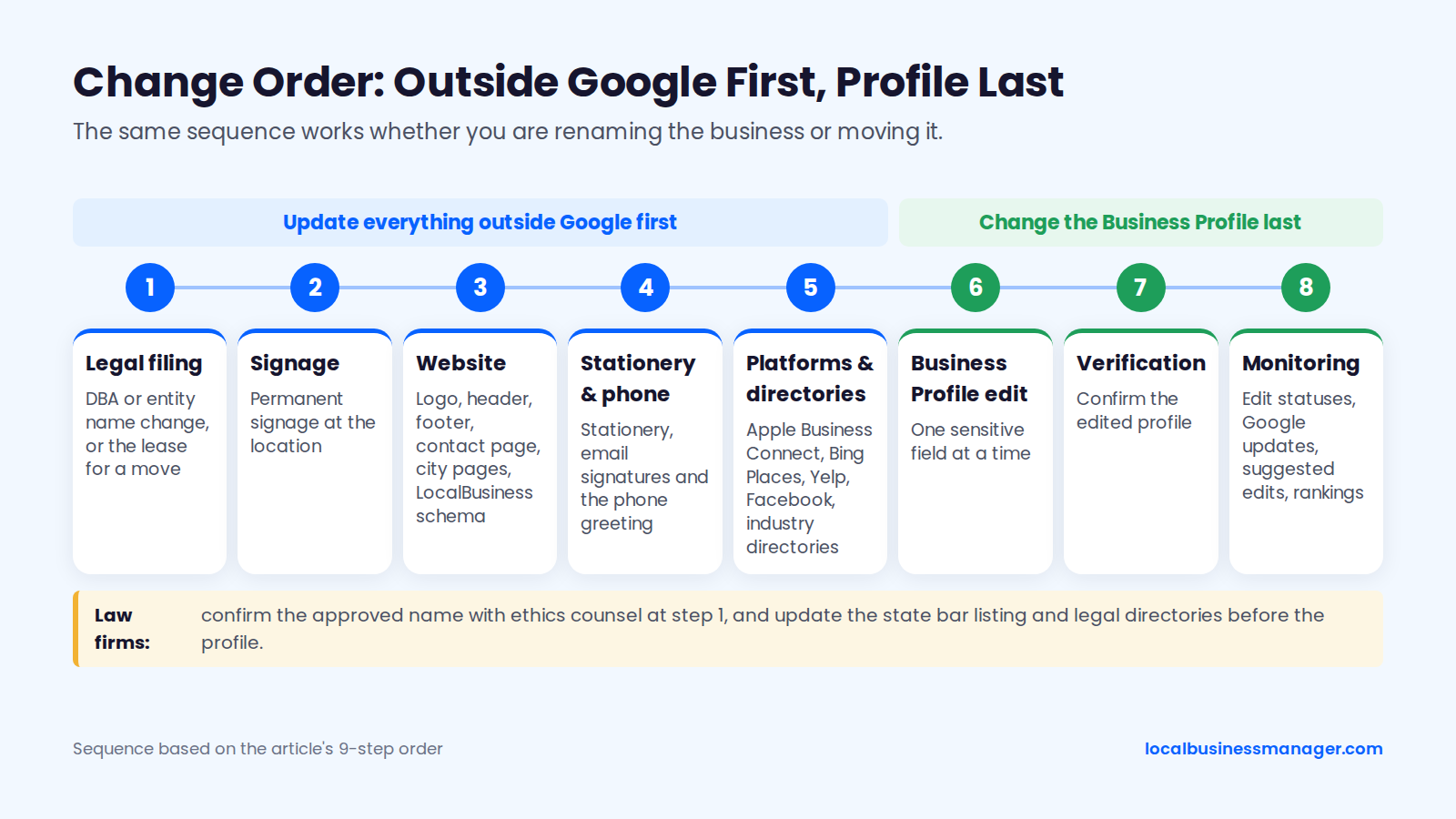
Update everything outside Google first and change the Business Profile last. This 9-step order puts the legal filing and signage ahead of the website-first order in Sterling Sky's rebranding checklist, and one Local Search Forum practitioner also advises updating the core citations before the profile name, to play it safe. The order works for a rename or a move:
- File the legal change first: the DBA or entity name change, or the lease for a move. Law firms confirm the approved name with ethics counsel.
- Put up permanent signage at the location.
- Update the website: logo and header, footer, contact page, each office's city page, and LocalBusiness schema with the new name and address.
- Update stationery, email signatures and the phone greeting.
- Law firms update the state bar website listing.
- Update the major platforms: Apple Business Connect, Bing Places, Yelp and Facebook.
- Update industry directories, and legal directories for law firms.
- Edit the Google Business Profile, one sensitive field at a time (the FAQ below covers spacing).
- Monitor edit statuses, Google updates, suggested edits and rankings.
In the 2 moving case studies above, rankings followed the new address even though citations stayed unchanged for 3 months. After the change, a citation audit catches the listings that still carry the old details.
How Do You Stop Google or Users From Changing It Back?
The way to keep a new name or address in place is to catch and reject wrong changes quickly, because Google updates can't be blocked entirely. Google may change a profile when other sources report its details are wrong, and it can publish some user-suggested edits without the owner's approval.
Where Google Updates and Suggested Edits Show Up
Google's help page on Google updates says Google may update a profile when sources report its information is incorrect or outdated. The same page warns that not every Google update can be managed through the Business Profile. After a rename or move, changes reach the profile in 3 ways:
- Google updates: the owner gets a notification and an alert in the Edit profile section, where wrong changes can be reviewed and rejected.
- User-suggested edits: Google may send an email or in-product notification. If the owner doesn't respond within 4 days, Google may publish the edit when public information such as the website supports it. Search Engine Roundtable reported the 4-day wording on September 23, 2026.
- Edits applied without review: Google says it may apply some user edits with no prior review. Older guides that claim suggested edits never go live without the owner's approval are wrong.
The rebranding checklist cited earlier warns that a rebrand not made official everywhere will likely be reverted again and again.
A Monitoring Routine That Catches Reverts
Google doesn't recommend how often to check a profile. My routine is weekly: I check the name, address, attributes, services and other fields for edits, whether Google or a third party made them, and I check rankings monthly. Because of the 4-day window on suggested edits, some practitioners check notifications daily. Build the routine from these 4 habits:
- Route Google's notification emails to an inbox someone reads every day.
- Each week, compare every field in Edit profile against your stored record of the profile.
- Accept or reject every suggested edit as soon as it arrives.
- Check rankings more often only in the weeks right after an edit, to see whether the edit had an effect.
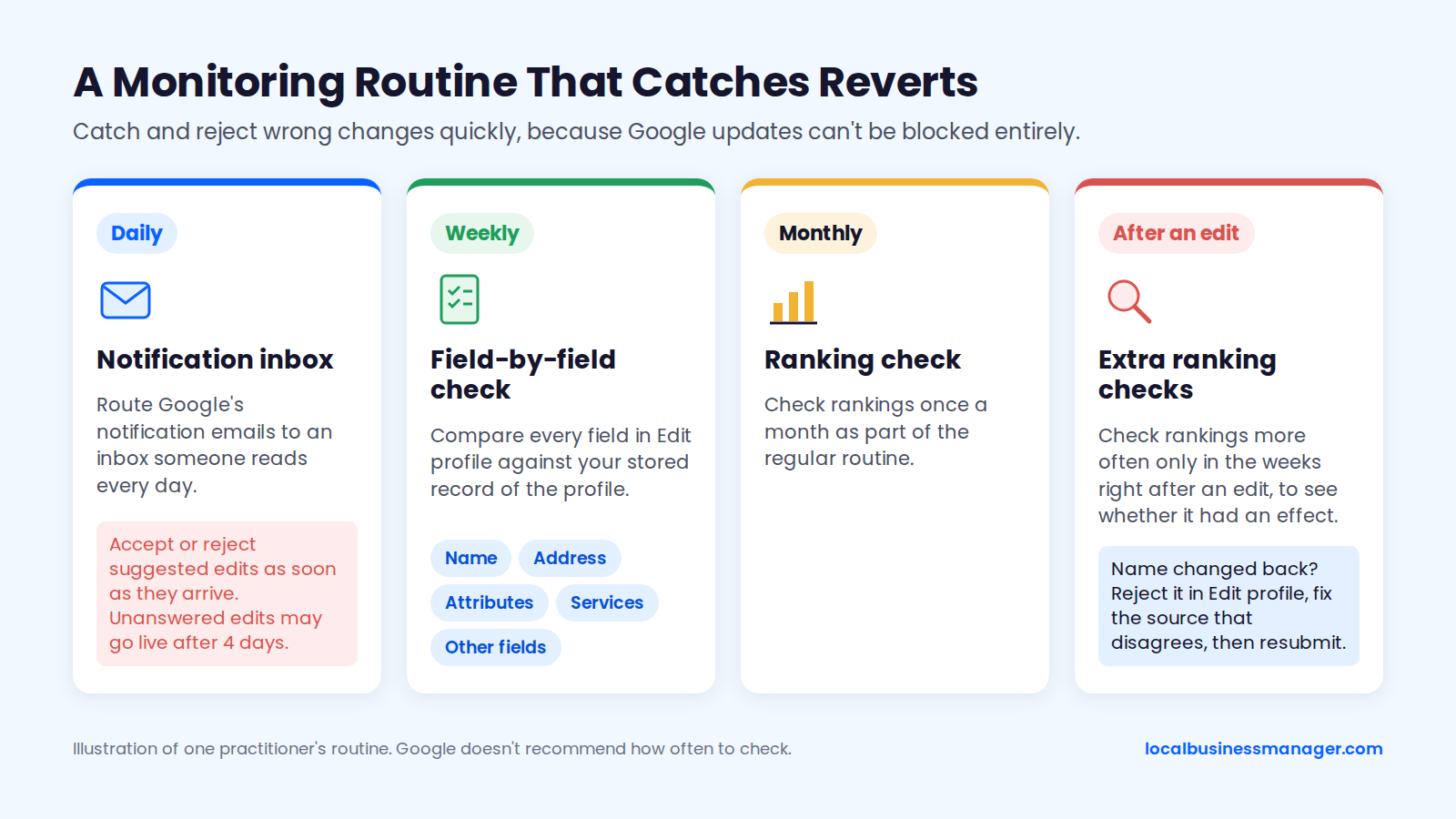
If Google changes the name back, reject the update in Edit profile. Then fix whatever source disagrees with you (usually the website) before you resubmit.
Agency Checklist: Running a Client Rebrand or Move
An agency rebrand or move has 3 phases. Get access and evidence in place before the change, set the client's expectations in writing, and watch the profile closely after the edit. Each phase below works with any tool, including a spreadsheet.
Before the Change
Run these 8 checks before anyone edits the profile:
- The client is primary owner and the agency is a manager through your agency organization account. If not, fix that first.
- The profile is verified. Google says some businesses might need to verify before they can change any info.
- Rankings are snapshotted from a grid of points across the service area, not from one address.
- Calls, direction requests and website clicks are recorded for the report.
- The documents are collected: DBA or registration, license, lease, utility bill, signage photos.
- Law firms have confirmed the approved name with their ethics counsel.
- The edit order and dates are planned.
- Multi-location clients have a list of every location and city page, with each location's edit planned in Business Profile Manager.
Client Email Script
This template sets timing and ranking expectations using only Google's published figures:
Subject: Your new [name / address] on Google: what to expect
>
Hi [Client name],
>
We're ready to move your Google Business Profile to [new name / new address]. Here's the plan:
>
1. Before we touch Google, your [signage / website / DBA] needs to show the new [name / address]. We'll update your website and main listings first and change the profile last.
2. Google reviews every change. Google says that usually takes about 10 minutes and can take up to 30 days, and some changes are rejected the first time. If that happens, we'll appeal with your documents.
3. Google may ask you to verify again. If it asks for a video of the location, you'll record it on site, and we'll send you a shot list.
4. Rankings can move. Map rankings depend partly on distance, so [a move changes where you show up / a new name can shift rankings], in either direction. We've taken a snapshot today so we can compare.
5. From you, we need [DBA certificate / lease / utility bill / photos of the new signage]. Please don't edit the profile yourself while the change is in progress, and especially not during verification.
>
We'll confirm when Google accepts the change, and your monthly report will show calls and rankings against today's snapshot.
>
Thanks,
[Your name]
After the Change
Track these 6 items until the change is stable:
- Check the edit status until it shows Accepted or Not approved.
- If Google requests verification, send the client the video shot list the same day.
- Review Google updates and suggested edits at least weekly, and answer every notification as it arrives.
- Update the remaining directories and run a citation audit.
- Compare rankings with the pre-change snapshot, more often in the first weeks, then monthly.
- Lead the monthly report with calls and rankings, which is how I report every month.
Frequently Asked Questions
Can I change my business name and address at the same time?
Change them one at a time: after a name, address or category edit, I wait a day or two before making the next sensitive edit. Ciphers Digital wrote in 2026 that name, address, primary category and phone changes can each trigger re-verification, which can temporarily pull a listing from Maps, so stacking them raises the stakes on a single review. That spacing is my own practice, not a figure Google publishes.
How do I change my business name if I don't have access to the profile?
Ask the current primary owner to add you as a manager or transfer primary ownership to you; only the primary owner can transfer it. Google's Business Profile Community guide says new owners or managers must wait 7 days before they can receive primary ownership. When a former agency or ex-employee holds the profile, recovery depends on the person: in my experience it's sometimes immediate and sometimes takes a week or two. Never pay a third-party "support number" to get access.
Is there a Google Business Profile phone number I can call?
No: Google Business Profile has no direct phone support line, so any page listing a GBP support number belongs to a third party. Google's Business Profile Community guide on contacting support and Sterling Sky both point owners to the contact form at support.google.com/business/gethelp, the Help Center and the Help Community. Google does publish +1-650-206-5555, but only for opting out of its automated verification calls, not for support.
How do I suggest a name or address change for a business I don't own?
Open the business on Google Maps or Search and use Suggest an edit to propose the correct name or address. Google may ask the owner to review the suggestion, and in some cases it publishes suggested edits without the owner's answer. The section on stopping Google or users from changing it back explains when. If you work for the business, ask the owner for manager access instead, since the owner can reject a suggested edit.
Before You Click Save
Make the profile edit the last step, after the new signage is up and the website shows the new name or address. If you run these changes for clients, join Local Business Manager early access.