Service Area Business SEO: How to Rank Without a Storefront

If a plumber client has asked why they show up in the map pack at home but vanish 30 minutes away, practitioner tests point to one answer: the address Google verified. A service-area business ranks in the map pack mainly near that verified address, even when it's hidden. Local SEO for service-area businesses therefore means setting the profile up exactly as Google requires, then winning farther towns through city pages, reviews and, where it pays, ads.
You'll get a setup checklist, a script for the "why don't we rank in [town]?" call, a city page template, a schema example, and citation, tracking and suspension checklists.
What Counts as a Service-Area Business (and What Doesn't)?
A service-area business (SAB) is a business that serves customers at the customer's location and doesn't serve them at its own address. Google recognizes 3 profile setups: storefront, service-area and hybrid. Some businesses don't qualify for a profile at all, so check eligibility before anything else.
Pure SAB vs Hybrid vs Storefront
The setup depends on one question: do customers come to a staffed location during business hours? Google's guidelines for representing your business on Google say a service-area business should hide its address and keep one profile for its central office, with a designated service area. A hybrid business can show its storefront address and also set a service area.
Only 2 of the 5 rows below show an address to customers, and both need a location where customers are actually served. The table summarizes Google's Business Profile guidelines and eligibility rules as of November 2026, sorted from the most visible address down to no profile at all.
Setup | Who it fits | Address on the profile | Service areas | Example |
|---|---|---|---|---|
Storefront | Customers visit a staffed location | Shown | Not needed | An auto repair shop |
Hybrid | Customers visit a staffed location, and the business also travels to them | Shown | Up to 20 | An appliance store that also does in-home repair |
Service-area business | The business travels to customers and serves no one at its address | Hidden | Up to 20 | A plumber, a mobile groomer, a house cleaner |
Ineligible address | Only a rented mailing address, or a virtual office nobody staffs | No profile | Not applicable | A business run from a rented mailbox |
Online-only | Never meets customers in person | No profile | Not applicable | An online tutor who works only remotely |
Businesses Google Doesn't Allow a Profile For
Google doesn't allow a Business Profile for an online-only business, or for an address the business doesn't actually operate from. Google's "Get started with Google Business Profile" help page says a business with no physical location customers can visit, and that doesn't visit customers in person, isn't eligible. The guidelines also rule out 2 kinds of address:
- A rented mailing address the business doesn't operate from. It is ineligible.
- A virtual office. In Google's words, "Service-area businesses can't list a 'virtual' office unless that office is staffed during business hours."
Hiding the address doesn't get around either rule. Sterling Sky adds that the staff must be the business's own: a virtual-office receptionist doesn't count.
Several ranking guides list online-only tutors, accountants and web designers as SABs. Under Google's rule, a business that works with customers only remotely isn't eligible for any setup. Serving customers across the whole country doesn't make a business an SAB either, because the service area has its own distance limit, covered below.
How Do You Set Up a Google Business Profile for a Service-Area Business?
Set up a service-area profile in 3 moves: hide the address, add up to 20 service areas within about 2 hours' drive, and verify with the method Google offers, which for many SABs is a video. The checklist gives the order; the sections after it cover where SAB setups usually go wrong.
SAB Profile Setup Checklist
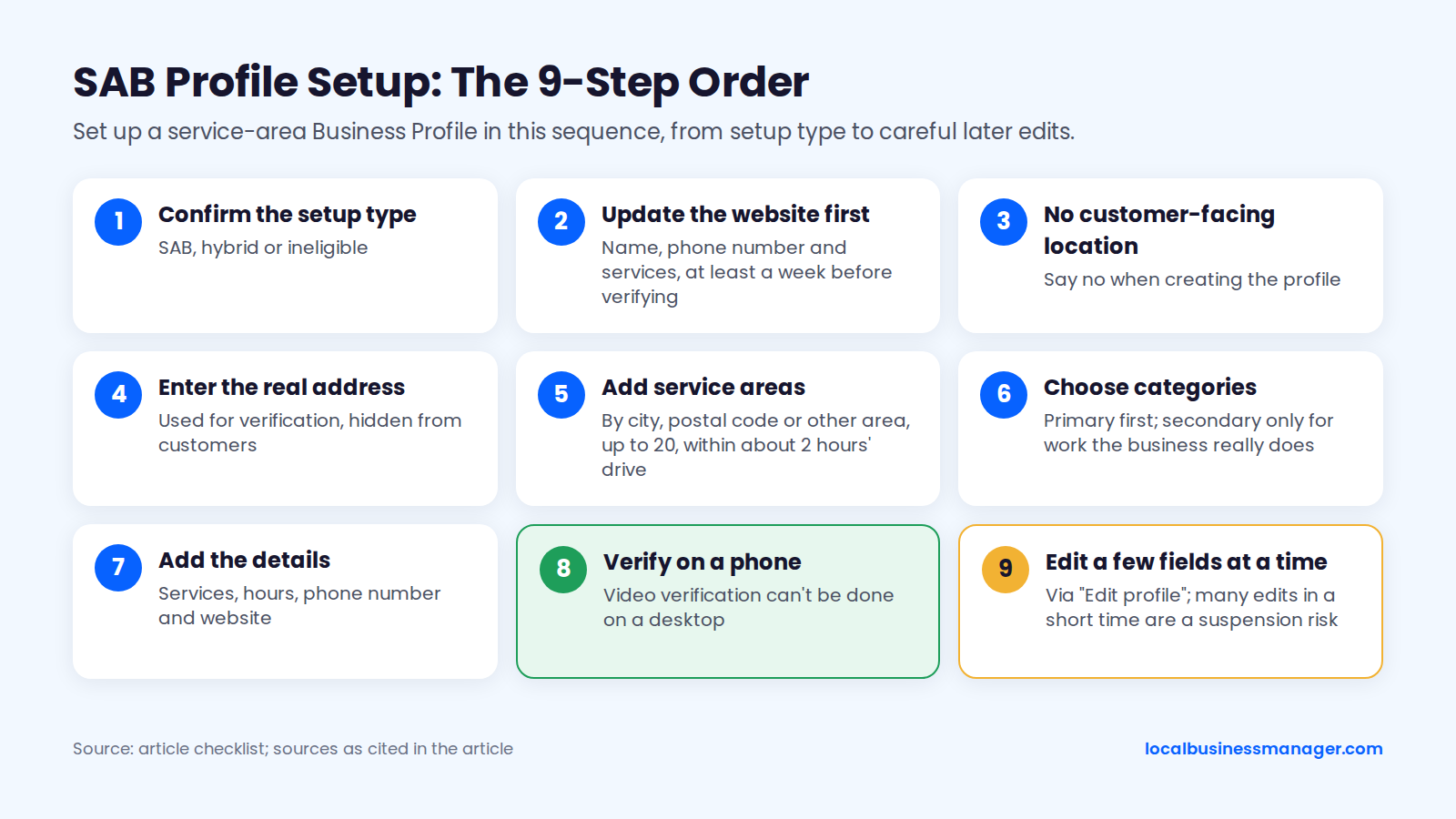
Work through a new Google Business Profile (formerly Google My Business) in this order:
- Confirm the setup type with the table above: SAB, hybrid or ineligible.
- Put the business name, phone number and services on the website first. Search Engine Land's 2025 verification guide suggests doing this at least a week before verifying.
- When creating the profile, say no to a customer-facing location.
- Enter the real address the business operates from. It's used for verification and stays hidden from customers.
- Add service areas by city, postal code or another type of area, within the limits covered below.
- Choose the primary category, then secondary categories only for work the business really does.
- Add services, hours, the phone number and the website.
- Verify on a phone. A May 2025 guide in the Google Business Profile Community notes that video verification can't be done on a desktop.
- Make later changes from the profile in Google Search or Maps through "Edit profile", a few at a time. The Google Business Profile Community's 2024 FAQ on suspended profiles lists many edits in a short time as a suspension risk.
Hide the Address
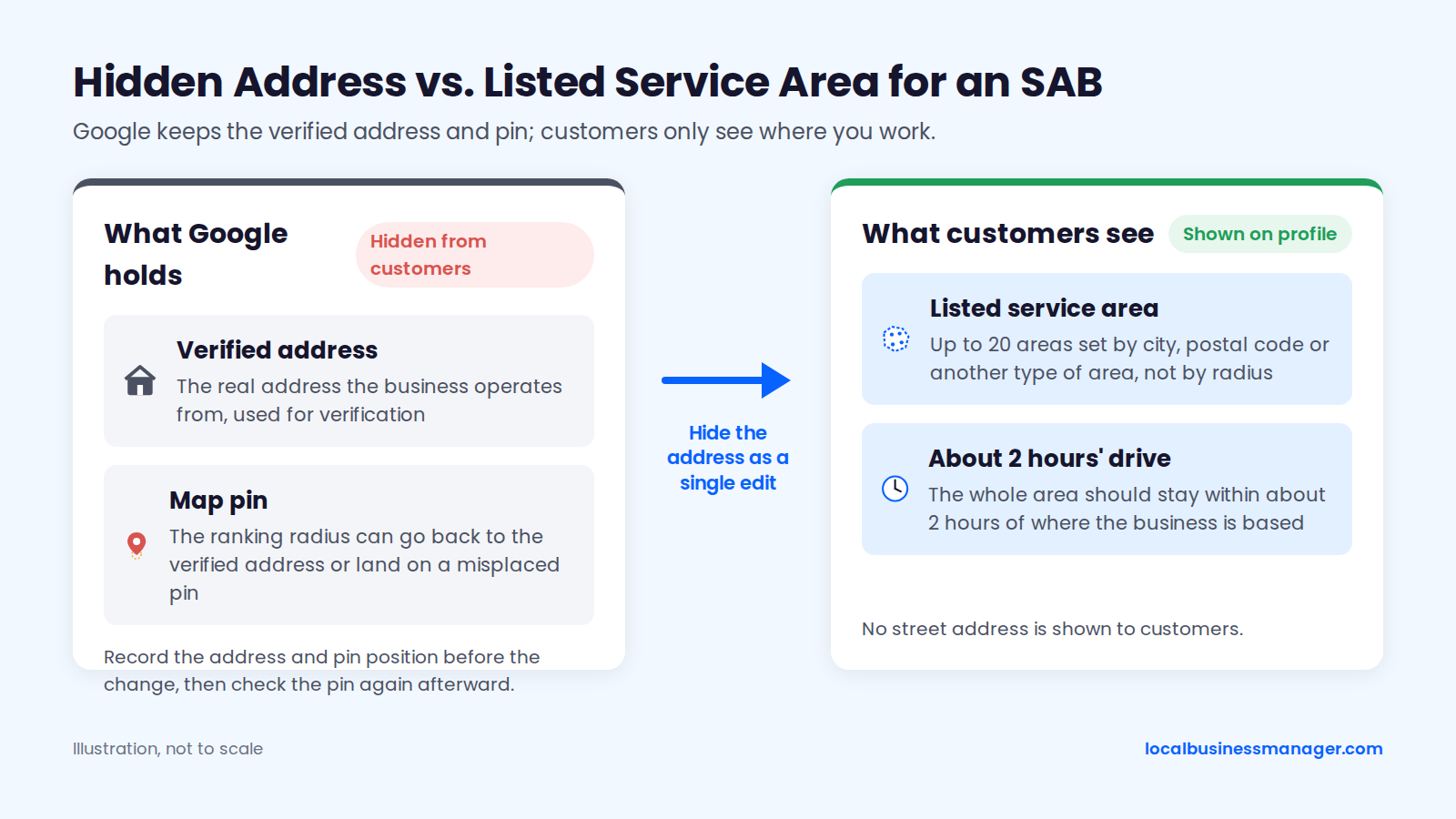
Google's guidelines say a service-area business should hide its address from customers. Some guides suggest leaving the address visible and marking the business closed to the public instead, but that isn't what Google's guidelines ask SABs to do.
Hiding the address carries a documented ranking risk. In a Sterling Sky test, rankings and calls dropped after an address was hidden and recovered when it was shown again. A local SEO software company's 2025 explanation points to 2 causes:
- The displayed address differs from the verified one. The ranking radius goes back to the originally verified address.
- A business that never moved hides its address. Its ranking radius can land on a randomly placed map pin.
Hide the address anyway, but make the switch carefully:
- Record the verified address and pin position before the change.
- Hide the address as a single edit, not bundled with other changes.
- Check the pin again afterward and watch rankings closely in the following weeks.
Add Service Areas: The 20-Area Limit and the 2-Hour Guideline
A Business Profile can list up to 20 service areas, set by city, postal code or another type of area rather than by radius. Google's official help page on managing your service area says the whole area should stay within about 2 hours' drive of where the business is based. That page describes service areas as something that "helps people find your Business Profile" and shows customers where you work, and it says nothing explicit about ranking.
Advice to set a service-area "radius" is out of date. Google's help page says a radius can't be set anymore, and a profile that still has an old radius can't edit it and must replace it with cities, postal codes or other areas. A June 24, 2025 change, reported by PPC Land, also banned whole states and countries as service areas.
Google documents no ranking difference between cities and postal codes. Pick whichever describes the real coverage more accurately:
- Cities suit a plumber who covers 2 counties and drives to a known list of towns.
- Postal codes suit a cleaner who works inside one large city.
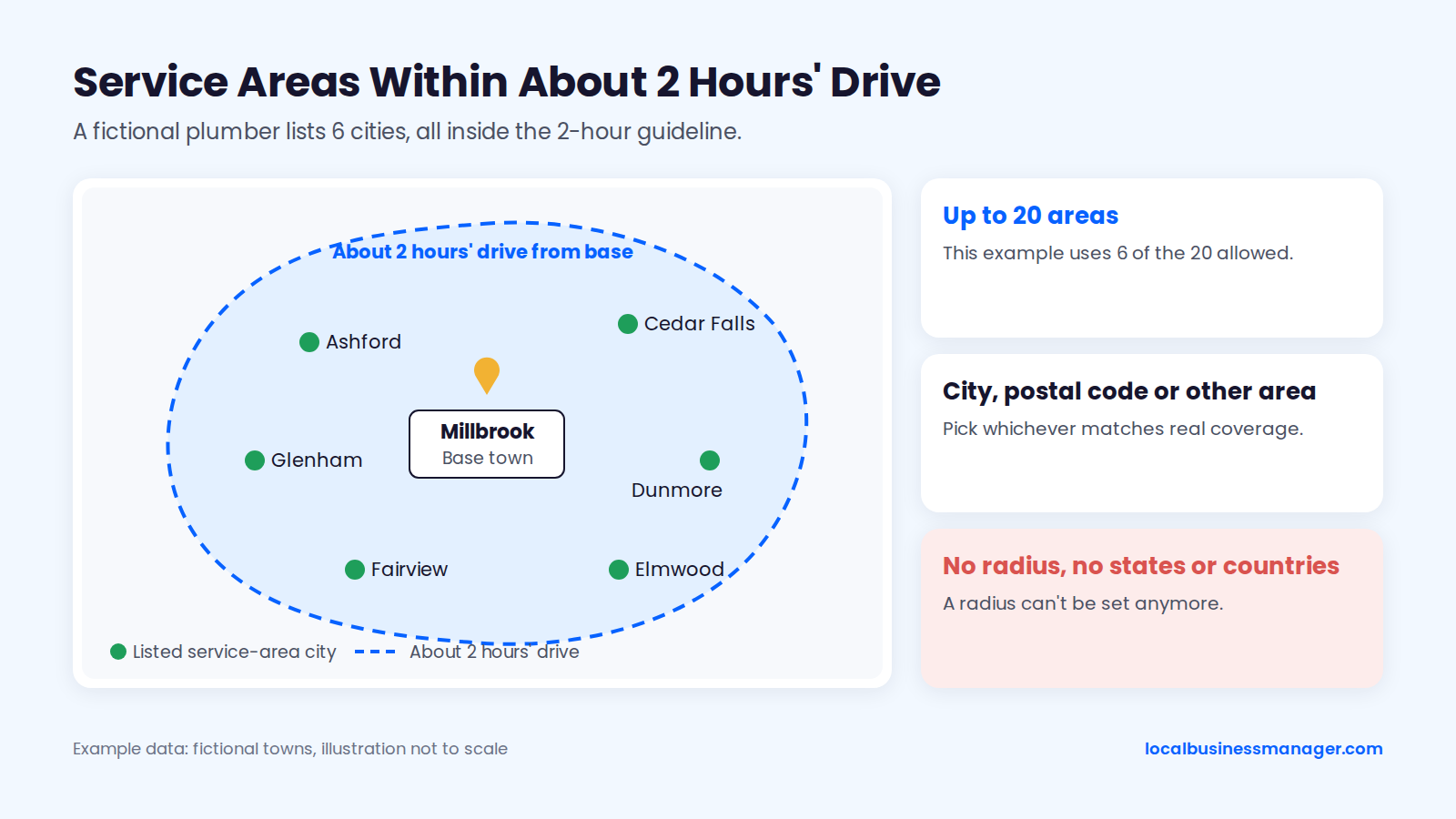
Example data.
How to Change or Remove Your Service Areas
Google's help page gives this path to add or edit service areas on a Business Profile:
- Open the Business Profile and select "Edit profile".
- Select "Location".
- Next to "Service area", select "Edit".
- Choose or enter the areas.
- Select "Save".
To remove an area, take it out under "Selected service areas" and save. To remove every service area, the business must be a storefront with an address on its profile, so an SAB always keeps at least one.
Google says approved service-area edits may take up to 48 hours to show. Make the change, then wait out that window before deciding something went wrong and editing again.
Google Business Profile Verification for SABs: What to Film
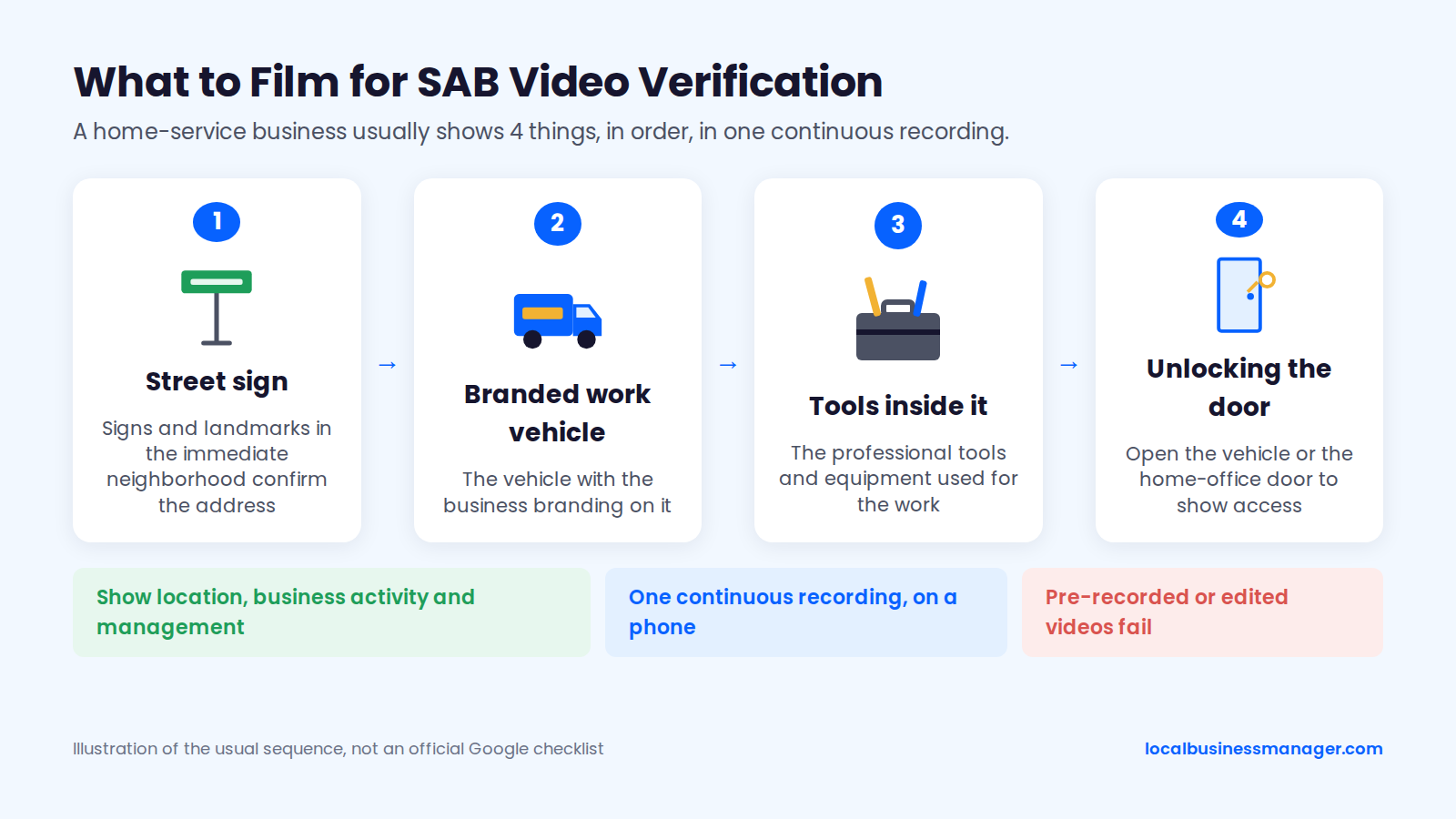
Google says video verification works for storefront, service-area and hybrid businesses, and the business type decides what the video has to show. For a home-based SAB, Google suggests filming landmarks and signs in the immediate neighborhood to confirm the address, plus the professional tools, equipment or products used for the work.
An August 2026 product expert guide in the Google Business Profile Community says the video should show the business's location, business activity and management in one continuous recording. The same guide adds that a home-based SAB doesn't need to look like a storefront, and that pre-recorded or edited videos fail.
Search Engine Land's 2025 guide describes the usual sequence for a home-service business, and a 2025 Local Search Forum thread adds the home-office version:
- Outside: park the work vehicle at home or at an intersection with visible street signs.
- The business name on the vehicle.
- The tools inside the vehicle.
- Proof of control: unlock and start the vehicle, or unlock the home-office door and show the business name on a business card or license.
Why SAB Video Verification Fails
Google publishes no pass or fail rates and often gives no reason for a rejection, so everything in this section comes from practitioner reports. These causes come up repeatedly:
- A visible home address with no signage. The profile is set to show the address, which pulls in storefront-style requirements. Local Search Forum users (2025) advise hiding the address before verifying.
- Overlapping service areas. In a January 2026 article, Sterling Sky called overlapping service areas the number one reason video verification fails for a second location, so keep each location's areas separate.
- A broken recording. The video is pre-recorded, edited, or stopped and restarted.
- Failed uploads or unexplained rejections. Sterling Sky's fallback is asking Google support for manual verification.
Sterling Sky also notes that switching a profile to SAB won't remove a video requirement Google has already set.
For agencies, the practical problem is that the client has to shoot the video. Send them the shot list before they open the verification flow, and have them rehearse it once without recording.
Is My Home Address Shown?
No: once the address is hidden, Google Search and Maps show the service area to customers instead of the street address. Google still holds the address for verification.
A home address can still leak through 2 other routes:
- A map embed on the website's contact page. It drops a pin on the house. Show the service area on the website instead.
- Directories that print whatever address you enter. The citations section below covers how to handle them.
A local SEO software company's 2024 guidance adds a caveat: a business address will probably reach the web through government business databases anyway. Treat hiding as a way to limit exposure, and tell home-based clients so plainly.
Do Service Areas Help You Rank in Those Towns?
Practitioner tests say the service areas on a profile change what customers see on the map and don't move map-pack rankings. Google hasn't confirmed or denied this. Map-pack reach stays tied to the verified location, so the work goes into relevance and prominence.
Why the Map Pack Favors the Hidden Verified Location
Google's tips to improve your local ranking name 3 factors: relevance, distance and prominence. Distance between the searcher and the business is the one factor nobody can change.
Practitioner tests show that for an SAB, distance is measured from the hidden verified address. Sterling Sky (Colan Nielsen) found that service areas don't currently affect local rankings for service-area businesses: ranking depends on the address the profile was verified at, just as it does for storefronts. Sterling Sky says it keeps tracking listings, including its own hidden-address profile, in case this changes.
A survey and a correlation study also put weight on the address:
- The 2026 Local Search Ranking Factors survey (published November 6, 2025), in which local SEO specialists score ranking factors, gives proximity of the address to the searcher a score of 225 and a physical address in the city of search a score of 213. Both are among its top local pack factors; the scores are expert ratings, not measured rankings.
- Sterling Sky's 2025 study of 8,186 businesses in 200 cities found that being a service-area business correlated negatively with ranking for "near me" searches.
Verified Location vs Service Areas vs Real Reach
Of the 3 things clients mix up, only the verified location anchors map-pack ranking, according to Sterling Sky's tests. The listed service areas are display only.
Item | What it is | Shown to customers | Moves map-pack ranking |
|---|---|---|---|
Verified location | The real address Google verified, hidden for an SAB | No | Yes, it's the anchor (practitioner tests) |
Listed service areas | Up to 20 cities, postal codes or other areas | Yes | No (practitioner tests) |
Realistic map-pack reach | The area where the profile actually appears in the 3-pack | Not applicable | Set by distance from the verified location, relevance and prominence |
The map below is a service area business SEO example: a fictional plumber with 6 listed towns, most of them outside the zone where the profile actually shows in the 3-pack. Pull it up when a client asks why a town on their list never shows them.
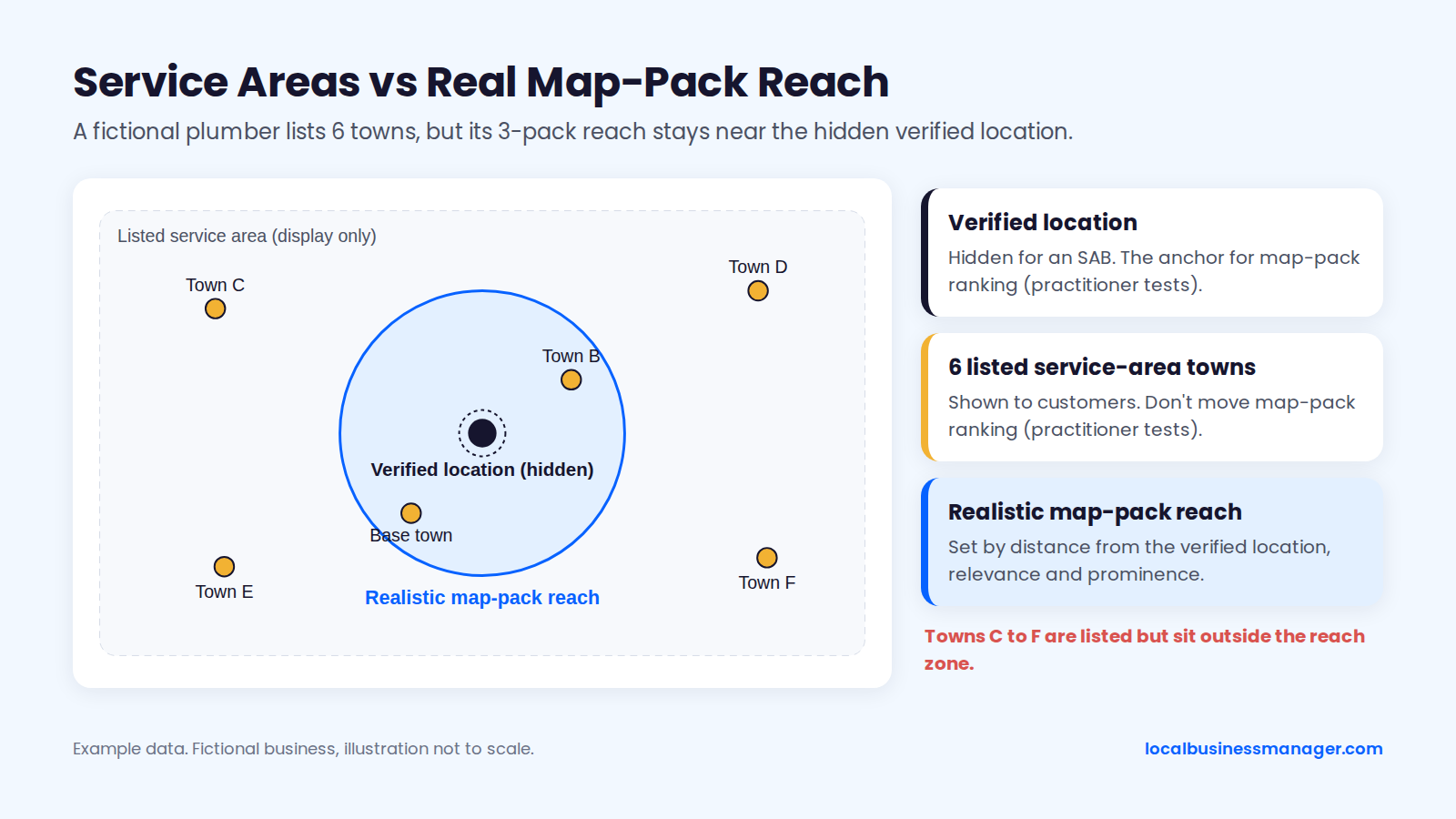
Example data.
What You Can Still Move: Relevance and Prominence
Relevance and prominence are the 2 Google ranking factors an agency can still change. Agencies work on relevance through:
- the primary category
- the services listed on the profile
- the business name (see the DBA route below)
- website pages about the work and the towns
For most SABs, prominence work means reviews, links and mentions. For trades, local link sources include sponsorships, supplier "find an installer" pages and trade association memberships; where a link relates to one town, point it at that town's city page.
As former Head of SEO at a legal-marketing agency, I ranked and served close to one hundred US personal-injury law firms, and at agencies I worked for I also ranked pages for most of the common home-service trades. The firms that missed the 3-pack most often had an unoptimized business name and too few new reviews. In my view local SEO works the same way in every niche, so check both on an SAB.
Script: Explaining This to a Client
Use these lines when a client asks, "Why don't we rank in [town]?" Swap in the real towns and distances.
- "Google ranks map results on 3 things it names publicly: how relevant you are, how far you are from the person searching, and how prominent your business is."
- "Your profile is anchored to your verified address in [base town], even though customers can't see it. [Town] is [X] miles from there, so searchers in [town] see businesses much closer to them first."
- "The towns in your service area tell customers where you work. Tests by local SEO agencies show they don't change where you rank."
- "What we can change is relevance and prominence: your category, your services, your reviews and your website."
- "To win [town], we'd build a page about jobs you've actually done there and ask every customer there for a review. If you want leads sooner, we'd run ads aimed at [town]."
- "A real, staffed office in [town] is the only way to add a second map-pack anchor there."
How Can a Service-Area Business Reach Towns Farther From Its Base?
A service-area business reaches farther towns through 4 compliant routes: organic city pages, a real staffed second location, Local Services Ads and Google Ads. No Google source or published test gives a rule for choosing between them. Pick by what the business can prove and what it can afford.
Comparing the 4 Compliant Options
A staffed second location is the only route that adds a second map-pack anchor. The table draws on Google's Business Profile guidelines, Google's Local Services Ads help and the spam policies, as of November 2026, sorted by how directly each option affects the map pack.
Option | What it requires | Effort | When results can start | Main risk |
|---|---|---|---|---|
Staffed second location | An office in the area, staffed during business hours | High | After the new profile is verified | Suspension if it isn't really staffed |
Organic city pages | Real jobs, photos and reviews from the town | Medium | Gradual; no published benchmark | Doorway or thin-content treatment |
Local Services Ads | The town's county, city or zip code added as a service area | Medium | Once the ads are live | Visibility still favors closer businesses |
Google Ads search campaigns | A campaign aimed at the town | Medium | Once the ads are live | Leads stop when spending stops |
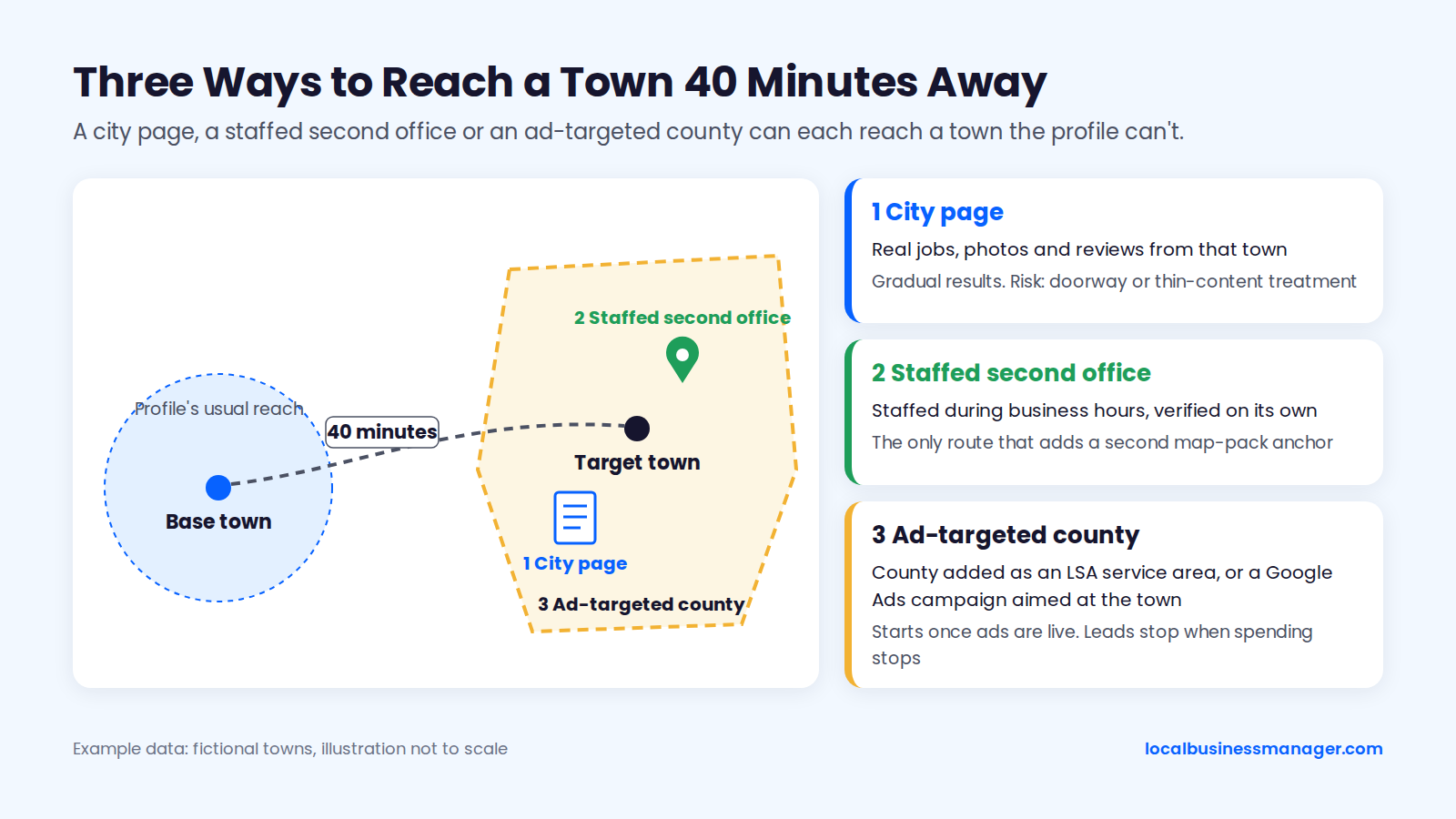
Example data.
Organic City Pages
Organic results don't require a local address, so a city page can rank in a farther town's organic results even where the profile can't reach that town's map pack. Google's spam policy doesn't ban city pages; it targets pages built only to catch searches, such as near-identical pages for every town.
A city page works when it carries 2 kinds of proof that exist only for that town:
- Real work: jobs done there and photos from those jobs.
- Real customers: reviews from people who live there.
A page that could be copied to another town by changing the name is the kind Google's doorway policy describes. The city pages section below covers how to choose towns, what goes on each page and how to stay out of doorway territory.
A Real Second Base: When a Second Profile Is Legitimate
A second profile is legitimate only when the business has a real office in the area, staffed during business hours. Google's guidelines rule out virtual offices that aren't staffed and mailing addresses the business doesn't operate from, so a second profile in a town 40+ minutes away needs real staff there during the listed hours. The second location also has to pass verification on its own, so set it up with the checklist above.
In my practice, each office's profile links to its own dedicated city page, and that page carries the local details for that office. Name and address edits cause the most suspensions I've seen, which is one more reason not to "move" an existing profile's address to chase a town.
Local Services Ads and Google Ads
Local Services Ads charge per lead. Google lists 5 factors behind LSA visibility:
- proximity to the customer
- reviews
- responsiveness
- an up-to-date Business Profile
- budget
Google also says closer businesses are more likely to be shown, so LSA still favors businesses near the searcher. LSA service areas are set by adding counties, cities or zip codes under "Include these service areas" in Google's Local Services settings. Google doesn't say whether the 2-hour guideline for Business Profiles also applies to LSA service areas.
For a town the profile can't reach, LSA or a Google Ads search campaign aimed at that town buys visibility now, while city pages and reviews build it over time.
What Never to Do: Virtual Offices, PO Boxes, Coworking Desks
Never list an address where the business doesn't actually serve customers or keep staff during business hours. Product Expert Claudia Tomina's 2026 suspension guide in the Google Business Profile Community lists virtual-office and P.O. box addresses among the common triggers.
Each shortcut has a compliant alternative:
- Virtual office in the target town: use a city page plus ads aimed at that town.
- Coworking desk nobody staffs: it fails the same staffing test as a virtual office. Open a real office or skip the profile.
- P.O. box or mailing address: use the real base address, hidden.
- Extra profile for a town without a staffed office: use a city page with real jobs, photos and reviews from that town.
How Do You Build City Pages That Aren't Doorway Pages?
Build city pages only for towns the business really serves. Fill each one with proof that exists only for that town, and link the pages into the site's structure. Google's spam policies set no page limit; they target near-identical pages made to catch searches.
What Google Calls a Doorway Page
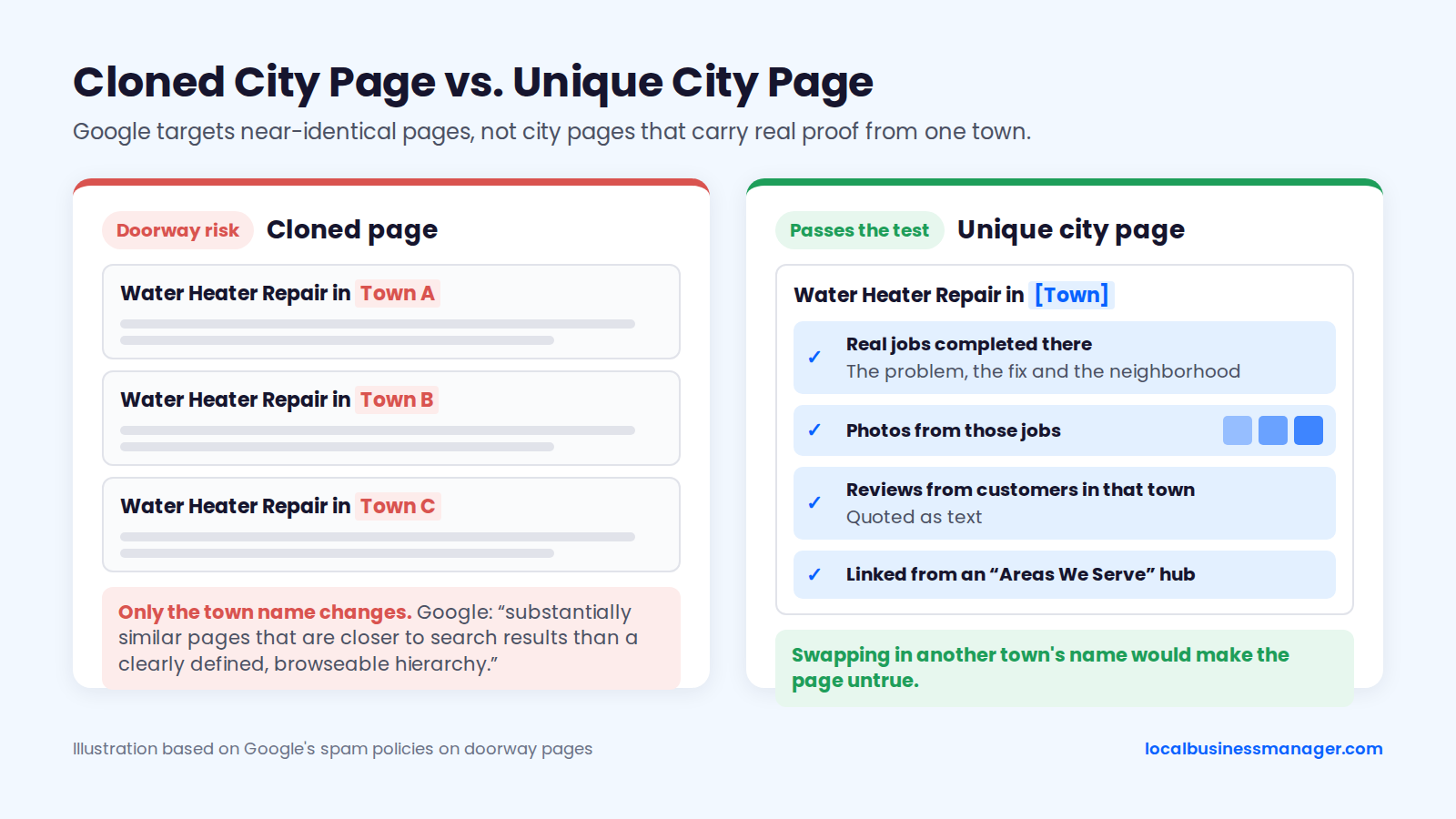
Google's spam policies give 2 doorway examples that matter for SABs:
- "pages targeted at specific regions or cities that funnel users to one page"
- "substantially similar pages that are closer to search results than a clearly defined, browseable hierarchy"
Google's policy doesn't ban city pages and gives no number of pages. The test is how similar the pages are and how they fit into the site.
Google's John Mueller made the same point in 2019, as reported by Search Engine Roundtable. He said a plan for 1,300 keyword-plus-city landing pages "sounds like doorway pages, not something I'd recommend."
Which Towns Deserve a Page
My rule for city pages starts with one requirement: the business must actually serve that town. I never build a page for a town the business doesn't serve.
After that, 3 things make a page stronger. The table lists the requirement first, then the strengtheners; the rule comes from my own practice, not a published test.
Signal | Required or strengthener | What it adds to the page |
|---|---|---|
The business actually serves the town | Required | The reason the page can exist |
Jobs completed there (case studies) | Strengthener | Content no other town's page can share |
Job photos from there | Strengthener | Visual proof of the work in that town |
Reviews from customers there | Strengthener, a huge plus | Local proof written by real customers |
Published page counts vary, and none come with data:
- Eric Scott Studios suggests 6 to 15 pages.
- A local SEO software company says 10 to 15 "max".
Sterling Sky gives no number; it advises starting with a few pages and testing before you scale. Valve+Meter (2026) argues that a business's own job history should set the number of pages.
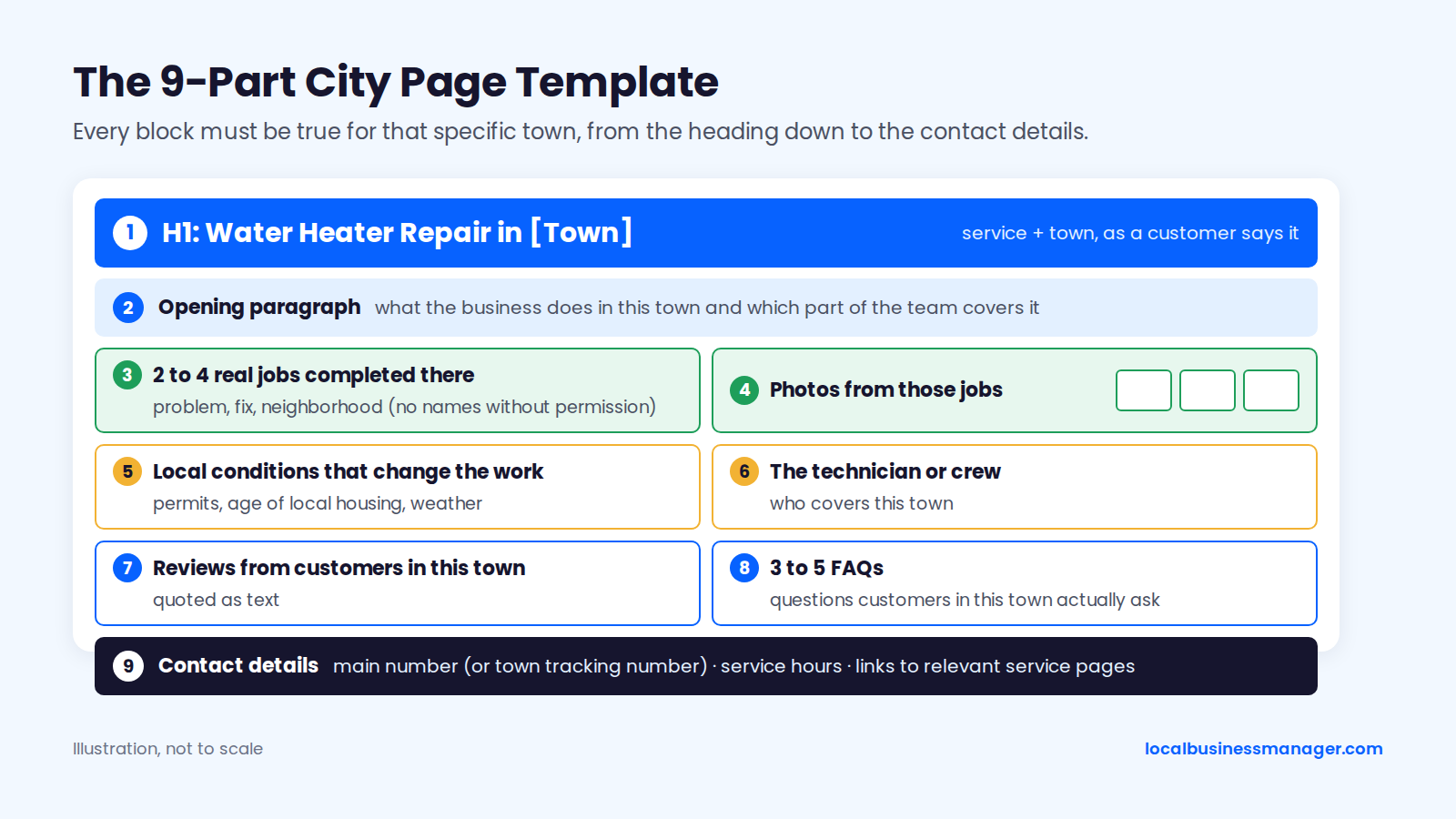
What Goes on Each Page (City Page Template)
Every item in this template must be true for that specific town.
- H1: the service and the town, written the way a customer would say it ("Water Heater Repair in [Town]").
- Opening paragraph: what the business does in that town and which part of the team covers it.
- 2 to 4 real jobs completed there: the problem, the fix and the neighborhood. No customer names without permission.
- Photos from those jobs.
- Local conditions that change the work: permits the town requires, the age of local housing, or weather the trade has to deal with.
- The technician or crew who covers the town.
- Reviews from customers in that town, quoted as text.
- 3 to 5 FAQs customers in that town actually ask.
- Contact details: the business's main number (or the page's own tracking number, if you track calls by town), service hours, and links to the relevant service pages.
The "Unique Enough?" Test
A city page is ready only if it passes all 6 checks below. Run them on every page before publishing, including pages a writer or an AI tool drafted.
- Swapping in another town's name would make the page untrue.
- The page names at least one real job done in that town.
- At least one photo comes from a job there.
- The page says something about the town that changes the work, such as a permit, a local condition or a common problem.
- A customer in that town would learn something the main service page doesn't tell them.
- The page is linked from a site menu or an "Areas We Serve" hub, so visitors can browse to it. It isn't an orphan reachable only from search.
Check 6 comes straight from Google's doorway wording about "a clearly defined, browseable hierarchy". The other 5 test whether the page is "substantially similar" to its siblings.
City Pages à Service Pages: Site Architecture
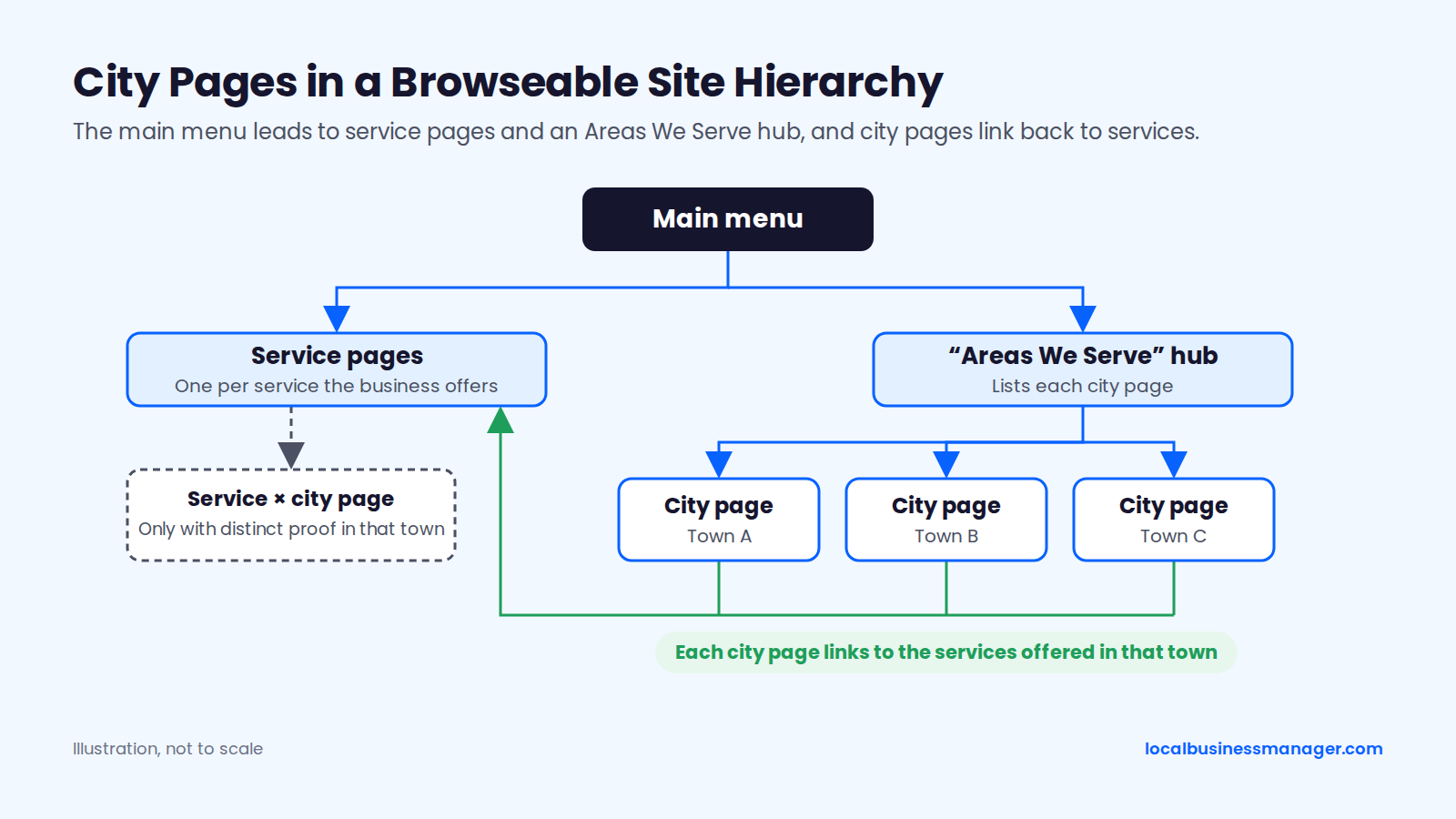
No public test compares city-only pages with service à city pages, so architecture comes down to Google's doorway wording: pages should sit in a clearly defined, browseable hierarchy. In practice that means:
- Service pages: one per service the business offers.
- An "Areas We Serve" hub: linked from the main menu, listing each city page.
- City pages: each linking to the services offered in that town.
- Service à city pages: only where the business has distinct proof for that service in that town, such as a run of roof replacements in one neighborhood.
Volume alone carries risk. Valve+Meter (2026) reports a Sterling Sky case from July 2023 in which a site with more than 3,000 human-written location pages received a manual action for thin content.
Using AI to Draft City Pages Safely
AI-written city pages fail when they have nothing unique in them. Sterling Sky (Joy Hawkins, March 2025) described 200 AI-generated service area pages that weren't penalized; Google simply didn't index them. Google added a scaled content abuse policy to the spam policies on March 5, 2024, covering pages mass-produced mainly to manipulate rankings, whether made by automation, by people or by both.
To use AI without producing thin pages:
- Collect the real inputs for each town first: jobs, photos, reviews, local conditions and who covers the area.
- Let the AI draft only from those inputs, never from a blank prompt.
- Have a person who knows the work edit every page and check every claim.
- Publish a few pages, then check in Search Console whether Google indexes them before writing more.
- Run the "unique enough?" test on every page.
Which Profile Fields Matter Most for a Service-Area Business?
The business name and the primary category are the 2 profile fields on my first-check list for any new local client. I check 4 things in order: rankings across the whole area, the business name against the ranking competitors' names, the primary category, then the website.
Primary and Secondary Categories
My rule for the primary category: use what most of the ranking competitors use. If Google is rewarding a different category than the "logical" one, I go with the category Google rewards. Relevance is one of Google's 3 published local ranking factors, and the category is where the profile states what the business does.
To find the winning category:
- Search the client's main service from a few points across the service area.
- Note the primary category each business in the 3-pack uses.
- Look for the majority, and check whether it holds across the area.
Secondary categories are for other work the business really does. Remove any that cover work it no longer does.
Services, Description and Job Photos
List every service the business performs, in the words customers use, and write the description plainly: what the business does and roughly where it works. When I take over a client from a previous agency, the problems I most often inherit are:
- no services or products set up on the profile
- duplicate listings
- bad naming
- no review campaign
For photos, upload real ones from jobs across the area; the same job photos can go on the matching city page.
Keyword Business Names: The Compliant DBA Route
My recommendation is to put the main service keyword in the business name, but only by making that name the business's real name. I've taken many clients through this process.
Google's rule is that the profile name must match the business's real-world name, as used consistently on its storefront, website and stationery and as customers know it. Google's permanent-signage requirement applies only to businesses that show their address, so an SAB doesn't need a sign. When a name includes legal terms or special characters, Google's guidelines ask for real-world proof such as signage, business cards or invoices.
A DBA filing alone doesn't make the name compliant. Google judges the name the business really uses; the DBA is what proves the name if Google asks during re-verification or reinstatement. Never append keywords to a name the business doesn't use; that stays against Google's guidelines.
How to Rename an SAB Through a DBA
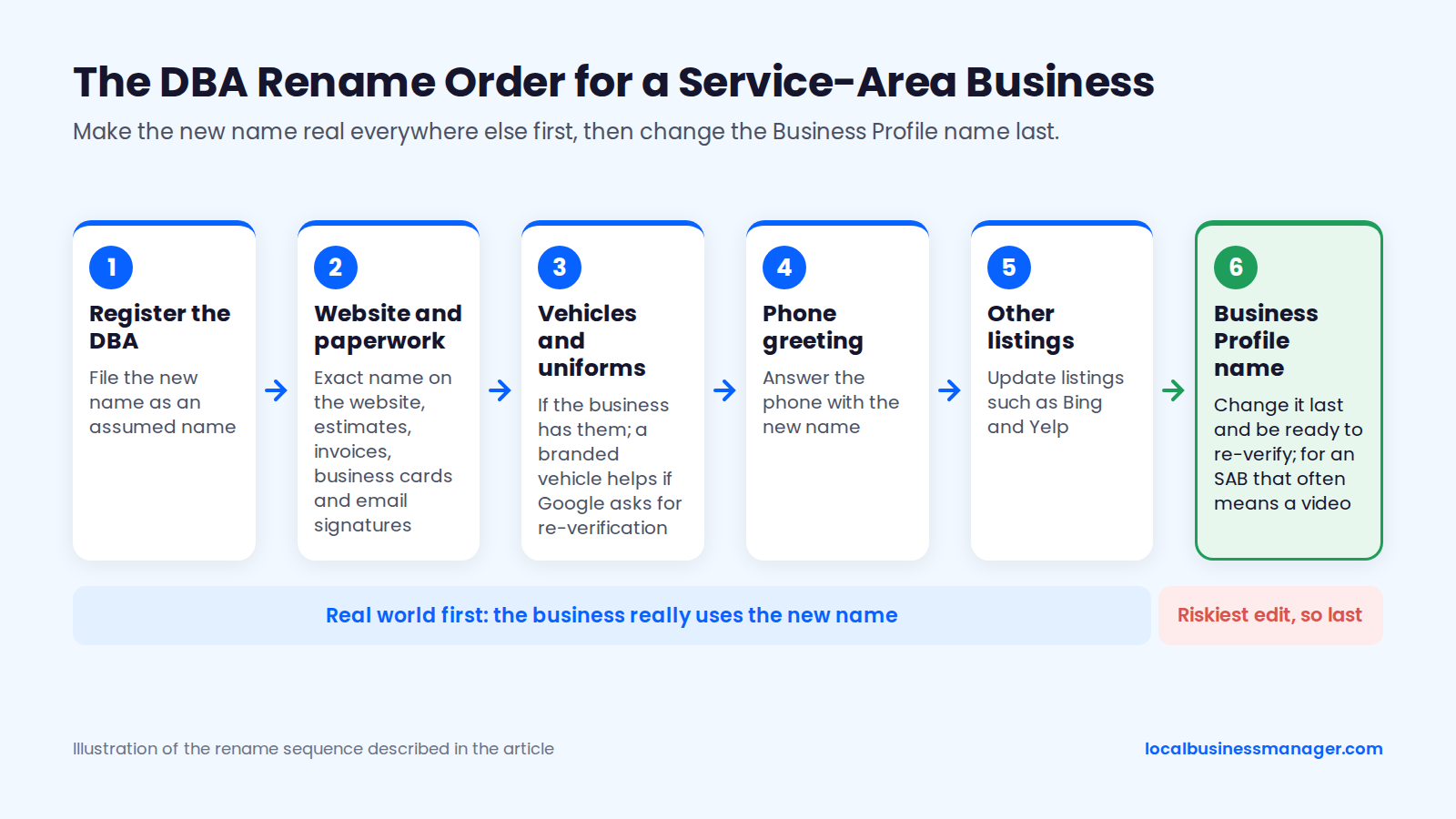
For an SAB, the rename runs in this order, with the Business Profile changed last:
- Register the new name as a DBA (assumed name).
- Put the exact name on the website, estimates, invoices, business cards and email signatures.
- Put the name on the work vehicles and uniforms, if the business has them. Community and practitioner verification guides recommend showing the service vehicle in an SAB video, ideally branded with the business name, so a branded vehicle helps if Google asks for re-verification.
- Answer the phone with the new name.
- Update the other listings, such as Bing and Yelp.
- Change the Business Profile name last, and be ready to re-verify. Google's help page on editing a profile says changing a verified name may require verifying again, and for an SAB that often means a video.
What a Keyword Name Risks
A keyword name raises rankings and suspension risk together. The 2026 Local Search Ranking Factors survey lists keyword names among the top suspension risk factors, and the same company's 2026 data found that keyword names correlate with higher local-pack rank.
Sterling Sky's work covers both sides:
- The upside: in a Sterling Sky test, adding a keyword to the name improved rankings and removing it dropped them back, with gains often appearing within hours.
- The risk: Sterling Sky calls a DBA the only way to use keywords in the name without breaking Google's guidelines. Unless the name is the legal name, the business risks a hard suspension after a competitor report.
Name edits are among the riskiest edits I see (see the second-base section above), which is why the profile name changes last, after everything in the real world already matches. If a renamed profile is challenged, the DBA is what proves the name; the reinstatement section below lists what else to have ready.
How fast a fix shows depends on what's already optimized. In my experience, a single high-impact fix like the name can show ranking gains within about a month; once the basics are done, further gains, for example from a strong review push, come gradually.
How Should a Service-Area Business Get and Answer Reviews?
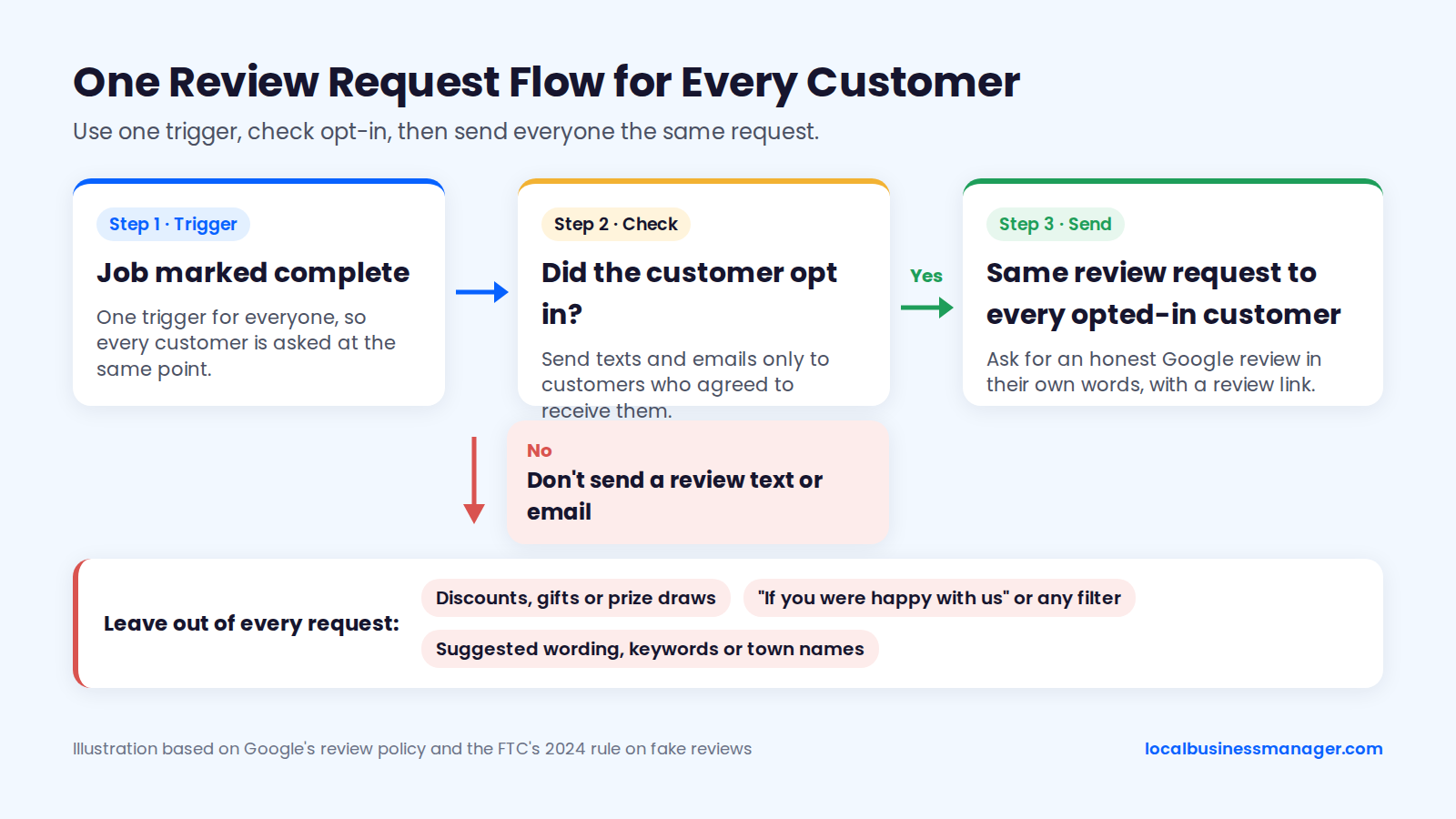
Ask every customer the same way when the job is done, by text or email only if they opted in, let them describe the work in their own words, and answer reviews in plain language about the job. Google's review rules and the FTC's 2024 rule on fake reviews set the limits.
Ask Every Customer, Not Just Happy Ones
Google lets a business ask for reviews of genuine experiences, and its review policy prohibits asking only some customers. Google's help pages say reviews must reflect a genuine experience, and that businesses may remind customers to leave one with a link or a QR code. Asking only happy customers is selective solicitation, often called review gating.
The FTC's final rule from August 2024 (16 CFR Part 465) bans 2 related practices:
- paying or rewarding people for reviews that express a particular sentiment
- suppressing reviews
The safest setup uses one trigger for everyone, such as "job marked complete", so every customer gets the same request at the same point. Send texts and emails only to customers who agreed to receive them, and offer no discounts or gifts for reviews.
Let Customers Describe the Job and the Town Naturally
Tests don't support coaching customers to put town names or keywords in reviews. As of November 2026, 2 small controlled tests and a 2026 data comparison found no meaningful effect, while expert ratings and 2 correlation studies (2025 and 2017) suggest some effect. The table is sorted by date, newest first.
Source | Date | Method | Finding on keywords in reviews |
|---|---|---|---|
Another local SEO software company's comparison | 2026 | Survey factors checked against its own ranking data; sample size not stated | At most 1.6 percentage points, which it called too small to act on |
2026 Local Search Ranking Factors survey | November 2025 | Expert ratings | #36 for the local pack (score 117) and #107 for local organic (score 53) |
An SEO software company's study, reported by Search Engine Journal | 2025 | Correlation study of 3,269 businesses | Review keyword relevance had about 22% influence among top-10 map positions |
Sterling Sky second test | November 2022 | A made-up word on another listing | No effect |
Sterling Sky test | 2022 | 6 keyword reviews added to a listing with 18 reviews | No improvement; one phrase got worse |
Shotland and Leibson | 2017 | Correlation study | Reviews mentioning the keyword or city correlated with rankings |
Search Engine Roundtable described the 2022 Sterling Sky test as very limited. The 2 correlation studies show association, not cause, and we found no public controlled test that isolates town names in reviews for SABs.
Sterling Sky concluded that coaching customers to use keywords doesn't work and can look unprofessional. Ask an open question about the job instead, and don't supply the words.
Review Request Script (Opt-In Customers Only)
Send these templates only to customers who agreed to receive texts or emails from the business, and send them to all of those customers.
Text version:
- "Hi [first name], it's [technician] from [business]. Thanks for having us out for the [job] today."
- "Would you leave an honest Google review of how it went? [review link]"
- "Reply STOP to opt out of texts."
Email version:
- Subject: "How did the [job] go?"
- "Hi [first name], thanks for choosing [business] for the [job] on [date]."
- "If you have a minute, we'd appreciate an honest Google review in your own words: what we did, how it went, and anything we could do better. [review link]"
- "Thanks, [name]"
Leave these out of every request:
- discounts, gifts or prize draws
- "if you were happy with us" or any other filter
- suggested wording, keywords or town names
How to Answer Reviews for a Service-Area Business
Answer reviews as the business, in plain words about the specific job. Write the reply for the customer and for the next person reading it, and keep keywords and town names out of it.
For each reply:
- Thank the customer and refer to the job they described, in their words.
- Reply to positive and negative reviews alike.
- For a negative review, acknowledge the problem, give a way to reach the office, and don't add details about the customer or the job beyond what they wrote.
- Have a person read every reply before it's posted, including drafts written with AI.
How Do You Handle Citations When the Address Is Hidden?
Enter the real address and hide it wherever a directory allows. Where it doesn't, leave out the street line or skip the directory. Keep the business name and main phone number identical across directories, and never expose a home address or invent one.
Directories That Let You Hide the Address
Google, Bing and Yelp all let an SAB keep its street address off the public listing, each with its own conditions. Apple is the platform to check in the live interface. The table draws on each platform's help pages and practitioner reports as of November 2026, sorted from the most control over the address to the least.
Directory behavior | Example | What to enter | What shows publicly |
|---|---|---|---|
Expects the address hidden | Google Business Profile | Real verification address, hidden | Service areas |
Lets you hide the address if you add service areas | Bing Places | Full real address plus service areas | City and service areas |
Lets eligible categories hide it | Yelp | Real address, hidden, plus service areas | Service areas |
Address optional, no hide setting | Some directories | City and state only | City and state |
Address required and always shown | Some directories | Skip the directory | Nothing |
Unclear | Apple Business | Check the live interface first | Not confirmed |
A local SEO software company's 2024 guidance agrees: hide the address wherever a site allows it, and still build citations on the rest. One Microsoft Q&A report from 2026, from a single user, describes Bing assigning a location 30 miles away to an SAB listing imported from a Google profile with no visible address, so check imported listings by hand.
Directories That Require a Visible Address
When a directory requires an address and shows it publicly, skip that directory. A home address on public display is a privacy problem, and a made-up address is the kind of fake location Google's guidelines prohibit.
Where the street line is optional, enter city and state only. A Local Search Forum thread from about 2020 lists 3 options practitioners use for SAB citations: enter the full address with the street line hidden, leave the street address out, or put a placeholder such as "n/a" in the street field. No directory documents the placeholder tactic, so treat it as a workaround, not a rule.
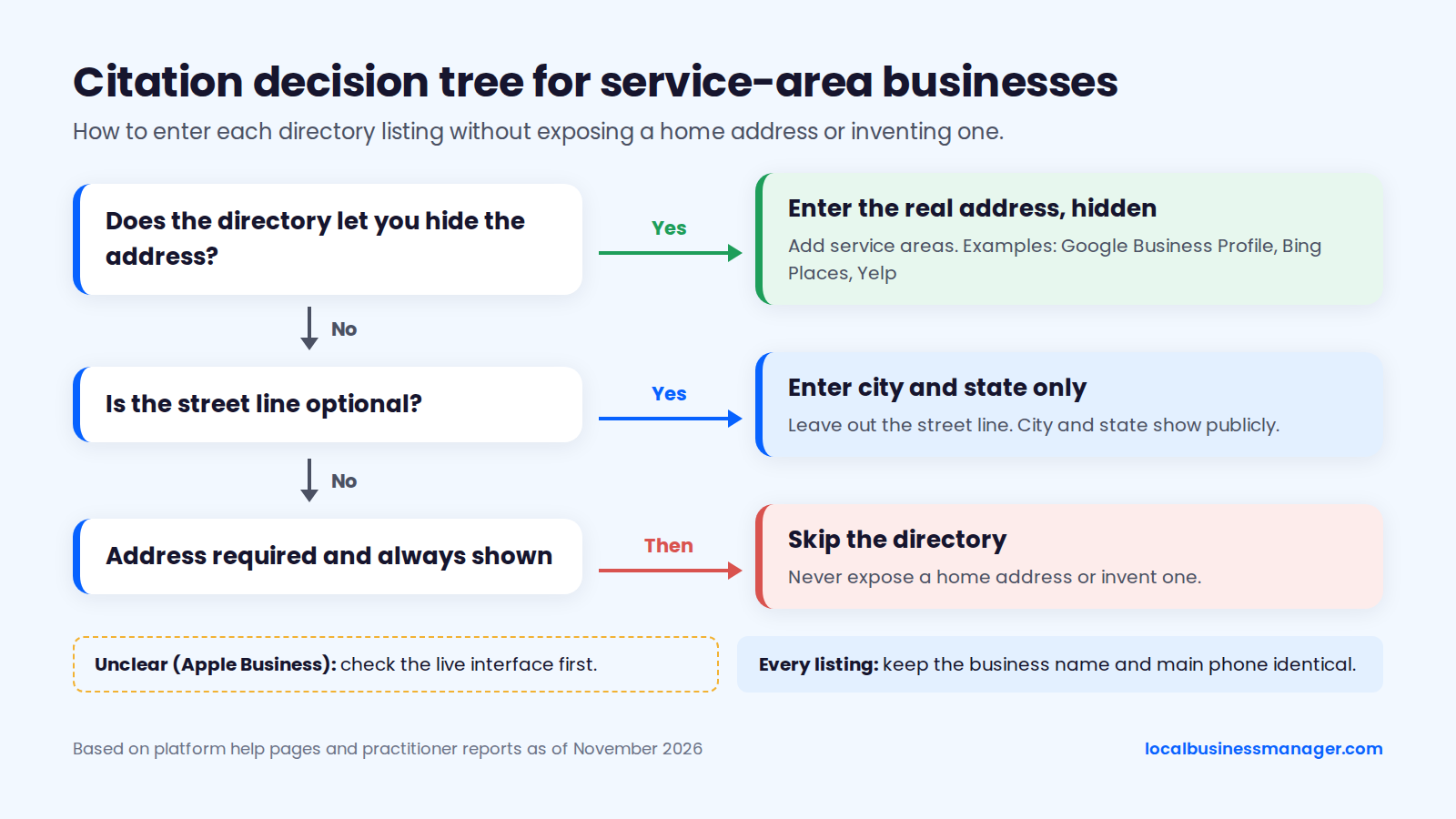
Apple is the open question as of November 2026:
- 2023: Local Search Forum users reported that Apple Business Connect had no way to hide an address and removed a home-based electrician's listing.
- May 2026: a review software company's article says the renamed Apple Business now lets service-area businesses list a service area without showing a home address.
Neither source is Apple's own documentation, so check the setting in the live interface before you submit a client's listing.
Keep the Name and Phone Consistent
With no public street address, the business name and phone number become the details that tie an SAB's listings together. Use the exact same name everywhere, and the same main number on the website and every directory.
In my setups the Business Profile is the one deliberate exception: its primary number is the call-tracking number, with no additional number. After a DBA rename, update the directories before the profile.
My approach to cleanup is to fix all of them, with no strict order:
- the Business Profile
- the data aggregators
- the major platforms
- the industry directories (for my law-firm clients, these were the legal directories)
When hours are tight, I fix the most serious issues first, from Critical to High, Medium and then Low.
What Schema Should a Service-Area Business Use?
Use the most specific LocalBusiness subtype from schema.org, list the towns in areaServed to match the profile, and decide deliberately how much of the address to publish. Google's LocalBusiness structured data documentation lists required properties (name and address, where address is a PostalAddress for the business's physical location) and recommended ones (such as telephone, url, geo, openingHoursSpecification and priceRange).
The JSON-LD below uses example data for a fictional plumbing business:
{
  "@context": "https://schema.org",
  "@type": "Plumber",
  "name": "Example Plumbing Co.",
  "url": "https://www.example.com/",
  "telephone": "+1-614-555-0142",
  "image": "https://www.example.com/images/service-van.jpg",
  "address": {
    "@type": "PostalAddress",
    "addressLocality": "Riverton",
    "addressRegion": "OH",
    "addressCountry": "US"
  },
  "areaServed": [
    { "@type": "City", "name": "Riverton" },
    { "@type": "City", "name": "Oak Hill" },
    { "@type": "City", "name": "Lakeview" }
  ],
  "openingHoursSpecification": {
    "@type": "OpeningHoursSpecification",
    "dayOfWeek": ["Monday", "Tuesday", "Wednesday", "Thursday", "Friday"],
    "opens": "07:00",
    "closes": "18:00"
  }
}
When you adapt it for a client:
- Type: pick the schema.org subtype that matches the primary category, such as
Plumber,Electrician,HVACBusiness,RoofingContractororLocksmith. - areaServed: list the same towns as the profile's service areas.
- Address: Google lists address as a required property, so leaving the street line out means the markup may not qualify for local business rich results. If the profile hides a home address, weigh the client's privacy against that eligibility.
- Phone and name: use the exact name and the main number from the website and directories.
- Ratings: don't add
AggregateRatingorReviewmarkup for your own testimonials. Since September 2019, Google's Search Central blog says, Google doesn't show review stars for self-serving reviews a business publishes about itself with LocalBusiness or Organization markup. Existing markup doesn't have to be removed, but it won't produce stars.
For city pages, schema.org's Service type can also name the town in areaServed:
{
  "@context": "https://schema.org",
  "@type": "Service",
  "serviceType": "Water heater repair",
  "provider": { "@type": "Plumber", "name": "Example Plumbing Co." },
  "areaServed": { "@type": "City", "name": "Oak Hill" }
}
Compare the client's LocalBusiness markup against Google's documentation, then run it through the Rich Results Test before it goes live.
How Do You Track Rankings for a Business That Covers a Whole Area?
Track an SAB's rankings from many points spread across its service area, not from one address, and report calls next to rankings. Because distance is one of Google's ranking factors, a single check only tells you how the business ranks at that one spot.
Why One Check From One Spot Misleads
A single rank check shows the ranking at one point, and an SAB covers dozens of points. Distance is one of Google's 3 local ranking factors, and practitioner tests tie an SAB's ranking to its hidden verified address. A plumber can hold the 3-pack near its base and be invisible 25 minutes away, and both results are accurate.
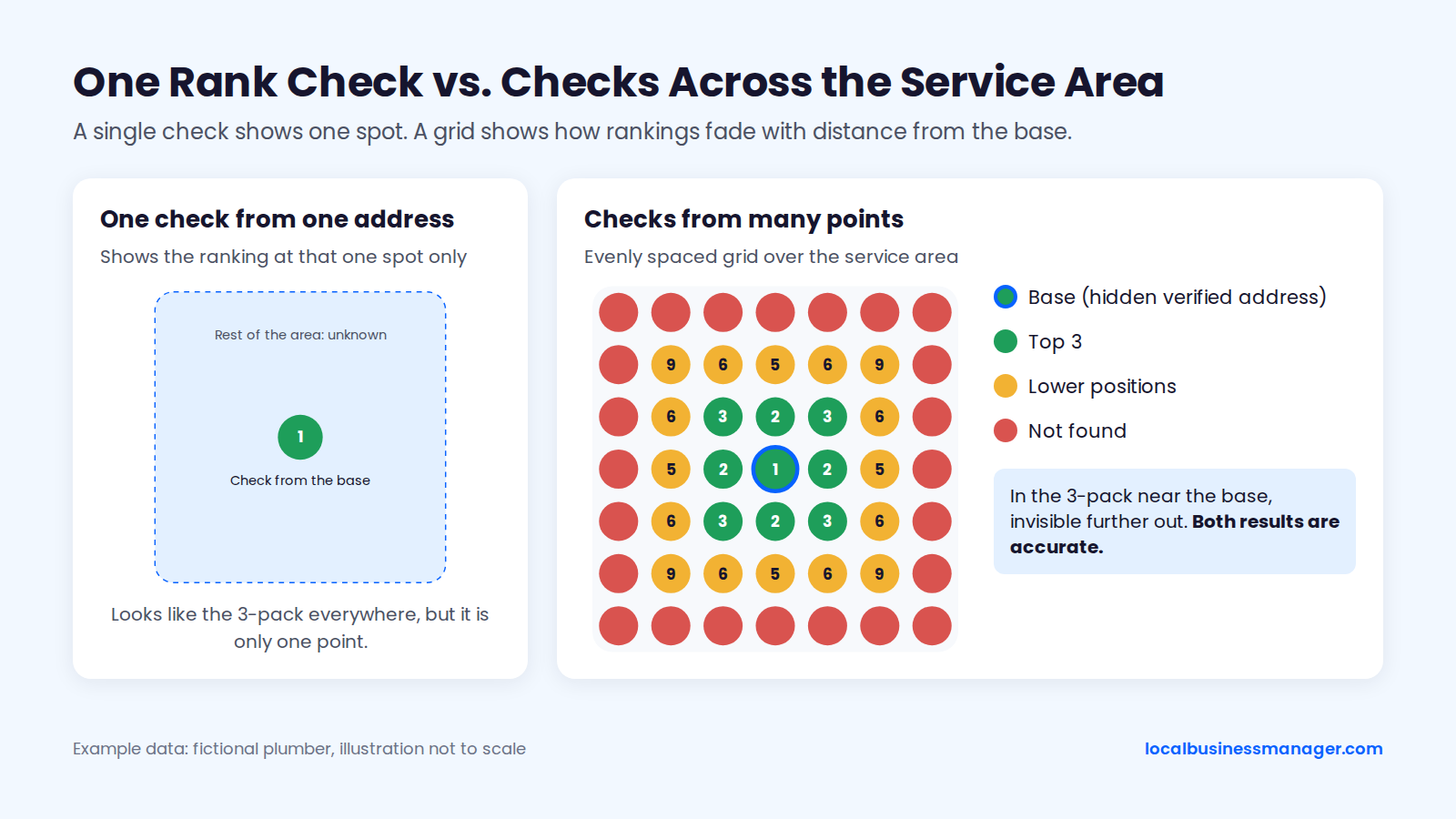
Example data.
Most agencies have had the call where a client checked from their kitchen and decided "we dropped." I don't offer or use single-point rank checks, because one location says little about how a business ranks across its area.
I'm also careful with a single average rank. In my view, Google is fighting scrapers, including AI scrapers, by mixing up results, which makes the results page very volatile. An average rank can make sense, but right now it's hard to read with confidence on its own.
Checking Rankings Across the Service Area
Check rankings from a grid of evenly spaced points laid over the service area, running the main keyword from each point and color-coding each point by position. Any tool that checks from set coordinates works.
My scanning method:
- Start with one scan just to learn how the business ranks. My usual first scan is 13 Ã 13 points with 0.5 miles between them.
- If the grid comes back mostly green, widen the spacing to see how far the ranking reaches.
- If it comes back mostly red, tighten the spacing.
- Scan at least once a month. Daily scans make sense only after an edit, when you want to see whether it produced a result.
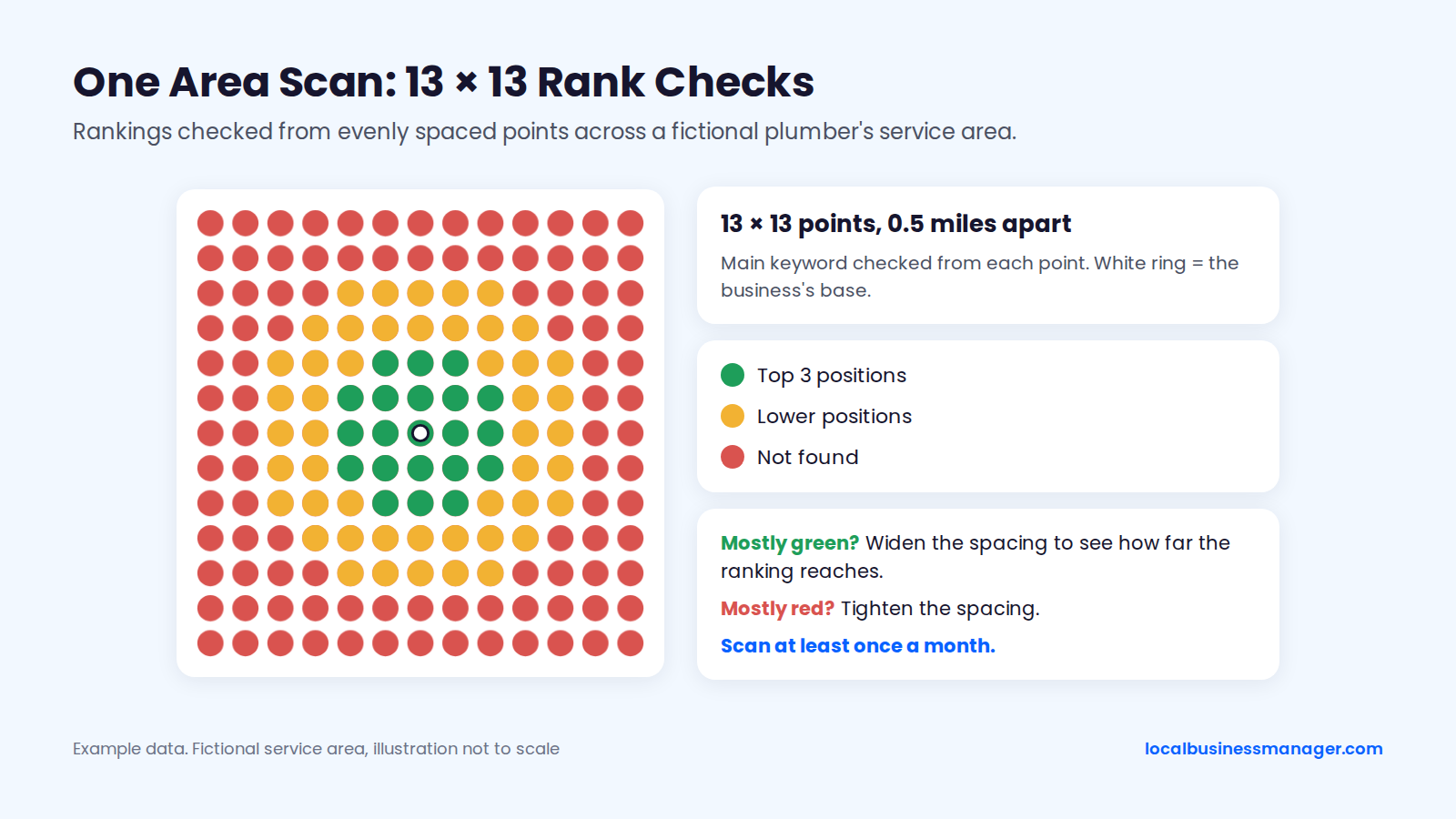
Example data.
A Monthly SAB Report
Calls and rankings lead my monthly report. In my setups, the call-tracking number is the profile's primary number, with no additional number needed. City-level evidence comes from the website: Search Console filtered by each city page's URL, and, if you want calls by town, a tracking number shown only on that city page.
My own routine runs on 2 cycles. Every week, I check the name, attributes, services and other fields for edits made by Google or anyone else. Every month, I check rankings and the post schedule.
A fuller monthly checklist for an SAB:
- Run the area scan for the main keywords and compare it with last month.
- Pull the call-tracking data and the Business Profile's Performance report.
- Pull Search Console clicks and impressions for each city page.
- Count calls by city page, if each page shows its own tracking number.
- Count new reviews and note which towns customers mentioned on their own.
- Check the post schedule.
- Confirm that the hidden address, the map pin and the service areas haven't changed.
What Gets Service-Area Profiles Suspended?
The SAB suspension triggers that Google Business Profile Community guides name most often are address or service-area settings that don't match, keyword-stuffed names, virtual-office or P.O. box addresses, and many edits in a short time. These come from community guides rather than Google policy, and no study measures how often each one occurs.
The SAB Suspension-Risk Checklist
Check these 10 risks on every SAB profile you take over. They come from Google Business Profile Community guides, a local SEO software company's 2025 suspension guide and my own experience, and each one has a compliant fix.
- Visible home address where customers aren't served: hide it, as one single edit.
- Address and service-area settings that don't match: make them describe the same real base and coverage.
- Virtual office, unstaffed coworking desk, P.O. box or mailing address: use the real base address, hidden.
- Extra profiles for towns without a staffed office: use city pages or ads instead.
- Overlapping service areas across listings: split coverage between offices.
- Keywords in the name that the business doesn't use: use the real name, or follow the full DBA route.
- Many edits in a short time, including a storefront-to-SAB switch: change one thing at a time and keep records of why.
- Duplicate listings: remove or merge them.
- A map pin in a suspicious place or false 24-hour hours: fix the pin and list real hours.
- Review incentives or gating: ask every customer, with no rewards.
The same 2025 software company guide notes that automated sweeps have targeted SAB-heavy categories such as locksmiths and plumbers, and it lists storefront-to-SAB changes as a known cause of suspension.
Even a change that follows the guidelines can trigger a suspension. Search Engine Journal reports a landscaper whose listing was suspended right after he correctly switched from a storefront (his home) to a service-area business. That's trade-press and practitioner reporting; Google itself doesn't say it.
What Reinstatement Takes
Reinstatement in the US runs through Google's appeals tool, according to Sterling Sky (2025). Sterling Sky says the tool reached the US around December 2023, has been the only route since February 2024, and requires evidence within 60 minutes of opening the evidence form; those details come from a 2025 report, so the process may have changed since.
Claudia Tomina's 2026 community guide separates 2 levels of suspension:
- Soft suspension: the profile stays live but can't be edited.
- Hard suspension: the profile is removed from Search and Maps.
Fix the violation first, then appeal, and have the evidence folder ready before you open the form, because 60 minutes doesn't leave time to gather it. Practitioners recommend:
- a business license or tax certificate
- utility bills
- photos and video
The documents I've seen reinstatement need are the DBA, a lease agreement, and photos of the office with signage, or a video recording of the premises. A home-based SAB has no signed office to photograph, so build its folder around the DBA, the license and the other paperwork.
Reinstated.net's 2026 guide says that in rare cases Google may ask for video verification after an appeal, and that reinstatement restores the listing but not necessarily its previous rankings.
Do AI Answers Change SEO for Service-Area Businesses?
This guide doesn't cover AI-visibility data for local searches; the one AI change it covers is Google Search calling local businesses on a user's behalf.
In July 2025, Google Search started using AI to call local businesses for users, asking about pricing, availability and service options, according to Search Engine Journal. The feature launched in the U.S., with higher usage limits for Google AI Pro and Ultra subscribers.
For an SAB, that's one more reason to keep the profile's phone number, hours and service list accurate. Make sure whoever answers the phone can quote availability.
Do You Need a Website to Rank as a Service-Area Business?
Yes, if the business wants to reach towns beyond its map-pack reach: city pages on a website compete in organic results, which don't require an address in each town.
The website also backs up the profile. Google's name rule refers to the name a business uses consistently on its website and stationery, and Search Engine Land's 2025 verification guide suggests putting the business information on the website at least a week before verifying, which is why the setup checklist puts the website first.
Where to Start With Your Next SAB Client
Before the next "why don't we rank in town]?" call, put the client's verified location next to the towns they're asking about and check rankings from several points across the area, then walk them through the map instead of a theory. We're building Local Business Manager as one place for an agency's local SEO work, and it's in early access now: [join the early access list.