How to Get More Google Reviews (Within Google's Rules)

To get more Google reviews, ask every customer when the job ends, send them the direct review link from your Business Profile, and follow up once. The hard part is doing that every time without bending Google's rules to speed things up.
Below you'll find copy-ready scripts for in person, text, email and invoices, a table of what Google allows and bans, a way to set a review target against your real map-pack competitors, and what to do when new reviews disappear. I was Head of SEO at a legal-marketing agency, so I've added a law-firm layer, plus a section for agencies running this across clients.
What Actually Gets More Google Reviews?
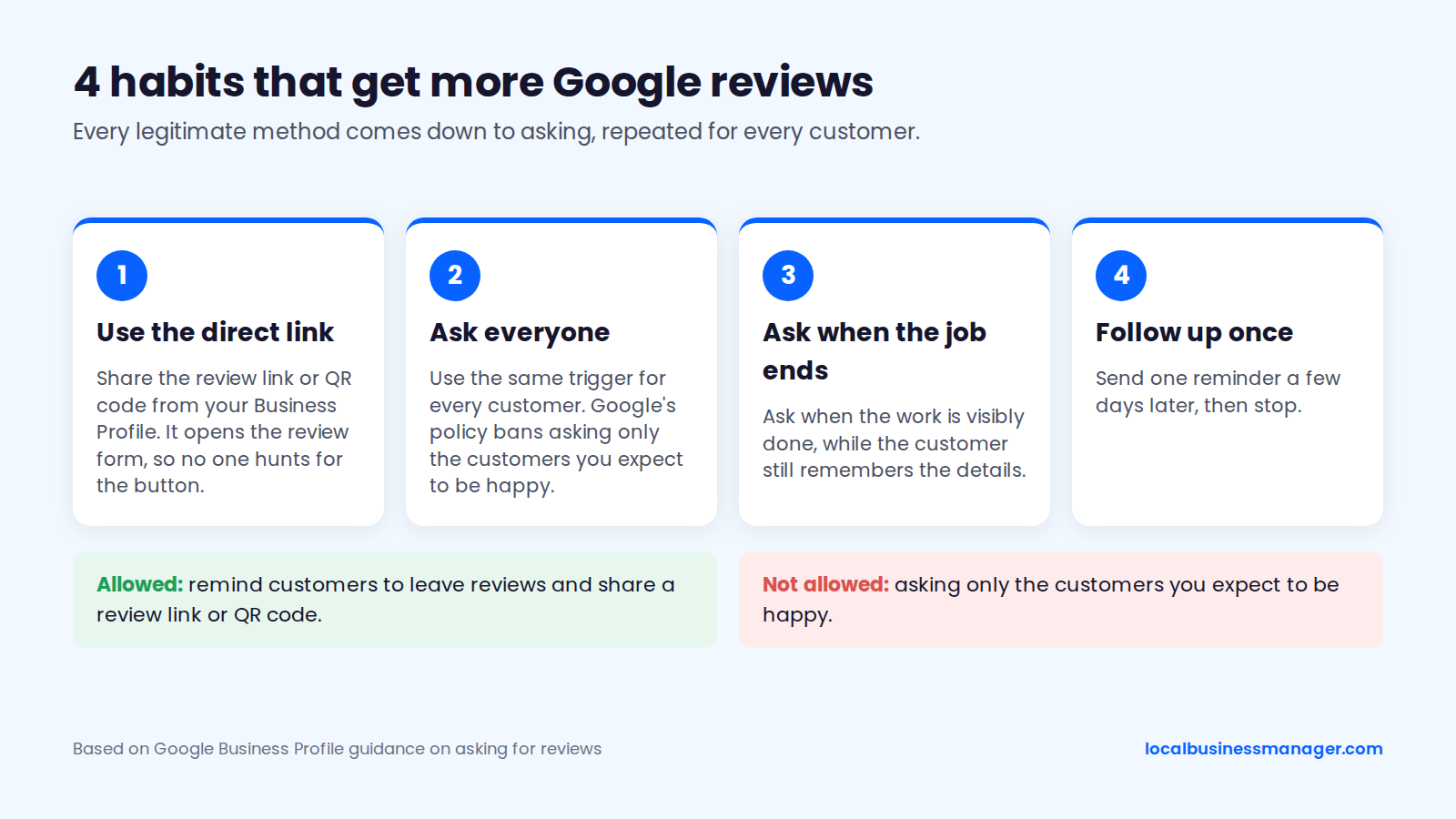
More reviews come from 4 habits repeated for every customer: a direct review link, a request to everyone, a request when the job ends, and one follow-up. Every legitimate method comes down to asking. Google's Business Profile help pages tell businesses to remind customers to leave reviews and to share a review link or QR code.
- Use the direct link. Google gives you a review link and QR code in your Business Profile. The link opens the review form. If you send people to your profile page instead, they have to hunt for the button.
- Ask everyone. Use the same trigger for every customer. Google's policy bans asking only the customers you expect to be happy.
- Ask when the job ends. Ask when the work is visibly done, while the customer still remembers the details.
- Follow up once. Send one reminder a few days later, then stop.
When I take over a client from a previous agency, a missing review campaign is one of the problems I inherit. The others are duplicate listings, bad naming and no services set up on the profile.
Among the personal-injury firms I worked with, the 2 reasons I saw most often for missing the 3-pack were review flow that was too low and a business name that wasn't optimized. A keyword name only works when the firm registers it as a DBA and actually uses it everywhere (signs, website, listings) before the profile name changes, and even then it carries suspension risk. Law firms also have to clear their state bar's trade-name rules first.
What Do Google's Rules Allow and Ban When You Ask for Reviews?
Yes, you're allowed to ask any customer for a Google review. Google bans incentives for reviews, review gating, and requests that try to influence the rating or what the review says. The rules come from Google Maps' prohibited and restricted content policy and Google's review help pages. In the US, the FTC's Consumer Review rule adds a second layer.
As of November 2026, 2 of the 10 common practices below are allowed, and the second comes with a legal condition. Allowed practices are listed first. The sources are Google's Maps content policy, Google's Business Profile review help pages and the FTC rule.
Practice | Allowed by Google? | What the rule says | Do this instead |
|---|---|---|---|
Asking any customer for an honest review | Yes | Google's help pages encourage sharing a review link or QR code | Ask every customer at the same point |
Texting the review link | Yes | Google doesn't ban it; US consent law applies | Text only customers who opted in |
Offering a discount, gift card, free service or payment | No | Incentives in exchange for reviews are "considered fake engagement and is strictly prohibited" | Ask with nothing attached |
Asking only customers you think are happy | No | Selectively soliciting positive reviews is rating manipulation (review gating) | Use one trigger for everyone |
Discouraging negative reviews | No | Listed as rating manipulation | Fix the problem and still share the link |
Asking for 5 stars or a specific rating | No | Requests may not try to influence the rating | Ask for an honest review |
Asking customers to mention a service, keyword or staff name | No | Merchants should not request specific content | Keep the ask plain |
Setting staff quotas for reviews | No | Merchants may not ask staff to collect a set number of reviews | Make the ask a process step |
Requiring or pressuring reviews on the premises | No | Merchants should not require or pressure reviews on site | Ask in person, let them review later |
Reviews from staff, owners or relatives | No | Reviews must reflect a genuine customer experience | Ask customers only |
Google's Business Profile help page on getting more reviews states the incentive ban exactly: "Offering incentives, like free of cost or discounted goods or services, in exchange for customers to post reviews, change reviews or remove negative reviews is considered fake engagement and is strictly prohibited."
Google's Maps policy is just as precise about in-person asks. Merchants "should not require or pressure users to leave ratings or write reviews while on the premises, nor should they request that specific content be included."
Why Feedback-First Review Flows Count as Gating
A feedback-first flow is review gating if only satisfied customers ever see the Google link. Many review tools send a short survey first. Happy answers go to Google and unhappy answers go to a private form. Google's policy lists that kind of selective solicitation of positive reviews as rating manipulation, however polished the survey looks.
A compliant feedback-first flow shows every customer the Google review link, whatever they answered. Google's policy also bans requesting specific content, so a tool that pre-writes the review for the customer is steering what it says.
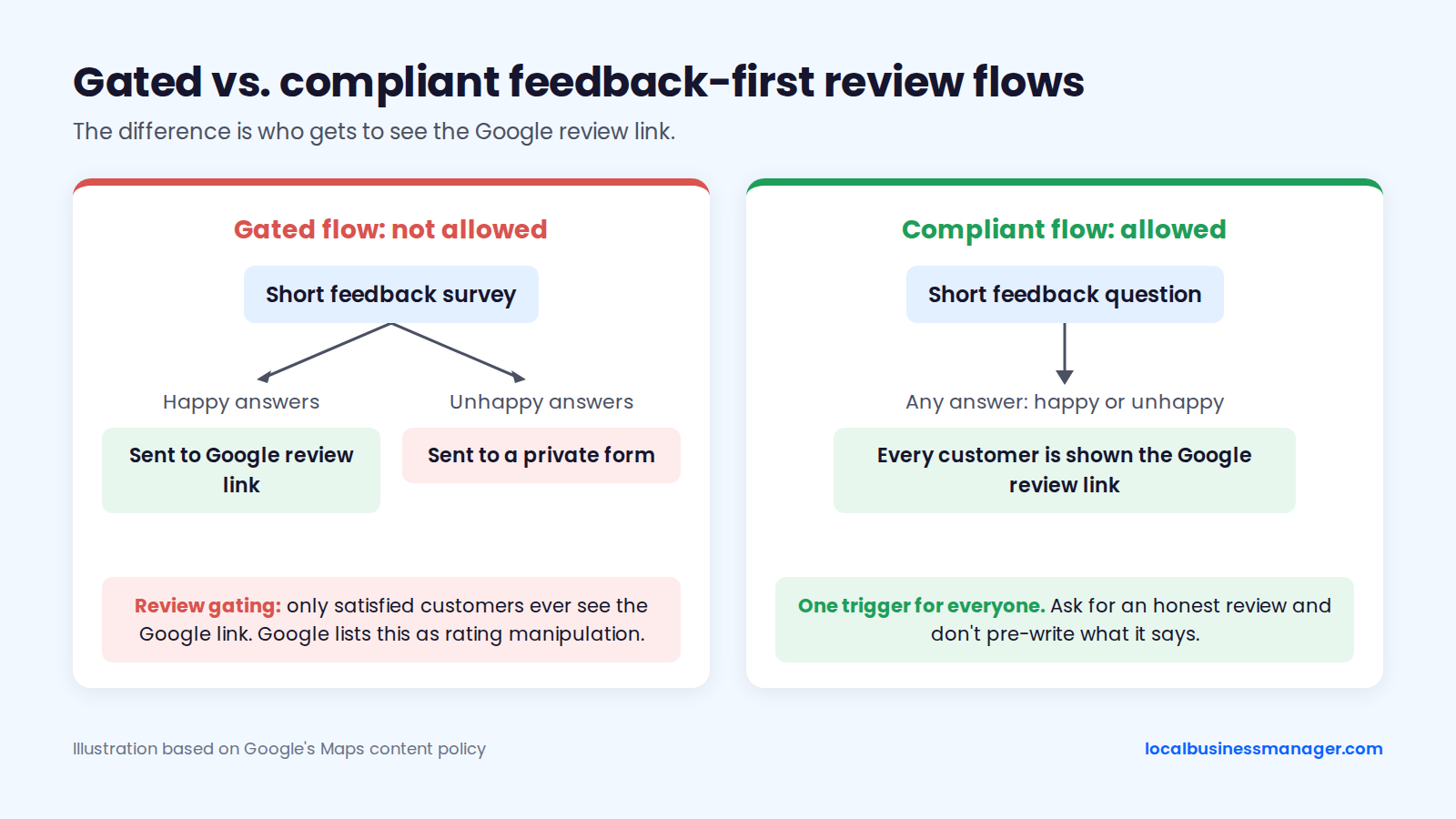
In the request flow I use, customers answer a short feedback question first. Then every one of them is shown the Google review link, whatever their answer.
If you're auditing a client's current setup, look for score-based routing that hides the Google link from some customers.
What the FTC's Consumer Review Rule Adds
The FTC's Consumer Review rule, 16 CFR Part 465, took effect on October 21, 2024, according to its Federal Register notice. It puts US federal law behind several of Google's bans. Among other things, the FTC rule covers:
- Fake reviews: the rule targets them directly
- Conditional incentives: offering anything in exchange for a review that expresses a particular sentiment
- Review suppression: suppressing negative reviews
- Bought reviews: buying reviews written to express a set sentiment
- Insider reviews: officers or managers asking employees or relatives for reviews, or telling employees to get them from relatives, under certain conditions
Reviews that come from general requests sent to all purchasers are exempt from parts of the FTC rule. Google's ban is wider than the FTC's. The FTC targets incentives tied to sentiment, while Google bans incentives for reviews of any kind, including ones with no condition attached.
How Do You Get Your Google Review Link and QR Code?
You get the review link and QR code from your own Business Profile, while signed in as an owner or manager. Each location has its own link, and the QR download steps are written for a computer. Test every link on a phone that isn't signed in to the owner account.
Steps on a Computer
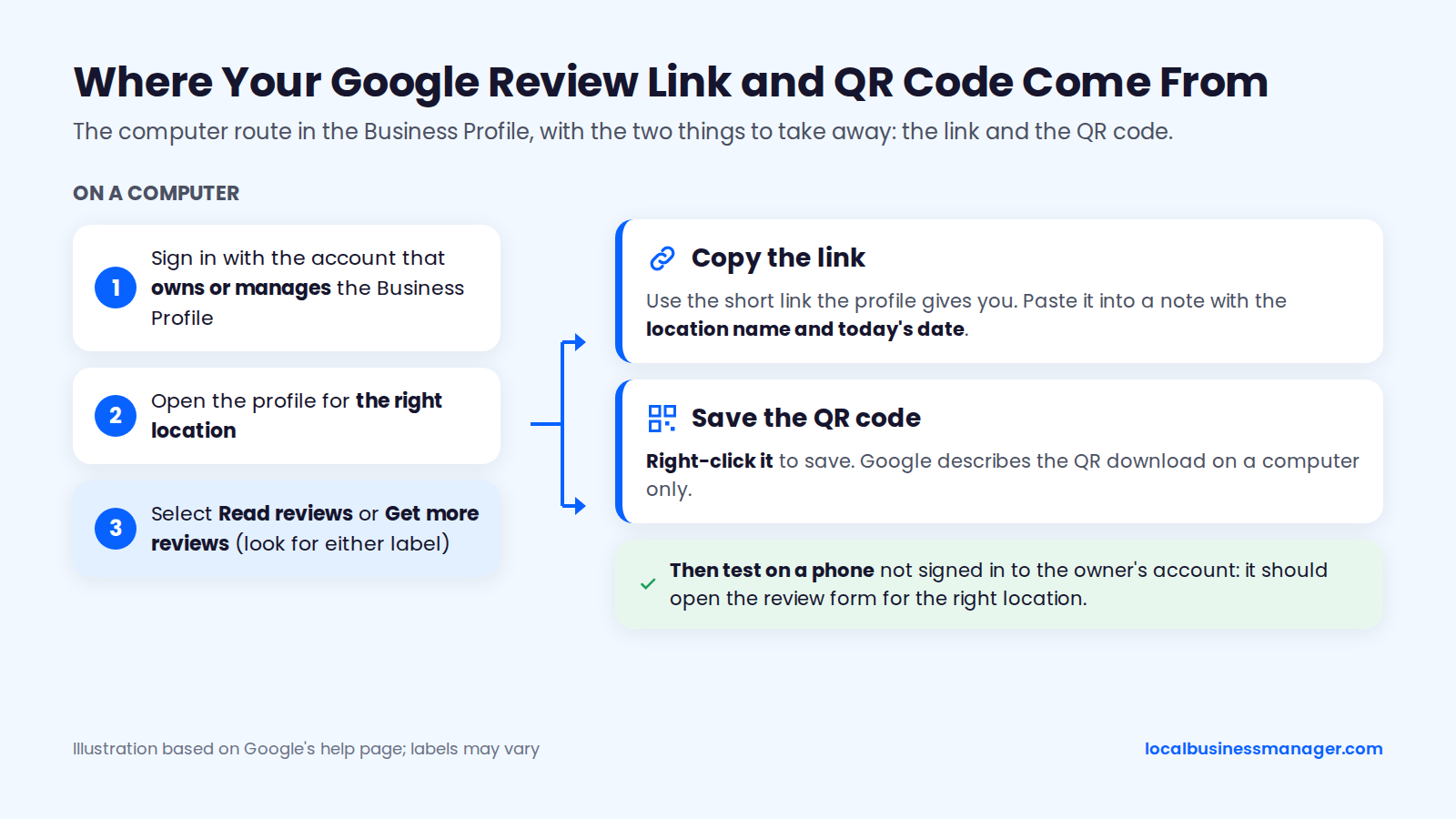
Google's help page on review links gives the path: go to your Business Profile, select Read reviews, then Get more reviews, and copy the link or share the QR code. Google's steps for saving the QR code are for a computer. A Google Product Expert guide on Google's community site says this screen works only in a desktop web browser, not in the Google Maps app.
- Sign in with a Google account that's an owner or manager of the profile.
- Open your Business Profile on a computer.
- Select Read reviews, then Get more reviews.
- Copy the review link.
- To save the QR code, right-click it and select "Save image as...".
- Test the link on a phone that isn't signed in to the owner account. It should open the review form.
Use the link the profile gives you, not the Place ID URLs older guides teach. Save the link and the QR file somewhere your team can reach from a phone, such as a shared folder or a pinned note, so the person asking at the end of a job doesn't need a computer.
Links for Multiple Locations
Each location has its own Business Profile and review link, so send customers the link for the location they actually visited. A single shared link sends every review to one profile.
Before anyone sends a request, build a sheet with 5 columns:
- Location name, as it appears on the profile
- Street address, or service area for businesses that hide their address
- Review link
- QR code file name
- Date the link was last tested on a logged-out phone
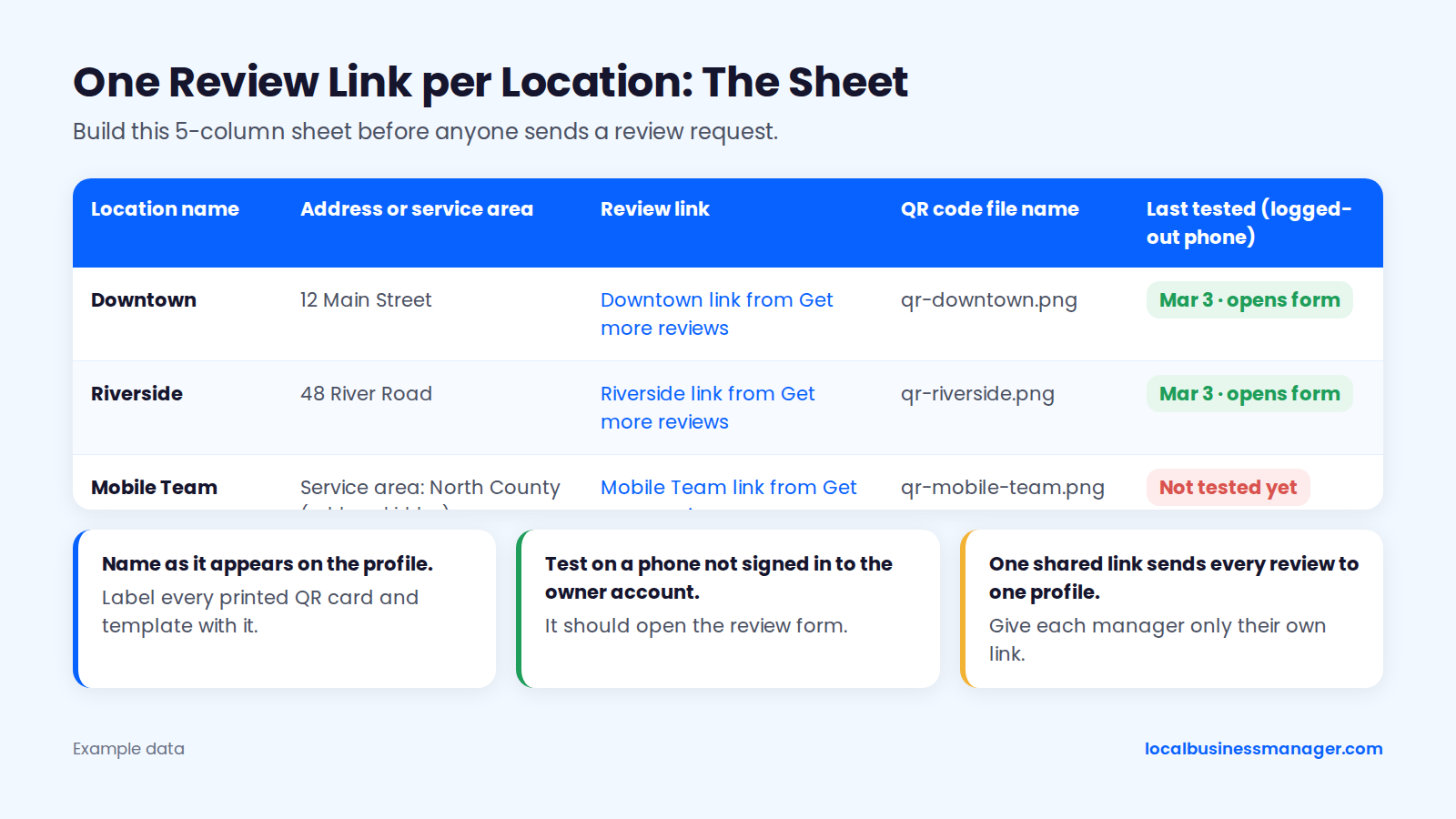
Label every printed QR card and message template with the location name, and give each franchise or location manager only their own link. Service-area businesses that hide their address can still receive reviews, as a local SEO trade guide notes. Customers leave them the same way as for any other business.
When the Option Doesn't Show
A missing review link usually comes down to the account, the profile's status or the location selected. Check these in order:
- Account. Confirm you're signed in with the account that's an owner or manager of this profile, not a personal account with no access.
- Verification. Google's help pages say only verified profiles can reply to reviews, so confirm the profile is verified and in good standing (see why Google Business Profiles get suspended).
- Location. In accounts with many profiles, confirm you opened the right location before copying the link.
- Device. Use a computer for the QR code. Google's QR download steps (right-click, then "Save image as...") are written for a computer browser.
- Customer side. If a customer says the link doesn't work, test it yourself on a logged-out phone, then see the FAQ on why customers can't leave a review.
When Should You Ask for a Google Review?
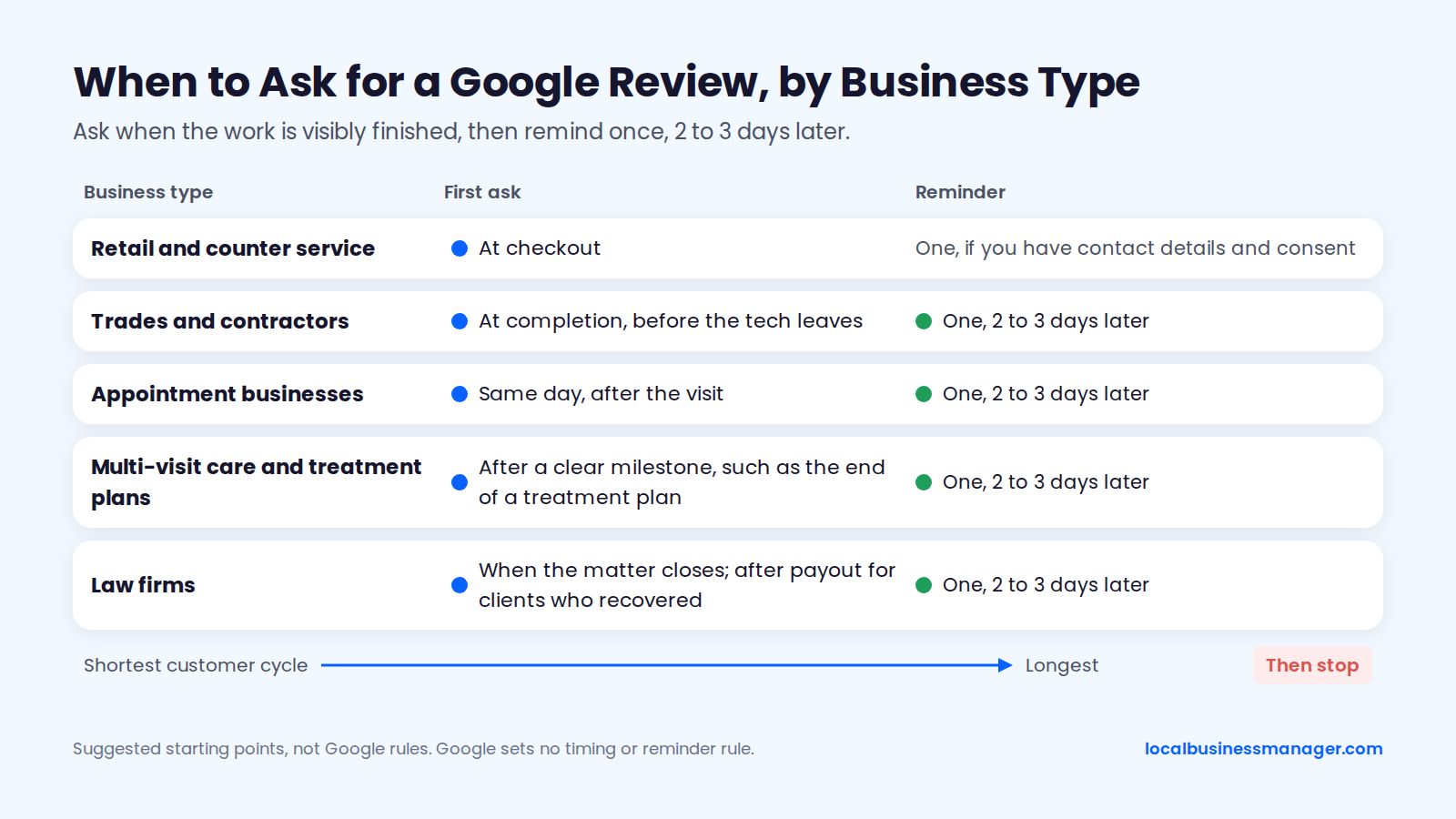
Ask when the work is visibly finished, and ask every customer at that same point. Google's help pages don't name a moment, so the right point depends on your business type. The table gives a starting point by business type, and the sub-section below covers long cases such as law firms and insurance jobs.
The table suggests a trigger for 5 business types, sorted from the shortest customer cycle to the longest. None of these timings comes from Google, which sets no timing rule.
Business type | When to ask | Channel | Reminder |
|---|---|---|---|
Retail and counter service | At checkout | Receipt line or counter QR card | One, if you have contact details and consent |
Trades and contractors (plumbing, HVAC, roofing) | At completion, before the tech leaves | In person, then the link by text or email | One, 2 to 3 days later |
Appointment businesses (dental, auto repair, salons) | Same day, after the visit | Text or email | One, 2 to 3 days later |
Multi-visit care and patient treatment plans | After a clear milestone, such as the end of a treatment plan | Text or email | One, 2 to 3 days later |
Law firms | When the matter closes; after payout for clients who recovered | Text or email | One, 2 to 3 days later |
For every business type, apply these 5 rules:
- Remind once. Google sets no reminder rule. One reminder 2 to 3 days after the first ask is a suggested starting point, not a tested one. Then stop.
- Skip no-shows and cancellations. Google requires reviews to reflect a genuine experience, and these customers didn't receive the service.
- Skip anyone who already reviewed. A second ask annoys people and adds nothing.
- Fix bad jobs first, then ask anyway. Google bans discouraging negative reviews, so a customer whose job went wrong still gets the same request, with no conditions attached.
- Let customers review later. Google's policy says businesses can't require or pressure customers to leave reviews while they're on the premises. In one Sterling Sky case, reviews left inside the business were the most likely to be removed.
Timing for Long Cases: Law Firms and Insurance Jobs
Long cases need one trigger every client reaches, because Google's policy bans selectively asking for positive reviews. For law firms, that trigger is the close of the matter, and every client gets the same request then. For personal-injury clients who recovered, the matter closes after payout, so I recommend sending the review request by text or email after the client has been paid, and clients whose cases didn't recover get the same request when their matters close.
Vendor blogs disagree on personal-injury timing, and none of them cites data. Their suggestions are:
- The settlement or verdict meeting
- When the settlement check is paid out
- After the check is delivered and liens are resolved
- After positive mid-case milestones as well
That last suggestion carries a risk. Asking only after good news can look like selective asking, which Google bans.
For roofing and other insurance-claim jobs, one suggested trigger is the completion walkthrough rather than the day the claim pays out. Every customer reaches the walkthrough, whatever the insurer decides.
How to Ask for Google Reviews: Scripts and Templates
A good review request asks every customer for an honest review in the same words, and says nothing about the rating or the content. Each template below follows that rule. The last section lists what to leave out of every script.
In Person
A polite in-person ask is brief and hands the review off to later. Say it at the end of the job, then send or hand over the link. Don't watch the customer write the review.
- "Thanks for having us out today. Google reviews are how a lot of new customers find us. Can I send you the link so you can leave an honest review when you have a minute?"
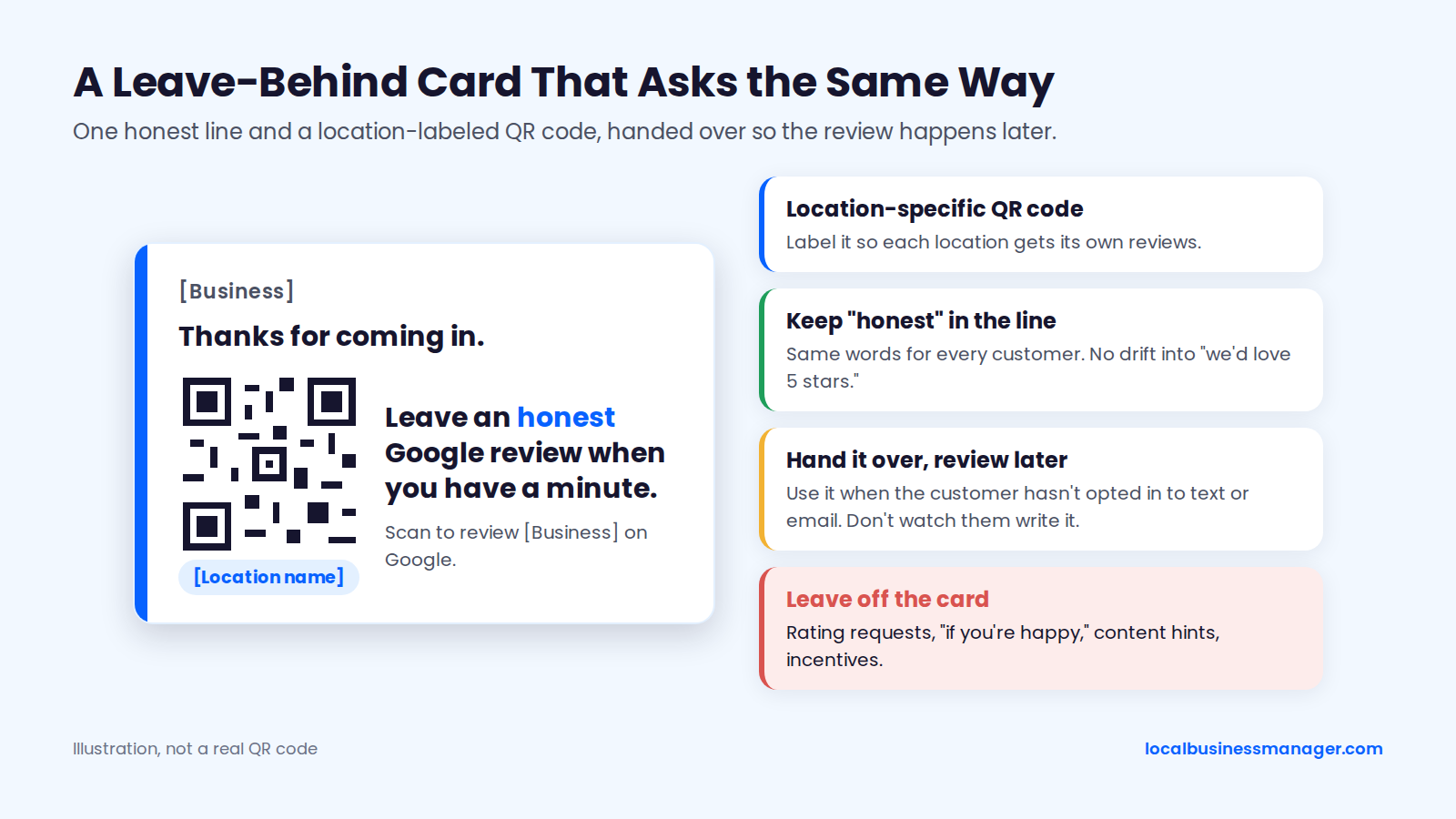
- For counter businesses: "Thanks for coming in. The card has a QR code for a Google review if you'd like to leave one later."
Send the link by text or email only if the customer has opted in to that channel. Otherwise, hand over a review request card with the QR code. Keep "honest" in the line. It stops whoever is asking from drifting into "we'd love 5 stars" on a busy afternoon.
Text Message
A review-request text should fit in about 160 characters and end with an opt-out line. It goes only to customers who opted in (see the consent rules below).
Hi [First name], thanks for choosing [Business]. Could you leave an honest Google review of your visit? [link] Reply STOP to opt out
The fixed wording is about 105 characters. The whole text fits in 160 only if the link, first name and business name together come to about 55 characters or fewer. Use the short link Google gives you, and check the merge fields before the batch goes out.
Change "visit" to "service", "repair" or "appointment" to match the business. Don't add the service name as a hint for what to write.
Email gives you room for a subject line and a single clear button. Send it only to customers who opted in to email, and keep it shorter than you think it needs to be.
Subject: Thanks from [Business], [First name]
>
Hi [First name],
>
Thank you for choosing [Business]. If you have a minute, we'd appreciate an honest review on Google. It helps other people decide who to call.
>
[Leave a Google review]
>
Thanks,
[Name], [Business]
>
[Unsubscribe]
Use one link and one button. Any of these turns the email into a gate: a star picker, a survey that routes by score, or a "contact us if you weren't happy" path that replaces the Google link. If your flow asks a feedback question first, every customer must still see the Google link.
Invoice or Receipt Line
The invoice line is the lowest-effort ask, and it reaches every paying customer by default. That makes it a useful backstop when staff forget to ask.
- Printed invoice: "Thanks for your business. Share an honest review on Google: [short link] or scan the QR code."
- Emailed receipt: "How did we do? You can leave an honest Google review here: [link]"
- Service report or job sheet: "Review [Business] on Google: [QR code]"
Print the location-specific QR code on each location's invoice template. Keep the line the same for every customer, including those with a disputed charge.
Past Customers
A past-customer ask works when it goes to everyone served in a set period, not a hand-picked list of favorites. Pick the period first, such as everyone served in the last 6 months, then send to all of them.
Hi [First name], thanks again for choosing [Business] earlier this year. If you have a minute, we'd appreciate an honest Google review: [link] Reply STOP to opt out
Four rules keep a past-customer ask clean:
- Send to the whole period, not only customers you remember fondly.
- Spread the sends over several weeks instead of one afternoon (see why new reviews go missing).
- Remove anyone who already left a review.
- Message only customers who opted in to that channel.
The One Follow-Up
The follow-up is a single reminder 2 to 3 days after the first ask, sent only to people who haven't reviewed yet. Google publishes no rule on reminders. Stopping after one keeps the ask from turning into pressure.
Hi [First name], a quick reminder in case you'd like to leave a review for [Business]: [link] No reply needed. Reply STOP to opt out
By email, reuse the original message with "Quick reminder" in the subject. Don't escalate the tone, and don't add an incentive the second time.
Law Firm Variant
A law-firm request goes to every client when the matter closes. It offers nothing in return and doesn't hint at a rating, the case facts or the outcome.
Hi [First name], now that your matter is closed, thank you for trusting [Firm] with it. If you're willing, we'd appreciate an honest Google review of your experience working with us: [link] Reply STOP to opt out
New York State Bar Association Ethics Opinion 1286 (2025) concludes that New York's rules don't prohibit asking a former client for a Google review. It flags confidentiality as a consideration.
We found no bar opinion that approves a specific review-request script. Treat this template as marketing wording, not legal advice, and check your state bar's rules before using it. Republishing client reviews as testimonials on the firm's own site is a separate question for the same check.
What to Leave Out of Every Script
Every script above leaves out the same 6 things, either because Google's policy bans them or because they turn an ask into a filter:
- Any rating request: "5 stars", "a great review", "top marks"
- Conditional phrases: "if you're happy", "if we did a good job"
- Content requests: "mention the service", "say which city", "name your technician"
- Incentives of any size, including entry into a draw
- Requests to review on the spot, on the business's device
- A private complaint path that replaces the Google link instead of sitting next to it
Coaching keywords also showed no ranking payoff in the one published test. In a Sterling Sky test (2023, updated December 2024), 6 keyword-containing reviews on an 18-review profile didn't improve map-pack rankings, and some rankings got worse. Joy Hawkins, who ran the test, advises against coaching customers on wording.
Where Should You Put Your Review Link?
Put the review link wherever the customer already looks when the job ends. Always point to the review form, never the profile home page. Use the link on screens and the QR code on paper.
The table lists 10 places for the link, sorted from the moment of service outward. Pick the ones that match how your customers already interact with the business.
Placement | Format | Best for |
|---|---|---|
Review request card left at the job site | QR code | Trades and home services |
Counter card | QR code | Retail and front desks |
Appointment card | QR code | Clinics and salons |
Receipt | Link or QR code | Every paying customer |
Invoice | Link or QR code | Billing after the job |
End of a chat, WhatsApp or Facebook message thread | Link | Customers already messaging you |
Follow-up text | Link | Customers who opted in to texts |
Follow-up email | Link or button | Customers who opted in to emails |
Staff email signature | Link | Ongoing client relationships |
Website contact or thank-you page | Link | Customers who visit the site after service |
Treat on-site QR codes as reminders to review later at home, for the reasons covered in why new reviews go missing. If you also show reviews on your website, don't cherry-pick only the 5-star ones.
How Do You Make Review Requests Happen After Every Job?
A review routine needs one owner, one trigger tied to job status, and a consent check before any text or email goes out. Set up those 3 pieces first. Automation only repeats the routine underneath it, mistakes included.
Pick One Owner and One Trigger
Every request should fire from a status change, not from someone's memory. The flow runs in 6 steps:
- The trigger fires: job marked complete, appointment checked out, or matter closed.
- The system checks consent for the channel and excludes no-shows, cancellations and previous reviewers.
- The request goes out by text or email.
- After 2 to 3 days with no review, one reminder goes out.
- The sequence stops.
- When a review arrives, someone replies to it.
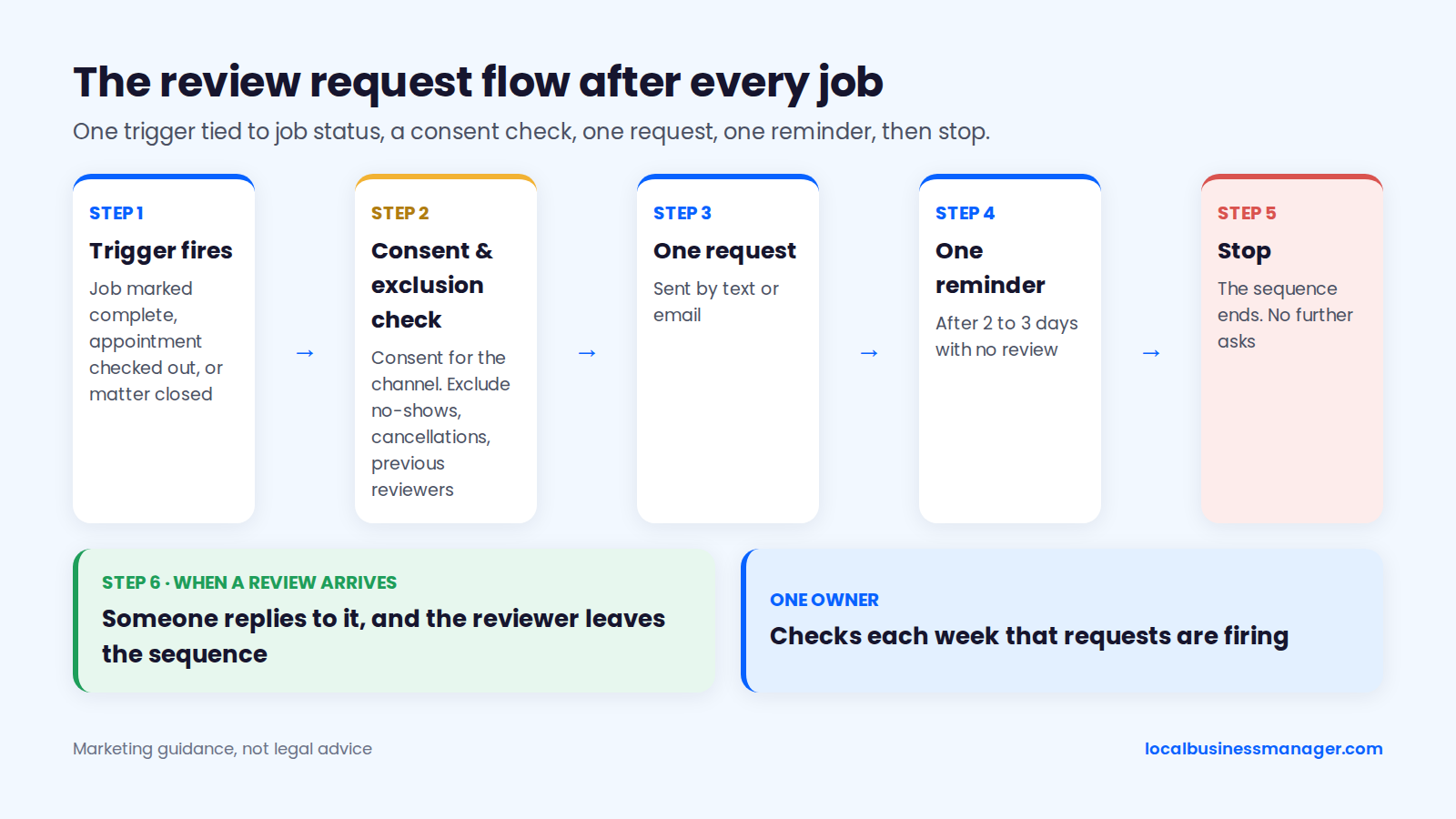
Name one person at the business who owns the routine and checks each week that requests are firing. Sterling Sky, for example, runs what it calls "Review Culture Training" with staff before rolling out in-person and link-based requests.
Don't put staff on targets. Google's policy bars merchants from asking staff to collect a set number of reviews, a clause PPC Land reported Google added on April 17, 2026. Google's wording doesn't mention per-review bonuses, but a bonus creates the same pressure as a quota, so leave it out.
Message Only Customers Who Opted In
Send review-request texts and emails only to customers who agreed to receive them from the business, and honor every opt-out. Google doesn't ban texting the link. The risk is US law, mainly the Telephone Consumer Protection Act (TCPA).
As of November 2026, a vendor's legal review found no FCC rule or court decision that settles whether a standalone review-request text is informational or marketing. Texts that include advertising need prior express written consent under FCC rules. Courts are split on the consent standard:
- Fifth Circuit (covers Texas): on February 25, 2026, it held that only "prior express consent" is required, as Holland & Knight summarized.
- Other circuits, including the Ninth: they follow the FCC's stricter rules.
- States: mini-TCPAs may still require written consent.
Consent Habits for Texts and Emails
Because the consent standard differs by circuit and state, the setup that's easiest to defend is opt-in you can prove for every customer you message. Four habits keep texts and emails on safe ground:
- Collect opt-in with clear wording at booking.
- Record when and how each customer gave consent.
- End every text with "Reply STOP to opt out".
- Give every email an unsubscribe link.
This is marketing guidance, not legal advice. Check your setup with TCPA counsel.
Automation Mistakes to Avoid
Automate the request, sent the same way to every customer who consented. Never automate the review itself. Seven common mistakes:
- Blank or wrong names. "Hi [First name]" or a misspelled name tells the customer nobody checked.
- Sends after cancellations or no-shows. The job status has to block the request.
- Repeat asks after a review. Remove reviewers from the sequence.
- Whole-backlog blasts. Sending to everyone at once creates the burst pattern linked to removals (see why new reviews go missing).
- Score-based routing. Showing the Google link only to high ratings is gating.
- Unconsented contact lists. A phone or email list imported from invoices isn't an opt-in list.
- Ignored STOP replies. Honor opt-outs promptly and stop all messages of that type. Check current TCPA rules with counsel.
How Many Google Reviews Do You Need?
No public source sets a number of reviews that guarantees a local-pack spot, and Google publishes none. The defensible target comes from benchmarking against the businesses already ranking for your main search. Then reach that target at a pace the business's own job volume supports.
My review goal for a client is to match the average review count of the top 3 map-pack results, and ideally to get as many reviews as possible beyond that.
The Benchmark Worksheet
The benchmark compares your profile with the top 3 map-pack results for your main search, searched from inside your service area. For each of the 4 profiles (3 competitors plus yours), record 5 numbers:
- Total review count
- Average rating
- Reviews in the last 90 days. Count by date on each profile's newest-first sort.
- Age of the newest review, in days
- Share of recent reviews with text, out of the last 10
From those, work out 3 figures:
- Count target: the average total of the top 3
- Pace target: the average reviews per 90 days of the top 3
- Recency gap: how many days your newest review trails theirs
Repeat the worksheet each quarter. Competitors keep collecting reviews, so a target set once goes stale.
A Worked Example (Hypothetical)
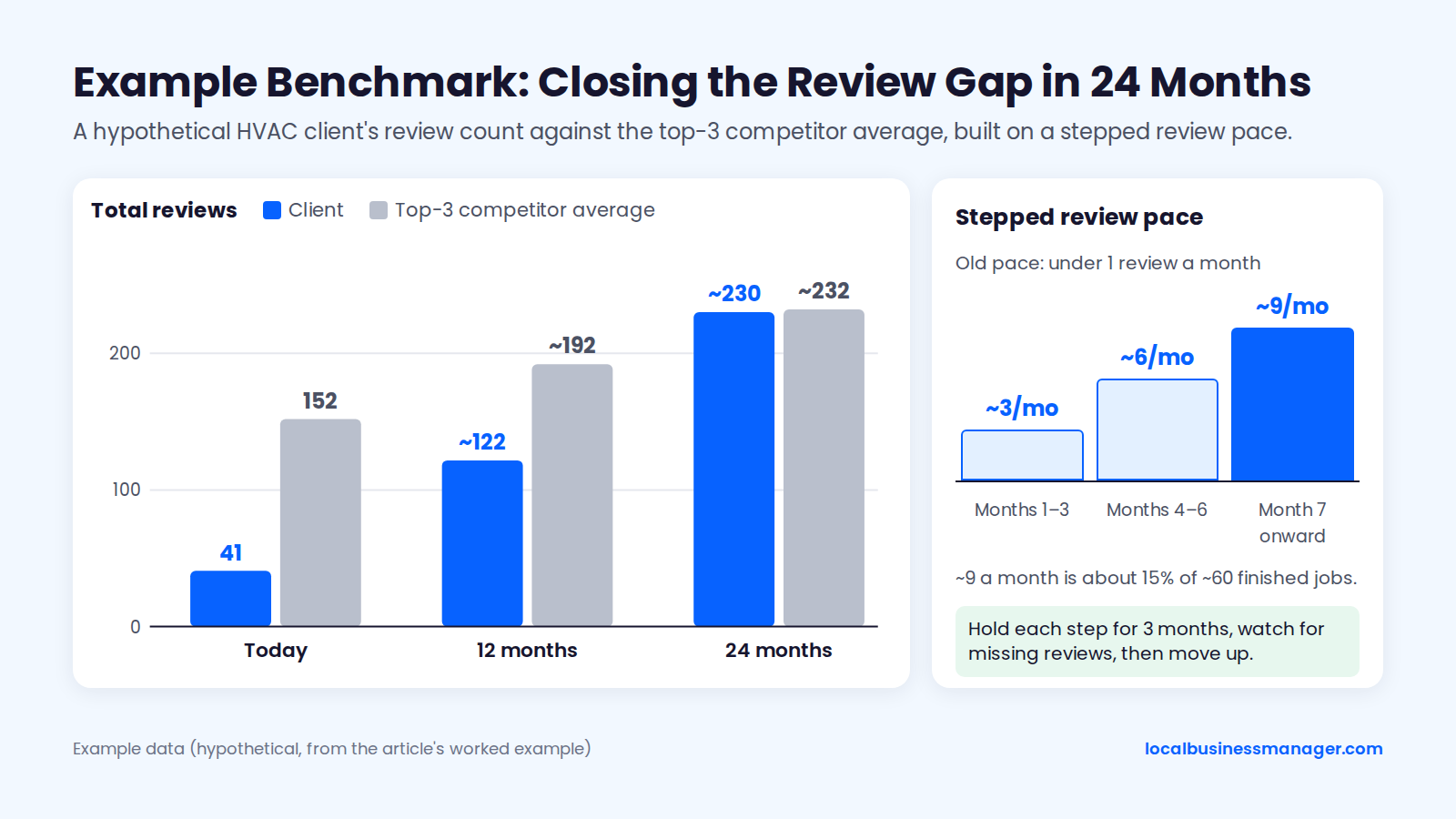
The numbers in this example are invented to show the math. They don't come from a real business or market. An HVAC company checks the top 3 results for its main search. Those competitors average 152 reviews (212, 148 and 96) and add about 10 reviews per 90 days (18, 9 and 4).
Profile (hypothetical) | Total reviews | Rating | Reviews in last 90 days | Newest review (days ago) | Text reviews (last 10) |
|---|---|---|---|---|---|
Competitor A | 212 | 4.7 | 18 | 3 | 8 |
Competitor B | 148 | 4.8 | 9 | 6 | 9 |
Competitor C | 96 | 4.6 | 4 | 41 | 6 |
Client | 41 | 4.9 | 2 | 64 | 5 |
At about 10 reviews per quarter, the competitor average grows by roughly 40 a year, reaching about 192 in 12 months. Closing that gap in 1 year would take about 150 new reviews, roughly 13 a month, from a client that currently gets 2 a quarter. A jump like that, held for months, matches the pattern described in why new Google reviews go missing.
How Fast Should the Example Client Raise Its Pace?
The example client sets its pace from the jobs it actually finishes, not from the size of the gap. Say it completes about 60 jobs a month (also hypothetical) and has never asked consistently. It raises its review pace in 3 steps:
- Months 1 to 3: about 3 new reviews a month
- Months 4 to 6: about 6 a month
- Month 7 onward: about 9 a month, or 15% of finished jobs
That ramp still runs well above the client's old pace of under 1 review a month: about 4.5 times higher at the first step and about 13 times higher at the last. Any business that starts asking after years of not asking will jump above its old pace. In Sterling Sky's documented removal case, volume held at roughly 2.5 times the baseline for 3 months preceded mass removals and a 30-day block, so hold each step for 3 months, watch for missing reviews, and only then move up. No source publishes a safe pace, so each step is a judgement call.
On that ramp, the example client passes 100 reviews in month 10 (41 + 9 + 18 + 36 = 104). It reaches about 122 reviews after 12 months and about 230 after 24 months, when the competitor average is about 232.
Why Pace Matters More Than the Total
The evidence points to steady new reviews mattering more than a large total that has stopped growing. Sterling Sky has published 3 findings on this:
- Review count test (2025). Rankings rose when a listing went from 3 to 16 reviews, with no clear gain from 16 to 31. Three businesses that went from 9 to 10 reviews saw a small Maps ranking gain, and three that went from 10 to 11 did not.
- Study of 8,186 businesses in 200 cities (2025). Reviews gained this month mattered more than total reviews, and reviews with text had a stronger effect than star-only ratings. One dental client's rankings "fell off a cliff" after 18 days with no new reviews, a single anecdote rather than a test.
- Recency case study. A client's rankings fell after its review flow stopped (one profile went over 3 years without a new review) and improved as new reviews came in.
Customers notice ratings too. The 2026 Local Consumer Review Survey, published in February 2026 by a local SEO software company, found that 31% of consumers will only use a business rated 4.5 stars or higher.
Why Do New Google Reviews Go Missing?
New Google reviews don't always post immediately. Google's "About missing or delayed reviews" help page says Google checks reviews against its policies, which can take a few days and delay a review's appearance. It also says "reviews removed for policy violations won't be restored." Beyond those checks, small published studies link missing reviews to volume running above a business's normal pace.
What Google Says About Review Spikes
Google published a Maps post on April 16, 2026, titled "New ways we're protecting businesses on Maps." It says that when Google sees a sudden spike in spam reviews, it takes 4 steps:
- Removes the fake content
- Pauses new reviews on the profile
- Alerts the Business Profile owner
- Shows a notification banner to consumers
The April 2026 post covers spam spikes only. Google hasn't said whether a burst of reviews from real past customers triggers the same response.
Google publishes no safe number of reviews per week. Any "safe pace" figure you see is a vendor's advice, not a tested threshold.
What Practitioners Have Measured
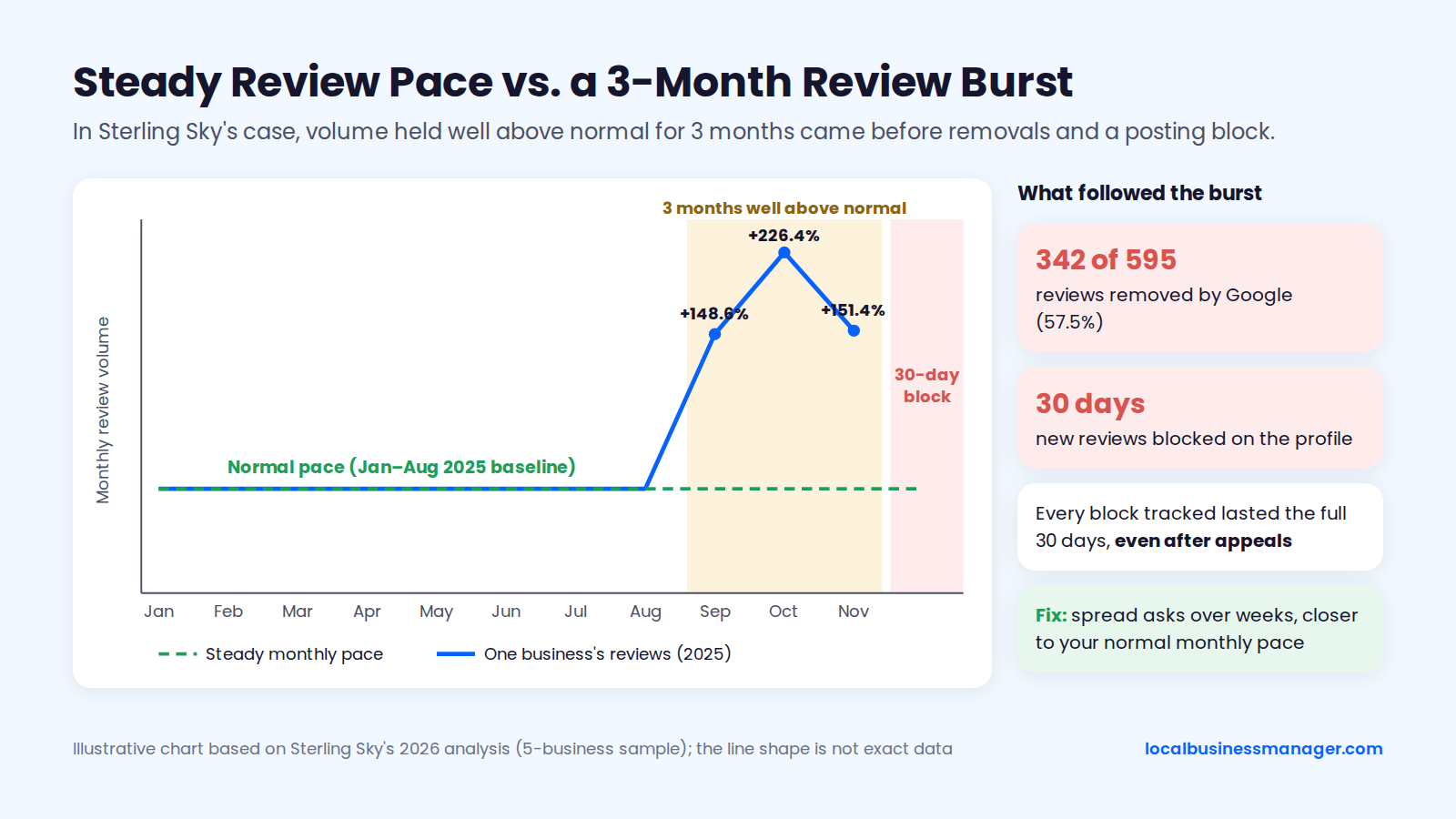
The best public data comes from Sterling Sky's 2026 analysis by Claudia Tomina, based on a small sample of 5 businesses. In that analysis, isolated spikes did not seem to trigger enforcement, but high volume that continued for weeks did. Sterling Sky ties posting blocks to in-store requests, QR codes and same-day bursts of reviews repeated over about 90 days.
In one of those businesses, reviews ran 148.6%, 226.4% and 151.4% above the January to August 2025 baseline from September through November 2025. Google removed 342 of the 595 reviews (57.5%) and blocked new reviews for 30 days. Removal was selective, and reviews left inside the business were the most likely to go. Every posting block Sterling Sky tracked over 60 days lasted the full 30 days, even after appeals.
A study discussed on Near Media's Near Memo (episode 280, October 2026) points the same way. Bursts above a business's normal pace drew deletions, while review length, images, stock phrases and staff names had no measurable effect.
A local SEO software company's 2026 missing-reviews troubleshooting checklist adds 4 common causes:
- Sudden review spikes
- Incentivized reviews
- Review kiosks or shared IP addresses
- Suspicious or inactive reviewer accounts
The same checklist notes that automated filtering can remove legitimate reviews by mistake.
What to Do When Reviews Disappear
When reviews vanish, slow the pace and fix the pattern. Don't push the same customers harder. Work through it in 5 steps:
- Compare the timing with your request log. Did a backlog campaign, an event or a QR push create a cluster?
- Spread future past-customer asks over weeks, closer to the business's normal monthly pace.
- Move on-site asks to "review later." Hand over the QR card, or send the link to customers who opted in, so they can use it at home on their own phone.
- Don't ask customers to repost. Asking the same person to post again and again adds to the pattern that got the first review filtered.
- Plan around a block. If the profile shows a posting block, go back to sending requests at a normal pace once it lifts. In Sterling Sky's tracked cases, appeals didn't shorten blocks.
For more causes and fixes, see our guide on why Google reviews go missing.
How Should You Reply to Reviews?
Reply to every review, positive and negative, ideally by the next day and always within a week. Reply as the business, in plain words. The 2026 Local Consumer Review Survey, published in February 2026 by a local SEO software company, found that 32% of consumers want a reply by the next day and 81% within a week.
Google's "Manage customer reviews" help page says replying shows customers you value their feedback. It says nothing about ranking. The same page says a reply may need edits before Google approves it. Google checks replies against its content policies before posting them, which usually takes up to 10 minutes but can sometimes take up to 30 days.
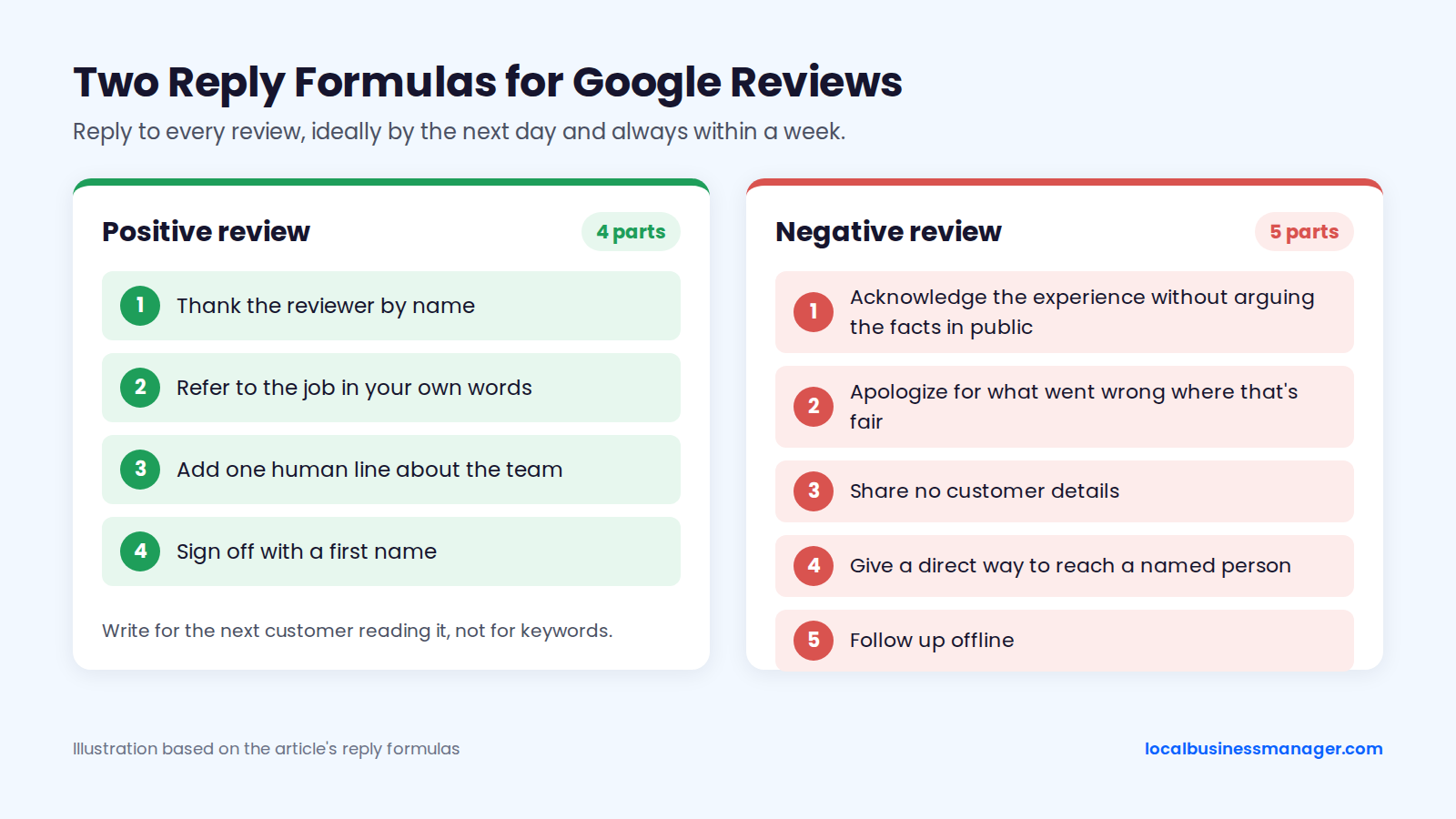
A positive Google review response has 4 parts:
- Thank the reviewer by name.
- Refer to the job in your own words.
- Add one human line about the team.
- Sign off with a first name.
Example: "Thanks, Maria. Glad the new water heater is running and that the crew left the garage cleaner than they found it. We'll pass your note on to Luis. Sam, [Business]"
A negative Google review response has 5 parts:
- Acknowledge the experience without arguing the facts in public.
- Apologize for what went wrong where that's fair.
- Share no customer details.
- Give a direct way to reach a named person.
- Follow up offline.
Example: "Hi Tom, I'm sorry your appointment started late. That's not the wait we want anyone to have. I'd like to hear what happened and put it right, so please call me directly at [number]. Priya, office manager, [Business]"
Don't stuff service or city keywords into replies. Google has never said replies affect ranking, so write for the next customer reading them.
In my agency work, the agency writes and posts every reply, and the client doesn't approve each one. If AI drafts any replies, a person must read and approve each one before it's posted. Our guide to responding to Google reviews has full reply templates.
Can You Remove or Delete a Google Review?
Only if it breaks Google's policy. You can't delete a review yourself; you report it. Google's "Report inappropriate reviews" help page says Google removes a reported review only if it violates Google's policies. A review that complies with the policies stays live, even if it's negative.
How to Report a Review
Report a review when it breaks a specific Google policy, such as fake content, a conflict of interest, spam or profanity. You select the reason when you report. Google's help page on reporting reviews gives this path:
- Open your Business Profile while signed in as an owner or manager, and select Read reviews.
- Next to the review, select Report and choose the reason that fits.
- Check the status in the Reviews Management Tool. Google's evaluation typically takes several days.
- If Google finds no violation, you can submit a one-time appeal from the Reviews Management Tool.
For the appeal, keep a short, factual note of why the review breaks policy, with evidence such as no customer record matching the reviewer. While the report is open, reply to the review calmly, because future customers read the reply even if the review stays. Our guide to reporting and removing fake Google reviews covers which reviews qualify.
Red Flags in Review-Removal Companies
A review-removal company that guarantees results is promising something only Google controls. Five red flags stand out:
- Guaranteed removal. No outside party decides what Google removes.
- Requests for owner access or your Google password. In my practice, the client stays primary owner and the agency is added as a manager through one agency organization account.
- Legal threats against reviewers. Google's policy lists discouraging negative reviews as rating manipulation, and a threat doesn't make Google remove a review.
- Vague reasons. The company can't say which Google policy each review breaks.
- Offers to bury bad reviews with new ones. Bought reviews break Google's policy and the FTC rule.
Before hiring one, ask:
- Which Google policy does each review we want removed break?
- What access do you need, and will you work as a manager rather than an owner?
- Will you contact reviewers, and if so, how?
- What happens if Google keeps the review?
- Do you ever post, buy or arrange reviews?
Do Google Reviews Help SEO and Local Ranking?
Yes. Google says more reviews and positive ratings can help local ranking, but it publishes no weights. Google's "Tips to improve your local ranking" page says local results are "mainly based on relevance, distance, and popularity" and that "more reviews and positive ratings can help your business's local ranking."
Outside evidence ranks reviews behind category and distance. The 2026 Local Search Ranking Factors survey polls about 47 local SEO practitioners and was published in late 2025 by a local SEO software company. For the local pack and Maps, the survey ranks:
- Primary category: #1 (score 227)
- Proximity to the searcher: #2 (score 225)
- Number of native Google reviews with text: #9 (score 170)
- Review recency: #11 (score 164)
Those ranks are expert opinion, not measured weights. Our guide to local ranking factors covers the other signals.
On a new client, the first 4 things I check, in order, are:
- Rankings across the whole area with a geo-grid scan
- The business name against the names of the ranking competitors (a keyword name only goes on the profile after the business registers it as a DBA and uses it everywhere, and it still carries suspension risk)
- The primary category
- The website
In my experience, once the basics are done, further gains, such as those from a strong review push, come gradually.
How Do Agencies Run Review Requests Across Clients?
Agencies get reviews for clients by building the ask into the client's own process and then reporting on it. Staff at the client business make the ask. The agency sets up and monitors the routine, starting with ownership and consent and ending with a monthly report that shows whether the routine is running.
Onboarding Checklist
Before the first request goes out for a new client, complete 9 items:
- Ownership. The client is primary owner of each profile. The agency is added as a manager and accepts invites through one agency organization account, not personal or shared logins. (That's how I run it.)
- Links. Pull a review link and QR code per location, test each on a logged-out phone, and record them in the location sheet.
- Owner at the client. Name one person who owns the routine.
- Trigger. Confirm the status change that fires each request.
- Consent. Check how text and email opt-in is collected and recorded, and how STOP replies and unsubscribes are handled.
- Templates. Get the client's approval on all templates. For law firms, the firm also checks them against its state bar's rules.
- Clean-up. Find and switch off any incentives, staff quotas or flows that hide the Google link from some customers.
- Benchmark. Fill in the competitor worksheet for each location.
- Replies. Decide who writes and posts replies, and set the target reply time.
What to Tell the Client
Clients push back most on 2 rules: no discounts, and asking unhappy customers too. These lines cover both:
- "Google treats any reward for a review as fake engagement, and the FTC rule bans rewards tied to a positive review. A discount can get reviews removed. Our process offers nothing."
- "We ask every customer the same way. Asking only happy customers is called review gating, and Google bans it."
- "We'll grow reviews at a steady pace. In documented cases, review volume held far above a business's normal pace for weeks led to removed reviews and a 30-day block on new ones."
- "Your team makes the ask, and we make sure it happens every time."
What to Put in the Monthly Report
Calls and rankings lead my monthly reports. The review block sits under them and shows whether the routine is running.
The table lists 7 review metrics. Three track signals Sterling Sky's studies link to ranking, 2 check that the routine runs, and 2 are customer-experience numbers Google has never tied to ranking.
Metric | What it shows | Type |
|---|---|---|
New reviews this month | Pace compared with the benchmark | Ranking-related (Sterling Sky studies) |
Days since newest review | Gaps in recency | Ranking-related (Sterling Sky studies) |
Share of new reviews with text | Review quality | Ranking-related (Sterling Sky studies) |
Requests sent | Whether the trigger fires | Process check |
Request-to-review rate | Share of asks that became reviews | Process check |
Response rate | Share of reviews with a reply | Customer experience |
Median reply time | Speed of replies | Customer experience |
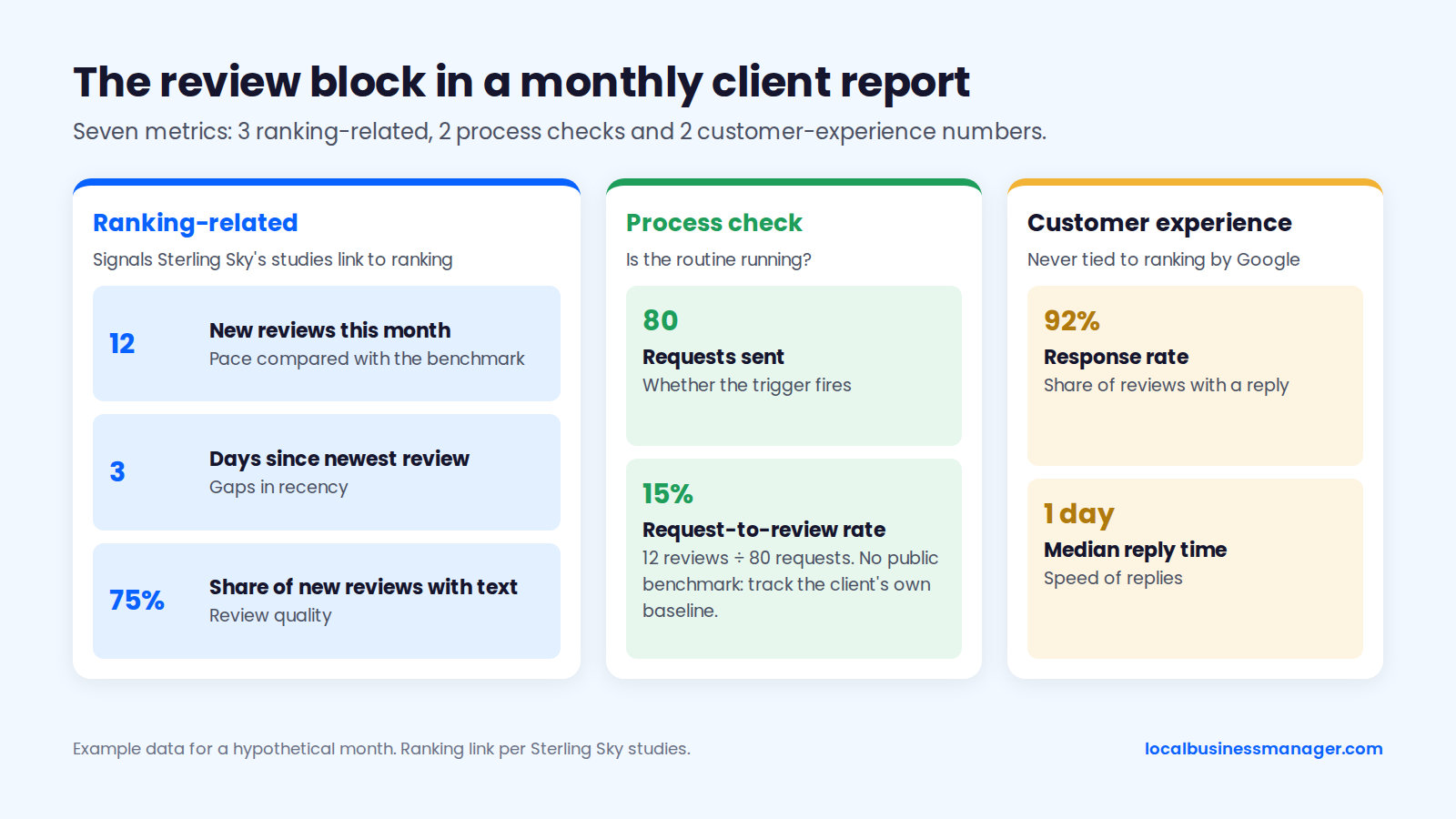
Request-to-review rate is new reviews from requests divided by requests sent. In a hypothetical month, 12 reviews from 80 requests is a 15% rate. There's no public benchmark for it, so track each client's own baseline and watch the trend.
Frequently Asked Questions
The 2 most-asked questions are answered above: yes, you're allowed to ask for Google reviews, and you get the QR code from the Get more reviews panel on a computer. The questions below cover the rest.
Can I Ask a Customer to Change or Remove a Negative Review?
You can fix the problem, but you can't offer anything for revising or removing the review, and you can't pressure the customer. Google's policy bars incentives such as payment, discounts or free services for changing or removing a negative review. It also lists discouraging negative reviews as rating manipulation.
Resolve the issue, reply publicly, and leave the next step to the customer. If you mention updating the review at all, attach no offer and no pressure.
Why Can't a Customer Leave a Review on My Business?
Google says customers must be signed in to a Google Account, and that reviews are available only in certain countries or regions and for certain business categories. Check those first.
If none of those is the problem, test the review link on a phone that isn't signed in to the owner account to rule out a wrong link or the wrong location. Practitioners such as Sterling Sky also document temporary 30-day posting blocks, and the section on why new reviews go missing covers what preceded them. A hidden address doesn't stop reviews: service-area businesses can still receive them.
Can I Use an In-Store Tablet or Kiosk for Reviews?
Google's policy doesn't name kiosks or tablets, but it says merchants shouldn't require or pressure customers to review while on the premises, so a shared in-store device is a poor bet. Google removed a line about review stations from its guidelines in December 2017. Several 2026 practitioner blogs read the premises clause, whose date isn't confirmed, as a kiosk ban, but that's their interpretation.
The missing-reviews checklist cited above lists kiosks and shared IP addresses as causes of missing reviews. Give customers the link to use on their own phone instead.
Can I Ask Customers to Add Photos to Their Review?
Asking for photos is a grey area: Google's policy bans requesting specific content but doesn't say whether a photo counts. Sterling Sky found that a review with a photo stays in a listing's top reviews longer, but no official source confirms that asking for one is safe.
Asking customers to mention the service, a keyword or a staff name is not a grey area. Google's policy bans it, as the rules table shows. If you want photos, leave them to customers who choose to add them.
How Do I See All My Google Reviews?
Open your Business Profile while signed in as an owner or manager and select Read reviews. Google's "Tips to get more reviews" help page describes the Read reviews panel as listing your reviews. The Get more reviews option for sharing your link or QR code is in the same place.
In a multi-location account, each location's reviews sit on its own profile, so check you've opened the right location first. If a review a customer says they posted isn't there, see the section on why new reviews go missing.
Start With the Ask That Isn't Happening
Pick one client or one location this week. Write down the exact moment a customer's job ends, and make the review request fire from that moment for every customer, with nothing attached. If you run this for several clients, you can join Local Business Manager early access.