How to Rank Higher on Google Maps: A Practitioner's Playbook

You rank higher on Google Maps by making the Google Business Profile clearly relevant to the search and building its prominence. The searcher's distance from the business sets the ceiling. Relevance comes from the primary category, the services and the linked page. Prominence comes from reviews, links and mentions.
This playbook gives you a diagnose-first order of fixes, the evidence behind each factor, compliant review scripts, a template for the "we dropped" call and honest timelines. I've spent 15+ years in SEO and ranked close to 100 personal-injury law firms in Houston, Denver, Los Angeles and New York, so expect opinions, clearly labeled.
How Does Google Decide Who Ranks on Google Maps?
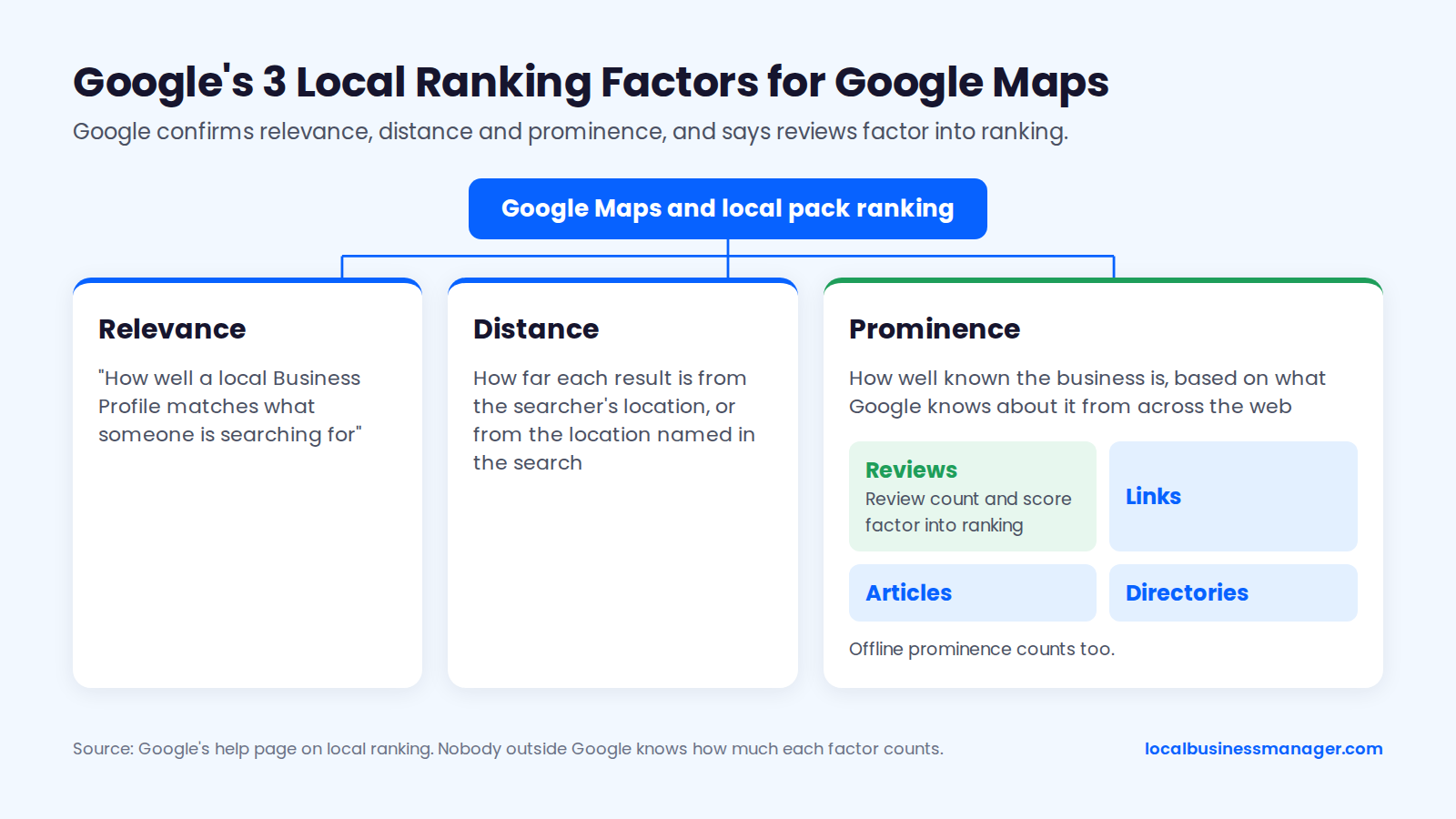
Google ranks Google Maps and local pack results mainly on relevance, distance and prominence. Google confirms those 3 factors and the role of reviews inside them. Everything else comes from expert surveys, correlational studies or practitioner tests, and the sections below label which is which.
Relevance, Distance and Prominence in Google's Words
Google's help page on local ranking states that local results are based mainly on relevance, distance and prominence. Google describes the 3 factors this way:
- Relevance: "how well a local Business Profile matches what someone is searching for," in Google's wording.
- Distance: how far each result is from the searcher's location, or from the location named in the search.
- Prominence: how well known the business is, based on what Google knows about it from across the web, such as links, articles and directories. Google adds that a business's offline prominence counts too.
The same help page says review count and review score factor into local ranking, and that more reviews and positive ratings can improve a business's ranking. It also says there's no way to request or pay for a better local ranking on Google.
Nobody outside Google knows how much any single input counts, so every percentage or "top factor" list you see is an estimate.
What the 2026 Local Search Ranking Factors Survey Estimates
The 2026 Local Search Ranking Factors survey, published on November 6, 2025, asked 47 local SEO experts to score 187 factors, and they ranked the primary Business Profile category first for the local pack and Google Maps. The table shows the survey's top 5 local pack and Maps factors, sorted by rank. The scores reflect expert judgment, not measured ranking effects.
Factor (2026 survey) | Rank for local pack and Maps | Expert score |
|---|---|---|
Primary Business Profile category | 1 | 227 |
Proximity of the address to the searcher | 2 | 225 |
Keywords in the Business Profile name | 3 | 223 |
Physical address in the city of search | 4 | 213 |
Open at the time of search | 5 | 189 |
The primary category's score rose from 193 in the 2023 edition to 227 in 2026. Two of the top 4 factors, proximity and an address in the city of search, depend on where the business physically sits, and ordinary optimization changes neither. At the other end of the list, frequency of Google posts ranks #148 with a score of 55.
Which Profile and Website Factors Are Confirmed, Measured or Myth?
Among the 10 profile and website factors below, Google confirms only distance and the role of links, articles and directories, and it sets rules for the business name and the landing page. Everything else rests on surveys, correlations or tests.
The table draws on Google's help pages, the 2026 survey and the studies named in this article, as of November 2026, sorted from strongest evidence to weakest. "Profile study" means a local SEO software company's correlational study of 16,098 Business Profiles; like every study cited here, it shows what tracked with rank, not what caused it.
Factor | What Google confirms | What studies and surveys show | What to do |
|---|---|---|---|
Distance to the searcher | One of 3 main factors | #2 in the 2026 survey | Rank from where the business really is |
Links, articles, directories | They feed prominence | Landing-page link quality #25 in the survey | Earn local links and mentions |
Keywords in the name | Name must be the real-world name | #3 in the survey | Only via a DBA the business really uses |
Landing page | Must be a dedicated page for the business | Keywords in headings #20 in the survey | Link a relevant page |
Open at time of search | Google's Search Liaison has commented on it | #5 in the survey | Keep main hours accurate |
Primary category | Not published | #1 in the 2026 survey | Match what the top 3 use |
Photos | Not published | Median 44 at #1 vs 21 at #11 and below (profile study) | Upload real photos |
Business description | Not published | Having one correlated with higher rank; length didn't (profile study) | Write it for customers |
Google posts | Not published | No effect in a 2021 test; posting at all correlated with higher rank (profile study) | Treat as conversion content |
Schema and map embeds | Not confirmed as local factors | No study we could verify | Treat as website hygiene |
Which Review and Engagement Factors Are Confirmed, Measured or Myth?
Among these 4 review and engagement factors, Google confirms only review count and score. Recency, replies and behavioral signals rest on practitioner observation, the 2026 survey or the profile study, with the same sources and sort order as the table above.
Factor | What Google confirms | What studies and surveys show | What to do |
|---|---|---|---|
Review count and score | Both factor into ranking | Small lift at 10 reviews (Sterling Sky, 2025); median 79 at #1 (profile study) | Ask every customer |
Review recency and pace | Not confirmed | 18-day rule observed; no pace effect (profile study) | Ask steadily |
Review replies | Not published | No ranking benefit (profile study) | Reply for customers |
Behavioral signals (clicks, calls, directions) | Not confirmed | About 9% of expert weight in the 2026 survey | Never fake or buy clicks |
The 9% behavioral weight is expert opinion, not something Google has confirmed.
Why Does Your Google Maps Ranking Change Depending on Where You Search?
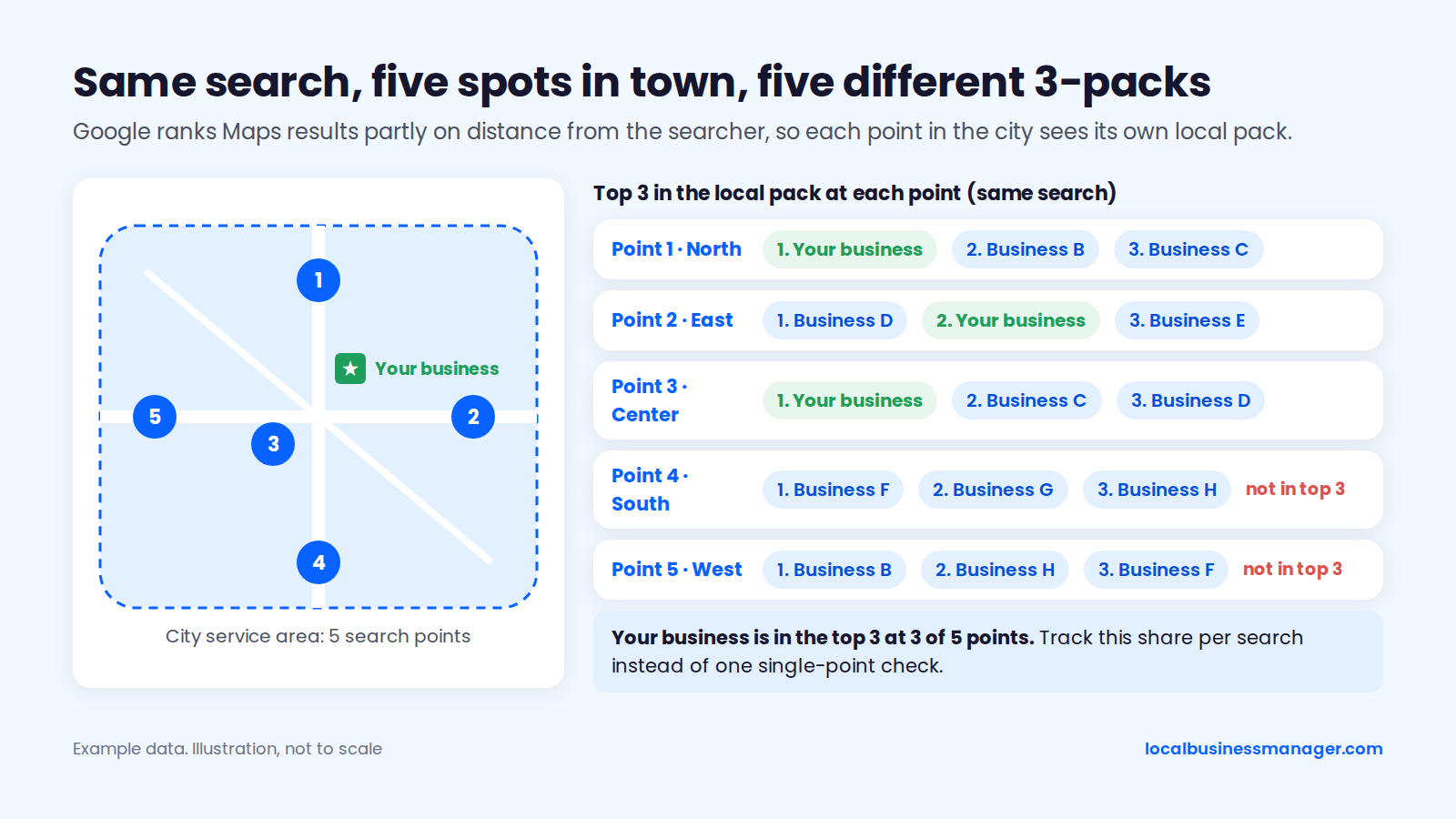
Your ranking changes by location because Google ranks Maps results partly on distance from the person searching. Searchers in different parts of town see different 3-packs. A single check from the office or a client's kitchen shows one version of the results, not "the" ranking.
Distance Sets the Ceiling
Distance to the searcher is one of Google's 3 main local ranking factors, and it's the one factor no optimization can change. The 2026 Local Search Ranking Factors survey ranks proximity of the address to the point of search #2 (score 225) and a physical address in the city of search #4 (score 213).
Juris Digital's 2025 proximity study of law-firm rankings found that the searcher's physical location still has a big effect on map-pack results. Sterling Sky's 2025 clustering analysis showed Google building pack results close to the searcher's location.
Google Maps Help says that when Search history is on, results can include places you've searched before. That makes a signed-in owner checking their own business a poor neutral observer.
How to Check Rankings Properly
Check rankings from many points across the service area, for the same 3 to 5 core searches, on a fixed schedule. Any multi-point rank tool works, and so does a spreadsheet of checks from the same fixed coordinates each month. Track the share of points where the business appears in the top 3, per search.
I don't use single-point rank checks at all; one location says little about how a business ranks across its area. On a new client, I run one scan first just to learn how the business ranks, then adjust:
- Start with 13 Ã 13 points, 0.5 miles apart.
- If the grid comes back mostly green, widen the spacing to see how far the ranking reaches.
- If it comes back mostly red, tighten the spacing.
My recommendation for agencies is to scan at least once a month. Daily scans make sense only when you've just made an edit and want to see whether it produced a result.
In my view, average rank is misleading on its own right now. Google is fighting automated and AI data collection, mixing results and making the results page very volatile, so an average rank can make sense but is hard to read with confidence.
What to Tell a Client Who "Dropped" From Their Kitchen
Tell the client that their phone showed one location's results, then show them the multi-point check that covers their whole area. Most agencies have had this call, usually with a screenshot attached. The script below is a template, not a transcript; adapt the wording to your own clients:
- "Thanks for flagging it. Where were you when you searched, and were you signed in to Google?"
- "Google ranks Maps results partly on how far the business is from the person searching. Your phone at home sees one version of the results, and a customer 3 miles away sees another."
- "When your Search history is on, Google can include places you've searched before, so your own phone can show results shaped by your search history."
- "That's why we check from [number] points across your area, on the same searches, every month. Here's this month next to last month."
- "If the area-wide check shows a real drop, we compare your name and primary category with the businesses now ranking above you. Then we check your website and any recent edits to your profile, including ones Google made."
- "Your next update is on [date]. If you spot something before then, send the screenshot along with where you were when you took it."
What Should You Fix First? A Diagnostic Table
Start from the client's symptom, not from a factor list. The 6 symptoms below cover most stuck profiles, from not showing at all to suspended, based on Google's ranking help page and the practitioner research cited here (November 2026). Each row gives the likely cause, what to check and the step that fixes it.
Symptom | Likely cause | What to check | Where it's fixed |
|---|---|---|---|
Not showing at all, even nearby | Relevance gap or a filter | Primary category vs the top 3; duplicate or near-identical listings | [Step 1](#step-1-fix-the-foundations-verification-duplicates-address-and-service-area) and [Step 2](#step-2-choose-the-categories-that-match-the-search) |
Shows only near the address | Distance plus weak prominence | Multi-point check; review count vs the top 3 | [Step 5](#step-5-earn-more-reviews-without-breaking-googles-rules) and [Step 7](#step-7-build-prominence-beyond-the-profile) |
Ranked, then dropped suddenly | Recent edit, filter or new spam | Changes to name, category, URL or hours, including Google's | [Step 2](#step-2-choose-the-categories-that-match-the-search), [Step 4](#step-4-complete-the-profile-fields-that-matter), [Step 6](#step-6-make-your-website-back-up-the-profile) and [Step 8](#step-8-deal-with-spam-listings-that-outrank-you) |
Stuck at positions 4 to 10 | Name and review gap vs the top 3 | Competitor names, categories and review counts | [Step 2](#step-2-choose-the-categories-that-match-the-search), [Step 3](#step-3-should-you-put-keywords-in-your-business-name) and [Step 5](#step-5-earn-more-reviews-without-breaking-googles-rules) |
Outranked by spam listings | Fake or keyword-stuffed competitors | Signage, Street View, state business registry | [Step 8](#step-8-deal-with-spam-listings-that-outrank-you) |
Profile suspended | Name or address edit, ineligible address | Recent edits and documents on hand | [Suspension section](#what-can-hurt-your-ranking-or-get-the-profile-suspended) |
Sterling Sky lists a changed primary category among the things to check when Business Profile rankings drop. Step 1 covers how Google filters near-duplicate listings, and Step 6 covers what a changed profile URL can do.
When I take on a new local client, I check 4 things in this order:
- Rankings across the whole area, with a multi-point scan
- The business name compared with the names of the competitors outranking it
- The primary category
- The website
With personal-injury firms that couldn't get into the 3-pack, the cause I saw most often was a business name that wasn't optimized, together with a review flow that was too low.
The Fix-First Checklist: 20 Items in Order
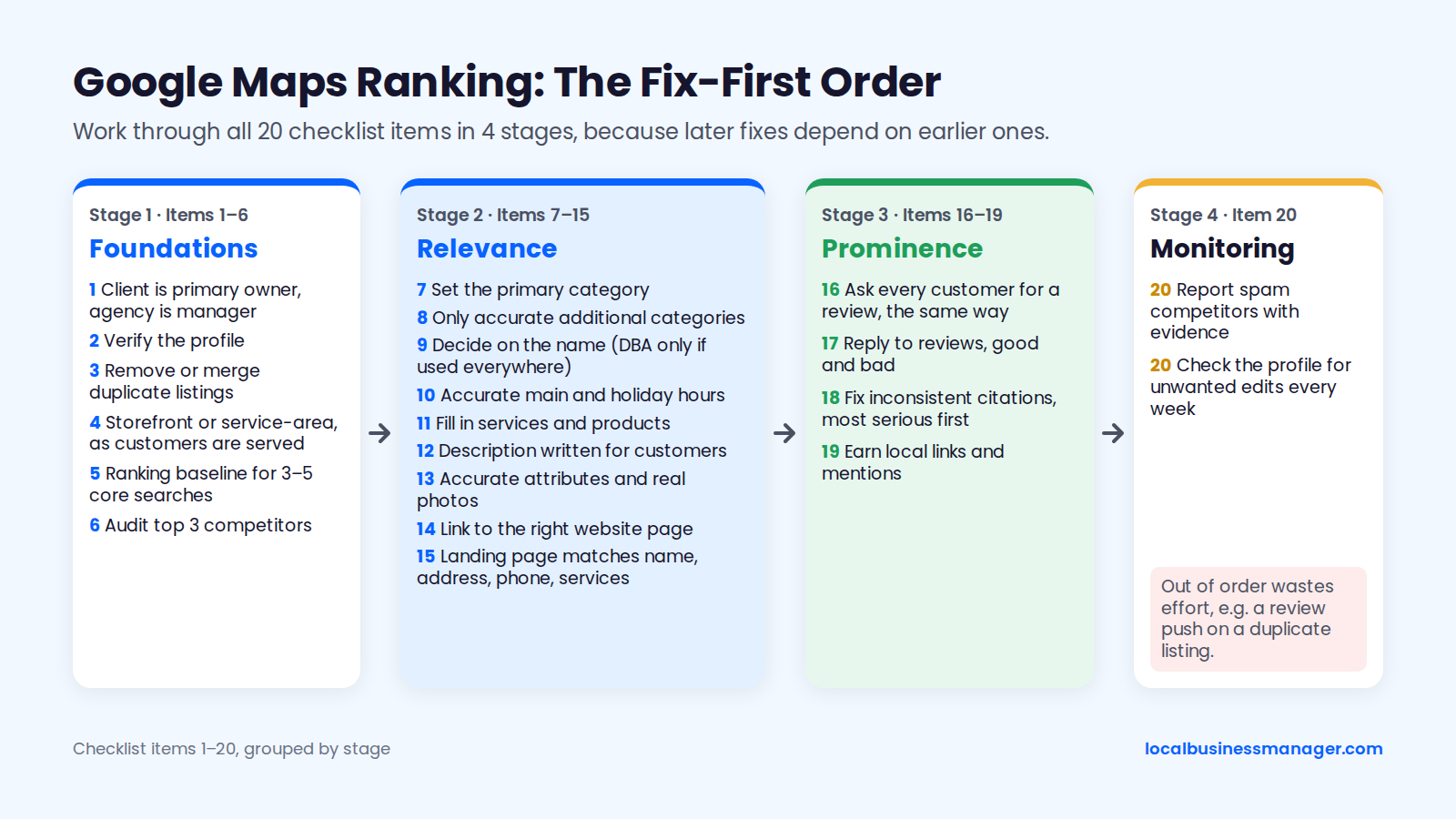
Work through these 20 items in order: foundations first, then relevance, then prominence and monitoring. The order matters because later fixes depend on earlier ones; a category change on an unverified profile, or a review push on a duplicate listing, wastes effort. Each item is covered in the steps below.
- Confirm the client is the primary owner and the agency is a manager.
- Verify the profile.
- Find duplicate listings and remove or merge them.
- Set the profile up as a storefront or a service-area business, matching how customers are really served.
- Run a multi-point ranking baseline for 3 to 5 core searches.
- Audit the top 3 competitors' names, categories and review counts.
- Set the primary category.
- Add only accurate additional categories.
- Decide on the name. Use the DBA route only if the business will use that name everywhere.
- Set accurate main hours and holiday hours.
- Fill in services and products.
- Write the business description for customers.
- Add accurate attributes and real photos.
- Link the profile to the right page on the website.
- Make the landing page match the profile's name, address, phone and services.
- Start asking every customer for a review, the same way.
- Reply to reviews, good and bad.
- Fix inconsistent citations, most serious first.
- Earn local links and mentions.
- Report spam competitors with evidence, and check the profile for unwanted edits every week.
Step 1: Fix the Foundations (Verification, Duplicates, Address and Service Area)
The foundations are a verified profile, one listing per real location, and an address setup that matches how customers are served. Fix these before touching categories or reviews. Google can filter duplicate listings, and every later fix depends on a verified profile.
Verify the Profile
Verify the profile first, because Google's published processing times run to days or weeks depending on the method. These times come from Google's Business Profile help on verification and its community guide:
- Postcard codes usually arrive within 14 days and expire after 30 days.
- Verification reviews take up to 5 business days, occasionally longer.
- Video verification can take up to 7 days to process.
On my clients' profiles, the client records the verification video alone. The most common reason a video gets rejected is that it doesn't show the signage, the street number or other proof of the location, so have the client plan those shots before recording.
I set ownership up the same way every time. The client is the primary owner, and the agency is added as a manager. The agency accepts invites through one agency organization account rather than personal or shared logins.
Find and Remove Duplicate Listings
Duplicate listings are one of the problems I've inherited from previous agencies, along with bad naming, no review campaigns and no services set up on the profile. They matter because Sterling Sky reports that Google can filter listings with a similar name, URL or address, or that sit very close to a competitor, and usually shows only the strongest one for a keyword. To find duplicates, search Google Maps for:
- The business name and its common variations
- Every phone number the business has used
- Every previous address
- For law firms and clinics, each practitioner's name
Keep the listing that has the verified owner, the correct details and the most reviews. Check Google's current Business Profile help for how to remove or merge the others.
Storefront or Service-Area: Address, Pin and Service Areas
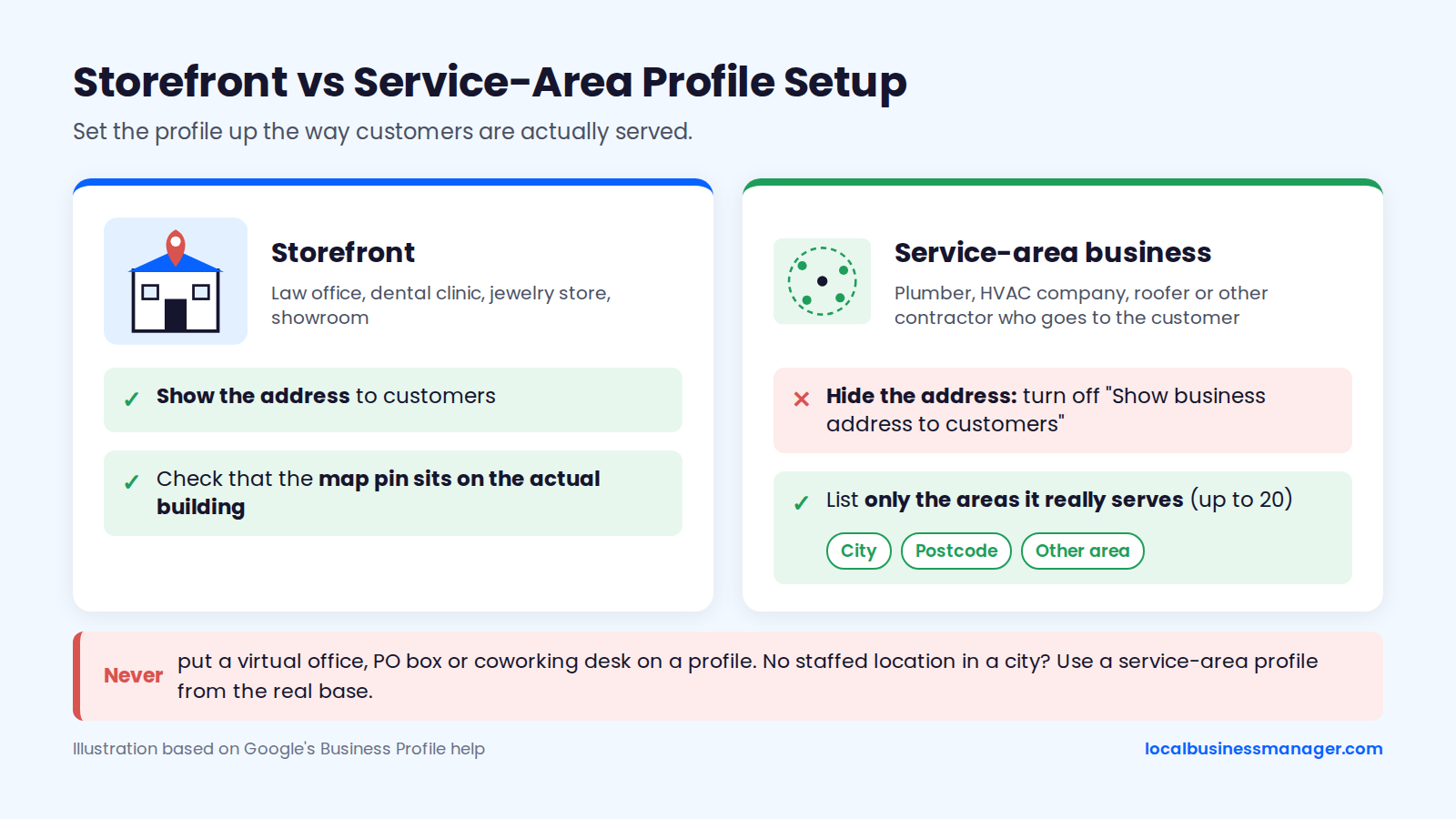
Set the profile up the way customers are actually served. Google's Business Profile help on managing your business address says that if you don't serve customers at your business address, you can choose not to show it and list your service area instead. The same page says to hide the address only if you're a service-area business, which leaves 2 setups:
- Storefront (law office, dental clinic, jewelry store, showroom): show the address, and check that the map pin sits on the actual building.
- Service-area business (plumber, HVAC company, roofer or other contractor who goes to the customer): hide the address and list only the areas the business really serves.
Google's help on managing service areas gives the setup in 2 steps:
- Go to Edit profile > Location > Business location, then turn off "Show business address to customers".
- Go to Edit profile > Location > Service area, then add up to 20 service areas by city, postcode or other area.
Listing service areas doesn't make the profile rank across all of them; the FAQ on towns far from the address explains why and what to do instead.
Never put a virtual office, PO box or coworking desk on a profile. If the business has no staffed location in a city, the compliant route is a service-area profile from its real base. Add a city page on the website for each town the business really serves.
Step 2: Choose the Categories That Match the Search
The primary category is the #1-rated factor in the 2026 Local Search Ranking Factors survey, an expert estimate that Google hasn't confirmed. Choose it by looking at who already ranks, and add only accurate additional categories (more in how to choose Google Business Profile categories). Change it carefully, because category edits can trigger re-verification.
Pick the Primary Category the Top Competitors Rank With
Choose the primary category that most of the businesses already ranking for the target search use. The category still has to describe the business truthfully, so a personal-injury firm might be choosing between "Law firm" and "Personal injury attorney". To rank a jewelry store on Google Maps, check whether the shops in the top 3 use "Jewelry store" or a more specific option, then pick the accurate match.
Sterling Sky says changing the primary category has a major effect on ranking. My rule for every client is to pick what most of the ranking competitors use. If Google is clearly rewarding a different category than the "logical" one, I use the category Google rewards, as long as it's accurate for the business.
Add Only Accurate Additional Categories
Add only additional categories that describe services the business really offers. A roofer that also does gutters can add a gutter category. A roofer that refers gutter jobs to someone else can't.
Agency guides, including OptDigital's, put the limit at 1 primary category plus up to 9 additional ones, 10 in total. Check the count in the live category editor. Google's own category help says not to pick a category for every product or service.
In a local SEO software company's study of 16,098 profiles, more additional categories tracked with higher rank:
- Profiles at #1 averaged 3.7 additional categories.
- Profiles at #11 and below averaged 2.7.
- A quarter of profiles at #11 to #20 had none.
Some guides turn findings like these into a target number, and chasing a count pushes people into inaccurate categories. In my experience, a typical profile ends up with 3 to 5 additional categories.
How to See Which Categories Top Competitors Use
Run your 3 to 5 core searches from several points across the service area, and record the top 3 profiles at each point. The category that most of the top 3 share across points is your shortlist for the primary category.
Keep one tab per search term, with 8 columns:
- Search point
- Competitor name, exactly as shown on the profile
- Primary category
- Additional categories, if your tools show them
- Review count
- Average rating
- Distance from the search point to the competitor
- The page the profile links to
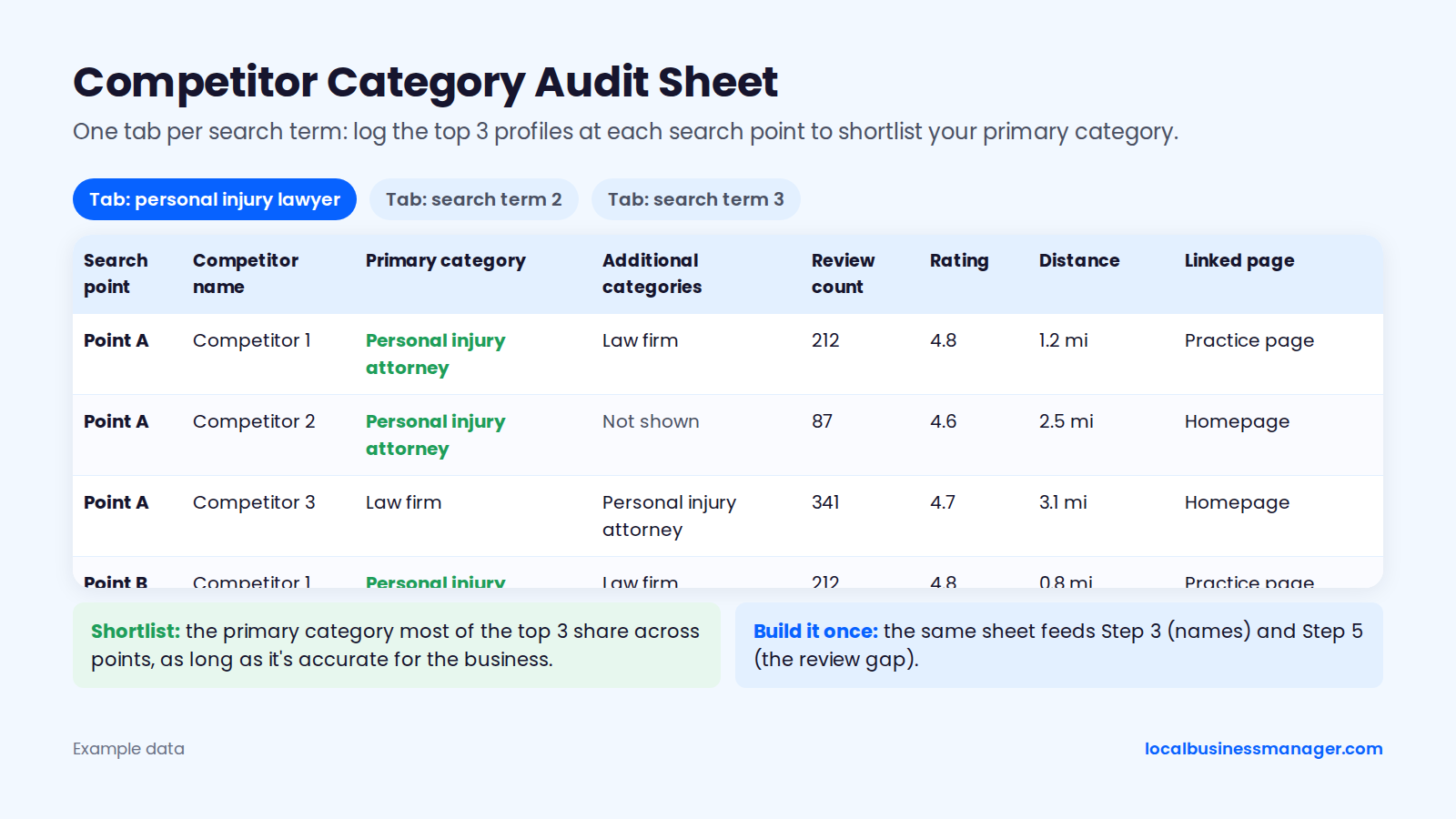
The same sheet feeds Step 3 (names) and Step 5 (the review gap), so build it once.
When to Change the Primary Category, and the Risk
Change the primary category only when the audit says you should, and plan for possible re-verification. Google says that if you add or edit a category, you might be asked to verify your business again. Google's help on profile edits says edits are usually reviewed within 10 minutes, but sometimes take up to 30 days.
Practitioners have reported what a category edit can set off:
- In late 2024, DAC Group spent several weeks investigating a wave of unverified listings among its clients. It concluded that category edits, primary or secondary, were the main cause, though not every change triggered one.
- In a 2024 Local Search Forum thread, a profile with a category edit and an address edit made together got a 30-day review notice.
- In a 2022 Local Search Forum case, a restaurant switched its primary category from Sushi Restaurant to Japanese Steakhouse. It then dropped out of the local pack for "sushi restaurant".
After a name, address or category edit, I wait a day or two before making the next sensitive edit. Never change the category and the address on the same day.
Step 3: Should You Put Keywords in Your Business Name?
Yes, but only if the keyword name becomes the business's real name: register it as a DBA, use it everywhere, and change the profile name last. That's my recommendation, and it carries real suspension risk. Appending keywords to a name the business doesn't use breaks Google's rules (see keyword business names and DBAs).
What Google's Name Rule Says
Google's guidelines for representing your business require the Business Profile name to be the business's real-world name. That's the name used consistently on signage, the website and stationery. It isn't necessarily the legal registered name, and Google allows only a few specific exceptions.
The rule prohibits adding a service or city to a name the business doesn't actually use. "Smith Law Car Accident Lawyer Houston" on a profile whose sign says "Smith Law" is a clear example. Competitors can suggest an edit to remove it, and Google can suspend the profile.
Do Keywords in the Name Still Help Rankings?
Keywords in the name still correlate with higher rankings, but the size of the effect depends on whose data you read:
- The 2026 Local Search Ranking Factors survey ranks keywords in the Business Profile name #3 (score 223).
- A local SEO software company's 2026 study found that, in 15 of the 16 industries it analyzed, names starting with a keyword correlated with more top-3 rankings.
- A second local SEO software company's 2026 analysis of more than 131,000 keywords found a smaller effect: stem-matched name keywords raised the top-3 rate by 4.0 percentage points.
Sterling Sky's test showed the effect directly. Adding "Salad Bar" to a name raised rankings, often within hours, and removing it dropped them back.
Sterling Sky also reports that Google's November 2021 Vicinity update weakened the factor. One keyword-named law firm fell from 220 rankings to 26, with the biggest hit on searches without a city name.
The Compliant Route: A Registered DBA You Actually Use
The compliant route is to make the keyword name the business's actual name before it appears on the profile. I've taken many clients through this process.
A DBA document alone doesn't make a name compliant. Google judges the name the business really uses, and the DBA is what proves it if Google asks.
The risk is real. The 2026 Local Search Ranking Factors survey lists keyword names among the top suspension risk factors, and in a 2025 Local Search Forum thread, experts said a DBA on its own "probably isn't enough". If a profile is suspended anyway, the suspension section below covers what reinstatement usually needs.
The DBA Rename Sequence in 12 Steps
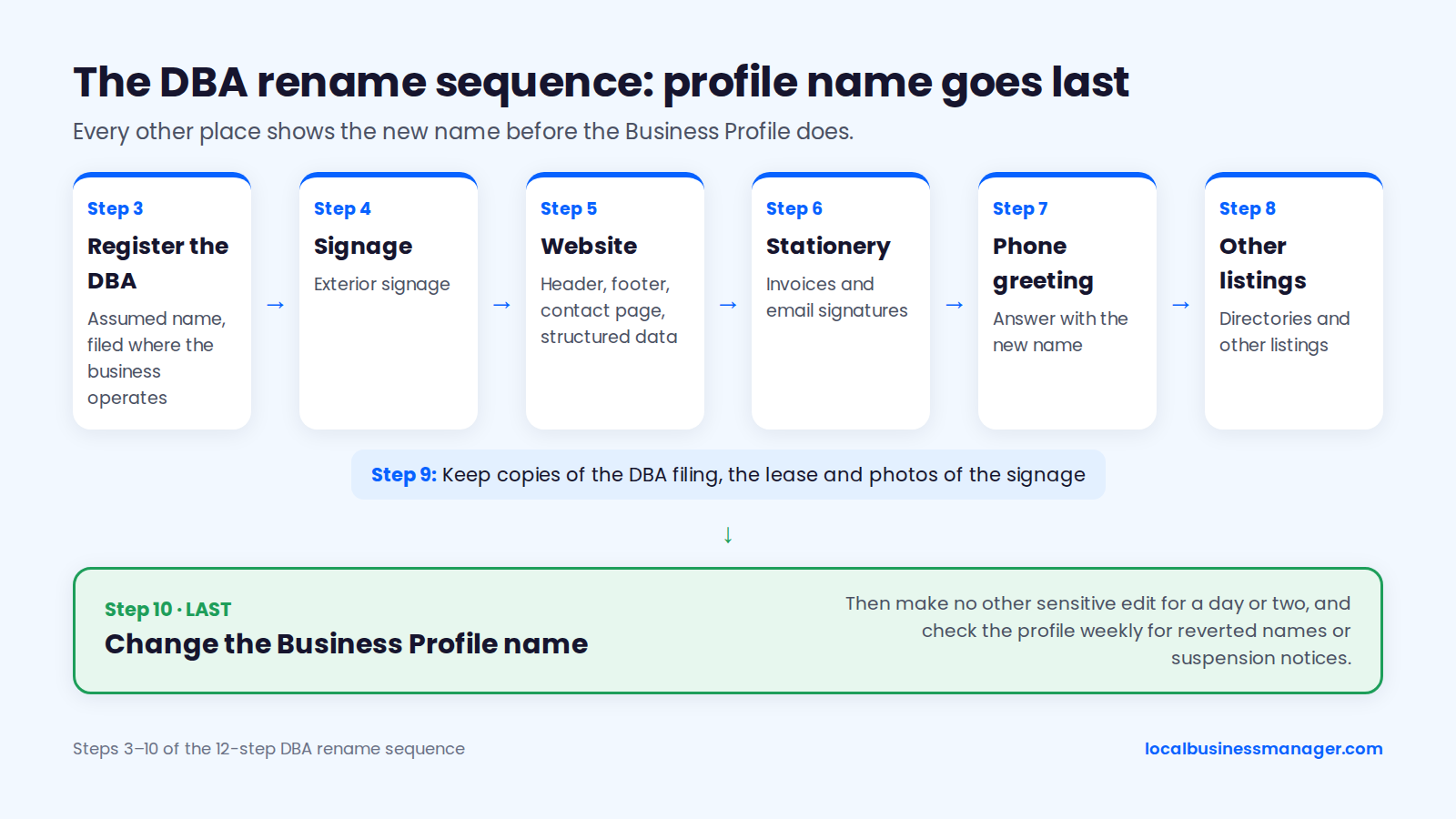
Run the rename in this order, so every other place shows the new name before the profile does:
- Confirm the business will trade under the new name long term, not just on Google.
- Law firms: check your state bar's trade-name rule before anything else (see below).
- Register the DBA (assumed name) with the office that handles assumed names where the business operates.
- Change the exterior signage.
- Change the website header, footer, contact page and structured data.
- Change stationery, invoices and email signatures.
- Change the phone greeting.
- Change the name on other listings and directories.
- Keep copies of the DBA filing, the lease and photos of the signage.
- Change the Business Profile name last.
- Make no other sensitive edit for a day or two.
- Check the profile weekly for reverted names or suspension notices.
Extra Rules for Law Firms
Law firms have to clear their state bar's trade-name rule as well as Google's name rule; this is marketing guidance, not legal advice. Under ABA Model Rule 7.1, Comment 5, a firm may use a trade name that isn't false or misleading. A geographic trade name may need a statement that the firm isn't a public legal aid organization.
Some states go further than the Model Rule:
- New York Rule 7.5(b) bars lawyers in private practice from practicing under a trade name, so the keyword-DBA route likely isn't available to New York firms.
- Texas has its own trade-name requirements, including state bar approval.
- Kentucky, New Jersey and Rhode Island also restrict trade names.
Bar rules change, so check your own state bar's current rule before filing anything.
Step 4: Complete the Profile Fields That Matter
Of the fields in this step, accurate main hours have the strongest ranking evidence. Services, the description, attributes, photos and posts mostly help customers choose you, with weak or unconfirmed ranking effects. Fill them all in accurately anyway, because they turn a ranking into calls.
Does Being Open at the Time of Search Affect Ranking?
Practitioners have observed profiles losing visibility when the business is closed at the time of search, and the 2026 Local Search Ranking Factors survey ranks "open at time of search" #5 (score 189). Sterling Sky first reported it in December 2023, and later work has mostly backed it up:
- Sterling Sky saw businesses become far less visible in local results when closed, noticeable since the November 2023 core update.
- A local SEO software company's December 2023 study of 50 locations in 10 categories found higher average rankings during listed open hours.
- In 2025, Sterling Sky reported that only main hours affect rankings, not additional hours such as online service hours.
- One 2024 industry report said the effect showed in Search but not yet in the Maps app, where users can filter with "Open now". Most later grid studies treat it as a local pack and Maps factor.
How to Set Hours and Holiday Hours
Set hours to match when the business is really open, because faking them can cost the profile. Google's Search Liaison advised against switching to 24/7 hours unless the business is truly open 24/7, because the signal may keep being adjusted. Keep hours honest:
- List the hours the business is really open, as main hours.
- Never fake a 24-hour schedule. A local SEO software company's 2025 analysis noted that listings can be suspended for it.
- Set holiday hours ahead of every holiday, so the profile doesn't show open when the doors are locked.
Services and Products
Add every service the business actually offers, in the words customers use. For the services section:
- List each real service separately ("water heater replacement", "drain cleaning"), not one catch-all.
- Match the services to sections or pages on the website, so the profile and site say the same thing.
- Use products for offers with a clear price or package, and leave them out if there's nothing to price.
No study cited here measures a ranking effect for services. They're still worth the hour, because they show searchers exactly what the business does.
Business Description
Write the description for customers: who the business serves, where, what it specializes in and why someone should call. In the 16,098-profile study, having a description correlated with better rankings, and the gap was wider for profiles with many reviews than for those with few. Description length made no difference.
Write the description once, accurately, and skip phrases like "best electrician near me".
Where Does Q&A Content Go Now?
Q&A content now belongs on the website and in the profile fields you control. According to a local SEO software company's November 2025 guide, Google has discontinued Q&A on Business Profiles and is replacing it with an AI feature called Ask Maps; the same guide reports that the Q&A API shut down on November 3, 2025, and that the public Q&A section has been disappearing from profiles since.
Older guides still tell you to seed and answer questions in Q&A. Put those questions and answers in 3 places instead:
- An FAQ on the landing page
- The services list
- The description
Attributes, Photos and Videos
Attributes, photos and videos help customers decide, so treat them as conversion content. In the 16,098-profile study, median photo counts were:
- 44 at #1
- 36 at #2
- 35 at #3
- 21 at #11 and below
Upload real images that answer a customer's questions:
- The storefront and signage, so customers recognize the building
- The team, vehicles and equipment
- Finished jobs, ideally from the towns the business serves
- The office interior, for law firms and clinics
Photos of the signage and street number also serve as proof. They're what a verification video needs (Step 1), and they're part of the documents reinstatement usually asks for (see the suspension section).
Replace photos that show an old name, old signage or a previous address, so the images match the profile. Set only the attributes that are true, such as accessibility, payment options and online appointments.
Google Posts
Google posts are conversion content: no controlled test has shown posts improving local-pack rankings. The evidence on posts:
- Sterling Sky's 2021 test added keyword-relevant posts to 3 inactive listings, tracking 441 keywords per location, and found no measurable effect.
- Joy Hawkins noted that the average post click-through rate is about 0.5%.
- The 2026 Local Search Ranking Factors survey ranks frequency of posts #148 of its local pack and Maps factors.
Correlational data points the other way, but only weakly. The 16,098-profile study found that posting at all was associated with better rankings and that total post count correlated with rank, but posting pace didn't.
I still post 3 times a week. The evidence that posts help rankings is weak, but regular posting is a signal to Google that the business is active. That's my practice and view; the controlled test above still found no measured ranking effect.
Step 5: Earn More Reviews Without Breaking Google's Rules
Google confirms that review count and score factor into local ranking. Grow both by asking every customer, the same way, with no reward and no filtering, and keep asking steadily. The scripts below follow those rules.
What the Data Says About Review Count and Rating
Review count tracks ranking, and the clearest measured lift comes early. In its 2025 update, Sterling Sky still saw a small ranking lift when a listing reached 10 reviews, with no similar jump beyond that, and suggested that leading on review count may affect click-through more than rank.
Rating matters less than count in the published data:
- In the 16,098-profile study, rating was the flattest factor measured, and a perfect 5.0 average ranked worse than a 4.9.
- SearchLab Digital's 2025 Attorney GBP Study, released as an October 2025 press release, found that personal-injury firms in position 1 of the map pack averaged 555 reviews, compared with 395 for position 10.
The SearchLab averages are correlational and don't set a threshold for entering the pack, and we couldn't review the full study's method.
Does Review Recency Matter for Rankings?
Google hasn't confirmed review recency or the pace of new reviews as a ranking factor, so the case for recency rests on practitioner observation. Sterling Sky's "18-day rule" says rankings can fall sharply if new reviews stop for about 3 weeks. In 2025, the organizer of the Local Search Ranking Factors survey moved review recency into his personal top 5 based on client observation, up from #20 in the 2023 survey.
The 16,098-profile study offers a counterpoint: no monthly review rate tracked with position, and only total review count did. The study measured pace rather than recency itself, so it doesn't refute the 18-day rule, and a steady request routine fits both readings.
How Many Reviews Do You Need to Reach the 3-Pack?
No public source gives a review count that guarantees a 3-pack spot: Google publishes none, and the personal-injury averages above are national, not market-level. For general context, the 16,098-profile study found a median of 79 reviews at #1 and 25 at #11 and below.
My benchmark is practical: match the average review count of the top 3 map-pack results for the client's main search, then keep going and get as many as you honestly can. Pull those counts from the competitor sheet in Step 2. If the top 3 average 300 reviews and your client has 60, you know the size of the gap before touching anything else.
How to Ask Every Customer (Scripts)
Ask every customer the same way, at the same point, with the Google review link included. Texts go only to customers who agreed to receive texts from the business. Every customer sees the Google review link, whatever feedback they give first.
Get the link from the profile itself. Search Engine Roundtable, quoting Google's help page, reports the steps on desktop:
- Open the Business Profile.
- Choose Read reviews.
- Choose Get more reviews to copy the link or download a QR code to print for in-person asks.
The labels can shift as Google updates the interface. Our guide on how to get more Google reviews goes further on compliant requests.
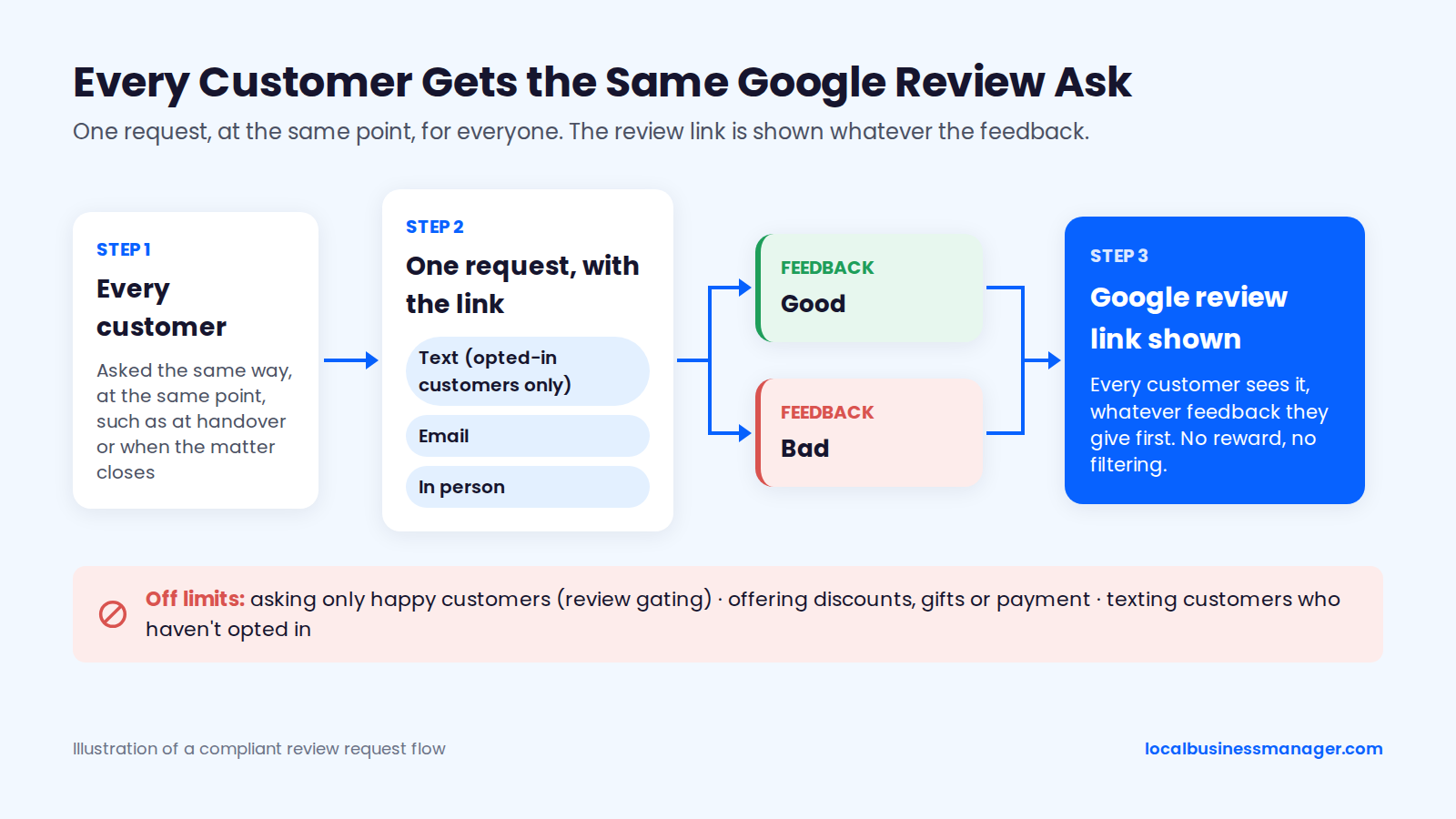
Text (opted-in customers only), about 130 characters: "Hi [Name], thanks for choosing [Business]. How did we do? We'd appreciate an honest Google review: [link]. Reply STOP to opt out."
Email:
- Subject: How did we do, [Name]?
- Body: "Thanks for trusting [Business] with [service]. If you have 2 minutes, we'd appreciate an honest review on Google: [link]. Every review helps other people in [area] choose. Thank you, [Name and role]."
In person, at handover: "We ask every customer for an honest Google review. Can I text you the link, or would email be better? Good or bad, it helps us."
For personal-injury clients, ask every client the same way when their matter closes. For clients who recovered, that moment is after they've been paid. Asking only at payout would mean asking only winning clients, which is selective solicitation.
Can You Pay for Google Reviews or Offer a Discount for Them?
No. Google's Maps user-contributed content policy prohibits offering incentives in exchange for posting a review, including payment, discounts, and free goods or services, and Google's policy also bans review gating, which means asking only happy customers. These are off limits however they're worded:
- Offering a discount, gift or draw entry for a review ("Leave a review and get 10% off")
- Asking only satisfied customers ("If you're happy, please review us; if not, call us first")
- Coaching keywords into reviews ("Please mention 'car accident lawyer Houston' in your review")
- Paying a service for reviews
- Having employees, family or other lawyers review the business (Sterling Sky notes that lawyers reviewing lawyers is a removable conflict of interest)
- Running review contests or bulk drives
- Texting customers who haven't opted in
Search Engine Land reported in 2018 that a Louisville law firm lost almost all its Google reviews after running review contests. Google said the contests broke its rule against bulk review solicitation.
Replying to Reviews
Reply to every review, because replies are written for the next customer reading them. Google doesn't confirm a ranking effect for replies, and in the 16,098-profile study replying showed no ranking benefit; top-3 profiles actually replied less than lower-ranked ones.
On my clients' profiles, the agency writes and posts all replies, and the client doesn't approve each one.
A good reply does 3 things:
- It answers what the reviewer said and thanks them.
- It reads naturally, without stuffed service or city keywords; with no evidence that replies affect ranking, keywords only make a reply read like an ad.
- For a negative review, it states the facts calmly and offers a way to continue the conversation offline.
Step 6: Make Your Website Back Up the Profile
The website supports the profile's relevance. Link the profile to a page that matches its category and services, and make that page carry the same name, address and phone number. Build location pages only for towns the business really serves.
Which Page Should the Profile Link To?
Link a single-location profile to the homepage by default, and link each profile of a multi-location business to its own city page. That's how I set it up. With several offices, each office's profile links to its dedicated city service page, which carries relevant local details for that office.
Search Engine Roundtable reported Google's links policy as updated in September 2025. The policy sets these requirements:
- Links must lead to a dedicated landing page for the business.
- For multi-location businesses, links must go to that location's page, not a general page or another branch.
- Linked URLs must be crawlable and return a 200 status. Social media, messaging and app-store links aren't allowed, and neither are link shorteners.
Does Changing the Linked Page Change Rankings?
Practitioner tests suggest the linked URL can change local-pack rankings, though no large controlled study has measured it. Around 2020, Sterling Sky switched a non-ranking practitioner listing at a New York City personal-injury firm from the homepage to the firm's bus-accident page, and concluded that the URL affects local-pack ranking. That was one listing with no control group.
After Google's Diversity Update, Sterling Sky now advises linking to a relevant page that doesn't already rank organically, and checking Search Console to see which page ranks best. Joy Hawkins of Sterling Sky also lists a changed profile URL as a possible cause of dramatic ranking drops, so don't change it casually.
What the Landing Page Needs
The landing page needs to say plainly what the business does, where, and how to contact it. The 2026 Local Search Ranking Factors survey ranks keywords in the landing page's headings #20 (score 135) and the quality of links pointing to that page #25 (score 127). A strong landing page has 6 elements:
- The primary service and city in the main heading, written naturally
- The same name, address and phone number as the profile
- The services listed on the profile, each with a short explanation
- Real photos and reviews from customers in the area
- An FAQ answering the questions customers ask before calling
- A clear call to action with the phone number near the top
Service and City Pages: What Has to Be True First
Build a city page only for a town the business actually serves. That's the main requirement, and no amount of content makes up for missing it. Once it's true, 3 things make a city page stronger:
- Case studies of jobs done in that town
- Job photos taken there
- Reviews from customers there (a huge plus in my experience)
Write each page from that town's real work, not from a template with the town name swapped in. Google Search Central's spam policies name doorway abuse, which includes pages targeted at specific regions or cities that funnel users to one page.
Near-identical, town-swapped city pages can be treated as doorway abuse, though Google doesn't ban city pages outright. For a business with several offices, each office's city page is also the page its profile links to (see above).
NAP and LocalBusiness Schema
Make the name, address and phone number on the website match the profile exactly, down to the suite number and the phone format. That consistency, plus the profile's website field, is what connects the two. Check 4 places on the site:
- The header or footer
- The contact page
- The landing page the profile links to
- Any LocalBusiness schema
After a DBA rename or an office move, update all 4 before the profile changes, as in Step 3's sequence.
Treat LocalBusiness schema and an embedded Google Map as website hygiene and a convenience for visitors. Neither is a documented Maps ranking lever, so don't sell either one to a client as one. Add the schema with the same details as the profile.
Step 7: Build Prominence Beyond the Profile
Prominence comes from what Google knows about the business across the web. Google names links, articles and directories, and notes that offline fame counts too. Earn local links, fix inconsistent citations, and get the business mentioned where people in the area already read.
Local Links Worth Earning
The links that moved Maps rankings for my clients came from 3 sources, and they're the ones I'd chase first:
- Local news coverage of something the business actually did
- Sponsorships of local teams, events and charities, with a link from the sponsor page
- Industry directories
Ask for a link wherever the business has a real local or trade connection:
- Trade and industry associations the business belongs to
- The local chamber of commerce
- Supplier, manufacturer and partner "find a pro" or dealer pages
Google Search Central's spam policies treat paid links that pass ranking credit as link schemes. Mark a link given in exchange for a sponsorship with rel="sponsored" or nofollow. Law firms should also check their state bar's version of ABA Model Rule 7.2 before paying for listings or sponsorships, because state versions of the rule differ.
Published practitioner guides on prominence mention partnerships, sponsorships, local media and industry directories, but none of them separates the effect on Maps rankings from the effect on organic rankings. No public test shows which link types move Maps rankings for personal-injury firms.
Do Citations Still Matter, and How Many Do You Need?
Citations still matter mainly for consistency: fix the wrong listings first, then stop building new ones for their own sake. In the 16,098-profile study, median citation counts were 27 at #1, 21 at #3 and 14 at #11 and below, and adding citations well beyond that range didn't raise top-3 rates further.
My approach is to fix all of them: the Business Profile, the data aggregators, the major platforms and the industry directories. When hours are tight, fix the most serious issues first, working from critical to low.
To find and fix inconsistencies:
- Search the business name with each old address and each old phone number.
- Check the major directories for the business's category.
- After a DBA rename or an office move, repeat the search with the old name and old address.
- Rank fixes by damage. A wrong phone number on a major platform sends callers elsewhere, so it comes before a missing suite number on a small directory.
- Record each listing, the wrong detail and the date it was fixed in one sheet, so the next audit starts from a list.
Brand Mentions, Local Press and Directories
Google's description of prominence names articles and directories alongside links, and says a business's offline prominence counts too. Coverage on news sites, community pages and trusted directories all fits that description.
For law firms, paid legal directories are worth a look. In my observation, some bring cases, and they also help the firm get mentioned in Google's AI Overviews. Judge each directory by the cases it sends, and check your state bar's rules on paid listings before signing.
Step 8: Deal With Spam Listings That Outrank You
Report spam listings through Google's own channels, with evidence. Use "suggest an edit" for a single wrong detail, and the Business Redressal Complaint Form for fraud or false information. Google publishes no service time or success rate for either route.
Sterling Sky's 2022 study tracked 5,306 ranking listings across 16 industries over 4 years. Google removed 315 of the 416 personal-injury lawyer listings checked (75.7%), compared with 23.2% for criminal lawyers. The 75.7% figure counts removals for any reason, not report success.
Suggest an Edit for Simple Errors
Use "suggest an edit" on the competitor's profile for a single wrong detail, such as a keyword added to the name. It's quick, but Sterling Sky's 2025 guide to fighting spam says simple edits are often denied or reversed.
Gather 5 kinds of evidence before you report:
- Photos of the competitor's real signage, or of the empty address
- Street View images of the address
- The state business registry record for the name
- Professional license records, where the trade or practice requires one
- Notes from a call to the listed number (who answered, what name they used)
Suggest the business's real name, not just "remove the keywords". Practitioners disagree on how often this route works. One Local Search Forum user said an edit worked where 5 Redressal Forms didn't, so it's worth trying first for small errors.
Use the Business Redressal Complaint Form for Fraud
Use the Business Redressal Complaint Form when a listing contains fraud or false information. Google's help page on reporting a Business Profile says anyone can ask for a profile to be removed, even without owning it, if the business never existed or isn't eligible. Fraud or false information in the name, phone number or website goes through the form, which Google launched in February 2019.
The timing and odds come from practitioners:
- Sterling Sky's 2025 guide puts turnaround at about 2 weeks. It says you can file repeatedly and advises keeping every case ID.
- In a Local Search Forum reply from around 2020, Joy Hawkins said lead-gen listings are usually removed after one report, while keyword stuffing usually takes several.
- In the same reply, she advised waiting about 3 weeks before reporting again.
I don't have first-hand experience with redressal cases, so everything in this step comes from Google's documentation and the practitioners named here.
What Not to Do When Reporting Competitors
Report only what you can prove. A competitor outranking your client isn't a policy violation. Stay away from these reporting habits:
- Reporting a real business as fake because it ranks above you
- Filing reports without evidence, or filing in bulk to wear Google down
- Leaving reviews on a competitor's profile to hurt it
- Creating accounts to suggest the same edit many times
How Long Does It Take to Rank Higher on Google Maps?
How long it takes depends on what's already optimized. In my experience, a single high-impact fix can show ranking gains within about a month, for example getting the keyword into the Business Profile name through a DBA the business really uses. Once the basics are done, further gains come gradually, for example from a strong review push.
As of November 2026, Google publishes processing times for verification and edits but no timeline for ranking. The ranking column shows my own observation where I have one, an older expert-panel estimate for new profiles, and "No published data" where neither Google nor a study gives a range. The rows run in the order these changes usually happen.
Change | Google's published processing time | Ranking movement |
|---|---|---|
Postcard verification | Code usually within 14 days; expires after 30 | Not applicable |
Video verification | Up to 7 days to process | Not applicable |
Category, hours or services edit | Usually 10 minutes; sometimes up to 30 days | No published data |
Keyword name via a used DBA | Usually 10 minutes; sometimes up to 30 days | Gains within about a month (my observation) |
Citation cleanup or new local links | Not applicable | No published data |
Steady review push after the basics | Not applicable | Gradual (my observation) |
New office or new profile in a competitive city | Verification times above | 3 to 9 months for most experts in an older panel |
The panel estimate comes from an undated expert-panel survey published by a local SEO software company, likely several years old and not specific to law firms: 61% of experts said significant local rankings take 3 to 9 months, and 28% said more than 9 months.
Competitive markets set a higher bar, because review counts at the top are high and spam is dense (see Steps 5 and 8).
What Can Hurt Your Ranking or Get the Profile Suspended?
In my experience, name edits and address edits cause the most suspensions. These 7 habits put a profile at risk, and each has a compliant alternative:
- A keyword name the business doesn't use. Use the DBA route only if the name goes on the signage, website and stationery first.
- A virtual office, PO box or coworking desk. Use a service-area profile from the real base instead.
- Incentivized, gated, employee-written or contest reviews. Ask every customer the same way, with no reward.
- Frequent core edits. Space name, address and category edits a day or two apart.
- Changing the address on a profile after a move. Sterling Sky recommends a new profile instead (see the FAQ below).
- Duplicate profiles. Remove or merge them (Step 1).
- Fake 24-hour hours. List the hours the business is actually open.
Anyone can suggest edits to a profile, and Google changes profiles too. Google's annual Maps spam report for 2024, as covered by Search Engine Roundtable, counted more than 12 million fake Business Profiles and more than 70 million policy-violating edits removed or blocked. My routine is a weekly check and a monthly check:
- Every week, check the name, attributes, services and other fields for edits by Google or third parties.
- Every month, check rankings and the post schedule.
Reinstatement usually needs documents or a video, so gather them before you appeal: the DBA, a lease agreement and photos of the office with signage, or a video recording the storefront and office. The appeal process is covered in Google Business Profile suspensions: causes and reinstatement.
When an appeal was denied, what worked for me was a second review with new evidence. In my experience, rankings recover if you act fast, and I've never lost reviews in a reinstatement.
How Do You Measure Progress and Report It to a Client?
Measure calls and rankings first, because they're what I put at the top of every monthly report. Add direction requests, website clicks and reviews, and compare every number with the previous month, using the same search points. For the full report format, see local SEO client reporting.
Which Numbers to Track
Track 5 numbers every month, from the profile's own performance data and your multi-point checks:
- Calls from the profile
- Share of search points where the business ranks in the top 3, per core search
- Direction requests
- Website clicks from the profile
- New reviews, average rating, and review count vs the top 3 average
For calls, I put the call-tracking number as the Business Profile's primary number. That's my practice. Check Google's current guidance on phone numbers before you change a client's primary number.
Monthly Report Outline
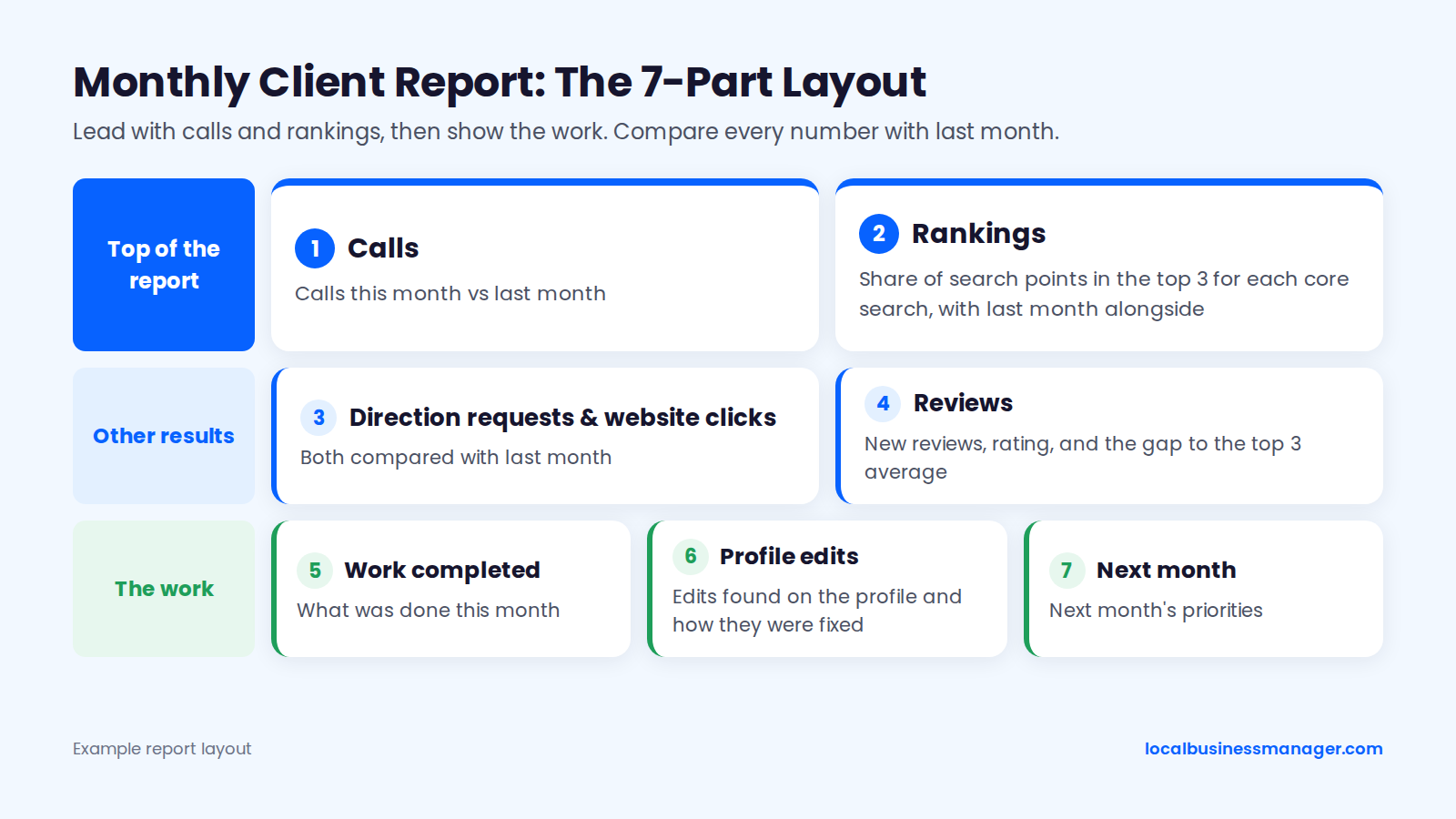
Lead with what the client cares about, then show the work. Order the 7 parts of the monthly report like this:
- Calls this month vs last month
- Rankings: share of points in the top 3 for each core search, with last month alongside
- Direction requests and website clicks
- Reviews: new reviews, rating, and the gap to the top 3 average
- Work completed this month
- Edits found on the profile and how they were fixed
- Next month's priorities
FAQs
Is Google My Business the Same as Google Business Profile?
Yes. Google Business Profile is the current name for what was formerly Google My Business.
Many guides still say "GMB" and describe the old dashboard and section names. Before following step-by-step instructions from an older guide, check them against what you see in the current Business Profile interface. Menus and field names may have moved since the guide was written.
Can a Service-Area Business Rank in Towns Far From Its Address?
Not reliably in the map pack. Listing a far-off town as a service area doesn't change how far the business is from searchers there, and distance is one of Google's 3 main local factors.
The 2026 survey's #2 factor is the proximity of the business's address to the searcher, and that applies to a plumber, an HVAC company, a roofer or any other contractor. To see where a profile's reach actually ends, run a multi-point check and widen the spacing until the results turn red. Beyond that point, there are 2 compliant routes:
- A city page on the website for each town the business really serves (Step 6)
- A real staffed location in that town, with its own profile
Never use a virtual office to stretch the reach.
Should a Business That Moves Change Its Address or Create a New Profile?
Sterling Sky recommends creating a new profile at the new address rather than changing the old one, because an address change is more likely to cause a suspension.
Address changes can also be slow to take effect. In a 2024 Local Search Forum thread, a profile was still ranking for its old area 2 months after an address change. Before creating the new profile, check Google's current Business Profile help for how to close or remove the old one, so the business doesn't end up with 2 live profiles. Plan a move like a new launch, with verification documents ready and the website updated first.
Should a Law Firm Create a Profile for Each Attorney?
My intended setup is to give each attorney profile a different primary category from the firm's, so they don't compete with each other. I haven't tested this in practice.
The page each attorney profile links to matters as much as it does for the firm's profile. Step 6 covers Sterling Sky's practitioner-listing test and Google's links policy. Keep each attorney's name, phone number and category accurate, and ask for reviews the same way you do for the firm (Step 5).
Where to Start This Week
Pull the top 3 competitors for your client's main search from several points across the area, and put their names, categories and review counts next to your client's. That's the order I work in on every new client: rankings across the area first, then the name against the competitors ranking above it. None of it needs a budget, since Google's Business Profile product page states that creating a profile and listing a business is free. Local Business Manager is built for agencies doing this work across many clients; you can join early access here.