How to Build a Local SEO Report Clients Actually Read

A local SEO report clients actually read puts the numbers they care about on 1 page: calls, rankings across their area, and the leads that became booked jobs or signed cases. That page also needs one sentence on what changed and 3 next steps, each with an owner. Everything else sits underneath as evidence.
I was Head of SEO at a legal-marketing agency and worked with close to one hundred personal-injury firms. Below you'll find a copyable template, where every number comes from and what it really counts, what to cut, and wording for "we dropped" calls and bad months.
What Should a Local SEO Report Include?
A local SEO report should include 8 sections, in the order a client reads them: a 1-page summary first, then the evidence behind it. A report is the monthly progress document. An audit is a one-off check for problems, and it belongs in a separate local SEO audit.
Most of the evidence comes from one place. Google's Business Profile Performance report covers views, searches, calls, website clicks, direction requests and bookings, according to Google's help page on profile performance.
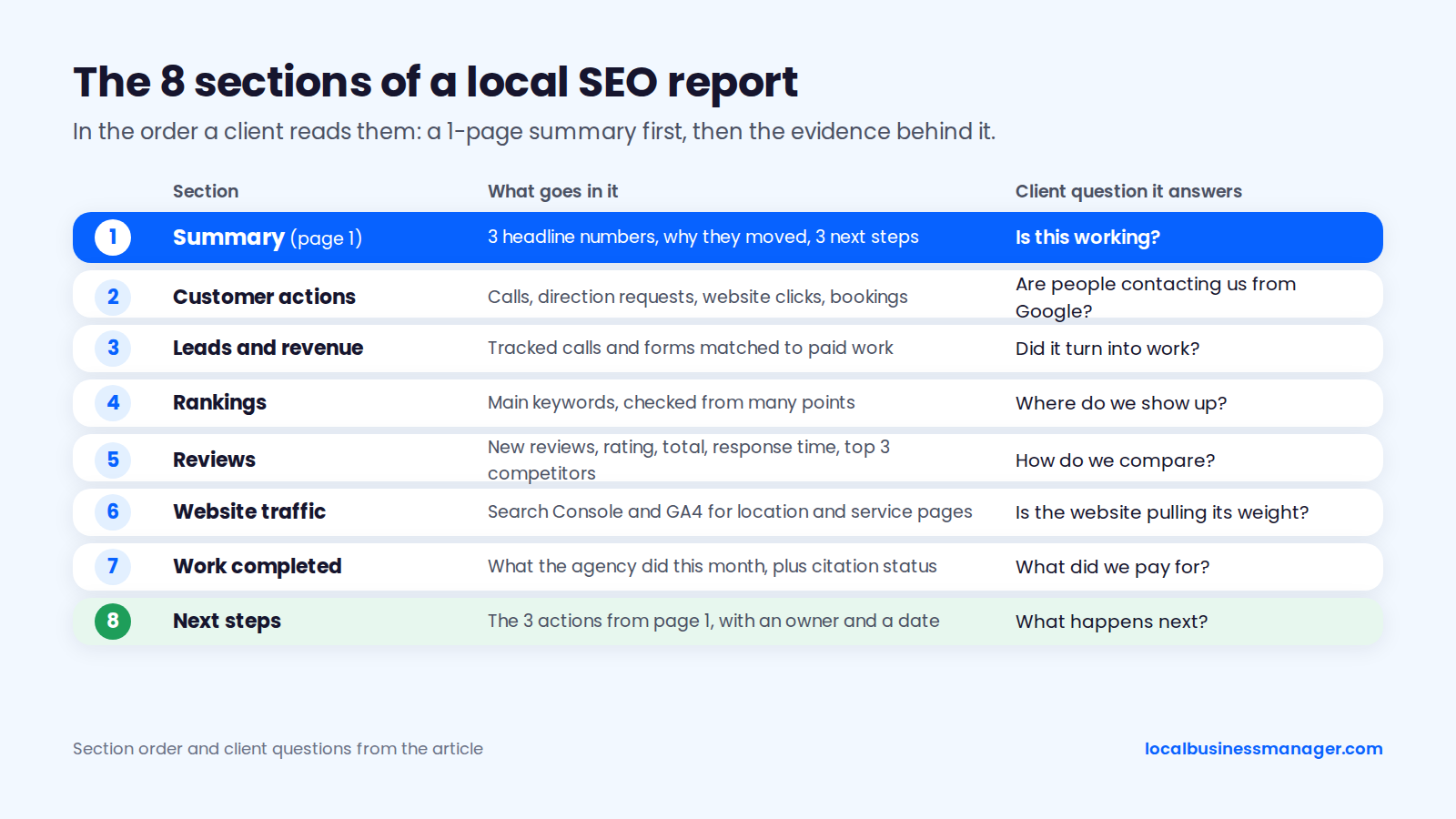
These are the 8 sections, in reading order:
- Summary: 3 headline numbers, a sentence on why they moved, and 3 next steps.
- Customer actions: calls, direction requests, website clicks and bookings from the Business Profile.
- Leads and revenue: tracked calls and forms matched to booked jobs or signed cases.
- Rankings across the service area: the main keywords, checked from many points.
- Reviews: new reviews, rating, total, response time, and the top 3 competitors.
- Website traffic: Search Console and GA4 data for the location and service pages.
- Work completed: what the agency did this month, plus a one-line citation status.
- Next steps: the 3 actions from page 1, in detail.
The table below lists each section's main metric, its source and the client question it answers, as of November 2026.
Section | Main metric | Where it comes from | Question it answers for the client |
|---|---|---|---|
Summary | 3 headline numbers and the reason they moved | Your write-up of the sections below | Is this working? |
Customer actions | Calls, direction requests, website clicks, bookings | Business Profile Performance | Are people contacting us from Google? |
Leads and revenue | Tracked calls and forms matched to paid work | Call tracking, GA4 key events, the client's CRM or intake records | Did it turn into work? |
Rankings | Share of grid points in the top 3 for the main keywords | A grid scan with the same settings every month | Where do we show up? |
Reviews | New reviews, rating, total, response time | The Business Profile and the competitors in the local pack | How do we compare? |
Website traffic | Clicks to local pages, sessions from the profile link | Search Console, GA4 | Is the website pulling its weight? |
Work completed | Tasks finished this month, citation status line | The agency's task log | What did we pay for? |
Next steps | 3 actions with an owner and a date | The agency | What happens next? |
Page 1: The Summary the Client Actually Reads
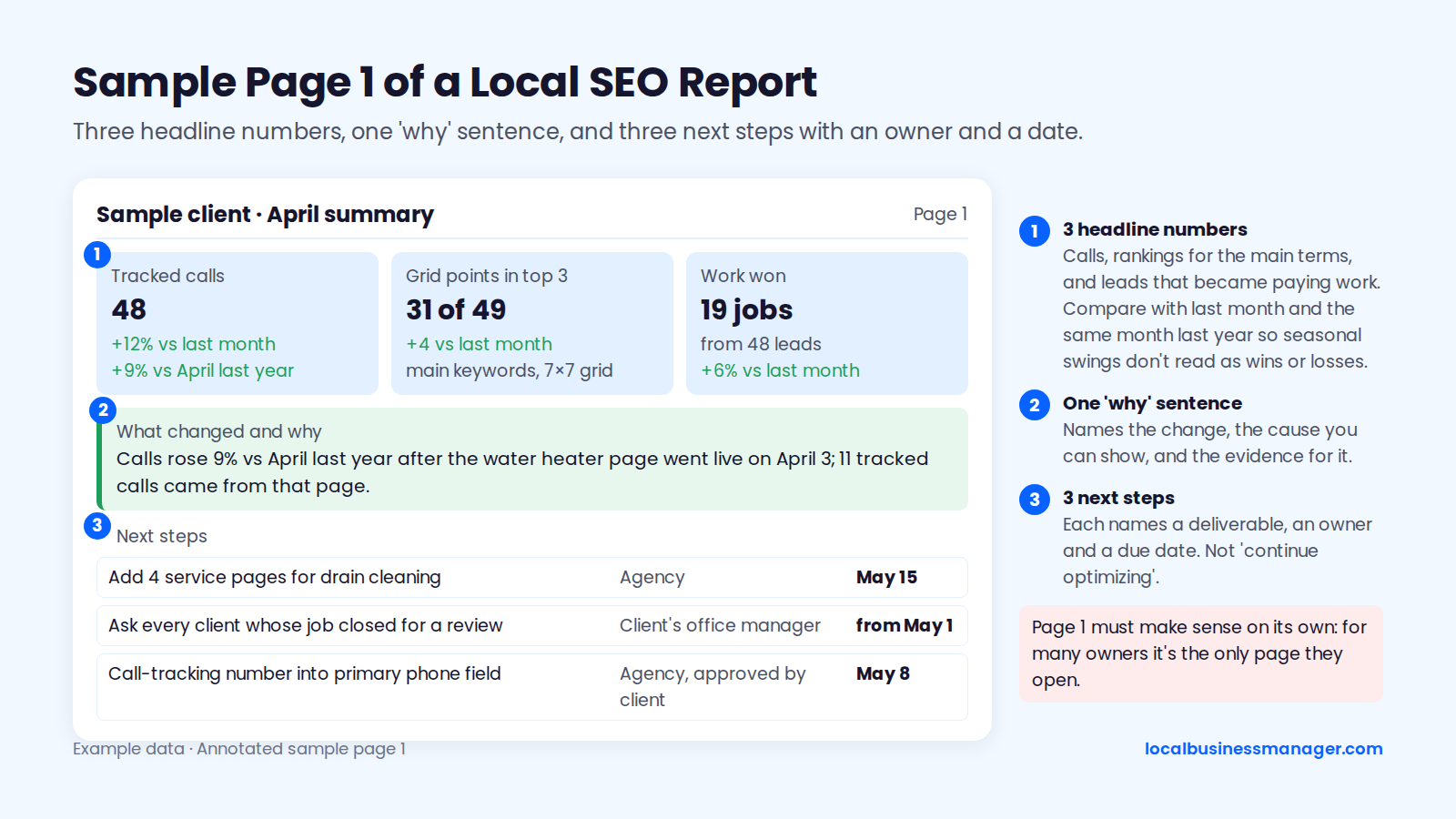
Page 1 holds 3 headline numbers, a sentence on what changed and why, and 3 next steps with an owner and a date. It has to make sense on its own, because for a lot of owners it's the only page they'll open. A copyable version sits at the end of this section.
The 3 Numbers That Go at the Top
The 3 numbers at the top of a local SEO report should be calls, rankings for the main terms, and the leads that became paying work. Calls and rankings lead my reports. The third number, paid work, is what this guide recommends adding, because it shows whether the calls turned into business.
Where each of the 3 numbers comes from:
- Calls: use tracked calls if you have call tracking. Google's help page defines Calls as "the number of times a customer clicked on the call button on your Business Profile," so it counts taps on the button, not confirmed completed calls. Sterling Sky's 2026 guide makes the same point.
- Why the profile figure runs low: an older Sterling Sky analysis (around 2020) found the profile's call count undercounted real calls because it captured mobile click-to-call taps only, though the trend line was still useful.
- Rankings: the share of grid points in the top 3 for the main keywords, covered in the rankings section below.
- Paid work: booked jobs or signed cases if the client shares them. A storefront business with no booking data can use direction requests instead.
Next to each number, show the change against last month and against the same month last year, so seasonal swings don't read as wins or losses.
A Single Sentence on What Changed and Why
The "why" line is a single sentence that names the change, the cause you can show, and the evidence for it. Use this shape: "[Metric] [rose/fell] [amount] vs [period] because [cause], shown by [evidence]." If you don't know the cause yet, say so and say when you will.
Three examples, with placeholders where your numbers go:
- "Calls rose [X]% vs [month] last year after the [service] page went live on [date]; [n] tracked calls came from that page."
- "Rankings for [keyword] slipped at the edges of the grid while calls held steady; we're checking whether the [date] hours edit caused it and will report back by [date]."
- "Direction requests fell [X]%, in line with the same month last year, which points to seasonality rather than a ranking problem."
Next Steps With an Owner and a Date
A next step is useful only when it names a deliverable together with its owner and due date. "Continue optimizing" has none of them. The 4 examples below show the difference.
Weak next step | Strong next step | Owner |
|---|---|---|
Continue optimizing | Add 4 service pages for [service] by May 15 | Agency |
Get more reviews | Ask every client whose job closed this month for a review, the same way, starting [date] | Client's office manager |
Improve rankings | Test [category], the primary category most ranking competitors use, on [date]; rescan 4 weeks later | Agency |
Fix call tracking | Put the call-tracking number in the primary phone field and move the main number to Additional phone by [date] | Agency, approved by client |
The category example follows how I pick primary categories: use what most of the ranking competitors use, and if Google rewards a different category than the "logical" one, go with the one Google rewards.
Copy this summary template:
- Client and period: [Business name], [Month YYYY]
- Calls: [tracked calls] ([+/- %] vs last month, [+/- %] vs [month] last year)
- Rankings: [main keywords], [grid size] grid: [n] of [total] points in the top 3 ([change] vs last month)
- Work won: [booked jobs or signed cases] from [n] leads ([+/- %] vs last month)
- What changed and why: [single sentence]
- Next step 1: [action], owner [name], due [date]
- Next step 2: [action], owner [name], due [date]
- Next step 3: [action], owner [name], due [date]
- Watch item: [anything pending: an appeal, a data delay, a test in progress]
Where Each Number Comes From (and What It Really Means)
Every number in the report comes from Business Profile Performance, its search terms, Search Console, GA4 or your call tracking. Each counts something slightly different. The caveats below belong in the report's footnotes, so the client hears them from you before they spot a mismatch themselves.
Google Business Profile Performance
The Performance report in Google Business Profile (formerly Google My Business) covers views, searches, calls, website clicks, direction requests and bookings, as listed on Google's Performance help page. Google says: "Performance data includes views, searches, and actions from both organic search results and Google Ads." The data is available only for verified profiles.
Plan around 3 limits when you pull the numbers:
- Retired metrics: Google retired several older metrics in February 2023, including Total Searches, Direct and Discovery searches and Total Views (Momentic Marketing covered the change). Templates built before then may still show fields that no longer exist.
- Date range: Search Engine Land reported in January 2024 that the Performance report lets you pick a date range from roughly the past 6 months. Export each month's figures and keep them, or next year's same-month comparison has nothing to compare against.
- No call history: Google removed call history from the Business Profile as of July 31, 2024, so call-level detail has to come from your own call tracking.
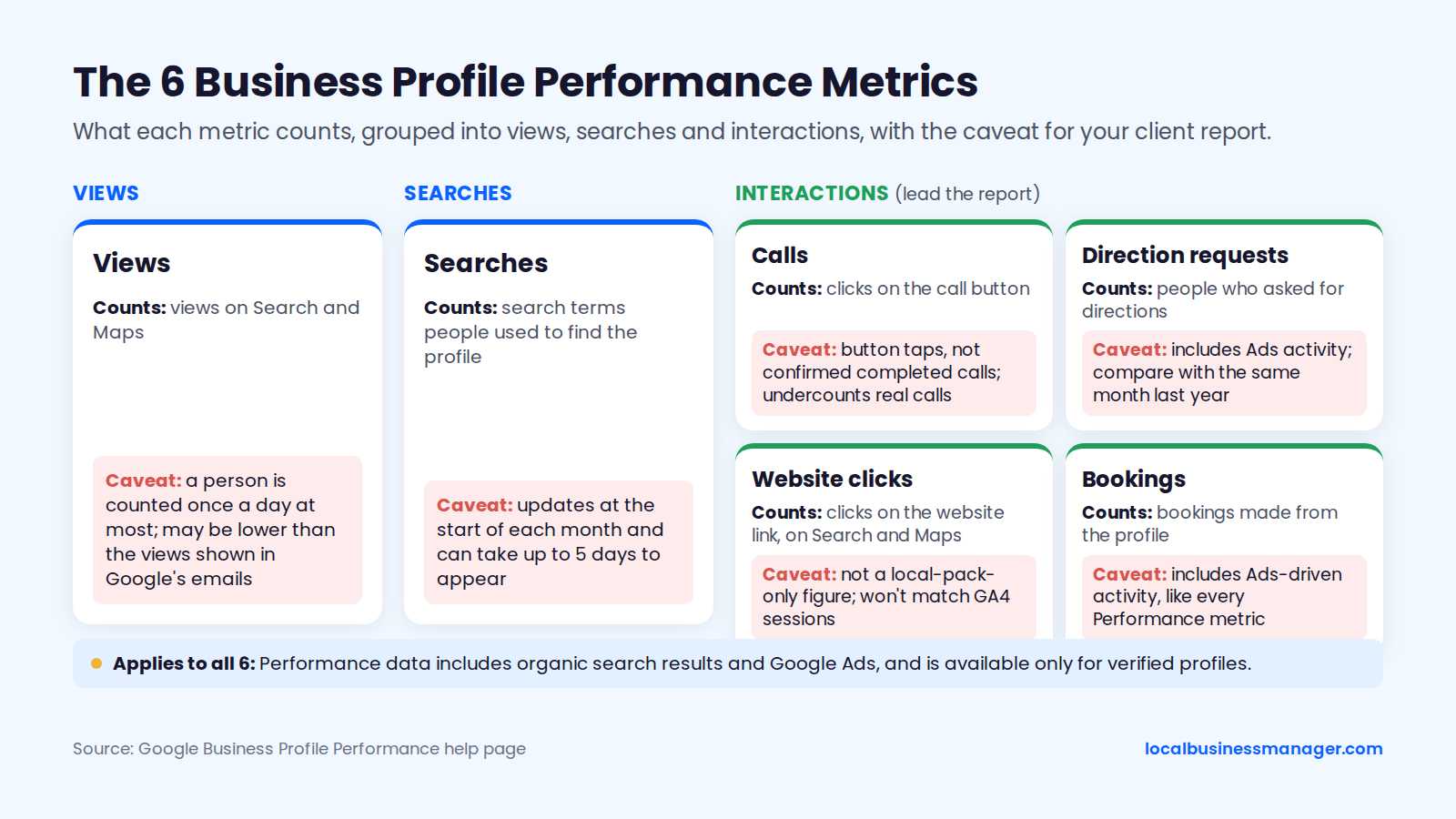
As of November 2026, the 6 Performance metrics count different actions, and each needs a caveat somewhere in a client report. The table lists the action metrics first, because those lead the report.
Metric | What Google counts | Caveat for the report |
|---|---|---|
Calls | Clicks on the profile's call button | Button taps, not confirmed completed calls; undercounts real calls |
Direction requests | People who asked for directions | Includes Ads activity; compare with the same month last year |
Website clicks | Clicks on the website link from the profile, on Search and Maps | Not a local-pack-only figure; won't match GA4 sessions |
Bookings | Bookings made from the profile | Includes Ads-driven activity, like every Performance metric |
Searches | Search terms people used to find the profile | Updates at the start of each month and can take up to 5 days to appear |
Views | Views on Search and Maps | A person is counted once a day at most; may be lower than the views shown in Google's emails |
Google's help page says a person can only be counted once a day, a limited number of times across devices and platforms. DreamHost's August 2026 guide to local SEO reporting describes views the same way.
Search Terms
The search terms report shows the queries people typed before they found the profile, and it's most useful grouped rather than pasted in as a raw list. Sort the terms into 3 groups and report the trend for each:
- Branded searches (the business name and its variations)
- Service searches ("water heater repair", "car accident lawyer")
- "Near me" and city searches
Business Profile queries are counted by unique user. Sterling Sky's 2026 case study of 78 profiles, 29 businesses and 1,560 keywords found large discrepancies between Business Profile searches and Search Console query data, so never present one as a check on the other.
Google says the searches data updates at the start of each month and can take up to 5 days to appear. A report sent on the 2nd may show last month's terms as missing, so either send after the 5th or add a line saying the search terms will follow.
Search Console for Local Pages
Search Console shows organic clicks and impressions for the website's own pages, so it's where the location and service pages get reported. Filter by page rather than by query: one row for each location page and each main service page, compared with last month and the same month last year.
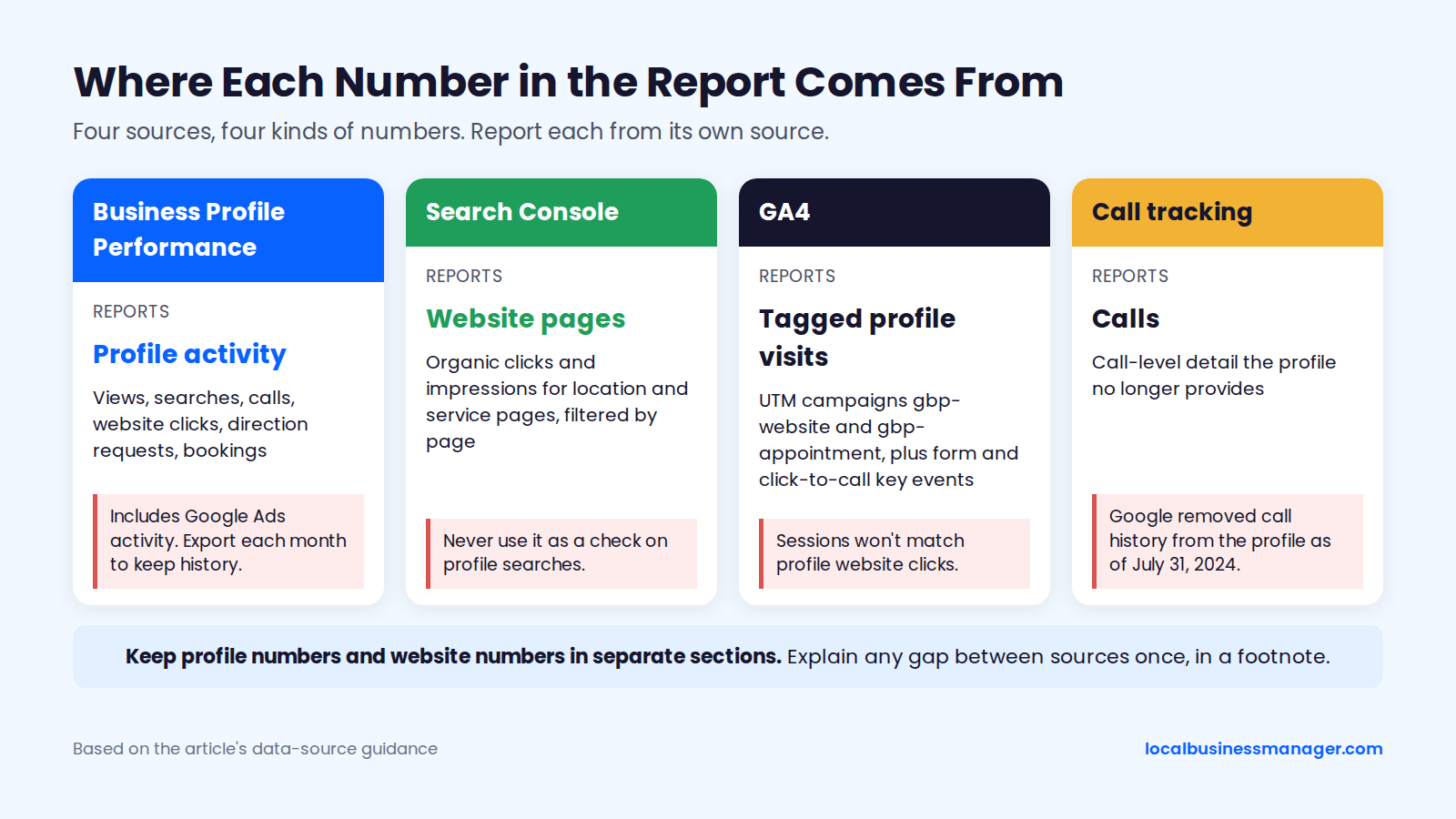
Keep profile numbers and website numbers in separate sections of the report, so the client doesn't compare profile searches with Search Console queries.
Google added Search Generative AI performance reports to Search Console in June 2026, per Google's Search Central Blog. The AI section below covers how to use them in a client report.
GA4: Tag the Profile's Website Link With UTMs
Tag the profile's website and appointment links with UTM parameters, so GA4 can tell profile visits apart by campaign. Practitioner setups, Sterling Sky's among them, add UTMs to both links.
Pick one naming pattern and use it for every client; our guide to UTM-tagging your Business Profile links covers the details.
https://www.example.com/?utm_source=google&utm_medium=organic&utm_campaign=gbp-website
https://www.example.com/book/?utm_source=google&utm_medium=organic&utm_campaign=gbp-appointment
With these tags, the source / medium stays google / organic, and the campaign value (gbp-website or gbp-appointment) is what separates profile visits. Then set form submissions and click-to-call taps on the site as key events in GA4, so leads from the profile link show up next to the visits.
Expect profile website clicks and GA4 sessions to differ. The profile counts clicks on the link, including activity that came through Google Ads. Report each number from its own source and explain the gap once, in a footnote.
How to Report Rankings Without Triggering the "We Dropped" Call
Report rankings from many points across the service area, with the same settings every month, and you'll have an answer ready when the "we dropped" call comes. Most agencies have had that call, usually with a screenshot attached. The client's own search is one point; this section covers what to show instead, whether rankings belong in the report at all, and what to say on the phone.
Why a Search From the Client's Kitchen Isn't a Ranking
Google ranks local results on relevance, distance and prominence, and distance is how far the business is from the person searching, per Google's local ranking help page. The 2026 Local Search Ranking Factors survey of local SEO practitioners puts the distance between the searcher and the business at #2 among local pack and Maps factors.
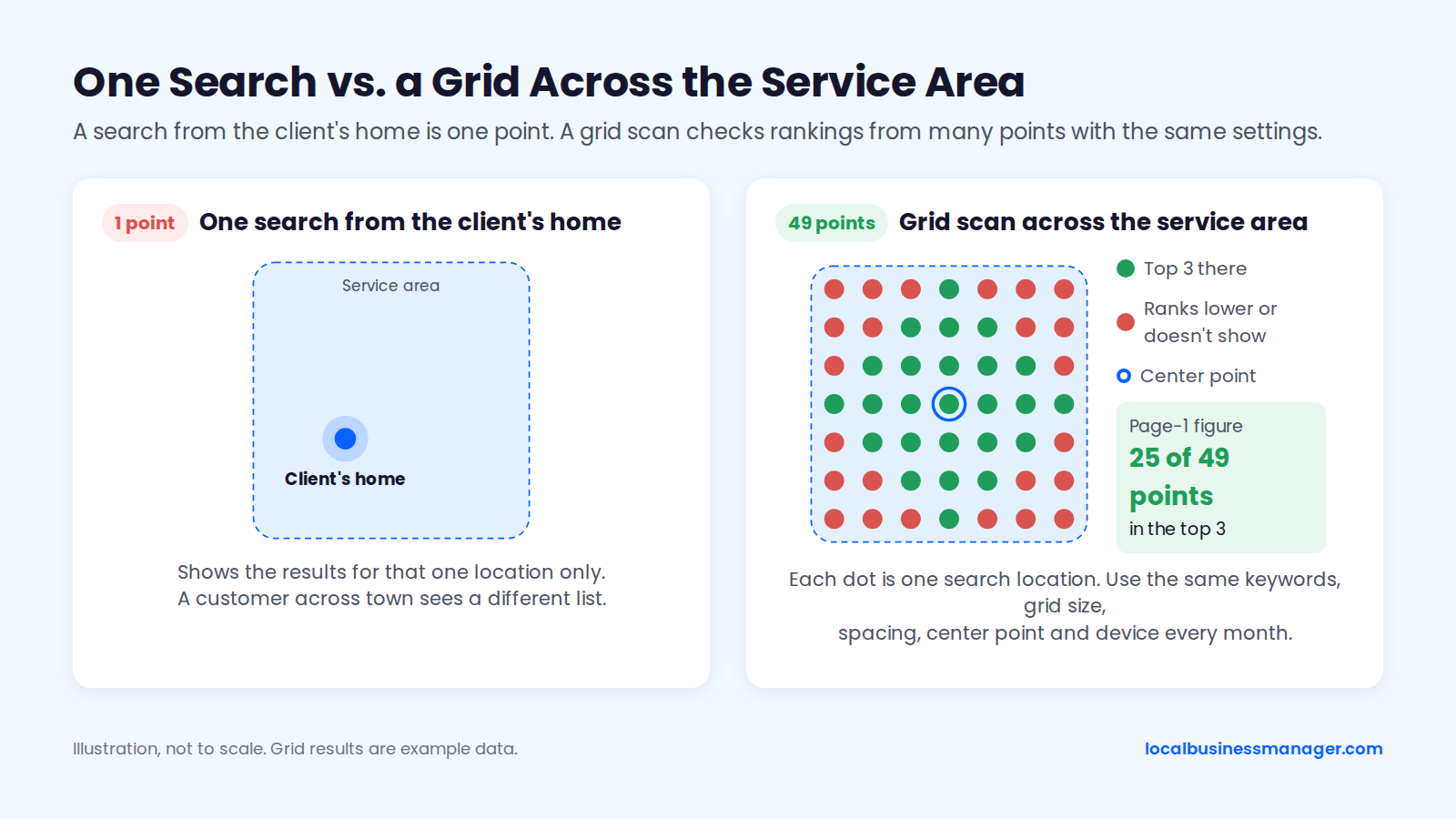
3 findings from Sterling Sky, a local SEO agency, show how narrow one search is:
- December 2024: Google consistently clusters local pack results in a tight radius near the searcher's location, in small towns and big cities alike.
- 2018: a separate study of localized organic results (2 keywords, one city, 72 postal codes in Toronto) found results changed depending on where the search was made.
- December 2024: a Sterling Sky post on X pointed out that mobile and desktop results differ.
I don't use single-point rank checks at all. One location says little about how a business ranks across the area it serves. More on this in why local rankings change by searcher location.
What to Show From a Grid Scan
Show the grid map for each main keyword, scanned with the same keywords, grid size, spacing, center point and device every month. Change any one of those and this month's map can't be compared with last month's.
Here's how I set a grid up. I run one scan first just to learn how the business ranks, usually 13 Ã 13 with 0.5 mi between points. If the grid comes back mostly green, I widen the spacing to see how far the ranking reaches. If it's mostly red, I tighten it.
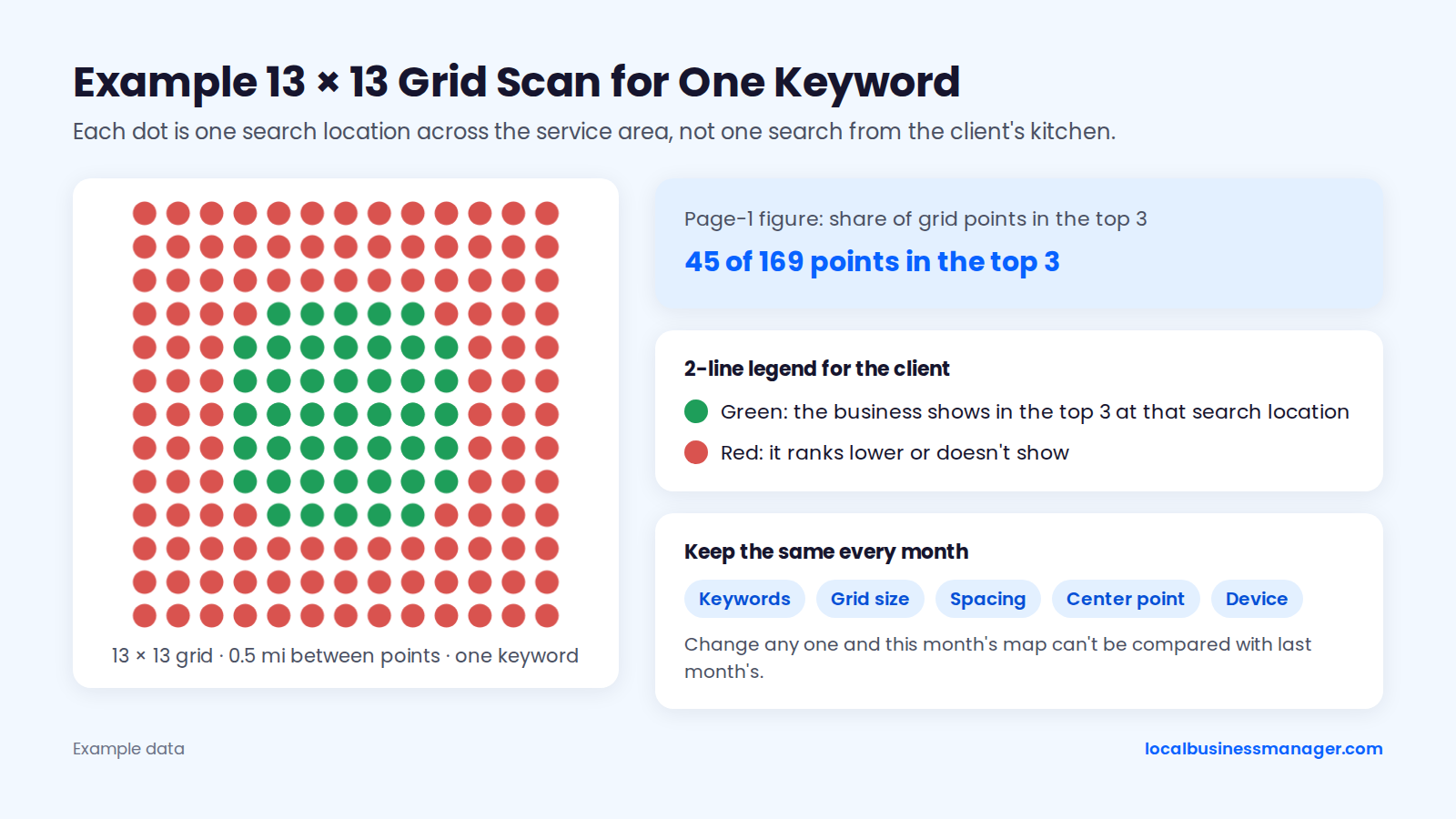
Give a non-SEO client a 2-line legend with every map. Each dot is one search location; green means the business shows in the top 3 there, and red means it ranks lower or doesn't show.
For the page-1 figure, this guide recommends the share of grid points in the top 3, written as "[n] of [total] points". Don't headline any single grid point, including the one at the office, because it repeats the one-location search.
Treat average rank as a secondary figure at most, for 2 reasons:
- It's hard to read right now. In my view, average rank is misleading on its own today: Google is pushing back against automated tools that copy its results, mixing results and making the results page very volatile.
- Tools count missing points differently. One widely used tool scores a point where the business doesn't rank as 21 and a "not found" point as 22, so averages from different tools aren't comparable. If you show average rank, state how missing points were counted.
My rule on frequency: scan at least once a month for the report. Daily scans make sense only after you've made an edit and want to see whether it produced a result.
Should Rankings Be in the Client Report at All?
Practitioners disagree, and I land on yes: rankings for the main terms belong on page 1, next to calls. As of November 2026, the published positions split 3 ways:
Position | Who holds it | Reason given |
|---|---|---|
Rankings on page 1, next to calls | Dragan Nedelkovski (this guide) | Delivering rankings for the main terms is what a proper local SEO engagement has to do |
Leave rank tracking out of monthly client reports | Sterling Sky (2020 post by Joy Hawkins) | Points clients to data that matters more than rank tables |
Replace geo-grid reports with performance reports | Map Labs (2025) | Geo-grid reports can be "not helpful and misleading" for some businesses |
Sterling Sky's website today sums up its position separately: "rankings don't make you money â leads make you money." Even so, Sterling Sky still calls grid scans its first troubleshooting tool, for example to spot filtering, which shows up as a scattered "Swiss-cheese" pattern. So Sterling Sky keeps using the scans behind the scenes.
Script for the "We Dropped" Call
Use this script when a client searches from home or the office and calls to say they dropped. Adjust the wording to your own voice.
- "Thanks for flagging it. Where were you when you searched, were you on your phone or a computer, and roughly what time was it?"
- "Google ranks local results partly by how far the business is from the person searching. A search from your house shows the results for your house. A customer across town sees a different list."
- "Results also shift between phone and desktop, and can appear to change depending on whether you're open at that moment."
- "Here's this month's scan from [n] points across your area for [keyword], with the same settings as last month. Here's last month's next to it."
- "And here's what pays the bills: [tracked calls] calls this month, against [last month's figure] last month."
- "If the scan shows a real drop, I'll tell you what we're checking and when you'll hear back: [check], by [date]."
Keep the calls figure in step 5 in every version of this call. Sterling Sky has pointed out that rankings can drop while calls stay the same, and suggests checking mobile rankings before anyone panics.
How to Connect Local SEO to Leads and Revenue
Connect the report to revenue in 3 steps: track calls and forms by source, match them to the client's booked jobs or signed cases, and put a value on each one. No public source documents a standard method for this, so the process below is the practical version, with its limits stated.
Tracking Calls With a Tracking Number on the Profile
The documented default puts a call-tracking number in the profile's primary phone field and moves the business's real number to the additional phone field. Sterling Sky and several call-tracking vendors describe this setup. The fuller version adds 2 more pieces:
- Separate tracking numbers for each source: profile calls, calls from the website after a profile visit, organic and ads.
- Dynamic number insertion on the website.
My own practice is simpler: I put the call-tracking number in the primary field, and I don't think a secondary (additional) number is needed. Skipping it means the business's main line doesn't appear on the profile at all.
Both setups are practitioner and vendor recommendations, not Google's own wording. Before you change any phone number, check Google's guidelines for representing your business and decide whether the real number goes in the additional field.
Matching Leads to Booked Jobs or Signed Cases
Matching is a monthly join between your lead list and the client's list of paid work, and it runs on your call-tracking records.
Call-tracking tools typically log the caller's number (caller ID), the call's start time, its duration and, if recording is turned on, a recording. Check your state's call-recording consent rules before turning recording on. Then follow these 6 steps:
- Export the month's tracked calls and form fills, with source, caller number or email, date and call duration.
- Ask the client for their new booked jobs or signed cases for the same month, from their CRM or intake system.
- Match by phone number or email first, then confirm by date.
- Tag each matched lead with its source: profile, website page or ads.
- Report matched leads as confirmed and leave unmatched ones as "unconfirmed", never as lost.
- Note call quality as well as volume: how many calls were real prospects, wrong numbers or existing customers.
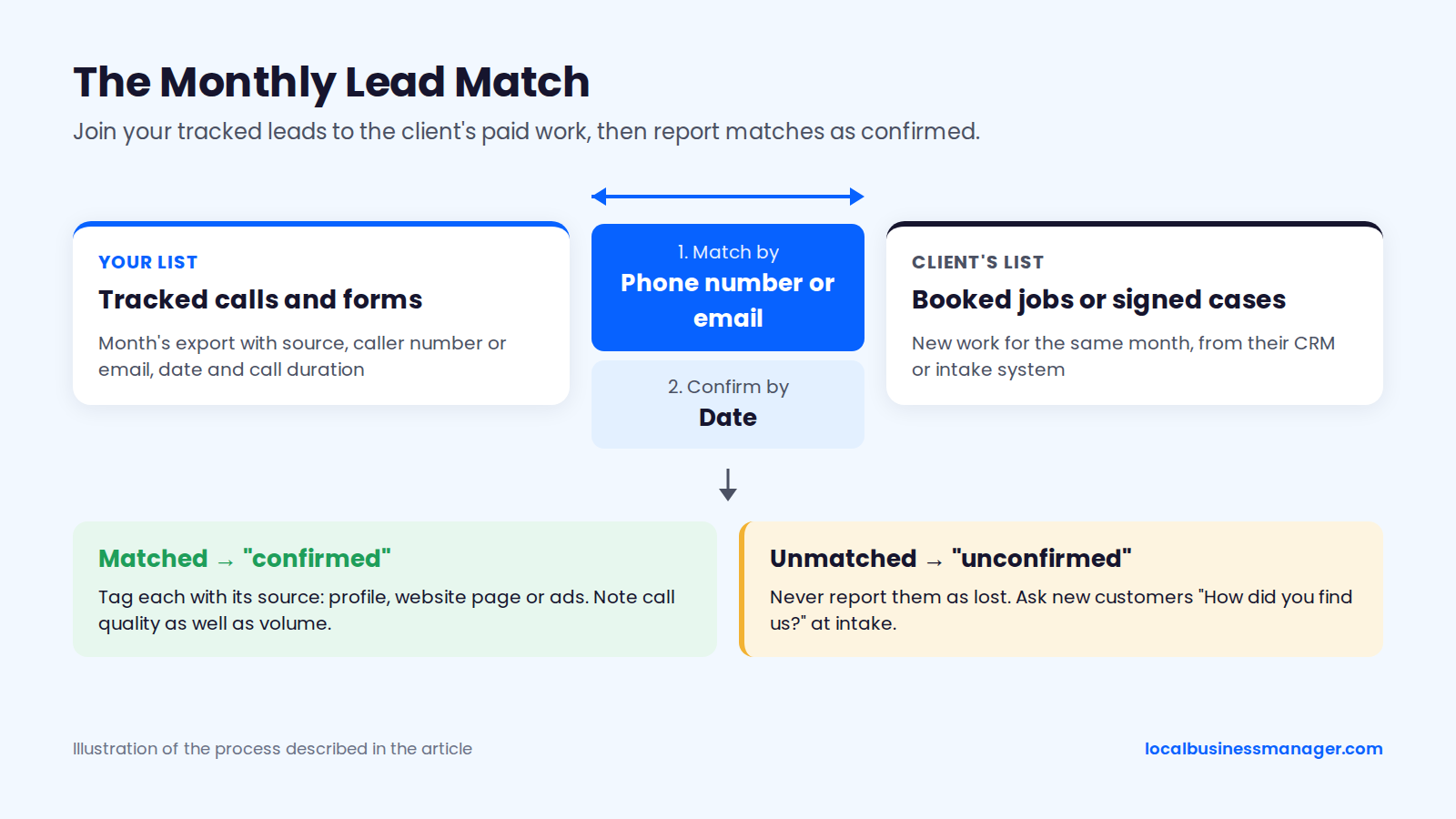
For callers who don't match, DreamHost's August 2026 guide recommends asking new customers "How did you find us?" at intake. That question also catches customers who called from a different phone.
For law firms, let the firm decide what case data it shares with you, and report counts rather than client names.
Putting a Value on a Lead
Put a value on leads with a cost-per-result figure and a client-supplied average value, never a number you made up. Law-firm marketing sources define cost per signed case as total marketing spend divided by new cases signed in the same period. The same formula works for trades as cost per booked job.
Few firms publish even that. Silver Atlas's 2026 review of 50 public law-firm marketing case studies found only 10 quantified signed cases or clients, and only 3 disclosed cost per signed case.
2 ways to put a revenue figure on the work:
- When the client shares closed work: ask for their average job value or fee, multiply it by matched work, and label the result "estimated, using your average [job value]". Sterling Sky's ROI reporting advice includes estimating revenue and rating call quality as well as volume.
- When the client won't share closed work: DreamHost's August 2026 guide multiplies monthly leads by the share that usually become customers, then by the average job value. Its example is 15 quote requests à 30% close rate à $400 = $1,800, which DreamHost calls "likely revenue"; use that label in the report.
Put these 4 limits in the report:
- Performance data includes Google Ads activity, so it isn't purely organic.
- Profile call counts undercount real calls.
- Customers often touch several channels before they call.
- A customer who calls from a different phone won't match.
What to Report About Reviews
Report new reviews this month, average rating, total count, response time, and the same numbers for the top 3 competitors in the local pack. Google's local ranking help page lists reviews under prominence and says more reviews and positive ratings can improve a business's local ranking.
The 5 review metrics each come from a different place and answer a different question. Competitor numbers come from their public profiles.
Metric | Where to get it | Why it's in the report |
|---|---|---|
New reviews this month | Client's profile and top 3 competitors' profiles | Recency, compared with competitors |
Average rating | Same profiles | What a searcher sees first |
Total reviews | Same profiles | Context for the headline figures |
Response time | Client's profile | Shows the client is answering |
Unanswered reviews | Client's profile | A task list for next month |
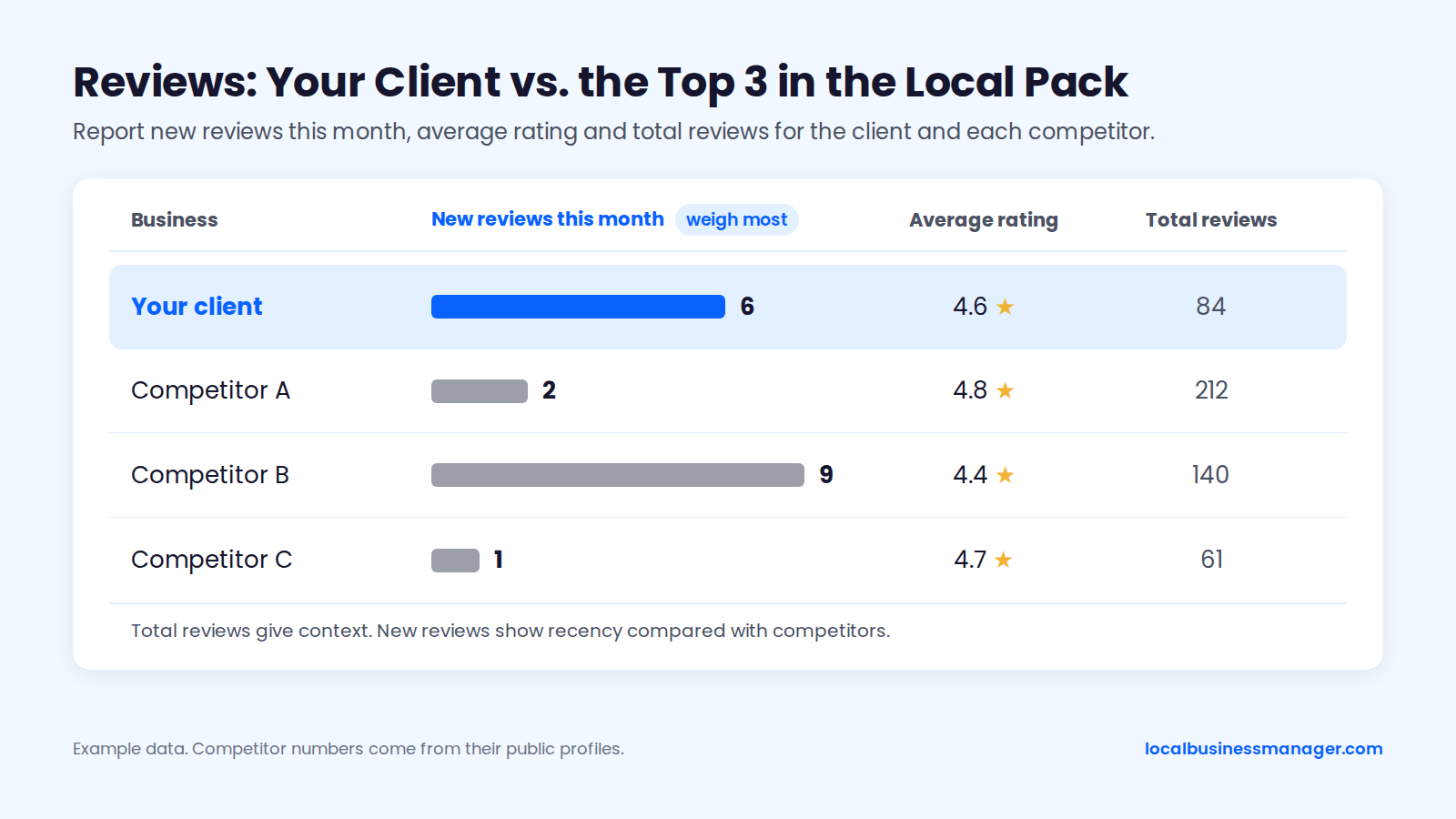
New reviews deserve more weight than totals, for 3 reasons from practitioner and survey data:
- In one test, gains leveled off: a Sterling Sky test on a single listing saw rankings rise when it went from 3 to 16 reviews but not from 16 to 31, and a 2025 retest saw a small Maps lift when 3 businesses went from 9 to 10 reviews.
- Recency ranks high in one 2025 write-up: a 2025 ranking-factors write-up by a local SEO software company put review recency among its top 5 local ranking factors.
- Customers expect fresh reviews: the 2026 Local Consumer Review Survey from a local SEO software company found consumers expect more recent reviews than in past years.
When the rating dips, report it with the reviews behind it: the new negative reviews, whether each has a reply, and any theme they share, such as missed appointments. Then turn that theme into a dated next step.
Ask for reviews only in ways Google allows: Google's review policy prohibits incentives and selective solicitation, which means asking only happy customers. Send text requests only to customers who opted in. For personal-injury firms, ask every client the same way when their matter closes; for clients who recovered, that moment is after the payout.
When a Metric Moves: What to Check First
When a metric moves, check whether something on the profile or in your setup changed before you assume Google changed its mind. DreamHost's August 2026 guide gives 3 rules for deciding whether a change is real:
- A change counts when it lasts 2 or more months in a row or shows up in several metrics at once; a one-month dip is usually noise.
- Compare each month with the trailing 3-month average and with the same month last year.
- Calls and direction requests per view show whether the profile persuades people; raw views only show whether it appears.
Of the 10 movements below, 1 has a Google-confirmed cause, 2 pair a Google-confirmed fact with our reasoning, 1 is practitioner-observed, and 6 are our own reasoning (one of them built on a Sterling Sky finding). The rows follow the report's order, with the suspension check last.
Metric that moved | Likely causes | First check | Evidence level |
|---|---|---|---|
Calls down, rankings flat | Profile Calls and tracked calls count different things (see the Performance table); tracking number or phone field changed | Compare tracked calls with profile Calls | Google-confirmed (Calls definition); cause is our reasoning |
Calls and directions down together | Profile hours edited (open status at search time appears to affect local pack rank) | Profile hours and recent edits | Our reasoning, built on a Sterling Sky finding (December 2023) |
Directions down alone | Seasonality | Same month last year | Our reasoning |
Website clicks down, GA4 profile sessions flat | Counting difference between the two; Ads activity in Performance | UTM-tagged sessions in GA4 (needs tagged profile links) | Our reasoning |
Views down, actions steady | Google Ads changes (Ads activity is included in Performance) | Google Ads spend for the period | Google-confirmed (Ads included); cause is our reasoning |
Search terms empty | Data not published yet | Wait until 5 days into the month | Google-confirmed |
Rankings down in part of the grid | Scan settings changed; category or name edit; new competitor; filtering | Confirm scan settings match last month | Our reasoning |
New reviews down | Review requests stalled | Who is asking, and when | Our reasoning |
Rating dipped | A shared theme in recent negative reviews | Unanswered reviews and response time | Our reasoning |
Every metric near zero | Suspended or disabled profile | Profile status and Google's appeals process for suspended profiles | Practitioner-observed |
Seasonality sits behind several of these rows, so compare against the same month last year before calling anything a drop.
Several of these causes are edits nobody asked for. I check weekly for edits to the name, attributes, services and other fields, whether Google or a third party made them, and check rankings and the post schedule monthly.
How to Report a Bad Month
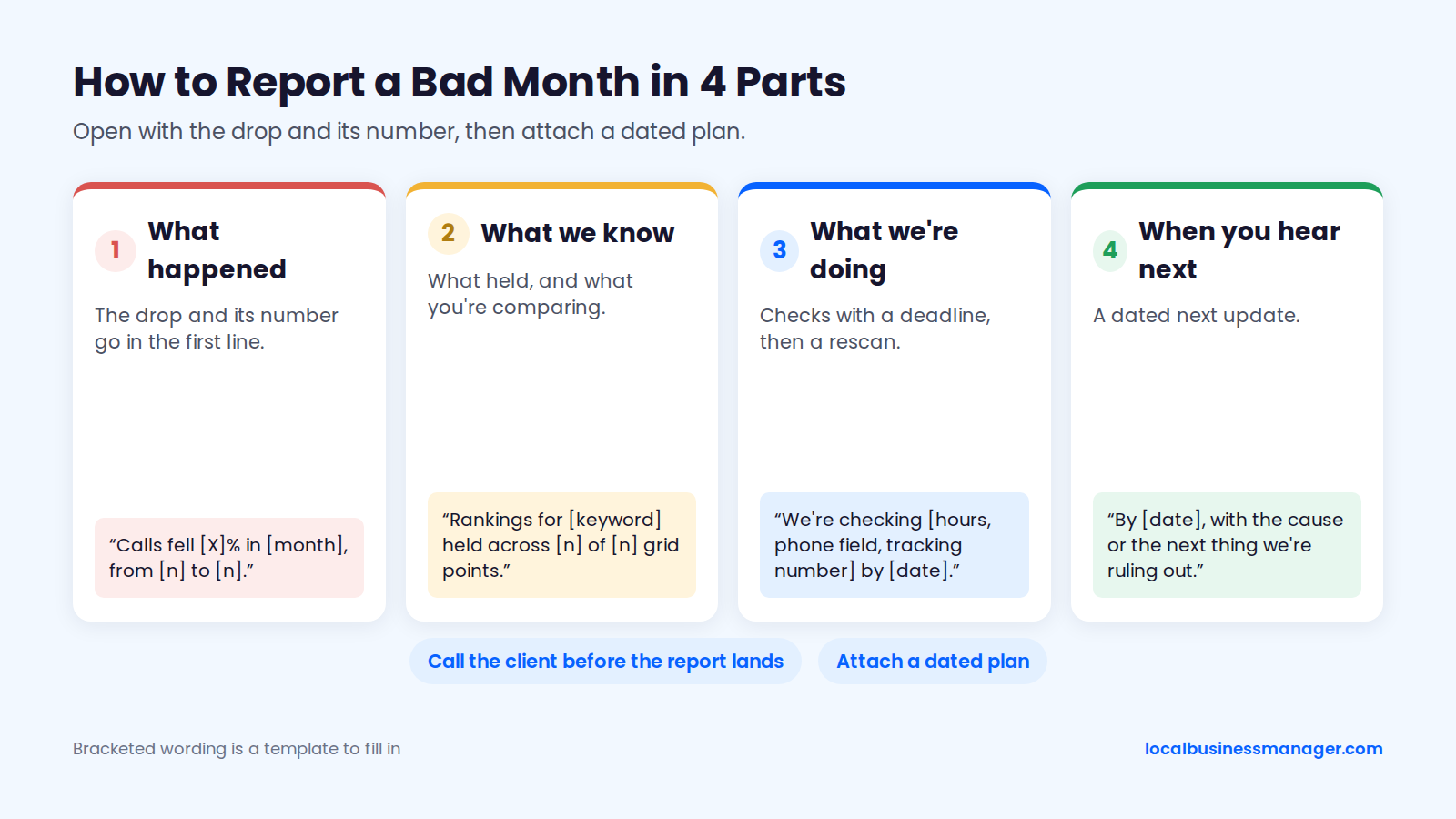
Report a bad month in 4 parts: what happened, what we know, what we're doing, and when the client hears next. Agency and reporting-software blogs give the same advice: put the drop and its number in the first line, call the client before the report lands, and attach a dated plan. These are opinion pieces, not studies, and no source measures whether this format keeps clients.
Ranking or Call Drop
A drop report opens with the drop and its number in the first line. Use this wording:
- What happened: "Calls fell [X]% in [month], from [n] to [n]."
- What we know: "Rankings for [keyword] held across [n] of [n] grid points. We're comparing the profile's Calls figure with our tracked calls, because the two count different things."
- What we're doing: "We're checking [hours, phone field, tracking number] by [date] and rescanning [keyword] after any fix."
- When you'll hear next: "By [date], with the cause or the next thing we're ruling out."
Give the client a realistic timeline. In my experience, how fast results come depends on what's already optimized. A single high-impact fix can show ranking gains within about a month, while gains after the basics are done, such as from a strong review push, come gradually.
Suspended Profile
A suspension report states the date, Google's stated reason and the appeal status, all of which the appeals tool shows. Google's help page on fixing suspended profiles says an appeal can be submitted only once, and an account-level restriction suspends every profile that account manages. Our guide to Business Profile suspension and reinstatement covers the appeal itself.
Two practitioner reports belong in the plan:
- Evidence deadline: Sterling Sky reports that the evidence form must be completed within 60 minutes of submitting the appeal, or the evidence isn't attached.
- Wait times: these are practitioner reports, not Google figures. A secondary summary of Sterling Sky's playbook gives about a week normally and 1 to 6 weeks overall.
In my experience, name edits and address edits cause the most suspensions. Reinstatement usually needs documents, such as the DBA, a lease agreement and photos of the office with signage, or a video recording the storefront and office.
Use this wording: "Google suspended your profile on [date] for [stated reason]. We need [documents] from you by [date] for the appeal, which can be submitted only once. One agency's published guidance puts typical waits at about a week, and 1 to 6 weeks overall; we'll update you every [day of week] until it's resolved."
Google Data Delays or Glitches
Flag a Google data delay or counting issue in the report itself, with your own tracked figure next to Google's. Two known causes:
- Search terms can take up to 5 days into the month to appear, per Google.
- Google has said, as quoted by Igniting Business, that the Phone Calls metric can differ from real calls when people dial the number by hand or hang up before the call connects.
Use this wording: "[Metric] shows [value] for [period]. Google's data for this period is [delayed / counted differently], and our tracked [calls / sessions] show [value]. We'll confirm the final figure by [date]."
What to Leave Out of a Client Report
Cut 6 metrics from the client report, or move them to an appendix or the audit. 2 of them leave entirely, 2 go to the appendix, and the rest move to a separate report or the audit.
Metric | Why it's cut | Where it goes instead |
|---|---|---|
Photo and post views | Not among the metrics Google's Performance help page lists | Delete |
Domain authority, domain rating, "toxic link" scores | Third-party scores; Google's John Mueller has said Google has no domain-authority metric | Delete |
Profile views as a headline | Google says the figure may be lower than the views in its emails, and it includes Ads activity | Appendix trend |
Raw lists of 200 keyword positions | Page 1 carries the main terms, and the grid maps show them across the area | Appendix |
Social follower counts | Google representatives have said likes and shares aren't direct ranking factors | A separate social report, if any |
Generic 300-check audit scores | A tool's score, not a Google metric, so "92 out of 100" says nothing about calls | The audit, with findings moved to next steps |
How to Report on Multiple Locations
Report multiple locations with one combined report: a portfolio rollup, an exceptions list, and per-location detail as an appendix. No study compares combined and per-location reports.
Meticulosity recommends reporting at the location level with a per-location scorecard. Conduit Digital says rankings, profile health and review velocity should be broken out per location rather than folded into one total. The layout below follows that pattern, in 4 parts:
- Portfolio rollup: total calls, total matched leads and total new reviews, against last month and last year.
- Exceptions list: every location below its own 3-month average on calls or rankings, with the likely cause and owner.
- Per-location scorecard: one row per location with the same 3 headline numbers as page 1.
- Appendix: each location's full grid maps, reviews and Performance data.
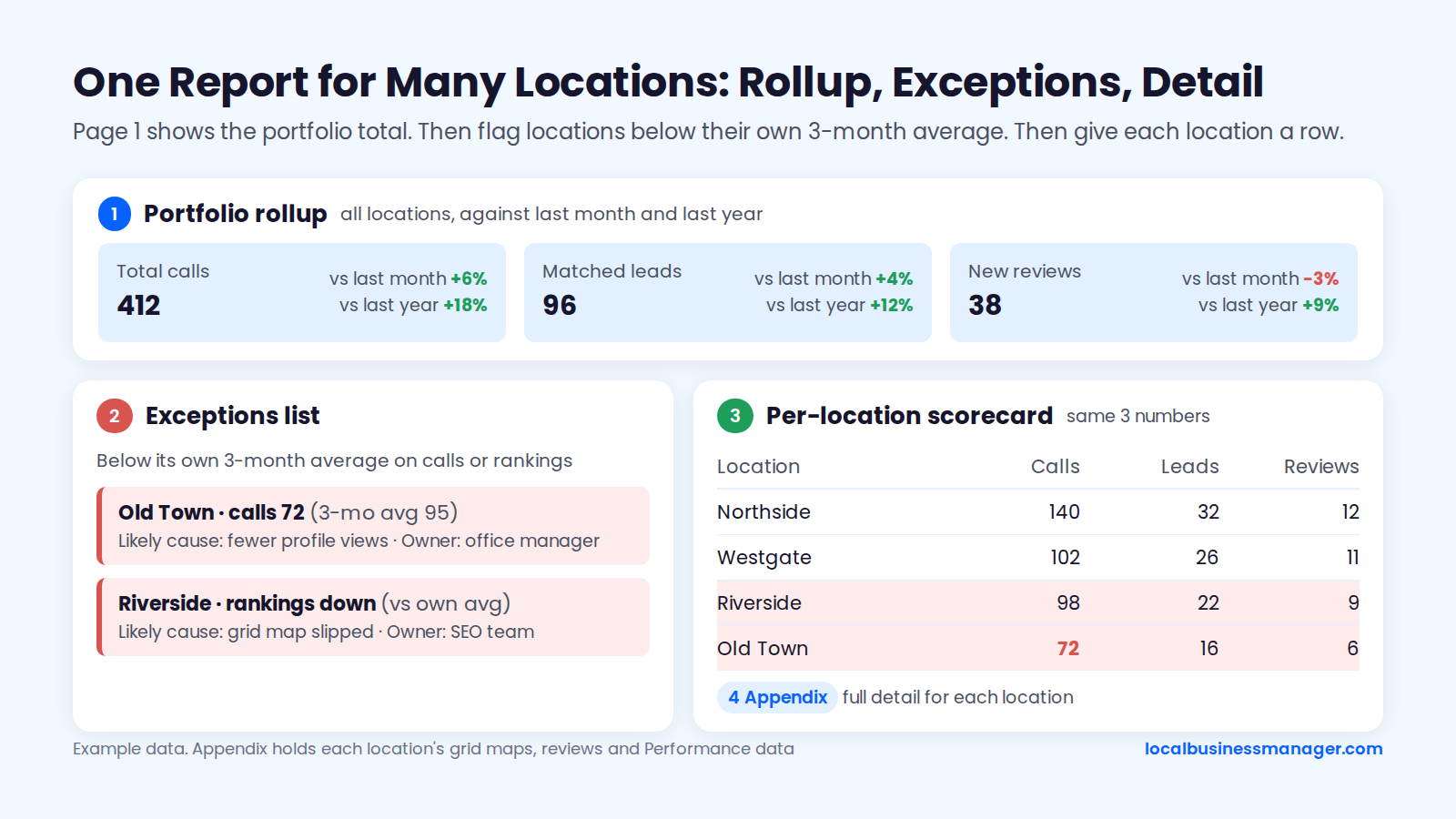
Compare each location with its own history rather than with the other locations; the exceptions list already uses each location's own 3-month average. Google lets managers of several profiles download Performance data for many profiles at once into one spreadsheet, which makes the rollup much faster.
For website numbers, I set each office's profile to link to its own city page, carrying local details for that office. Search Console can then report each office's page separately. More on structure in local SEO for multiple locations.
Should the Report Cover ChatGPT and AI Overviews?
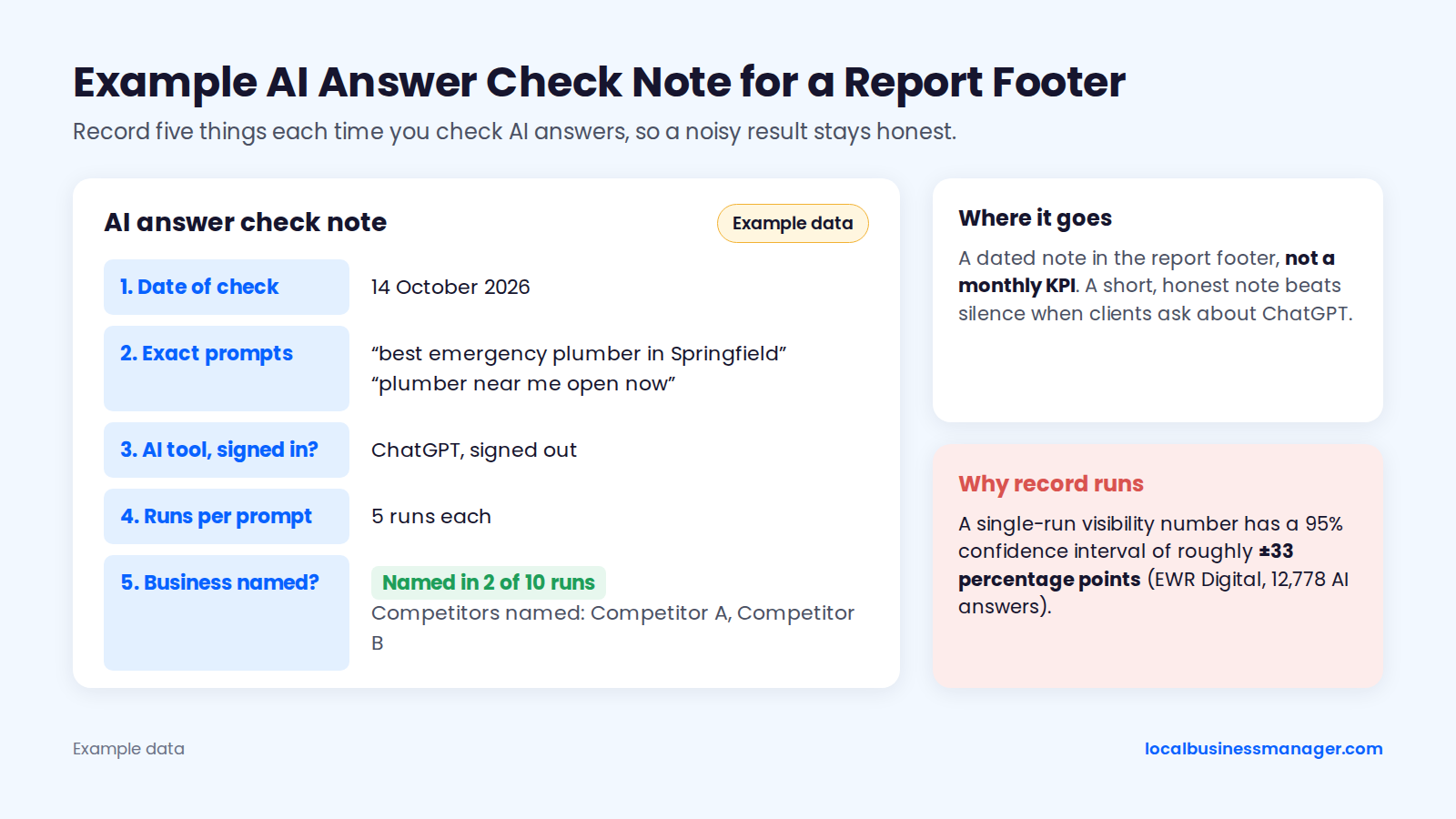
This guide recommends reporting AI answers as a dated note in the footer, because single checks of ChatGPT or AI Overviews vary too much to track as a monthly KPI. Clients will ask "are we showing up in ChatGPT?", so a short, honest note beats silence.
Google's side has some first-party data. Google's Search Central Blog announced Search Generative AI performance reports in Search Console in June 2026 (June 3, per trade coverage), first for a subset of sites. A note Google added to that announcement says the reports reached all websites worldwide on August 31, 2026.
ChatGPT has no first-party equivalent, so manual checks are where the noise comes in. SparkToro's 2026 research found less than a 1 in 100 chance that ChatGPT or Google's AI, asked 100 times, returns the same brand list twice. An EWR Digital study of 12,778 AI answers (September 2026) put the 95% confidence interval of a single-run visibility number at roughly ±33 percentage points, so each note should record these 5 things:
- The date of the check
- The exact prompts used
- The AI tool and whether the user was signed in
- How many times each prompt was run
- Whether the business was named, and which competitors were
For law firms, my observation is that some paid legal directories bring cases and also help a firm get mentioned in AI Overviews. That's worth a line in next steps if the note keeps coming back empty.
How Often Should You Report to Clients?
Send the report monthly and hold a strategy call each quarter; the weekly edit check stays out of the report unless something changed. Who gets which part, which tools fit, and the checks to run before sending follow below.
Monthly Report, Quarterly Call
A monthly report is the standard rhythm: DreamHost's August 2026 guide recommends pulling the numbers into a simple one-page report once a month. The quarterly strategy call is this guide's own recommendation.
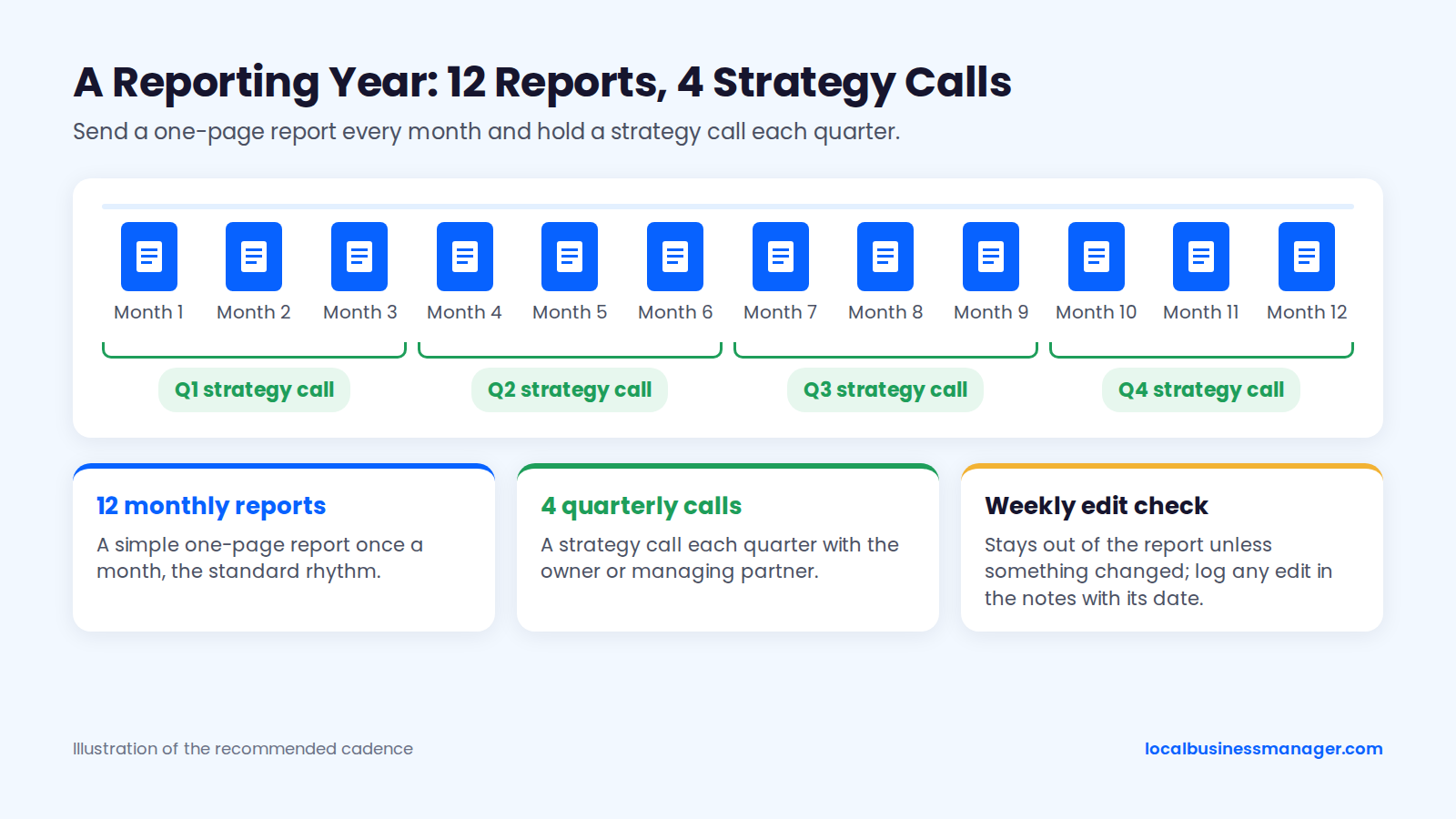
Weekly monitoring is my own routine, the edit check described in the diagnostic section above. This guide recommends logging any edit it finds in the report's notes, with its date.
Match comparison periods to the business. Seasonal trades such as HVAC, roofing or landscaping need month vs the same month last year on page 1, with month vs last month as the second figure. For a steady business, either works, but pick one and keep it.
Who Receives What
Split the report into a one-page summary for decision-makers and a working file for the people doing the tasks. DreamHost describes its monthly checklist as "the working half of your monthly local SEO report"; the split below is this guide's framing of that advice, and the table is our own recommendation.
Reader | What they receive | Format |
|---|---|---|
Owner or managing partner | Page 1 summary and the quarterly call | PDF one-pager |
Marketing lead | Full report and the working file | PDF plus a live link |
Office manager | Unanswered reviews, review requests to send, profile edits to confirm | Task list from the working file |
Send page 1 as a PDF so it can be forwarded and read on a phone between appointments. Keep the live link for the person who will actually click through the evidence.
What to Look For in Local SEO Reporting Tools
A reporting tool works for this template if it pulls Business Profile data cleanly and lets you review everything before it sends. DreamHost's August 2026 guide notes that Google doesn't offer a native Business Profile connector for Looker Studio, so you either paste the metrics in each month or pay for a third-party connector.
Tools that can do the job:
- Looker Studio, for a dashboard you build and maintain yourself.
- Google Sheets, for the Performance bulk export and call-tracking matches.
- White-label reporting platforms, which combine the pieces under your agency's brand.
Whatever you choose, check for 5 things: Business Profile Performance as a data source, grid maps with saved settings, white-label branding, PDF and live-link delivery, and a review step before anything goes to the client. Write the summary, the "why" sentence and the next steps by hand every month; Sterling Sky's reporting advice includes stopping automated Google Analytics reports.
Pre-Send QA Checklist
Run these 10 checks before every report goes out:
- Every section uses the same date range.
- Comparisons are like-for-like (same month last year for seasonal clients).
- Grid keywords, size, spacing, center and device match last month.
- Profile Calls and tracked calls are labelled as different numbers.
- Search terms are complete, or a note says they're still arriving.
- Any Google Ads changes this month are noted.
- Profile edits, suspensions or appeals are mentioned with dates.
- Every next step has an owner and a date.
- Metric names match the ones in Google's current Performance report.
- No client names or case details appear that the client hasn't approved.
Local SEO Report Template (Copy This)
A report template works when it passes 4 tests: a page 1 a client can read on a phone, a source named for every number, comparisons with last month and the same month last year, and next steps with owners and dates. The template below follows the 8 sections in reading order, plus a notes footer, and works in a document, a spreadsheet or any reporting tool.
- Summary (page 1): use the summary template above.
- Customer actions: calls, direction requests, website clicks and bookings from Performance; this month, last month, same month last year; a footnote that Performance includes Ads and Calls are button clicks.
- Leads and revenue: tracked calls by source; form fills from GA4 key events; matched booked jobs or signed cases; unconfirmed leads; cost per booked job or signed case; estimated revenue, labelled with the client's average value.
- Rankings: grid map per main keyword with a 2-line legend; grid settings listed; share of points in the top 3 vs last month; how missing points were counted if you show average rank.
- Reviews: new reviews, average rating, total, response time and unanswered reviews, for the client and the top 3 competitors.
- Website traffic: Search Console clicks and impressions for each location and service page; GA4 sessions from the UTM-tagged profile links.
- Work completed: each task with the date done, plus a one-line citation/NAP status ("consistent" or "[n] fixes made"), kept out of the headline numbers.
- Next steps: 3 actions with an owner, a due date and the metric each should move.
Notes footer (not a section): data delays, profile edits, suspensions or appeals, and AI answer checks with date and prompts.
Frequently Asked Questions
Can I Get a Free Local SEO Report?
You can get a free audit or snapshot, but a monthly local SEO report needs the client's own data, which a free generator can't see. Google shows Performance data only for verified profiles, and you see it only with access to the profile. Search Console, GA4, call tracking and the client's job or case records need access too. A free snapshot is fine for a sales conversation, but it can't show calls, leads or paid work.
The Page That Keeps the Client
If you change one thing this month, rebuild page 1 so it shows calls, rankings for the main terms and the work they produced, with a dated next step under each. If you're building this for a roster of clients, Local Business Manager is in early access for agencies: join the early access list.