How to Do a Local SEO Audit: The Agency Checklist

A local SEO audit is 10 checks run in a fixed order. It starts with a baseline and ends with a ranked fix list for the client. In between, you check rankings across the service area, the Business Profile, reviews, competitors, spam, citations, the website and AI answers. Recording the baseline first is what lets you prove a result later.
I've ranked and served close to one hundred personal-injury law firms in Houston, Denver, Los Angeles and New York, some of the toughest local markets in the US. Below is the audit I'd run on a new client this week, step by step, with my view on the 2 gaps that most often keep PI firms out of the 3-pack. The one-page report template is in Step 10 and the checklist is at the end.
What Does a Local SEO Audit Cover?
A local SEO audit covers every signal behind the 3 local ranking factors Google names: relevance, distance and prominence. It also sets up the tracking you need to prove the fixes worked. Below are the 10 steps in order and the point where a GBP-only audit stops.
Google's help page on how local ranking works says complete, accurate profile details such as category, address and hours help Google match a business to searches. The same page says more reviews and positive ratings can help local ranking. It also says nobody can pay or ask Google for a better local ranking.
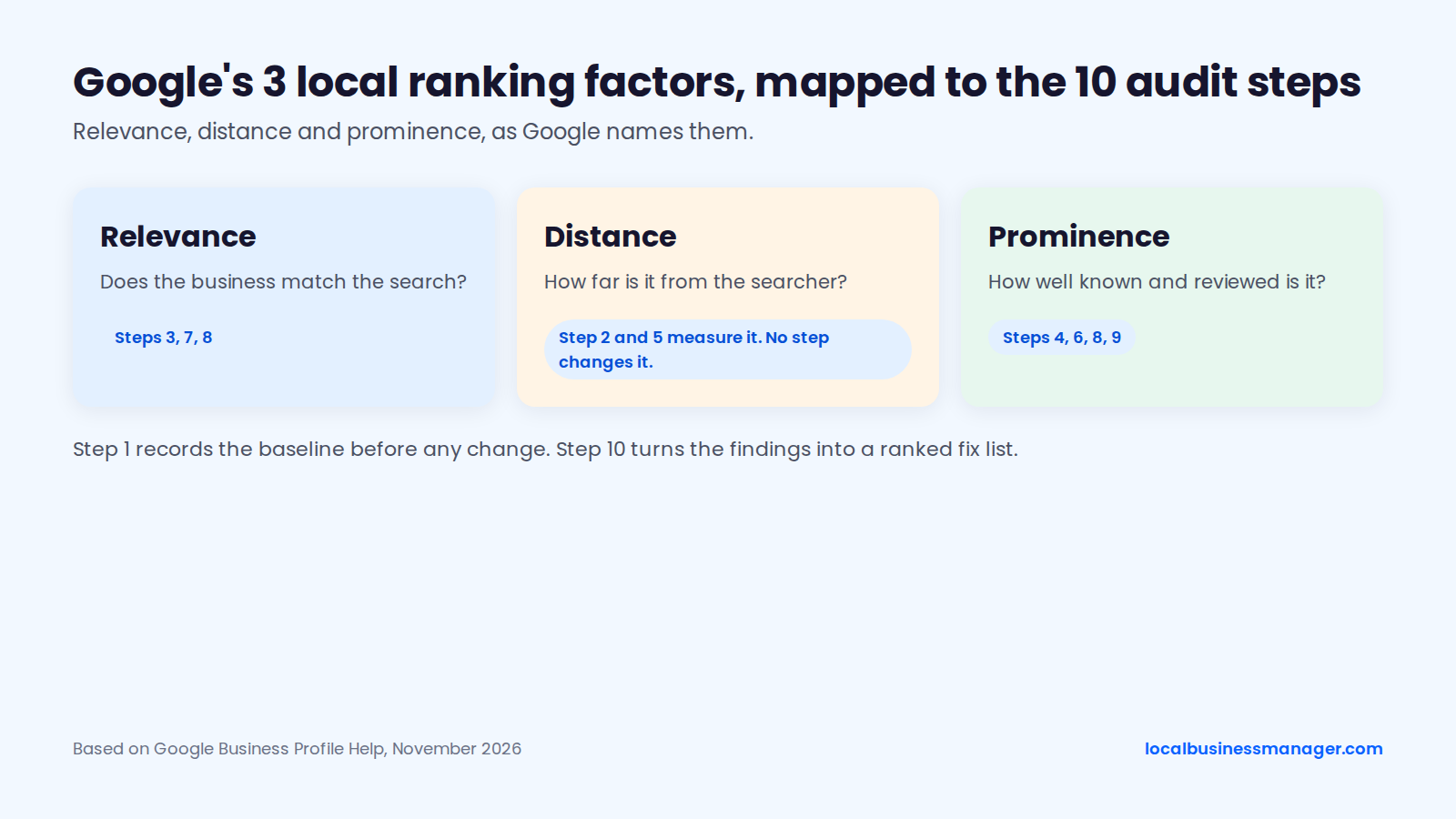
Relevance, distance and prominence mapped to the 10 audit steps.
Distance is the one factor an audit can measure but not change, because it depends on where the searcher is standing. The 10 steps, in the order they should run:
- Record a baseline before you touch anything.
- Check rankings across the service area.
- Audit the Google Business Profile field by field.
- Benchmark reviews against the 3-pack.
- Compare the competitors who beat you.
- Find spam and duplicate listings.
- Check NAP and citations.
- Audit location pages, schema and local links.
- Test how the client shows up in AI answers.
- Prioritize fixes and report to the client.
In expert opinion, profile and review signals carry about 52% of local pack weight, which is why Steps 3 to 6 take up most of the audit. The 2026 Local Search Ranking Factors survey, published November 6, 2025, had 47 experts score 187 factors.
The table below shows how the survey splits the weight by factor group, as reported by several summaries of it, sorted by weight. The weights are expert estimates from a survey, so read them as a guide to where effort goes.
Factor group | Share of local pack weight (%) | Where the audit checks it |
|---|---|---|
Google Business Profile signals | 32 | Steps 3, 5 and 6 |
Review signals | 20 | Step 4 |
On-page signals | 15 | Step 8 |
Behavioral signals | 9 | Step 1 (measured, not edited) |
Link signals | 8 | Step 8 |
Citation signals | 6 | Step 7 |
Personalization | 6 | Not auditable |
The published group weights add up to 96%, not 100%. The summaries don't list the rest, so the table shows only what they report.
A GBP audit, sometimes still called a GMB audit for local SEO, is Step 3 on its own: the Google Business Profile (formerly Google My Business) checked field by field. A full local SEO audit adds the other 9 steps. A well-built profile can still lose to a closer competitor with a stronger review flow, and only the wider audit shows that.
Step 1: Record a Baseline Before You Touch Anything
A baseline is a dated snapshot of calls, website clicks, direction requests, search traffic and rankings taken before the first change. Without it, the audit can't show a result later, and the client's memory of "how things were" becomes the benchmark. Record the 6 items below on day one.
Google's Business Profile performance data covers search terms, profile views, calls, website clicks and direction requests, and it's only available for verified profiles. Google counts views as unique visitors. Every metric combines organic and Google Ads activity, so note whether the client is running ads during the same period.
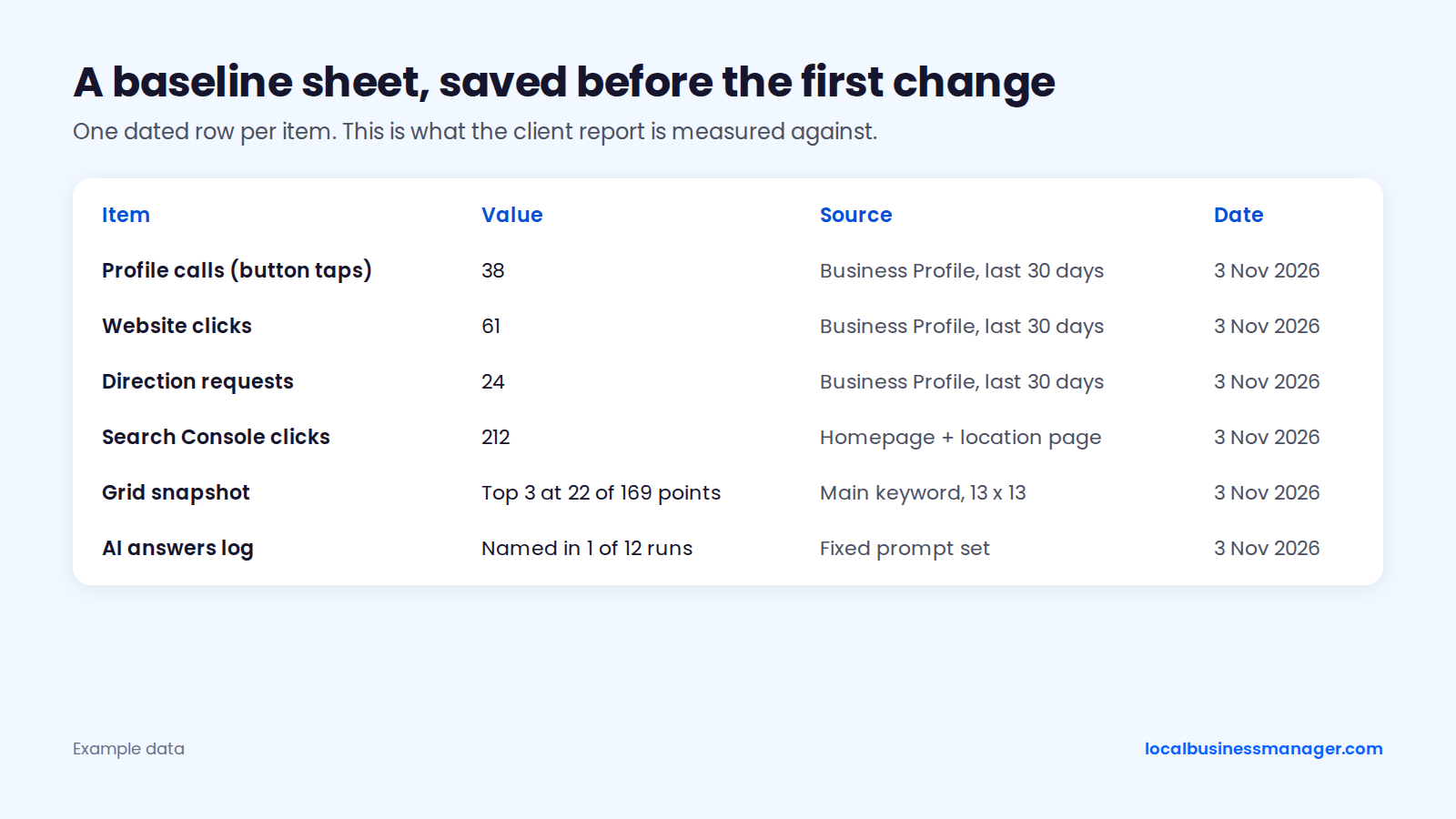
Example data. One dated row per baseline item.
Sterling Sky, a local SEO agency, points out that the "Calls" metric counts taps on the call button, not calls that connected. Treat the Business Profile call count as a trend line, and pair it with the client's own call log or intake records where they exist.
The 6 baseline items:
- Business Profile performance: export the longest date range the dashboard offers for calls, website clicks, direction requests and search terms.
- Google Search Console: clicks and impressions for the homepage and each location page. Search Console is free and doesn't need an ads account.
- A UTM tag on the profile's website link, so profile visits show up as their own source in analytics. Template:
https://www.example.com/location-page/?utm_source=google&utm_medium=organic&utm_campaign=gbp - A grid scan for each tracked keyword (Step 2).
- An AI answers log for a fixed prompt set (Step 9).
- Dated screenshots of the profile as it stands: name, categories, hours, services and the website link.
Calls and rankings lead the monthly report I'd send a client, so both belong in the baseline.
Step 2: Check Rankings Across the Service Area
Check rankings with a grid of search points spread across the service area, because Google ranks the same business differently depending on where the searcher is. Summaries of the 2026 Local Search Ranking Factors survey rank distance from the searcher second among local pack factors. The sections below cover keyword choice and grid size and spacing.
Choosing Keywords
Pick keywords in 3 shapes. Industry guides note that most local businesses have at least 3 main terms: "service", "service near me" and "service in [city]". For a roofer, that's "roofer", "roofer near me" and "roofer in Plano".
A starting keyword set for one location:
- The term that matches the primary category ("personal injury lawyer").
- The 2 or 3 services that make the client the most money.
- The "near me" version of the main term.
- The "[service] in [city]" version for the main city.
The same guides suggest choosing grid keywords by search volume or by profit, even when a profitable term has low volume. It recommends comparing terms tied to the primary category as well.
Sterling Sky found that adding "near me" wording to a page helps organic rankings far more than 3-pack rankings. That's a reason to scan the "near me" version as its own keyword instead of assuming it tracks the plain term.
Grid Size and Spacing
My first scan on a new client is a 13 Ã 13 grid with 0.5 miles between points, which covers 6 miles edge to edge. I use that first scan to see how far the client's ranking reaches, then adjust:
- Mostly green (top 3 at most points): widen the spacing to find where the ranking stops.
- Mostly red (outside the top 3, or not found): tighten the spacing to map the small area where the client does rank.
- Scattered, "Swiss-cheese" pattern: Sterling Sky reads this as a sign of filtering, usually caused by a nearby business with the same primary category within about 200 feet. Check Step 6.
I don't run single-point rank checks, because one location says little about how a business ranks across its area. Most agencies have had the call from a client who searched at the kitchen table and decided the rankings had dropped, and a grid is how you answer it.
I also don't trust average rank on its own right now. Google has been mixing results and the results page is very volatile, so an average can make sense but is hard to read with confidence.
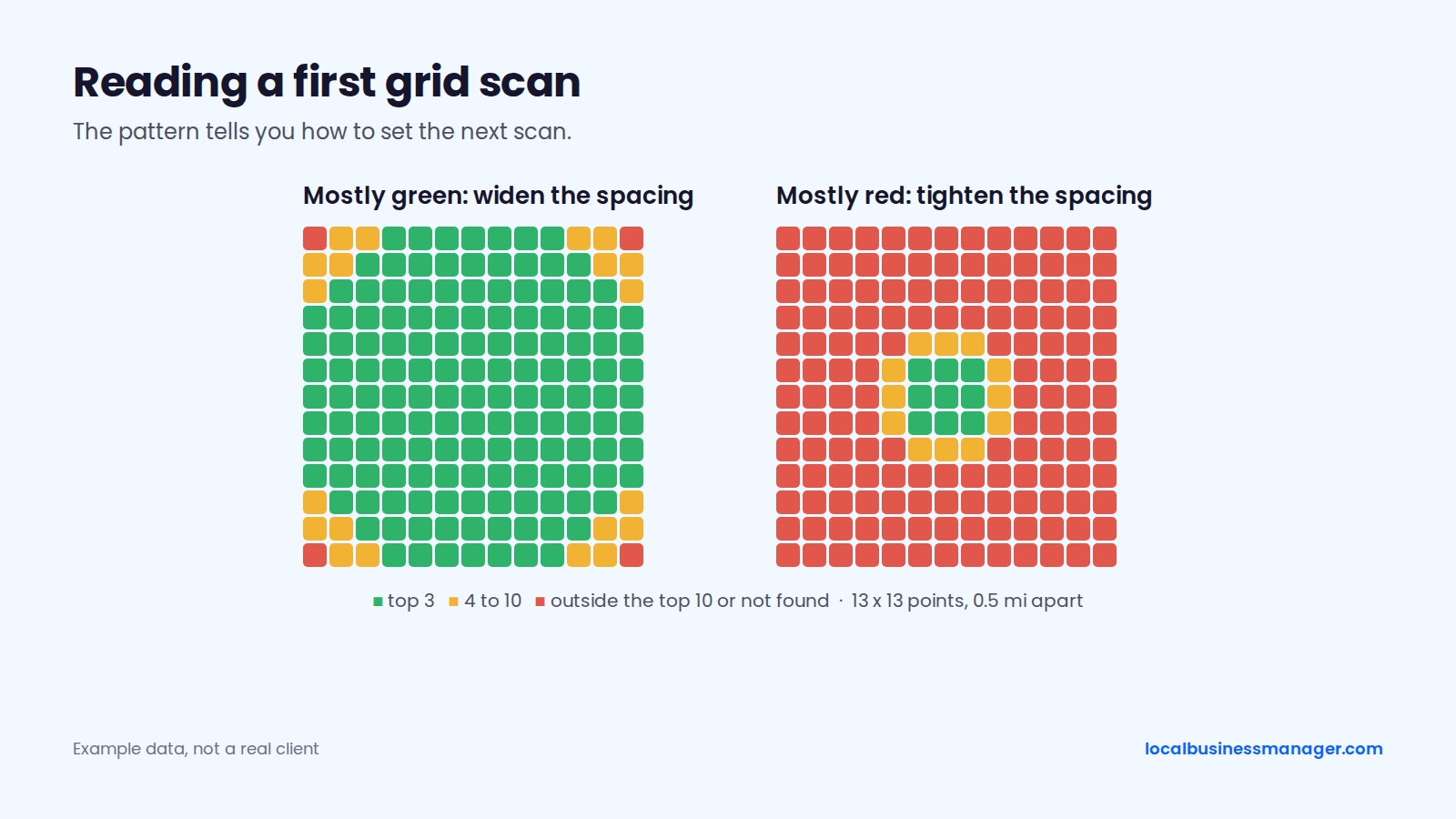
Example data. Mostly green: widen the spacing. Mostly red: tighten it.
Step 3: Audit the Google Business Profile Field by Field
The profile audit checks each field against Google's guidelines and against the profiles that outrank the client. The profile carries the most weight: summaries of the 2026 Local Search Ranking Factors survey report that 8 of the top 10 local pack factors come from the Business Profile. Work through the name, categories, detail fields, duplicates and service-area settings.
Business Name
The Business Profile name must match the name the business uses in the real world, according to Google's guidelines for representing your business. Flag any keyword on the profile that doesn't appear on the signs, website and stationery. That's a violation and a suspension risk, and it gets fixed first.
A keyword name the business really uses is a different case. I recommend it when it's done in this order:
- Register the keyword name as a DBA (assumed name).
- Put that exact name on the signage, website, stationery, phone greeting and other listings.
- Change the Business Profile name last.
A DBA document alone doesn't make a name compliant. Google judges the name the business actually uses and can still challenge or suspend it, and the DBA is your proof if Google asks during reinstatement or re-verification.
The 2026 survey lists keyword names among the top suspension risk factors. In a separate 2026 study of more than 1.4 million listings across 17 industries, a company that sells local SEO software found a correlation between keywords in the business name and higher local pack rank. Law firms also have to clear their state bar:
Jurisdiction | Trade-name rule (as of November 2026) |
|---|---|
ABA Model Rule 7.1, Comment 5 | A trade name must not be false or misleading |
New York | Rule 7.5(b) bans trade names |
Texas | A trade name needs state-bar approval |
Kentucky, New Jersey, Rhode Island | Trade names are restricted |
Rules change and this isn't legal advice, so check the state bar's current rule before filing the DBA.
Primary and Secondary Categories
Google tells businesses to pick categories that are "as specific as possible, but representative of your main business." It says to use the fewest categories that describe the core business and never to use categories as keywords, and it adds the general parent categories automatically.
Practitioners don't all agree with "fewest":
- Sterling Sky's tests found that adding relevant secondary categories never hurt rankings for the main keywords, and it recommends using all 10 slots.
- A 2019 industry test found that unrelated categories can confuse Google.
- Neither source documents a test on removing secondary categories from a personal-injury firm.
Whichever side you take, add only categories for services the client actually offers, which keeps the profile inside Google's rule against using categories as keywords.
The primary category carries more weight. In Sterling Sky's tests, changing the primary category had a major impact, and primary category is the top local pack factor in the 2026 Local Search Ranking Factors survey, with a score of 227, up from 193 in 2023, according to a summary of the report.
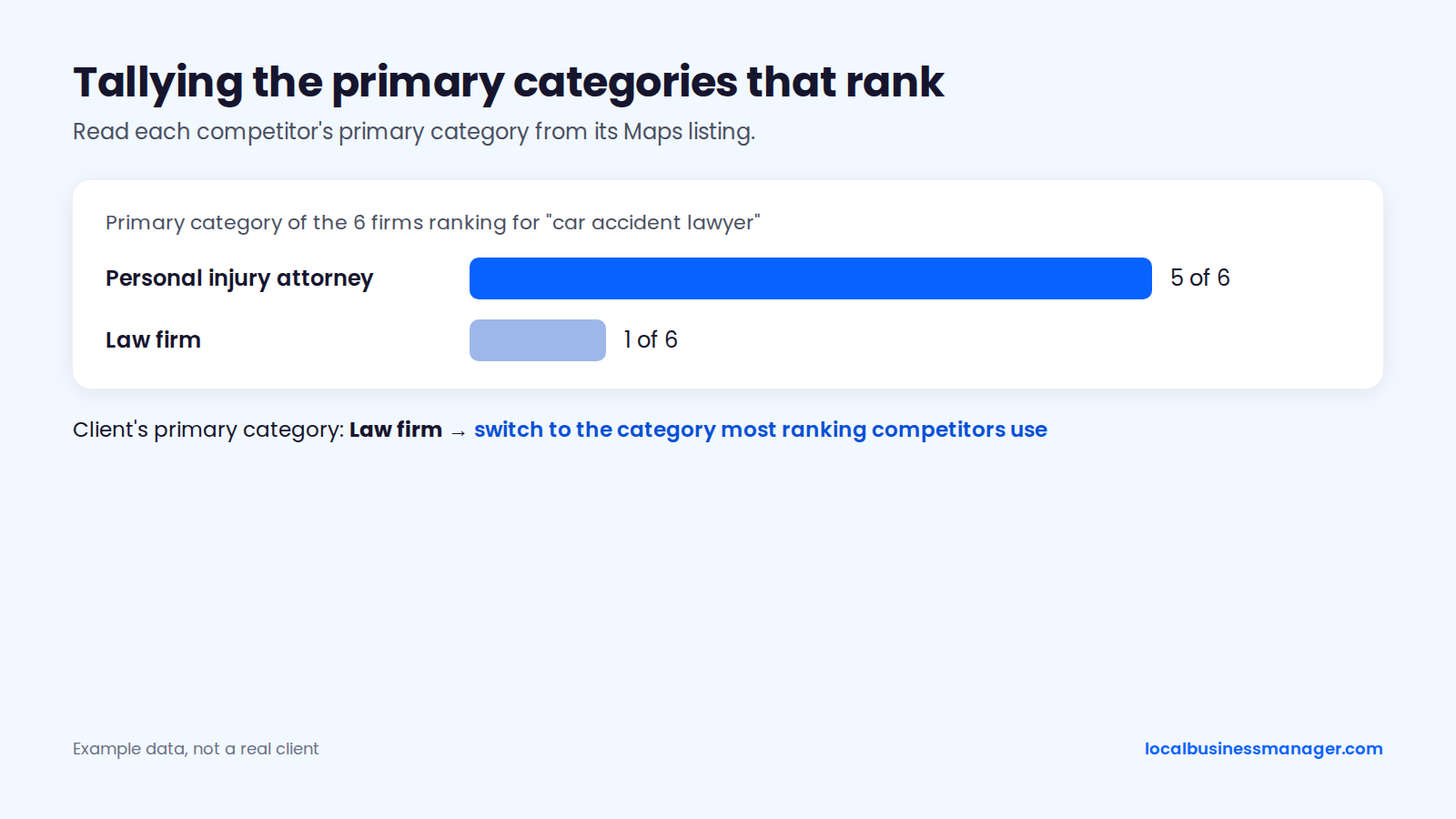
Example data. Count the primary categories the ranking competitors use.
For the primary category, I pick what most of the ranking competitors use. If Google is rewarding a different category than the "logical" one, I use the category Google rewards.
Sterling Sky reports a case that shows why the choice matters: a PI firm with "Insurance attorney" as its primary category ranked noticeably better for injury terms after switching to "Personal injury attorney", and its visibility for insurance terms dropped.
Hours, Services, Attributes and Photos
Every detail field should be filled in and true, because Google says complete, accurate information helps it match a business to searches. Hours deserve extra care: summaries of the 2026 Local Search Ranking Factors survey rank "business is open at time of search" as the 5th local pack factor.
- Hours and special hours: regular hours match the real hours, and holiday hours are set before each holiday.
- Services: the list matches the services on the website, named the way customers search for them.
- Attributes: every attribute that applies is set, such as accessibility and payment options.
- Photos: real photos of the team, vehicles, premises and work, added steadily. Skip geotagging (see the mistakes section).
- Description: accurate and readable. The description isn't a known ranking lever, and stuffing it with keywords breaks Google's guidelines.
- Q&A: don't spend audit time on it. Google discontinued its Q&A API on 3 November 2025 and is moving that section to AI-generated answers in Maps, so audit Q&A only if the profile still shows one.
Duplicates and Service-Area Settings
Search Google Maps for the client's phone number, current name, former names and former addresses to find duplicate profiles. Log every duplicate you find for the fix list, where duplicates sit in the top tier (Step 10).
The service-area rule is narrower than many checklists suggest: hide the address only when customers aren't served at that address.
- Storefront business: customers visit the address, so it stays visible.
- Hybrid business, such as a plumbing company with a showroom customers visit: the address stays visible.
- Service-area business that only travels to customers: the address is hidden.
The address itself must be a real location the business operates from. A virtual office, PO box or coworking desk doesn't qualify, and a profile built on one is at risk no matter how well the other fields are done.
Setup work that goes beyond the audit is in our Google Business Profile optimization guide.
Step 4: Benchmark Reviews Against the 3-Pack
Benchmark 5 review numbers for the client and each 3-pack competitor: total Google reviews, average rating, reviews gained in the last 90 days, date of the newest review, and the share of reviews with an owner reply. Google says "More reviews and positive ratings can help your business's local ranking" but gives no weights.
The 2 strongest measured findings point in different directions. A software vendor's data (131,000+ keywords) found that total reviews had the largest effect on top-3 rate (+33.7 percentage points), a correlation rather than a test, while Sterling Sky's study of 8,186 businesses found that reviews gained this month mattered more than the total. That disagreement is why you benchmark all 5 numbers. The table lists each finding as of November 2026, with ranking evidence first and consumer evidence last.
Review metric | Finding | Source (type) |
|---|---|---|
Total Google reviews | +33.7 percentage points on top-3 rate, largest measured effect | Software vendor 2026, 131,000+ keywords (vendor correlation) |
Reviews gained this month | Mattered more than total reviews | Sterling Sky 2025, 8,186 businesses |
Total reviews, 3 to 31 | Rankings rose as one listing went from 3 to 16 reviews, then did not rise from 16 to 31 | Sterling Sky test, 2025 |
Review recency | 11th pack factor, up from 93rd in 2023 | 2026 ranking-factors survey via summaries (expert opinion) |
Average rating | Ratings worked as a cutoff at 4.5 stars rather than a sliding scale | Software vendor 2026 (vendor correlation) |
Recent reviews (consumers) | 44% value a review from the last month | 2026 consumer survey by a local SEO software company |
Rating threshold (consumers) | 31% only use businesses rated 4.5 stars or higher | 2026 consumer survey by a local SEO software company (1,002 US adults) |
No public source sets a review gap against the top 3 that marks it as the main problem. Read the gap alongside the grid: if the client trails on both total and recent reviews in the areas where competitors win, the review gap is a strong candidate.
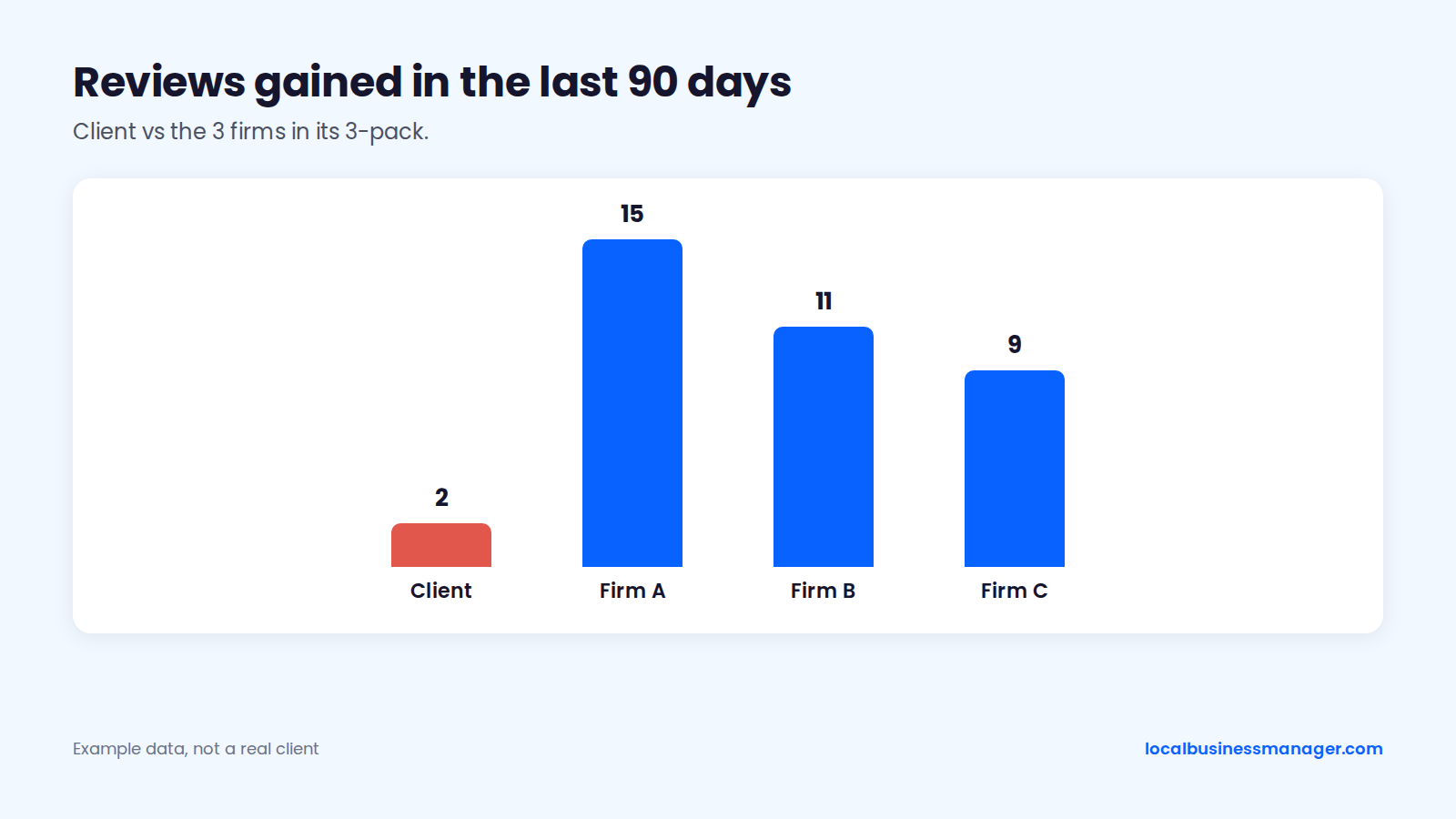
Example data. Reviews gained in the last 90 days, client vs 3-pack.
In the personal-injury firms I've worked with, a review flow that's too low is one of the 2 most common reasons a firm misses the 3-pack. The other is a Business Profile name that isn't optimized, meaning the firm hasn't adopted a keyword name through a registered DBA it really uses.
The fix for a review gap has to stay inside the rules:
- Ask every customer the same way at the same point, never only the happy ones. Google's review policy prohibits selective solicitation, also called review gating.
- Never offer discounts, gifts or other rewards for reviews.
- Never use reviews from employees or family, and never buy reviews.
- Send text review requests only to customers who opted in to texts.
- Keep a steady pace instead of bursts. The 2026 ranking-factors survey lists "too many Google reviews too fast" as a negative factor.
If the reply share is low, our guide on how to respond to Google reviews covers the replies themselves.
Step 5: Compare the Competitors Who Beat You
Put the client next to each business in the 3-pack for its main keyword and compare 7 attributes, so every gap points at a specific fix. The comparison also shows which gaps an audit can't close, starting with distance.
Summaries of the 2026 Local Search Ranking Factors survey rank primary category, distance and keywords in the business name as the top 3 local pack factors, so the side-by-side comparison starts there. Fill in one column per competitor in your own sheet.
What to compare | Where to find it | What a gap usually points to |
|---|---|---|
Primary category | Shown under the name on the Maps listing | Category mismatch with what Google rewards |
Distance to the searcher | The grid scan: where each competitor wins | Proximity, which the audit can't fix |
Business name | The listing, plus the business's signs and website | A real keyword name (DBA) or stuffing (Step 6) |
Review count and recent reviews | The profile's reviews, sorted by newest | Review flow gap (Step 4) |
Hours | The profile | Lost "open now" searches |
Landing page | The website link on the profile | Thin or missing location page (Step 8) |
Local links | Any backlink tool | Weak local prominence (Step 8) |
Proximity sets a limit on what any fix can do. Google lists distance as one of its 3 local ranking factors, and an audit can't move the client's address, so a competitor based in the middle of the area it wins keeps its distance advantage there. The client can still work on relevance and prominence to extend its reach.
Sterling Sky's case study of a personal-injury and criminal defense firm in Myrtle Beach named pushing rankings further out geographically as one of its main challenges.
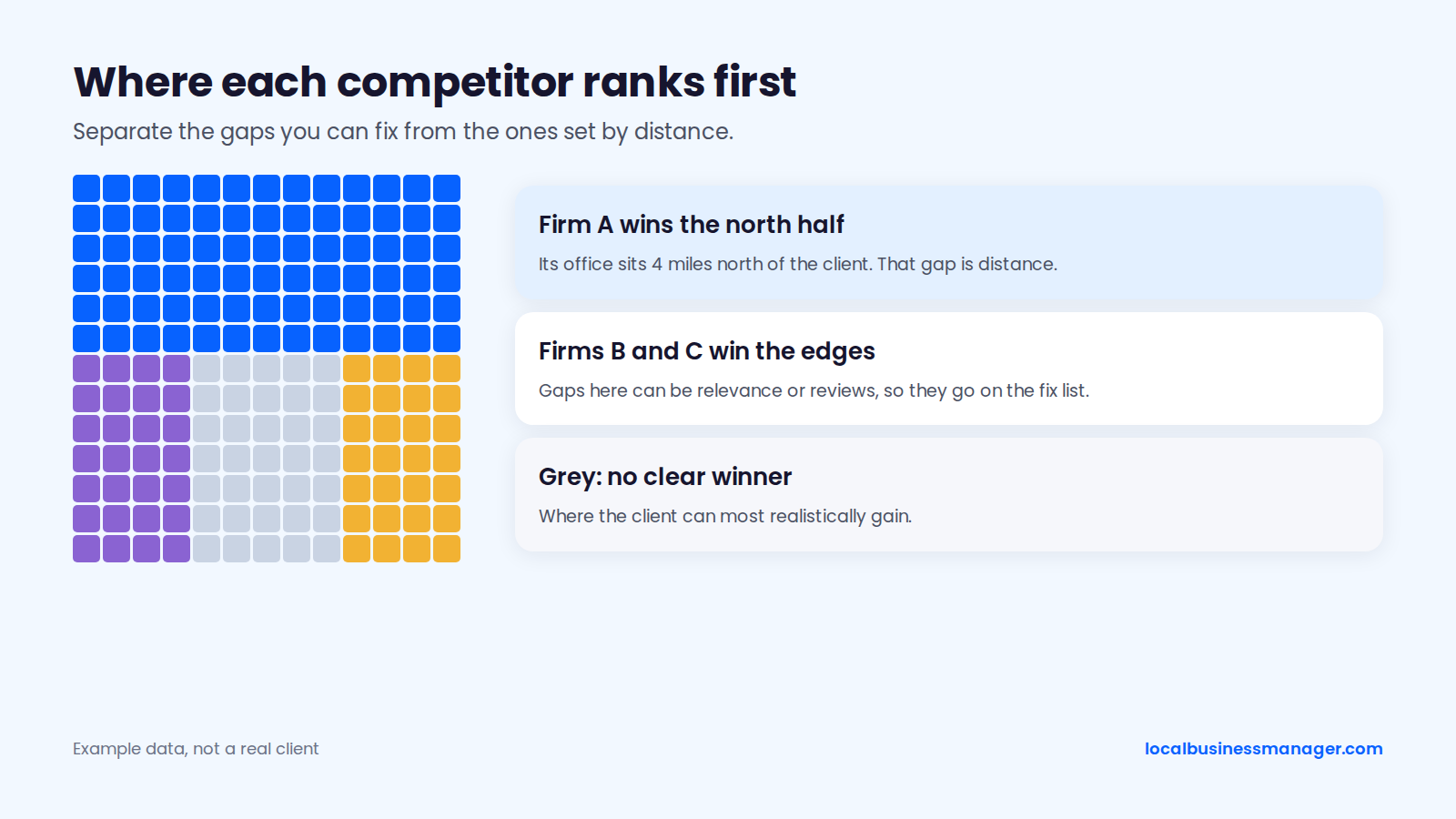
Example data. Where each of 3 competitors ranks first, and where the client sits.
Step 6: Find Spam and Duplicate Listings
Spam in a client's grid comes in 3 forms: keyword-stuffed names the business doesn't really use, listings for businesses that don't exist or aren't eligible, and duplicates of one business. Few audit checklists cover this step. It needs care, because a careless report can backfire.
Google lets anyone ask to remove a Business Profile they don't own if the business never existed or isn't eligible. Fraud involving a listing's name, phone number or website goes through Google's Business Redressal Complaint Form, which states that submitting it doesn't guarantee action.
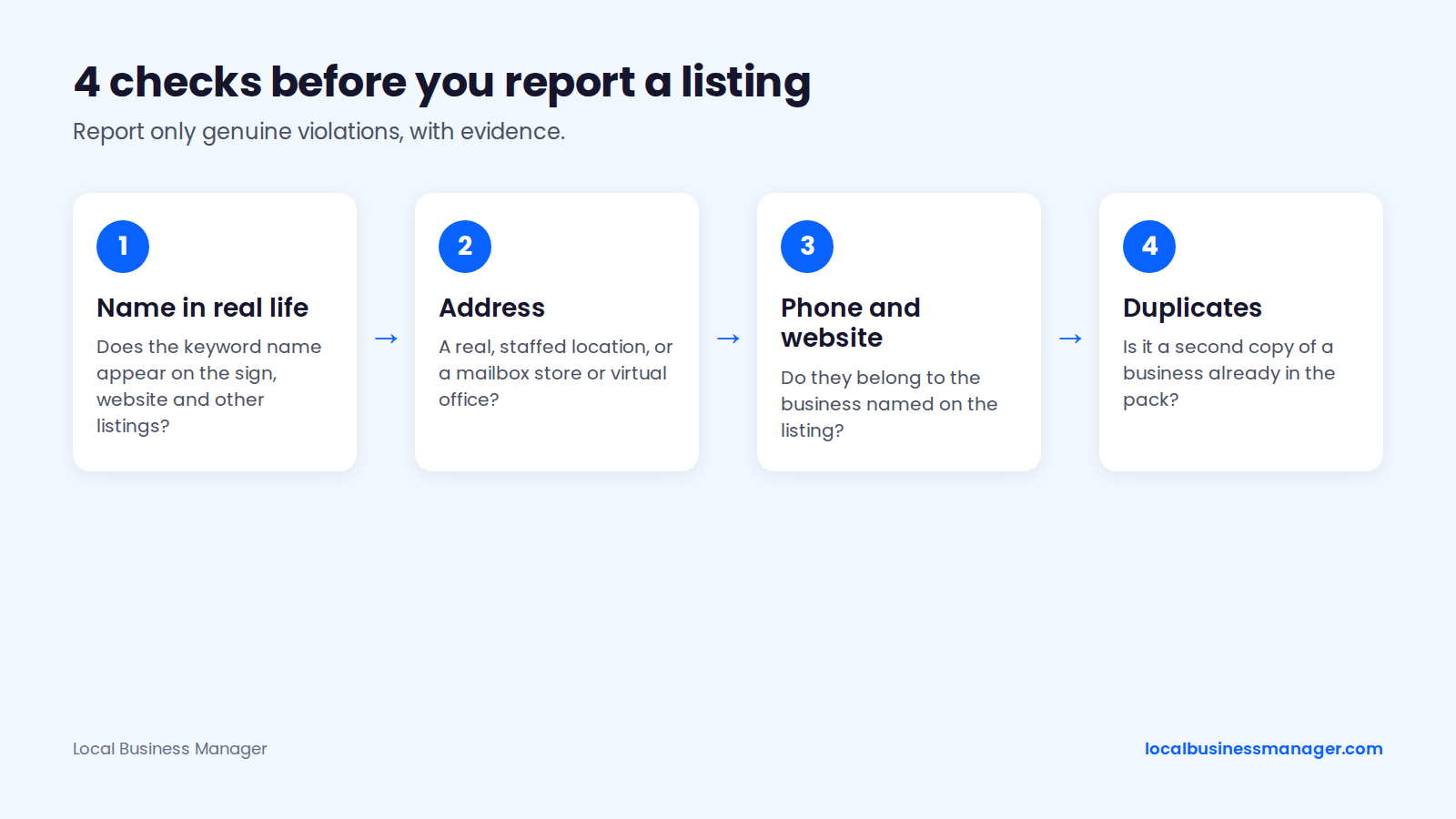
The 4 checks to run before reporting any listing.
Google's 2025 Maps safety report, as covered by Search Engine Roundtable, says Google removed over 13 million fake Business Profiles that year. Enforcement on individual reports is less consistent, as Sterling Sky's work shows:
- In a study of 50 keyword-stuffed listings, mostly law firms, 60% got only a warning, all 50 added the keywords back, and "Suggest an edit" never stopped stuffing on verified listings. The study is undated and probably several years old.
- Sterling Sky's current guide says self-submitted edits have become far less effective.
- The same guide warns that removing a spam listing can help another competitor whose real listing it was filtering out.
Check these 4 things before reporting anything:
- The name in real life: does the keyword name appear on the building (Street View), the website and other listings? A keyword name used everywhere may be a registered DBA, and that isn't spam.
- The address: is there a real, staffed location there, or a mailbox store, virtual office or empty lot?
- The phone and website: do they belong to the business named on the listing?
- Duplicates: is the listing a second copy of a business already in the pack?
Then match the problem to the route Google provides:
Problem found | Evidence to attach | Route |
|---|---|---|
Business never existed or isn't eligible (for example, a virtual office) | Street View or photos of the address, proof the business doesn't operate there | Request to remove a Business Profile you don't own |
Fraud in a listing's name, phone number or website | Screenshots of the listing and of the business's real signage, website and other listings | Business Redressal Complaint Form |
Duplicate of a business already in the pack | Links to both listings and the matching details | Suggest an edit on the duplicate in Maps, marking it as a duplicate |
Report only genuine violations, with the evidence attached. Google can't act on a report without evidence, and a report about a competitor that isn't actually breaking the rules does nothing for your client.
Step 7: Check NAP and Citations
Treat citations as hygiene: confirm that the name, address and phone number match across the Business Profile and the main platforms, and clear duplicates, instead of building volume. The full cleanup process is in our citation audit guide. The evidence on citations as a pack ranking factor is mixed, and most of it points to a small effect.
Three findings put citations in proportion:
- The 2026 ranking-factors survey says citations have been losing importance for about 10 years, though AI search is giving them new life: experts rated 3 of the top 5 AI visibility factors as citation factors.
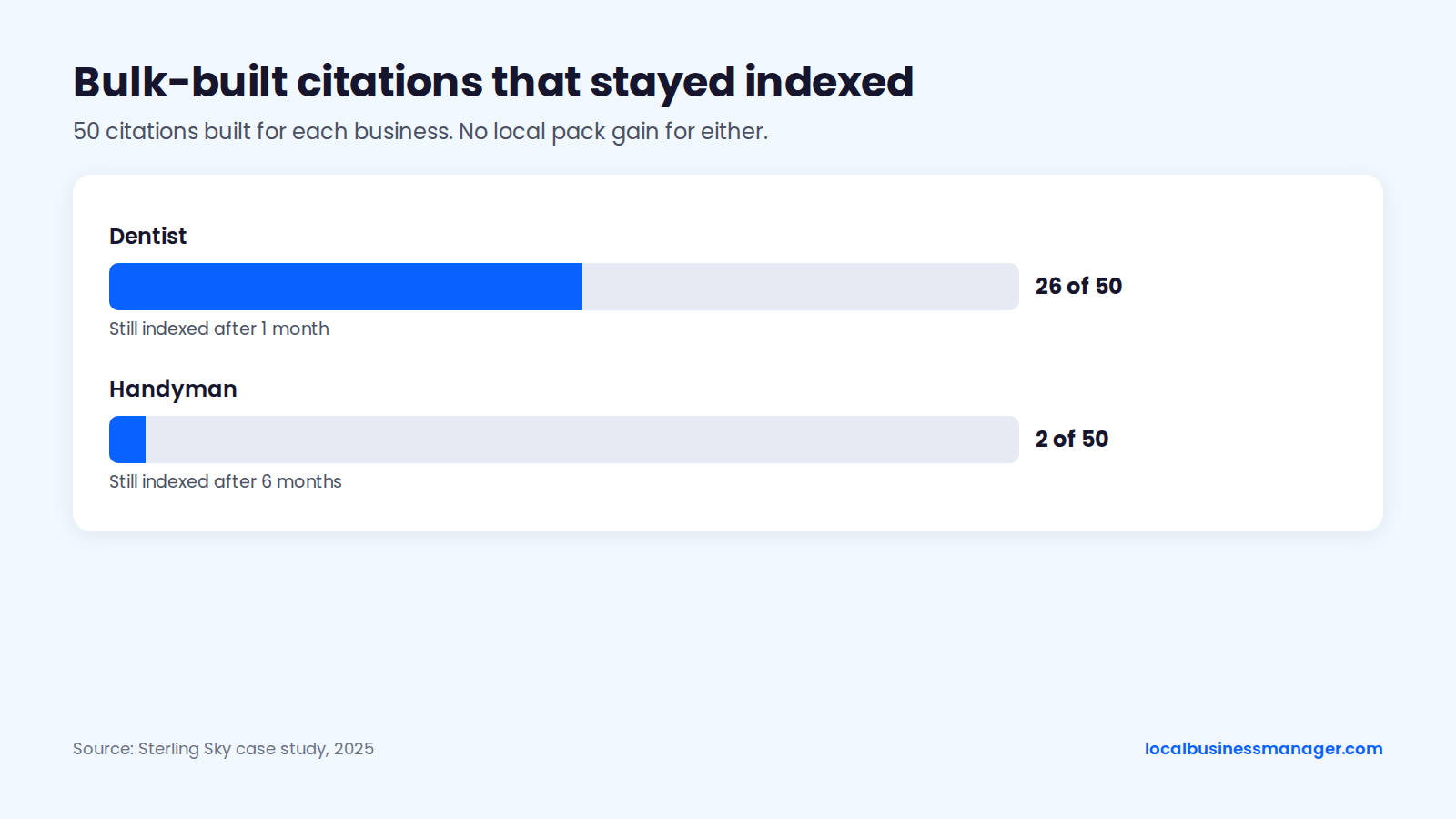
- A Sterling Sky case study built 50 citations in bulk for a dentist and a handyman. Organic rankings rose but local pack rankings didn't, and only 26 of the dentist's 50 citations stayed indexed after a month, and 2 of the handyman's 50 after 6 months.
- A software vendor's 2026 comparison across more than 131,000 tracked keywords, a correlation from a software vendor, found that profiles with 21 to 50 citations reached the top 3 19.9 percentage points more often than profiles with 1 to 5, with gains leveling off around 20 citations.
Source: Sterling Sky case study, 2025.
Past the first 20 or so citations, check accuracy on the main platforms rather than adding volume. Two platforms are quick wins:
- Bing Places can import business information from a Google Business Profile and keep it up to date.
- Apple Business Connect is free and lets the owner claim and edit the Apple Maps listing. Search it for duplicates under old or alternate names.
Use these exact-match searches on Google to find mismatches and stray listings:
"Client Name" "555-123-4567""555-123-4567" -site:clientsite.com"Old Business Name" "City""123 Main St" "City"to find other businesses or old listings tied to the address"Client Name" "old phone number"
I'd fix every mismatch you find, across the Business Profile, the data aggregators, the major platforms and the directories for the client's industry (legal directories for law firms), with no strict order.
Step 8: Audit Location Pages, Schema and Local Links
The website part of the audit checks 3 things: a useful page for each location and core service, valid LocalBusiness schema, and real local links. Summaries of the 2026 Local Search Ranking Factors survey put on-page signals at about 15% of local pack weight and links at about 8%.
Location and Service Pages
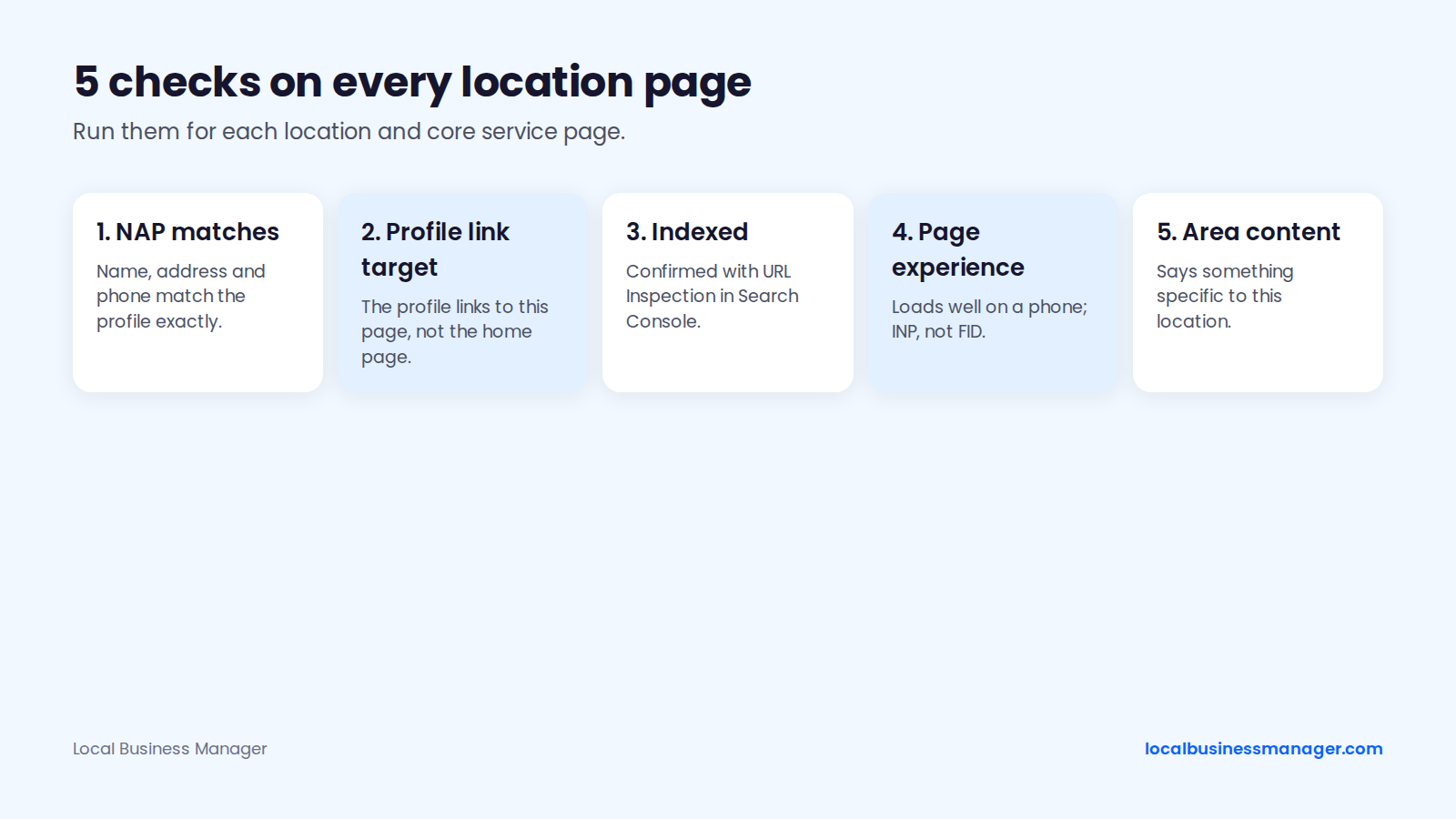
Each location needs its own page, and each core service needs its own page. Check these 5 points:
- The name, address and phone number on the location page match the Business Profile exactly.
- The profile's website link points to the matching location page, not a generic page that doesn't mention that location.
- Every location and service page is indexed. Check with URL Inspection in Search Console.
- Page experience is measured with Lighthouse. The Core Web Vitals are now LCP, INP and CLS, because INP replaced FID in March 2024.
- The page says how the business serves that area in specific terms, not the city name swapped into a template.
Example data. The 5 checks on one location page.
Some older checklists still send you to the Mobile-Friendly Test and the Google cache. Both are retired, so use Lighthouse and URL Inspection instead.
A full technical audit is its own job. In a local audit, note the technical problems in the report and come back to them after the local fixes.
LocalBusiness Schema
Google's structured data documentation lists name and address as required properties for LocalBusiness markup. Older checklists that say an address alone is enough are wrong. Check each location page for 3 things:
- The page has LocalBusiness markup (or a more specific subtype) with at least the name and address.
- The name, address and phone number in the markup match the profile and the visible page.
- Each location page describes only its own location.
Don't add review or rating markup to location pages expecting stars in search results. Since 2019, Google hasn't shown review rich results for LocalBusiness or Organization markup that a business publishes about itself. If the client's pages carry that markup, it won't produce stars, so don't count it as a working signal in the audit.
Local Links
Local links get thin coverage in most audits, but summaries of the 2026 Local Search Ranking Factors survey still give link signals about 8% of local pack weight. Start with the links the client already has, then list the local sources it's missing:
- Local organizations the client belongs to, such as the chamber of commerce and trade associations.
- Teams, events and charities the client sponsors.
- Suppliers, manufacturers and partners that list their installers or dealers.
- Local news coverage of something real the business did.
- Industry directories relevant to the trade.
Judge each link by 3 questions, and skip any link that fails one:
- Does the site have a real local audience?
- Did a person choose to place the link?
- Does the link make sense for this business?
Step 9: Test How the Client Shows Up in AI Answers
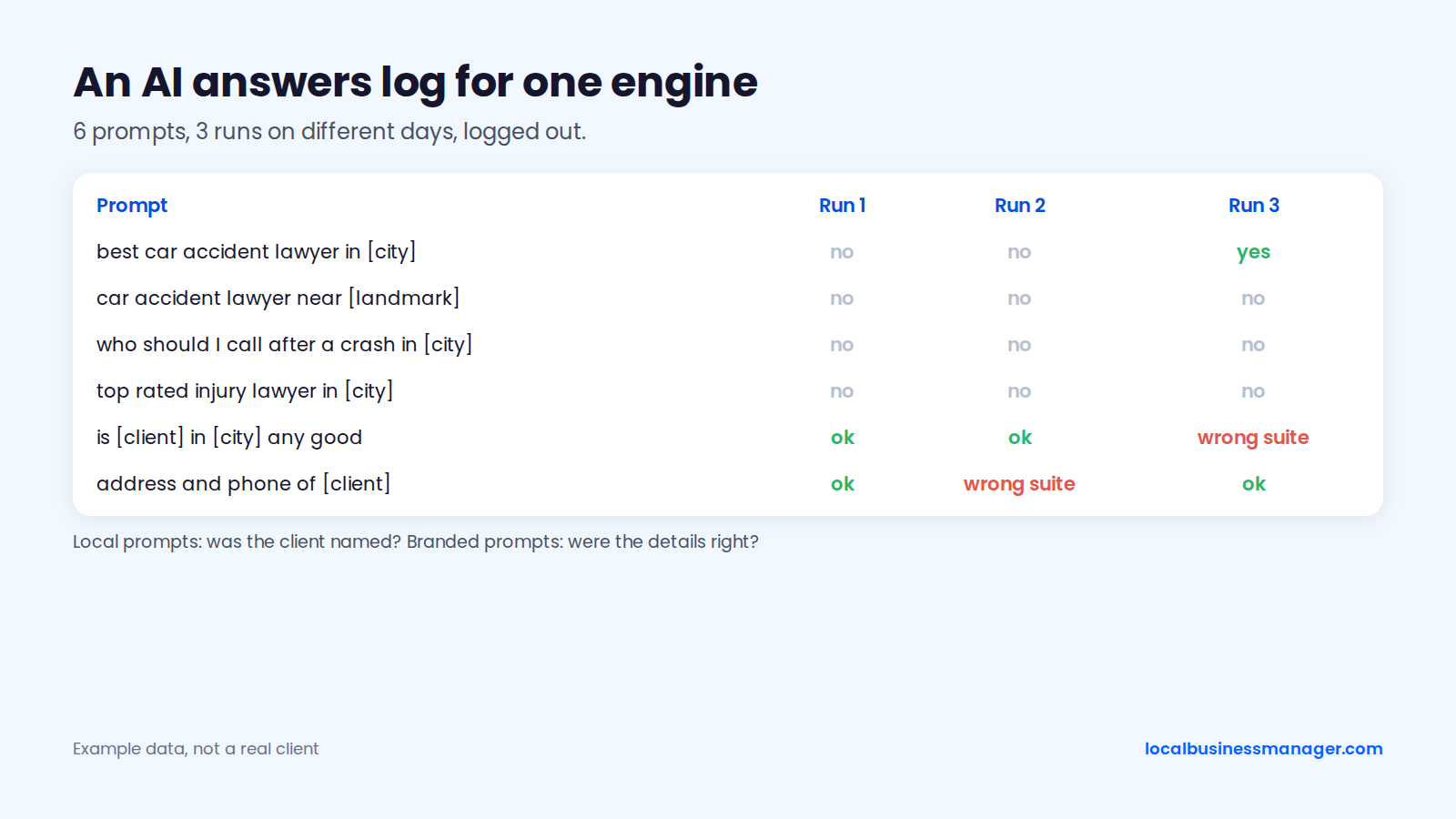
Test AI answers with a fixed prompt set, run logged out and repeated, recording whether the client appears and whether its details are correct. When a client asks whether they show up in ChatGPT, this log is the answer you show them.
Which Engines and Prompts to Test
Test ChatGPT, Google AI Mode and AI Overviews, Gemini and Perplexity. A 2026 consumer survey by a local SEO software company (1,002 US adults; AI findings published March 2026) found that 45% of consumers now use AI tools for local business recommendations, up from 6% a year earlier. ChatGPT was used most, by 31% of consumers for business recommendations in the past 12 months, then Google AI Mode at 23%, then Gemini. Perplexity is on the list because the contact-accuracy figure below covers it.
Run every prompt below in each engine, 3 times each on different days, while logged out. These 4 are local-intent prompts:
- "best [service] in [city]"
- "[service] near [neighborhood or landmark]"
- "who should I call for [specific problem] in [city]"
- "top rated [service] in [city]"
These 2 are branded prompts, which test what the engine says about the client by name:
- "is [client name] in [city] any good"
- "what's the address and phone number of [client name]"
Google's guidance on AI features in Search says AI Overviews and AI Mode have no extra technical requirements beyond normal SEO best practice. It also says the 2 features can use different models, so the businesses and links they show will vary, which is why both are on the list.
What to Log and What Counts as a Pass
Log the 6 fields below for every run. These fields follow the AI baseline that Search Engine Land suggests: mention rate, mention order, sentiment, accuracy and cited sources.
- Date, engine, prompt and run number.
- Whether the client is mentioned, and its position in the list.
- Which competitors are named.
- How the client is described.
- Whether the name, address, phone and hours shown match the profile.
- Which sources the answer cites.
Pass criteria have to match how AI answers behave. A 2026 vendor study of 200,000 local searches across ChatGPT, AI Mode and AI Overviews found that the same prompt returns different businesses on repeat runs, though a given business still tends to reappear in more than 50% of runs.
The same study found that Google Maps mentioned a tracked business in 66% of searches, compared with 32% to 38% on AI surfaces, and that ChatGPT named a median of 4 businesses per answer.
Example data. One row per prompt, engine and run.
A realistic pass is the client appearing in some runs of the local-intent prompts and showing correct details in every branded answer. The same vendor's 2026 local SEO statistics report that only 68% of business contact information on ChatGPT and Perplexity matches the Google Business Profile, so log every wrong name, address, phone number or set of hours, because those are the findings you can act on.
Check the Crawlers
Open the client's robots.txt and check that it doesn't block the crawlers that feed AI answers. AI Overviews follow normal Googlebot rules. Google-Extended is a control token for Gemini, not a crawler, so blocking it doesn't change whether the site appears in AI Overviews.
OpenAI separates its search crawler, OAI-SearchBot, from GPTBot, which collects training data. A client who wants to appear in ChatGPT search shouldn't block OAI-SearchBot, whatever it decides about GPTBot. Check PerplexityBot the same way.
robots.txt isn't the only place a crawler can be stopped. Ask whoever runs the client's CDN or firewall whether bot-protection rules block AI search crawlers, because a block there never shows up in robots.txt.
Step 10: Prioritize Fixes and Report to the Client
Step 10 turns the findings into a ranked fix list and a one-page report, presented on a short call, then sets the re-scan schedule. Rank fixes by risk first and by the size of the ranking gap second. Change 1 or 2 things at a time so you can see which one worked.
What Order Should Fixes Go In?
Anything that puts the profile at risk comes first. A suspension can take the profile out of results or out of your control, which undoes other fixes. Tiers 2, 4 and 5 follow the expert weights from the 2026 Local Search Ranking Factors survey, as reported by its summaries.
Competitor spam isn't one of the survey's weight groups. It sits in tier 3 because Sterling Sky's Joy Hawkins names spam fighting as a main focus for personal-injury lawyers, as reported by Rankings.io, while Google doesn't guarantee action on any report. That evidence is specific to personal-injury firms, and no source we found ranks spam removal against the other tiers for other trades.
Tier | Typical findings | Why it ranks here |
|---|---|---|
1. Profile at risk | Keywords the business doesn't use in its name, an ineligible address, duplicates | A suspension can take the profile out of results or out of your control |
2. Gaps in the biggest factor groups | Primary category mismatch, low review flow, wrong or missing hours | Profile and review signals carry about 52% of expert-rated weight |
3. Competitor spam | Genuine violations found in Step 6 | A main focus for PI firms per Joy Hawkins; Google doesn't guarantee action |
4. Website | Thin location pages, schema errors, pages not indexed | On-page and link signals carry about 23% |
5. Hygiene | Citation mismatches, wrong details in AI answers | Citations carry about 6% for the pack, more for AI visibility |
How fast results show depends on what's already optimized. In my experience, a single high-impact fix, such as getting the keyword into the Business Profile name once the DBA name is registered and in real use everywhere, can show ranking gains within about a month. Once the basics are done, further gains, for example from a strong review push, come gradually.
The One-Page Client Report
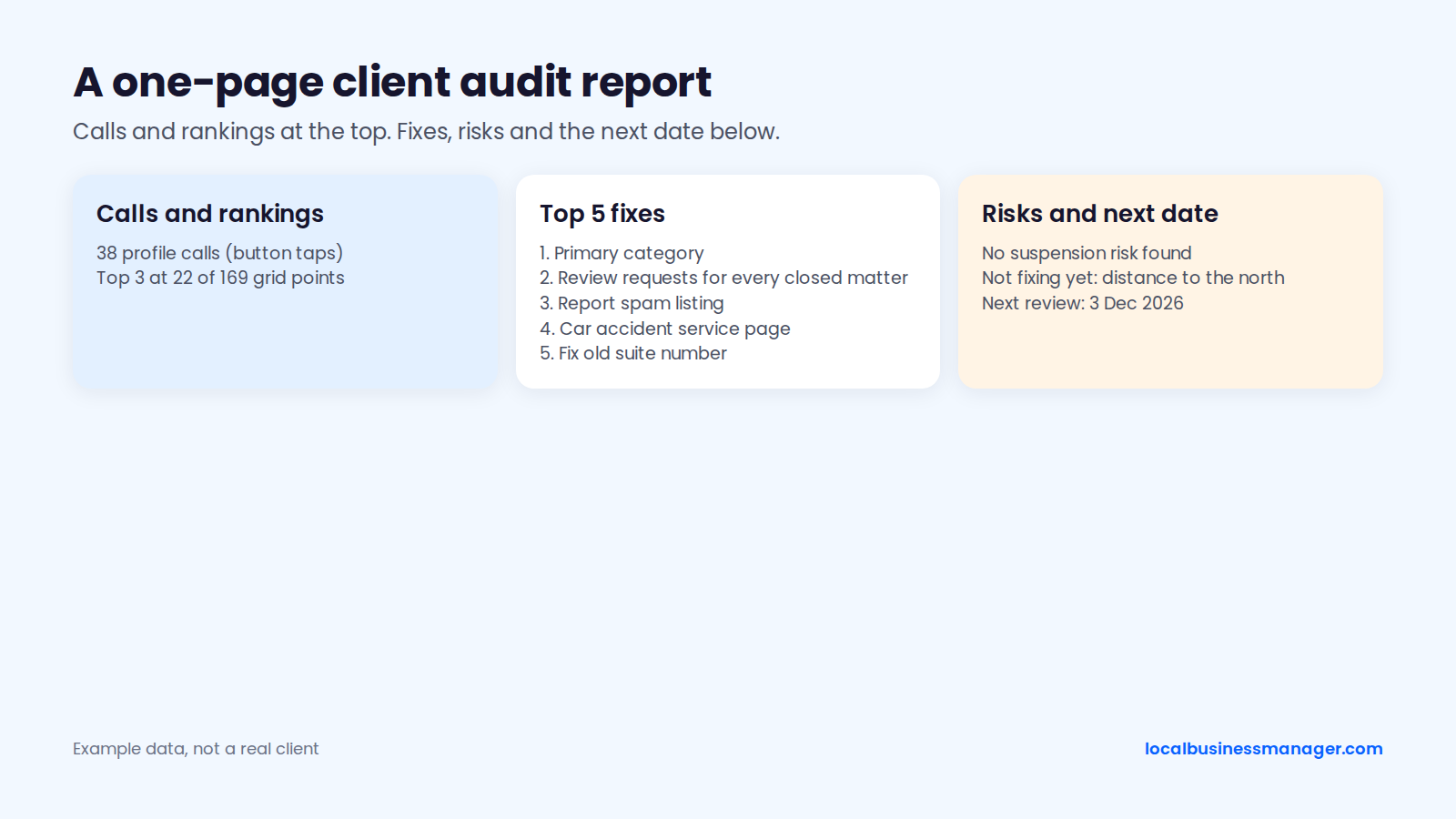
The client report should fit on one page and open with calls and rankings, the same 2 numbers that lead every monthly report I'd send.
The template:
- Header: client, location, audit date and next review date.
- Calls and rankings: baseline profile calls (noted as call-button taps) and the grid snapshot for the main keyword.
- Supporting baseline: website clicks, direction requests and Search Console clicks.
- Top 5 fixes: for each one, the finding, the fix, the owner and the due date.
- Risks: anything that could get the profile suspended, in plain words.
- Not fixing yet: what you found but parked, and why.
- AI answers: how many runs named the client, and any wrong details.
Example data. Calls and rankings sit at the top of the page.
Script for the Findings Call
Use these lines on the findings call and adapt them to the client:
- "Here's where you stand today. These are the calls from your profile over the last [period], and this map shows where you show up for '[main keyword]' across your area."
- "You're in the top 3 in the green area around [location] and not in the red areas. That's normal. Google ranks partly on how close the searcher is to you."
- "We found [number] things holding you back. The first fix is [tier 1 finding], because it puts your profile at risk."
- "Next is [main gap]. The 3 businesses above you got [X] reviews in the last 90 days, and you got [Y]. Here's how we'll ask every customer, the same way, when the job is done."
- "We'll change 1 or 2 things at a time, so we can show you which one moved your numbers."
- "Searching from your phone at the office only shows one spot on the map. We'll send you the full map every month instead."
- "We'll re-check on [date] and put the same numbers next to today's."
How Often to Re-Scan and Re-Audit
I'd scan rankings at least once a month, and daily only right after an edit, to see whether that change produced a result.
Run the full audit again when one of these 6 triggers happens:
- The profile is suspended or reinstated.
- Rankings drop across most of the grid, not at one point.
- A new competitor enters the 3-pack.
- The business name or primary category changes.
- The business moves or opens a new location.
- Google retires or changes a profile feature.
Example: Auditing a Personal-Injury Firm
Here is how the 10 steps fit together on one client. The firm, its city and every number below are invented for illustration: "Harbor Injury Law", a 4-lawyer personal-injury firm with one office in a mid-size city and 6 firms ranking against it.
Step | What the audit found | Fix tier |
|---|---|---|
1. Baseline | 38 profile calls and 61 website clicks last month; Search Console and a dated grid saved | Done before any change |
2. Rankings | "car accident lawyer" in the top 3 at 22 of 169 grid points, all within a mile of the office | Measured |
3. Profile | Primary category "Law firm" while 5 of 6 ranking competitors use "Personal injury attorney"; holiday hours missing | Tier 2 |
4. Reviews | 41 total reviews and 2 in the last 90 days, against 9 to 15 for the 3 firms in the pack | Tier 2 |
5. Competitors | The strongest firm sits 4 miles away and holds the north half of the grid; that gap is distance | Not fixable |
6. Spam | One listing in the pack uses "Best Car Accident Lawyer" as its name; the sign and website show a different name | Tier 3 |
7. Citations | Old suite number on 2 data aggregators and a legal directory | Tier 5 |
8. Website | The profile links to the home page; no car accident service page exists | Tier 4 |
9. AI answers | Named in 1 of 12 local-intent runs; one engine gives the old suite number | Tier 5 |
10. Report | Top fixes: primary category, a review-request process for every closed matter, the spam report, then the service page | Agreed on the findings call |
Read the rows in tier order and the fix list writes itself. Nothing in Tier 1 means the profile isn't at risk, so the work starts with the category and the review flow, the 2 largest gaps against the pack. The firm 4 miles north stays on the report as a limit, not a task, so the client doesn't expect the grid to turn green there.
The 10-Step Audit Checklist
The whole audit fits in 10 rows. Copy the table into a spreadsheet and add a Status column (pass, partial or fail) and a Due date column for each client. Rows follow the audit order.
Step | What to check | Passing looks like | Usual owner |
|---|---|---|---|
1. Baseline | Profile performance, Search Console, UTM tag, screenshots | All 6 baseline items saved with a date | Agency |
2. Rankings | Grid scan for each keyword | Spacing adjusted until the edge of the ranking is visible | Agency |
3. Business Profile | Name, categories, hours, services, attributes, photos, duplicates | Name matches real-world use, primary category matches what ranks, no duplicates | Agency and client |
4. Reviews | Count, rating, last 90 days, newest date, reply share | Within reach of the 3-pack on recent reviews, with every review replied to | Client, with agency support |
5. Competitors | 7-attribute side-by-side comparison | Every gap has a named fix or is marked as distance | Agency |
6. Spam | Names, addresses, phones and duplicates in the grid | Genuine violations reported with evidence | Agency |
7. Citations | Exact-match searches, Bing Places, Apple Business Connect | NAP matches everywhere, no duplicates | Agency |
8. Website | Location pages, schema, indexing, local links | Each location page indexed, NAP matches, schema has name and address | Agency and web developer |
9. AI answers | 6 prompts, 3 runs each, crawler check | Client appears in some runs with correct details, and search crawlers aren't blocked | Agency |
10. Report | Fix list, one-page report, findings call | Client agrees the top 5 fixes and the next review date | Agency |
What Mistakes Make an Audit Useless?
These 5 mistakes either waste audit time on things that don't matter or make results impossible to prove.
- Geotagging photos. There's no evidence, and no confirmation from Google, that location data inside photo files strengthens local relevance. Spend that time on real photos added regularly.
- Checking rankings from one spot. An incognito window doesn't remove the searcher's location, so a search from the client's office shows only that one point. A grid shows the whole area.
- Chasing citation counts. In Sterling Sky's case study, 50 bulk-built citations produced no local pack gain: a dentist still had 26 of them indexed after a month, and a handyman 2 of 50 after 6 months.
- Fixing everything at once. If 12 changes go live in the same week, nobody can say which one moved rankings or calls, and the next report can't explain itself.
- Auditing retired tools. The Mobile-Friendly Test, the Google cache and FID are all gone. An audit that lists them tells the client the checklist is old.
Frequently Asked Questions
How Long Does an Audit Take?
It depends on how many locations, keywords and competitors you check, and the AI answer runs alone take at least 3 days because each prompt is repeated.
Each extra location repeats Steps 2 to 9, and each extra keyword adds a grid scan. The AI answer runs take the longest in calendar time because each prompt runs 3 times on different days. Book the findings call after the last run so the report includes all 3.
Can You Do a Local SEO Audit for Free?
Yes, most of it: the Business Profile dashboard, Search Console, Lighthouse, URL Inspection, Bing Places, Apple Business Connect and the AI answer checks all cost nothing.
The grid scan is the step that usually needs a paid tool, because a 13 Ã 13 grid means checking 169 points. We haven't verified a free method that reproduces a grid scan reliably, so budget for a tool for that one step. If there's no budget, the weaker fallback is a manual check of each keyword from at least 3 points in the service area, such as the office, the far edge and a main suburb, using a location-set search rather than one search from the office. Label it as a spot check in the report, because 3 points can't show the gaps a grid shows. A short free version also works as a sales tool; our guide to finding local SEO clients shows what to put in it.
What Changes When You Audit a Law Firm?
The steps stay the same, but the name and review checks get stricter, because trade names must clear state bar rules and review requests must treat every client the same way.
Trade-name rules range from New York's ban to Texas's state-bar approval, so check the state bar before filing a keyword DBA (Step 3 lists the rules, and our local SEO guide for law firms covers the rest of a firm's setup). A PI client is only paid when the case recovers, so ask every client the same way when the matter closes; for clients who recovered, that moment comes after payout.
How Do You Audit a Multi-Location Business?
Run Steps 2 to 9 for each location, then compare the locations side by side so the weakest ones get fixed first.
Check that hours, holiday hours, categories and services are consistent wherever they should be. Each profile's website link should point to its own location page, and that page should carry its own LocalBusiness markup with its own name and address. Keep one sheet with a row per location so gaps between locations show at a glance.
Where Should You Start?
Run the baseline and the first grid scan before you change anything, even when the profile is obviously broken. Save both before the first fix, because the baseline is the only way to show the client later what the work did. Local Business Manager is in early access for agencies and multi-location businesses, and you can request a spot through early access to Local Business Manager.