How to Respond to Google Reviews (with Examples)

Reply to Google reviews from your verified Business Profile with a short, personal reply that thanks the reviewer, deals with any problem and moves the details offline without confirming anything private. Google sets no deadline. However, in the 2026 Local Consumer Review Survey, run by a local SEO software company in February 2026 with 1,002 US consumers, 32% expected a reply by the next day. That formula covers most reviews. The hard ones are the 1-star rant and the patient who names their treatment in public.
Below are the clicks, what happens after you hit Reply, copy-ready examples for every review type (including privacy-safe versions for dentists and law firms), a never-say checklist and a reply workflow for agencies.
How Do You Reply to a Google Review?
You reply from your Business Profile on Google while signed in to an account that owns or manages the verified profile (formerly Google My Business). The steps below cover desktop Search and the Google Maps app, then who on a team can reply and how to edit or delete a reply later.
From Google Search on a Desktop
On a desktop, search for your business on Google while signed in, then select Read reviews and choose Reply under the review. The flow usually looks like this:
- Sign in to the Google account that owns or manages the verified Business Profile.
- Search for your business name and city on Google.
- Select Read reviews, or open the Reviews tab.
- Find the review you want to answer and select Reply.
- Type your reply in the box and select Reply again to submit it.
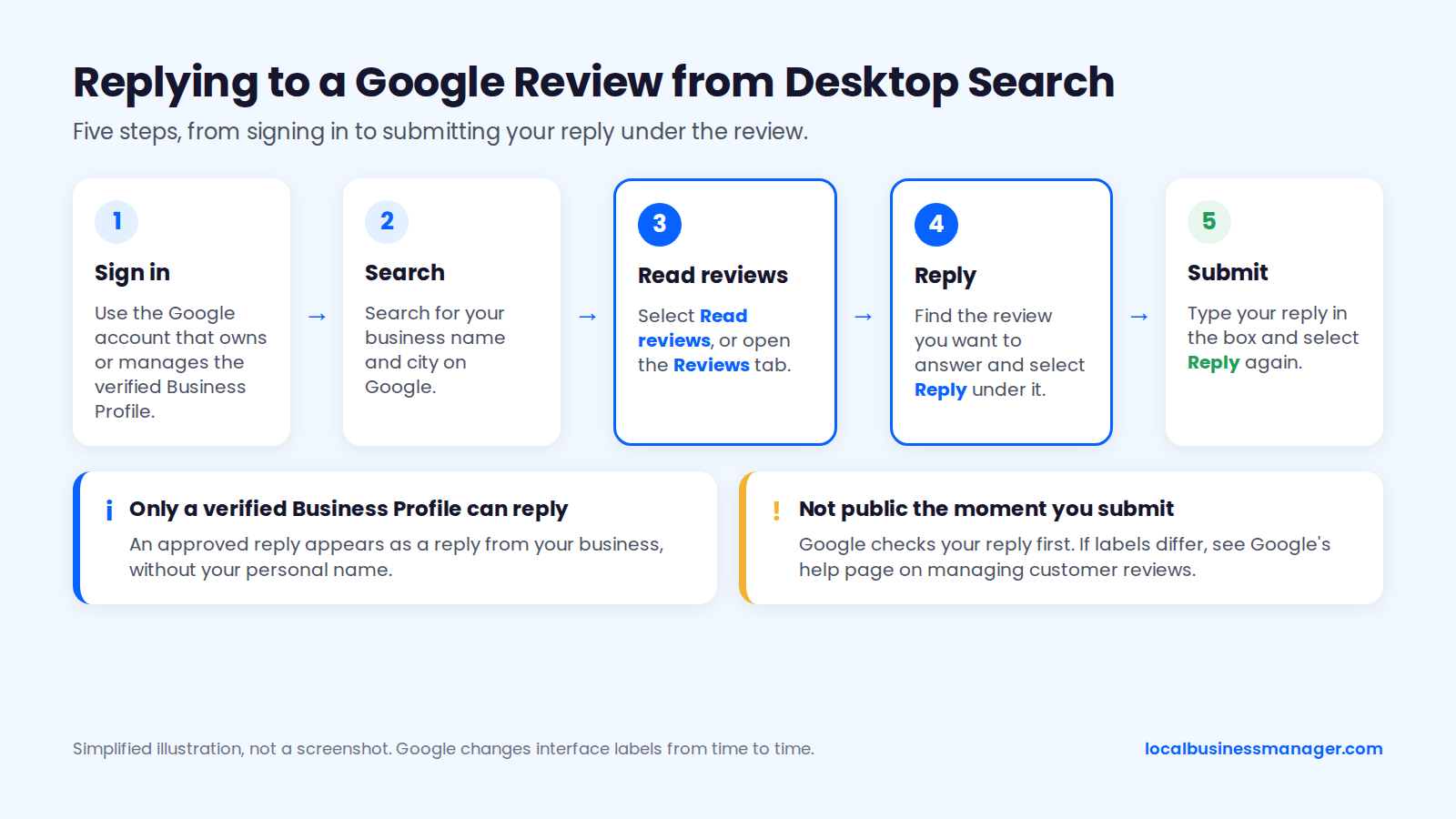
Google changes interface labels from time to time. If yours differ from these steps, check Google's help page on managing customer reviews for the current wording. Your reply doesn't appear publicly the moment you submit it, because Google checks it first (see the moderation section below).
From the Google Maps App on a Phone
In the Google Maps app, sign in with the account that owns or manages the profile and search for your business name and city. Then open the Reviews tab and select Reply under the review. App labels change too, so if yours look different, Google's help page has the current wording.
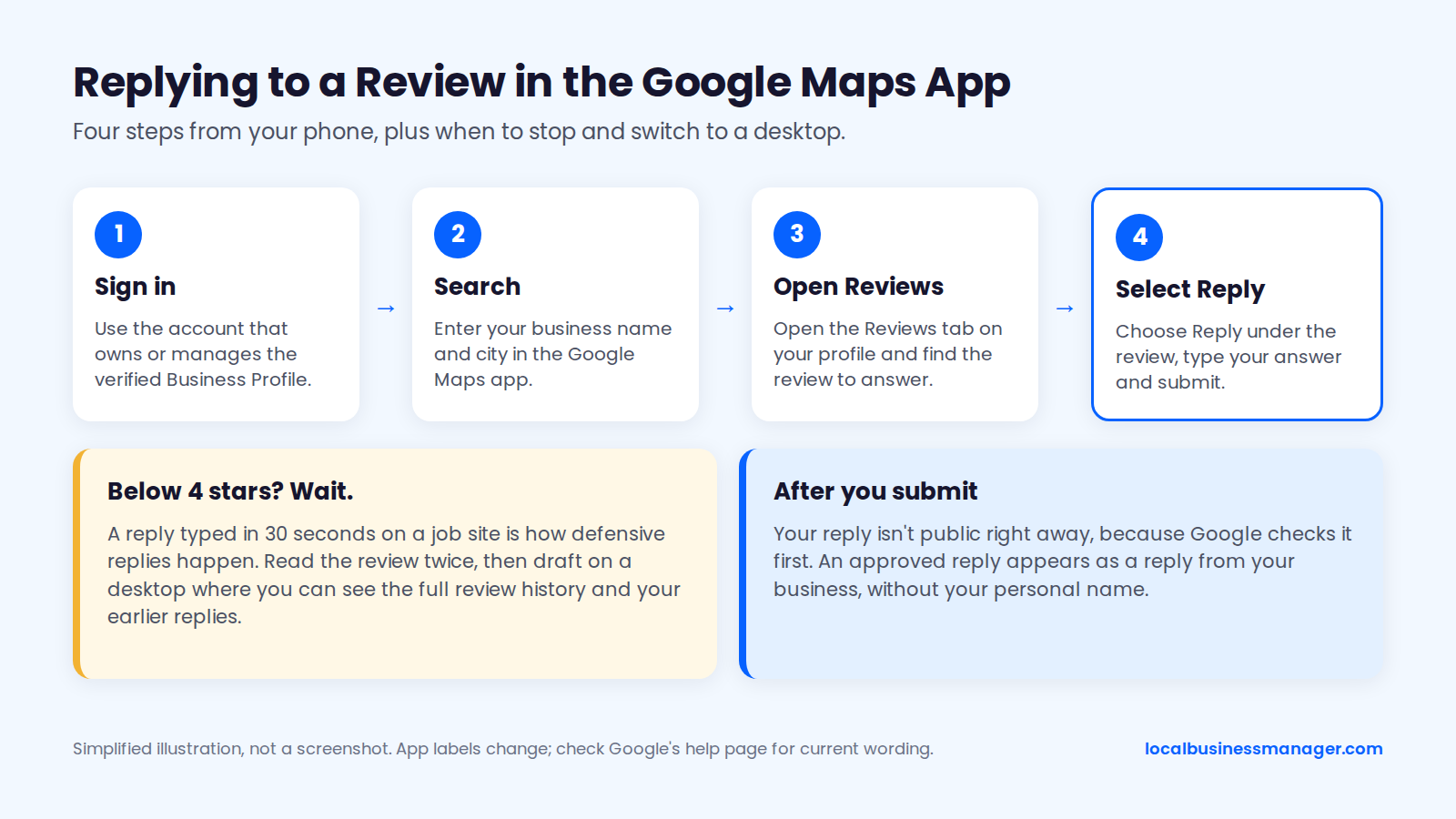
Phones make it tempting to fire off a reply between jobs. For anything below 4 stars, wait. A reply typed in 30 seconds on a job site is how defensive replies happen.
Read the review twice. Then draft the reply on a desktop, where you can see the profile's full review history and your earlier replies, so you don't contradict something already posted.
Who Can Reply: Verification and Profile Roles
Only a verified Business Profile can reply to reviews, according to Google's help page. Google also says an approved reply appears as a reply from your business, without your personal name. Sterling Sky, a local SEO agency, notes the label reads "Response from the owner" whichever user wrote it. Third-party guides that summarize Google's user-roles help page add 3 points:
- Primary owners, owners and managers can all reply to reviews.
- Only owners can change who has access to the profile.
- Agencies are commonly added as managers for that reason. This is standard practice rather than a Google rule.
In my own client work, the client stays the primary owner and the agency is added as a manager. We accept those invitations through one agency organization account, never personal or shared logins. The steps are in our guide to adding a manager to a Google Business Profile.
Editing or Deleting Your Reply
To change a reply, open the review again and use the Edit or Delete option on your existing reply. Each review carries one owner reply, so an edit replaces the original. Use each option for a different job:
- Edit when the situation changes, for example after the customer calls and the problem is solved. A short note works well: "Update: we spoke with Sam and arranged a return visit."
- Edit when you spot a detail that shouldn't be public, such as an invoice amount or a staff surname.
- Delete only when the reply itself was a mistake, such as one that named a patient's treatment. Deleting a reply doesn't remove the review.
Teams managing many locations can also work through code. According to Google's developer documentation, the Business Profile API can list reviews across locations and post or delete replies.
What Happens After You Post a Reply?
Google checks your reply against its content policies, then publishes it under the review and notifies the reviewer, according to its help page. This section covers 3 things: the moderation window, a reviewer who updates their review, and rejected replies.
Moderation: Why a Reply Can Take Minutes or Weeks
Google says most replies are checked within about 10 minutes, but some take up to 30 days. A reply goes public only once it's approved. Google doesn't explain why some checks take longer than others.
Since April 1, 2026, Google's Business Profile API changelog has included a reply status (ReviewReplyState). It shows whether each submitted reply is pending, approved or rejected. A rejected reply never goes live.
You may not use the API or a tool that reads it. In that case, check the profile a day after replying while signed out of Google or in a private browser window. That shows you what customers see, including whether your reply is there.
The Reviewer Is Notified and Can Update Their Review
Google's help page says the reviewer is notified when you reply and can still change their review afterward. If they change it, Google says the review's date changes to show the latest update.
On a complaint, assume the reviewer will read your reply the same day, because Google tells them it's there. Future customers scrolling your profile will read it too.
A reviewer may come back and update their review with new complaints. If so, edit your existing reply to address the latest version instead of stacking a second paragraph onto the first. Keep it to 2 or 3 sentences and point back to a private channel.
If the exchange is turning into a public argument, stop replying in public. One calm, final reply that invites a phone call reads better than a back-and-forth. The exception is an update that adds a threat or a policy violation. In that case, follow the escalation and reporting steps later in this guide.
What to Do If Google Doesn't Approve Your Reply
Google's help page says that if a reply isn't approved, you're asked to edit it. Vendors that monitor replies report that, in practice, no email or dashboard warning appears when a reply is rejected. A rejected reply can go unnoticed unless someone checks.
Google hasn't published a list of rejection reasons. Vendors say its prohibited and restricted content policy also covers owner replies. That policy bans advertising, personal information, profanity, harassment and off-topic content.
A company that sells Business Profile API tools analyzed 12,752 rejected replies in 2026, gathered in 2 data pulls (April 22 and May 28, 2026). It linked 2 things to rejection:
- Email addresses in the reply
- Replies over an undocumented length limit (the longest rejected reply in the study was 1,731 characters)
That analysis didn't publish its method or a breakdown of rejection causes, so treat it as one vendor's observation. Other monitoring vendors name phone numbers, website links and promotional calls to action ("Call us atâ¦", discount offers) as triggers.
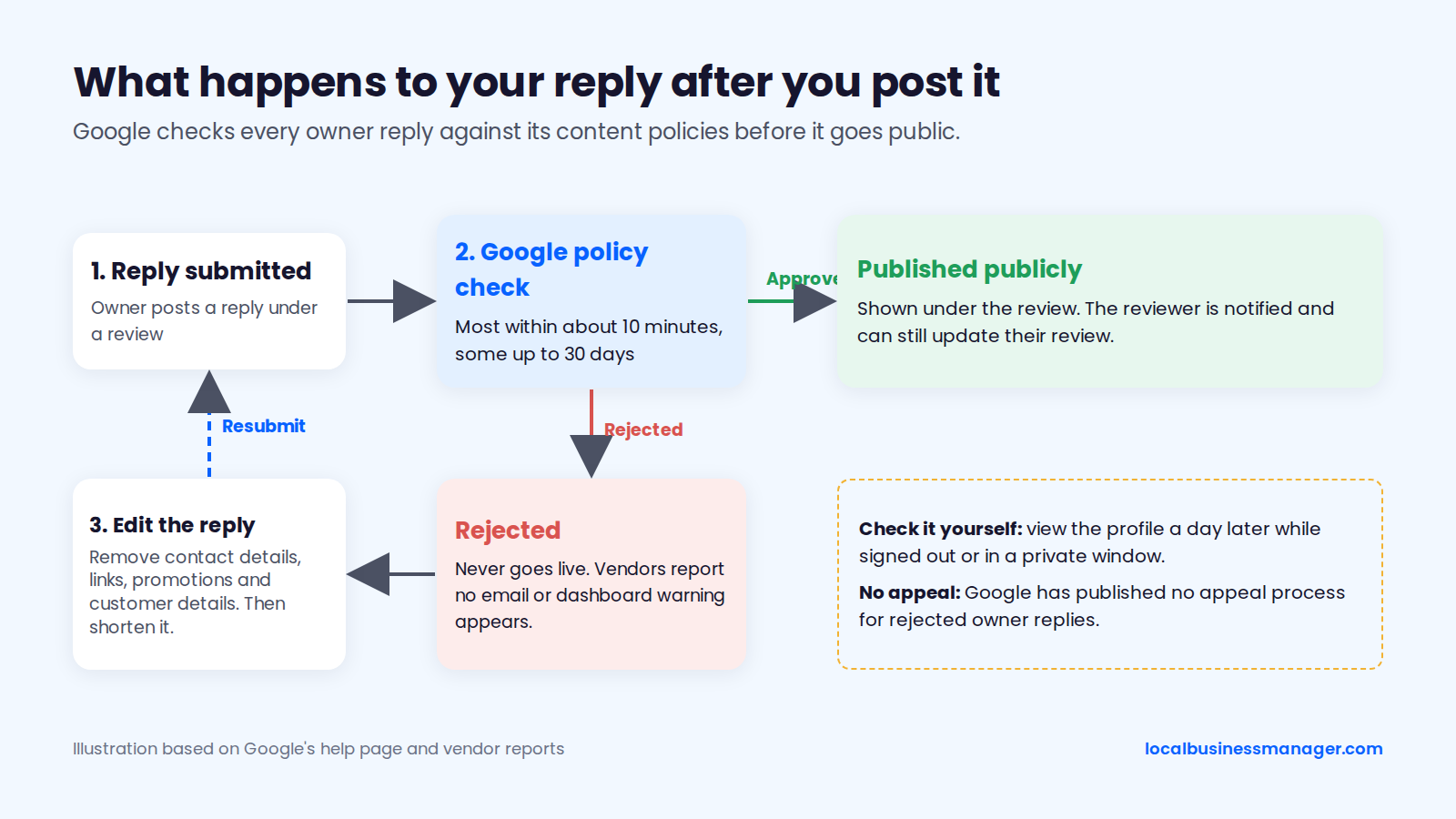
To fix a rejected reply, strip out contact details, links, promotions and any customer details. Shorten it, then resubmit. Google has published no appeal process for rejected owner replies.
Should You Reply to Every Google Review?
Reply to most reviews, and put the most care into the ones where a reply adds something, such as a problem to address or a question to answer. Google's help page tells owners to reply because it shows customers their feedback matters. It also says to focus on reviews where a reply can share a useful update or answer a question.
Star-Only Reviews
Star-only reviews are public and show the reviewer's profile name. Sterling Sky's testing found that Google's review sorting is driven mainly by recency and that rating-only reviews sink lower over time. As a result, a reply to one is rarely seen near the top of your profile.
Keep these replies short:
- A star-only 5-star rating: a 1-sentence thank-you plus a signature (examples below).
- A star-only 1- or 2-star rating: a short invitation to get in touch, since you have no other way to learn what went wrong.
Review: 1 star, no text.
>
Reply: "We're sorry the experience fell short, and we'd like to understand what happened. Please call the office and ask for Dana. Dana, office manager"
Old Unanswered Reviews
No published test shows whether replying to a backlog of old reviews changes rankings or conversions. So prioritize by what a reader will actually see and what still matters. When you take over a profile with an unanswered backlog, this guide suggests working in this order:
- Negative reviews of any age that describe a problem a future customer might worry about.
- Every review from the last 3 months.
- Detailed positive reviews from the last year.
- Everything else, only if a reply adds something (an update, an answer to a question).
Old 5-star reviews from years ago gain little from a reply, and Sterling Sky's recency finding means few people will see one. An old 1-star review near the top of the "lowest rating" sort is different. Answer it, even late. "We're sorry we missed this when it was posted" is honest and fine.
How Fast to Reply
Google sets no deadline for replies, but customer expectations are tightening. The 2026 Local Consumer Review Survey (published February 2026, 1,002 US consumers) was run by a local SEO software company. It found:
- 89% of consumers expect business owners to respond to reviews.
- 19% expect a reply the same day, up from 6% the year before.
- 32% expect a reply by the next day, up from 18% in 2025.
- 81% expect a reply within a week.
Some negative reviews need an owner, a lawyer or a privacy check. Those are the exception to replying fast. Hold them until the right person has seen them, for the reasons in the never-say section.
What Should a Good Review Reply Include?
A good reply is short and specific: thank the reviewer, mention one real detail, deal with any problem, and sign it with a name. Google's tips ask for replies that are polite, short and "conversational, not promotional." This section covers the formula, length, sign-off, keywords, personalizing templates and a goal table.
The 4-Part Reply Formula
Google's tips say to address the reviewer by name and acknowledge their specific feedback. Every example in this guide builds on that with the same 4 parts:
- Thank them. Use the reviewer's first name as it appears on the review. Skip the name on healthcare and law-firm profiles (see the privacy section).
- Mention one specific detail from what they wrote: the technician, the fast response, the clean-up. This shows a person read it.
- Address the issue or invite them back. On a negative review, acknowledge the problem and say what happens next. On a positive one, a short "see you next time" is enough.
- Sign off with a name and role, plus a contact route when follow-up is needed ("call the office and ask for Dana"). Healthcare and law-firm profiles sign as the team or the firm instead.
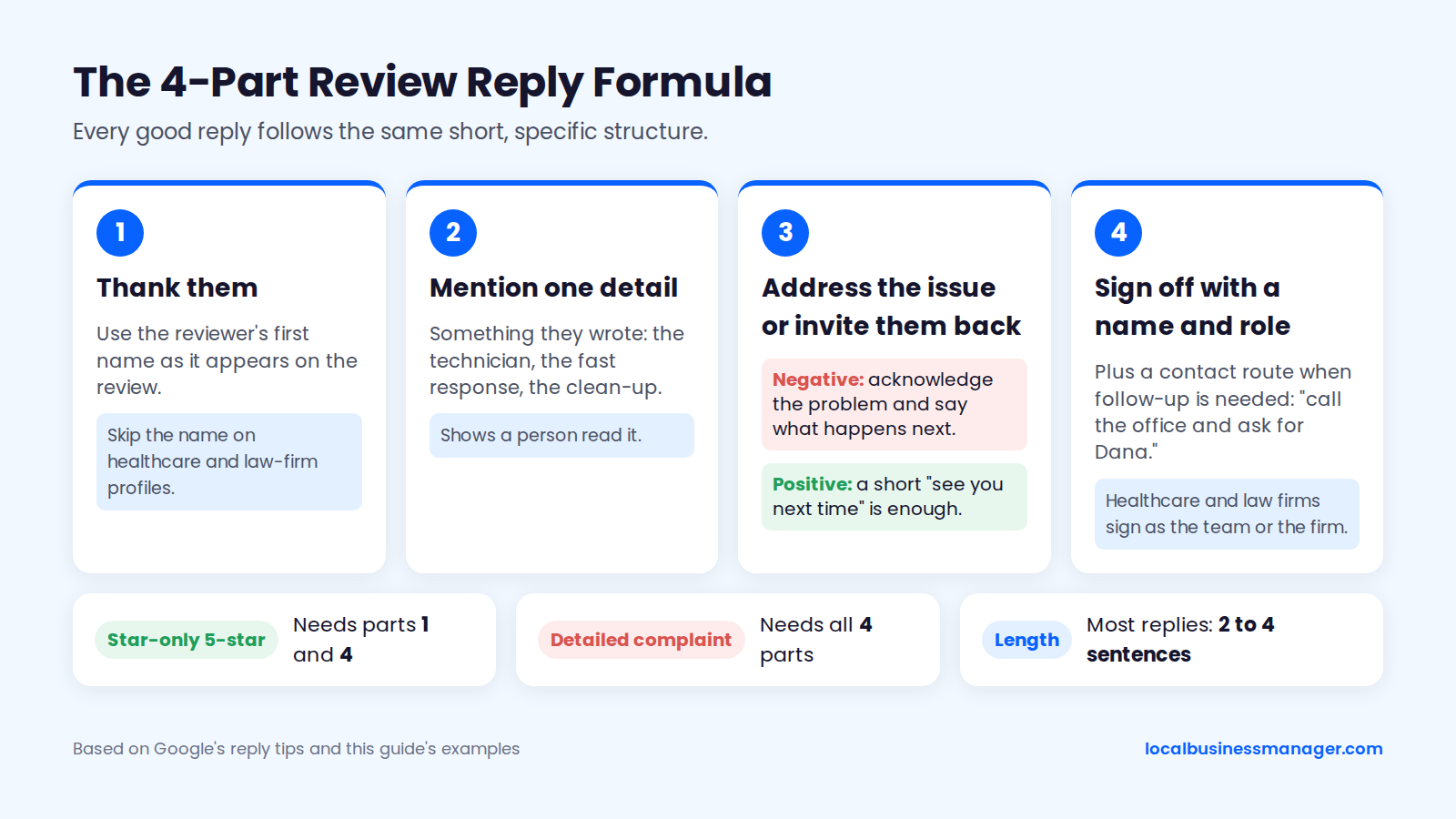
Not every reply needs all 4 parts. A star-only 5-star review needs parts 1 and 4. A detailed complaint needs all 4.
How Long a Reply Should Be
Most replies should be 2 to 4 sentences. Google's tips say to keep replies short. This guide's rule of thumb is that positive replies rarely need more than 2 sentences. Short replies also stay clear of the undocumented length limit that the 2026 rejected-replies analysis linked to rejection.
In our view, a long reply to a complaint tends to read as defensive, because the extra sentences are usually justification. If you need more than 4 sentences to answer a review, the conversation belongs on the phone.
Who Should Sign the Reply
Sign every reply with a real first name and role, such as "Dana, office manager" or "Chris, owner." Google shows replies as coming from the business, not from the person who wrote them. The signature is the only way readers know a person is behind it.
On negative reviews, the signature also gives the reviewer a name to ask for when they call. Use someone who can resolve the issue and will take the call. Agencies should sign with a name from the client's staff, agreed in the client's brand-voice sheet (template below). That way nobody signs as a person who has left the company.
Should You Add Keywords or Your City?
No. Leave service keywords and city names out of review replies unless they occur naturally in a sentence a person would write. There is no reliable evidence that keywords in owner replies improve local rankings. Google's own tips ask for replies that are conversational and free of promotion.
"Thanks for choosing ABC Plumbing, the best emergency plumber in Denver, Colorado" reads as spam to the customer and to anyone scrolling your profile. Keyword-stuffed replies also edge toward the promotional content Google's moderation filters for. The evidence on replies and rankings is in the SEO section below.
How to Personalize Templates So 20 Replies Don't Read the Same
Use templates for structure, and write the finished sentences fresh for each review. The 2026 Local Consumer Review Survey, from a local SEO software company, found that generic template replies erode trust. Google's tips also warn against sending everyone the same thank-you.
A simple system keeps a team of 3 people from sounding like 1 bot:
- Keep 3 or 4 openers per star rating and rotate them.
- Pull one detail from every review: a name, a job, a time of day, a word the reviewer used.
- Vary the sign-off phrasing: "see you next time," "glad we could help," "thanks for trusting us with it."
- Read the last 5 replies on the profile before posting a new one. If yours sounds the same, rewrite the opening.
- Never reuse a negative-review reply word for word. The "lowest rating" sort lines those replies up side by side.
Reply Goals by Review Type
The goal of a reply changes with the review, from a quick thank-you on a 5-star rating to protecting privacy on a legal or health complaint. The table below sorts review types from most positive to most sensitive. It's based on Google's reply tips and the policies cited in this article, as of November 2026.
Review type | Goal of the reply | Include | Leave out |
|---|---|---|---|
5-star with text | Thank and reinforce | Name and one detail | Promotions |
5-star, star-only | Acknowledge briefly | 1 short thank-you | Copy-paste wording |
4-star | Thank and learn | Open question about improvement | Asking for a 5th star |
3-star | Show what changed | The positive and the fix | Excuses |
1 to 2 star | De-escalate | Apology and named contact | Arguing or account details |
Fake or wrong business | Stay calm on record | "No matching record" wording | Accusations |
Legal or health complaint | Protect privacy | Generic offline invitation | Confirming client or patient status |
Positive Review Response Examples
A good response to a positive review thanks the reviewer by name and mentions one detail from their review, then stops. Google's tips say not to use replies to positive reviews for promotions. Below are examples for common review types and for home services, dental and law. Most use a plumbing company with an office manager named Dana.
Detailed 5-Star Review
Reply to a detailed 5-star review by thanking the reviewer by name and picking up one specific detail they mentioned.
Review: "Called at 7 a.m. with a burst pipe under the kitchen sink. They had someone here by 9, explained everything and cleaned up after. Fair price too."
>
Reply: "Thanks, Priya. A burst pipe before breakfast is a rough start to anyone's day, and we're glad the team got there quickly and left your kitchen clean. Dana, office manager"
This reply names a detail (the early call, the clean-up) without repeating the price. Price talk in a public reply can start arguments with the next reviewer who paid more.
Star-Only 5-Star Review
A star-only 5-star review needs one short sentence of thanks and a signature, because the rating is the only thing to respond to.
Review: 5 stars, no text.
>
Reply: "Thanks for the 5 stars, Jordan. We appreciate you taking a moment to rate us. Dana, office manager"
Star-only replies are where copy-paste shows most, because there's no detail in the review to pull from. Keep 3 or 4 versions and rotate them:
- "Thanks for the great rating, Jordan. Glad we could help. Dana, office manager"
- "Appreciate the 5 stars, Jordan. Thanks for choosing us. Dana, office manager"
- "Thank you, Jordan. It means a lot that you took the time. Dana, office manager"
Team Member, Repeat Customer and Location Reviews
A review may name a staff member, mention coming back or name one of your locations. Pick up that exact detail in the reply.
Review: "Marco was fantastic. He found the leak nobody else could find and showed me exactly what he fixed."
>
Reply: "Thank you, Lisa. Finding the leak other people missed is exactly what Marco is good at, and I'll make sure he sees this. Dana, office manager"
Review: "Third time using them. Always on time, always tidy."
>
Reply: "Thanks for coming back to us, Robert, and for noticing the tidy part. We work hard on it. See you next time. Dana, office manager"
Review: "The Northside branch fit me in the same afternoon. Really helpful front desk."
>
Reply: "Thanks, Ana. The Northside team will be glad to hear it, and I'll pass this on to them today. Chris, owner"
Pass staff praise on to the person named. For a repeat customer, a thank-you for coming back is enough. There's no need to list the other services you offer.
4-Star Review (Without Asking for the Fifth Star)
Thank a 4-star reviewer, acknowledge the weak spot they named and ask what could be better, without asking for a higher rating.
Review: "Great work on the water heater install and the tech was friendly. Took almost a week to get an appointment though."
>
Reply: "Thanks, Angela. We're glad the install went well, and you're right that a week is a long wait. If there's anything else we could do better, I'd like to hear it. Call the office and ask for me. Dana, office manager"
Review: 4 stars, no text.
>
Reply: "Thanks for the rating, Ben. If there's anything we could have done better, we'd like to hear it. Dana, office manager"
Neither reply asks the reviewer to change the rating. Google's policy says businesses shouldn't request that specific content be included in a review, which makes asking for a specific star rating risky.
Home Services Examples
Trades replies can mention the job, because the reviewer already made it public and no HIPAA-style rule covers a roof. Skip the address, the neighborhood and anything that tells strangers where the customer lives.
Review: "Roof leak fixed before the storm hit. Crew was polite and fast."
>
Reply: "Thanks, Kevin. Beating the storm was the goal, and the crew will be glad to hear it held. Chris, owner"
Review: "Furnace died on the coldest night of the year and they came out at 10 p.m."
>
Reply: "Thanks, Marcus. A late call on a freezing night is when a working furnace matters most, and we're glad the tech got your heat back on. Chris, owner"
Dental and Medical Practice Examples
On a dental or medical profile, thank the reviewer without confirming they are a patient or naming any treatment, even when they named it first. The reasons, including federal enforcement actions, are in the never-say section below.
Review: "Dr. Lee and the hygienist were so gentle with my crown. Best dentist I've had."
>
Reply: "Thank you for the kind words. We'll share them with the whole team. The team at [Practice name]"
The reply doesn't use the reviewer's name, and it doesn't say "your crown," "your visit" or "we loved seeing you." Any of those would confirm the patient relationship in public. Signing as the team keeps the formula's sign-off without naming anyone.
Law Firm Examples
On a law-firm profile, thank the reviewer without confirming representation, the case type or any outcome. Lawyers' confidentiality duties are broader than most businesses expect (see the never-say section). I've ranked and served close to one hundred US personal-injury law firms, and the wording below keeps to the confidentiality concern ABA Formal Opinion 496 describes. The wording comes from the opinion's guidance, not from a tested reply policy.
Review: "They handled my car accident case and got me a great settlement. Highly recommend."
>
Reply: "Thank you for taking the time to leave a review. We appreciate it. [Firm name]"
The reply doesn't mention the accident, the settlement or "working with you." Check your state bar's rules before settling on a standard reply. Negative law-firm reviews are covered in the next section.
How Do You Respond to a Negative (Bad) Google Review?
Respond to bad reviews on Google by acknowledging the problem without arguing about the facts, then give a named person to contact offline. The examples below cover 6 complaint types and a law-firm version. They're followed by 3 rewrites of flawed replies and guidance on when to hold a reply.
4 Steps for Replying to a Bad Review
A reply to a negative review follows 4 steps:
- Acknowledge the specific problem in the reviewer's own terms ("a missed appointment window").
- Apologize for the experience, even if you dispute some of the claims. "I'm sorry this happened" works either way.
- Say what happens next, such as "I'm looking into the schedule for that day."
- Name a person and a channel: "Call the office and ask for Dana."
Leave the actual phone number and email out of the reply. Monitoring vendors name contact details and links as common rejection triggers, and Google's policy bans advertising and personal information. The number is already on your profile, so invite the reviewer to contact a named person. Don't promise "we'll reach out within 24 hours."
Negative Review Examples: Price and Billing
On price and billing complaints, acknowledge how the bill felt and offer to go through it privately. Never quote invoice amounts, payment history or account details in public, even to prove a point.
Review: "Way overpriced for a 20-minute fix."
>
Reply: "Thanks for telling us, Sam. I understand the bill felt high for a short visit, and I'd like to walk you through how it was worked out. Please call the office and ask for Dana. Dana, office manager"
Review: "Charged my card twice and nobody fixed it."
>
Reply: "I'm sorry for the trouble with your bill. We can't go into account details here, but I can review the charges with you directly. Please call the office and ask for Dana. Dana, office manager"
Negative Review Examples: Late, No-Show, Rude Staff and Poor Workmanship
On service complaints, own the specific failure in one sentence, say what you're doing about it, and name who to call. On rude-staff complaints, never name the employee or say what discipline followed. "I'm taking it up with the team" is as far as a public reply should go.
Review: "Tech showed up 2 hours late and didn't call ahead."
>
Reply: "I'm sorry, Paul. Arriving 2 hours late without a call isn't acceptable, and I'm looking at how that day was scheduled. Please call the office and ask for Dana. Dana, office manager"
Review: "Waited all day. No one showed up and no one called."
>
Reply: "Mike, I'm sorry. Missing a window without calling isn't how we want to work, and I'm looking into what happened with the schedule that day. Please call the office and ask for Dana so we can sort it out. Dana, office manager"
Review: "The guy on the phone was rude and hung up on me."
>
Reply: "I'm sorry, Teresa. That's not how anyone calling us should be treated, and I'm taking it up with the team. If you're willing, call and ask for me directly. Chris, owner"
Review: "Water heater leaking again 2 weeks after they installed it."
>
Reply: "That shouldn't happen 2 weeks after an install, Greg, and I want our lead technician to take a look. Please call the office and ask for Dana to book a return visit. Dana, office manager"
Negative Reviews on Law-Firm Profiles
On a law-firm profile, the safest options for a negative review are no reply or a short, generic invitation to talk privately. ABA Formal Opinion 496 suggests exactly that kind of invitation:
Review: "They stopped returning my calls and my case went nowhere."
>
Reply: "Please contact me by telephone so that we can discuss your concerns. [Attorney name], [Firm name]"
The reply confirms nothing about the reviewer, a case or a relationship. For a client or former client, the opinion offers an even shorter line: "Professional obligations do not allow me to respond as I would wish." The full rules are in the never-say section.
Before and After: Fixing 3 Flawed Replies
These 3 flawed replies are each fixed, with notes: one defensive, one that breaches privacy, and one that pressures for a better rating.
1. The defensive reply
Before: "Our technician arrived on time and YOU weren't home. Maybe check your facts before posting lies online."
>
After: "I'm sorry the visit didn't go as planned, Alex. Our records show a different arrival time, and I'd like to compare notes so we can get this right. Please call the office and ask for Dana. Dana, office manager"
Edit notes: The rewrite removes the accusation ("lies") and the capitals. It still records the factual disagreement politely, and it ends with a person to call.
2. The privacy-breaching reply (dental)
Before: "Hi Karen, we're sorry your root canal was painful. As Dr. Lee explained at your appointment, your infection was very advanced."
>
After: "Thank you for your feedback. We take every concern seriously, and our practice manager would like to speak with you. Please call the office and ask for Dana."
Edit notes: The original confirms Karen is a patient, names a procedure and a diagnosis, and refers to an appointment. The rewrite confirms nothing about who the reviewer is or why they visited.
3. The rating-pressuring reply
Before: "Thanks for the 4 stars! What can we do to earn that 5th star? Update your review and get 10% off your next service."
>
After: "Thanks, Jamie. We're glad the job went well, and if there's anything we could have done better, we'd like to hear it. Dana, office manager"
Edit notes: The original ties a discount to changing a review. Google's policy prohibits that, and the FTC's rule bans incentives conditioned on a review's sentiment (both covered below). The rewrite asks for feedback with nothing attached.
When the Complaint Involves Health, Safety, Discrimination or a Legal Threat
Some reviews shouldn't be answered until the owner, and sometimes a lawyer, has seen them. Hold the reply when the review contains any of these:
- A threat to sue, or a mention of an existing lawsuit or claim
- An injury, property damage or a safety incident
- An accusation of discrimination or harassment
- A named employee accused of misconduct
- On a healthcare or law-firm profile, any mention of treatment, a condition, a case or an outcome
The holding reply, when one is needed at all, stays generic: "We take this seriously and would like to speak with you directly. Please call the office and ask for Chris."
Never threaten legal action against a reviewer in a reply. The FTC's Consumer Reviews and Testimonials Rule bans groundless legal threats, physical threats and intimidation used to prevent or remove a negative review.
How Do You Respond to Mixed and 3-Star Reviews?
Reply to a 3-star review by thanking the reviewer for both halves of the feedback and saying what has changed since. Google's tips favor replies that share a useful update. A 3-star review, where the reviewer liked some things and named the rest, is where an update helps most.
The framework has 4 parts: thank, name the positive, address the problem, say what changed. Only write "we've since addedâ¦" if you actually made the change. A customer who comes back and finds nothing different has a reason to write a second review. Two examples:
Review: "The tech did solid work on our AC, but scheduling was a mess. Rebooked twice."
>
Reply: "Thanks for the honest review, Dave. Glad the AC work held up, and you're right about the scheduling. We've since added a confirmation call the day before each visit. If anything else comes up, ask for Dana. Dana, office manager"
Review: 3 stars, no text.
>
Reply: "Thanks for rating us, Nina. We'd like to know what would have made it a better experience. If you're willing, call the office and ask for Dana. Dana, office manager"
What Should You Do About Fake or Unfair Google Reviews?
Report fake Google reviews that break Google's content policy, and reply calmly while the report is pending. A negative review isn't a removal reason on its own. This section covers whether a business can delete a review, which reviews Google removes, the reporting flow, a safe public reply and removal companies.
Can a Business Delete or Remove a Google Review?
No. Businesses can't delete Google reviews themselves. Google's "Report inappropriate reviews on your Business Profile" help page says that if a review breaks Google's policies, you can report it. Google then decides whether to remove it.
Deleting your own reply doesn't remove the review either. The only route to removing a Google review is a report under a policy the review actually breaks. The next 2 sections explain that route, and our guide on how to remove a Google review covers it in more depth.
Which Reviews Google Will Remove
Google removes reviews that break its prohibited and restricted content policy. A review that is only negative or unfair doesn't qualify. The policy's categories include:
- Fake and misleading content, such as reviews bought with incentives
- Conflict-of-interest content
- Off-topic content
- Harassment
- Profanity
- Personal information
For reviews from someone with a connection to the business, the relevant category is conflict of interest. Google's examples include current or former employees, contractual or consultancy relationships, competitors, family members, and "other professional or personal affiliations."
Google doesn't name opposing parties or defendants in a lawsuit anywhere in that list. The claim that an opposing party's review counts as a conflict of interest comes from law-firm marketing and removal vendors, not from Google.
Sterling Sky's experience is that Google mostly acts in cases of extortion, review attacks or ex-employees. Google generally won't remove a star rating that has no text, and doesn't treat a fake-looking name alone as grounds for removal. Sterling Sky's 2026 guide adds that when it's clear the reviewer was never a customer, the review is often removable.
How to Report a Review and Track It
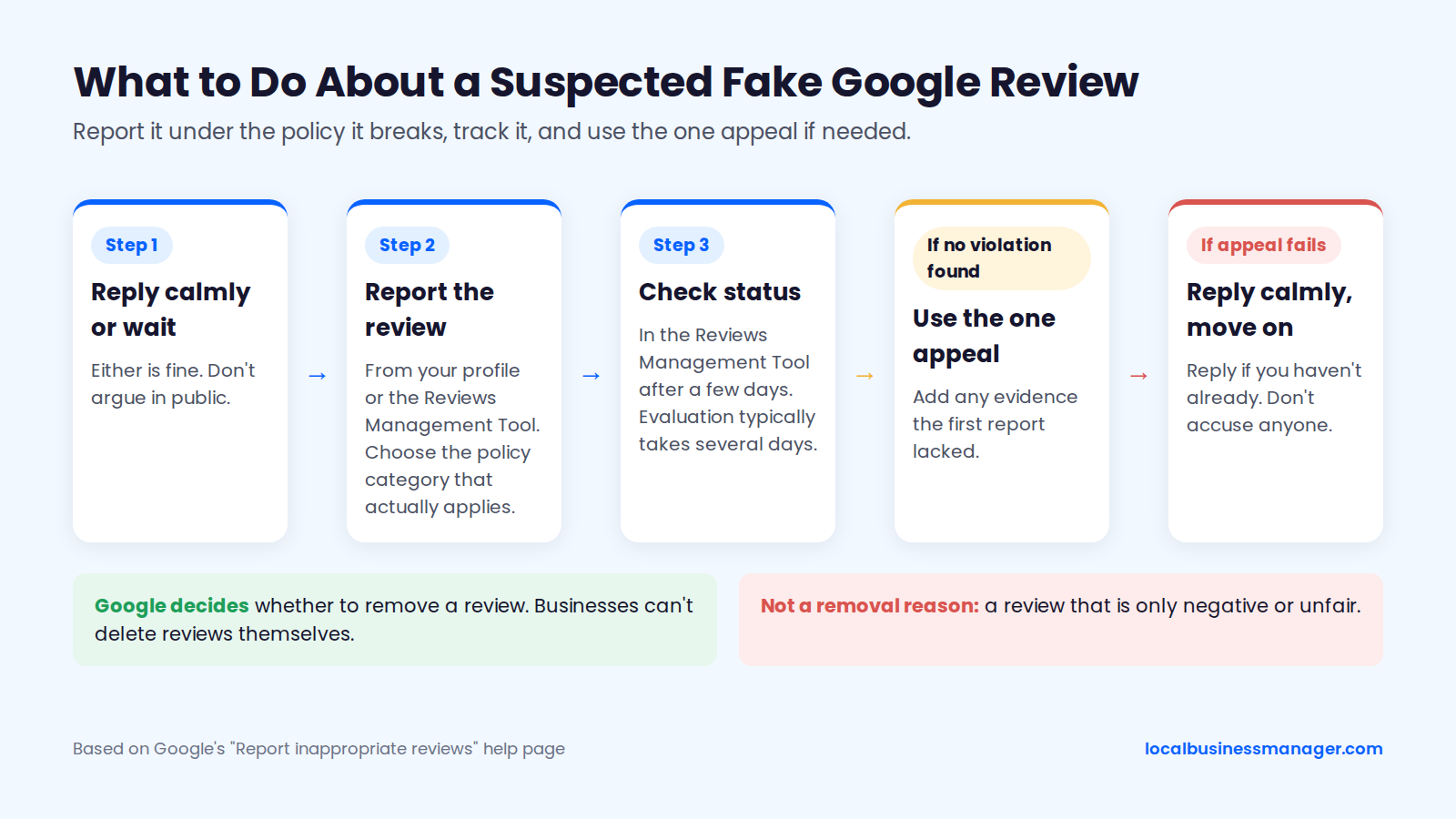
Report a review from the Business Profile or through Google's Reviews Management Tool, then track its status there. Google's "Report inappropriate reviews" help page says evaluation typically takes several days and each review gets one appeal.
The flow for a suspected fake review:
- Decide whether to reply now or wait (see below). Either is fine. Don't argue in public.
- Report the review from your profile or the Reviews Management Tool, choosing the policy category that actually applies.
- Check the report's status in the Reviews Management Tool after a few days.
- If Google finds no violation, use the one appeal, adding any evidence the first report lacked.
- If the appeal fails, reply calmly if you haven't already, and move on.
How to Reply Publicly While a Report Is Pending
A safe public reply to a suspected fake review says you can't find a matching record and invites the person to get in touch, without accusing anyone. The "fake" reviewer can turn out to be a real customer using a nickname, or a spouse who booked under another name.
Review: "Terrible service, never using them again." (No matching job in your records.)
>
Reply: "We take every review seriously, and we can't find a record matching this description. If we've missed something, please call the office and ask for Dana so we can look into it. Dana, office manager"
The reply doesn't say "fake," "you were never a customer" or "competitor." If the review stays, future customers see a business that checked its records and stayed polite. For law firms, the reply carries ethics risk too. An ethics commentator's summary of ABA Opinion 496 says lawyers must take care even when replying to posts from non-clients.
Review Removal Companies: Red Flags and Questions to Ask
A legitimate removal service can only do what you can do: report reviews that break a named Google policy through Google's own flow. Treat these as red flags:
- A guarantee that negative reviews will be removed
- A request for your Google password or owner access instead of a manager invitation
- A plan to report reviews that don't break any policy
- Any suggestion of contacting reviewers with legal threats, which the FTC rule bans when the threats are groundless
- Vague answers about how the work is done
Questions to ask before hiring anyone:
- Which Google policy does each review break?
- Will you report through Google's own flow, and can I see each status in the Reviews Management Tool?
- What access do you need, and will you accept a manager invitation?
- What happens when Google finds no violation and the one appeal is used?
- Do you ever contact reviewers, and if so, how?
What Should You Never Say in a Review Reply?
Two rules carry regulator and bar consequences: never confirm someone was a patient or client, and never offer anything for changing a review. The other items on the list protect trust with future customers. This is marketing guidance, not legal advice, so check with your compliance contact or state bar. A printable checklist closes the section.
Never Confirm Someone Was a Patient or Client
HHS's Office for Civil Rights (OCR) has settled with healthcare providers that revealed patient information in their replies to online reviews. The rule applies to HIPAA-covered healthcare providers. Law firm Nixon Peabody's July 2023 summary describes 2 cases:
- Manasa Health Center (June 5, 2023): a $30,000 settlement plus a 2-year corrective action plan over patient information disclosed in a review reply.
- A California dental practice (December 2022): a settlement over similar allegations involving its replies to Yelp reviews.
HHS lists its HIPAA resolution agreements on its enforcement agreements page.
Lawyers face a parallel rule. ABA Formal Opinion 496 (January 13, 2021) names client confidentiality under Model Rule 1.6 as the main ethical concern when responding to online reviews. It says a negative review on its own isn't a lawyer-client "controversy," so the self-defense exception doesn't apply. The ABA suggests 3 options:
- Don't respond, which is often the best choice.
- Post a generic invitation, such as "Please contact me by telephone so that we can discuss your concerns."
- Even for a client or former client, say only "Professional obligations do not allow me to respond as I would wish."
State bars mostly agree with the ABA, and Colorado is the outlier. Check your own state bar's rules before a firm adopts a reply policy. The table below lists 3 state opinions, newest first:
Opinion | Year | What it says about replying to reviews |
|---|---|---|
Colorado Opinion 136 | 2019 | Allows limited disclosure when a real controversy exists; the ABA disagrees |
Texas Opinion 662 | 2016 | Bars replies that reveal confidential information; allows a "proportional and restrained" reply |
New York State Bar Association Opinion 1032 | 2014 | Bars disclosing confidential information just to answer a former client's criticism |
Never Offer Anything for Changing or Removing a Review
Google strictly prohibits offering free or discounted goods or services for changing or removing a review, and treats it as fake and misleading content. Google's prohibited-content policy also bans discouraging negative reviews and selectively asking only happy customers.
The FTC's Consumer Reviews and Testimonials Rule is 16 CFR Part 465. It was announced in August 2024 and became fully effective October 21, 2024. It bans compensation or other incentives conditioned on a review's sentiment, positive or negative.
The rule also bans review suppression. That includes groundless legal threats, intimidation and certain false accusations used to get a negative review removed. The FTC's 2025 warning-letter template cites the rule. In practice, it rules out replies like these:
- "We'll refund you if you take this down."
- "10% off when you update to 5 stars."
- Public compensation offers tied to the review.
If you refund a customer, do it because the job warranted it. Do it privately, with no condition attached to the review. For compliant ways to ask customers for new reviews, see how to get more Google reviews.
Other Things to Leave Out
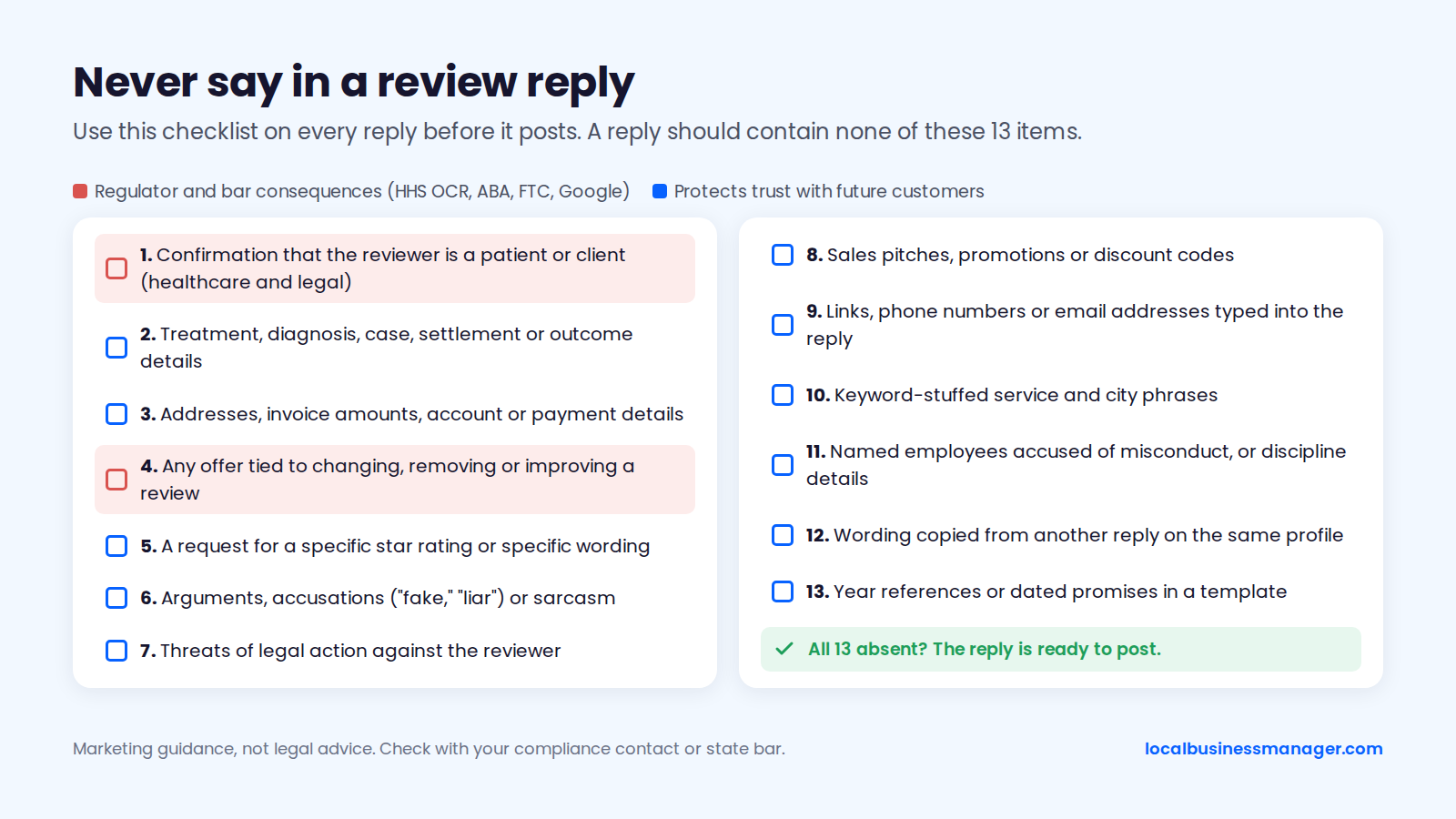
Use this checklist on every reply before it posts. A reply should contain none of the following:
- Confirmation that the reviewer is a patient or client (healthcare and legal)
- Treatment, diagnosis, case, settlement or outcome details
- Addresses, invoice amounts, account or payment details
- Any offer tied to changing, removing or improving a review
- A request for a specific star rating or specific wording
- Arguments, accusations ("fake," "liar") or sarcasm
- Threats of legal action against the reviewer
- Sales pitches, promotions or discount codes
- Links, phone numbers or email addresses typed into the reply
- Keyword-stuffed service and city phrases
- Named employees accused of misconduct, or discipline details
- Wording copied from another reply on the same profile
- Year references or dated promises in a template
Can You Ask a Customer to Update Their Review?
Yes, you can ask once after the problem is genuinely fixed, as long as nothing is attached to the request. No Google or FTC rule we found forbids a single neutral request. Both forbid tying it to a reward or to pressure. Sterling Sky's reply guide lists "Request an update" as a follow-up step after resolving a complaint.
Make the request in the same channel where you resolved the issue, such as the phone call or the email thread. Only send it by text if the customer has opted in to texts from the business. A script for the private follow-up:
"Hi [first name], thanks again for giving us the chance to fix the [issue]. If you feel differently about your experience now, you're welcome to update your Google review. Either way, we appreciate you letting us make it right."
The script asks for nothing specific and offers nothing in return. Google says businesses shouldn't request that specific content be included in a review. Leave star ratings and suggested wording out of it.
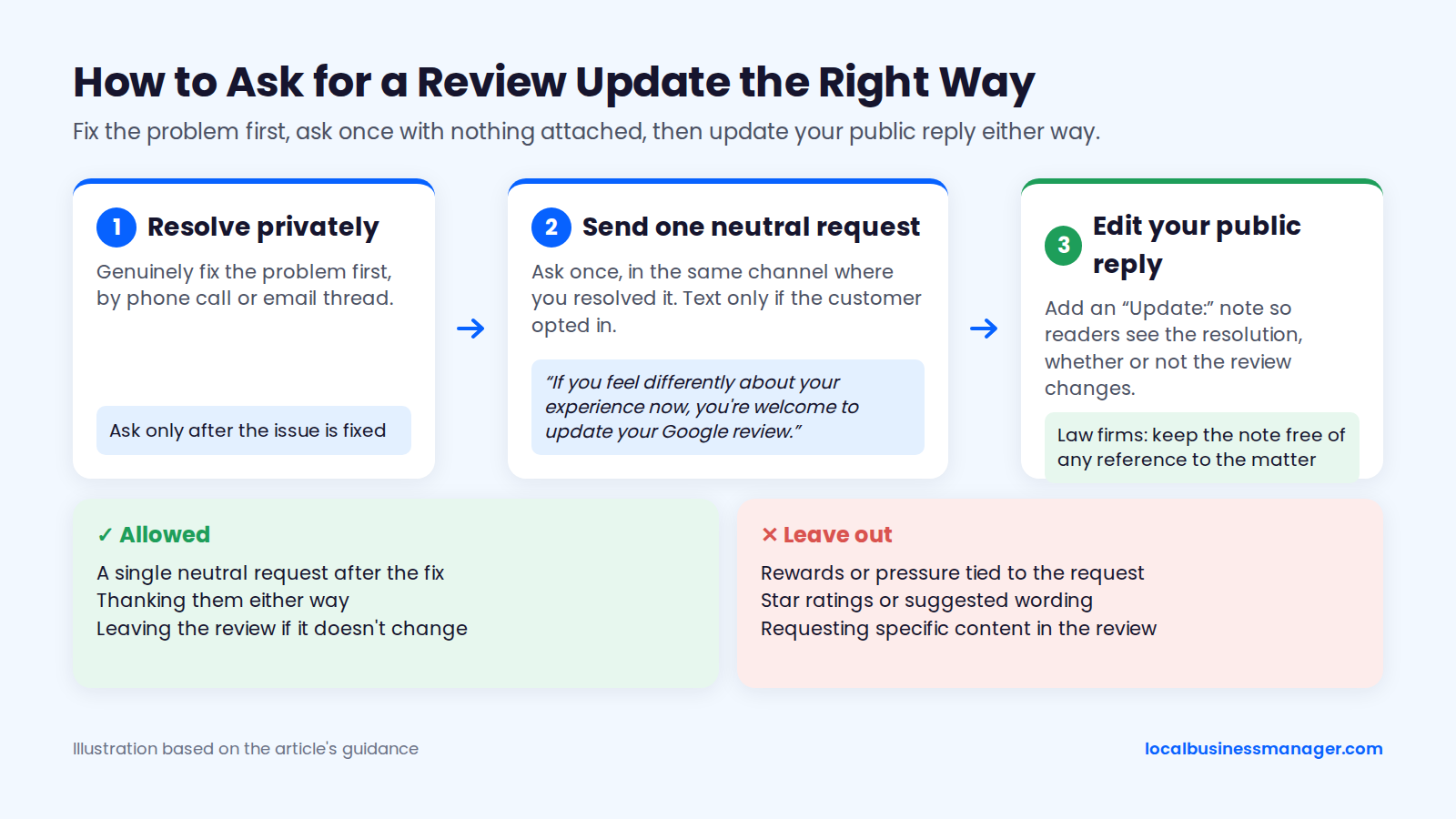
The customer may not update the review. If so, leave it there and add an "Update:" note to your public reply, like the one in the editing section, so readers see the resolution either way. On a law-firm profile, keep that note free of any reference to the matter.
Do Google Reviews and Replies Help SEO?
Google says reviews can help local ranking, but no published test shows that replying to reviews, or adding keywords to replies, improves rankings. Google also hasn't confirmed replies as a ranking factor. Here is the evidence by source:
- Google's statement on reviews: Google's "Tips to improve your local ranking on Google" page says local results are mainly based on relevance, distance and popularity. It also says "More reviews and positive ratings can help your business's local ranking." Google's reply tips treat replies as customer service and make no ranking claim. Our guide to local ranking factors explains all 3.
- Expert opinion on replies: the 2026 Local Search Ranking Factors survey was published in November 2025. Its experts ranked the presence of owner responses to most reviews #122 as a local-pack factor but #17 as a conversion factor. They ranked keywords in owner responses #182 for the local pack and #108 for conversion. The survey records expert opinion. It doesn't measure rankings.
- Ranking data: in September 2026, a second local SEO software company compared that survey with its own ranking data. It reported a reversed effect for owner responses, meaning no measurable ranking benefit. It didn't publish its sample size or method, so read it as correlation.
- Controlled test: the closest one, from Sterling Sky (January 2023, updated December 2024), looked at keywords in customer reviews rather than owner replies. On a single small profile, it found no gain in map-pack rankings, and rankings got worse for one phrase.
The customer side is clearer. In the 2024 Local Consumer Review Survey, from a local SEO software company, 88% of consumers said they would use a business that replies to all its reviews. Only 47% said the same for one that doesn't respond at all. In the 2026 edition (February 2026, 1,002 US consumers), 37% counted an owner response among the most important review factors.
How Should Agencies and Multi-Location Teams Manage Review Replies?
Agencies running replies across many profiles need 4 things: clear roles, a check that each reply went live, a voice and escalation sheet per client, and a person approving every AI draft. Google provides no approval workflow or deadline, so each agency builds its own, as below.
Who Drafts and Who Approves
In my practice, the agency writes and posts all replies, and clients don't approve each one. Access runs through the manager role and one agency organization account, never shared logins.
The sources also support a sign-off step for sensitive reviews on regulated accounts. ABA Opinion 496 is a strong reason to have the lawyer approve any reply to a negative review. The HHS enforcement actions above make the same case for a healthcare practice's privacy contact. The workflow below combines the agency-posts model with that approval step for escalated reviews:
Step | Who | When | Output |
|---|---|---|---|
1. Triage | Agency account manager | As each review arrives | Star rating and escalation check |
2. Draft | Agency account manager | After triage | Reply in client's voice |
3. Check | Second agency team member | Before posting | Never-say checklist passed |
4. Approve (escalated only) | Client owner, lawyer or privacy contact | Before posting | Written approval |
5. Post | Agency, via manager access | After check or approval | Reply submitted |
6. Verify and log | Agency account manager | After moderation | Public status confirmed, logged |
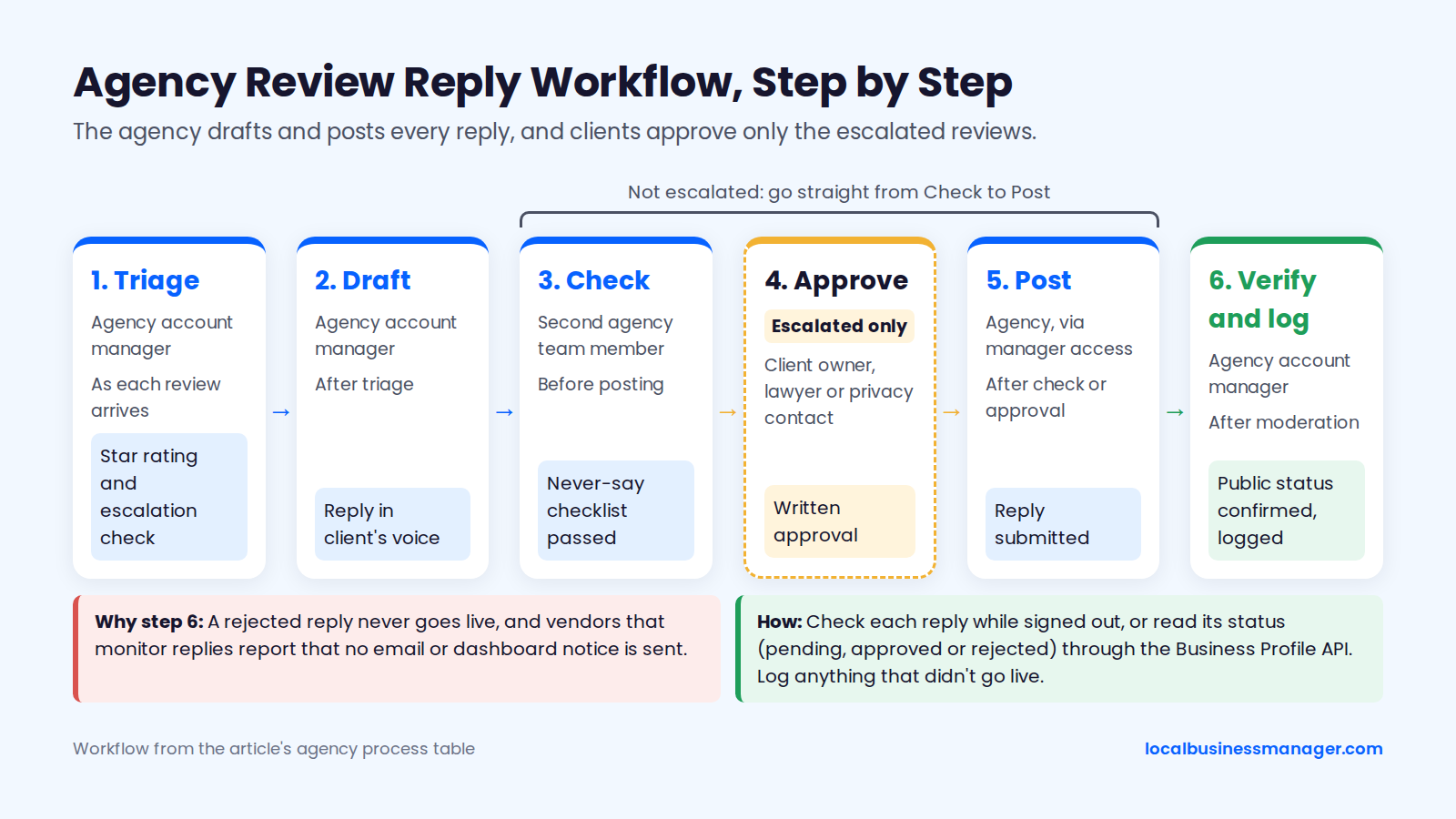
Step 6 exists because a rejected reply never goes live. According to vendors that monitor replies, a rejection also comes with no email or dashboard notice. Check each reply while signed out, or read its status (pending, approved or rejected) through the Business Profile API if you use it. Log anything that didn't go live.
A Brand-Voice and Escalation Sheet Per Client
Every client gets a 1-page sheet so any team member can reply in the client's voice and knows when to stop. Google sets no reply deadline, so the turnaround targets on the sheet are whatever the agency and client agree. Escalated reviews wait until the right person has checked them. The template:
- Sign-off name and role: who replies are signed as, and a backup name
- Contact line: the exact wording for offline contact ("call the office and ask for Dana")
- Tone: 3 words describing it (for example, "plain, warm, brief")
- Words to avoid: competitor names, slang, internal job codes
- Regulated status: healthcare, legal or neither, and the privacy rule that applies
- Reply turnaround by star band: agreed targets for 1 to 2 star, 3 star, 4 to 5 star and escalated reviews
- Escalation contact: name, channel and expected turnaround
- Escalation triggers: legal threats, injury or safety, discrimination, named staff accused, any treatment or case detail, extortion or a suspected review attack
- Approved generic replies: for law firms, wording checked against ABA Formal Opinion 496 and the state's ethics rules
- Last updated: the date the client confirmed the sheet, refreshed whenever staff change
Using AI to Draft Replies Safely
This guide's position: AI drafts are fine, provided a person approves every reply before it posts. Google has tested AI-suggested replies and offers drafting in the Gemini app:
- Search Engine Journal (June 2026): the Gemini app can connect to a Business Profile and draft a reply that refers to the customer's feedback. A summary of Google's help page published in October 2026 says this feature isn't available in the EEA or UK.
- Search Engine Roundtable (March 2026): Google was testing a "Reply to reviews with AI" option in some Business Profile dashboards.
- Location3, a marketing agency (July 2026): describes Google's suggested replies as something owners review, edit and publish.
In a blind test reported in the 2024 Local Consumer Review Survey, from a local SEO software company, 58% of consumers preferred an AI-written reply over a human-written one. Respondents didn't know which reply was AI-written, and no sample size was published for the test.
The risk is in what a draft repeats. An AI that summarizes a review can easily echo "your root canal" or "your accident case" back to the reviewer. That is exactly the kind of disclosure HHS acted on and ABA Opinion 496 warns against.
A person should read every AI draft and check it against the never-say checklist before approving it. Rewrite generic phrasing too, since the 2026 Local Consumer Review Survey found that generic template replies erode trust. For legal and health complaints, use a human-written generic reply instead of editing an AI summary of the complaint.
FAQs
Is the reviewer notified when I edit my reply?
Google's help page says the reviewer is notified when you reply, but it doesn't say whether they're notified when you edit a reply. Write every edit as if the reviewer will see it. Keep edits to genuine updates, such as a note that the problem has been resolved or the removal of a detail that shouldn't be public. Don't reword an argument. A reviewer who sees a sharper second version has a fresh reason to update the review.
Can I reply to reviews from other sites shown on my profile?
Reply to or report those reviews on the site where they were posted. Google says Business Profiles may show reviews from other websites and that businesses can't stop them. For concerns about those reviews, Google says to contact the site where the review was posted. Handle replies and reports on that platform, under its own rules.
Should I reply to a Google review written in another language?
Reply in the reviewer's language if someone on your team writes it well; otherwise reply in the language your business normally uses. Google's reply tips ask for short, personal replies that acknowledge the reviewer's specific feedback, and a rough machine translation that misreads a complaint fails that test. On a negative review in another language, have a fluent speaker confirm what it says before you reply. Apply the same never-say checklist.
Can someone report my reply?
Yes. Users can report a published owner reply, which is separate from Google rejecting a reply before it goes live, according to an August 2026 report from a review-software vendor. Google hasn't explained an appeal process for owner replies. The best protection is a reply that already passes the never-say checklist: no contact details, no promotions, no personal information and nothing that reads as harassment.
Start With the Never-Say List
If you change one thing this week, make the never-say checklist a required step for whoever posts replies, before anything goes live. Start with your dental, medical and law-firm profiles, where a single sentence can confirm a patient or client.
Local Business Manager is building a one-stop local SEO platform for agencies and multi-location teams. If that's you, join the early access list.