Can You Delete Google Reviews? What Owners and Agencies Can Actually Do

Every agency gets this message: a client spotted a 1-star review that looks fake or is just nasty, and wants it gone. You can't delete a Google review someone else wrote; only the author or Google can remove it. You can report it when it breaks a Google policy, track the report and appeal once.
This guide covers the report, the appeal, the defamation and extortion routes, what to post when Google says no, and the moves that break Google policy or the FTC's review rule.
Can You Delete a Google Review?
Only the person who wrote a Google review, or Google itself, can remove it. No, companies can't delete Google reviews posted by others, and neither can their agencies. Google Maps Help says nobody can directly delete someone else's review, though any Maps user can flag one. A business has 3 removal routes, and a reviewer has 1.
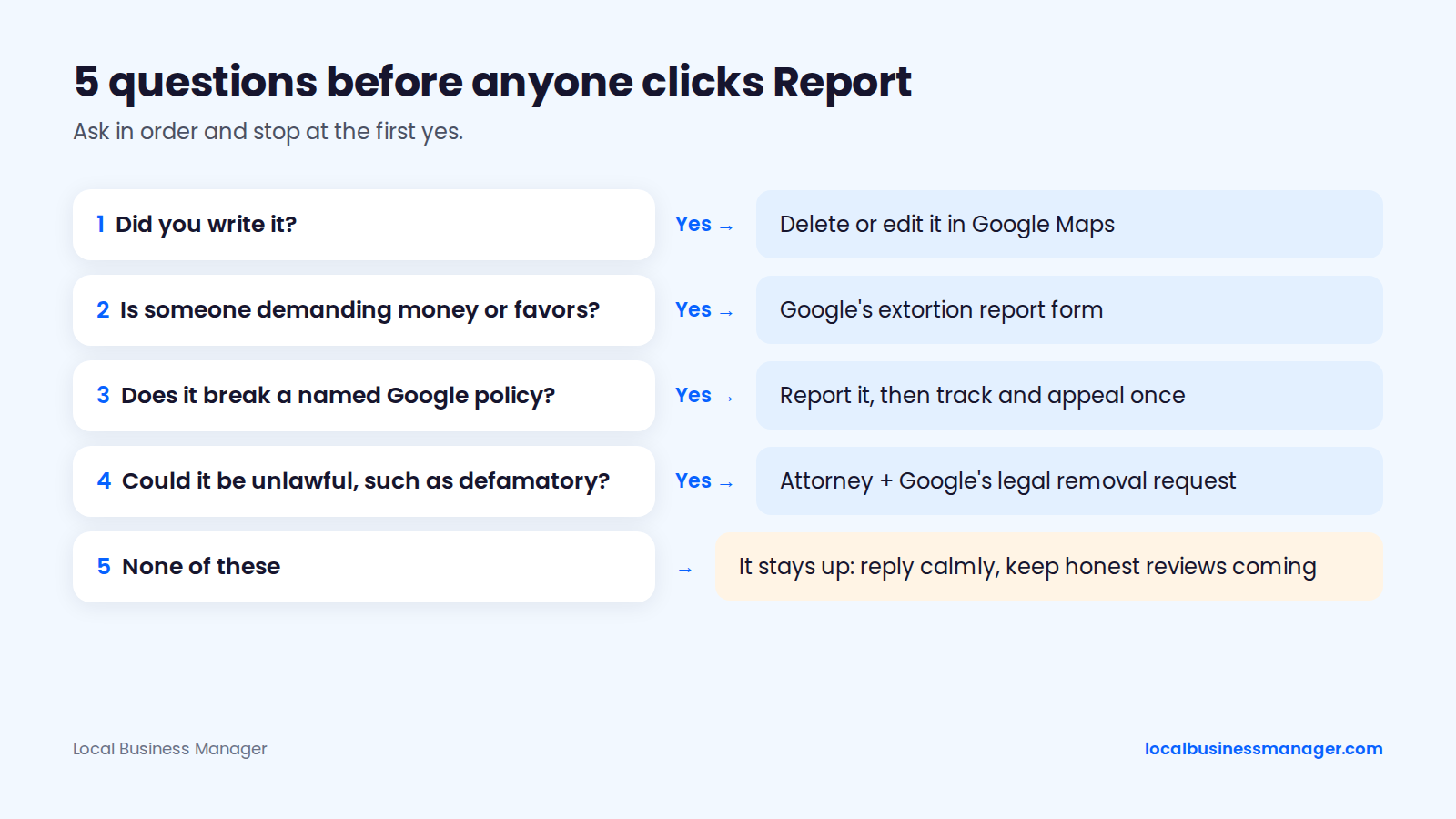
Ask these 5 questions in order and stop at the first yes:
- Did you write it? Delete or edit it in Google Maps.
- Is someone demanding money or favors to remove reviews? Use Google's extortion report form.
- Does it break a named Google policy? Report it, then track and appeal once in the Reviews Management Tool.
- Could it be unlawful, such as defamatory? Ask the business's attorney about Google's legal removal request.
- None of these? It stays up. Reply calmly and keep honest reviews coming.
How Do You Delete a Google Review You Wrote?
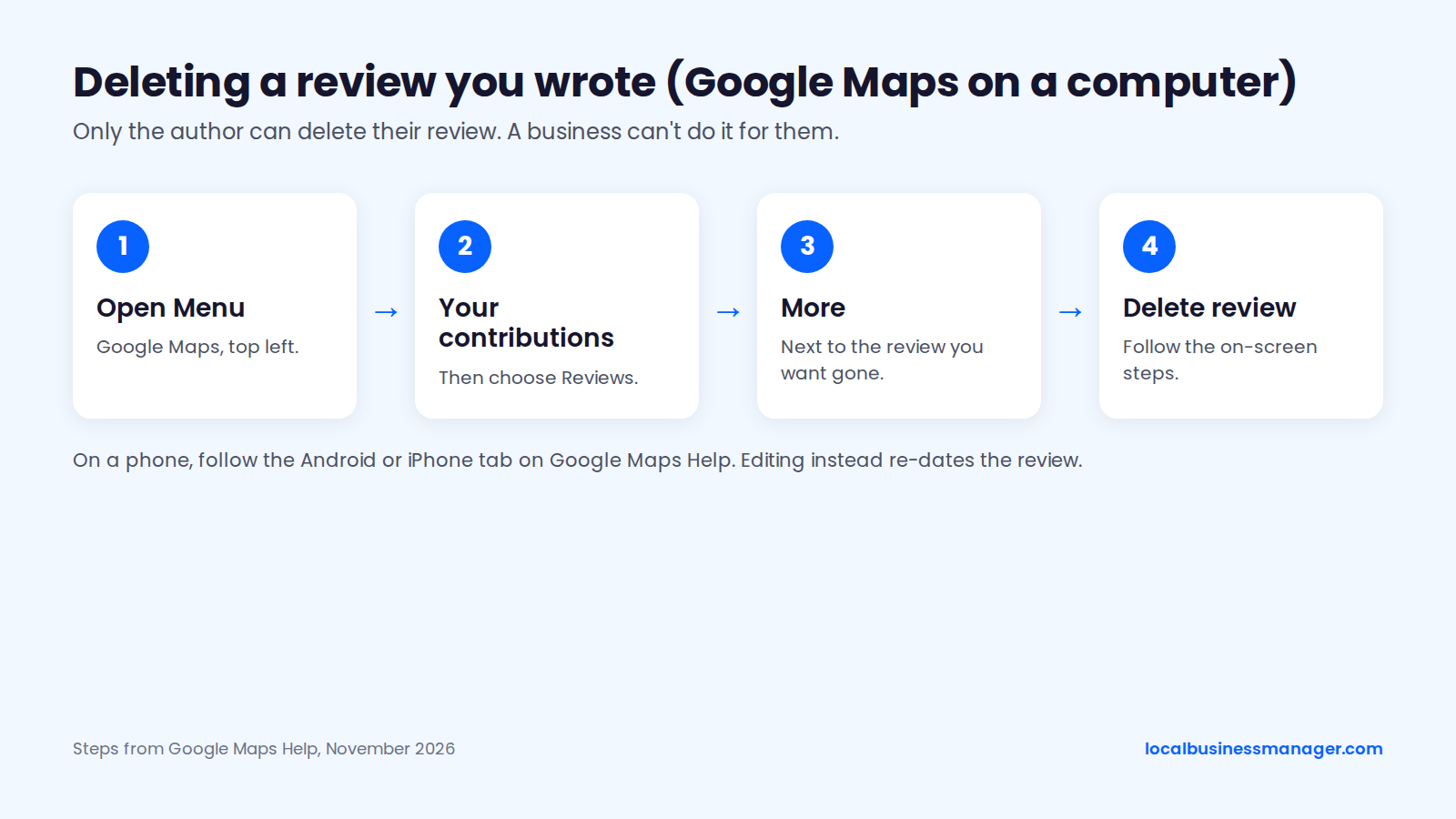
You delete a review you wrote yourself from your own contributions in Google Maps, and no business can delete it for you. On a computer, Google Maps Help gives these steps:
- Open Google Maps and click Menu at the top left.
- Click Your contributions, then Reviews.
- Next to the review, click More.
- Select Delete review and follow the on-screen steps.
On Android, the steps are:
- Open Google Maps and tap Contribute, then View your profile.
- Scroll down and tap See all reviews.
- Tap More next to the review, then Delete review.
On iPhone, use the iPhone tab on the same help page if a label differs. Editing is the other option if your view has changed: the edited review then shows the date of its latest edit. Google Maps Help also says it doesn't reinstate reviews removed for policy violations.
Which Google Reviews Can a Business Get Removed?
Through a policy report, Google removes a review only when it breaks a specific policy. Google's reporting help page says it doesn't get involved in conflicts between businesses and customers. The sections below cover what Google removes, what it refuses, and a quick triage table.
Policy Violations Google Removes
Google's Prohibited and Restricted Content policy (explained in our Google review policy guide) lists the categories a report can cite. The ones that come up most for business reviews, as of November 2026:
- Fake engagement: content not based on a real experience, paid reviews, multiple accounts, or posts on a competitor's business to undermine it.
- Rating manipulation: incentivized, biased or conflicted reviews, such as from current or former staff or family. Google says these "will be removed from Maps."
- Off-topic: political, social or personal rants that aren't about an experience at the place.
- Harassment: threats, doxxing or targeting a person.
- Personal information: others' private details shared without consent.
- Hate speech, obscenity and profanity, impersonation: each a separate named category.
- Advertising and solicitation: promotions, contact details or links in a review.
Enforcement doesn't always match the text, and Sterling Sky documented these outcomes between January 2025 and mid-2026:
- Removed: reviews from people who were never clients, and 400+ reviews after a user sent photo proof the business offered 10% off for 5-star reviews.
- Refused: a review under a fake name, and a reviewer who posted 55 reviews in 1 hour across 12 US states and Ontario.
- Rarely removed: text-free star ratings and reviews reported without solid proof.
Reviews Google Will Not Remove
A genuine bad experience stays up, however harsh. Expect these to stay, based on Google's policy and practitioner experience:
- A real customer's negative experience, even if the tone is harsh
- Criticism of price, wait times or service quality
- A low star rating with no text from a real customer
- A review the owner simply disagrees with
- A review that's vague or light on detail
"Not a customer" isn't a named policy either, so tie it to one, such as fake engagement or conflict of interest, and back it with proof.
Can You Turn Off or Disable Google Reviews?
No. Practitioners including Sterling Sky report that Google offers no setting to disable reviews on a Business Profile. Deleting or recreating the profile to escape them is no fix: the business loses its history and its honest reviews too.
Quick Triage
Only 2 of the common scenarios below skip the policy report: possible defamation and extortion. Outside the extortion row, the evidence column is practitioner advice, not a Google rule.
Scenario | Route | Policy or reason | Evidence that helps |
|---|---|---|---|
Current or former employee | Policy report | Rating manipulation (conflict of interest) | Screenshots and public records (Sterling Sky) |
Competitor posting to hurt the business | Policy report | Fake engagement | Evidence linking the reviewer to the competing business |
Reviewer got a discount or payment | Policy report | Rating manipulation (incentivized) | Photo proof of the offer (Sterling Sky) |
Sudden wave of reviews from strangers | Policy report | Fake engagement | Pattern screenshots and burst timestamps (Connective Web Design) |
Threats or private details in the review | Policy report | Harassment or personal information | Screenshot of the review |
Possible defamation | Legal request | Defamation | Records the business's attorney requests |
Demand for money or favors | Extortion form | Extortion | Demand screenshots, review links, first-demand date and time (Google) |
How Do You Report a Google Review for Removal?
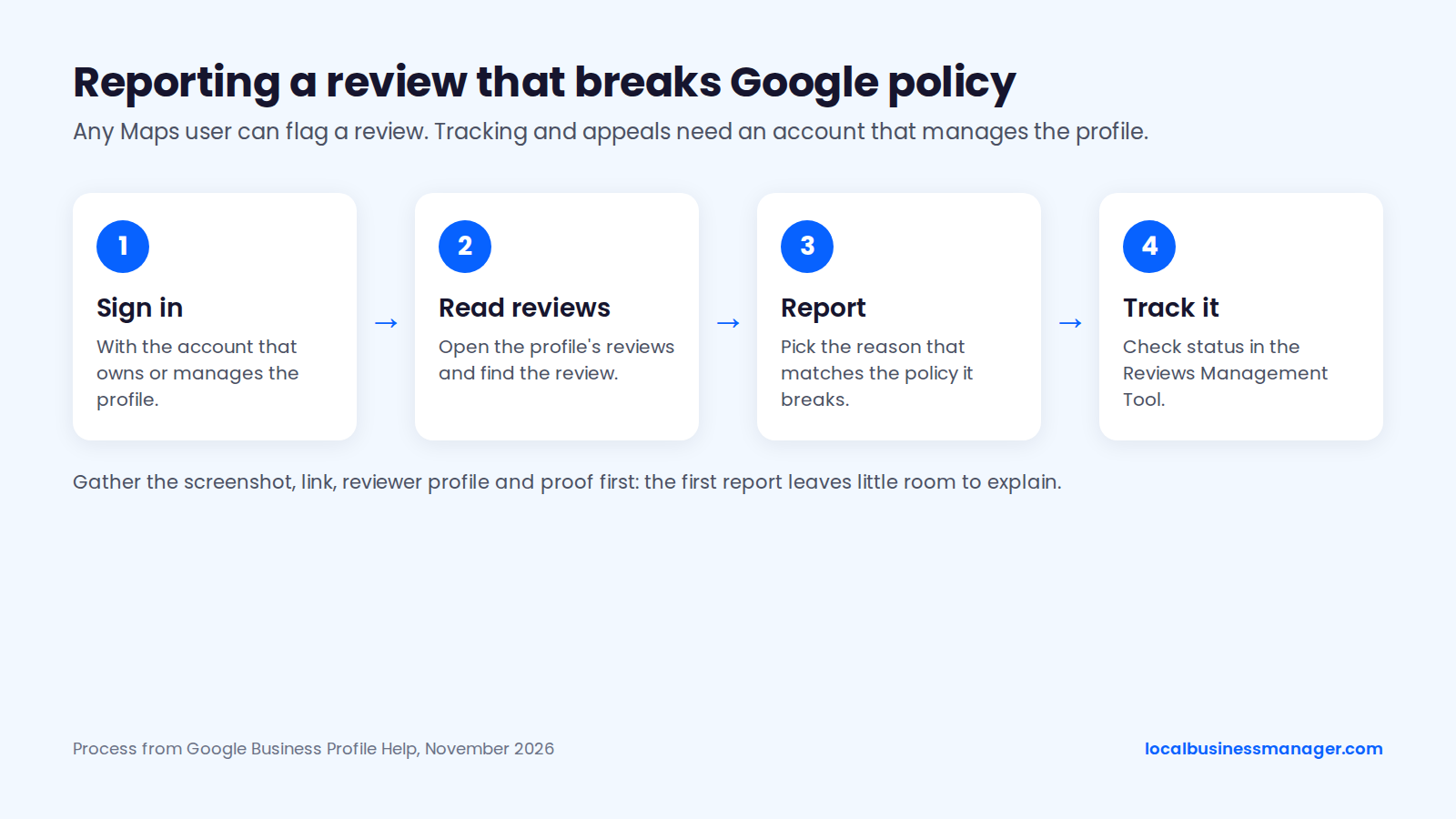
To take down a Google review that breaks policy, you report it from the profile, then track and appeal it in Google's Reviews Management Tool. Any Maps user can flag a review; checking status and appealing need the account linked to the Business Profile. Gather your evidence first, because the first report gives you little room to explain.
Step 1: Gather Evidence Before You Report
Before reporting, gather the review's screenshot and link, the reviewer's profile, the policy it breaks and proof for that policy. Google publishes no evidence checklist, so the list below is practitioner advice drawn from Sterling Sky and agency guides.
Google's content policy says its reviewers weigh the content, account information, user actions, patterns of harmful behavior and what reporters send.
- A screenshot of the review, with the reviewer's name and date
- The review's direct link
- A screenshot of the reviewer's profile and other reviews
- The policy it breaks, in Google's wording
- Proof for that policy, such as public records, a photo of an incentive offer or burst timestamps
Keep customer details out of every public reply. Law firms should check their confidentiality rules before sending client-matter records, even to Google.
Step 2: Report the Review and Track It
Google's help page on reporting reviews gives this process as of November 2026:
- Sign in to the account that owns or manages the profile.
- Open the profile's reviews (Read reviews), find the review and choose Report.
- Pick the reason that fits. Google's examples include Spam, Profanity, Legal issue and Privacy concerns.
- Check the status in the Reviews Management Tool, using Switch account if the profile sits under another email.
Will the reviewer know you reported them? Google doesn't say. Its reporting help page is silent on notifying the reviewer.
What Happens After You Report a Review?
Google says review evaluation typically takes several days, and it gives no timeframe for appeals. The sections below cover timing, the appeal step and when to escalate.
How Long Google Takes
Google's reporting help page says review evaluation "typically takes several days" and that the result arrives by email. "Decision Pending" means no decision yet, and a first rejection isn't final while your 1 appeal remains.
Check Status and Appeal
If Google decides a review doesn't break policy, you get 1 appeal per review in the Reviews Management Tool (Check status, then Appeal eligible reviews). One appeal can cover up to 10 reviews, which then show "Escalated - check your email for updates."
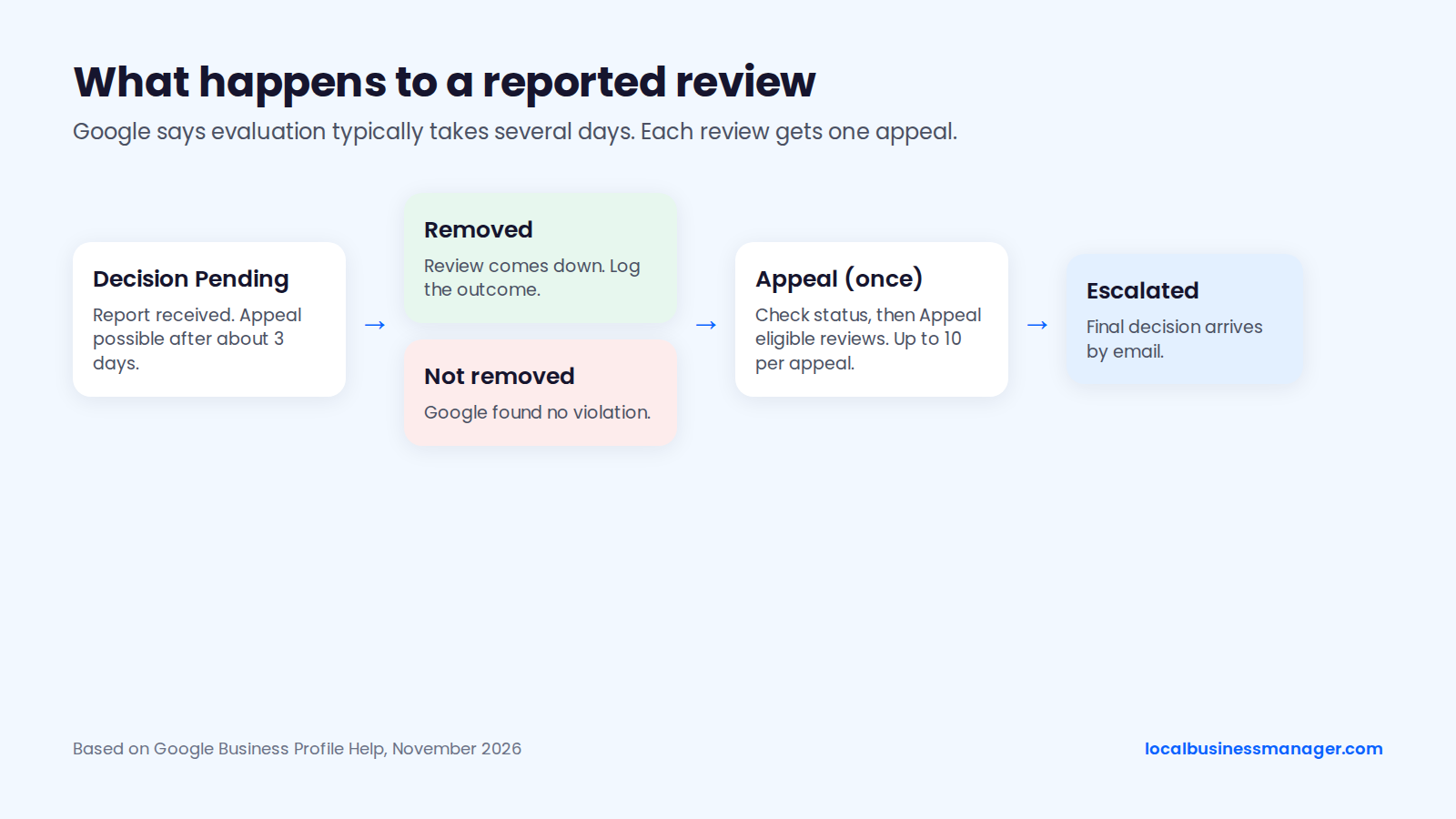
A Google Product Expert guide in the Business Profile Community (October 2025) says you can appeal 3 days after reporting, even while the status reads "Decision Pending," and add evidence then.
When to Contact Support
When a report stalls, the next move depends on where it's stuck:
- No appeal option while "Decision Pending": Sterling Sky says the review may need Business Profile Support.
- Appeal rejected: Sterling Sky and other practitioners suggest posting the case ID in the Business Profile Community for a Product Expert to escalate.
- Appeals running slow: don't file a duplicate report.
Sterling Sky advises naming the violated policy in the appeal, and practitioners advise keeping emotion out. Fill in the brackets:
- "Review by [reviewer name], posted [date]: [direct link]."
- "This review violates Google's [policy name] policy because [one factual sentence]."
- "Evidence attached: [screenshot], [record], [timestamps]."
- "We request removal under the policy named above."
Are There Companies That Can Remove Google Reviews?
A removal company can only file the same reports and appeals you can; only Google decides. Companies that remove bad Google reviews work through the same Report button and Reviews Management Tool. Watch for these red flags:
- A guaranteed removal, which no one outside Google can promise
- Advice to delete or recreate the Business Profile
- No named policy for each review they plan to report
Before hiring one, ask which policy each review breaks, what evidence they'll send, and what happens to your fee if Google says no.
What If the Review Is Defamatory or Part of an Extortion Scam?
Defamation and extortion each have their own Google route, separate from a policy report. This is marketing guidance, not legal advice. Whether a review is defamatory is a call for the business's attorney.
Google's Legal Removal Request
Google's Report Content troubleshooter separates policy (non-legal) reasons from legal ones based on local law, including defamation of you or your business and content a court has ruled unlawful. Google's legal help says an effective request names the correct legal basis, such as defamation, privacy or a court order.
Google publishes no rule for choosing between the two routes. A 2024 Maryland State Bar Association article keeps a cease-and-desist letter or a defamation suit for when the reviewer is known and harm can be proven.
Reporting Extortion or a Review Attack
Report a pay-to-remove demand through Google's merchant extortion report form, which covers only direct demands for money or favors. Google's extortion help page gives 3 steps:
- Don't engage with the scammers.
- Don't pay. Google says paying can invite more attempts and doesn't guarantee removal.
- Submit the form with screenshots of the demand, links to every review involved, and the date and time of the first demand.
Google began rolling out the form in November 2025; Search Engine Land (December 2025) reports you must be signed in to an account with access to the profile.
For an attack with no demand attached, report each fake review in the Reviews Management Tool and appeal rejections together, up to 10 at a time.
What Should You Never Do to Get a Review Removed?
Never offer anything for an edit, and never threaten the reviewer. An offer breaks Google policy, and the FTC's Consumer Reviews and Testimonials Rule bans incentives conditioned on a review's sentiment. The same rule bans threats used to remove negative reviews, and it makes fake reviews themselves illegal for businesses to write, buy or sell.
Steer clear of these 5 moves:
- Offering refunds, discounts or gifts for an edit or removal. Google bans payment, discounts or free goods for revising or removing a negative review. The FTC rule (16 CFR Part 465), fully in force since October 21, 2024, bans incentives conditioned on a review's sentiment, whether the condition is stated or implied.
- Threatening the reviewer. The FTC rule bans unfounded legal threats, physical threats and intimidation used to prevent or remove a negative review.
- Asking only happy customers, or setting staff review quotas. Both break Google policy. PPC Land reported Google added the staff-quota ban in April 2026.
- Paying for "guaranteed" removal. Only Google decides. Joy Hawkins of Sterling Sky wrote in January 2025 that she regularly sees businesses paying thousands to remove reviews that break no policy.
- Flagging every negative review. Google's help page tells owners not to report reviews they simply disagree with.
How Should You Handle a Bad Review Google Won't Remove?
When you can't get rid of a bad Google review, most practitioner guides land on the same answer: reply professionally, and keep honest new reviews coming. Google's review help page says the reviewer is notified of your reply and can still change the review afterward. Our guides to responding to Google reviews and getting more reviews without breaking policy go deeper.
Keep customer details and accusations out of public replies. These templates fit the common cases:
- Suspected fake: "Thanks for writing. We can't find a record matching this experience and want to look into it. Please contact [name] at [phone or email]."
- Former employee: "Thank you for the feedback. This page is for customer experiences, so please reach [name] at [contact] to talk it through."
- Genuine complaint: "Thank you for raising this. [Issue type] isn't the standard we aim for, and we'd like to hear more and put it right. Please call [name] at [phone]."
- Under report: "Thanks for the feedback. We're looking into it. If we missed something, please contact [name] at [contact]."
Law-firm clients should use the most neutral template, such as the under-report one, or not reply at all. ABA Formal Opinion 496 (2021) says lawyers may not disclose confidential client information when responding to online criticism, and should seriously consider not responding.
Asking for an Update or New Reviews
No Google policy bans a plain, no-strings request to update a review once a problem is fixed. That's our reading of a policy that bans incentives, discouraging negative reviews and selective asking. A fix must never depend on the edit.
For new reviews, ask every customer the same way. Across close to one hundred personal-injury firms, I ask every client when their matter closes, by text or email and only if they opted in; for PI clients who recovered, that moment is after payout.
How Should Agencies Handle Removal Requests Across Clients?
Agencies should set expectations before filing anything and log every report. Google offers no export of removal-request history, so the agency keeps the record.
When a client asks you to "get that review deleted", these lines set the expectation:
- "Only the reviewer or Google can remove a review. We can't, and nobody can guarantee it."
- "We'll check it against Google's policies. If it breaks one, we'll report it with evidence. If not, reporting won't help."
- "Meanwhile, we'll post a calm reply and keep honest reviews coming in."
Keep one row per reported review, across all clients, with these fields:
- Client and location
- Review link, reviewer, date and rating
- Date reported, policy cited and evidence sent
- Status (Decision Pending, removed, rejected or escalated)
- Appeal date
- Outcome and outcome date
- Next step
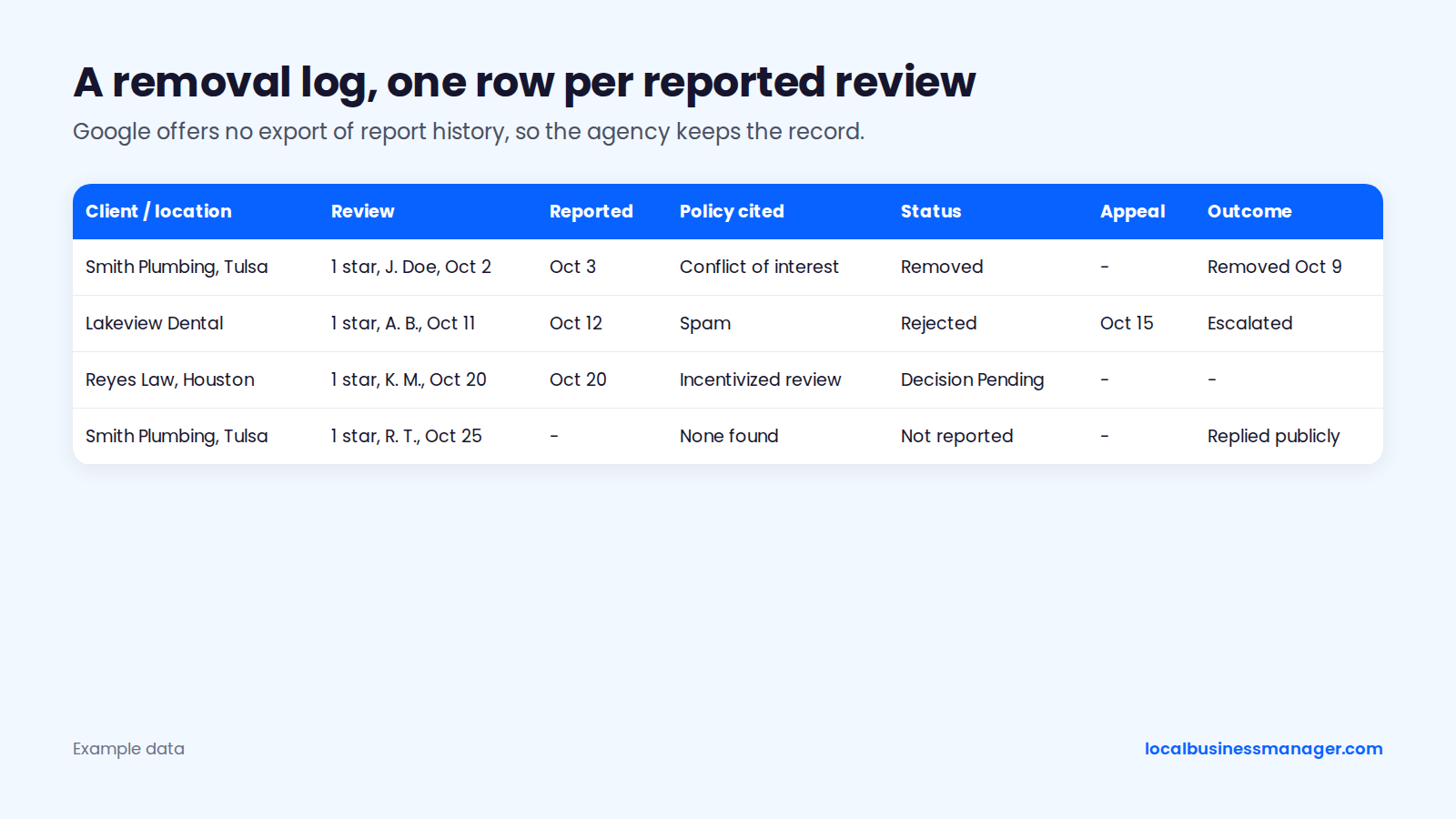
Calls and rankings lead my monthly reports; the removal log fits in a "work done" section below them.
What Else Do Owners Ask About Removed Reviews?
Google says little about these two questions, so the answers stick to what Google has confirmed and what has been observed.
Why Did Google Remove Reviews From My Business?
Google's automated spam detection removes reviews it judges to break policy, and Google's help page admits it sometimes removes legitimate ones by mistake.
On July 3, 2026, Google confirmed, per TechWyse, that when its systems detect suspicious reviews it may remove them and temporarily pause new reviews on the profile.
Does Removing a Review Change a Business's Ranking?
Google doesn't say, and the best public evidence suggests rankings don't always drop right away.
In a 2026 case study of one listing that lost 98% of its reviews, Sterling Sky found the removed reviews were usually hidden rather than permanently deleted, and losing many reviews didn't always cause an immediate ranking drop. One listing is a small sample, so treat it as an observation, not a rule. To see where reviews stand against the businesses in the 3-pack, use the review benchmark in our local SEO audit.
Where Should You Start With a Bad Review?
Run every review through the 5 triage questions before anyone clicks Report. Then file only the reports you can tie to a named policy and back with proof. Local Business Manager is in early access for agencies managing profiles across many clients: request early access to Local Business Manager.