Local SEO for Small Businesses: Where to Start

Most owners have a few hours a week for marketing and no clear idea which job comes first. Start with a complete, verified Google Business Profile and a steady flow of genuine reviews, then fix your listings, your website and your links, in that order. The profile comes first because 2 of the top 3 map-pack factors in the 2026 Local Search Ranking Factors survey are set on it.
Below you'll get each step with its effort and cost, a review-request script and 3 reply templates, an example schema block, a week-by-week starter checklist that doubles as an agency onboarding list, and the mistakes that get profiles suspended.
What Is Local SEO for a Small Business?
Local SEO, short for local search engine optimization, is the work of getting found by nearby customers in Google's local pack, on Google Maps and in "near me" searches. It depends on 4 things you manage: your Google Business Profile (formerly Google My Business), your reviews, your listings on other sites and your website.
Local Pack vs Organic Results vs AI Overviews
The local pack is the map with 3 businesses that appears for searches like "plumber near me", and each entry comes from a Google Business Profile. Organic results are the website listings below the pack, ranked mostly on the strength of each web page. A business can rank in one and not the other.
Ads and AI Overviews, Google's AI-generated summaries, can both appear above the local pack. Google Ads Help says ads can show above, below or inside AI Overviews, and Search Engine Land notes that when an AI Overview shows up for a local search, it often sits above the local pack. The section on AI answers further down covers what they cite and what to do about them.
Local SEO vs Regular SEO
Search engine optimization for a local business differs from regular SEO in what Google ranks: a Business Profile shown to people near it, instead of a web page shown to anyone anywhere. Regular SEO is mostly about pages, content and links. Local SEO adds profile signals and the searcher's location.
The 2026 Local Search Ranking Factors survey, published in November 2025, shows the difference. In it, 47 local search practitioners scored 187 factors, and 3 results stand out:
- Primary Business Profile category: the top local pack factor (score 227). An ordinary web page has no category.
- Distance between the searcher and the business: 2nd for the local pack (score 225). It plays no part in ranking an ordinary web page.
- A dedicated page for each service: the top factor for local organic results, so the website still counts.
In my view, the method doesn't change by industry. Each industry adds its own rules on top, such as state bar advertising rules for attorneys or HIPAA for dentists.
How Does Google Decide Which Businesses Show Up in the Map Pack?
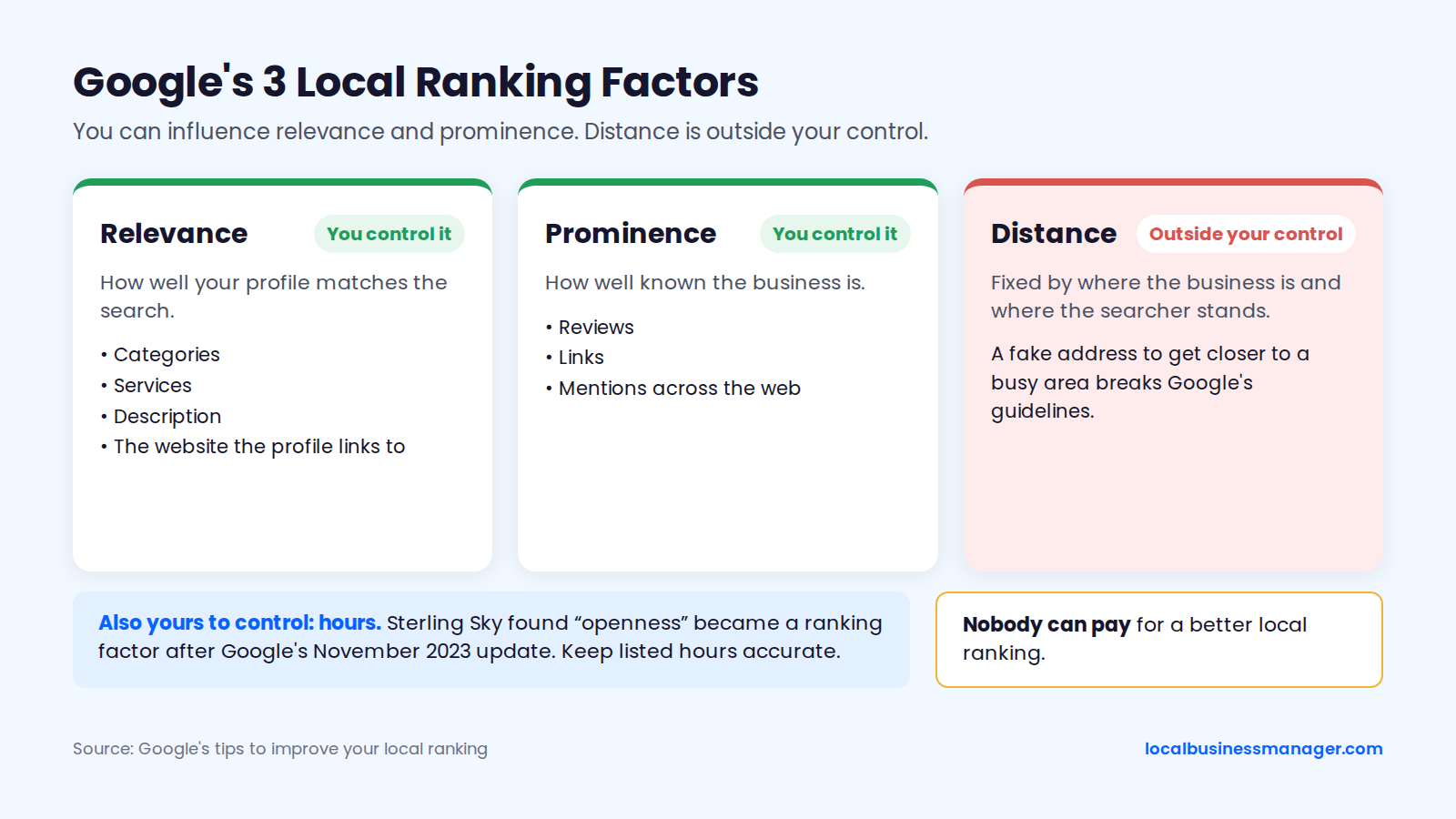
Google says local results are based mainly on relevance, distance and prominence, and that nobody can pay for a better local ranking (Google's tips to improve your local ranking). You can influence 2 of the 3 factors. The third explains why your rank changes across town.
What You Control and What You Don't
Relevance and prominence are the 2 factors you control. Distance to the searcher is outside your control. In plain terms:
- Relevance (you control it): how well your profile matches the search, through your categories, services and description, and the website the profile links to.
- Prominence (you control it): how well known the business is, through reviews, links and mentions across the web.
- Distance (you don't): fixed by where the business is and where the searcher stands. Listing a fake address to get closer to a busy area breaks Google's guidelines, which allow either a staffed location customers can visit or a service-area setup with the address hidden.
Hours are one more thing you control. Sterling Sky, a local SEO agency, found that business hours ("openness") became a ranking factor after Google's November 2023 update. A business can drop in the pack during the hours it's listed as closed, so keep your listed hours accurate.
Why You Rank Differently Across Town
Your map ranking changes with the searcher's location, so one check from your office, or from a client's kitchen table, tells you little about the rest of your area. A business that ranks first next door can be invisible 5 miles away.
Imagine a plumber whose shop is on the east side of town. The figures below are example data, not a real business. The example plumber ranks 1st at the shop and drops out of the top 20 eight miles west, sorted here by distance from the shop:
Search location (example) | Distance from the shop (miles) | Example map rank |
|---|---|---|
At the shop | 0 | 1 |
North side | 2 | 2 |
Downtown | 4 | 5 |
West suburbs | 8 | Not in top 20 |
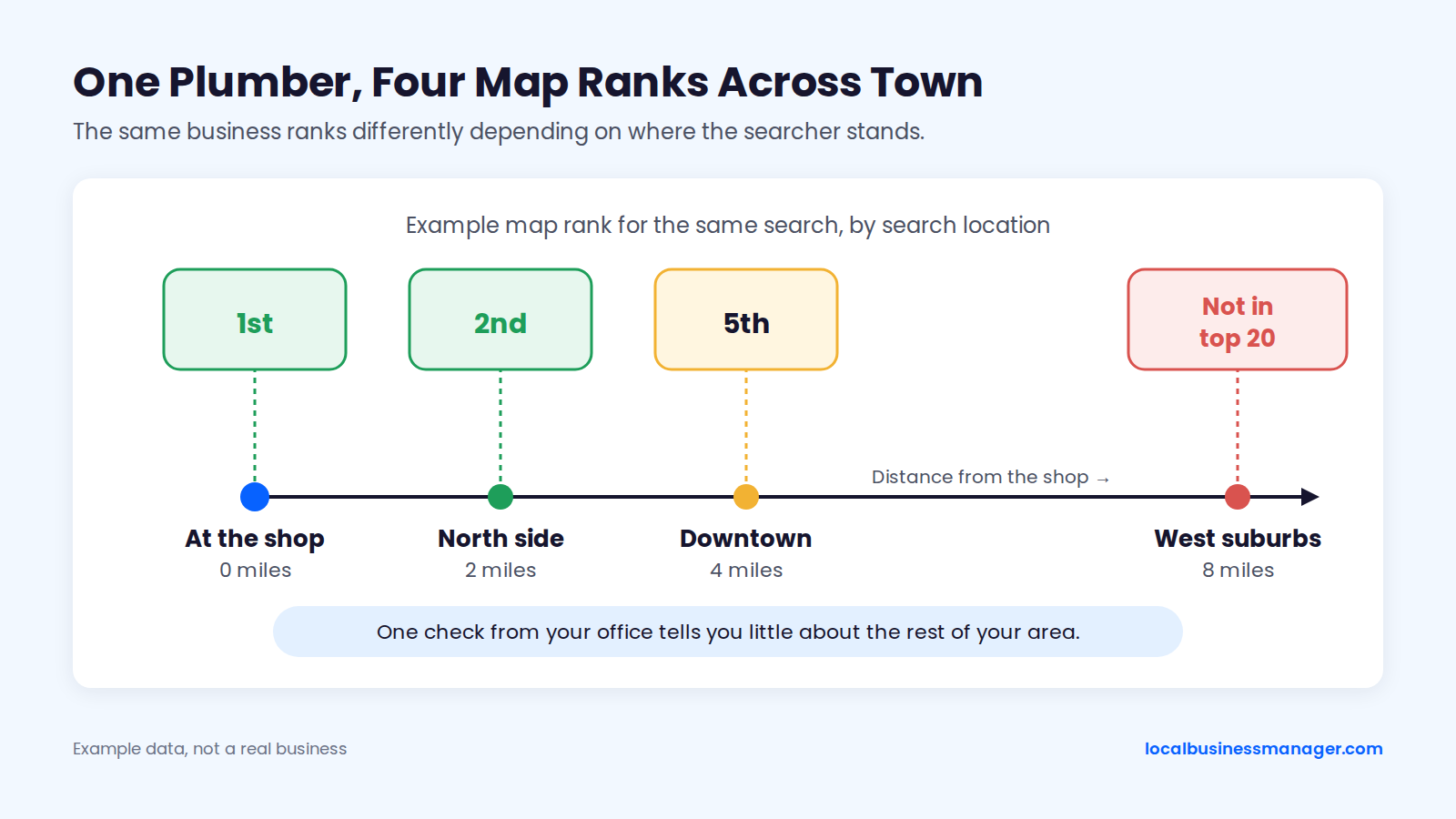
Example data, not a real business.
I never rely on a single-point check. On a new client, the first thing I look at is how the business ranks across its whole area. I search from a grid of points spread over the service area before I touch anything else.
Where Should a Small Business Start? The Order That Matters
The order that matters is profile first, reviews second, then listings, website and links. The profile holds the top-rated map-pack factors, and reviews build prominence. Listings, the website and links back them up. The table is sorted in the order to do the work, with the week to start each step:
Step | Why it sits here | When to start | Ongoing effort | Money cost | Who should do it |
|---|---|---|---|---|---|
1. Google Business Profile | Primary category is the top local pack factor in the 2026 survey | Week 1 | Setup once, then weekly checks for edits | Free, apart from a filing fee if you register a DBA | In my view, an agency; an owner can do it after reading Google's guidelines |
2. Reviews | Reviews build prominence, one of Google's 3 factors | Week 2 | Ask every customer, every week | Free | Owner and staff ask; owner or agency replies |
3. Listings | Conflicting details mislead customers and data sources | Week 3 | Fix once, recheck after any move or phone change | Free for manual fixes | Owner |
4. Website | Backs up the profile and ranks in organic results | Week 4 | Build pages once, update as services change | Free if you edit your own site | Owner or web developer |
5. Links and mentions | Prominence from local mentions builds slowly | Week 4 onward | Ongoing, as local relationships allow | Sponsorships and chamber membership cost money | Owner, since the relationships are local |
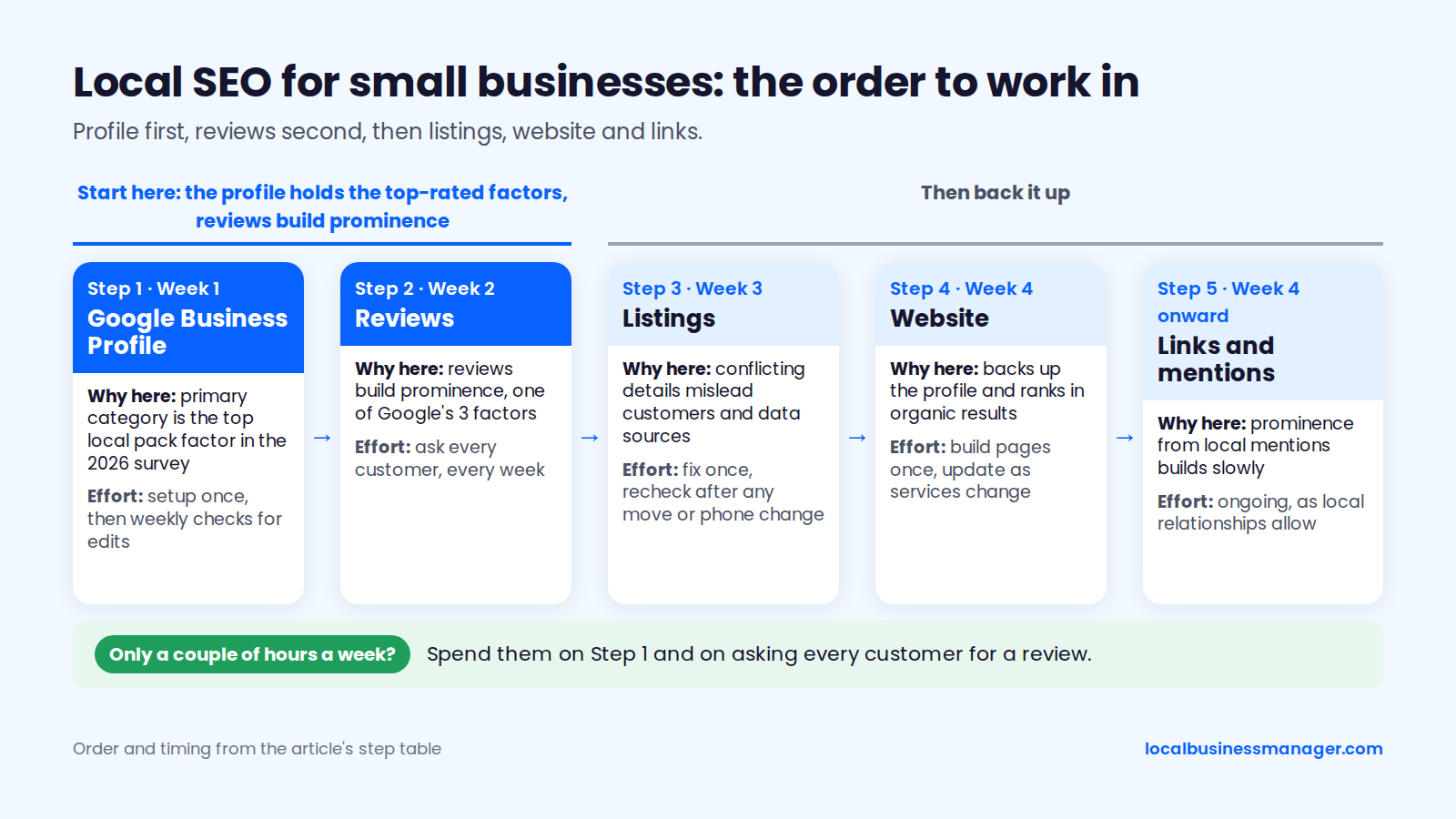
The order comes from the survey data and from my own work. The 2026 Local Search Ranking Factors survey, which records expert opinion rather than measured rankings, puts the primary category and keywords in the business name among the top 3 local pack factors, and both are set on the profile. And among the close to 100 personal-injury firms I ranked, the 2 reasons a firm most often missed the 3-pack were a business name that wasn't optimized and too few new reviews coming in.
Listings sit after reviews for a reason. Sterling Sky has said citation work has little impact for long-established businesses. In one of its case studies, rankings rose after an office move even though no citations were updated for 3 months.
What to skip in the first month:
- Mass directory submissions. The 2026 survey rated industry-relevant and locally relevant listings above the raw number of listings.
- Changing many profile fields at once. Sterling Sky advises against making several major changes at the same time.
- Trading or buying links. Google's spam policies treat link exchanges as link schemes.
If you only have a couple of hours a week, spend them on Step 1 and on asking every customer for a review. Leave listings, the website and links until the profile is right and reviews are coming in. The checklist at the end lays out the first month week by week.
Step 1: Set Up and Verify Your Google Business Profile
Your Business Profile carries 2 of the 3 strongest local pack factors in the 2026 survey: the primary category and keywords in the business name. Get ownership, verification, categories, address type and name right before anything else. Read Google's guidelines for representing your business once, start to finish.
Claim and Verify
The business owner should claim the profile as its primary owner and add any agency as a manager, never the other way round. Google's Business Profile guidelines say agencies must not claim a profile without the owner's consent, and should have the owner own the profile and add the agency as a manager. In my practice, the agency accepts manager invites through one agency organization account, never a personal or shared login.
Verification happens inside the profile, using the options Google shows you there. Video is one route my clients have used, and 3 habits from my practice make verification, and any later dispute, easier:
- Collect documents before setup: the DBA filing, business license, proof of address and photos of the signage. The more you collect, the better.
- Let the owner record the video: if verification is by video, the owner records it alone.
- Film the proof first: the rejection I see most is a video that doesn't show the signage, the street number or other proof of the location.
Choose Your Primary and Secondary Categories
Google says to pick one primary category that best describes the main business, as specific as possible, and not to choose categories just as keywords. Google also says a specific category covers the broader ones above it.
My rule for the primary category is to use what most of the ranking competitors use. If Google is clearly rewarding a different category than the "logical" one, I use the category Google rewards. A typical profile I work on ends up with 3 to 5 additional categories, each matching a service the business really offers. Our guide on how to choose Business Profile categories goes deeper. What the survey and testing data show:
- Experts rate the primary category highest: the 2026 Local Search Ranking Factors survey rated it the number 1 local pack factor (score 227, up from 193 in 2023), and rated an incorrect primary category the number 2 negative factor.
- Relevant additional categories help: in Sterling Sky's tests, they caused no dilution and lifted rankings for related searches. Unrelated categories caused drops that reversed once they were removed.
- A primary category change cuts both ways: in a case Sterling Sky described in 2026, an HVAC company fell from 1st to 31st overnight after changing its primary category, and returned to the top 2 weeks after the change was reversed.
Storefront or Service-Area Business?
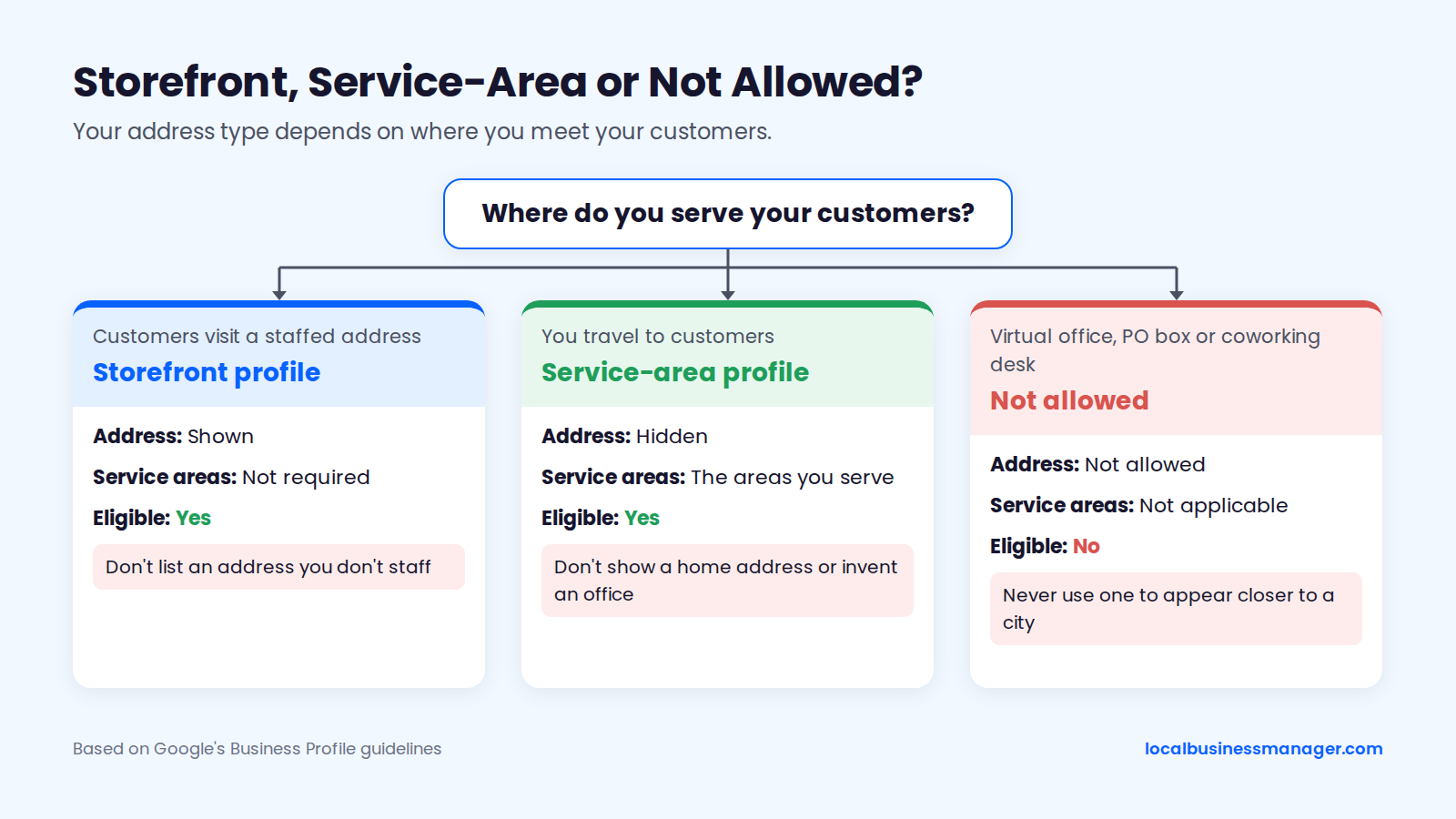
The setting to get right first is the address type: choose storefront if customers come to a staffed address, and service-area business if you travel to customers. A service-area business hides its address and lists the areas it serves. Under Google's guidelines, businesses that serve customers at the customer's location are eligible, so a plumber working from home doesn't need an office to show up in Maps.
Google's guidelines support 2 of these 3 setups:
Business setup | Address on the profile | Service areas listed | Eligible for a profile | What not to do |
|---|---|---|---|---|
Storefront (customers visit a staffed location) | Shown | Not required | Yes | Don't list an address you don't staff |
Service-area business (you travel to customers) | Hidden | Yes, the areas you serve | Yes | Don't show a home address or invent an office |
Virtual office, PO box or coworking desk | Not allowed | Not applicable | No | Never use one to appear closer to a city |
If you work from home and go to customers, you're a service-area business, and every step in this plan applies to you. Our service-area business setup guide walks through the settings.
Business Name: Use Your Real Name
Your profile name must be the real-world name on your storefront, website and stationery, the one customers know you by. Google's guidelines don't allow adding unnecessary information such as keywords or locations, and doing it can get the profile suspended. The temptation is real, and so is the risk:
- Experts rate keyword names highly: the 2026 survey, an expert opinion survey rather than a measurement, ranked keywords in the business name 3rd among local pack factors (score 223, up from 181 in 2023).
- The boost isn't permanent: Sterling Sky's tests found that the boost disappears when the keywords are removed.
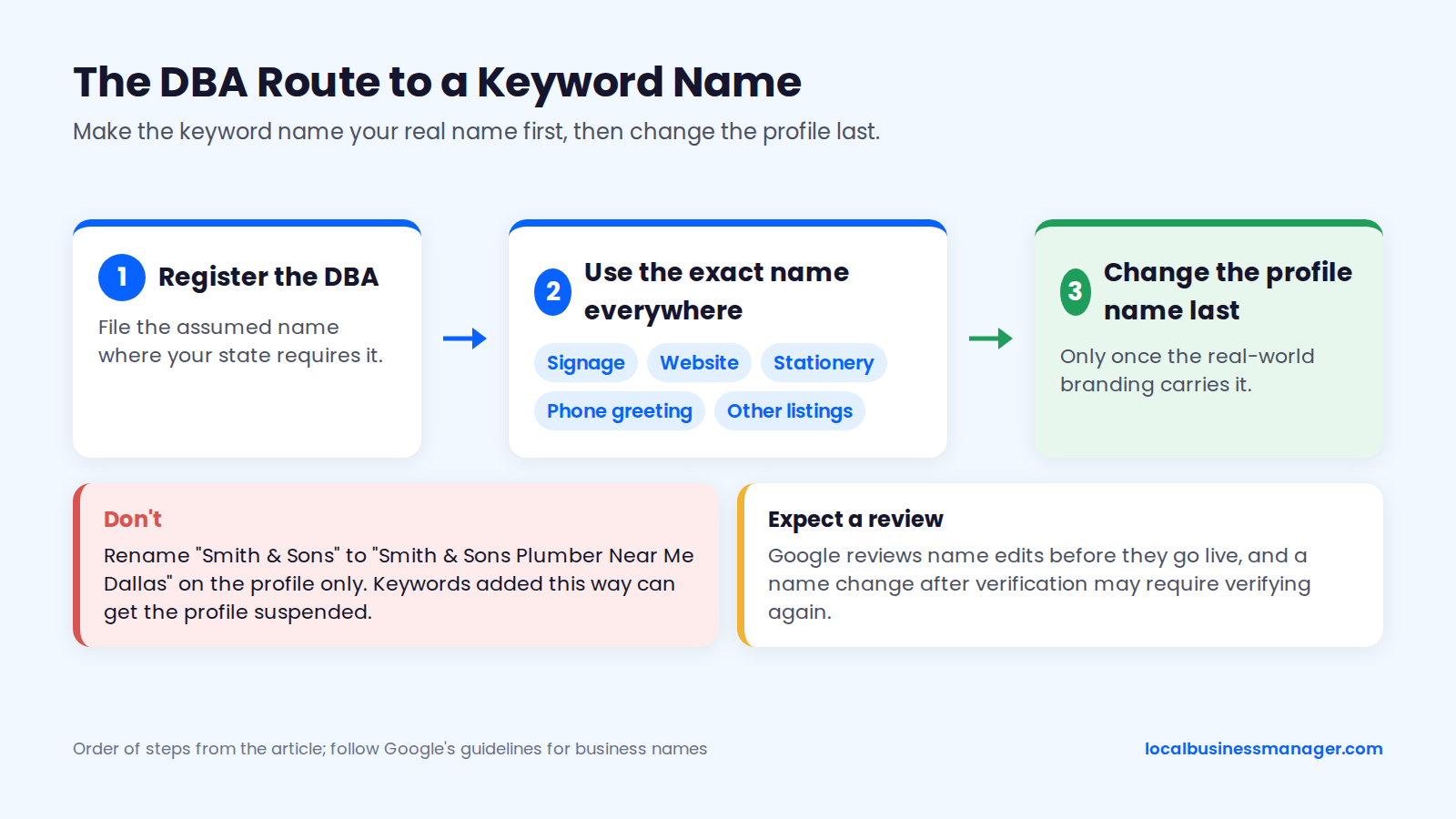
- Name edits get reviewed: Google reviews name edits before they go live, and a name change after verification may require verifying again.
If your real name is "Smith & Sons Plumbing", the service is already in it, and that's fine. What you can't do is rename "Smith & Sons" to "Smith & Sons Plumber Near Me Dallas" on the profile only.
The DBA Route to a Keyword Name
I recommend a keyword name, made compliant by registering it as a DBA and using it everywhere before the profile changes. I've taken many clients through this process, and the order matters:
- Register the DBA (assumed name) where your state requires it.
- Put the exact name on the signage, website, stationery, phone greeting and other listings.
- Change the Business Profile name last, once the real-world branding carries it.
A DBA document alone doesn't make a name compliant. Google judges the name you actually use and can still challenge or suspend the profile. The DBA is what proves the name if Google asks during re-verification or reinstatement. The 2026 survey that rates keyword names highly also lists them among the top suspension risk factors.
Law firms have an extra gate: a trade name must not be false or misleading under ABA Model Rule 7.1, Comment 5. New York bans trade names (Rule 7.5(b)), Texas requires state bar approval, and Kentucky, New Jersey and Rhode Island restrict them, so check your state bar before filing.
Fill In Every Field: A Profile Field Map
Fill in every field that says what you do, where you work and when you're open, and treat the name, address, primary category and phone with care, since edits to those can trigger re-verification. After a name, address or category edit, I wait a day or two before the next sensitive edit. This field map is built from Google's guidelines and the tests cited in this step, with the riskiest fields first:
Field | What to enter | Caution |
|---|---|---|
Business name | The real-world name on signs, website and stationery | Edits are reviewed; no keywords the business doesn't use |
Address or service areas | A staffed address, or a hidden address plus the areas you serve | No virtual office, PO box or coworking desk |
Primary category | The most specific category for the main business | A change can move rankings sharply |
Phone | The number customers call | Changes can trigger re-verification |
Additional categories | Real services only, typically 3 to 5 on profiles I work on | Unrelated categories caused drops in Sterling Sky's tests |
Website link | The homepage for one location, each office's city page for several | Add a UTM tag (see Step 4) |
Hours and holiday hours | Regular hours, and holiday hours before each holiday | A business can drop during its listed closed hours |
Services | Google's pre-defined services that match your real work | Only services you actually offer |
Description | A plain summary of what you do and the areas you serve | 750 characters or fewer |
Photos | The storefront with its signage, the team and finished work | Real photos only; they also help prove the location |
On profiles I inherit from previous agencies, the same problems keep turning up:
- Duplicate listings
- Bad naming
- No review campaigns
- No services or products set up
Services are worth the time: in tests Sterling Sky published in 2026, adding Google's pre-defined services improved rankings for relevant keywords within 24 to 72 hours, with results varying by industry and market. Google's Edit your Business Profile help page says not to go over 750 characters in the description.
Google confirmed to Search Engine Roundtable in December 2025 that it has removed the Questions & Answers feature from Business Profiles on Google Maps; people now use an AI-powered "Ask" button on the profile instead. Answer common customer questions in the description, the services list and your website's FAQ.
Posts and Keeping the Profile Current
Business Profile posts show the business is active, and in my view the evidence that they help rankings is weak. I post 3 times a week for clients. I see very little ranking influence from posts, but regular posting signals to Google that the business is active and gives searchers something current to read. None of the ranking studies cited in this guide measures a ranking effect from posts, so treat posting as a way to keep the profile current, not as a ranking lever.
Keeping the profile accurate is the bigger job, because Google and third parties can edit fields such as the name, attributes and services. My routine has 2 parts:
- Weekly: check the name, categories, attributes, services and other fields for edits made by Google or anyone else.
- Monthly: check rankings across the area and the post schedule.
Sterling Sky lists an unexpected primary category change, made by Google or another editor, as one of the first things to check when rankings drop.
Step 2: Get Reviews the Right Way
Reviews build prominence, one of Google's 3 local ranking factors, and the rule for getting them is strict: ask every customer the same way and offer nothing for the review. The sections below cover timing and volume, scripts, replies and Google's prohibitions.
When to Ask and How Many Reviews You Need
Ask every customer, the same way, once the job or purchase is done. My target for a new client is to match the average review count of the top 3 map-pack results, then keep going. The published evidence covers volume, timing and where the link goes:
- Volume: in case studies Sterling Sky has published (the original study date isn't confirmed), profiles saw a noticeable ranking boost on reaching 10 reviews, with gains leveling off after that. The agency also found that a steady flow of recent reviews matters more than a large total that has stopped growing.
- Timing: Near Media summarized a 2024 study by researchers at the University of Nevada and Arizona State University. Requests sent within 24 hours of a transaction did worse than no request at all, while requests sent 9 or 14 days later did better. The authors say no single timing fits every business.
- Where to put the link: Google's Business Profile tools create a review link and a QR code. Google suggests putting the link on receipts, in thank-you emails and at the end of chats, and showing the QR code in the store.
Review Request Scripts
These 3 scripts are the same ask for every customer, with no incentive and no filtering. Send texts and emails only to customers who agreed to receive them from you. Every customer is shown the Google review link, whatever their feedback.
- In person: "Thanks for choosing us today. Is it OK if we text or email you a review link in a week or two? If you have a minute then, we'd really appreciate an honest review on Google."
- Text (opted-in customers only, about 160 characters): "Hi [First name], thanks for choosing [Business]. Could you share an honest review of your experience on Google? [review link] Reply STOP to opt out."
- Email (customers who agreed to hear from you): Subject: "How did we do, [First name]?" Body: "Thanks for choosing [Business] for [service]. If you have 2 minutes, an honest review on Google helps other people in [city] decide. Here's the link: [review link]. Thank you, [Name]."
In the timing study, the better results came at 9 or 14 days, not within 24 hours, so try a delay in that range and test it with your own customers.
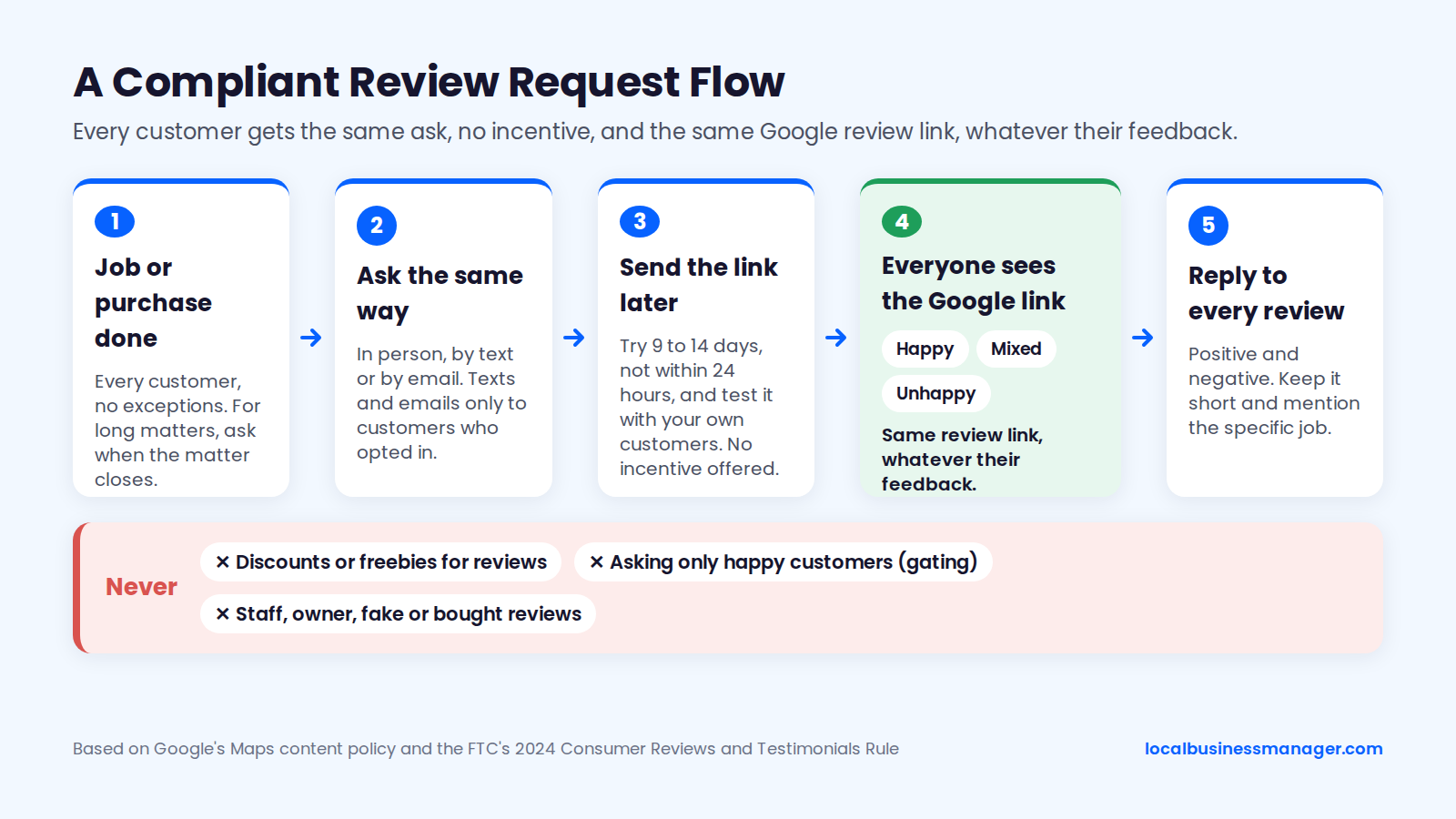
For businesses where work ends long after the first visit, such as law firms, ask every client the same way when their matter closes. For personal-injury clients who recovered, that moment comes after they've been paid.
How to Reply to Reviews
Reply to every review, positive and negative. Google's own local ranking tips include responding to reviews. Keep each reply short and mention the specific job, and don't stuff service or city keywords into it. In my agency work, we write and post replies for our clients. Use these 3 templates as starting points:
- Positive: "Thanks, [Name]. We're glad the [service] went smoothly, and we appreciate you taking the time to say so. We're here whenever you need us again."
- Mixed: "Thanks for the honest feedback, [Name]. We're glad [the part that went well] worked out, and we're sorry about [the issue]. We've shared it with the team, and we'd like to make it right: call us at [phone]."
- Negative: "[Name], we're sorry this wasn't the experience you expected. We'd like to understand what happened and fix it. Please call [owner or manager name] directly at [phone]."
Never argue in public or share private details in a reply. For the harder cases, see how to reply to negative Google reviews.
What Google Prohibits
Google's Maps content policy bars businesses from discouraging negative reviews or asking only happy customers for reviews, a practice known as review gating. The policy allows asking for reviews of genuine experiences when no incentive is offered. Together, Google's policy and US law rule out:
- Incentives: no discounts or freebies for reviews.
- Gating: every customer is asked and shown the Google link, whatever their feedback.
- Staff or owner reviews: reviews must come from genuine customer experiences.
- Fake or bought reviews: the FTC's 2024 Consumer Reviews and Testimonials Rule bans buying or selling fake reviews, and 16 CFR 465.4 bars giving incentives conditioned on a review expressing a particular sentiment.
- Legal threats to suppress reviews: the same FTC rule bars groundless legal threats used to prevent or remove reviews (16 CFR 465.7).
Law firms should also check their state bar's rules on review requests and thank-you gifts before asking.
Step 3: Make Your Business Details Match Everywhere
Step 3 means fixing conflicting details on the handful of sites customers and data sources actually use. Wrong phone numbers, old addresses and duplicate profiles cause real problems. Small formatting differences rarely do.
Which Listings to Claim First
After Google, claim Bing Places, Apple Business Connect, Facebook and Yelp, then the main directory for your industry and your local chamber of commerce. Google sets no order for these. One local SEO software company's citation guidance puts Bing and Apple Maps first, then Yelp and Facebook, which gives a sensible sequence:
- Bing Places
- Apple Business Connect
- A Facebook page
- Yelp
- The main directory for your industry, for example Avvo for lawyers
- Your local chamber of commerce listing
The 2026 Local Search Ranking Factors survey scored industry-relevant and locally relevant listings above the raw count of directory listings. For a new business, these listings help customers and search engines confirm your details. For an established business, the work is mostly cleanup.
How to Find and Fix Wrong or Duplicate Listings
A free manual audit finds wrong and duplicate listings by searching for every version of your details that ever existed. Run these searches on Google and note each listing in a spreadsheet:
- Your business name
- Your business name plus your city
- Every old address the business has used
- Every old phone number, including old tracking numbers
For each result, record the site, the name, address and phone it shows, and whether it's wrong. Then claim and correct each one.
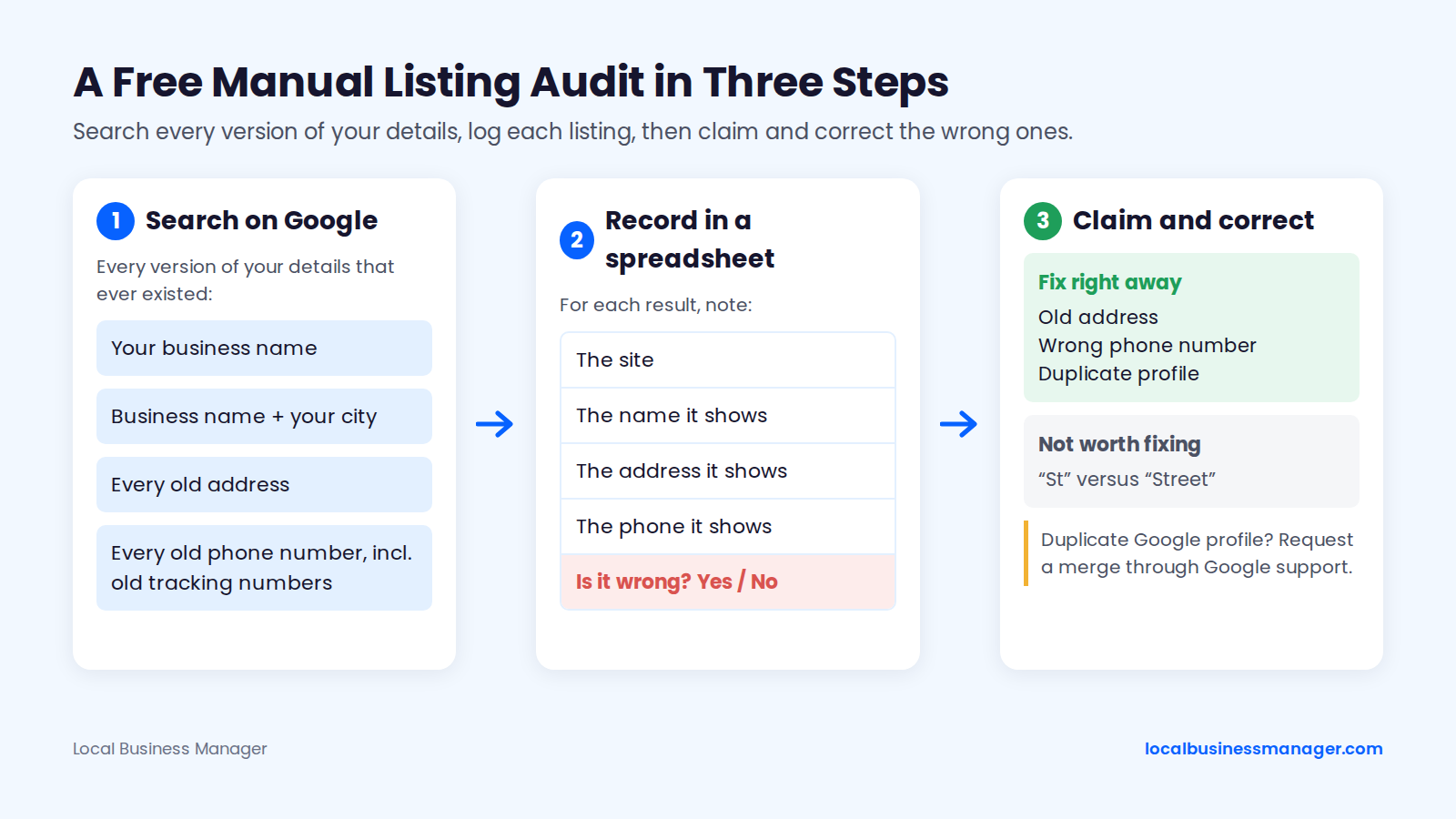
An old address, a wrong phone number or a duplicate profile is worth fixing right away. "St" versus "Street" isn't, and Sterling Sky ranks the suite number as the least important part of a listing's details.
My approach is to fix all of them, in no strict order. When hours are tight, fix the most serious issues first. For a duplicate Google profile, the route that has worked for me is a merge request through Google support.
Step 4: Make Your Website Back Up Your Profile
Your website confirms what the profile claims and earns the organic rankings below the pack. 4 things matter most: clear contact details in text, the local keywords customers use, a real page for each service, and LocalBusiness structured data.
Homepage and Contact Page Basics
Your homepage and contact page should show the same name, address and hours as the profile, as HTML text, not inside an image. The basics that cover most small business sites:
- Contact details in text: put them in the footer and on the contact page. Service-area businesses that hide their address on the profile can leave the street address off. If the profile's primary number is a call-tracking number (see the measurement section), decide which number the site shows and keep it the same on every page.
- Works on a phone: check every page on a phone, and add tap-to-call and directions buttons.
- Title tags: include the main service and city, for example "Emergency Plumber in Dayton | Smith & Sons Plumbing". Title tags affect rankings. Meta descriptions don't, though they shape the snippet and clicks.
- The profile's website link: for a single location, I point the profile at the homepage. With several locations, each office's profile links to its own city page, which carries that office's local details.
- A UTM tag on that link: add something like
?utm_source=google&utm_medium=organic&utm_campaign=gbpso Google Analytics 4 separates profile visits from other traffic. - Map embeds: they help visitors find you, but there's no evidence they help rankings.
Find the Local Keywords Customers Use
Local keywords are the phrases nearby customers type, usually a service plus a place or "near me". You can find them for free:
- Google autocomplete: type your main service and note the suggestions.
- People also ask: read the questions under a search for your service.
- "Searches related to": check the suggestions at the bottom of the results page.
Look for patterns such as [service] + [city], [service] + [neighborhood], [service] near me and emergency [service]. Then give each phrase a home on the profile and on the site. In this placeholder example for a plumber, 4 search phrases map to 1 primary category, 3 services and 4 pages:
Search phrase (example) | Profile category or service | Page that targets it |
|---|---|---|
plumber dayton | Primary category: Plumber | Homepage |
water heater repair dayton | Service: Water heater repair | Water heater repair page |
drain cleaning near me | Service: Drain cleaning | Drain cleaning page |
emergency plumber oakwood | Service: Emergency plumbing | Oakwood city page, only if you serve Oakwood |
Categories still follow Google's rule: they describe what the business is, not every phrase you'd like to rank for. Services and pages carry the rest.
Service Pages and Service-Area Pages That Aren't Thin
Build one dedicated page for each main service. The 2026 survey rated a dedicated page per service the top factor for local organic results and 2nd for AI visibility. A strong service page explains what's included, who it's for, how the job works and how to book.
City pages need more care. My first rule is that the business must actually serve that town, and I never build a city page for a town the business doesn't serve. After that, 3 things make a city page stronger:
- Case studies of jobs done in that town
- Photos from jobs there
- Reviews from customers there, which are a big plus
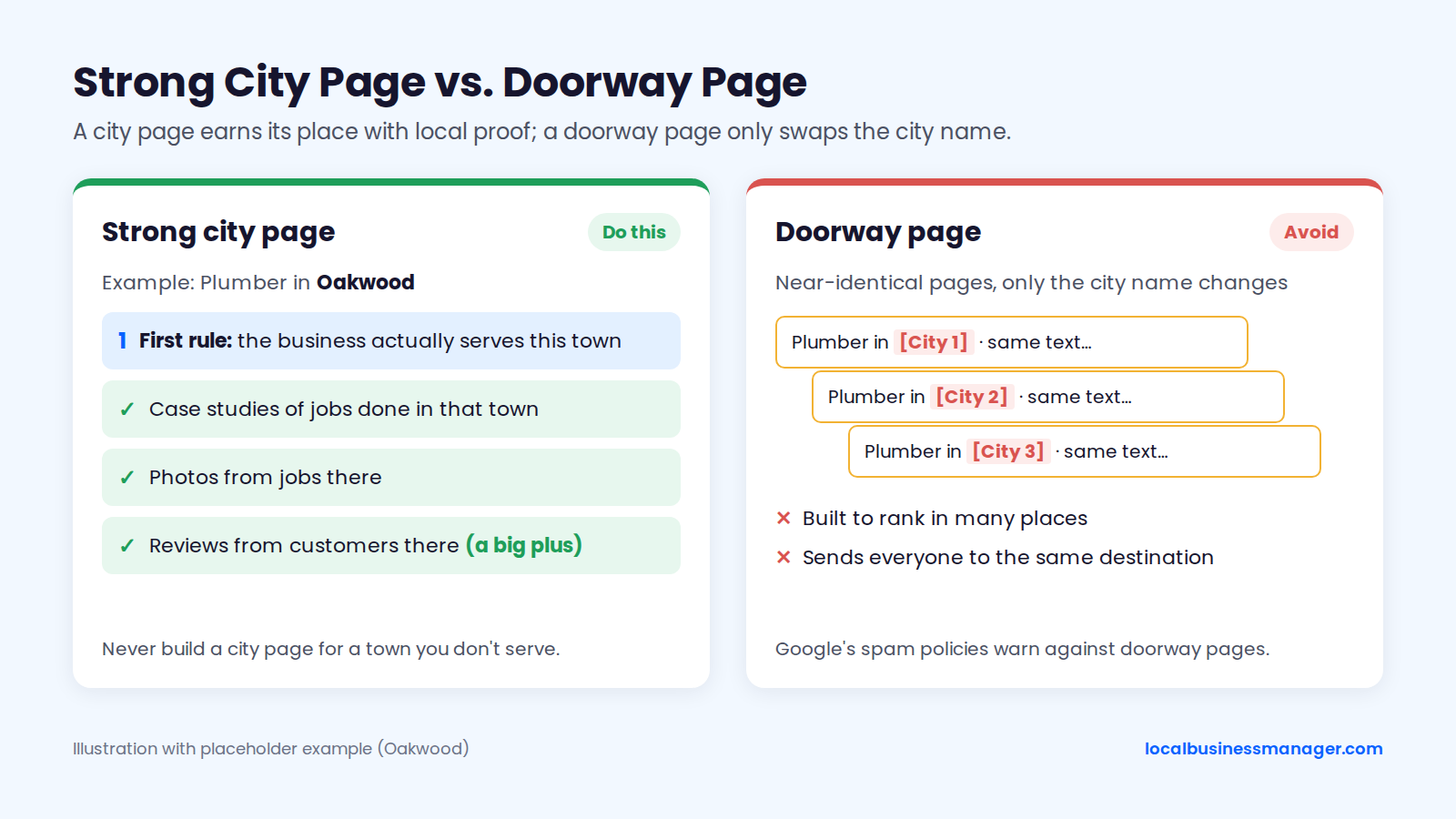
Google's spam policies warn against doorway pages. These are near-identical pages built to rank in many places that send everyone to the same destination. Ten pages where only the city name changes is the pattern to avoid.
LocalBusiness Schema
LocalBusiness structured data is code that states your business type, name, address, phone and hours in a format search engines read directly. Use the most specific subtype that fits, such as Plumber or Dentist. Google's LocalBusiness structured data documentation lists name and address (a PostalAddress) as required, and recommends other properties, including telephone, url and openingHoursSpecification.
Here is an example block for a plumber, with placeholder values to replace with your own. Your developer adds it to the page as a JSON-LD script:
<script type="application/ld+json">
{
  "@context": "https://schema.org",
  "@type": "Plumber",
  "name": "Smith & Sons Plumbing",
  "url": "https://www.example.com/",
  "telephone": "+1-555-555-0123",
  "address": {
    "@type": "PostalAddress",
    "streetAddress": "123 Main St",
    "addressLocality": "Dayton",
    "addressRegion": "OH",
    "postalCode": "45402",
    "addressCountry": "US"
  },
  "openingHoursSpecification": [
    {
      "@type": "OpeningHoursSpecification",
      "dayOfWeek": ["Monday", "Tuesday", "Wednesday", "Thursday", "Friday"],
      "opens": "08:00",
      "closes": "17:00"
    }
  ]
}
</script>
The name, address and phone in the block should match the text on the page. Test the page with Google's Rich Results Test after publishing. Don't add review markup about your own business: since 2019, Google hasn't shown review rich results for self-serving reviews in LocalBusiness or Organization markup.
Service-area businesses that hide their address need one extra check. Google's LocalBusiness documentation lists address as a required property, so read the current documentation before leaving streetAddress out of your markup, and make sure the markup only shows details that also appear on the page.
Step 5: Earn Local Links and Mentions
Local links build prominence slowly, through real local relationships, which is why they close the plan rather than open it. The links that moved Maps rankings for my clients came from local news, sponsorships and industry directories. Sources open to almost any small business:
- Chamber of commerce: a listing in your local chamber's member directory.
- Sponsorships: youth sports teams, charity events and community festivals.
- Supplier and partner pages: manufacturers, distributors and partners often list local installers or providers.
- Local press: a new hire, an expansion or a community project can earn a story.
- Industry directories and associations: the ones customers in your trade actually use.
- Unlinked mentions: sites that already name your business without linking; ask them to add the link.
A short ask works for sponsors, suppliers and partners: "We're proud to [sponsor the team / install your products / work with you]. Would you add us to your [sponsors / installers / partners] page with a link to our website, [URL]?"
There's no sourced evidence that social posts move map rankings directly, but a local story shared there, such as a finished job or a sponsorship, can lead to press and links. Google's spam policies treat link exchanges ("I'll link to you if you link to me") as link schemes, so skip link swaps with other businesses.
How Do You Know Local SEO Is Working?
Local SEO is working when calls, direction requests and website clicks from the profile rise, and rankings improve across your area. A single search from your desk can't show either. Calls and rankings lead every monthly report I build.
Measure This, Not That
The 3 measures that hold up are Business Profile Performance, UTM-tagged profile clicks in Google Analytics 4, and rank checks from many points across the area. The 2 that mislead are a single search from one spot and Search Console used as a map-pack tracker. Sorted from most to least useful:
Measure | What it shows | Where to find it | Use it for local SEO? |
|---|---|---|---|
Business Profile Performance | Calls, direction requests, website clicks, searches | The profile's Performance report (formerly Insights) | Yes |
Rank checks from many points | Where the business ranks across its area | A grid of search locations over the service area | Yes |
UTM-tagged profile clicks | Visits and leads that came from the profile | Google Analytics 4 | Yes |
Search Console | Web search clicks and impressions, including AI feature clicks | Google Search Console | Only for the website |
One search from the office | The rank at one spot | Your own phone | No |
Search Console doesn't report map pack positions. Google says clicks from AI features are included in Search Console's normal totals.
In my practice, the call-tracking number goes in as the profile's primary number, with no secondary number needed. I'd also be careful with a single average rank. Google's results are volatile right now, and an average is hard to read with confidence.
A Monthly Check-In Routine
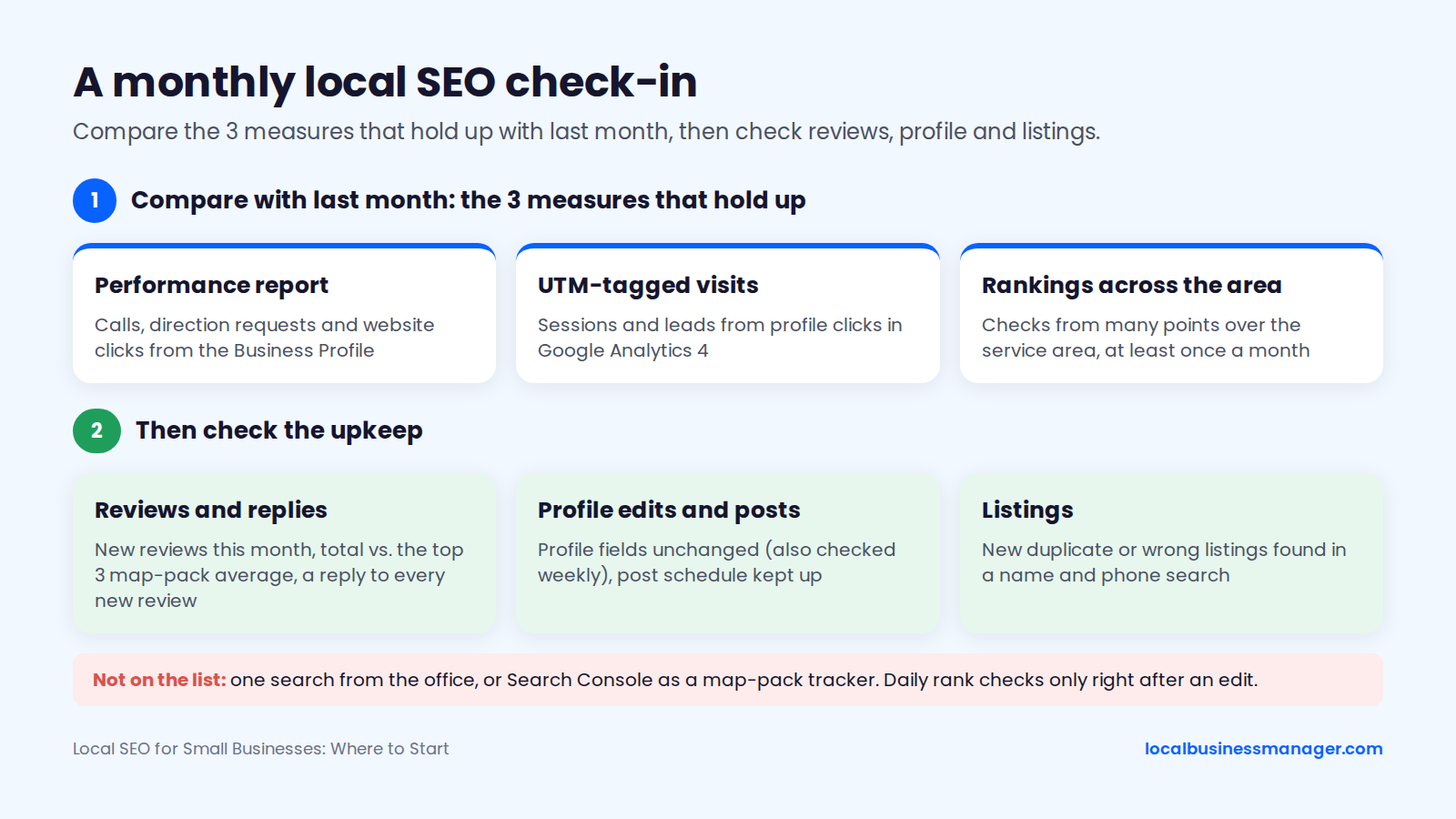
A monthly check-in compares the 3 measures that hold up with last month: Performance, UTM-tagged profile clicks and rankings across the area. My rule is that agencies should check rankings across the area at least once a month, and that daily checks only make sense right after an edit, when you want to see whether it worked. The month's list:
- Calls, direction requests and website clicks in the Performance report, compared with last month
- Sessions and leads from UTM-tagged profile clicks in Google Analytics 4
- Rankings from many points across the service area
- New reviews this month, and the total compared with the top 3 map-pack average
- Replies posted to every new review
- Profile fields unchanged (also checked weekly)
- The post schedule kept up
- New duplicate or wrong listings found in a name and phone search
How Do AI Answers Change Local SEO in 2026?
Google's "AI features and your website" page says normal SEO best practices apply to AI Overviews and AI Mode, and that sites don't need special AI files or markup to appear in them. So the local work you already do now feeds more places, though Google hasn't published which Business Profile signals feed its AI answers.
What the 2026 Studies Show
The 2026 studies agree that local businesses get cited in AI answers, but each AI surface pulls from different sources. In Steady Demand's September 2026 study of about 4,000 local-service searches and 86,645 citations, 70.7% of AI Overview citations for local-intent queries went to the business's own website and only 3.1% to Google Maps or the profile.
AI Mode reversed that pattern in the same Steady Demand study: 79.8% of its local-intent citations went to Google Maps or the profile, and 12.8% to the business's website. ChatGPT is the least documented of the 3. OpenAI hasn't published which sources its local answers use, and vendor studies suggest it leans more on directory listings such as Yelp and Apple's business listings than on Google's profile.
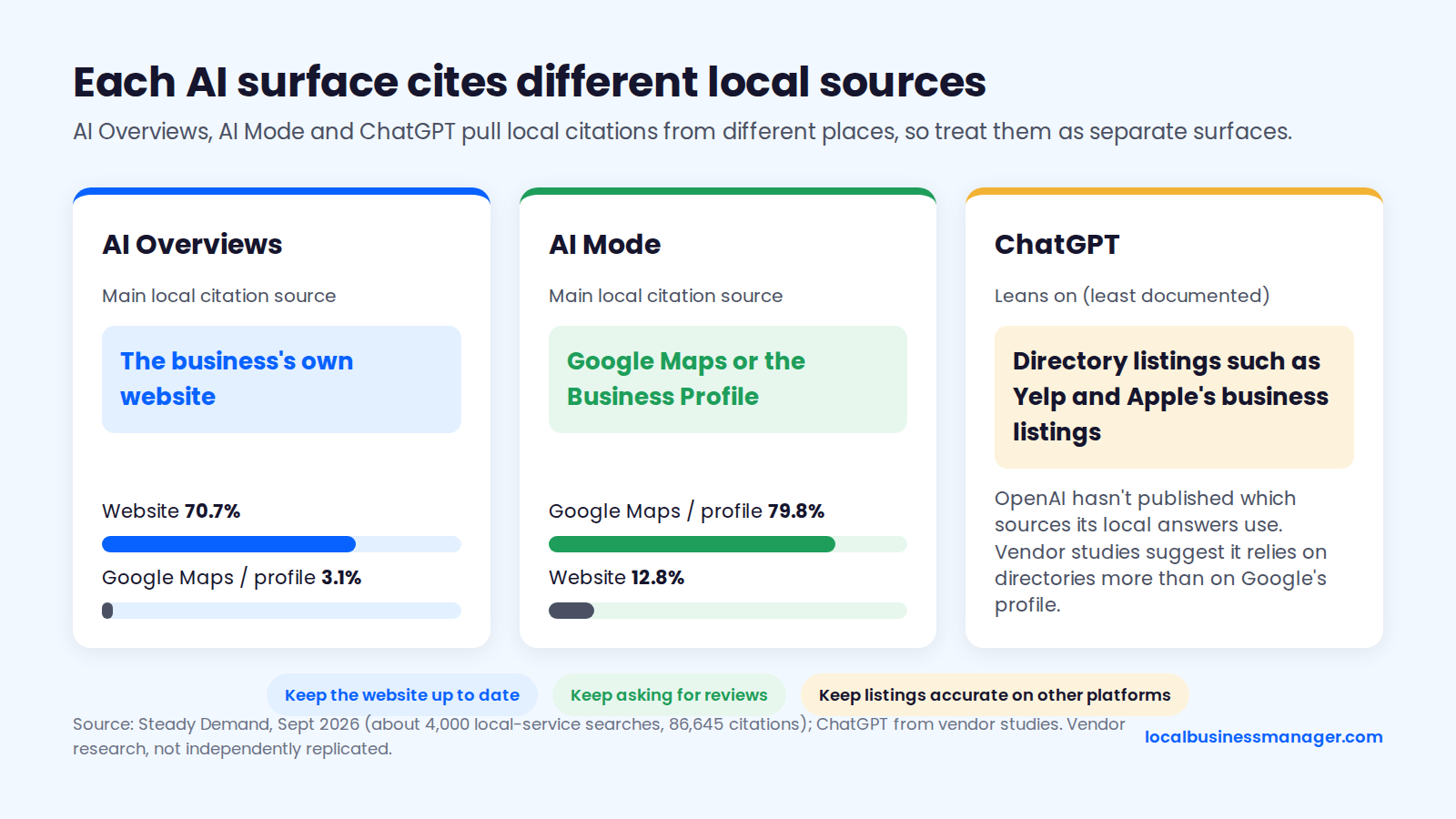
Most studies of AI citations come from companies that sell AI-visibility tracking, and none has been independently replicated. Treat AI Overviews, AI Mode and ChatGPT as separate surfaces rather than one channel.
What I Do About It
My approach to AI answers is to keep doing steps 1 to 4 well, with a few habits that cover the sources AI tools pull from. I see AI Overviews appear above the Business Profile section and usually pull in the top-ranking businesses, so map-pack work still pays off there. What I keep doing for clients:
- Keep asking every customer for a review.
- Keep the website's information up to date: services, areas, hours and contact details.
- Keep listings accurate.
- Get reviews on the other platforms Google pulls information from, not only on Google.
Google's guide to optimizing for generative AI features adds one technical point: generative AI features rely on content that is publicly accessible and crawlable. A service page that loads only after a script runs, or sits behind a login, may not be available to them.
What Gets a Google Business Profile Suspended?
In my experience, name edits and address edits cause the most suspensions. The 6 mistakes below cover the usual causes, each with its compliant alternative. Google's guidelines, linked in Step 1, are the rulebook for all of them.
Name and address edits sit at the top of this table because they're the most common trigger I see:
Mistake | Why it's risky | Compliant alternative |
|---|---|---|
Editing the name or address of a live profile | Edits are reviewed and can force re-verification | Edit only to match a real change (a registered DBA, a real move), with documents ready |
Keywords in a name the business doesn't use | Breaks Google's real-world name rule | Use the real name, or register a DBA and rebrand everywhere first |
Virtual office, PO box or coworking desk as the address | Not a staffed location customers can visit | A real staffed storefront, or a service-area profile with the address hidden |
Many core edits at once (name, address, category, phone) | Sterling Sky reports that too many edits to important fields can lead to suspension | One sensitive edit, wait a day or two, then the next |
Fake, incentivized or staff-written reviews | Breaks Google's content policy and the FTC's 2024 rule | Ask every customer the same way, with no incentive |
Duplicate profiles for one location | Shows customers conflicting details | A merge request through Google support |
In my experience, getting a suspended profile reinstated usually needs documents: the DBA filing, a lease agreement and photos of the office with its signage. Sometimes it needs a video of the storefront and office instead. When an appeal was denied, what worked for me was a second review with new evidence.
After reinstatement, rankings recover if you act fast, and I've never lost reviews in a reinstatement. Our suspension and reinstatement guide covers the appeal in detail.
How Long Does Local SEO Take, and What Does It Cost?
The core steps cost time rather than money. In my experience, the first gains can show within about a month when one high-impact fix was missing, and after the basics are done, gains come gradually. Hiring help costs real money, so know what a fair proposal looks like before you sign.
Timeline
The timeline depends on what's already optimized. These are the ranges from my experience, not guarantees:
- One high-impact fix was missing: a fix such as getting a properly registered keyword name onto the profile can show ranking gains within about a month.
- A brand-new profile in a competitive city: it can take a month or two to show in the map pack for category searches.
- The basics are already done: further gains, for example from a strong review push, come gradually.
Some single changes act faster, such as the services test in Step 1. Be wary of fixed promises: published ranges from vendors run from a few weeks to 12 months and come with no methodology.
Is Local SEO Free?
Yes, in money terms: the core profile, review, listing and website steps are free and cost your time. Money comes in when you hire an agency or a web developer, register a DBA for a keyword name, or pay for sponsorships and chamber membership in Step 5. None of the steps in this plan needs a paid tool; the audit, the scripts and the monthly check-in all work with a spreadsheet.
Can I Do Local SEO Myself?
Yes, you can do every step in this plan yourself without paying for tools or an agency. My view is that an owner should still leave the whole Business Profile management to an agency, because the risky edits live on the profile. Changing the name, address, primary category or phone number can trigger re-verification, and Sterling Sky reports that too many edits to important fields can lead to suspension. If you do it yourself, read Google's guidelines first and make one sensitive edit at a time.
How Much Does Local SEO Cost for a Small Business?
There's no official price for local SEO, and the public figures are surveys in which providers report their own prices. My personal-injury clients paid from about $5,000 a month at the low end, around $12,000 on average, on month-to-month terms. That's personal-injury law-firm pricing, a high-cost niche, so don't read it as a general benchmark for small businesses. Whatever the quote, expect an audit that gives realistic estimates of improvement and of the work involved, which is what Google's hiring advice says an audit should include.
Is SEO Worth It for a Small Business?
Local SEO is worth doing when nearby customers search for what you sell, because the core steps cost time rather than money. The profile, reviews and website you build serve customers in the map pack, on Google Maps and in the organic results below the pack. Paying someone is worth it only if the proposal passes the red flags below and you can see the work in a monthly report.
Red Flags When Hiring
Google's own advice on hiring an SEO names the biggest red flag: no one can guarantee a number 1 ranking. Walk away from any of these offers:
- A guaranteed number 1 ranking
- A claimed "special relationship" with Google, or "priority submit"
- An agency that wants to own your profile, or claims it without your consent
- An offer to supply reviews, or to run discounts in exchange for reviews
- Adding keywords to your profile name without a registered DBA and a real-world rebrand
- No audit, or an audit with no estimates of the work involved
A good proposal covers 4 things. The first 2 come from Google's guidance, and the last 2 are my view:
- An audit with realistic estimates of improvement and of the work involved, as Google recommends
- Ownership terms: you stay primary owner, and the agency is added as a manager, as Google's guidelines say
- Work aimed at rankings for your main terms, which in my view is the core of what a proper engagement must deliver, with no promised position
- A monthly report led by calls and rankings across your area
A Starter Checklist for the First Month
Use this checklist as a first-month plan for one business, or as the onboarding list when a new client signs. It follows the 5 steps week by week, and none of it needs a paid tool.
Week 1: Profile Ownership, Verification and Setup
Week 1 gets the profile owned, verified and accurate, because every later step depends on it:
- Owner is the primary owner of the Business Profile; agency added as a manager through an agency account
- Documents collected: DBA filing, license, proof of address, signage photos
- Profile verified; if by video, signage and street number shown
- Primary category matches what the top-ranking competitors use and accurately describes your main business
- 3 to 5 relevant additional categories, all for real services
- Storefront or service-area setting correct; no virtual office, PO box or coworking address
- Profile name matches the real-world name, or a DBA route is planned in the right order
- Hours, holiday hours, services, description (750 characters or fewer) and photos complete
- Weekly check for edits to the name, categories, attributes and services set up
Weeks 2 and 3: Reviews and Listings
Weeks 2 and 3 start a review flow that treats every customer the same way and fix the details customers see outside Google:
- Review link and QR code created; every customer asked the same way
- Texts and emails sent only to customers who opted in
- Every review answered
- Bing Places, Apple Business Connect, Facebook, Yelp, the main industry directory and the chamber listing claimed
- Old addresses, old phone numbers and duplicate profiles found and fixed
Week 4: Website and First Links
Week 4 makes the website back up the profile and starts the slow work on links:
- Website shows name, address and hours as text, matching the profile, with one consistent phone number
- Site works on a phone, with tap-to-call and directions buttons
- Local keywords mapped to a category or service and a page
- One page per main service; city pages only for towns the business serves
- LocalBusiness JSON-LD added and tested with the Rich Results Test
- UTM tag on the profile's website link
- At least one local link source started: chamber, sponsorship, partner or local press
From then on, run the monthly check-in above: calls, direction requests, website clicks and rankings across the area.
Frequently Asked Questions
Why Is My Business Not Showing Up on Google?
The usual causes are an unverified profile, a searcher too far away, a primary category that doesn't match the search, or a suspension. Check verification and suspension status first. Then check whether a recent name or address change is still pending, since Google reviews edits before they go live. Finally, check from several points across your area, because you may rank well near the office and nowhere else.
How Do I Verify My Google Business Profile Without a Postcard?
Start verification in the profile and look at the options Google offers there; if a video recording is one of them, you can verify without a postcard. If you go the video route, the owner records it alone and films the signage, the street number and other proof of the location first, since a video missing those is the rejection I see most. Our Google Business Profile verification guide goes deeper.
Do I Need a Website to Show Up in Google Maps?
No: Google Ads Help describes Business Profile as a tool for managing listings across Search and Maps, and says businesses without a website can use their verified profile as an ad landing page. A website still gives the profile something to back it up. It earns the organic results below the pack, and the 2026 survey rated a dedicated page for each service the top local organic factor.
Will My Reviews Survive If My Business Moves?
Yes, usually: Google's Business Profile Help page on moving reviews says that if you move and keep the same business name, Google transfers your reviews automatically. Trade sources note exceptions for some categories, such as hotels. Edit the address on the existing profile rather than closing it and creating a new one. Expect re-verification, which I've seen after an office move myself. Sterling Sky reports that a correctly moved service-area profile usually ranks again within a few weeks, while a botched move can leave it unranked for several months.
Should I Delete My Profile to Get Rid of Bad Reviews?
No. My advice is to recover the rating instead of deleting the profile. Ask every customer for a review so new ones outweigh the old, reply calmly to the negative ones, and request removal of any review that breaks Google's content policy. If the real problem is a duplicate profile rather than the reviews themselves, ask Google support to merge the duplicate instead of deleting anything.
Where to Go From Here
If you only do one thing this week, open your Business Profile and confirm 2 things: you're its primary owner, and the name and primary category match the rules in Step 1. Everything else in this plan builds on that profile. If you're an agency running this plan for several clients, Local Business Manager is in early access: join the early-access list.