Local SEO for Dentists: The Complete Playbook for Practices and Agencies

Local SEO for dentists is mostly 3 jobs: a Google Business Profile that matches what patients search for, reviews requested from every patient and answered without confirming anyone is a patient, and a website page for every treatment you want to rank for.
This playbook covers each job and includes the templates agencies keep rebuilding: a category table, HIPAA-safe replies, review scripts, a service page outline, Dentist schema and an onboarding checklist. It also flags dental SEO advice that's outdated, so you can stop spending time on it.
A note on my examples: I have 15+ years in SEO, Google Ads, Meta Ads and Google Business Profile optimization. I'm a former Head of SEO at a legal-marketing agency, and I've ranked and served close to one hundred US personal-injury law firms in Houston, Denver, Los Angeles and New York. My examples come from law firms, and I'm not claiming dental results. Local SEO is the same method in every niche, as our guide for contractors shows for the trades. For dentists, the industry-specific rules are HIPAA, dental board advertising rules and practitioner listings, and each is covered below.
What Is Local SEO for Dentists?
Local SEO for dentists is the work of getting a practice into Google's map pack and local organic results when nearby patients search for care, for queries like "emergency dentist city]" and "Invisalign [city]". [Google says it ranks local results on 3 factors: relevance, distance and prominence. The map pack and organic results weigh these factors differently.
How the Map Pack Differs From Organic Results
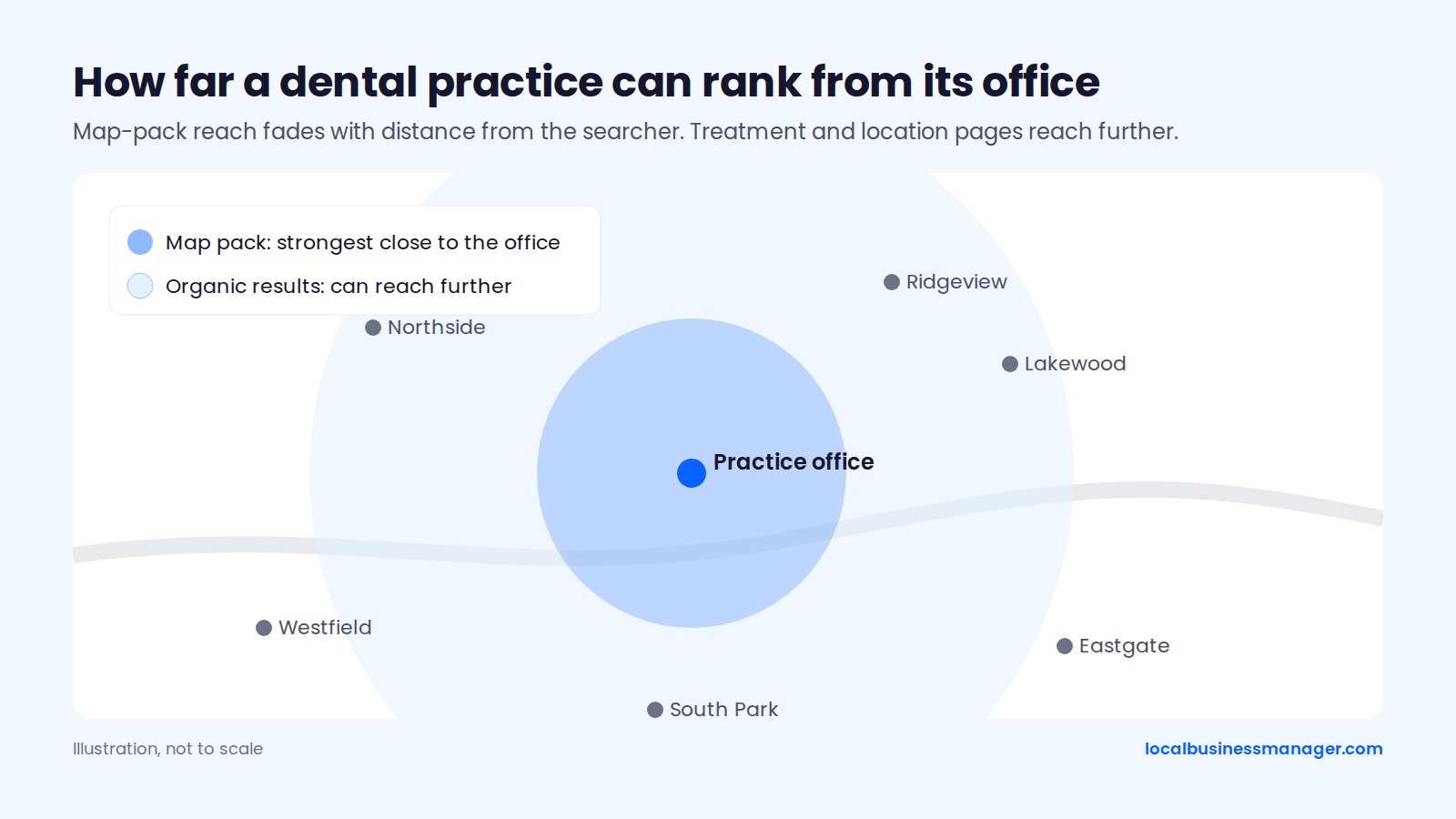
The map pack is tied to the practice's address, while organic results reach further. The 2026 Local Search Ranking Factors survey is run by a local SEO software company and was published in November 2025. It scores ranking factors from local SEO practitioners' ratings, and the respondent count isn't given with the scores. In the survey, "proximity of address to the point of search" ranked #2 for the map pack (score 225), and "physical address in city of search" ranked #4 (score 213).
The same proximity factor ranked only #41 for local organic results. For a dental practice, that splits the job into 3 parts:
- The Business Profile wins searches close to the office, such as "dentist near me", where distance works in its favor.
- Treatment and location pages win organic searches across a wider area, where distance matters far less.
- General SEO (technical health, content quality, links) supports both.
How Should a Dental Practice Set Up Its Google Business Profile?
A dental practice sets up its Google Business Profile (formerly Google My Business) around 4 decisions: categories, services and booking details, practitioner profiles, and the business name. All 4 affect relevance. Two of them also carry compliance risk for dentists: categories, and the name, which falls under state dental board naming rules.
Which Categories Can a Dental Practice Use?
My rule: use the primary category most ranking competitors use. Secondary categories should match treatments the practice really provides. The 2026 Local Search Ranking Factors survey ranks primary category as the #1 map-pack factor (score 227) and an incorrect primary category as the #2 negative factor (score 214).
In a Sterling Sky dentist case, adding relevant secondary categories lifted rankings for the keywords tied to those categories. Removing extra categories did nothing for the main "Dentist" terms. Category choice follows 3 rules:
- Primary: my rule is to use what most of the ranking competitors use. If Google is clearly rewarding a different category than the logical one, I go with the one Google rewards.
- Secondary: add one only when the practice offers that treatment and has a page for it.
- Specialty: Sterling Sky suggests giving a specialty category, such as Orthodontist, to that dentist's practitioner profile as its primary, linked to the matching service page.
The table lists 6 common dental categories, sorted from broadest to most specialized. Dentist is the usual primary. The other 5 work as secondaries or as a practitioner profile's primary. A general dentist who offers Invisalign or implants keeps the same primary category and lists Invisalign and implants as profile services, each with its own treatment page. Specialty categories carry the ADA's specialty-announcement rules and the state board's advertising rules, so check those before adding one. Category names change over time, so confirm the exact names in the profile's category list before editing. Our guide to Google Business Profile categories has the wider list.
Category | Who it fits | Typical use | Watch out for |
|---|---|---|---|
Dentist | Any general practice | Practice profile primary | Check which category top-ranking competitors use |
Cosmetic dentist | Practices offering cosmetic treatments listed on the site | Secondary | Check ADA specialty-announcement rules and the state board |
Emergency dental service | Practices that see same-day urgent cases | Secondary | Emergency dentistry is not a recognized specialty |
Pediatric dentist | Dentists who can announce pediatric dentistry under their state board's rules | Secondary, or a practitioner profile's primary | Check ADA specialty-announcement rules and the state board |
Orthodontist | Orthodontists who can announce the specialty under their state board's rules | Secondary, or a practitioner profile's primary | Check ADA specialty-announcement rules and the state board |
Oral surgeon | Oral surgeons who can announce the specialty under their state board's rules | Secondary, or a practitioner profile's primary | Check ADA specialty-announcement rules and the state board |
Services, Attributes, Photos and Booking Links
The rest of the profile should mirror what the practice actually offers and put booking one tap away, through the call button and a booking link.
A secondary write-up citing Sterling Sky testing reports ranking movement within 24 to 72 hours of adding services to a profile. We couldn't locate the original Sterling Sky post. Set up these 6 areas:
- Services: add one entry per treatment that has its own page on the site. Use the words patients use (implants, Invisalign, crowns, emergency appointments).
- Booking link: point it at the scheduling page. Bookings count as an Interaction in the profile's performance report.
- Hours and holiday hours: keep them exact. If the profile shows after-hours availability, someone has to answer the phone then.
- Attributes: fill in the ones that are true for the practice, such as accessibility details.
- Description: write a plain summary of treatments, offices and who the practice serves, including answers to questions patients often ask.
- Photos: show the exterior, waiting room, team and equipment. Before using any patient photo, confirm the consent form with the practice's privacy officer or compliance adviser.
Should Each Dentist Have Their Own Profile?
Google's rules let each public-facing dentist have a profile. If they do, my intended setup is to give each practitioner profile a different primary category from the practice's so the profiles don't compete. I haven't tested this in practice yet. Google's guidelines for representing your business name dentists as individual practitioners and set 4 rules:
- At a location with several public-facing dentists, the practice gets its own profile, separate from theirs.
- Each practitioner profile carries only the dentist's name, not the practice name.
- A solo dentist should use one combined profile named "Practice: Dr. Name".
- No dentist should have more than one profile.
According to Sterling Sky, Google won't merge or remove profiles for dentists who still work at the practice. Practitioners disagree on whether to create practitioner profiles at all. Whiteboard Marketing (2023) advises multi-dentist practices not to create them and to play down existing ones. Sterling Sky recommends them for specialty searches.
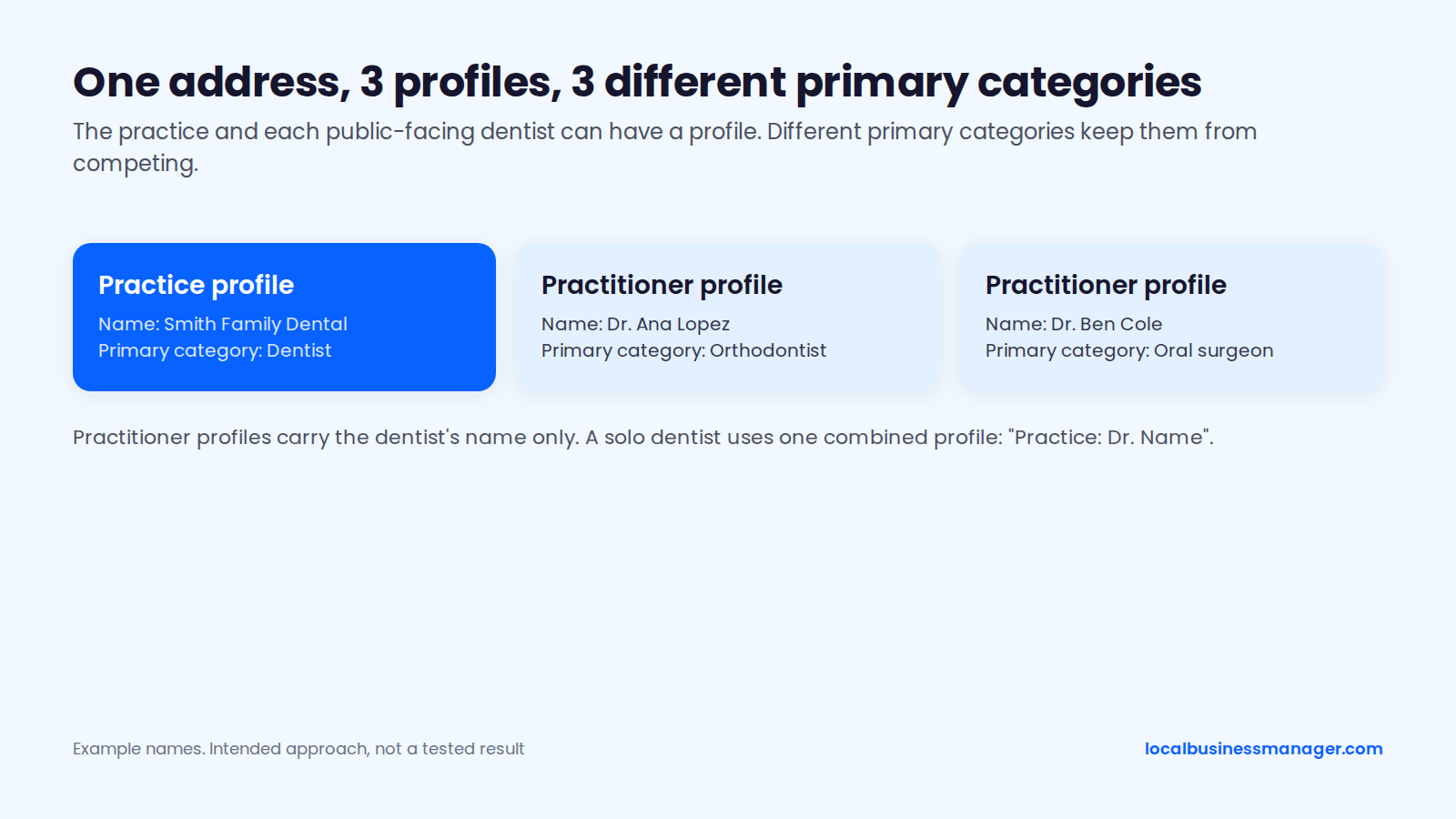
The evidence that a practitioner profile can push the practice profile out of the results is anecdotal. Local Search Forum threads from 2014, 2019 and 2022 describe a dentist's profile outranking or filtering out the practice profile at the same address. The fixes suggested there include a different primary category for each profile. Joy Hawkins has advised leaving the practice name off practitioner profiles for the same reason.
Keyword Business Names and DBAs
I recommend a keyword business name, but only after the keyword name has become the practice's real, registered name. Google requires the profile name to match the real-world name used on signage, the website and stationery. Adding keywords, cities or taglines isn't allowed and can lead to suspension. Two findings point to an upside and one to a risk:
- Rank upside: a local SEO software company's 2026 study counted how often profiles reached the local top 3, split by whether the name contained a keyword. Profiles with a keyword in the name reached it 6.73% and 5.26% of the time, against 2.82% without one. The sample size isn't stated with these figures, and real estate was the only exception.
- Survey weight: the 2026 Local Search Ranking Factors survey puts keywords in the business name third among map-pack factors.
- Suspension risk: the same survey lists keyword names among the top suspension risk factors.
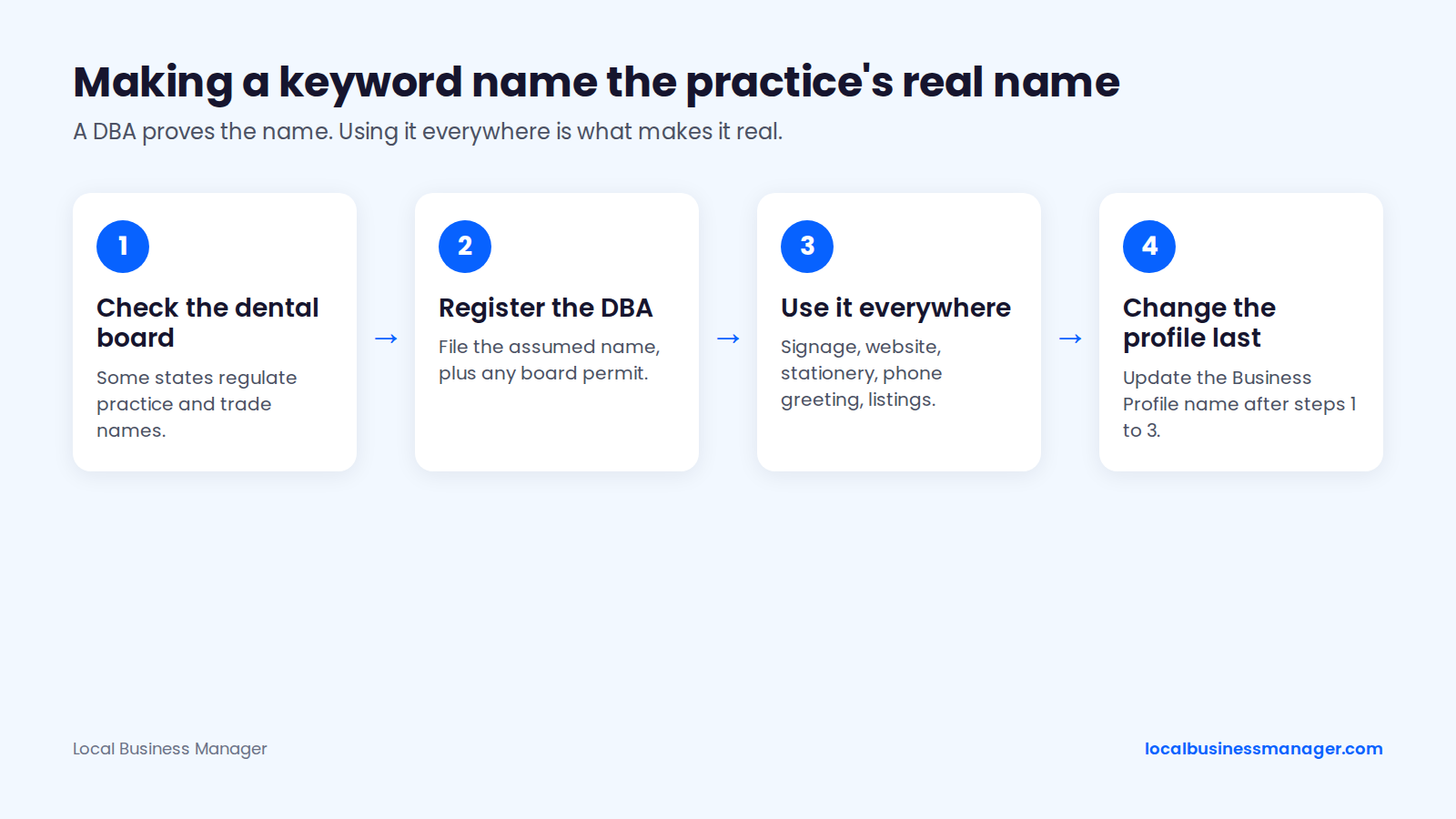
Sterling Sky uses a dental example, "Hawkins Dentists of Chicago" instead of "Hawkins Dental", and calls a legal rename or DBA the only compliant route. The order matters:
- Check the state dental board's naming rules (next section).
- Register the DBA (assumed name) and any board permit.
- Switch signage, website, stationery, phone greeting and other listings to that exact name.
- Change the Business Profile name last.
A DBA document alone doesn't make the name compliant. Google judges the name the practice really uses and can still challenge or suspend it. The DBA is what proves the name if Google asks during reinstatement or re-verification. Our guide to Business Profile suspensions and reinstatement covers that process.
Sterling Sky's test of 50 keyword-stuffed listings, mostly law firms, found that Google mostly acts when someone reports a profile. Sterling Sky notes that competitor reports can lead to suspensions.
In my law-firm work, a single high-impact fix like this one can show ranking gains within about a month. When personal-injury firms missed the 3-pack, the cause was most often an unoptimized profile name plus too little review flow.
Do Dental Boards Restrict Practice Names?
Yes, some state dental boards restrict practice names, which adds a layer that law-firm advice doesn't cover. Three examples show how the rules vary:
- California: a practice name that doesn't include an owner's family name needs a Dental Board fictitious name permit plus a county fictitious business name filing (Business and Professions Code 1701.5). The California Dental Association notes the permit is tied to one address.
- Texas: a rule proposed in March 2025 (22 TAC 108.52) requires anyone practicing under a trade name to clearly display the dentist's full name. Confirm with the Texas board whether it was adopted.
- ADA Code of Ethics: the code has a "Name of practice" provision and specialty-announcement rules. A non-specialty area announced to the public has to carry a disclaimer that it isn't a recognized specialty.
A dash-style name like "Smith Family Dental - Emergency Dentist" works only if that exact string is the registered name on the sign. Otherwise it reads as a tagline. "Emergency dentistry" also isn't a recognized specialty, so check the practice's state dental board before putting it in a name.
Which Searches Should a Dental Practice Target?
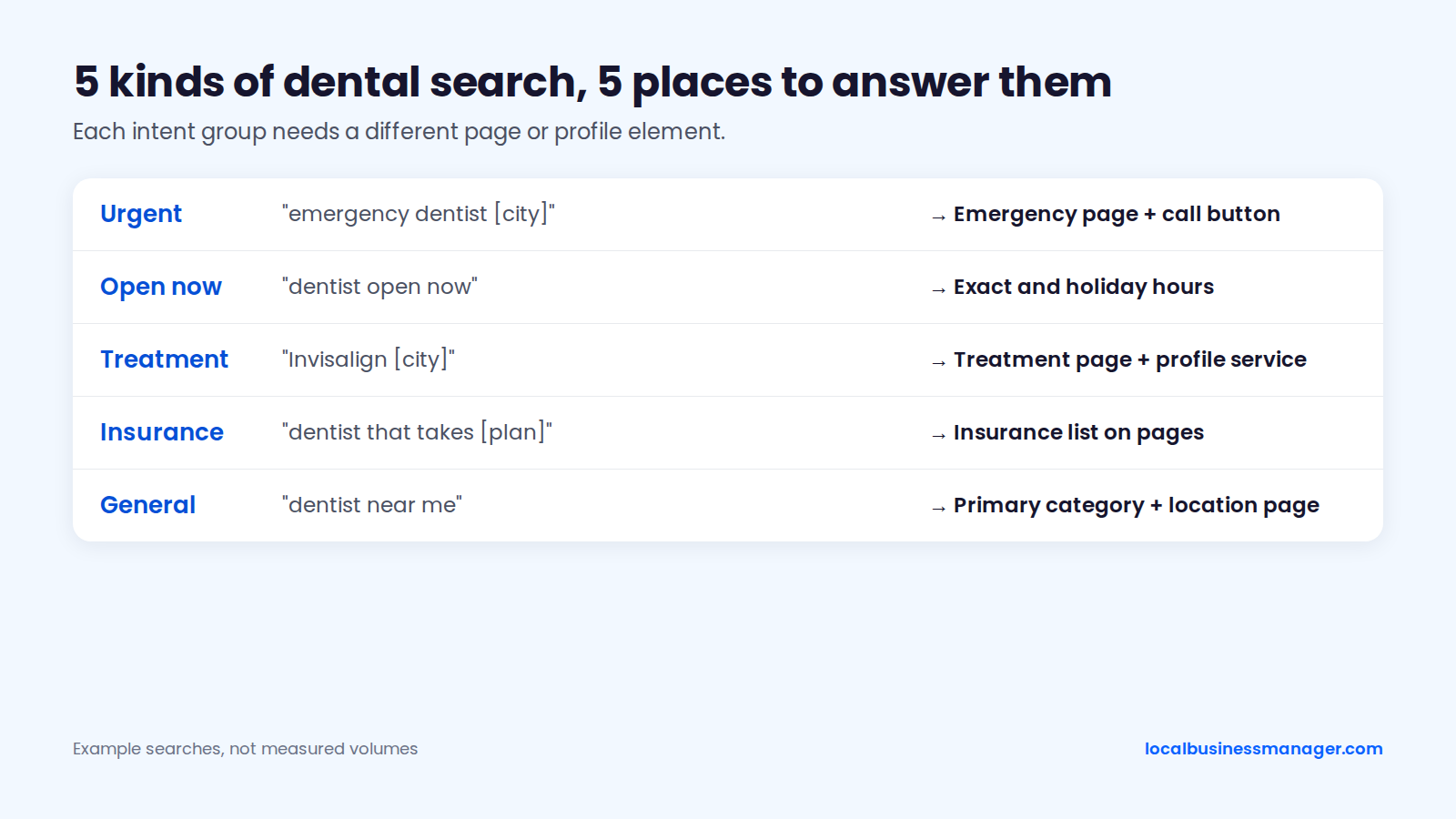
A dental practice should group target searches by intent, because each group needs a different page or profile element. The groups are urgent care, open-now searches, specific treatments, insurance and general "near me" searches. The profile's own Searches report shows the terms patients already use, so start there.
The table sorts 5 intent groups from most urgent to most general, as of November 2026. It gives example searches, not measured volumes, and maps each group to a specific part of the profile or site:
Search intent | Example search | Where the practice answers it |
|---|---|---|
Urgent | emergency dentist [city] | An emergency appointments page and the call button |
Open now | dentist open now | Exact hours and holiday hours on the profile |
Treatment | Invisalign [city] | The treatment's own page and a matching profile service |
Insurance | dentist that takes [plan] near me | The insurance list on treatment and location pages |
General | dentist near me | The primary category and the location page |
Find the exact wording in 3 places:
- The profile's Searches report, which lists the terms people used. Google adds each new month at the start of the month, and the data can take up to 5 days to appear.
- Google's autocomplete and related searches for each treatment plus the city name.
- The front desk's call notes, which show how callers describe what they need.
How Do You Get More Patient Reviews Without Breaking Google's Rules?
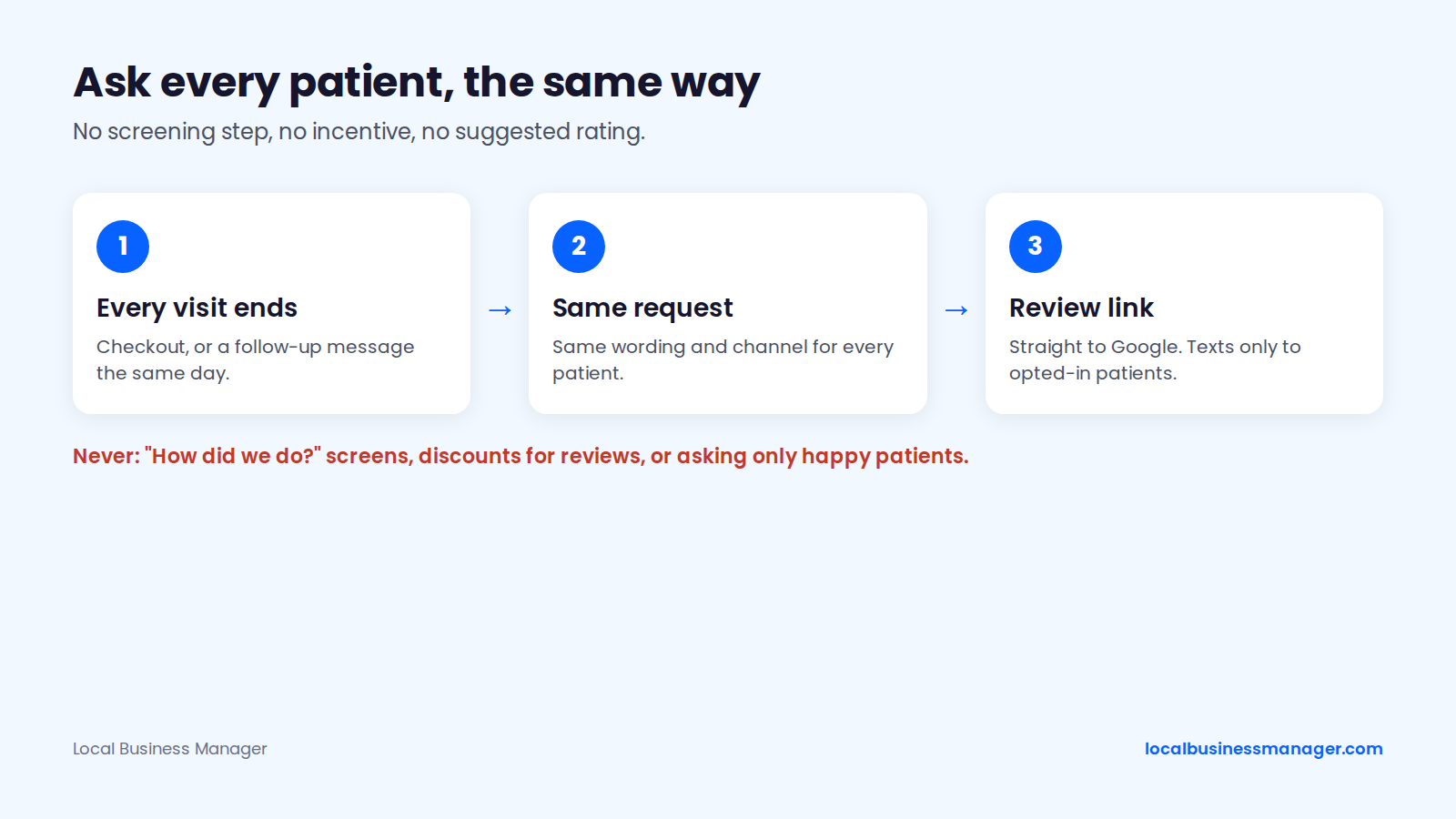
Ask every patient, the same way, with no incentive and no screening. Google's review policy lets a business ask any customer for a review. It prohibits incentives, steering the rating or wording, discouraging negative reviews, and asking only the customers you expect to be happy.
When and How Should a Practice Ask?
The safest timing is the same moment for every patient, such as checkout or a follow-up message the same day. No published study identifies a best time or channel for dental review requests. Google's help page suggests 4 places to share the review link:
- Receipts.
- Thank-you emails.
- The end of chats.
- A printed QR code in the office.
Texts go only to patients who gave written consent. One compliance guide classes review-request texts as promotional under the TCPA, which requires written consent.
The rule that keeps any review program compliant is to ask every client the same way. For personal-injury firms, that means asking every client when their matter closes, and for clients who recovered, that moment is after payout. For a dental practice, the equivalent is the same ask, on the same channel, after every visit.
Sterling Sky case studies show rankings declining when a client stopped asking for reviews and recovering when the program restarted.
Front-Desk, Text and Email Scripts
These 3 scripts ask every patient the same way. They leave out treatment details, staff names and any hint about the rating.
- Front desk (spoken): "Thanks for coming in today. We ask every patient to share honest feedback on Google. This card has a QR code that goes straight to our review page if you'd like to leave one later."
- Text (opted-in patients only): "Hi [First name], it's [Practice name]. Thanks for visiting today. We ask every patient for honest feedback on Google: [review link]. Reply STOP to opt out."
- Email: subject "How was your visit to [Practice name]?", body "Hi [First name], thank you for choosing us. We ask every patient for an honest review on Google, whatever your experience was: [review link]. Thank you for your time. [Practice name]"
What Not to Do
These 9 practices break Google's policy, FTC rules or Yelp's guidelines:
- Offering a discount, free whitening or a raffle entry in exchange for a review.
- Asking only patients you expect to be happy, or adding a "how did we do?" screen before the review link. The FTC's warning letters list selective asking as review manipulation. Fashion Nova paid $4.2 million in 2022 to settle FTC allegations that it suppressed reviews below 4 stars.
- Requiring or pressuring patients to review while they're in the office, such as handing them a tablet before they leave.
- Asking patients to name a dentist or hygienist, or having staff collect reviews that name them.
- Setting staff review quotas. A secondary summary by Launchcodex reports that Google's April 2026 update bans them explicitly.
- Posting reviews written by staff, family or friends.
- Using threats or groundless legal action to stop or remove negative reviews, which the FTC's 2024 final rule on fake reviews bans.
- Texting patients who haven't opted in.
- Asking for Yelp reviews at all. Yelp tells businesses not to ask anyone for reviews and can apply a review-solicitation ranking penalty.
If a review looks fake or breaks Google's rules, report it through Google rather than arguing in the reply.
How Should Dentists Reply to Reviews Without Violating HIPAA?
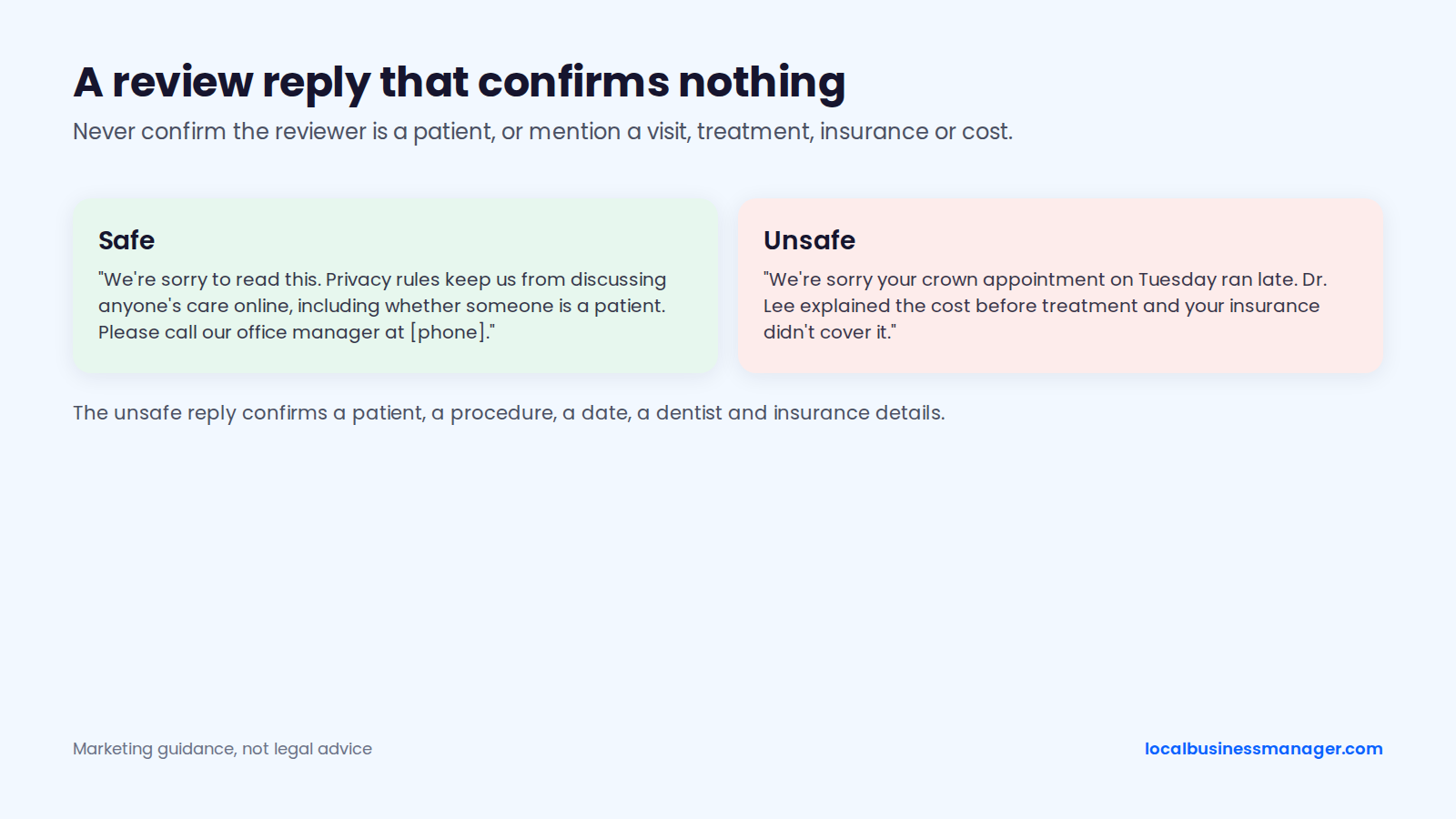
Dentists should reply without confirming the reviewer was ever a patient or mentioning any visit, treatment, insurance or cost detail. The HHS Office for Civil Rights has stated that providers cannot disclose patients' health information when responding to negative reviews. This section is marketing guidance, not legal advice.
What a Reply Must Never Confirm
Two dental practices have paid HHS settlements over review replies:
- Elite Dental Associates in Dallas paid $10,000 and agreed to 2 years of monitoring, announced by HHS OCR in October 2019, after replies on Yelp disclosed patients' last names and treatment details.
- New Vision Dental in California paid $23,000 plus a corrective action plan, announced by HHS OCR in December 2022, after replies to Yelp reviews disclosed patient names, treatment and insurance details.
A dental review reply should never include:
- Any wording that confirms the reviewer is or was a patient ("we're sorry your visitâ¦").
- Appointment dates, times or the dentist who saw them.
- Procedures, diagnoses or clinical explanations.
- Insurance, billing or cost details.
- A rebuttal drawn from chart notes, however wrong the review is.
- The patient's name, even if they used it in the review.
Positive reviews need the same care. "So glad your implant healed well" confirms both a patient and a procedure. The practice's privacy officer or counsel has the final word on reply policy.
Templates: Positive, Negative, Possibly Fake
Each template thanks the reviewer, confirms nothing and moves any detail offline. Swap in the practice's phone number and leave the rest as written.
- Positive: "Thank you for taking the time to share this. We appreciate the kind words, and the whole team will see them."
- Negative: "We're sorry to read this. Privacy rules keep us from discussing anyone's care online, including whether someone is a patient. Please call our office manager at [phone] so we can talk it through directly."
- Possibly fake: "We take every review seriously. Because privacy rules keep us from discussing anyone's care here, please contact our office manager at [phone] so we can understand what happened."
On a review you suspect is fake, don't write "we have no record of you". That sentence still tells the public something about who is or isn't a patient. Reply neutrally, then report the review through Google if it breaks policy. Our guide to what Google removes and how to handle bad reviews covers the reporting process for any business.
Which Pages Does a Dental Website Need to Rank Locally?
A dental site needs one page per treatment, one page per office and a homepage that ties them together. These organic pages extend the practice's reach beyond the office. In the 2026 Local Search Ranking Factors survey, proximity ranks #41 for local organic results, against #2 for the map pack.
Service Page Template
Build every treatment page you want to rank from this 10-part outline:
- An H1 with the treatment and city ("Dental Implants in [City]"), not a superlative such as "Best Dentist".
- A one-paragraph answer: what the treatment is and who it's for.
- What happens at each visit, in plain steps.
- Recovery and aftercare.
- How cost is worked out, and which insurance plans the practice takes.
- The dentist who provides it, with verifiable credentials.
- Before-and-after photos, used only with patient consent that the practice's privacy officer has approved.
- The questions patients actually ask on the phone, answered on the page.
- A booking link, phone number and office address with a map.
- Links to related treatments and the matching location page.
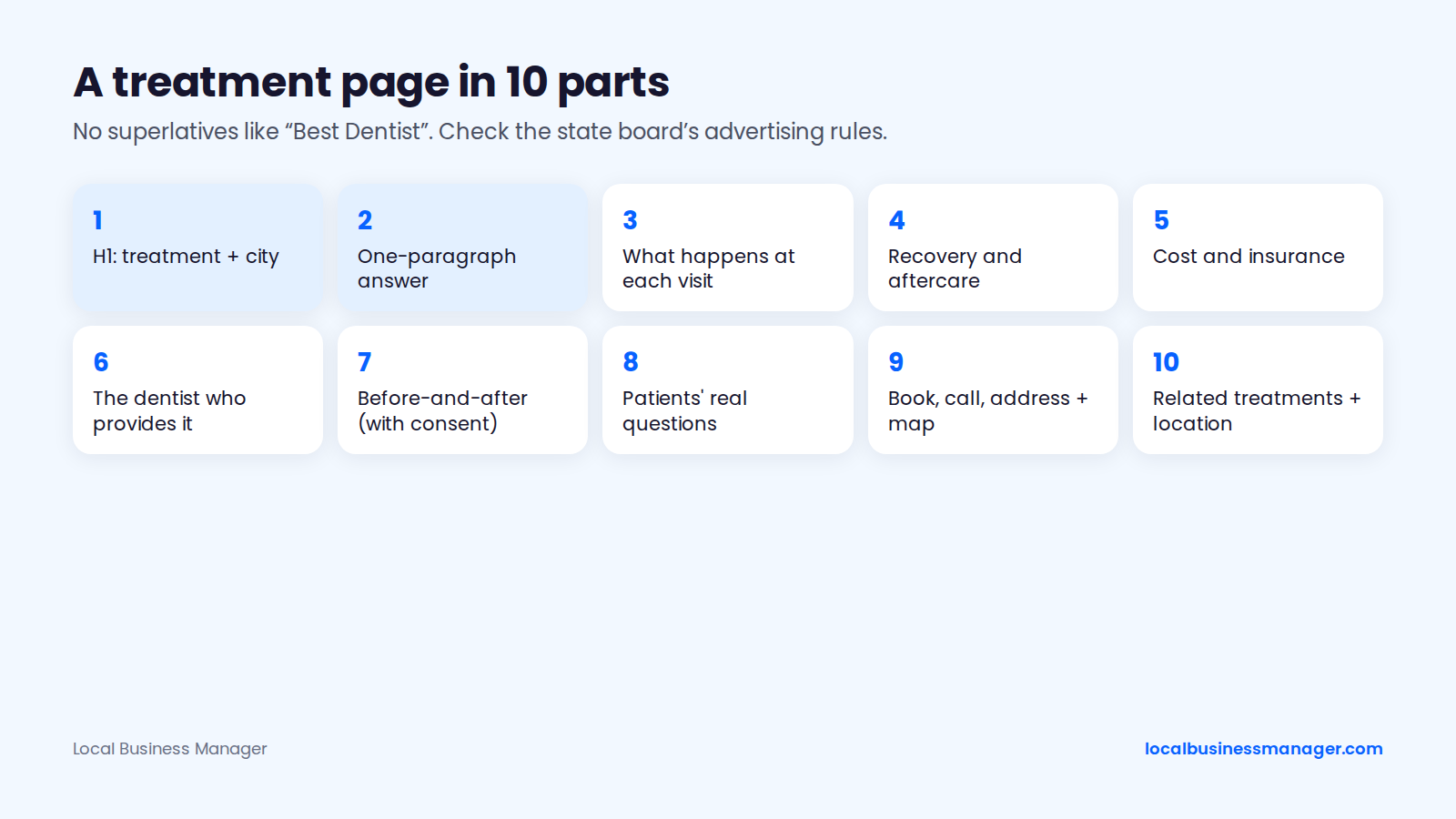
Words like "specialist" fall under the ADA's specialty-announcement rules and the state board's own advertising rules. Superlatives may too. Check the practice's state dental board before publishing either.
Location Pages for Multi-Office Practices
Each office gets its own Business Profile at its real, staffed address and its own location page. Under Google's guidelines, a virtual office isn't eligible for a profile. A virtual office is a rented mailing address the business doesn't operate from.
A location page earns its place with details only that office has:
- Address, map, parking and directions from nearby landmarks.
- Hours, including holiday hours.
- The dentists and hygienists who work there.
- The treatments offered at that office.
- The office's own phone number and booking link.
Point each profile's website link at its own location page, so patients land on the right office. Don't clone one page and swap the city name. Google's spam policy names city-targeted pages that funnel users to one page as doorway abuse, although having one page per city isn't a violation by itself.
Can You Rank in Towns Without an Office?
In the map pack, rarely. In organic results, yes. Joy Hawkins has called ranking in the 3-pack for a city you're not located in "extremely difficult". Small towns are the exception, because Google pulls in businesses from farther away to fill the results there.
Sterling Sky's testing found that the service-area setting doesn't affect rankings, which stay tied to the verified address. In one Sterling Sky case, moving a listing's address about half a mile closer to the city center lifted map rankings the next day. An unstaffed "office" still isn't eligible for a profile, which leaves 3 compliant options:
- Organic city pages that are genuinely useful to patients in that town.
- Local pack ads. Joy Hawkins says they help suburban businesses reach people searching the nearby city's name, though they don't fix proximity.
- A real, staffed second office, if demand justifies it.
Which Citations and Directories Matter for Dentists?
A dental practice needs the same name, address and phone on its Business Profile, the major map platforms and the healthcare directories patients use. The sections below list those platforms and explain how call tracking fits in.
Which Directories Should a Dental Practice Be Listed On?
Check these 8 platforms on every dental client. The table runs from map platforms to dental-specific directories:
Platform | Why it matters | Action |
|---|---|---|
Google Business Profile | The map pack and Google Maps | Match the name to the sign; set categories, services and hours |
Apple Business Connect | Apple Maps and Siri on iPhones | Claim the listing and copy the profile's details exactly |
Bing Places | Bing and Microsoft's map results | Claim it, or import it from the Google profile |
Yelp | A review site many patients check | Keep details exact; don't ask anyone for Yelp reviews |
Healthgrades | Patients compare dentists by specialty and insurance | Claim each dentist's listing and fix the office address |
Zocdoc | Online booking for many practices | Keep insurance plans and hours current if the practice uses it |
WebMD | Health information site with a provider directory | Claim the provider listing and match the name and address |
State dental association | A trusted member directory, often with a link | Update the member listing when anything changes |
My view on cleanup: fix all of them. When hours are tight, fix the most serious issues first and work down from critical to low. Our citation audit guide walks through that order.
Call Tracking Numbers and NAP
Google's guidelines don't mention call-tracking numbers by name, so any setup has to fit Google's general phone rules. As of November 2026, those rules set 3 conditions:
- The number connects to the individual practice location.
- The number is under the business's direct control.
- The number doesn't redirect callers to numbers other than the business's own. Additional phone numbers are allowed.
My practice is to put the call-tracking number as the primary number. I don't find a secondary number necessary. A suspension-recovery firm warns the other way: swapping in a tracking line without keeping the original number as a secondary can cause problems.
Many practitioners do add the secondary number. Joy Hawkins has said Sterling Sky puts the tracking number in primary and the real office number in additional for all its clients, and that this doesn't hurt ranking. A 2019 Local Search Forum thread reported tracking numbers spreading from Google to other directories. No published controlled test settles the question. Whatever the setup, check 2 things:
- The tracking line rings the office during business hours.
- Someone can answer it during verification, since the same recovery firm notes Google may call or text the listed number.
What Schema and Technical Basics Should a Dental Site Have?
A dental site needs Dentist structured data and a fast, mobile-friendly template. Schema.org defines a Dentist type for this. Mark up the name, address, phone, hours and profile links, as in the example below, then check the 3 points that follow.
{
  "@context": "https://schema.org",
  "@type": "Dentist",
  "name": "Example Family Dental",
  "url": "https://www.example.com/",
  "telephone": "+1-555-555-0100",
  "image": "https://www.example.com/images/office.jpg",
  "address": {
    "@type": "PostalAddress",
    "streetAddress": "123 Main St, Suite 200",
    "addressLocality": "Springfield",
    "addressRegion": "IL",
    "postalCode": "62701",
    "addressCountry": "US"
  },
  "geo": {
    "@type": "GeoCoordinates",
    "latitude": 39.7817,
    "longitude": -89.6501
  },
  "openingHoursSpecification": [
    {
      "@type": "OpeningHoursSpecification",
      "dayOfWeek": ["Monday", "Tuesday", "Wednesday", "Thursday"],
      "opens": "08:00",
      "closes": "17:00"
    },
    {
      "@type": "OpeningHoursSpecification",
      "dayOfWeek": "Friday",
      "opens": "08:00",
      "closes": "13:00"
    }
  ],
  "sameAs": [
    "https://www.facebook.com/examplefamilydental",
    "https://www.instagram.com/examplefamilydental"
  ]
}
Check 3 points on every dental template:
- Markup matches the page: every value in the JSON-LD appears on the visible page, and the name is identical to the Business Profile.
- No self-serving stars: Google said on 16 September 2019 that reviews a business marks up about itself aren't eligible for review rich results. Leave aggregateRating out of the practice's own Dentist markup.
- Mobile and speed checks: Google retired the Mobile-Friendly Test on 1 December 2023. Test treatment and location pages in PageSpeed Insights or Lighthouse instead. Google's Core Web Vitals count a page as good when Largest Contentful Paint is 2.5 seconds or less, Interaction to Next Paint is 200 milliseconds or less, and Cumulative Layout Shift is 0.1 or less.
How Do Dentists Earn Local Links?
Dentists earn local links from relationships the practice already has in its community, not from bought placements. Each idea below gives a local site a real reason to mention the practice:
- Sponsoring a youth sports team or school event that lists sponsors on its website.
- School dental health visits or screenings, written up by the school or district.
- Member pages of the state and local dental associations and study clubs.
- Dental school alumni or faculty pages, if a dentist teaches.
- A practice-run community event, such as a free care day, covered by local news.
- Local business groups, such as the chamber of commerce.
Don't pay for followed links. Google's spam policies class buying or selling links that pass ranking credit as link spam.
What Advice Is Outdated in 2026?
As of November 2026, 9 pieces of dental SEO advice still circulating on ranking pages are outdated or wrong, from the old Google My Business name to star ratings in a practice's own schema. The table gives the current replacement for each.
The table runs from profile and listing advice to website advice. The schema status comes from Google Search Central's September 2019 post, the review status from Google's review policy, the Mobile-Friendly Test retirement from Google's December 2023 announcement as reported by Search Engine Land, the chat removal and the Q&A change from Google's announcements as reported by trade press, the FAQ change from Google Search Central's August 2023 post, and the posting result from a secondhand report of a Sterling Sky test.
Old advice | Status (November 2026) | Do this instead |
|---|---|---|
Call it Google My Business | Renamed Google Business Profile | Use the current name |
List the practice in Apple Maps Connect | Now Apple Business Connect | Claim the listing in Apple Business Connect |
Post weekly to boost rankings | No ranking movement in a 9-week Sterling Sky test across 441 keywords (secondary report) | Keep posting as a sign the practice is active (I post 3 times a week), but don't expect posts alone to move rankings |
Request reviews right after a good appointment | Selective asking breaks Google's review policy | Ask every patient the same way |
Add aggregateRating to the site's own schema for stars | Self-serving reviews not eligible for review rich results since September 2019 | Leave ratings out of the practice's own markup |
Use the Mobile-Friendly Test | Retired in December 2023 | Use Lighthouse or PageSpeed Insights |
Turn on chat in the Business Profile | Chat was removed from Business Profiles on 31 July 2024 | Keep the call button and booking link working |
Seed the profile's Q&A with 15 to 20 answers | Google is replacing profile Q&A with an AI "Ask" feature, confirmed by a Google Product Specialist in December 2025 | Answer common questions in the profile description, services and treatment pages, which the AI answers draw on |
Add FAQ schema to win FAQ rich results | Since August 2023, FAQ rich results show only for well-known government and health sites | Keep FAQs on the page for patients; don't expect the rich result |
How Do You Measure Dental Local SEO Results?
Measure calls, bookings and rankings across the whole area around the practice, not a single search from the front desk. Google's performance report covers actions on the profile. Call tracking, UTM tags and GA4 events cover what happens after the click.
Why Checking From the Office Misleads
A search from the office shows what Google returns at that spot for that person, which isn't what patients across the area see. Sterling Sky notes that results are personalized by location and browsing history. An owner who often visits a competitor's site may see that competitor ranked higher.
Practitioners on the Local Search Forum add that results shift with time of day, browser, device, location setting, IP address and search history. Picture the owner searching "dentist near me" from the operatory chair, 50 feet from the address on the profile. A patient 3 miles east may see a different pack. Proximity ranks #2 among map-pack factors in the 2026 Local Search Ranking Factors survey.
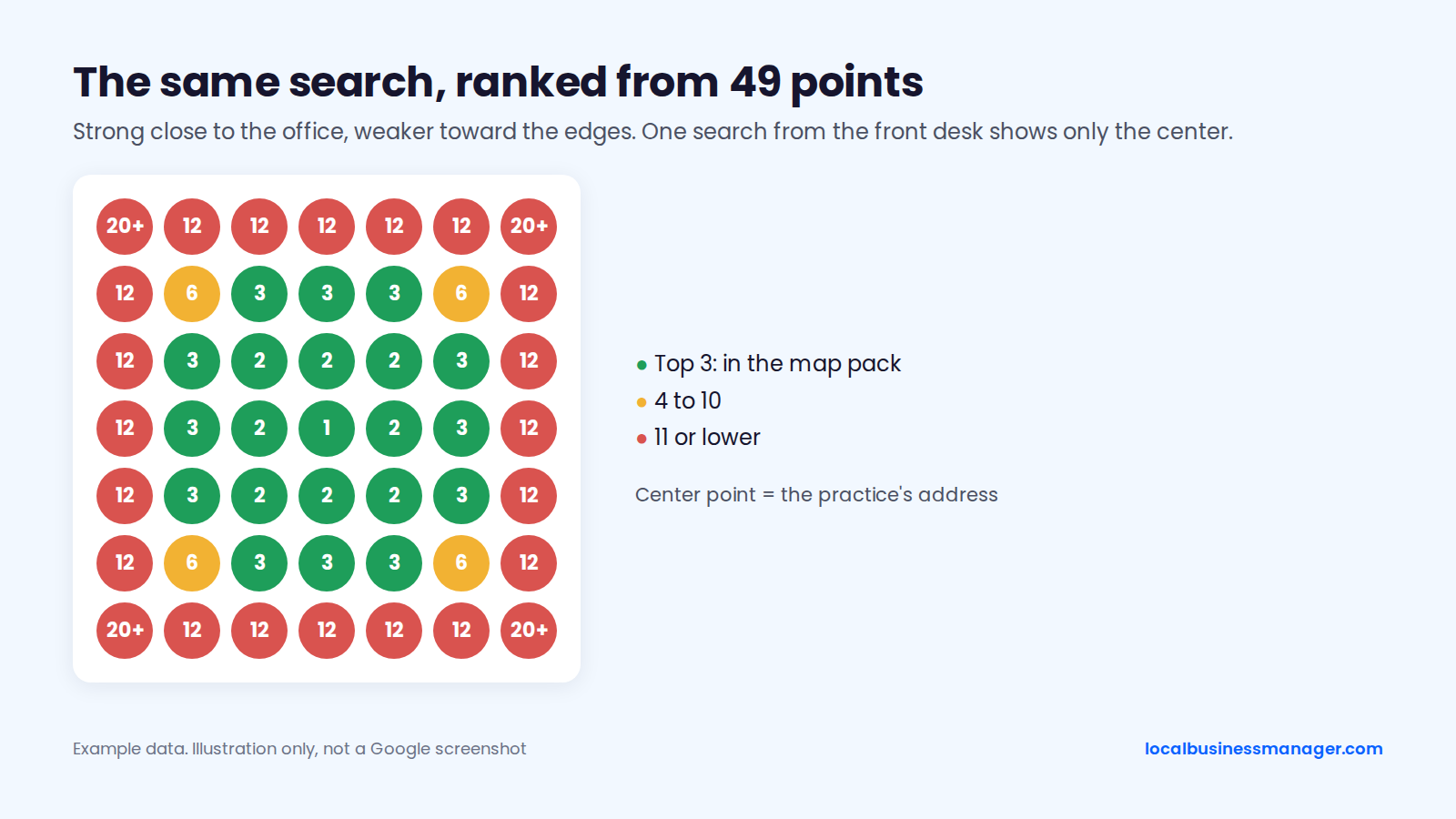
Example data. Illustration only, not a Google screenshot.
My first step on any new local client is a geo-grid scan, which checks rankings from a grid of points across the area. I start with 13 Ã 13 points spaced 0.5 miles apart. If the grid comes back mostly green, I widen the spacing to see how far the ranking reaches. If it's mostly red, I tighten it. Scan at least monthly, and daily only after an edit you want to check.
I don't use single-point checks at all, since one location says little about the whole area. I'd also read a grid's average rank with caution right now. In my view, Google's results have become unusually volatile, which makes any single average hard to read with confidence.
How to Track Calls and Bookings
Tracking profile clicks through to booked appointments takes 3 pieces:
- A UTM tag on the profile's website link, for example
https://www.example.com/?utm_source=google&utm_medium=organic&utm_campaign=gbp, so GA4 separates profile visits from other Google traffic. - GA4 events for click-to-call taps and completed online bookings.
- A call-tracking number on the profile (see the NAP section), to count calls the performance report misses.
Google's Business Profile performance report shows Interactions, which add up calls, chat clicks, bookings, directions, menu clicks and website clicks. Views count unique people, each counted once per day. Search terms arrive at the start of each month and can take up to 5 days to appear.
A local SEO software company's GBP guide (about 2023) notes that the profile's call metric counts only mobile taps on the Call button. Desktop calls are missing from that number.
Monthly Client Report Outline
Agencies disagree on what should lead a monthly report. In a local SEO software company's 2023 Local Search Industry Survey, agencies named local pack rankings as their top metric (54%), ahead of new leads (45%), organic rankings (39%) and GBP metrics (32%). The sample size isn't stated with these figures. Sterling Sky does the opposite: it leaves rankings out of client reports and focuses on profile views, actions and analytics conversions.
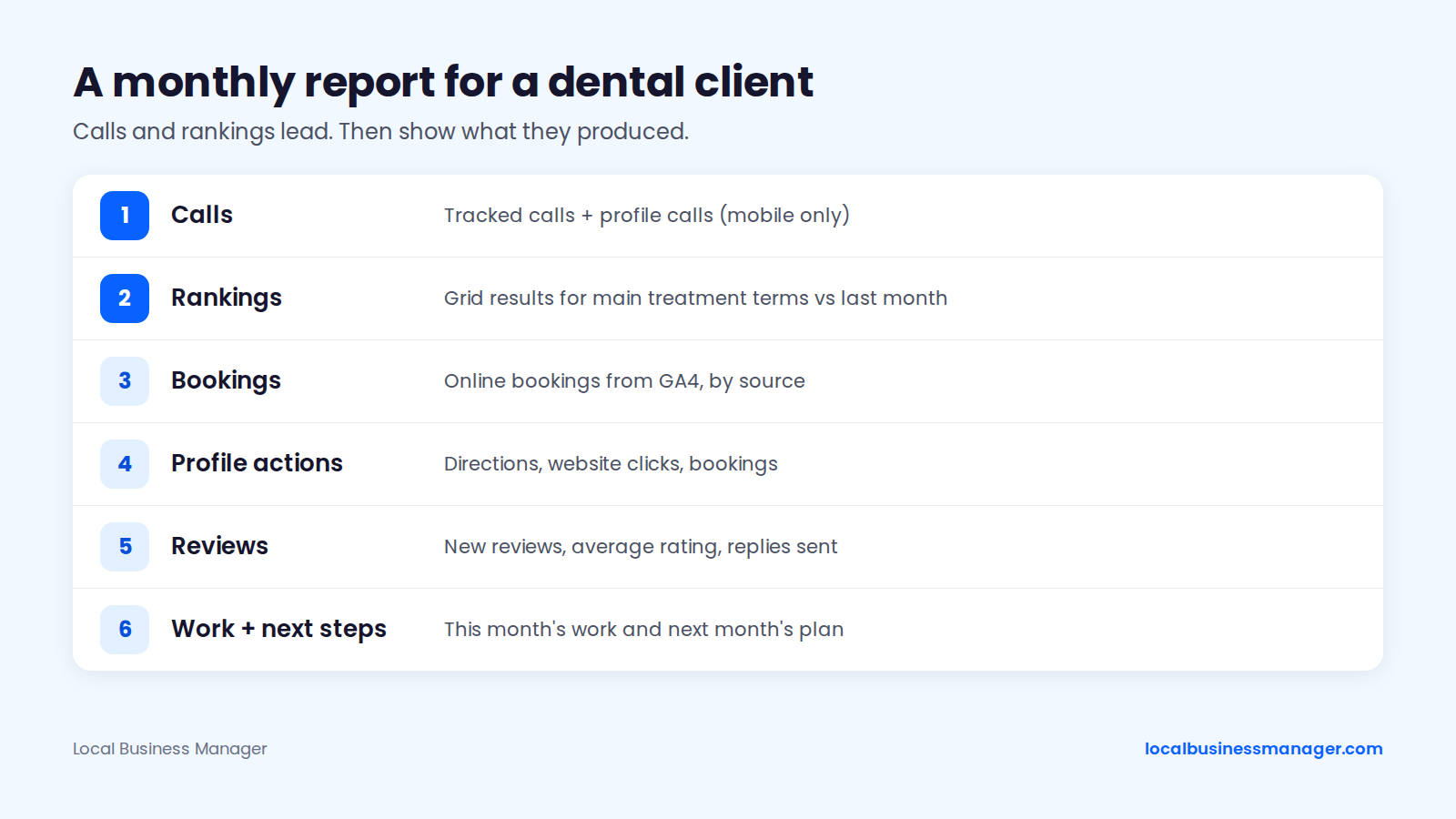
My view: calls and rankings lead the report. A dental client report can follow this order, and our guide to local SEO reporting for agencies covers building it:
- Calls: tracked calls, plus profile calls (mobile only).
- Rankings: grid results for the main treatment terms, compared with last month.
- Bookings: online bookings from GA4, split by source.
- Profile actions: directions and website clicks.
- Reviews: new reviews, average rating and replies sent.
- Work done this month and the plan for next month.
How Do AI Answers Affect How Patients Find Dentists?
No verified dental-specific data shows how AI answers change the way patients choose a dentist, and the same profile and website work applies. Google's AI Overview for "local seo for dentists", captured on 6 November 2026, summarizes the same pillars this guide covers. These include profile optimization, categories such as Dentist, Cosmetic Dentist and Emergency Dental Service, and NAP consistency.
The practical work is the same as for the map pack:
- Keep practice facts identical across the profile, the website and directories.
- List every treatment as a service and give it its own page.
- Answer patients' real questions on the website's treatment pages.
One observation from my law-firm work: paid legal directories helped firms get mentioned in AI Overviews. I have no dental data on whether healthcare directories play the same role.
How Much Does Local SEO for Dentists Cost, and How Long Does It Take?
Local SEO for dentists has no honest standard price. Cost depends on scope, the number of offices and the market's competition, and I won't quote unsourced figures. Timelines run from minutes for a profile edit to months for broad gains. The sections below cover timelines, scope and red flags.
How Long Does Dental Local SEO Take?
The fastest documented ranking movement comes from specific profile changes. Broad gains in competitive markets take months, according to an old practitioner survey. The table runs from fastest to slowest. Apart from the category example earlier in this guide, no source covers dental practices specifically.
Change | Time observed | Source |
|---|---|---|
Profile edit goes live | Up to 10 minutes, sometimes up to 30 days | Google Business Profile Help |
Address moved closer to the city center | Next day | Sterling Sky case study |
Services added to the profile | 24 to 72 hours | Sterling Sky testing, via a secondary report |
One high-impact fix, such as a keyword name via DBA | About 1 month | Founder observation, law firms |
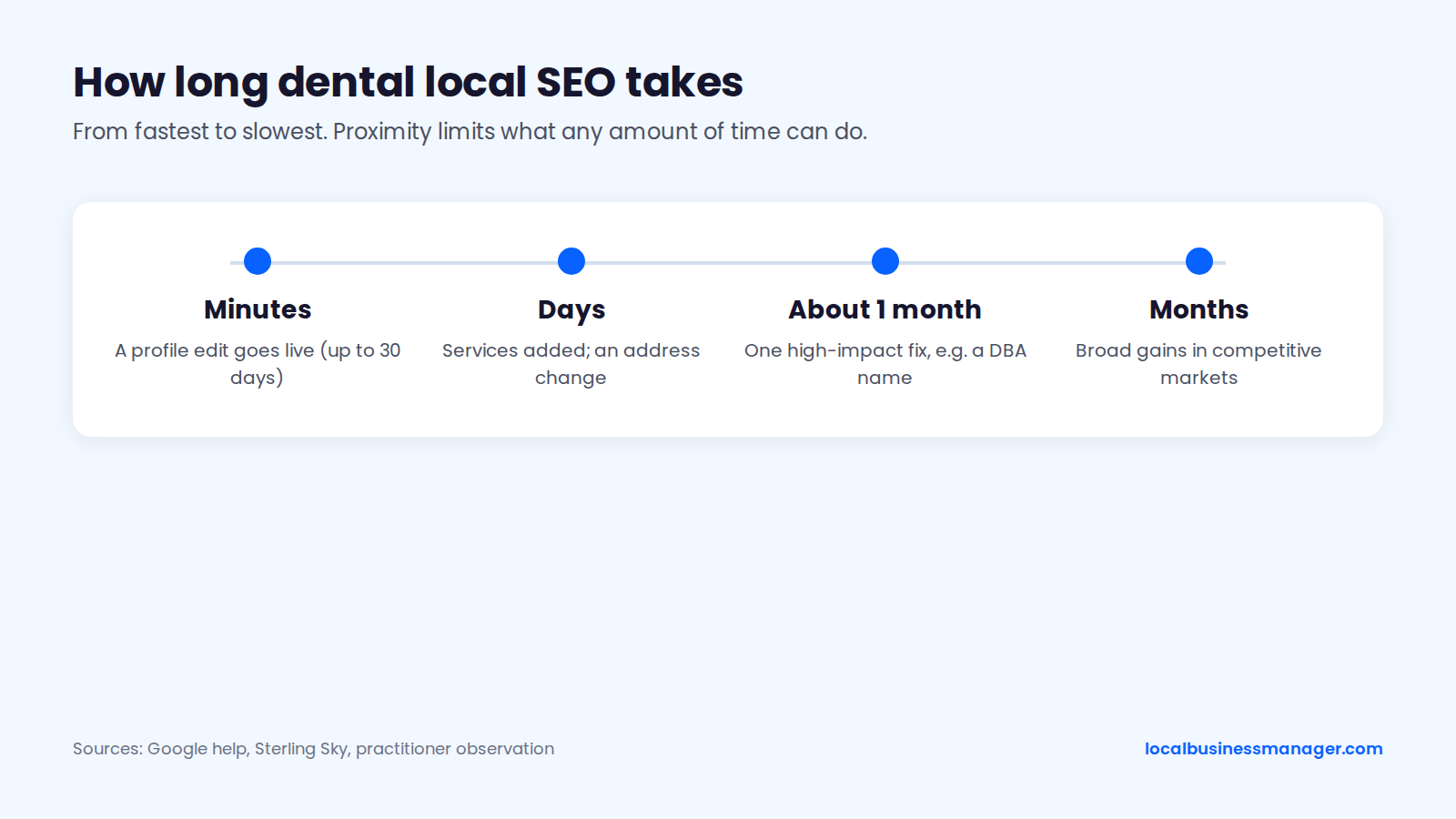
In my experience, once the basics are done, further gains come gradually, for example from a strong review push. Some ceilings don't move with time. Proximity is a top-2 map-pack factor, and Joy Hawkins calls ranking in the 3-pack for a city you're not located in "extremely difficult", with small towns the exception.
What an Engagement Should Include
In my view, a proper engagement must deliver rankings for the main treatment terms.
The work that produces those rankings is the work covered in the sections above. As a checklist drawn from the sourced sections of this guide, a complete dental engagement covers 6 areas:
- A profile audit and fixes: access, categories, name, services and practitioner profiles.
- A review program that asks every patient and replies within HIPAA limits.
- Treatment and location pages built to the template above.
- Citation cleanup on the core platforms.
- Dentist schema and a technical check.
- Call and booking tracking, with a monthly report that leads with calls and rankings.
Ask any provider which of these are in scope. Also ask who keeps ownership of the Business Profile and the tracking numbers if the contract ends.
How to Choose a Dental SEO Company or Consultant
Choose a dental SEO company or consultant by asking what they'll do, how they'll measure it and who owns the assets. These 5 questions separate a real plan from a sales pitch:
- Which of the 6 areas above are in scope, and what happens in the first month?
- How will rankings be measured: from a grid across the area, or from one location?
- Will the monthly report show calls and bookings, not only rankings?
- Who owns the Business Profile, the website and the tracking numbers if the contract ends?
- How will review replies stay within HIPAA, and who approves them?
The best dental SEO companies answer all 5 in writing before you sign.
Red Flags, Such as Guaranteed Rankings
Guaranteed rankings are the clearest red flag. Distance is one of Google's 3 local ranking factors, and nobody controls where a patient searches from. These 6 offers should end the conversation:
- A guaranteed #1 spot or guaranteed map-pack placement.
- Keywords added to the profile name without a registered DBA and matching signage.
- A virtual office or mailbox to get a listing in another town.
- Review "packages", incentives or a filter that sends only happy patients to Google.
- City pages cloned with only the name swapped.
- Reports built on rank checks from a single location.
Agency Checklist: Onboarding a New Dental Client
Onboarding a dental client starts with access. It then follows the order I check every new local client in: rankings, name, category and website. Practitioner profiles, reviews and tracking come after that. The checklist and client script below cover both.
Audit Checklist
Confirm access before anything else. Google allows several owners but only one primary owner, and managers can't add or remove users or delete the profile. If someone else owns the profile, request ownership through business.google.com/add.
I check the first 4 items in this order on every new local client. The rest come from Google's guidelines and the sections above. For the full process, see our 10-step local SEO audit.
- Rankings across the area: a grid scan for the main treatment terms, starting at 13 Ã 13 points 0.5 miles apart.
- The business name, compared with the names of the ranking competitors.
- The primary category, compared with what the ranking competitors use.
- The website: treatment pages, location pages, mobile speed and schema.
- Practice and practitioner profiles: duplicates, names, categories, and any dentist with more than one profile.
- Map pin placement and whether the address shows on the profile (both new top-10 factors in the 2026 Local Search Ranking Factors survey).
- Physical location or service-area setup.
- Services, booking link, hours and holiday hours.
- Review flow: new reviews per month, and whether requests go to every patient.
- Past review replies: any that confirm a patient or mention treatment.
- Phone setup: the tracking number and what's listed elsewhere.
- Citations on the 8 core platforms.
- The UTM tag on the profile link and GA4 events.
- Baseline numbers for the first monthly report.
The "We Dropped" Client Script
Use this script when a practice owner says the practice dropped after searching from the office:
- "Thanks for flagging it. Searches from the office are tuned to that spot and to your own browsing. If you visit a competitor's site often, Google can show them higher to you."
- "Patients search from all over the area, so we check rankings from a grid of points across it, not from one spot."
- "This is this month's grid next to last month's for [term]. These areas got stronger, and these got weaker."
- "These are the calls and bookings for the month, which is what the rankings are for: [numbers]."
- "Where the grid did slip, this is what we think caused it and what we're changing this week."
Frequently Asked Questions
Can a Dental Office Display a Review QR Code at the Front Desk?
Yes, a printed QR code appears to be allowed, and Google's own help page suggests one. Google's policy bans requiring or pressuring patients to review while they're on the premises. A passive sign or card fits Google's suggestion. A staff member standing over a patient with a tablet does not. No published test was found that shows where Google draws the exact line, so keep it passive and offer the code to every patient.
What Happens to a Dentist's Profile When They Leave the Practice?
Google treats the dentist named on a practitioner profile as its owner, so the profile follows the dentist. According to Sterling Sky, if the dentist moves to another practice, Google updates the profile to the new location. If they retire, Google removes it only on a specific request. Google won't merge or remove profiles for dentists still at the practice, so settle this before anyone creates a practitioner profile.
What Should You Fix First?
Check rankings across the whole area before changing anything, because every other fix is judged against that picture. Then work through the onboarding checklist above, and audit every past review reply against the never-confirm list. If your agency manages dental clients, Local Business Manager's early access is open.