Google Business Profile Posts: What to Post and How Often

Post useful Updates to your Google Business Profile on a schedule you can keep, and add an Offer or Event only when there's a real one behind it. I post 3 times a week per profile, but a smaller cadence you keep every week beats bursts.
Google sets no posting quota and hasn't confirmed posts as a ranking factor, so the case for posts rests on the people already looking at the profile. Below you'll find the 3 post types, an idea bank by industry with fill-in templates, Google's free scheduling and Repeats, a rejection checklist and a way to show clients whether posts did anything.
What Are Google Business Profile Posts?
Google Business Profile posts are short updates, offers and events that a business publishes on its own profile, shown on Google Search and Maps. Before the product was renamed, they were called Google My Business posts. Google's help page lists 3 post types (Update, Offer and Event). Where each one appears and how long it stays live shape what's worth writing.
Where Posts Show Up on Mobile and Desktop
Posts appear in the Updates or Overview tabs on mobile and in the "From the owner" section on a computer, on both Search and Maps, according to Google's help page on creating and managing posts. The same page limits featured posts to a narrow group of businesses.
Where | Where posts appear | Who it applies to |
|---|---|---|
Mobile (Search and Maps) | The Updates or Overview tabs | Every profile that posts |
Computer (Search and Maps) | The "From the owner" section | Every profile that posts |
Featured posts (mobile) | In place of reviews on the profile | Single-location food and drink businesses, in English, in the US, UK, Canada, Australia and New Zealand |
Google says featured posts can come from the business's social media channels, such as Facebook and Instagram, or from posts created on the Business Profile. For a plumber or a law firm, the Updates tab and "From the owner" are where posts live.
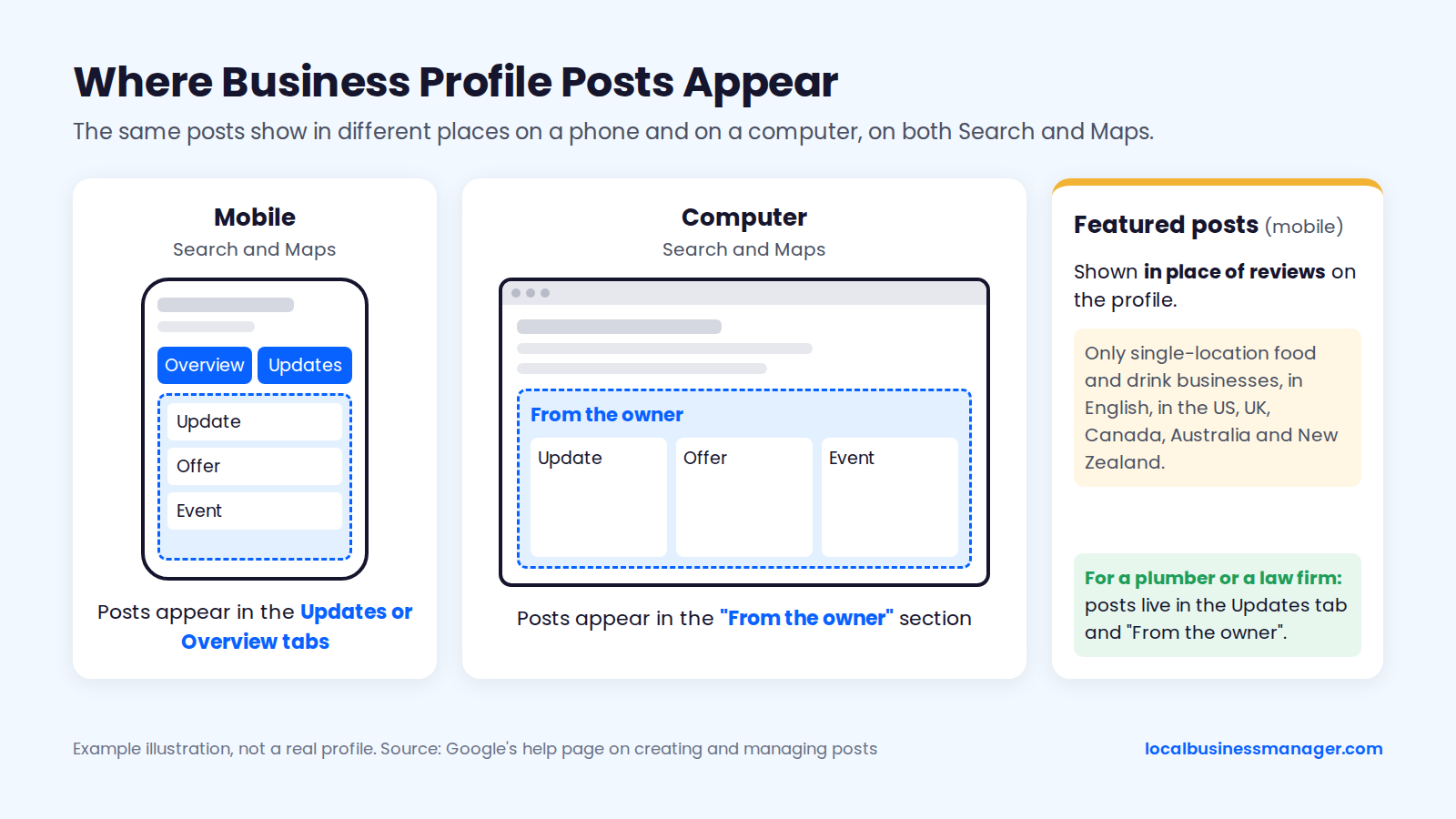
Example illustration, not a real profile.
Before you tell a client where to find their posts, check the profile yourself on a phone and on a desktop, so you describe what their customers actually see.
How Long Posts Stay Visible
Update posts stay live for 6 months: Google's help page says posts older than 6 months are archived unless a date range is set. Offers run until their end date, and Events until the event ends. Guides that say posts disappear after 7 days describe a rule that no longer applies.
The 6-month window has 2 practical consequences:
- A profile that stops posting doesn't go blank overnight. After 6 months of silence, though, no Update posts on it are still live.
- An Offer with an end date 3 months away stays up for all 3 months. Confirm the business will honor the deal for that long before you publish it.
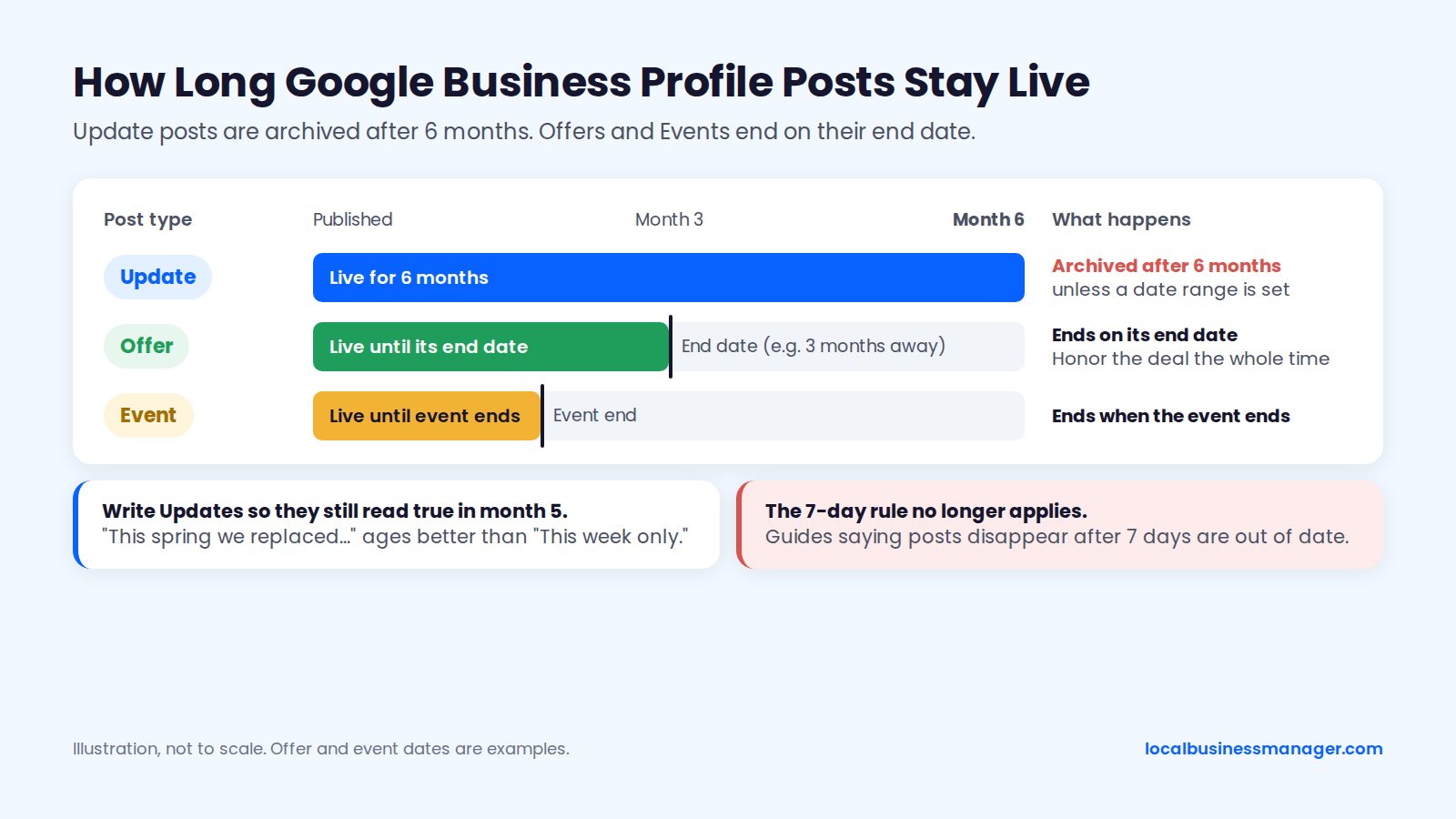
Write Updates so they still read true in month 5: "This spring we replacedâ¦" ages better than "This week only."
Which Post Type Should You Use: Update, Offer or Event?
Use an Update for almost everything, an Offer only for a genuine deal with an end date, and an Event only for something that happens at a set time. The table compares the fields Google's help page lists for each type, with Updates first because they carry most of a posting schedule.
Post type | Use it for | Required fields | Optional fields | Button | How long it stays live |
|---|---|---|---|---|---|
Update | News, finished jobs, tips, answers to common questions | Not listed on Google's page | 1 button | Optional, chosen by you | 6 months, then archived |
Offer | A real discount, sale or coupon | Title, dates and time | Description, photo, video, coupon code, link, terms and conditions | "View offer", added automatically | Until the end date |
Event | An open house, workshop or community event on a set date | Title, start and end dates | Start and end times, 1 button | Optional, chosen by you | Until the event ends |
Update Posts
An Update is the default post type for news, recent jobs, tips and answers. It needs no deal and no date, which is why most of a steady schedule should be Updates.
Update and Event posts can include 1 button: Book, Order online, Buy, Learn more, Sign up or Call now. Google's own help page says only "Add button" and doesn't list the labels; the list comes from trade press, including Search Engine Land.
The Business Profile API's localPosts reference lists 6 matching action types (BOOK, ORDER, SHOP, LEARNMORE, SIGNUP and CALL), but Google doesn't say which interface label maps to which value.
For contact details and links:
- Contact details. Around September 2026, Google reworded its posts rules, according to Search Engine Roundtable: posts with unverified contact information may be removed, and a phone number Google can't connect to the business may be rejected. Leave the number out of the text and use the Call now button, which uses the profile's verified number.
- Links. Point a link button at the page that matches the post: the water heater service page, not the homepage. Use Call now when no page fits the post.
Offer Posts
An Offer is for a genuine deal with dates and a time, and it stays live until the end date. Offers need a title, dates and a time, per Google's help page, and Google adds a "View offer" button automatically. The optional fields are a description, photo, video, coupon code, link and terms and conditions.
Offers also get their own reporting. In March 2026, Search Engine Roundtable reported that Google had added an offers metric, counting offer views and clicks, to its help documentation on Business Profile performance (more in the measurement section).
If there's no genuine deal, don't invent one just to use the post type. Write an Update instead. Law firms are the usual example: discount-style offers rarely fit legal services, and the firm's state bar advertising rules apply (see the law-firm section below).
Event Posts
An Event is for anything that happens at a set time: an open house, a community cleanup the team joins, a free workshop or a seminar. Google's help page says an Event needs a title and start and end dates; times are optional, but an Event with no start or end time shows as lasting 24 hours on the event dates.
Enter the times the event really runs. A 2-hour seminar posted without times reads as an all-day event and can bring people to the door when nobody is there.
Use Events only for things that happen on a date. A "spring tune-up season" that runs for 3 months is an Offer (if there's a deal) or an Update (if there isn't).
Do Google Business Profile Posts Help Rankings?
No controlled test or Google statement shows that Google Business Profile posts have an impact on ranking in the map pack. Google's help page on local ranking names 3 factors: relevance, distance and prominence. The best outside evidence rates posts as weak or ineffective for ranking (more in local ranking factors explained).
As of November 2026, the strongest evidence finds little or no ranking effect: a 3-profile test measured no change, and an expert survey placed post quantity at #168 among local pack factors. Only a correlation study links more active posts with higher rankings. The table grades each source, starting with Google's own statement.
Evidence type | Source and date | What it found | How strong it is |
|---|---|---|---|
Google statement | Google's local ranking help page | Relevance, distance and prominence; posts not confirmed as a factor | Official, but silent on posts |
Controlled test | Sterling Sky, 2021 (July, per a secondary summary) | Adding posts to 3 inactive profiles had no measurable effect on local pack rankings | Small: 3 profiles, about 9 weeks |
Correlation study | A local SEO software company, 2026: 16,098 profiles and 111,000+ posts | 10+ active posts: top 3 in 73.0% of cases, against 63.7% with no posts | Correlation, not cause |
Expert survey | 2026 Local Search Ranking Factors survey, published 2025, based on expert ratings | Post quantity #168 among local pack factors | Expert opinion, not measurement |
Practitioner | Joy Hawkins, Sterling Sky, April 2024 | Asked if posts affect rankings: "Not that I have ever seen" | One expert's experience |
Our view | Dragan Nedelkovski | Very little ranking influence; a sign the business is active | Practitioner opinion |
My view is that posting has very little influence on rankings. I still post regularly, because a profile that's updated often signals to Google that the business is active, and I'd rather send that signal than leave a profile quiet. Google hasn't confirmed that, so treat it as my practice and my read, not something I can prove with a test.
The evidence that posts help convert people already viewing the profile is limited, too:
- Sterling Sky recommends posts for conversions and messaging, not for keyword rankings.
- The 2026 Local Search Ranking Factors survey ranks post frequency #78 and post quantity #91 as conversion factors, against #168 for post quantity among local pack factors.
- Sterling Sky's study of more than 1,000 posts, from before Google removed post click data in 2023, shows small click numbers per post (see the measurement section).
How Often Should You Post?
Google publishes no posting quota and no penalty for posting too often or too rarely, so cadence is a judgment call. I post 3 times a week per profile. The cadence advice in other guides (weekly, or 2 to 3 times a week) comes from vendor and agency opinion, not data; treat weekly as a sensible floor to plan client work around, not as a Google rule.
The 2026 correlation study in the rankings table also found that posting several times a month did no better than posting rarely, a difference the company reported as â2.5 percentage points; profiles with more posts may simply be better maintained overall. Pick the cadence the client's budget and real news can support. The table works the arithmetic for 4 common cadences, using the 6-month archive rule.
Cadence | Update posts live at once (approx.) | Posts to write per month (approx.) |
|---|---|---|
3 per week | 78 | 13 |
1 per week | 26 | 4 |
2 per month | 12 | 2 |
1 per month | 6 | 1 |
A profile whose newest post is 4 months old looks unattended to the customer reading it, whatever Google makes of it. Batch-write if that's easier, then schedule the posts across the weeks with Google's free scheduler (covered below).
What to Post: Ideas by Goal and by Industry
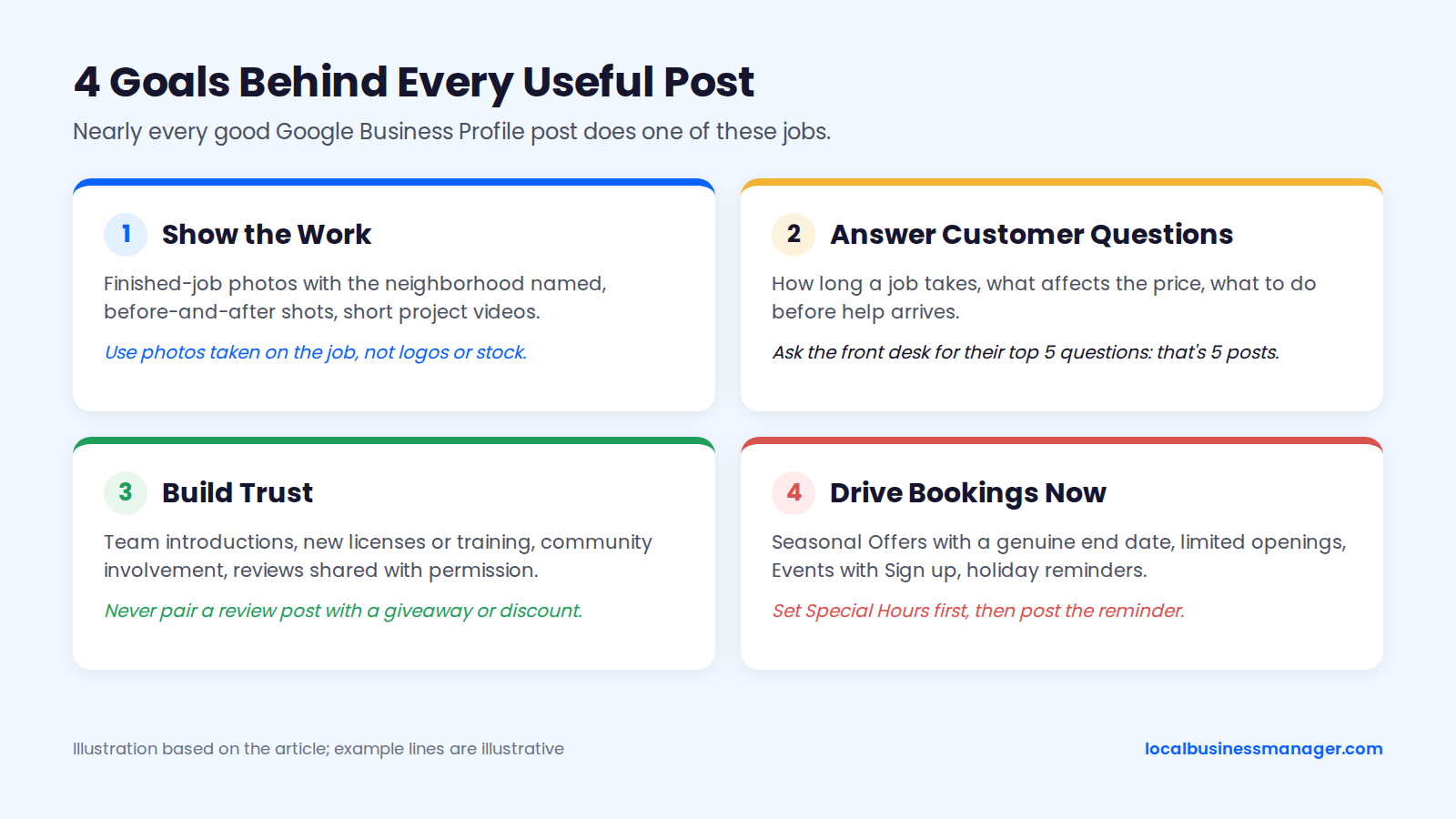
The best post ideas come from the business's own week: jobs finished, questions customers asked, people on the team and deals worth taking. The 4 goals below cover nearly every useful post, followed by idea tables by industry and a section for law firms. All example lines are illustrative, not from real clients.
Show the Work
Posts that show finished work answer the question a customer has before calling: does this business do what I need, near me? Finished-job photos with the neighborhood named, before-and-after shots from the same angle, and short project videos all work as Updates.
Use photos taken on the job. Logos and stock images are a reported rejection risk: in August 2022, Joy Hawkins linked a rise in post rejections to them, as Search Engine Roundtable reported.
Illustrative first line: "Finished a full panel upgrade in [neighborhood] today: here's what changed and why the homeowner needed it."
Answer Customer Questions
The questions a business hears on the phone every week make reliable Updates, because the people reading the profile are asking them too: how long a job takes, what affects the price, what to do before help arrives. Ask the client's front desk for the 5 questions they answer most, and you have 5 posts.
Point each post's button at the page that answers the question in full.
Illustrative first line: "Is it worth repairing a 12-year-old water heater? Here are the 3 things we check first."
Build Trust
Trust posts show the people and the standards behind the business:
- A team member introduction: their role, years in the trade and what they handle.
- A new license, certification or completed training.
- Community involvement, such as a sponsorship or a local cleanup.
- A customer review, shared with the reviewer's permission.
Review posts need care. Google's fake engagement rules prohibit asking only happy customers for reviews and offering incentives for them, so a review post never comes with a giveaway or a "review us for 10% off" line. Ask every customer for a review the same way (getting more Google reviews covers the compliant process), then ask the reviewer before you turn their words into a post.
Drive Bookings Now
Booking posts give a ready buyer a reason to act this week:
- A seasonal Offer with a genuine end date.
- Limited openings, such as "We have 4 slots left before the holiday."
- An Event with a Sign up button.
- A holiday schedule reminder, posted only after the hours are set correctly.
Holiday hours belong in the profile's Special Hours, not only in a post. A post on its own leaves the profile's regular hours unchanged, so set Special Hours first, then post the reminder if it helps.
Ideas for Home Services and Auto
Home-service and auto posts work best when they show a real job, answer a real question or carry a real deal. The table gives 3 ideas for each of 4 trades, with the post type and a button label Google offers. Lines are illustrative.
Industry | Post idea | Post type | Button | Example first line (illustrative) |
|---|---|---|---|---|
Plumbing | Recent tankless install | Update | Learn more | "New tankless install in [neighborhood]: here's how it fit a 2-foot closet." |
Plumbing | Frozen-pipe question | Update | Call now | "Pipes froze overnight? Do these 3 things before the plumber arrives." |
Plumbing | Drain-cleaning deal | Offer | View offer (automatic) | "$[X] off drain cleaning booked before [date]." |
HVAC | Furnace replacement finished | Update | Learn more | "Swapped a 20-year-old furnace in [neighborhood] for a high-efficiency unit." |
HVAC | Filter question | Update | Learn more | "How often should you change your furnace filter? It depends on 3 things." |
HVAC | Pre-season tune-up deal | Offer | View offer (automatic) | "Book a furnace tune-up before [date] and pay $[X] instead of $[Y]." |
Roofing | Roof replacement finished | Update | Learn more | "New roof on a [style] home in [neighborhood], done in [X] days." |
Roofing | After-storm inspection tips | Update | Book | "After last week's hail, check these 3 spots before you call anyone." |
Roofing | Homeowner Q&A night | Event | Sign up | "Join us [date] to learn what insurance covers after storm damage." |
Auto repair | Brake job finished | Update | Book | "Grinding brakes on a [model]? Here's what we found and fixed." |
Auto repair | Warning-light explainer | Update | Call now | "Check engine light on? Here's when to keep driving and when to stop." |
Auto repair | Winter check deal | Offer | View offer (automatic) | "Battery and tire check for $[X] until [date]." |
Ideas for Dental, Med Spa and Law Firms
Health and legal practices have professional advertising and patient-privacy rules to check before they post; for law firms, the bar-rule section below covers the main ones. The table gives 3 ideas each, leaning on Updates and Events. Lines are illustrative.
Industry | Post idea | Post type | Button | Example first line (illustrative) |
|---|---|---|---|---|
Dental | Meet the hygienist | Update | Call now | "Meet [name], who has cleaned teeth in [city] for [X] years." |
Dental | Common question | Update | Learn more | "Does a cracked tooth always need a crown? Here's how dentists decide." |
Dental | New-patient exam offer | Offer | View offer (automatic) | "New-patient exam and cleaning for $[X] until [date]." |
Med spa | Open house evening | Event | Sign up | "Join us [date] for a free skin-care Q&A with [provider]." |
Med spa | Treatment explainer | Update | Learn more | "What to expect at your first [treatment] appointment, step by step." |
Med spa | Provider introduction | Update | Book | "Meet [provider], now taking appointments at our [city] location." |
Law firm | Local law or deadline explainer | Update | Learn more | "Hurt in a crash in [city]? Here's how [state]'s filing deadline works." |
Law firm | Community event the firm sponsors | Event | Learn more | "We're sponsoring the [event] on [date]. Come say hello." |
Law firm | Practice area explainer | Update | Call now | "What a [case type] lawyer does in the first 30 days of a case." |
What Law Firms Should and Shouldn't Post
I've ranked and served close to one hundred personal-injury law firms, and for them my posts cover 3 topics: laws, local topics and the firm's services. I've never had one rejected.
Bar rules limit law-firm posts more than Google does:
- Results posts. Under ABA Model Rule 7.1, Comment 3, a truthful post about a past verdict or settlement can still mislead if it leads readers to expect a similar result. Qualifying language or a disclaimer can help. That makes "we won $X" posts the riskiest content a firm can publish.
- Texas filing. Texas Rule 7.04 sets filing requirements with the State Bar of Texas's Advertising Review Committee. The Texas Lawyers' Insurance Exchange's March 2026 guidance treats public social media posts as advertising unless a Rule 7.05 exemption applies. No source we found says directly whether a Business Profile post must be filed.
This is marketing guidance, not legal advice. Have the firm check its own state bar's rules before posting results, testimonials or offers; educational explainers and community events are on firmer ground.
How to Write a Post That Gets the Click
A post that gets the click says something specific in the opening line, shows a real photo and offers 1 button that matches the reader's next step. The sections below add what's known about specs, how to handle keywords, fill-in templates and before-and-after rewrites.
First Line, Photo and Button
Put the specific thing (the job, the deal or the date) in the opening line, so a reader who stops there still knows what the post is about. The explanation comes after.
The evidence on titles is mixed. Sterling Sky studied more than 1,000 posts before Google removed post click data in February 2023. Posts with titles averaged 1.90 clicks in the profile's own data, against 0.99 for posts without titles. In analytics, though, titled posts averaged 0.84 clicks against 0.97 without, so the analytics data showed no advantage.
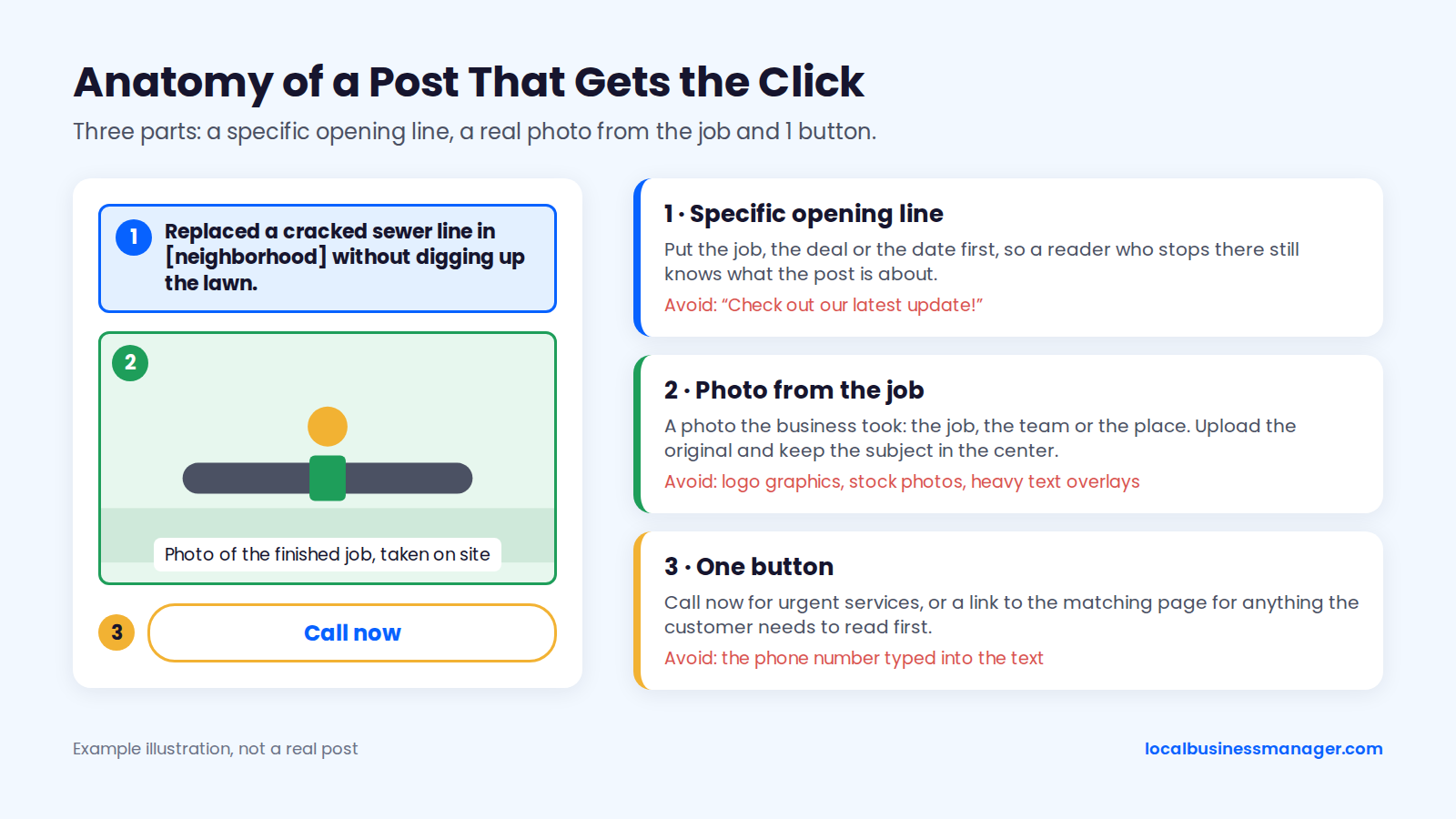
Example illustration, not a real post.
Use a photo the business took: the job, the team or the place. A logo graphic tells a customer nothing and carries rejection risk. Pick 1 button: Call now for urgent services, or a link to the matching page for anything the customer needs to read first.
Character Limit, Image and Video Specs
As of November 2026, we couldn't confirm a post character limit or image and video specs on a Google page, and the figures repeated across third-party guides conflict with each other. Check what the post editor accepts before you batch a month of copy.
Until Google publishes numbers, 3 habits cover the risk:
- Front-load the opening line, so the point survives if the text is cut short.
- Keep the photo's subject in the center, so any crop keeps it.
- Upload the original photo rather than a filtered or text-covered version.
The last point matters for approval. Practitioners list heavily edited or low-quality images and heavy text overlays as rejection causes. A local SEO software company's April 2026 guidance also notes that SafeSearch can flag words in the post or even in the image filename, so name files plainly, such as "water-heater-install.jpg".
Keywords and City Names in Post Text
Name the service and the city once, in natural wording, because that tells a reader whether the post is for them. Don't expect it to move rankings. Three sources rate post keywords low as a ranking factor:
- Controlled test. In Sterling Sky's test from the rankings table, posts were written on the same topics as 441 tracked keywords per location and had no measurable effect on local pack rankings.
- Expert survey. The 2026 Local Search Ranking Factors survey ranks "Keywords in Google Posts" #160 for local pack rankings and lists it at #28 on its local SEO myths list.
- Correlation study. A local SEO software company's 2026 study of 16,098 profiles classed post keywords as busted, with an effect of no more than 1.8 percentage points.
The case for naming the service is conversion. The 2026 Local Search Ranking Factors survey ranks post keywords #95 as a conversion factor, and in a 2020 Local Search Forum thread a practitioner reported Maps highlighting post snippets that matched a searcher's words. Keyword stuffing carries a policy risk: secondary summaries of Google's posts content policy list keyword stuffing and irrelevant content as spam.
Fill-In Templates for Update, Offer and Event Posts
Each template keeps contact details out of the text and leaves them to the button.
Update template:
- Opening line: [Specific job or news] in [neighborhood or city] [this month].
- Detail: [What you did or what the customer should know, in 1 to 2 sentences].
- Next step: [What to do next], plus a Call now button or a Learn more link to [matching page].
Offer template:
- Title: [Amount or % off] [service] until [end date].
- Dates and time: start [date, time] and end [date, time].
- Description: [Who it's for], [what's included], [any limit, such as the first 20 bookings].
- Optional fields: coupon code, link to redeem, terms and conditions.
Event template:
- Title: [Event name] at [place] on [date].
- Text: [What happens], [who it's for] and [how long it runs].
- Dates and times: start and end [date and time], plus a Sign up button linked to [sign-up page].
A filled-in Offer, illustrative only, shows every field Google's help page lists:
- Title: $40 off furnace tune-ups before December 15
- Dates and time: November 1, 2026, 8:00 AM to December 15, 2026, 6:00 PM
- Description: For homes in [city] with gas furnaces. Includes a 21-point inspection and filter change. First 30 bookings only.
- Coupon code: TUNEUP40
- Link:
https://www.example.com/furnace-tune-up/?utm_source=google&utm_medium=organic&utm_campaign=gbp-post&utm_content=tuneup-offer-nov - Terms and conditions: One per household. Not valid with other offers.
- Button: "View offer", added by Google automatically
Bad vs Better Rewrites
These rewrites fix 5 common failure points: a vague opener, contact details in the text, keyword stuffing, the wrong post type and a stock image. All examples are illustrative.
Problem | Weak version | Better version |
|---|---|---|
Vague opener | "Check out our latest update!" | "Replaced a cracked sewer line in [neighborhood] without digging up the lawn." |
Contact details in the text | The post ends with the office phone number typed out | The number is removed and a Call now button is added |
Keyword stuffing | "Best plumber [city], emergency plumber [city], plumbing [city]" | "Emergency plumber in [city]? Our on-call tech can be there tonight." |
Wrong post type | "This week only: 15% off!" written as an Update | An Offer post with dates, a time and terms |
Stock image | A logo graphic or stock photo | A photo of the finished job, taken on site |
How to Create, Schedule and Repeat a Post
You create, schedule and repeat posts from the profile itself, on Google Search or Maps, without a third-party tool. Older guides describe a separate dashboard with a Posts tab in the sidebar; today you work from the profile, and Google moves labels from time to time, so check the steps against Google's help page before you train a team.
Step by Step in the Current Interface
Google's help page describes the core flow as Posts > Add post, choose Update, Offer or Event, add your details, then select Post. The 7 steps below wrap that flow; steps 1, 2 and the status check in step 7 are our own additions, not Google's:
- Sign in to the Google account that owns or manages the profile.
- Open your Business Profile on Search or in the Google Maps app.
- Select Posts, then Add post.
- Choose Update, Offer or Event.
- Add your details: the text, any button and, for Offers and Events, the dates and time.
- If the post shouldn't go live now, turn on "Schedule this post". If it should recur, set Repeats.
- Select Post, then check the post's status: Live, Pending or Not approved.
A post that sits as Not approved looks published to whoever wrote it, unless they go back and look (which, on a busy Friday, nobody does). Add the status check to the task before marking it done.
Scheduling and Repeats
Native scheduling is free and built into the profile. Google's help page says to turn on "Schedule this post" and pick a date and time. For a recurring post, choose weekly, monthly or a custom schedule from the "Repeats" dropdown.
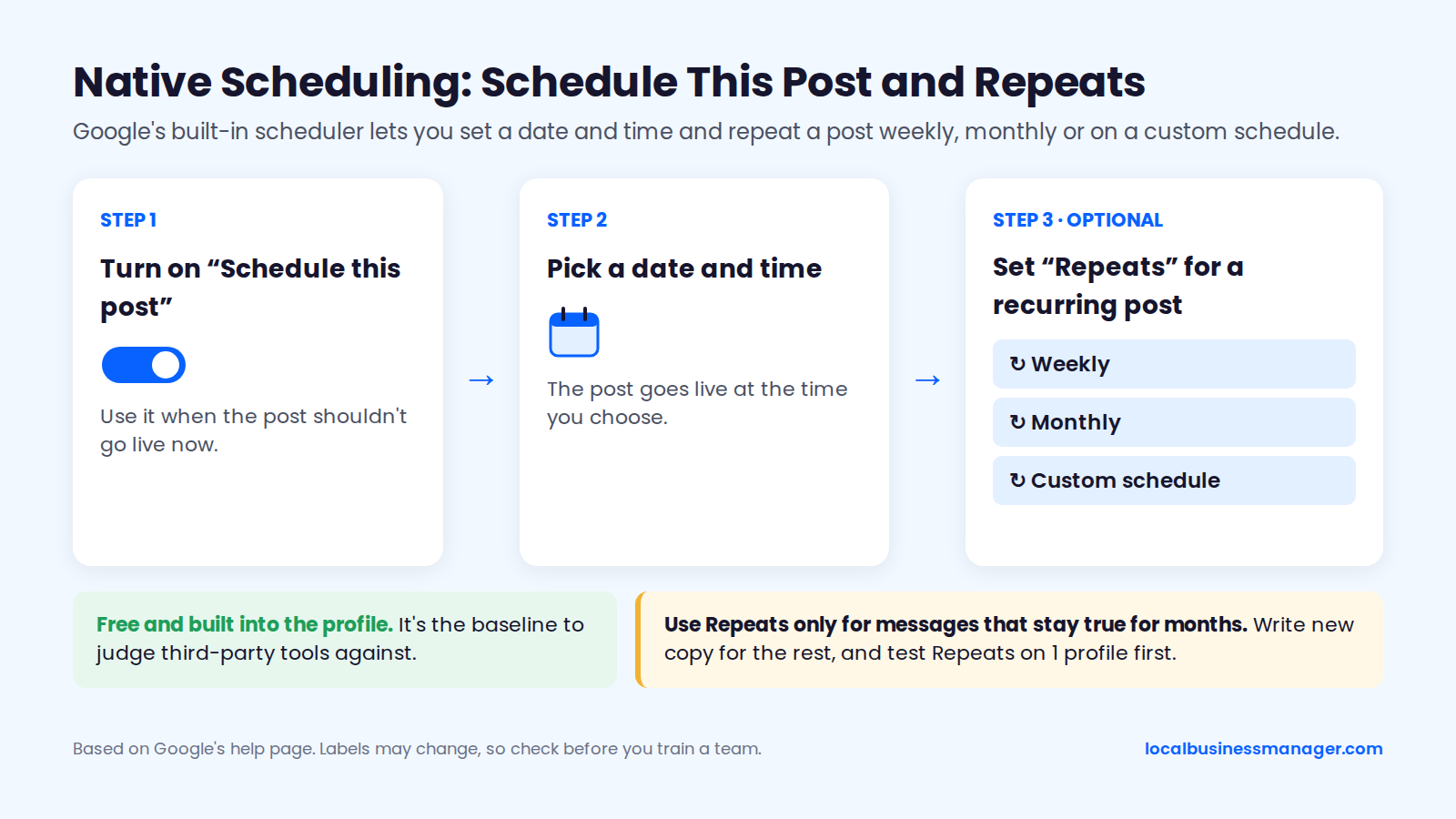
According to Attorney Marketing Network, Google added scheduling in late November 2025, along with the option to publish 1 post to several locations. Some guides still say the native tool can't repeat posts; that's out of date now that Google's help page documents Repeats. Others claim Repeats works only for Offers and Events. Google's help page doesn't say so, so test it on 1 profile first.
Third-party tools still add bulk uploads, approval steps and posting to other networks, and Google's scheduler is the free baseline to judge them against. Use Repeats only for messages that stay true for months and write new copy for the rest. No one has published a test of whether repeated posts lose engagement, but a customer who sees the same post 4 weeks running learns nothing new.
Posting to Several Profiles at Once
Google's help page describes posting to several profiles: select the profiles you want to share the post to, then select Post; to post on just one profile, select Skip.
Google's policy and practitioner advice disagree on whether identical posts across locations are a problem:
- Google's policy. Search Engine Journal reported in 2022 that Google's posts content policy lists "duplicate photos, posts, videos, and logos" as spam.
- Practitioner view. Sterling Sky said in January 2025 that multi-location businesses can use the same post on every location, because posts aren't indexed and aren't a ranking factor.
The safe middle is to share the topic but change the photo and local details for each location. The workflow section below shows how.
Editing and Deleting a Post
To edit or delete a post, go to your Business Profile, select Posts, then choose More > Edit or More > Delete next to the post, Google's help page explains. On Google Search, open the updates section, click View All > Updates, find the post, then click More > Edit or Delete.
Editing is also the usual fix for a Not approved post:
- Remove the problem, such as a phone number, a typed URL or a risky image.
- Save the post.
- Check that the status moves to Live.
Delete posts that are no longer true, such as an Offer the business ended early. Leaving them up until the end date sends customers to the business asking for a deal it no longer offers.
Why Was My Post Rejected, and How Do I Fix It?
Google's posts rules cover 3 groups of rejection causes directly: unverified contact details, duplicate photos and posts, and content that breaks its prohibited and restricted content policies. Practitioners report more, including stock or heavily edited images, sensitive words and auto-generated text, and some rejections are Google-side bugs. Google's posts content policy has the full rules.
What Live, Pending and Not Approved Mean
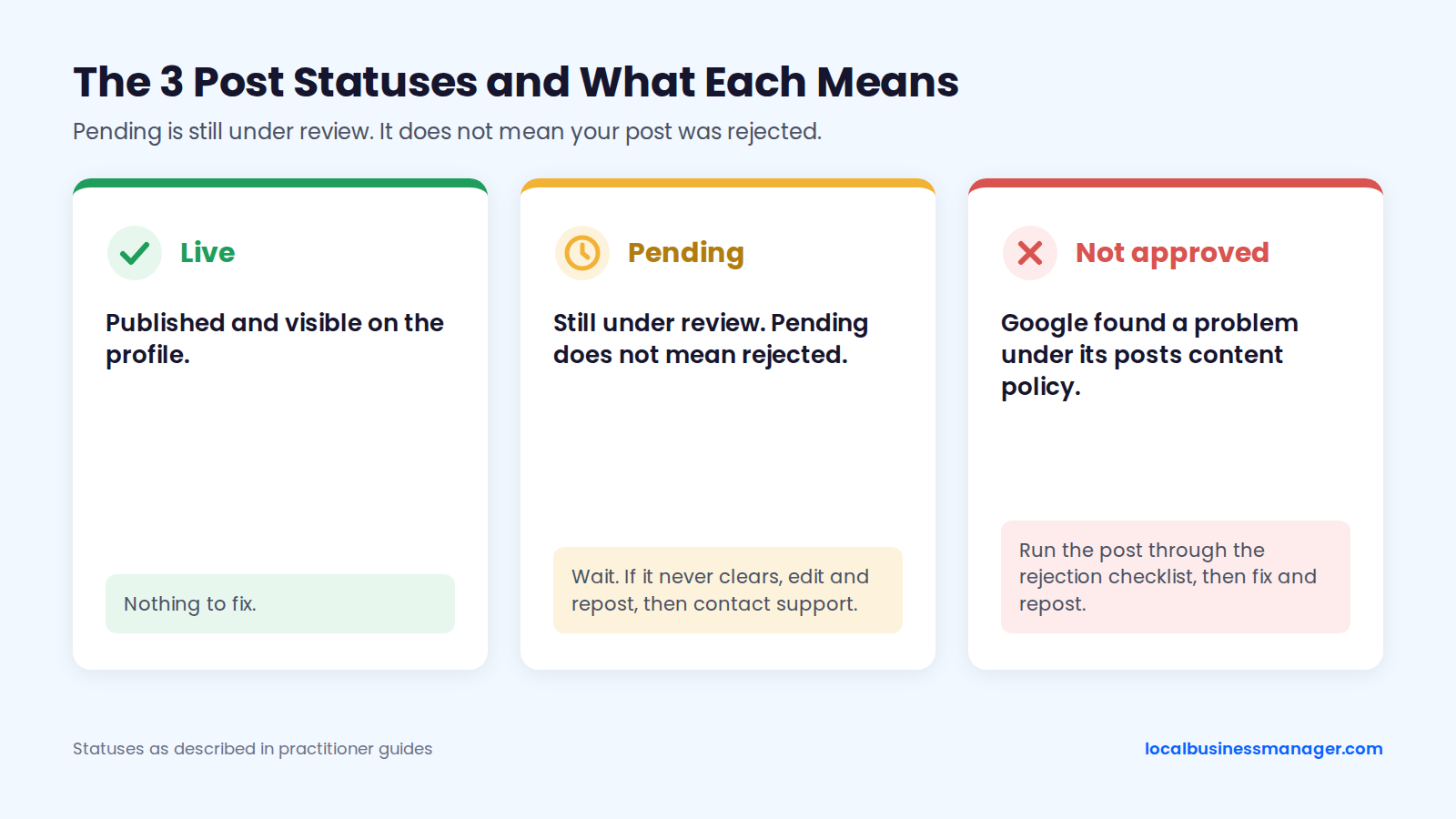
Practitioner guides, including one the agency Brightpath Digital published in September 2026, describe 3 post statuses:
- Live: published and visible on the profile.
- Pending: still under review. Pending does not mean rejected.
- Not approved: Google found a problem under its posts content policy.
A rejected post can show this error, according to a review-software vendor's July 2026 support page: "Looks like a content policy violation. Please verify post content and try again."
Rejections also come in waves. Local Search Forum threads record harmless posts rejected in bulk and later restored by Google in 2020 and 2022, and in 2025 1 agency reported rejections for 4 of its 6 clients in a single week. Sterling Sky notes that when a profile is blocked, its past posts may be rejected too, so if every post on a profile fails, check the profile before rewriting the posts.
Rejection Checklist
Run a stuck or rejected post through these 12 rows from top to bottom. The 2 contact-detail rows and the duplicate-content row trace to Google's policy wording as reported by Search Engine Roundtable and Search Engine Journal; the rest come from practitioner reports, vendor support pages and forum threads, ending with bugs and profile problems.
Symptom | Likely cause | Fix |
|---|---|---|
Not approved, text includes a phone number | Google can't verify the number belongs to the business (wording updated around September 2026, per Search Engine Roundtable) | Remove the number and add a Call now button |
Not approved, text includes an email or social handle | Unverified contact information, covered by the same 2026 update | Remove it and link to a contact page with the button |
Not approved, post promotes a regulated service such as financial services | Regulated services, listed as a cause on a review-software vendor's July 2026 support page | Remove the regulated item and check Google's prohibited and restricted content policies |
Not approved, a URL is typed into the text | Links in the post text, flagged in a 2020 Local Search Forum thread | Delete the URL and use the button |
Not approved, logo, stock or reused image | Duplicate or low-quality media | Use an original photo from the job |
Not approved, photo with heavy filters or a text overlay | Heavily edited media | Use the unedited photo and put the text in the post |
Not approved, harmless post with a sensitive word | SafeSearch flagging the text or the image filename | Reword the post and rename the file |
Not approved, same post on many locations | Duplicate content, which Google's policy lists as spam | Change the photo and local details for each location |
Not approved, off-topic or auto-generated text | Spam, irrelevant or misleading content | Rewrite it by hand, about the business |
Stays Pending | Google's review is still running | Wait; if it never clears, edit and repost, then contact support |
Harmless posts rejected on several profiles at once | A Google-side bug | Wait, then retry; contact support if it persists |
Every post on 1 profile rejected, including old ones | The profile is blocked or restricted | Fix the profile's status first |
Filters can be very literal: 1 pest-control client's posts were flagged for words like "urine" and "excrement", per a 2025 Local Search Forum thread. If a clean post still fails after 1 edit, contact Google support rather than posting the same text again.
How to Measure Whether Posts Work
Measure posts with 3 tools: Google's per-post view counts, the profile's Performance report and UTM-tagged buttons read in GA4. None of them proves that a post caused a call, so report posts as activity and engagement, never as ranking gains.
Post View Counts and the Performance Report
Each post now shows its own view count in the Posts section of the profile, covering up to 18 months, as PPC Land reported in September 2026. Google had removed per-post views and clicks on February 20, 2023, when it moved to the Business Profile Performance API. Google's Small Business Bulletin announced the return on September 10, 2026, in a post by Google employee Lisa Landsman in the Business Profile Help Community, as Search Engine Journal reported.
As of November 2026, 3 limits apply:
- Coverage. Views cover Updates, Offers and Events from the last 18 months, on a rolling basis, with Search and Maps views combined into 1 number.
- No per-post clicks. Clicks have not returned. Offers are the exception, through the offers metric covered under Offer Posts.
- No API access. The view counts aren't in the API yet, so reporting tools can't pull them automatically.
The Performance report, which older guides call Insights, shows profile-level numbers such as profile views, calls, website clicks and bookings. You can't attribute these to posts, because a customer who read a post and then called looks the same as one who never saw it.
UTM-Tag Every Post Button
UTM tags are how you count clicks and conversions from Update and Event post buttons in GA4, since those post types have no click data in Google's own reporting.
Keep the medium set to "organic". Prox Digital explains why in a November 2026 DEV Community guide citing Google's default channel group definitions: GA4 counts a visit as Organic Search when the medium is exactly "organic", and as Referral when it's "referral", "app" or "link". A medium of "gbp" or "referral" therefore pulls profile traffic out of Organic Search.
Use this convention:
- utm_source=google (some practitioners use "gbp"; pick 1 and use it on every profile)
- utm_medium=organic
- utm_campaign=gbp-post (use gbp-profile for the profile's main website link)
- utm_content=[post topic]-[location or month]
Worked example:
https://www.example.com/water-heater-repair/?utm_source=google&utm_medium=organic&utm_campaign=gbp-post&utm_content=tankless-install-may
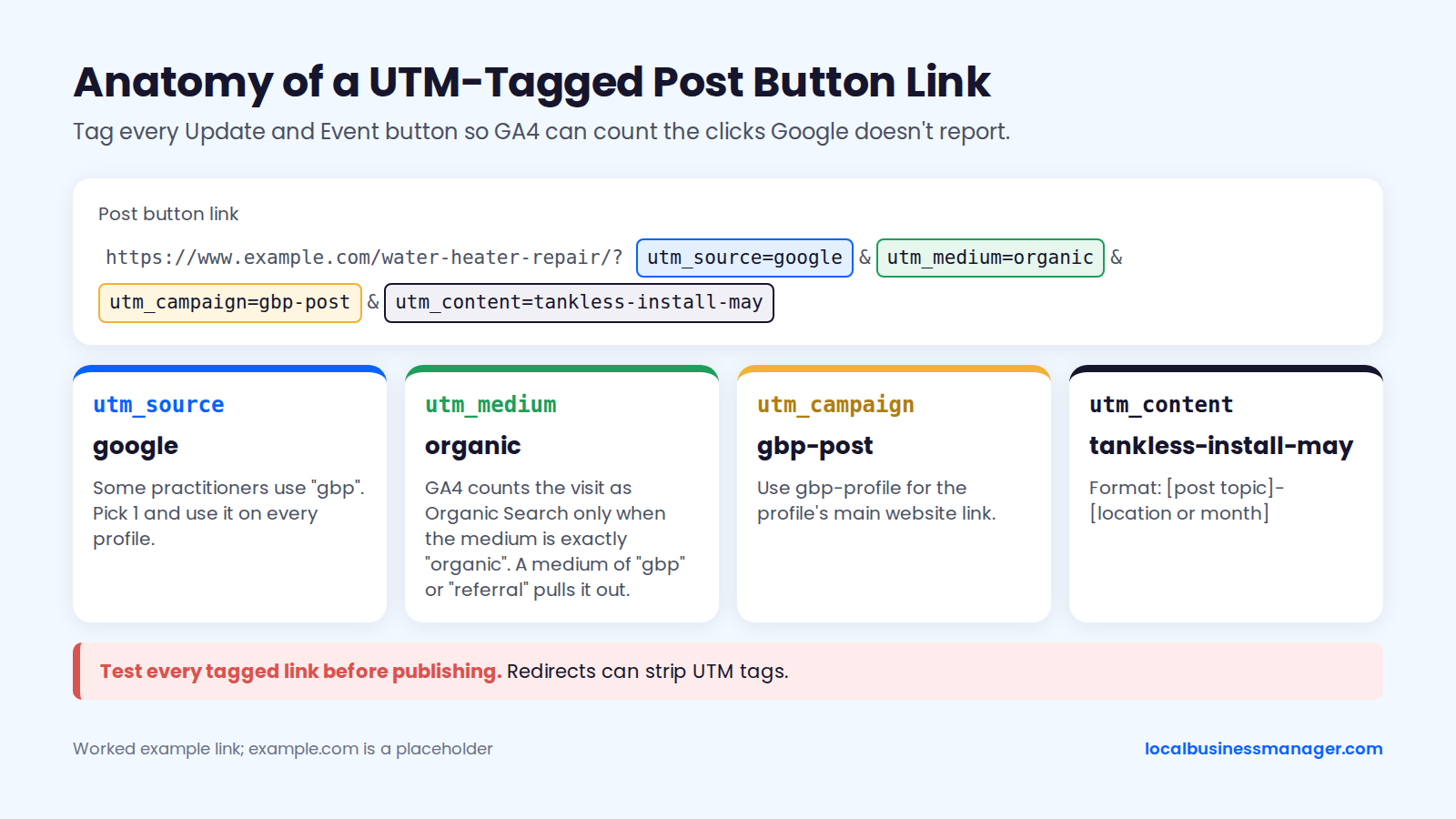
Test every tagged link before publishing, because a local SEO software company's guidance warns that redirects can strip UTM tags. Expect small numbers: Sterling Sky's pre-2023 study of more than 1,000 posts found that posts with titles averaged 0.10 conversions each, and posts without titles 0.05.
What to Put in the Client Report
My monthly reports lead with calls and rankings. For the posts section, here's a suggested snippet to fill in each month:
- Posts published this month: [number] ([Updates] Updates, [Offers] Offers, [Events] Events)
- Top post by views: "[opening line]", [views] views (Google's combined Search and Maps count)
- Post button visits in GA4 (utm_campaign=gbp-post): [sessions] sessions, leading to [conversions] [form fills or calls from the site]
- Offer results: [offer views] views and [offer clicks] clicks (the offers metric in the Performance report)
- Posts rejected or stuck in Pending, and what we fixed: [list]
- Next month's post plan: [3 themes]
Don't claim that posts raised rankings or caused calls. Nothing published supports either, and a client who hears it once will expect it every month. For the rest of the report, see our guide to the monthly local SEO report.
A 4-Week Posting Workflow for Agencies and Multi-Location Brands
Plan 4 weeks of topics in 1 sitting, localize them per location, get approval where the industry needs it and run a checklist before scheduling. The calendar assumes 3 posts a week, which is my cadence; drop columns to fit yours.
The 4-Week Calendar
At 3 posts a week, this calendar produces 12 posts in 4 weeks: 8 on work and customer questions, 2 trust posts and 2 booking posts. Each week mixes all 3 goals.
Week | Post 1: show the work | Post 2: answer a question | Post 3: trust or booking |
|---|---|---|---|
1 | Update: finished job photo | Update: most-asked phone question | Update: team member intro |
2 | Update: before-and-after shots | Update: what affects the price | Offer: seasonal deal with an end date |
3 | Update: crew or equipment on site | Update: seasonal checklist | Update: review shared with permission |
4 | Update: short project video | Update: what to do first in an emergency | Event: community event or open house |
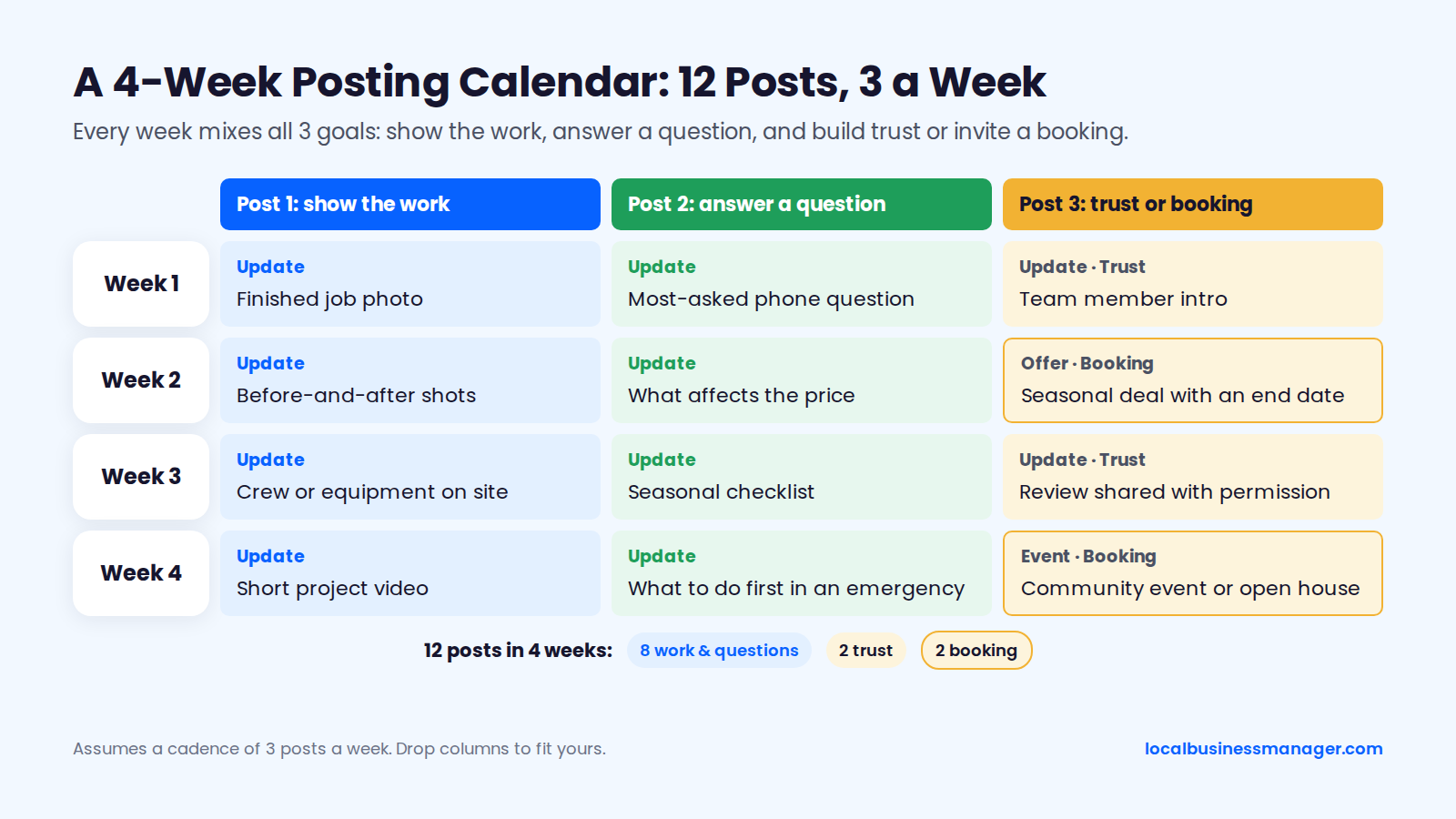
Fit the calendar into a fixed routine. Once a month, I check rankings and the post schedule. Every week, I check the profile for edits to the name, attributes, services and other fields, whether Google or someone else made them.
Localizing Posts Across Locations
Share the topic across locations, but localize the parts a customer can check: the photo, the area name, the offer and the link. The table covers 6 elements of a post, starting with the part you can share.
Element | Keep the same across locations? | How to localize |
|---|---|---|
Topic and theme | Yes | No change needed |
Opening line | No | Name that location's neighborhood or city |
Photo | No | Use a photo from that location's own jobs |
Offer | Only if every location honors it | Run location-specific deals when they differ |
Button link | No | Link to that location's page for the service in the post |
Publish time | No | Stagger times, as some multi-location guides suggest |
The photo carries the most risk, given the duplicate-photos line in Google's posts policy covered above. In my setup, each office's profile links to its own city page, which carries that office's local details, so a localized post has a local page to send people to. For the wider setup, see managing multiple locations.
Batching and Client Approval
Batch a month of posts in 1 session, then use Google's native scheduler to spread them across the 4 weeks. For regulated industries, add an approval step before anything is scheduled:
- Draft the month's posts with photos and tagged links.
- Send them to the client. Law firms should check each post against their state bar's advertising rules, and health practices should review anything about treatments or patients.
- Get written sign-off, then schedule.
- After each post goes out, check that it shows as Live.
For unregulated clients, a monthly topic list the client approves in advance can be enough; decide per client. Either way, keep the approval with the post, so you can show who approved what if a client later questions it.
Should You Auto-Post With AI or RSS?
Don't auto-post RSS feeds or bulk AI output to a profile; write or edit each post by hand. Third-party guides from 2026 quote Google's posts guidance as telling businesses to avoid "auto-generated or distracting content". Feeds and bulk templates also tend to produce the duplicate posts covered above.
AI help isn't banned in itself:
- Google's own AI tool. Google offers an AI "Suggest description" feature for profile descriptions.
- No definition. Google doesn't define "auto-generated", so a draft a person rewrites around a real job is a different thing from a feed.
- Stricter filters. The marketing agency Perfect Patients observed in 2026 that Google's automated filters had become stricter and could restrict posting on a whole profile. That is 1 agency's observation, not a Google statement.
No published study compares how AI-written or RSS-fed posts perform against hand-written ones.
The Pre-Publish Checklist
Run these 14 checks before scheduling any post:
- The profile isn't blocked or restricted.
- The post type fits: an Update, an Offer with genuine dates and a time, or an Event with a set date.
- The opening line names the specific job, deal or date.
- The text contains no phone number, email address or social handle.
- No URL is typed into the text.
- The photo is recent and taken by the business, not a logo or stock image.
- The image file has a plain, descriptive name.
- There is 1 button, pointing to the page that matches the post.
- The button link carries UTM tags and survives any redirect.
- Offer and Event dates, and any times, are set and correct.
- The service and city appear once, naturally, with no keyword lists.
- The location-specific details are right for this profile.
- For a regulated industry, client approval is on file.
- Nothing promises results, and any shared review has the reviewer's permission.
FAQ About GBP Posts
These answers cover follow-up questions the sections above don't: cost, Product posts and whether a rejection puts the profile at risk.
Is Posting on Google Business Profile Free?
Yes, posting on a Google Business Profile is free, including scheduling, Repeats and posting to several profiles. SocialRails' July 2026 guide confirms the native scheduler costs nothing; paid tools add bulk CSV uploads, approval steps and posting to other networks. Paid placements such as Local Services Ads and Google Ads can appear near profiles in search results, but they're separate products from posts.
Where Did Product Posts Go?
Product is no longer a post type: Google's help page lists only Update, Offer and Event. Guides that still list "What's New" or Products as post types are out of date. To feature a product or service in a post today, write an Update about it with a photo and a Learn more button to the matching page.
Can a Rejected Post Get My Profile Suspended?
We found no published case of a single rejected post suspending a profile. Barry Schwartz reported in Search Engine Roundtable in August 2022 that a post breaking Google's duplicate-content rule may be removed without the listing being suspended. Mass rejections can point the other way, to a profile problem: Sterling Sky notes that when a profile is blocked, its past posts may be rejected too. If the profile itself is hit, see Google Business Profile suspensions.
The One Change to Make This Month
If you change one thing this month, put UTM tags on every post button before the next batch goes out. When a client asks what posts are actually doing, tagged visits in GA4 are the closest thing to an answer you can show them. Local Business Manager is a single platform for agencies doing local SEO, and you can join the early access list.