How Long Does It Take for a Google Review to Post? (And What to Do When It Doesn't)

Google says a review with no detected policy problems can post within seconds. Its help pages are widely quoted as saying some checks take a few days, and Google sets no deadline beyond that. If you manage profiles, you know the call: "my customer left a review and it's not there."
A review that isn't showing may still be in Google's checks. It may also have been removed, landed on a duplicate or merged profile, or been blocked because reviews are turned off for that profile. Start with 2 quick checks to find out which case you're in. Then use the day-by-day plan and the ready-to-send messages for the customer and the client.
What Does Google Say About How Long Reviews Take?
Google says a review with no detected policy violations "can post within a matter of seconds," in its Maps 101 explainer on how reviews work. Its Business Profile (formerly Google My Business) Help page About missing or delayed reviews says reviews are checked against its policies. Several 2026 guides quote the page as saying "in some cases, this process might take a few days."
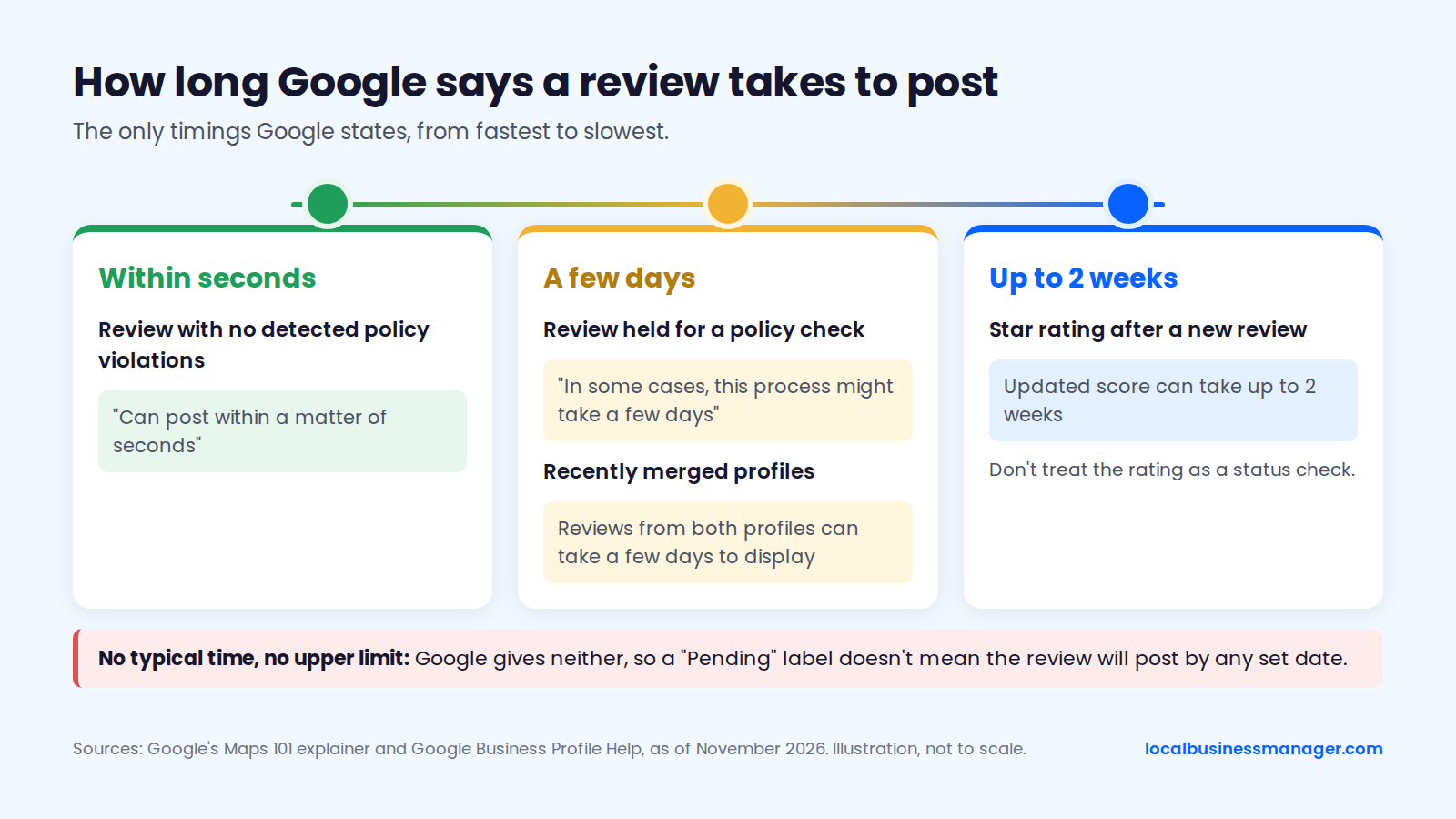
Sources: Google's Maps 101 explainer and Google Business Profile Help, as of November 2026.
Google gives no typical time and no upper limit, so a "Pending" label doesn't mean the review will post by any set date. According to Google's 2022 Maps 101 post, every review goes to Google's moderation system as soon as it's posted, and that system combines machine learning with human operators.
As of November 2026, Google states a time for 4 of the 7 situations below, and those 4 come first, sorted from quickest to slowest. The "few days", "up to 2 weeks" and outdated-app wording come from Google's help as quoted in several 2026 industry guides. The table separates what Google says from what forum and practitioner sources report.
Situation | What Google says | What's commonly reported | What to do |
|---|---|---|---|
Review with no detected violations | Can post "within a matter of seconds" | Vendor guides say minutes, with no data | Check the profile signed out, sorted by newest |
Review held for a policy check | "In some cases, this process might take a few days" | Reviewer sees "Pending"; a Local Guide reported in 2025 that a review went live after 10 days | Wait; don't edit or repost |
Recently merged profiles | Reviews from both profiles can take a few days to display | No outcome data published | Wait a few days, then contact support |
Star rating after a new review | Updated score can take up to 2 weeks | Not measured in any published study | Don't treat the rating as a status check |
Customer on an out-of-date app | An out-of-date app can stop a review showing | No outcome data published | Customer updates Google Maps, then checks again |
Review removed for a policy violation | Removed reviews aren't restored | An industry blog reported in July 2026 that Google Maps emails reviewers "Review not posted" notices with an appeal option | Reviewer appeals from their Maps profile, or edits out the trigger |
Profile reinstated after a suspension | Reviews can be removed; contact support | No recovery timeline published | Contact Business Profile support |
The ranges in many vendor guides (1 to 2 hours, 24 to 72 hours, 3 to 7 days) cite no data and contradict each other.
Why Does Google Hold Some Reviews Before They Post?
Google holds a review when its automated checks find something that might break its content policy or look like fake engagement. The triggers fall into 3 groups: what the review says, the patterns around who posted it, and restrictions on the profile or its whole category.
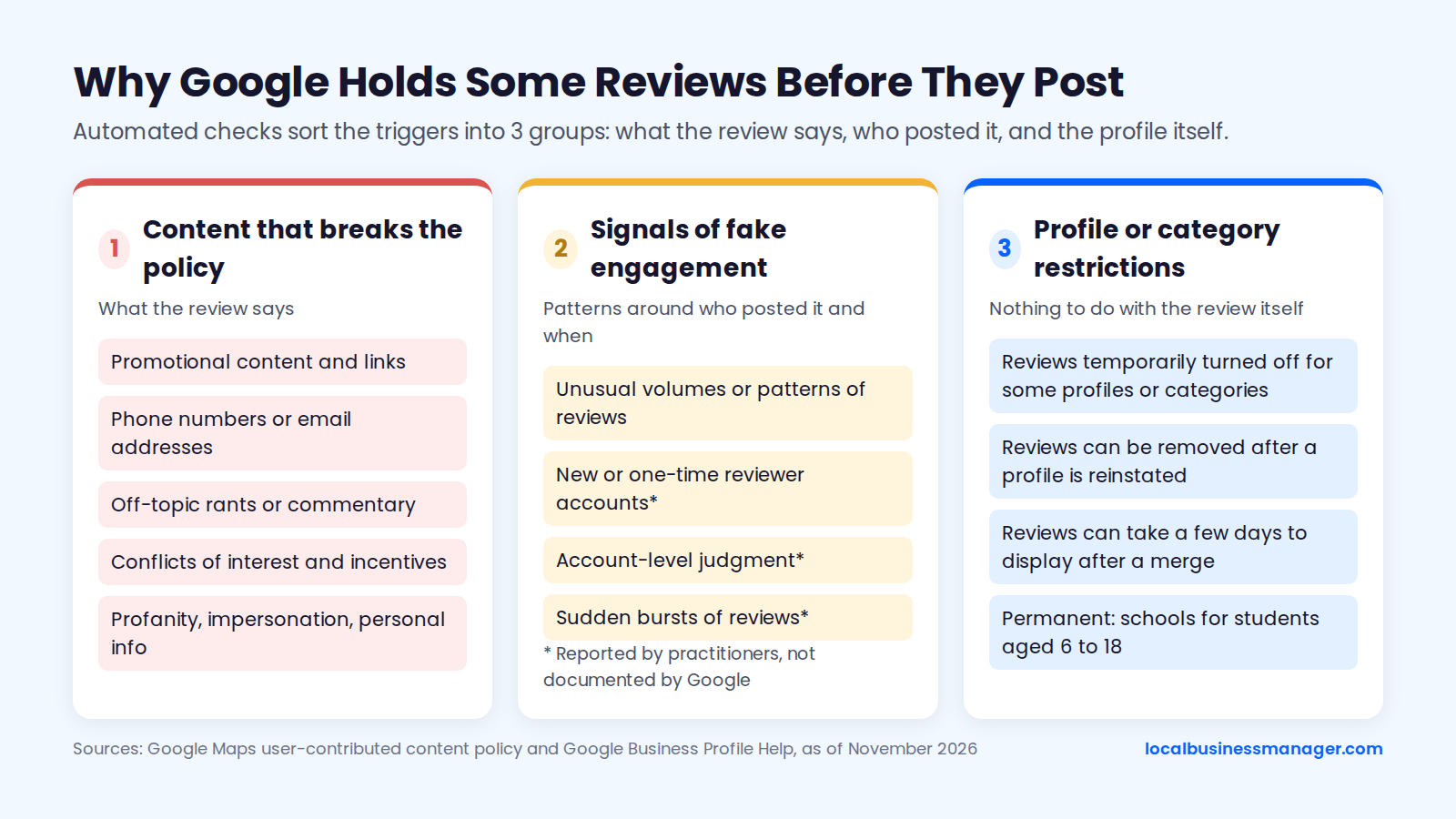
Sources: Google Maps user-contributed content policy and Google Business Profile Help, as of November 2026.
Content That Breaks the Review Policy
Google's prohibited and restricted content policy for Maps lists what a review may not contain. Reviews that run into these 6 areas get held or removed:
- Promotional or commercial content, and links to social media or other websites (the policy's "Advertising & solicitation" section).
- Contact details, such as email addresses and phone numbers.
- Off-topic content. Reviews must be based on the person's experience at that specific place. General, political or social commentary and personal rants aren't allowed.
- Conflicts of interest, which the policy lists under rating manipulation. Examples include current or former employment, contractual or consulting relationships such as suppliers, competitors and family relationships.
- Incentives. Google says fake engagement isn't allowed and is removed. That includes payment, discounts or free goods or services in exchange for a review.
- Profanity, impersonation and personal information. This covers obscenity used to offend, pretending to be someone else, and sharing someone's personal details.
The same policy also covers how a business may ask for reviews. Those rules are in the section on asking for reviews below.
Signals of Fake Engagement
Google also checks the patterns around a review, such as who posted it and when. When Google's systems detect suspicious reviews, Google may remove them and temporarily pause new reviews on the profile, according to a Google spokesperson quoted by TechWyse in July 2026.
Google doesn't publish what counts as suspicious. Practitioners point to 3 patterns, none of them documented by Google:
- New or one-time reviewer accounts: Local Search Forum threads from about 2022 describe filters hitting reviews from these accounts.
- Account-level judgment: in a 2023 LocalU test, Jason Brown of Sterling Sky saw the same review text filtered on one account and published on another.
- Sudden bursts: several vendor blogs describe a "velocity filter" triggered by a spike in reviews, but none publishes a threshold or test data.
Reviewer account history is widely reported as a factor, but Google hasn't confirmed it.
Category and Profile-Level Restrictions
Some holds have nothing to do with the review itself. Google's missing-reviews help page describes 4 profile- and category-level causes:
- Merges: after profiles are merged, reviews from both can take a few days to display.
- Reinstatement: reviews can be removed after a profile is reinstated, and Google says to contact support.
- Temporarily turned-off reviews: 2026 summaries of the page say reviews can be turned off for a profile or a business category for a time.
- Schools: Google has removed and turned off reviews and ratings for Business Profiles mainly categorized as schools for students aged 6 to 18. Universities, day care centers and swim schools aren't affected, and third-party sources date the change to around April 30, 2025.
No published study compares how long reviews take to post in different categories. Any category-specific delay quoted online has no data behind it.
How Do You Check If a Review Is Live, Pending or Filtered?
You need 2 views to check a review. The first is the reviewer's own Maps profile, which can show a status label. The second is the public profile seen signed out. Check both, because a filtered review usually stays visible to its author.
How to See the Google Reviews You've Left
Your Google reviews, including any that haven't posted, are on your Google Maps profile. Only the reviewer can see a review's status label there. The path is:
- Open Google Maps, signed in to the account that left the review.
- Go to Your contributions, then open the Reviews tab.
- Find the review and read any label shown with it.
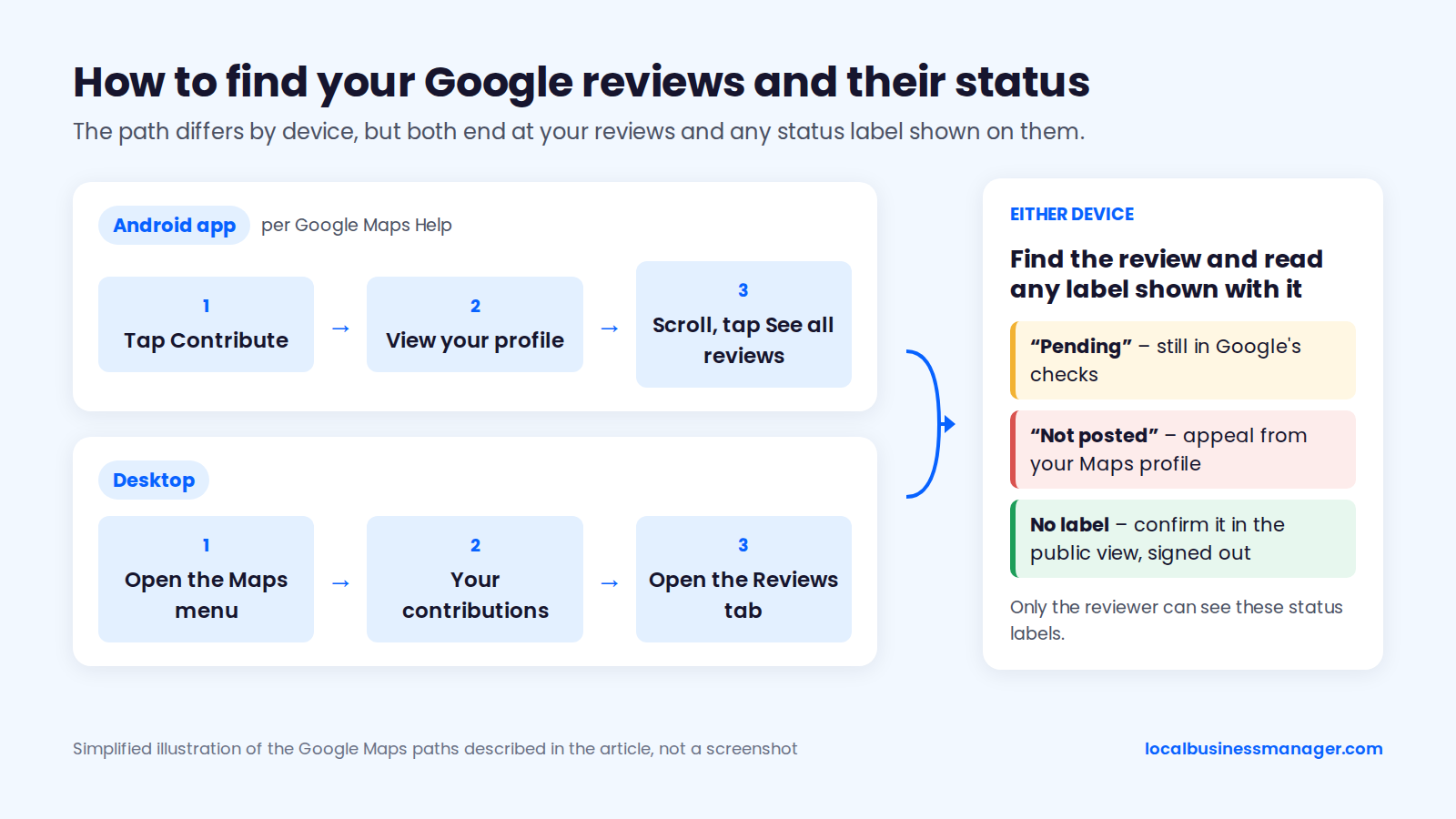
Google Maps app, Your contributions > Reviews. Captured November 2026; annotations added.
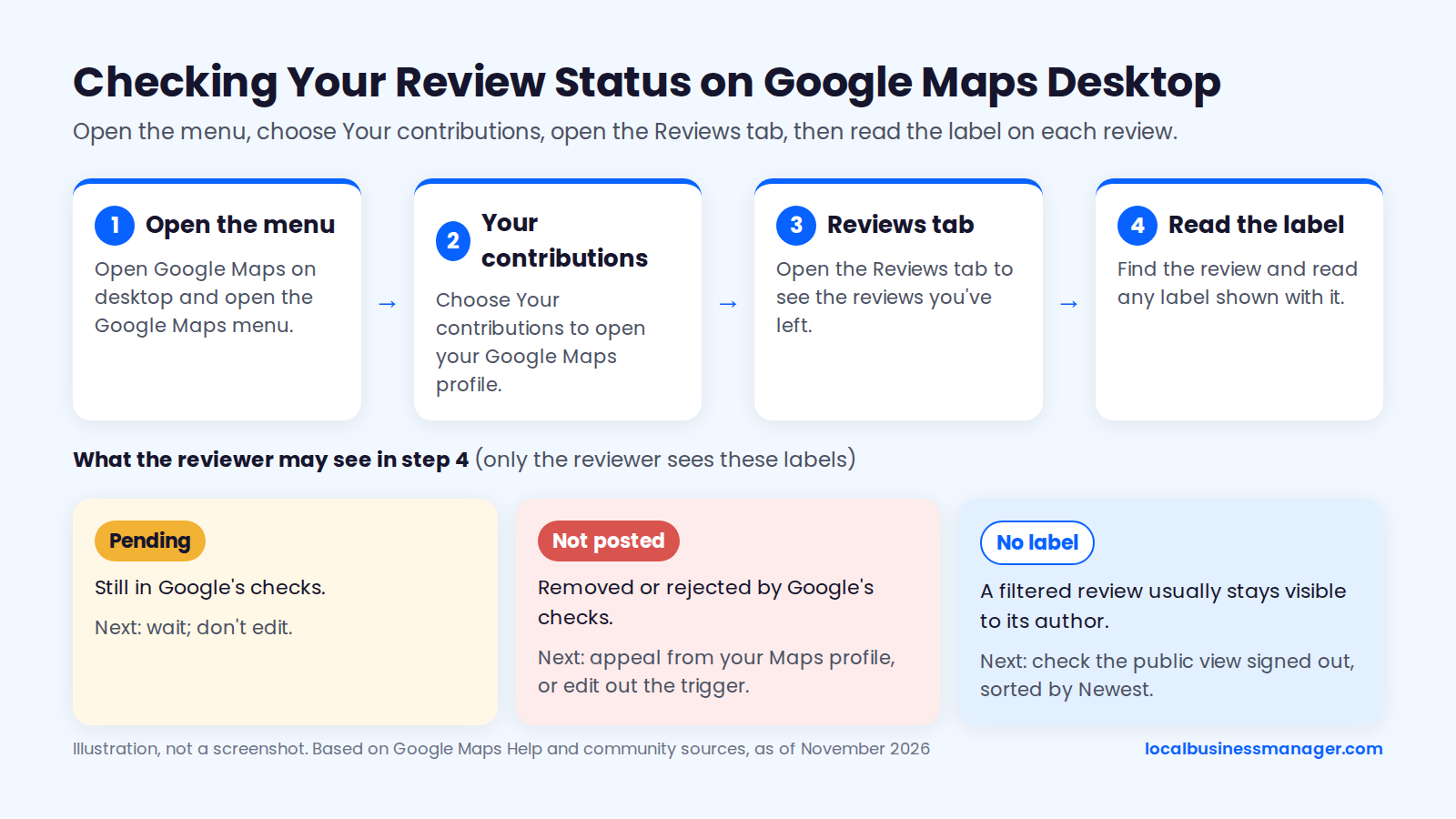
Google Maps on desktop, Your contributions > Reviews. Captured November 2026; annotations added.
A Google Maps Help community guide to unpublished reviews says a held or rejected review shows as "Pending" or "Not posted", and that the reviewer can appeal from there. A July 2026 Google Maps Help Community thread quotes the message a reviewer sees on a pending review: the review is going through automated checks before posting, and the time this takes varies.
Business: Check the Public View Signed Out, Sorted by Newest
Google offers no status page for a business owner to check a single review, so the owner sees only what the public sees. The public check takes 4 steps:
- Open a private or incognito window, or sign out of Google.
- Search for the business and open its profile on Google Maps or Search.
- Open the reviews and change the sort from "Most relevant" to "Newest."
- Look for the reviewer's name and the date they posted.
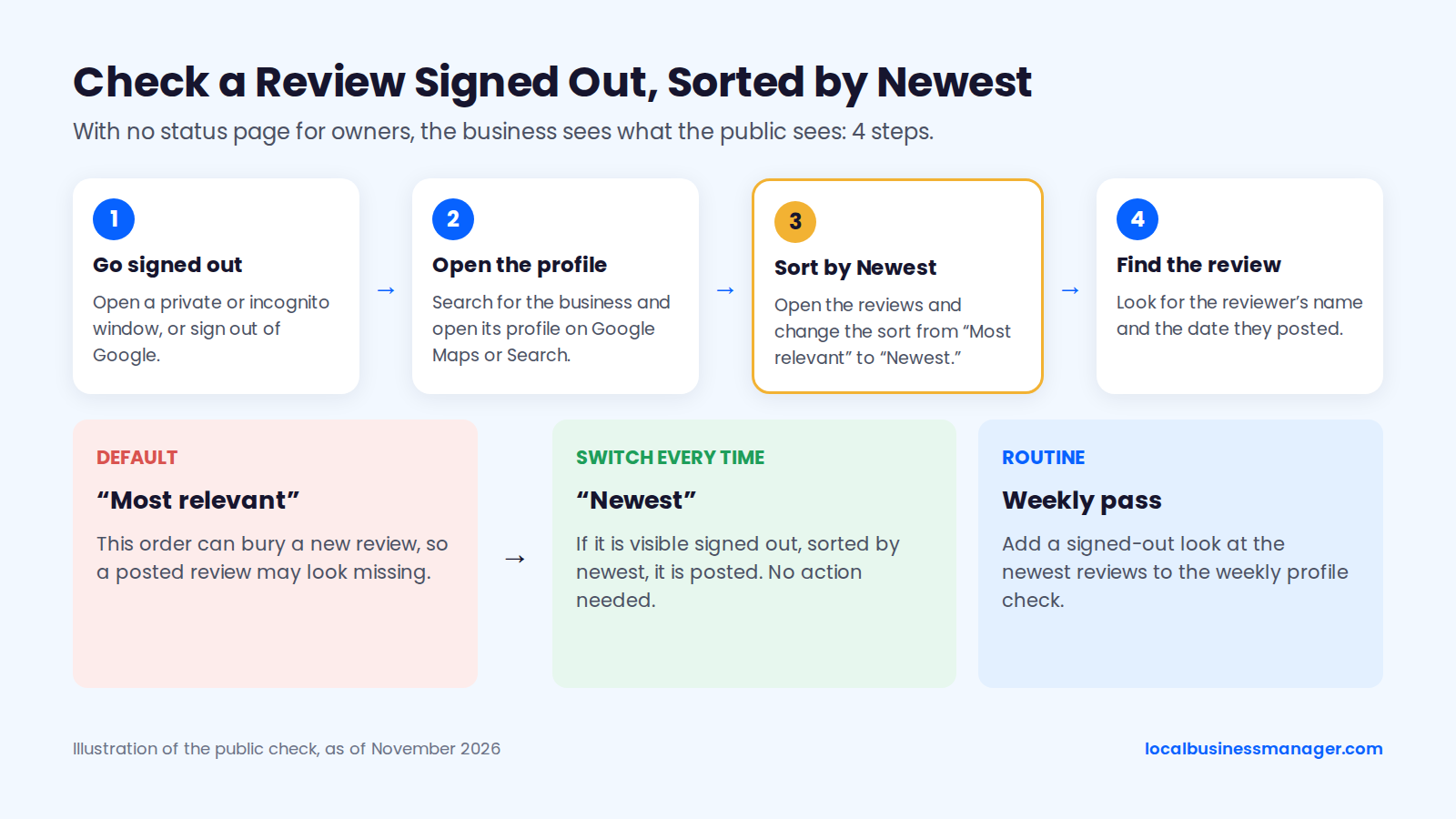
Signed-out view of a profile's reviews, sorted by Newest. Captured November 2026; annotations added.
The default "Most relevant" order can bury a new review, so switch to "Newest" every time. I check client profiles every week for edits to the name, attributes, services and other fields. A signed-out look at the newest reviews is easy to add to a weekly routine like that.
No reliable source supports checking a review with a direct review link, from another location or VPN, or with the review count in the Business Profile dashboard.
What Each Result Means
The table maps the 6 results the 2 checks can produce to what each one means and what to do next. It's based on Google's help pages and the practitioner sources above, as of November 2026, and sorted from posted to never found.
Result | What it means | Next step |
|---|---|---|
Visible signed out, sorted by newest | Posted | None |
Visible signed out, star rating unchanged | Posted; Google's help is quoted as saying the rating can take up to 2 weeks to update | Wait |
Reviewer sees "Pending" | Still in Google's checks | Wait; don't edit |
Reviewer sees it with no label, public can't | Probably filtered | Recheck weekly; owner files a missing-review request if it stays author-only |
Reviewer sees "Not posted" | Removed or rejected by Google's checks | Reviewer appeals from their Maps profile, or edits out the trigger |
Reviewer can't find it in their Maps profile | It may never have gone through (an out-of-date app is one cause listed in 2026 summaries of Google's help) | Update the app, check it wasn't posted on a different listing, then post |
Why Can the Reviewer See the Review but Nobody Else Can?
A review that's visible to its author but not to anyone else usually hasn't passed Google's checks, or has been filtered. Sterling Sky notes that a filtered review usually stays visible to the person who left it, but only while they're logged in. So the customer is telling the truth when they say they can see it, even though you can't.
Before assuming a filter, confirm the review landed on the right listing. Rule out 3 mix-ups:
- A duplicate profile for the same business. Our guide to duplicate Google Business Profiles covers merging and removing them.
- An old listing from a previous address or owner.
- A different business with a similar name nearby.
If the listing is right and the review stays author-only, the honest answer is to wait for a while. A Google Local Guides moderator said in 2024 that account investigations for contributions that aren't publicly visible take several weeks, and that the reviewer isn't notified of the result. The moderator's advice was to recheck weekly.
Why Did Reviews Appear and Then Disappear, or Vanish All at Once?
Google keeps checking reviews after they post, so a live review can still be removed later. Whole batches can also vanish after profile events or platform bugs. One missing review usually points to the review itself. Several missing at once usually point to the profile or to Google's systems.
One Review Disappeared
A review that was live and then vanished was most likely removed by a later check, though bugs have also hidden reviews across many businesses at once. Google's missing-reviews help page says reviews removed for policy violations won't be restored. An industry blog reported in July 2026 that Google Maps has started emailing reviewers "Review not posted" notices that offer an appeal, so ask the customer to check their inbox too.
The reviewer can act first, because the removal shows on their Maps profile and the appeal starts there. If the owner is sure the review is genuine and the reviewer's label doesn't explain it, the owner can send a missing-review request to Business Profile support. Check the Business Profile Community for similar reports before asking a customer to change anything.
Several Reviews Disappeared at Once
Several reviews usually vanish at once because of a merge, a move, a reinstatement, reviews paused on the profile, or a platform bug. Google's help page on moving reviews says reviews transfer automatically when a business moves and keeps the same name, except in some categories such as hotels, golf courses and scenic attractions. A duplicate profile created because of a move or a new owner needs a support request to transfer the reviews.
The table draws on Google's help pages and the reports listed below it, as of November 2026, and is sorted from causes only Google can fix to causes the owner can act on.
Symptom | Likely cause | Who can act | Next step |
|---|---|---|---|
Many businesses report the same drop that week | Google bug or moderation wave | Check the Business Profile Community; screenshot and wait | |
Count dropped but reviews still show | Counting problem | Screenshot and wait | |
Reviews missing right after a merge | Display delay after the merge | Nobody yet | Wait a few days, then contact support |
Reviews missing after a move or new owner | Reviews didn't transfer to the new profile | Owner | Ask support to transfer them |
Reviews missing after reinstatement | Removed after reinstatement | Owner | Contact Business Profile support |
New reviews stop appearing | Reviews turned off or paused for the profile or category | Owner | Contact support; consider slowing any review campaign while you investigate |
Slowing a campaign doesn't restore missing reviews. The reason to consider it is that a Google spokesperson said Google may pause new reviews on a profile when its systems detect suspicious activity.
Platform problems hit many businesses at once in 2025, so check for these first:
- February 2025: Google said a drop affecting many listings came from how reviews were counted, and the reviews hadn't been removed (reported on Local Search Forum and Search Engine Land).
- October 2025: Search Engine Roundtable reported a large wave of disappearing legitimate reviews.
- December 2025: Joy Hawkins of Sterling Sky reported that Google had confirmed a fix for a missing-review bug.
During an earlier bug in 2022, Google said some reviews could take 2 to 7 days to return. Check the Google Business Profile Community for reports from other businesses before treating a drop as a profile problem. Google gives no recovery timeline or success rate for any of these causes.
After a reinstatement, check the reviews separately, because Google says they can be removed when a profile is reinstated. Our guide to Google Business Profile suspension and reinstatement covers the rest of that process.
What Should You Do, Day by Day, While a Review Isn't Showing?
Google sets no point at which to stop waiting. This timeline follows Google's few-days window and the support routes Google offers. Public guides put the cutoff anywhere from 72 hours to 10 days and show no data behind any of those numbers.
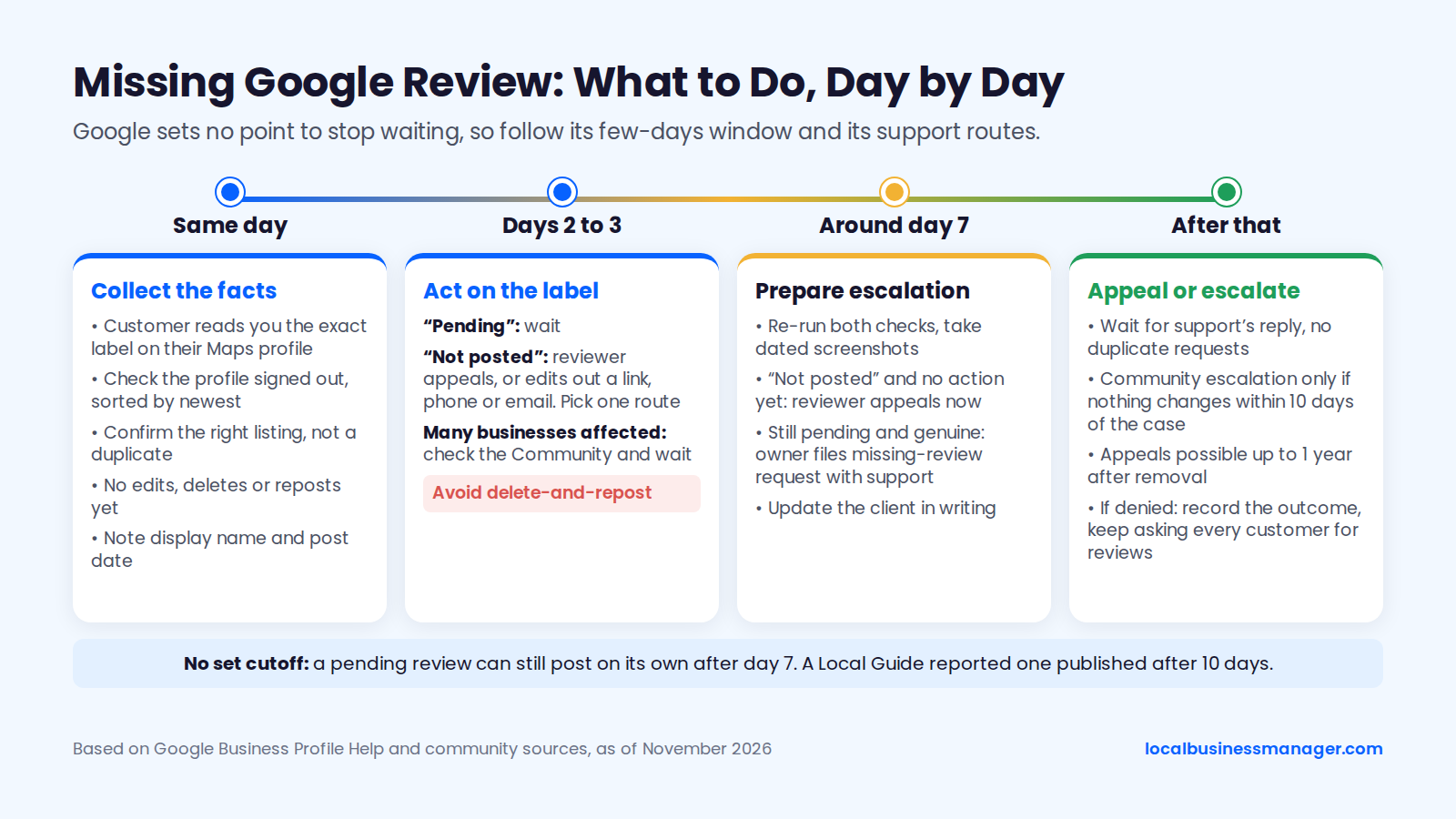
Day-by-day steps for a missing review, based on Google Business Profile Help and the community sources in this article, as of November 2026.
Same Day
On the first day, collect the facts before anyone changes anything:
- Ask the customer to check their Maps profile and tell you the exact label (template below).
- Check the profile yourself, signed out and sorted by newest.
- Confirm the customer reviewed the right listing, not a duplicate or a business with a similar name.
- Ask the customer not to edit, delete or post again yet.
- Note the reviewer's display name and the date they posted.
If the review is visible signed out, you're done. A star rating that hasn't moved yet is normal: Google's help is quoted as saying the updated score can take up to 2 weeks.
Days 2 to 3
Days 2 and 3 still fall within the few days Google says a check can take. What to do depends on the label:
- "Pending": wait. Google doesn't document whether an edit restarts the check, and the guides that claim either way show no test.
- "Not posted": the reviewer can appeal from their Maps profile. If the review contains a link, phone number or email, the reviewer can edit out that detail instead.
- Many businesses affected: check the Business Profile Community and wait.
Avoid the delete-and-repost reflex. An August 2026 Local Search Forum thread reports that reposting was blocked after a group of genuine reviews was removed. The thread is one community report, not a Google rule, and no published source shows that reposting helps.
Around Day 7
By day 7, Google's few-days window has passed, but a pending review isn't necessarily lost. A Local Guide reported in 2025 that a pending review was published after 10 days. Use day 7 to prepare the escalation without forcing anything:
- Re-run both checks and take dated screenshots.
- If the label says "Not posted" and the reviewer hasn't acted, the reviewer appeals now.
- If the review is still pending or author-only and you're sure it's genuine, the owner files the missing-review request with Business Profile support.
- Update the client in writing (template below), so there's a record of the wait.
Don't ask the customer to try a different account, a VPN or another network. Google doesn't document any of these as fixes.
After That: Appeal or Escalate
Google sets no time limit, and a pending review can still post on its own after day 7, as the 10-day Local Guide report shows. From here, 3 situations cover what you can act on:
- Appeal or support request open: wait for the reply instead of filing duplicates.
- No change within 10 days of opening a support case: use the community escalation described in the support section below.
- Appeal denied, or policy removal confirmed: Google's missing-reviews page says the review won't be restored, so record the outcome and go back to asking every customer for reviews.
When I've looked at why personal-injury firms miss the 3-pack, too little review flow is one of the 2 most common causes (the other is a Business Profile name that isn't optimized, which for a law firm means a registered trade name the firm actually uses and its state bar allows), so a steady flow of new reviews is worth more of your time than one stuck review.
A name change is a separate project with real suspension risk: the 2026 Local Search Ranking Factors survey lists keyword names among the top suspension risk factors, so the trade name has to be registered and in use everywhere before the profile name changes, last.
How Do Appeals and Google Support Work for Missing Reviews?
Older guides mix up 3 separate routes: the reviewer's own appeal, the owner's Reviews Management Tool, and Business Profile support. Only the reviewer's appeal and Business Profile support apply to a missing review.
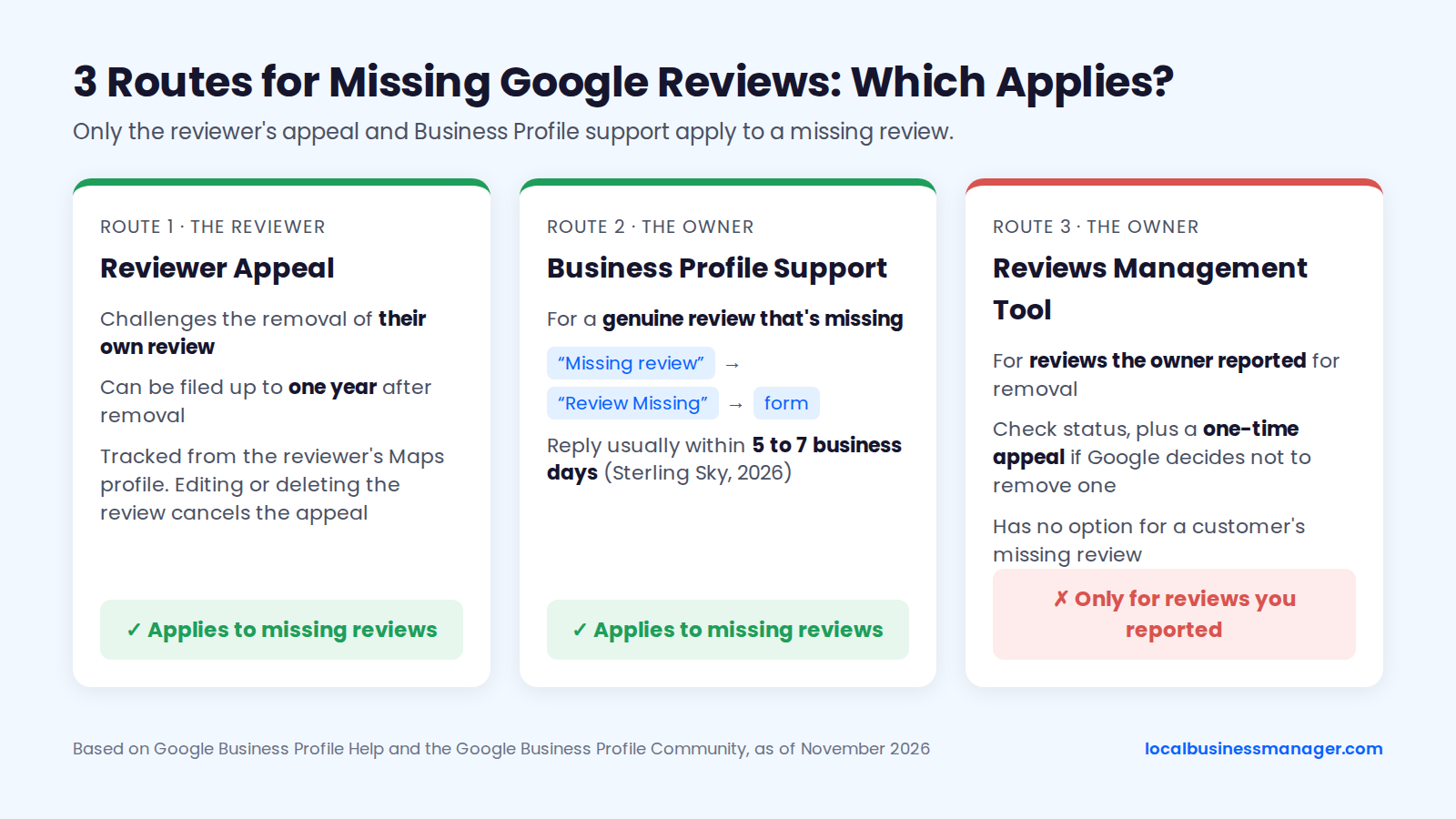
Which route applies, based on Google Business Profile Help and the Google Business Profile Community, as of November 2026.
Reviewer Appeal
The reviewer's appeal challenges the removal of their own review. It sits on the reviewer's Maps profile, so only the customer can file it. The Google Maps Help community guide to unpublished reviews says a reviewer whose review shows "Pending" or "Not posted" can appeal from their Maps profile. An industry blog reported in July 2026 that Google Maps now emails reviewers "Review not posted" notices with an appeal option, so older guides that say reviewers are never told are out of date.
Appeals can be slow. Search Engine Roundtable reported in October 2026 that a Google team member said review appeal processing times were extended and Google couldn't give a timeframe. Similar delays happened in December 2024 and March 2025.
Owner: Reviews Management Tool (for Reviews You Reported)
The Reviews Management Tool is for reviews the owner has reported for removal. In the tool, an owner can check the status of reviews they reported and use a one-time appeal if Google decides not to remove one. It has no option for a customer's missing review.
Sterling Sky reports that Google says evaluations of reported reviews typically take several days, though Sterling Sky has seen some sit in "Decision Pending" much longer. Some guides suggest the reviewer use "Report a problem" on their own review. That isn't a recognized way to restore a review.
Contacting Business Profile Support
Business Profile support is the owner's route for a genuine review that's missing. A Product Expert in the Google Business Profile Community describes the path: open the Business Profile support page, type "Missing review," choose "Review Missing," and fill in the form. Sterling Sky (2026) says the form usually gets a reply within 5 to 7 business days.
If the case isn't fixed within 10 days, the same Product Expert says the owner can return to the community with the case number, business name, Maps URL and a screenshot of the review for one last escalation. Outcomes from these routes vary widely:
- Before the form existed, Near Media says Product Expert escalations restored rejected reviews "more often than not."
- In a 2026 community thread, an owner lost every review after re-verification in January and was still stuck in late February.
- Older forum posts (2019 and 2022) say Google rarely restored reviews its algorithm removed in bulk.
What to Send Support: Evidence Pack Checklist
Send a complete pack the first time. Items 1 to 7 are what support and Product Experts ask for; items 8 to 10 are optional context that helps explain a multi-review loss:
- The Business Profile ID.
- The business name and its Google Maps URL.
- Each reviewer's display name.
- The date, or date range, of each missing review.
- A screenshot of the label on the reviewer's Maps profile, shared with their permission.
- A signed-out screenshot of the profile, sorted by newest, showing the review missing.
- The case number of any earlier request.
- Dates of any profile event: merge, move, reinstatement or re-verification.
- The review text, shared with the reviewer's permission.
- The reviewer's device and Google Maps app version.
Privacy note: send only what Google needs to find the review. Leave out customers' phone numbers, emails, invoices and details of the service they received. Ask the customer before you share anything from their account. Law firms should keep every detail of a client's matter out of the ticket.
What Should You Tell the Customer and the Client?
A missing-review call needs 2 messages. The first asks the customer what their status label says. The second tells the client what the agency can and can't see. Both are templates to adapt; Google doesn't require any particular wording.
Message to a Customer Whose Review Isn't Showing
The customer message asks for the status label and puts no pressure on the customer. Send it only through a channel the customer already uses with the business, and by text only if they opted in to receive texts.
Hi [first name], thank you for leaving us a Google review. It isn't showing on our profile yet, which can happen while Google runs its checks. If you have a minute, could you open your profile in Google Maps, find your reviews, and tell us whether yours says "Pending" or "Not posted"? Please don't post a second one; we'll let you know if anything else is needed. Thanks again, [your name] at [business]
The message deliberately leaves out 4 things:
- Any offer, discount or thank-you gift.
- Suggested wording, a star rating or staff names.
- Repeated follow-ups; one message is enough.
- Any request to switch accounts, devices or networks.
Explanation for a Client Who Says Reviews Are Missing
The client explanation has to say plainly what the agency can and can't see. Otherwise "reviews are missing" turns into blame for something only Google controls. Cover 4 points:
- What the agency can see: the public profile, the reviews shown and the rating.
- What nobody at the business can see: the status of a single review, because Google offers businesses no status page for one review.
- What only the reviewer can do: see the status label and appeal a removal.
- What only Google can do: release a held review or restore a removed one.
Thanks for flagging [customer]'s review. Google checks every review before it shows publicly. A clean review can appear within seconds, but Google says some checks take a few days, and it gives no fixed deadline. Google gives businesses no way to check the status of a single review; only your customer can see whether theirs is pending or not posted. What we've done: [checked the public profile signed out on (date); asked the customer for their status label, which shows (label)]. Next step: [wait until (date) / the customer can appeal / we've opened a missing-review request with Google, case (number)]. Google doesn't restore reviews removed for policy reasons, so we'll keep asking every customer for reviews as usual rather than chasing one.
How Can You Ask for Reviews Without Getting Them Held?
Ask every customer the same way, with no incentive and no scripted content. Google's content policy sets no limit on how many customers a business may ask. It does ban 6 request patterns, and the last 2 were added by April 2026:
- Asking only happy customers ("selectively solicit positive reviews," also called review gating).
- Discouraging negative reviews.
- Offering payment, discounts or free goods or services for a review.
- Pressuring customers to review while they're on the premises.
- Requiring staff to collect a set number of reviews.
- Asking staff to collect reviews with specific content, including content naming a staff member.
2 more habits come from practice rather than Google's policy:
- Send individual requests after real service, not one bulk blast to past customers. No primary source publishes a safe number of requests per day or week, and the weekly quotas in vendor blogs come with no data.
- Text only customers who opted in to receive texts, whatever channel the rest of the campaign uses. Our guide to asking for Google reviews within policy covers timing, channels and wording in full.
For law firms, send every client the same request when their matter closes, whether or not the case recovered. A personal-injury client is only paid when the case recovers, so asking only at payout would mean asking only clients who won, which is selective solicitation and Google's policy prohibits it.
For personal-injury clients who recovered, my practice is to ask after the client has been paid, by email, or by text if the client opted in to receive texts. The rest of a firm's setup is in local SEO for lawyers.
Which Common Explanations Are Myths?
Google doesn't document most of the explanations for slow or missing reviews that circulate online. The table labels 9 common claims by evidence level, as of November 2026, using Google's help pages and the practitioner sources in this article. It's sorted from the claim the evidence directly contradicts to claims with no source at all.
Claim | Evidence level | What to do instead |
|---|---|---|
Reviews with business replies get posted first | Contradicted: a business can't reply to an unpublished review | Wait for the review to post, then reply |
Unverified profiles can't receive reviews | Not documented by Google | Check the documented causes first |
Posting from the business's Wi-Fi or IP gets reviews filtered | Not documented by Google | Don't hand customers a device on site; the policy bans on-premises pressure |
Reviews posted at peak hours take longer | Not documented by Google | Ignore posting time |
Long, detailed reviews post faster | Not documented by Google | Never ask for a length or wording |
Verified businesses get reviews posted faster | Not documented by Google | Diagnose with the 2 status checks |
A VPN or different network gets a review past filters | Not documented; no published test | Wait, or use the reviewer's appeal |
A tiny edit re-triggers posting | Vendor claim, no evidence | Leave a Pending review alone |
2 to 4 reviews a week keeps you under the filter | No source; vendor guess | Ask every customer after real service |
Other Questions About Google Reviews Not Showing
Most follow-up questions come down to 3 facts: Google gives no fixed timeline, only the reviewer can see a review's status, and only Google can release or restore a review.
Why Can't I Leave a Review on Google?
Summaries of Google's help page give 3 reasons: an out-of-date Google Maps app, reviews temporarily turned off for the profile or its category, or a category where Google has switched reviews off.
Schools for students aged 6 to 18 are the documented example of the last case: Google has removed and turned off reviews and ratings for profiles mainly categorized that way. If none of the 3 applies, update the Maps app, check you're on the right listing, and try again.
Can a Business Owner See or Approve Reviews Before They Post?
No: owners can't approve reviews, and Google decides what appears.
Google's 2022 Maps 101 post says every review goes to Google's moderation system as soon as it's posted. An owner can reply to a review only after it has posted.
Does Editing a Review Make It Wait Again?
Google doesn't document whether editing a review sends it back through its checks.
The guides contradict each other. One 2026 guide says an edit can trigger a new check that hides the review for hours or days. Another says a tiny edit can get a stuck review re-checked and published. Neither shows a test. Until someone publishes one, leave a Pending review alone and edit only to remove a clear trigger such as a link or phone number.
Do Star-Only Reviews or Reviews With Photos Post Faster?
Google doesn't document any speed difference for star-only reviews or reviews with photos.
A 2025 Local Guides Connect thread linked pending holds to a new check process, especially for reviews with media. The only star-only evidence is a 2023 LocalU test by Jason Brown: a filtered review appeared after the reviewer posted a star-only rating and added text later. No published source has repeated that test since.
Can a Business Delete Google Reviews?
No: a business can report a review it believes breaks Google's policy, and Google decides whether to remove it.
The Reviews Management Tool tracks reported reviews and offers a one-time appeal if Google decides not to remove one. Google evaluates each reported review against its content policy. Our guide to deleting and reporting Google reviews covers what qualifies and how to word a report.
The One Habit Worth Keeping
Before anyone opens a ticket or asks a customer to rewrite a review, get a screenshot of the reviewer's status label and run the signed-out check yourself; those 2 facts decide every step after. Local Business Manager is in early access for agencies and multi-location businesses; join the early-access list if you'd like to see it.