Local SEO for Roofers: A Map Pack Playbook for Agencies and Roofing Companies

A roofer ranks in local search by setting up its Google Business Profile for where it actually works (usually as a service-area business), earning honest reviews from every customer, and backing the profile with real service and city pages. The roofing-specific part is doing that while storm chasers, keyword-named listings and suspensions crowd the category.
This playbook is built for an agency to run on a roofing client this week. It includes the setup decisions, compliant review scripts and reply templates, a city page template, a storm-season plan, a monthly report, a script for the "we dropped" call and a 32-item checklist.
What Does Local SEO for Roofers Actually Cover?
Local SEO for roofers is the work of getting a roofing company found in the 4 places a homeowner sees roofers in search: Local Services Ads, the map pack, the local organic results and AI answers. Google's own ranking factors explain the free placements. The map pack's near-constant presence on home-services searches shows the channel still pays.
How Does Google Decide Which Roofers Show in the Map Pack?
Google's Business Profile help page on local ranking says local results rank mainly on 3 factors: relevance, distance and prominence. The same page says Google keeps the details of its local algorithm confidential, so everything beyond those 3 words comes from practitioner testing.
- Relevance: how well a profile matches the search. Google says complete, detailed business information helps it match a business to relevant searches.
- Distance: how far the business's verified location is from the searcher, or from the place named in the search.
- Prominence: how well known the business is.
The profile controls the categories, services, name and visible review record. The website controls service and city content, links and technical health.
Does Local SEO Still Work for Roofers?
Local SEO still works for roofers because the map pack still appears on almost every home-services search. In a 2026 study of 100 home-services keywords (HVAC, plumbing, roofing, electrical and garage doors), the agency WebFX found the local pack on 98 of the 100 keywords.
What changed is the space above the map. The same WebFX study found that Local Services Ads appear above both Google Ads and the local pack when they show, and AI answers now compete for attention on many searches too. The free map listing still shows on those searches. It just sits below more paid and AI placements.
Why Is Roofing Harder Than Other Trades in Local Search?
Roofing is harder for 6 reasons, from hidden addresses to insurance law, and the evidence behind each one varies. Most roofers rank from a hidden address, keyword-stuffed, fake and storm-chaser listings compete in the same category, and paid placements sit above the map.
- Most roofers are service-area businesses. Their rankings stay tied to the address used to verify the profile, however big a service area they draw (Sterling Sky's testing, covered below).
- Keyword-stuffed and fake listings are reported in the category. In 2023 one practitioner blog, DBA Platform, reported that fake multi-location listings usually come from at-home service trades, and it named roofers alongside plumbers and electricians. In 2026 the agency Digital Division Group found the top roofing results in Seattle adding keywords such as "Roofing Services Seattle WA" to their names. This evidence is anecdotal, and no study measures a rate.
- Fake listings run at scale. Search Engine Roundtable reports that Google says it removed more than 13 million fake Business Profiles in 2025. In March 2025 Google sued a network behind about 10,000 fake or hijacked Maps listings. Many of those listings targeted locksmith and towing searches, and calls were routed through lead generation services.
- Lead-gen listings aren't eligible. Google's business eligibility guidelines say lead generation agents and companies can't have a Business Profile.
- Storm chasers arrive after big storms. Yahoo Local describes storm chasers as contractors who move into storm-hit areas, and out-of-town contractors may lack local licensing or warranties.
- Insurance rules shape the marketing. On insurance-paid jobs, Texas and Colorado limit what a roofer can promise about claims and deductibles. Those limits reach into review replies (covered below).
I treat local SEO as the same in every niche: the method doesn't change by industry, and each industry adds its own rules. For roofers, those rules cover storm season and insurance law.
I'm a former Head of SEO at a legal-marketing agency, and I've ranked and served close to one hundred US personal-injury law firms in Houston, Denver, Los Angeles and New York. The PI firms that missed the 3-pack most often had 2 problems: a business name that wasn't optimized and too little review flow.
How Should a Roofer Set Up Its Google Business Profile?
A roofer should set up its Business Profile for where it actually works. For most roofers that means a service-area profile with the address hidden, 1 accurate primary category and a name the company really uses. The decisions run in the order an agency makes them on a new roofing client: profile type, service areas, categories, profile content, the name, then verification.
Storefront or Service-Area Business: Which One Is a Roofer?
Most roofers are service-area businesses, because customers don't come to them. Google's guidelines for representing your business say a business that serves customers at their location, with no customer-facing address, should hide its address. A hybrid business that also receives customers can show its address and set a service area.
The table below covers 5 roofer setups, as of November 2026, based on Google's guidelines. It is sorted from compliant to not allowed, and only the first 3 setups qualify for a profile.
Roofer's setup | Profile type | Address on the profile | Allowed |
|---|---|---|---|
Home office, no customer visits | Service-area business | Hidden | Yes |
Equipment yard or warehouse, no customer reception | Service-area business | Hidden | Yes |
Staffed office where customers visit during posted hours | Hybrid (storefront plus service areas) | Shown | Yes |
Coworking desk | None | Not applicable | No |
Virtual office or PO box | None | Not applicable | No |
Never put a roofing profile on a virtual office, PO box or coworking desk, and never create a profile in a town where the roofer has no real location.
Do Service Areas Help a Roofer Rank in More Towns?
Service areas don't help a roofer rank in more towns: they show customers where the roofer works, but rankings stay tied to the verified address. Sterling Sky tested this on its own hidden-address listing. Adding a service area changed only what was displayed, and the listing didn't rank in the Toronto area it had added.
Sterling Sky's result is field evidence from 1 listing that the agency keeps updating, not a controlled study. Google sets 3 service-area limits, as of November 2026:
- Up to 20 service areas, set by city, postal code or another named area, not by radius.
- The whole area should stay within about 2 hours' drive of where the business is based.
- No whole countries or states. PPC Land reported that Google made this change on June 24, 2025.
Practitioners still debate whether Google uses a hidden address as the starting point for distance, and Google hasn't confirmed either way. We found no published study that gives a mile radius for how far a hidden-address roofer can rank, in a dense metro or a suburb, so measure reach with a grid scan (see the measurement section) instead of promising a number.
Which Categories Should a Roofer Choose?
Pick the primary category most of the ranking competitors use. That's my rule. If Google is clearly rewarding a different category than the "logical" one, I use the category Google rewards. Roofing industry guides consistently recommend Roofing contractor as the primary, so check the client's current pack before settling on it.
Secondary categories are where the guidance conflicts. Google's guidelines say to choose the fewest categories it takes to describe the core business, and not to use categories as keywords. Practitioner tests point a different way:
- In Sterling Sky's tests on a law firm and a New York City dentist, adding or removing relevant additional categories never hurt core rankings. The dentist gained rankings for terms tied to the new categories.
- In a January 2019 test on a local SEO company's own profile, adding unrelated categories dropped rankings, and they recovered once the categories were removed.
- Sterling Sky reports that changing the primary category has a major ranking impact.
The safe reading is to add a secondary category only for work the roofer really sells. Industry guides published in 2026 put the limit at 1 primary category plus 9 additional ones.
A Category Worked Example: Roofing, Siding and Gutters
Take a roofer that replaces and repairs roofs, does inspections, and installs siding and gutters, but doesn't clean gutters. That roofer gets 1 primary category and 2 or 3 secondaries. The gutter work goes in Services rather than under a cleaning category.
The table below is sorted from core work outward. Category names come from roofing industry guides as of November 2026, so confirm each one in the profile's category picker before adding it.
Work the roofer actually does | Category decision | What goes in Services |
|---|---|---|
Roof replacement and repair | Primary: Roofing contractor | Roof replacement, roof repair, leak repair, storm damage repair |
Roof inspections sold as a service | Secondary: Roof inspection service | Roof inspection, storm damage inspection |
Siding installation | Secondary: Siding contractor | Siding installation, siding repair |
Skylight installation | Secondary: Skylight contractor, only if offered | Skylight installation, skylight repair |
Gutter installation, no cleaning | No Gutter cleaning service category | Gutter installation |
Gutter cleaning, not offered | No category | Nothing |
Roofing guides commonly suggest Gutter cleaning service as a secondary category, but that category describes cleaning, not installation. No source we checked confirms a gutter-installation category, so if the picker doesn't offer one, list the installation work in Services only.
What Goes in Services, Description, Photos and Posts?
Services should list every job type the roofer sells, in the words homeowners use, and match the service pages on the website. The description should say plainly what the company does and where, with no promotions or keyword lists. The rest of the profile works like this:
- Photos: upload real job photos regularly: tear-offs, finished roofs, crews, trucks with branding. Google hasn't confirmed any ranking effect from geo-tagging photos, so don't spend time on it.
- Hours: set regular hours, plus special hours for holidays and storm weeks.
- Posts: Google has not confirmed posts as a ranking factor, and the evidence that they help rankings is weak.
I still post 3 times a week for clients. That's my practice; I've seen weak evidence that it moves rankings. In my view, regular posting signals to Google that the business is active, and a post about this week's hail repairs is useful to a homeowner reading the profile.
Can a Roofer Use a Keyword Business Name?
A roofer can use a keyword business name only if that name becomes the company's real name first. Google's guidelines say the profile name should match the business's real-world name as it appears on the storefront, website and stationery and as customers know it. As Sterling Sky notes, adding keywords the business doesn't use breaks those guidelines and can get a profile suspended.
I recommend keyword names, done through a registered DBA (assumed name), and I've taken many clients through this process. Picture "Smith Bros LLC" becoming "Denver Roofing Pros." The 4 steps go in this order:
- Register the DBA with the state or county.
- Put the new name on everything customers see: truck wraps, yard signs, website, estimates and invoices, the phone greeting and other listings.
- Change the Business Profile name last, once the real-world name matches.
- Keep the DBA filing and photos of branded trucks and signs on file, because that's what proves the name if Google asks.
A DBA filing on its own doesn't make a name compliant, because Google judges the name the business really uses. Sterling Sky's position is that a DBA or a legal rebrand is the only compliant way to get keywords into the name, and that Google cross-checks the name against the website and signage.
What Are the Risks of a Keyword Name?
A keyword name carries real suspension risk even when it's done properly. The 2026 Local Search Ranking Factors survey lists keyword names among the top suspension risks, and it also ranks keywords in the business title as the third most influential local pack factor. The ranking upside and the penalty risk both show up in other data:
- Ranking: In an August 2026 study of more than 1.4 million listings across 17 industries by a local SEO software company, keywords in the business name correlated with better top-3 visibility in every industry except real estate. That finding is a correlation, and it doesn't prove the keyword caused the rank.
- Penalty: In Sterling Sky's 50-case study from 2019, profiles that kept re-adding keywords to the name were soft-suspended 20% of the time.
- Re-verification: Searchscope, citing Google's help documentation, reports that a business may have to verify again after changing its name, because a name change is a major edit.
In my experience, a keyword name done through the DBA route, with the profile change last, is the kind of single fix that can show ranking gains within about a month. Nobody can guarantee that timing.
What to Expect From Verification
Expect a name change to trigger a review and possibly re-verification. Searchscope, citing Google's help documentation, reports that a name change is a significant edit that Google reviews automatically and that a business may have to verify again afterward.
In my experience, name edits and address edits cause the most suspensions, so plan each core change once rather than editing the same field again and again. Have 4 kinds of proof ready before anyone touches the profile:
- Photos of vehicles with permanent branding. The Product Expert-written suspension guide in the Google Business Profile Community recommends these for service-area businesses.
- The business license and a utility bill in the business name.
- The DBA filing if the name changed.
- For a staffed office, a lease agreement and photos of the office with signage, or a video recording the storefront and office. In my experience, reinstatements usually need documents like these or a video.
How Do Roofers Get More Google Reviews Without Breaking the Rules?
Roofers get more reviews by asking every customer for an honest review at the same point in every job, through channels the customer agreed to. Start with the rules, because they decide what the timing, the scripts and the replies are allowed to say.
What Does Google's Review Policy Prohibit?
Google's Maps user-generated content policy bars 4 practices:
- Discouraging or prohibiting negative reviews.
- Selectively asking only happy customers (review gating).
- Offering incentives such as payment, discounts or free services for posting a review, or for changing or removing a negative one.
- Asking staff to collect a set number of reviews.
PPC Land reported that Google updated the policy on April 17, 2026 to ban quota-based review solicitation, and that Google Maps now asks users whether a business paid for their review.
What Does the FTC Rule Add?
The FTC's 2024 final rule on fake reviews and testimonials bans incentives tied to a review expressing a particular sentiment. It also bans groundless legal threats, intimidation or certain false public accusations used to stop or remove a negative review, and the review-suppression section is codified at 16 CFR 465.7.
On top of the legal rules, keep the requests themselves clean:
- Consent: send text and email review requests only to customers who opted in through the business's own consent forms.
- No keywords: a review must describe the customer's real experience in their own words, so "please mention same-day roof repair" is off the table.
When Should You Ask a Roofing Customer for a Review?
No published source we found settles when roofers should ask. Google's policy settles only the rule any timing must follow: every customer gets asked at the same point in the job. Pick 1 of these 3 moments and apply it to every job:
- At the final walkthrough. The customer sees the finished roof and the crew in person.
- After cleanup. The yard is clear of nails and debris.
- After the insurance claim closes. This moment works only if every insurance customer is asked at claim close, including customers whose claims went badly. Using it to skip disputed claims is review gating.
Write the chosen moment into the job checklist, so nobody decides case by case who gets asked.
What Should a Roofer Say When Asking in Person or by Text?
Ask for an honest review without steering the wording, and replace the bracketed parts with the real details.
In person, at the chosen moment:
- "Thanks for trusting us with your roof, [Name]. We ask every customer for an honest Google review once the job's done, because it helps other homeowners around [town] pick a roofer. You can find us by searching [Business Name] on Google, and if you signed up for texts on our consent form, we'll text you the link."
SMS, only for customers who opted in through the business's consent form:
- "Hi [Name], it's [Your Name] from [Business Name]. Your roof at [street] is finished. If you have a minute, we'd appreciate an honest review of how the job went: [review link]. Reply STOP to opt out."
What Should a Review Request Email Say?
A review request email should go only to customers who agreed to receive email from the business, ask for an honest review, and keep any service follow-up separate from the request.
- Subject: "How did we do on your roof?"
- Body: "Hi [Name], thanks for choosing [Business Name] for your [roof replacement/repair]. We ask every customer for an honest review on Google. Good or bad, it helps us improve and helps your neighbors choose a roofer. Leave yours here: [review link]. Separately, if anything about the job still needs attention, reply to this email and [owner name] will call you. You're welcome to leave a review either way."
Send at most one follow-up, and never offer a discount, a gift card or entry into a drawing for a review.
How Should a Roofer Reply to Reviews?
A roofer should reply to every review, professionally and without sharing the customer's private details. Google's reply tips say to stay polite, never attack the reviewer, explain what you can and can't do, and avoid promotions in replies.
Insurance disputes need extra care, because state rules reach into what a reply can say:
- Texas: the Texas Department of Insurance says Texas Insurance Code 4102.163 bars a roofer from acting as a public adjuster on its own job. The department lists offering to negotiate claim settlements and saying you represent the policyholder as improper, and it says waiving or absorbing a deductible is illegal.
- Colorado: C.R.S. 6-22-105 bars roofers on insurance-paid jobs from promising to pay, waive or rebate a deductible.
These are marketing cautions, not legal advice, so check the rules in each state the client works in.
Review Reply Templates for Roofers
Use these 4 templates as starting points, and adjust the bracketed parts to the actual job:
- 5-star: "Thanks, [Name]. Glad the [replacement] went smoothly and the crew left the yard clean. Enjoy the new roof."
- Workmanship complaint: "[Name], we're sorry the [flashing/leak] isn't right. That's covered by our workmanship warranty. [Owner name] will call you today to schedule a crew. You can also reach us at [phone]."
- Insurance-claim dispute: "[Name], we understand the frustration with your claim. Coverage decisions are made by your insurance company, and we can't negotiate the settlement for you. We're happy to share our inspection photos and documentation with you. Call [owner name] at [phone]." Never promise to fight the insurer or cover the deductible.
- Suspected fake: "We can't find a record of a job under this name or address. If you're a customer, please call us at [phone] so we can help." Then flag the review in the profile.
What Pages Does a Roofing Website Need to Support the Map Pack?
A roofing website needs 1 page per service the company sells and city pages only where it has real local work to show. Service pages come first; city pages need a test and a template before they're built, and the profile needs to point at the right one.
Service Pages Every Roofer Should Have
Every service a roofer sells needs its own page, matching the profile's Services list. The standard set has 7 pages:
- Roof repair
- Roof replacement
- Storm and hail damage repair
- Emergency roof repair
- Roof inspection
- Commercial roofing, only if offered
- Gutters, only if the company installs them
Each page should target the way homeowners actually search: service plus city ("roof replacement Aurora"), "near me" searches, emergency terms ("emergency roof tarp") and storm terms ("hail damage roof repair"). Show real job photos, the materials the company installs, warranty terms and a phone number that's tappable on mobile.
The technical basics are table stakes: a fast mobile site and click-to-call in the header. Use the same business name and address (if shown) as the profile, and handle the phone number as described in the call-tracking section.
When Does a City Deserve Its Own Page?
A city deserves its own page only when the roofer has something true and specific to say about it. Google's spam policies list doorway pages as a violation, and thin pages that only swap the city name are the classic risk.
Build the page only if the answer is yes to all 4 questions:
- The roofer has completed jobs there and has photos of them.
- It has reviews from customers in that city.
- Something local differs: housing stock, common roof types, permit rules or weather.
- The city sits inside the area the roofer actually serves.
City pages help organic rankings and relevance for that city, but they don't move the map pin, because map pack position stays tied to the profile's location.
City Page Template
This 8-part outline keeps a city page useful to a homeowner and away from doorway patterns. Use it as a page brief.
- Headline: the service and city ("Roof Replacement in Aurora").
- Local housing stock: the homes and roof types common there (for example 1970s ranch homes with 3-tab shingles).
- Permit notes: whether the city requires a permit for re-roofing and how the roofer handles it.
- Weather risks: the hail, wind or snow-load issues that drive jobs in that area.
- Recent local jobs: 2 to 4 projects with photos, the neighborhood and what was done.
- Local reviews: reviews from customers in that city, quoted with permission.
- Nearby neighborhoods served: real ones, not a pasted list of every ZIP code.
- Contact: the main phone number and a short estimate form.
If sections 2, 5 and 6 are empty, the city doesn't pass the test yet.
Which Page Should the Profile Link To?
The profile should link to the page that best matches its location and primary category. For a roofer with 1 location, that's the homepage or the page for its home city, whichever names the city and the core roofing services most clearly.
For a roofer with more than one staffed office, each office's profile links to its own city page, which carries the local details for that office. That's how I set up multi-office clients, and it keeps each profile pointing at a page that matches its address instead of sending every profile to the same homepage.
Which Citations and Links Actually Matter for Roofers?
For roofers, a small set of accurate citations and a handful of earned, relevant links matter more than volume. Clean up the listings first, then go after links that come from real business relationships.
Which Citations Does a Roofer Need?
A roofer needs a small core set of accurate listings, not 50 directories. Start with these 6:
- Apple Maps and Bing Places
- BBB
- Angi
- Houzz
- Nextdoor
- The local chamber of commerce
Each listing should show the same business name and website as the profile, plus a consistent phone number (see the call-tracking section). For a hidden-address roofer, hide or omit the street address wherever the platform allows. Search for duplicate listings and old business names before building anything new.
My approach is to fix every inconsistent listing: the profile, the aggregators and the major platforms. When hours are tight, fix the most serious issues first and work down from Critical to High, Medium and Low.
Where Do Roofers Earn Legitimate Links?
Roofers earn their best local links from real business relationships. Look in 4 places:
- Manufacturer contractor listings, but only for certifications the roofer actually holds.
- Suppliers and distributors that publish a list of the contractors they work with.
- Trade associations the roofer belongs to, such as the National Roofing Contractors Association (NRCA) or a state roofing association, where they publish a member directory.
- Local sponsorships. Youth sports teams, school events and community projects the roofer actually supports.
Leave link exchanges and press-release campaigns out of the plan.
How Should Roofers Handle Storm Season and Storm-Chaser Listings?
Roofers handle storm season by preparing the profile and site before demand spikes, answering fast during it, and reporting genuinely fake listings through Google's official channels afterward. The profile work comes first, then spotting the listings that appear after a storm and reporting them properly.
Before, During and After a Storm: A Profile Playbook
A storm week brings the demand spike and the spam surge at the same time, so the work splits into 3 phases.
Before storm season:
- Publish or refresh the storm and hail damage page and the emergency repair page.
- Check that hours, services and the phone number are correct on the profile.
- Set up after-hours call handling so emergency calls don't hit voicemail.
- Write down the listings that rank in the client's pack today, so new arrivals are easy to spot.
During a storm event:
- Set special hours if the crew is working extended days.
- Post short updates: tarping availability, inspection scheduling, what to do before the crew arrives.
- Answer calls, messages and reviews fast.
After the storm:
- Upload photos of real storm jobs.
- Ask every storm customer for a review at the same fixed moment.
- Check the pack for new listings and run them through the spam checklist below.
How to Spot Fake and Storm-Chaser Listings
An out-of-town roofer isn't spam just for being out of town. Joy Hawkins of Sterling Sky noted in 2024 that Google keeps listings up when it has evidence the companies are genuinely separate, so a legitimate contractor set up as a service-area business is allowed. The listings worth reporting are the ones with fake details: invented or virtual-office addresses, keyword-stuffed names, duplicates and ineligible lead-gen listings.
Check each suspicious listing for 6 signs:
- An address that's a virtual office, mailbox store, empty lot or someone else's business.
- A name that's mostly keywords ("Best Roof Repair Denver CO") with no matching signage or website.
- The same phone number on several listings with different names.
- A listing that appeared within days of the storm, with few or no photos of real work.
- A website that's a lead-gen page with no named company, or no website at all.
- Reviews posted in a burst, written in the same style.
One sign on its own isn't proof, so report a listing when several signs point the same way.
How to Report Them the Right Way
Report fake listings through Google's 2 official routes, and report only what's actually false and documented. Never report a competitor falsely. Work through 5 steps:
- Suggest an edit on the listing in Google Maps. Use this route for a listing that may not exist at all, or for a business that's closed or moved.
- Business Redressal Complaint Form. Use the form for fraud in a listing's name, phone number or URL, which is all the form covers. Sterling Sky's 2025 guide recommends it for stronger cases, because simple edits are often denied or reversed.
- Document the case. Keep screenshots, the dates you checked and evidence such as street-view photos of the address.
- Keep the case IDs. You can file more than once.
- Escalate. If nothing happens, post the case IDs in the Google Business Profile Community and ask for a re-review.
Google's form page says Google can't guarantee action and won't update you on the status. Turnaround estimates vary: about 2 weeks (Sterling Sky, 2025), 10 to 14 days with some waits of 3 to 4 weeks (a Local Search Forum thread from about 2022), and well over a month (Rankings.io, 2026).
We found no public source that gives a success rate. Sterling Sky adds that fighting spam has become less effective over time and that removed listings can come back.
How Do Local Services Ads Fit With Local SEO for Roofers?
Local Services Ads and the map pack are separate placements, but for roofers they share one foundation: the Business Profile and its reviews. The comparison below shows how the 3 placements differ, followed by what LSA screening involves and whether LSAs move map rankings.
LSAs are the only one of the 3 placements a roofer pays for. The map pack showed on 98 of 100 home-services keywords in WebFX's 2026 study. The table is sorted by where each placement appears on the results page, top to bottom, as of November 2026. The LSA ranking inputs come from secondary summaries of Google's help content.
Placement | How the roofer pays | What decides position | What the roofer controls | Where it appears |
|---|---|---|---|---|
Local Services Ads | Paid advertising | Review rating and count, responsiveness to leads | Budget, response speed, reviews on the linked profile | Above Google Ads and the map pack when shown |
Map pack | Free | Relevance, distance and prominence | Profile setup, reviews, website, citations | On 98 of 100 home-services keywords (WebFX, 2026) |
Local organic results | Free | Google's general ranking systems | Service and city pages, links, technical health | In the regular results |
What Does LSA Screening Mean for Roofers?
LSAs require their own screening on top of the Business Profile. A 2026 Google Business Profile Community guide says every LSA advertiser needs a Business Profile affiliated with the account, and passing profile verification doesn't complete LSA screening.
Reviews tie the 2 products together. Customer reviews for LSA providers are managed through the Business Profile rather than the LSA account, and Search Engine Roundtable reported a Google email saying existing reviews would move to the profile starting in early 2025. Review work on the profile now feeds the ad too.
Do LSAs Change Map Pack Rankings?
No published test we found shows that running LSAs helps or hurts map pack rankings, and Google hasn't said either way. Treat LSAs and the map pack as separate rankings that share the profile's reviews. What does drive LSA position comes from secondary summaries and a former Googler:
- Secondary summaries of Google's help content list review rating, review count and responsiveness to leads as ranking inputs, and say Google recommends having 5 or more reviews.
- Google removed proximity from that help text in May 2024. Google's Ads Liaison, Ginny Marvin, called it a Help Center update only, not a change in how ads rank.
- Former Googler Eric Levine said on the Near Media podcast in 2026 that LSA ranking depends on review velocity, responsiveness and visual trust, not just reviews or budget.
How Do Roofers Show Up in AI Answers Like AI Overviews and ChatGPT?
No one can guarantee a roofer appears in ChatGPT, Gemini, Perplexity or Google's AI Overviews. What a roofer controls is the evidence those systems can find.
These 5 policy-safe steps keep that evidence consistent:
- Keep business facts identical everywhere: the same name, services and service area on the profile, website and core listings.
- Complete the profile: categories, services, hours and real photos.
- Publish clear service and area pages that answer the questions homeowners ask, such as what a hail inspection involves or whether a permit is needed.
- Earn reviews that describe real work. Customers who name the job in their own words ("they replaced our roof after the June hail") give AI tools something concrete. Never script the wording.
- Earn third-party mentions: manufacturer listings for certifications the roofer holds, association directories, local news coverage of community work.
How Do You Measure Local SEO for a Roofing Client?
You measure local SEO for a roofer by tracking rankings across the whole service area and the calls the profile produces, not by searching from the shop. Start with why a single check misleads, then set up the scan, the call tracking, the routine and the report, and keep a script ready for the "we dropped" call.
Why One Rank Check From the Shop Misleads
A single search shows where the roofer ranks from that one spot, not across its service area. The 2026 Local Search Ranking Factors survey ranked proximity of the business to the point of search as the number 2 local pack factor, with a score of 225. Sterling Sky has observed that Google clusters local pack results in a tight radius around the searcher.
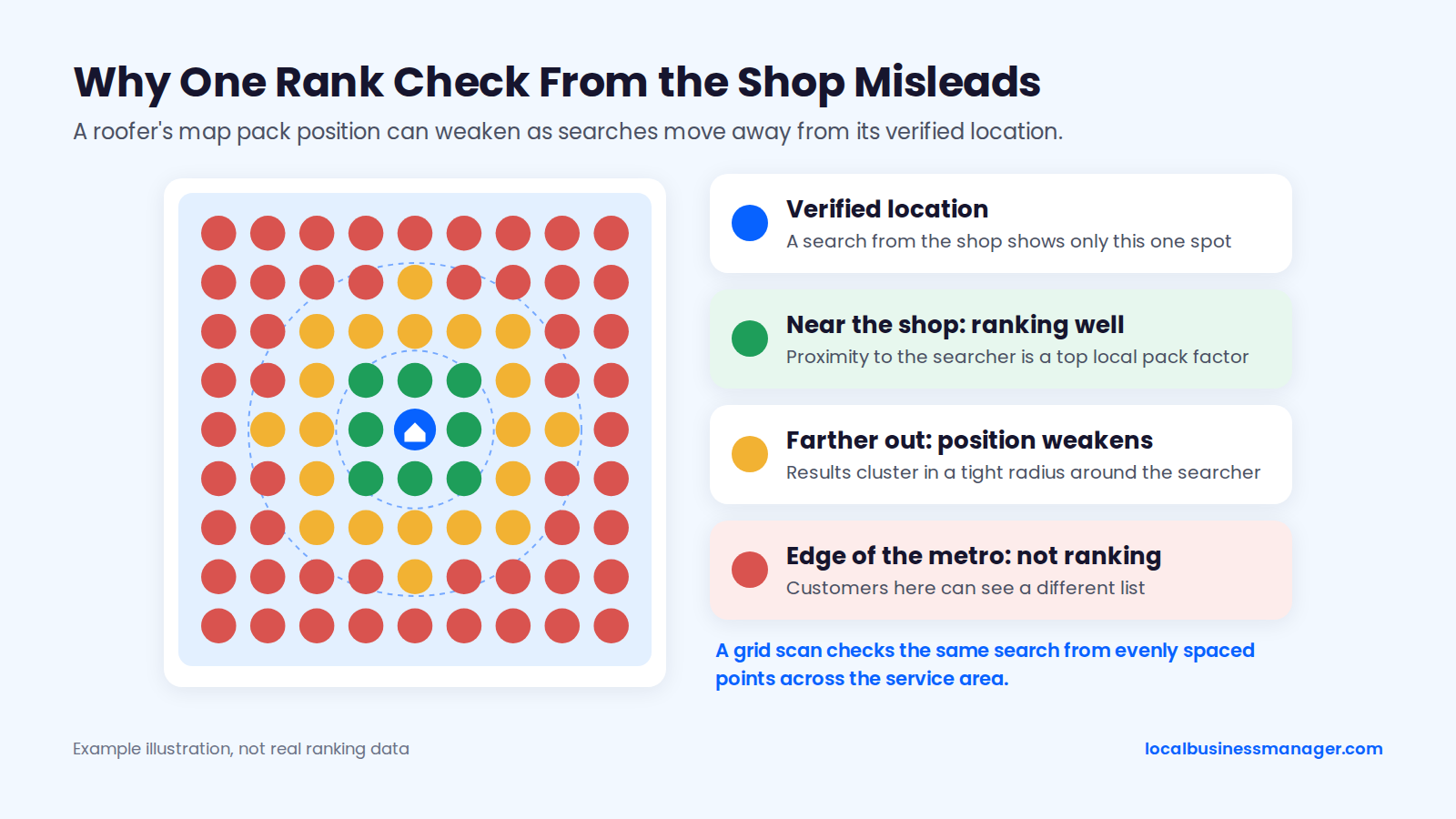
Example illustration, not real ranking data: a roofer's position weakens as searches move away from its verified location.
Google's Search Liaison said in 2018 that results differ mainly by location, language, platform and time, not personalization, and that people searching from the same location get the same localized results. An owner's search from the driveway shows the ranking at the driveway, not across the service area. That's why I don't use single-point rank checks: one location says little about how a business ranks across its area.
How to Scan Rankings Across a Service Area
A grid scan checks the same search from many evenly spaced points across the service area and shows how far a ranking reaches. Any grid tool works, and so does a careful manual sample.
My method is to run one scan first just to learn how the business ranks, then adjust from what it shows:
- First scan: 13 Ã 13 points with 0.5 mi between them.
- Mostly green (ranking well): widen the spacing to see how far the ranking reaches.
- Mostly red (not ranking): tighten the spacing to find where it does rank.
- Frequency: at least once a month. Scan daily only after an edit, to see whether it produced a result.
I'd be careful leaning on an average rank by itself right now. In my view, Google is fighting scrapers and AI scrapers, mixing results and making the results page very volatile, so an average can make sense but is hard to read with confidence. Look at the pattern across the grid and the trend over months.
How Should You Track Calls From the Profile?
My practice is to put the call-tracking number in the profile's primary phone field, with no secondary number. A little housekeeping keeps the setup working:
- Use a local number that forwards to the roofer's main line, and test the forwarding.
- Record which number lives where, so a later citation cleanup doesn't "fix" the profile back to the main line.
Remember what the profile's own call count measures. Google's performance report counts taps on the call button, and its data includes activity from both organic results and Google Ads, so a roofer running ads will see profile calls that aren't purely from SEO and the monthly report should label them that way.
What to Check Every Week and Every Month
Profiles change without anyone on the account touching them, because Google and third parties can edit fields. My routine for profiles I manage runs on a weekly and a monthly cadence:
- Weekly: check for edits to the name, attributes, services and other fields, made by Google or anyone else.
- Monthly: check rankings across the service area and the post schedule.
The weekly check catches name and address edits early, and in my experience those edits cause the most suspensions.
What Goes in a Monthly Roofing Report
My monthly report leads with calls and rankings, and the rest of the table follows in a suggested order. Google's Business Profile performance report provides interactions, searches, views on Search and Maps, direction requests, calls and website clicks.
Report section | What to show | Data source |
|---|---|---|
Calls | Profile call taps plus tracked calls, against last month | Profile performance report, call-tracking system |
Rankings across the service area | Grid scans for the main terms, against last month | Grid scan |
Website clicks | Clicks from the profile to the site | Profile performance report |
Searches | The terms people used to find the profile | Profile performance report |
Direction requests | Include only if the roofer shows an address | Profile performance report |
Reviews | New reviews, average rating, replies sent | The profile |
Work done and next month | Changes made, pages published, spam reported, next priorities | Agency work log |
Add one honest note every month: profile calls aren't booked jobs. We found no reliable public benchmark that ties profile interactions to booked roofing jobs, so the client's own job records are the final check.
What to Say When the Client Says "We Dropped"
Answer "we dropped" with evidence from the whole service area. Walk the client through it in this order:
- "Thanks for flagging it. Where were you when you searched, and what did you type?"
- "Google ranks roofers partly by distance from the person searching, so your truck or kitchen shows one spot. Someone in another part of your service area can see a different list."
- "Here's this month's scan across your whole service area." Share the grid and point out where it improved or slipped.
- "And here are your calls and website clicks from the profile, month over month."
- If something really did drop: "You're right, [area] slipped. Here's what changed and what we're doing about it." Check the weekly edit log first.
- "Next time you see something odd, send me the search term and where you were, and I'll check it against the scan the same day."
How Long Does Local SEO Take for a Roofing Company?
How fast local SEO works for a roofer depends on what's already optimized. In my experience, a single high-impact profile fix can show gains within about a month, and further gains come gradually. Google publishes no map pack timeline, and no one can honestly promise one.
The table below is sorted from fastest to slowest and labels the basis for each figure. The last row is a figure Google no longer publishes.
Scenario | Timing | Basis |
|---|---|---|
One high-impact profile fix on an unoptimized profile, such as a compliant keyword name via DBA | Ranking gains within about a month | My observation |
Further gains once the basics are done, such as a steady review push | Gradual, month over month | My observation |
Major website changes, such as new service and city pages | Several months to be reflected | John Mueller of Google, 2017, as reported by Search Engine Journal |
SEO overall, as Google once described it | 4 months to a year (withdrawn figure) | Google's "Do you need an SEO?" page said this for years; secondary sources report Google removed the number in June 2026 |
On a profile where the name, primary category and services are already right, there's no single fix left to pull. In my experience, progress then comes gradually from steady reviews.
What Gets Roofing Profiles Suspended, and How Do You Get Reinstated?
In my experience, name edits and address edits cause the most suspensions, and reinstatement depends on documents that prove the business is real and matches its profile. The triggers come first, because an appeal only works once the cause is gone.
What Triggers a Suspension?
Google's guidelines, practitioner studies and my own experience point to 4 suspension triggers:
- A keyword name the business doesn't actually use. Google's guidelines tie the name to the real-world name. Sterling Sky's 50-case study found that profiles repeatedly re-adding keywords were soft-suspended 20% of the time.
- An address that isn't a real, eligible location: a virtual office, coworking desk, PO box, or a home address shown when it should be hidden.
- Name and address edits. In my experience, these cause the most suspensions. Searchscope, citing Google's help documentation, reports that a name change is a major edit that Google reviews and that can force re-verification.
- Ineligible business models. Google's eligibility guidelines say lead generation companies can't have a profile.
Look at a profile inherited from a previous agency before making any edits. The problems I find on profiles handed over by previous agencies are duplicate listings, bad naming, no review campaigns and no services or products set up on the profile.
How Do You Get a Roofing Profile Reinstated?
Fix the cause before appealing. An appeal on a profile that still breaks the guidelines wastes the attempt, so work through 3 steps:
- Correct the profile. Restore the real business name, hide an address that shouldn't show, and merge or remove duplicates.
- Gather proof. In my experience, reinstatements usually need documents such as the DBA filing, a lease agreement and photos of the office with signage, or a video recording the storefront and office. The Product Expert-written suspension guide in the Google Business Profile Community also suggests business licenses, utility bills, links to signage photos and, for service-area businesses, photos of vehicles with permanent branding.
- Appeal through Google's official process. The community guide walks through the appeal. Volunteer Product Experts wrote the guide, and it isn't official Google policy.
The DBA filing, branded trucks and signage described in the keyword-name section are what prove the name is real if Google ever asks.
Roofing Local SEO Checklist
This checklist runs a new roofing client from onboarding to the first monthly report in 32 items. My first 4 checks on any new local client come in this order: rankings across the area with a grid scan, the business name against the ranking competitors' names, the primary category, then the website.
Profile
- Run a grid scan across the service area before changing anything.
- Compare the business name with the names of the roofers ranking in the pack.
- Use a keyword name only through the DBA path, with the profile name changed last.
- Set the primary category to the one most ranking competitors use (roofing guides recommend Roofing contractor).
- Add secondary categories only for work the roofer actually sells.
- Hide the address unless customers visit a staffed office. No virtual office, PO box or coworking desk.
- Set up to 20 real service areas, within about 2 hours' drive.
- List every job type in Services.
- Write a plain, accurate description with no keyword lists.
- Upload real job photos regularly.
- Set regular hours and holiday hours.
- Search for duplicate listings and old names.
- Check for edits to the name, attributes, services and other fields every week.
Reviews
- Choose 1 fixed moment to ask, and use it for every customer.
- Send text and email review requests only to customers who opted in through the business's consent forms.
- No incentives, no gating, no staff quotas, no suggested wording.
- Reply to every review.
- Keep insurance-dispute replies free of claim negotiation or deductible promises.
Website
- Build 1 service page per job type.
- Build city pages only where the 4-question test passes.
- Link the profile to the page that matches its location and category.
- Make the site fast on mobile with click-to-call.
- Match the business name and address (if shown) on the site to the profile, and log where the tracking and main numbers appear.
Citations and Links
- Fix the core citations, most serious issues first.
- Get listed with manufacturers only for certifications the roofer actually holds.
- Pursue supplier, association and local sponsorship links.
- Leave link exchanges and press-release campaigns out of the plan.
Storm Season
- Have the storm damage and emergency pages live before the season.
- Plan special hours and after-hours call handling.
- Record the current pack, and screen new listings after every storm.
Tracking and Reporting
- Put the tracking number in the primary phone field, test the forwarding and log where each number lives.
- Lead the monthly report with calls and rankings, scan at least monthly and scan daily only after an edit.
Roofing Local SEO FAQs
3 questions the sections above don't answer: what leads cost, whether manufacturer certifications help, and who should do the work.
How Much Do Roofing Companies Pay for Leads?
No reliable public figure exists for what roofing companies pay per lead. The published lead-cost numbers for Local Services Ads come from vendors and aren't verified.
The real number comes from the roofer's own LSA account and call records. Comparing cost per booked job alongside cost per lead shows which leads turn into work. The map pack and organic rankings take work to earn but carry no charge per call.
Do Manufacturer Certifications Like GAF or Owens Corning Help Local SEO?
We found no published test showing that a manufacturer certification moves map pack rankings on its own. Where a certification can help is as a listing: if the manufacturer lists certified contractors with a link to their sites, that listing works as a citation and a relevant link. List only certifications the roofer currently holds, and keep the company name and website in each listing identical to the profile so the citation matches.
Should a Roofer Do Local SEO In-House or Hire an Agency?
Either works if whoever does it can deliver rankings for the roofer's main terms. I judge any local SEO engagement on that result.
Whoever takes it on, some work shouldn't be handed off lightly. Link building is the one task I've outsourced, and I never outsource Business Profile naming or category selection, because those decisions drive so much of the map pack result.
Where to Start With a Roofing Client This Week
Before you write a single city page, scan the client's rankings across the service area, then compare their business name and primary category with the roofers already in the pack. That's the order I use on any new local client, with the website after it. If you want one place to run local SEO work for clients like this, Local Business Manager is in early access for agencies.