Local SEO for Plumbers: How to Win the Map Pack, LSAs and Emergency Calls

If a plumbing client has ever called because a competitor took their map pack spot, you know how much rides on this. Local SEO for plumbers means winning the map pack and organic results for emergency and "service + city" searches by getting the Business Profile, service pages and reviews right, without the shortcuts that get plumber profiles suspended. Below: setup steps, how Local Services Ads fit, copy-ready scripts and templates, and tracking across a whole service area.
My main track record is ranking close to one hundred personal-injury law firms, but I've also ranked pages for most common home-service trades at agencies I worked for. The method carries over; only the rules change.
Where Do Plumbing Customers Find You on Google?
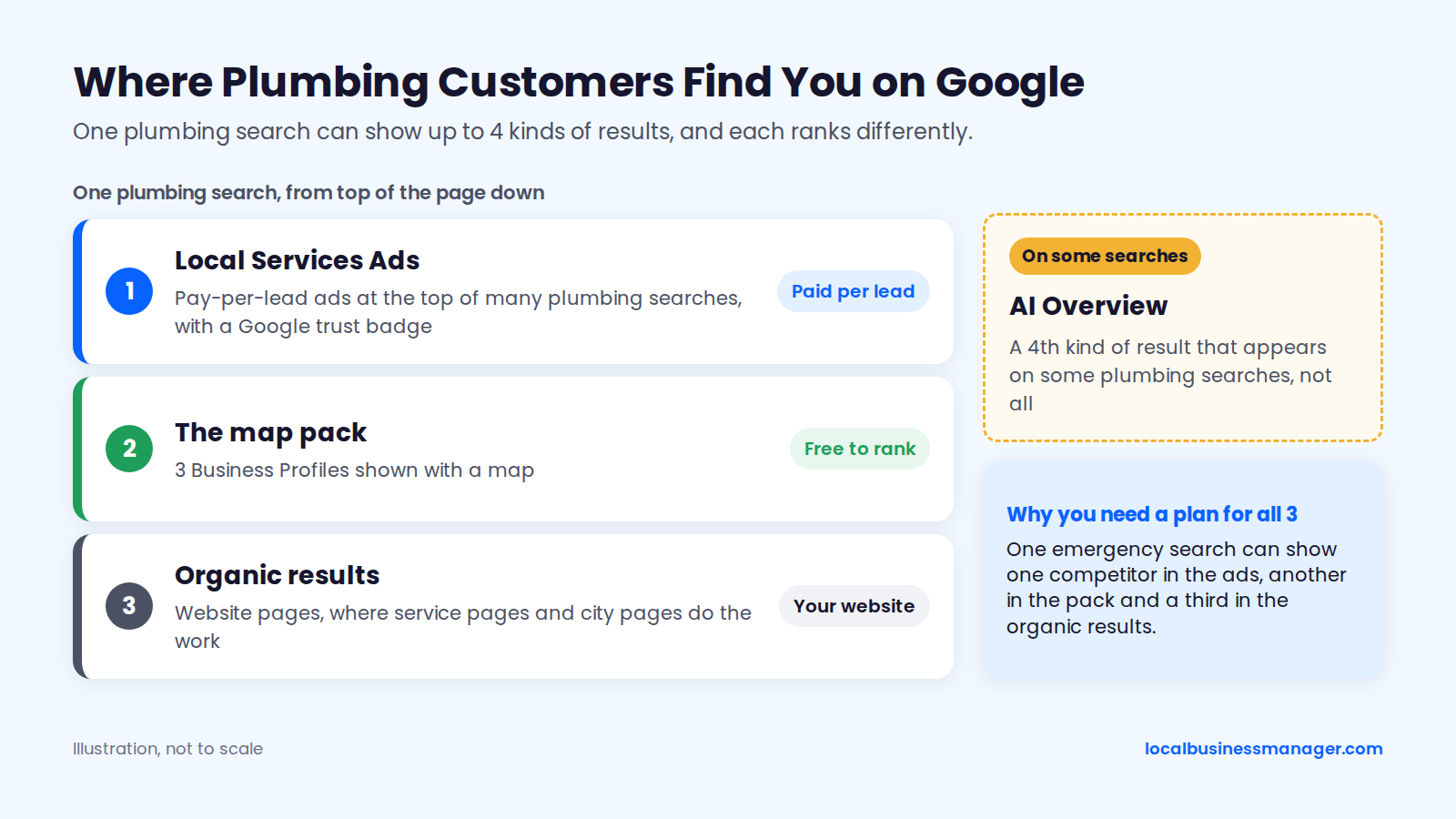
A plumbing customer can see up to 4 kinds of results for one search: Local Services Ads, the map pack, organic website results and, on some searches, an AI Overview. Each ranks differently, so this section covers what's on the page, how Google ranks local results and which page should answer each kind of search.
Local Services Ads, the Map Pack and Organic Results
A plumbing search can show 3 kinds of ranked results, and each one is won a different way:
- Local Services Ads (LSAs): pay-per-lead ads that sit at the top of many plumbing searches and carry a Google trust badge.
- The map pack: 3 Business Profiles shown with a map. Ranking there is free.
- Organic results: website pages, where service pages and city pages do the work.
A plumber needs a plan for all 3, because one emergency search can show one competitor in the ads, another in the pack and a third in the organic results. This guide starts with the map pack: ranking there costs nothing, and since July 2025 the profile behind it also holds the reviews LSAs use.
How Does Google Rank Local Results?
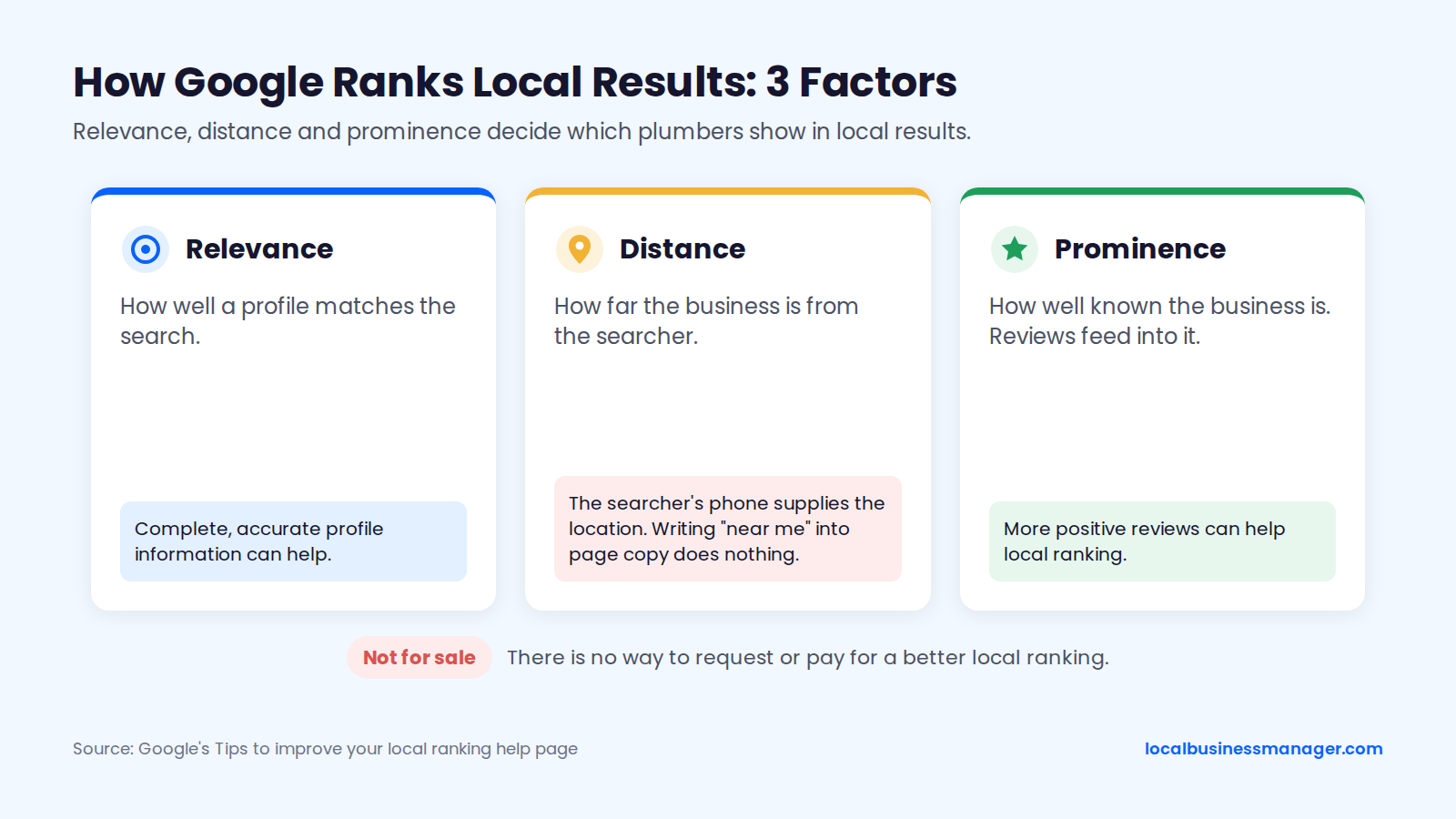
Google ranks local results on 3 factors: relevance, distance and prominence, according to its Tips to improve your local ranking help page.
- Relevance is how well a profile matches the search.
- Distance is how far the business is from the searcher.
- Prominence is how well known the business is. Reviews feed into it.
Distance is easy to misread. When a searcher doesn't type a location, Google works out distance from what it knows about where that person is (Google's wording, as quoted by Search Engine Journal). Writing "near me" into page copy does nothing for proximity, because the searcher's phone supplies the location and your text doesn't.
Google's ranking tips page also says complete, accurate profile information and more positive reviews can help local ranking, and that there is no way to request or pay for a better local ranking. Sterling Sky's 2024 analysis of map pack patterns found Google keeps results close to the searcher even in very large cities like Houston and Los Angeles.
Emergency Searches vs Planned-Job Searches
Emergency searches need the Business Profile and an emergency page with click-to-call ready to answer them, while planned-job searches lean on service and city pages as well. Here's how we'd map each search type as of November 2026, most urgent first:
Search type | Example searches | Page that should answer | Profile element that helps |
|---|---|---|---|
Emergency | "emergency plumber", "burst pipe plumber", "plumber near me" | Emergency page with click-to-call | Primary category, accurate hours, answered phone |
Problem | "water heater leaking", "toilet won't stop running" | Service page with a problem section | Services list |
Service + city | "drain cleaning Round Rock", "water heater installation Austin" | Service page, then a city page | Services list, service areas |
Cost | "cost to replace water heater" | Service page with a "what affects the price" section | Service descriptions |
Brand | "[company name] reviews" | Home page and reviews page | Name, reviews, photos |
To find the searches a plumbing company really gets, read the search terms in the profile's Performance report and the queries in Search Console, filtered by service words such as "drain", "leak" or "water heater".
Which Pages Matter Most for Each Kind of Plumbing Company?
The page to build first depends on the work that pays the bills: an emergency-led shop starts with the emergency page, while a specialist starts with its specialty's service pages. Here's how that plays out for 4 common company types, as we'd recommend it in November 2026:
Company type | Page to build first | Profile element to get right first |
|---|---|---|
Emergency-led shop | Emergency page with click-to-call | Staffed hours, with 24/7 only if a person answers |
Drain and sewer specialist | Camera inspection and hydro-jetting service pages | Drainage category and drain services |
Water heater specialist | Separate tank and tankless water heater pages | Water heater category and services |
Commercial plumber | Commercial service pages, separate from residential | Services list with commercial job types |
How Do You Set Up a Plumber's Google Business Profile?
A plumber's Google Business Profile (formerly Google My Business) is set up in 6 steps: categories, service-area setup, services, hours, photos and verification. Then comes the business name, where adding a keyword can lift rankings and also trigger a suspension.
Step 1: Choose the Primary and Secondary Categories
For most plumbing companies the primary category is Plumber. Check it against the businesses already ranking before you commit.
One plumbing software company's Business Profile guide names Drainage Service and Water Heater Installation Service as common secondary categories, other plumbing guides suggest Water Heater Repair Service, and some treat water heater repair as a services-list entry instead. Confirm every name in the category picker, and follow 3 rules:
- Cover real lines of work only, such as drain cleaning, water heaters or gas lines.
- Type each job into the category picker and use the exact category name Google offers.
- Never add a category for work the company doesn't do.
Categories tell Google what the business does, which feeds relevance, the first of the 3 local ranking factors Google names.
My rule for the primary category is simple. I use what most of the ranking competitors use. If Google is clearly rewarding a different category from the "logical" one, I go with the category Google rewards. One way to check:
- Search the main money terms from a few spots in the service area.
- Open the top profiles.
- Write down their primary categories.
For the full selection process, see our guide to Google Business Profile categories.
Categories for Plumbing and HVAC Companies
A plumbing and HVAC company should keep the primary category on the line of work that brings in the most jobs, and add a heating or air conditioning category as a secondary only if it's licensed for that work and actually does it. 3 checks before adding it:
- Run the same competitor check for the HVAC terms. The profiles ranking for "furnace repair" may use different primary categories from those ranking for "plumber", which shows which line the profile can realistically compete on.
- Use the exact category name the picker offers for the HVAC work.
- Give HVAC its own service pages rather than mixing furnace and water heater work on one page, so each search lands on a page about that job and every service on the profile has a matching page.
Step 2: Set Up as a Service-Area Business
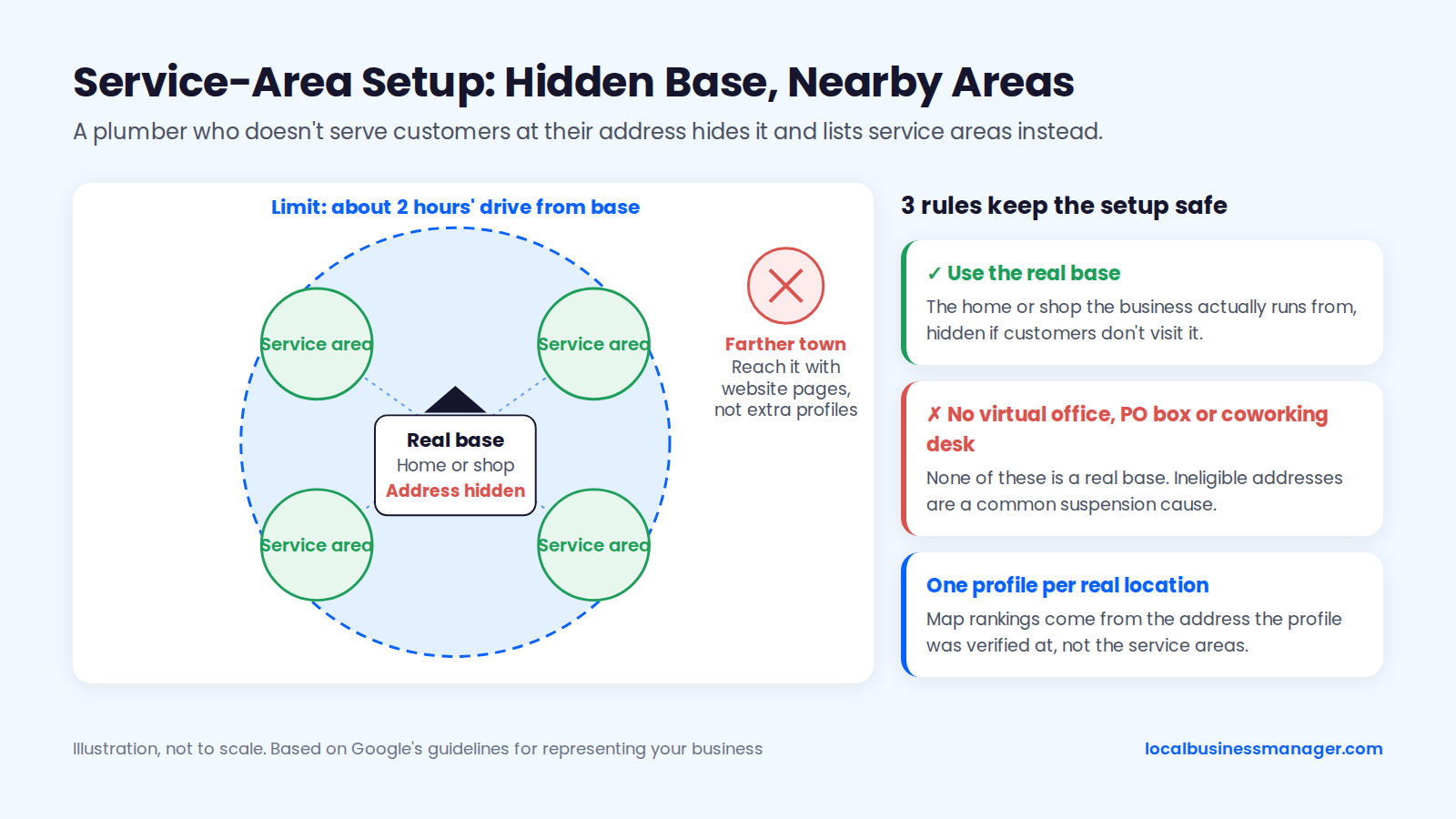
A plumber who doesn't serve customers at their address should hide it and list service areas instead. Google's guidelines for representing your business use exactly this case as the example: a plumber running the business from home. Google also says service areas generally shouldn't extend beyond about 2 hours' driving time from the base.
3 rules keep the setup safe:
- Use the real base. That means the home or shop the business actually runs from, hidden if customers don't visit it.
- No virtual office, PO box or coworking desk. None of these is a real base, and ineligible addresses are among the common suspension causes Sterling Sky lists in its 2026 suspension guide.
- One profile per real location. Sterling Sky's testing found that the service areas on a profile don't currently affect rankings. Map rankings come from the address the profile was verified at. Reach farther towns with website pages instead of extra profiles.
Some plumbers are tempted to show a home address anyway, because experts in the Local Search Ranking Factors survey ranked a visible address as the 7th most influential local factor, as the survey's publisher reported in 2025. Follow Google's rule regardless, because a suspended profile doesn't rank at all. Our walkthrough on setting up a service-area business and hiding the address covers each screen.
Step 3: Build the Services List From Real Job Types
The services list should mirror the jobs the company actually books, one entry per job type. Sterling Sky's 2026 tests found that adding Google's pre-defined services can improve rankings for related keywords within 24 to 72 hours, with the effect varying by industry and market. Start with the job types that apply:
- Emergency plumbing
- Drain cleaning
- Leak detection
- Water heater repair and installation
- Tankless water heaters
- Sewer line repair and replacement
- Repiping
- Toilet and faucet repair
- Sump pumps
- Backflow testing
- Gas line work (only if licensed for it)
Use Google's pre-defined services first, then add custom services for real jobs the list doesn't cover. Keep each description to what the job involves, with no keyword lists. Every service on the profile should have a matching page on the website.
An empty services list is a common gap. Problems I've inherited from previous agencies include duplicate listings, bad naming, no review campaigns and no services or products set up on the profile.
Step 4: Set Hours You Can Actually Staff
Hours on a plumber's profile should be the hours someone answers the phone, and they belong in the hours field only, since Google's naming guidelines ban hours wording in the business name. List 24/7 only if a person picks up around the clock; voicemail doesn't count.
Answered calls matter beyond the map pack too: Ignite Visibility's November 2026 write-up of the LSA auction lists responsiveness among its factors, and missed calls count against the business. Practical setup:
- Set regular hours to match staffed hours.
- If an on-call tech covers nights and weekends and really answers, set those days to open 24 hours.
- Add holiday hours before every major holiday, because homeowners search for emergencies on holidays too.
- Make sure the website and the profile show the same hours.
Step 5: Add Real Photos of Vans, Team and Job Sites
Photos on a plumber's profile should show the real vans, team and work a homeowner is about to let into the house. Some old, untraceable statistics claim a lift in direction requests from photos, so leave those out of client decks.
Shot list:
- Each van from both sides, with the wrap and any required license number visible
- The team in uniform
- Techs working on real jobs (with the customer's permission)
- Before-and-after shots of real work: a water heater swap, a repipe, a cleared drain
- The shop or office exterior with signage, if one exists
- Specialist equipment, such as camera inspection gear or a jetter
- The logo and a cover photo
Use only real photos taken by the company.
Step 6: Verify the Profile
Google chooses the verification method automatically, and the owner can't change it, according to Google's "Verify your business on Google" help page; some businesses need more than one method. The options you may see:
- Video recording (Google)
- Live video call (Google)
- Phone or text, email or postcard (listed in third-party guides)
For video verification, a guide in Google's Business Profile Community, written by a community member rather than Google staff, advises service-area businesses to keep the recording continuous and show the work vehicle, tools and equipment.
Before you start, get documents ready that match the profile's name and address exactly. Google's help page on suspended profiles lists 3 kinds of evidence it accepts in appeals:
- Business registration
- License or tax certificates
- Utility bills
Keep those in a folder from day one, because the same papers protect the profile later. New profiles are fragile: Sterling Sky lists "newness" and too few verification signals among common suspension causes, so avoid a burst of core edits once a profile is verified.
My routine after verification is a weekly check for changes to the name, attributes, services and other fields, whether Google made them or a third party did. Rankings and the post schedule get a monthly check.
GBP Setup Checklist for Plumbers
Run this checklist on every new plumbing profile, in this order:
- Primary category checked against the profiles ranking for the main terms
- Secondary categories only for real lines of work, using Google's exact names
- Address hidden if customers aren't served there; real base only
- Service areas set to towns actually served, within about 2 hours' drive
- Services list built from real job types, pre-defined services first
- Hours match staffed phone hours; holiday hours set
- Primary phone set (see the call tracking section below)
- Website link tagged with UTM parameters
- Business description written plainly, with no keyword stuffing and no promotions
- Only true attributes selected
- Photos from the shot list uploaded
- Verification documents saved, with name and address matching the profile
- Weekly edit check added to the account calendar
Can You Put "Emergency" or Your City in the Business Name?
Leave a city name or "Emergency" out of your profile name unless it's part of your real, consistently used business name, and never add "24/7" or "Open 24 Hours".
Google's guidelines for representing your business set 3 rules that apply here:
- The profile name must match the real-world name used on the storefront, website and stationery, and known to customers.
- Service and product information is on the list of things a name must not include.
- Hours wording isn't allowed: "Regal Pizzeria Open 24 hours" is Google's example of an unacceptable name, because hours go in the hours field.
A city name passes only when it's genuinely part of that real-world name. Google has no example that uses the word "Emergency", and a DBA that says "24/7" doesn't make hours wording compliant. Many plumbing marketers call any service or city word in a name keyword stuffing, whatever DBA is on file. Our guide to keyword business names and DBAs covers the rules across industries.
Do Keyword Business Names Help Plumbers Rank?
Keyword names correlate with higher local pack rankings, and they also carry a suspension risk. 2 sources point to the ranking gain:
- Experts in the 2026 Local Search Ranking Factors survey rank keywords in the Business Profile name among the top 3 local pack factors.
- A 2026 Sterling Sky test on a restaurant, not a trade business, found that adding a keyword to the name raised rankings, and removing it dropped them back.
The same 2026 survey also lists keyword names among the top suspension risk factors.
My recommendation is to use a keyword name only when it has really become the business's name, through a registered DBA.
How to Rename a Plumbing Business With a DBA
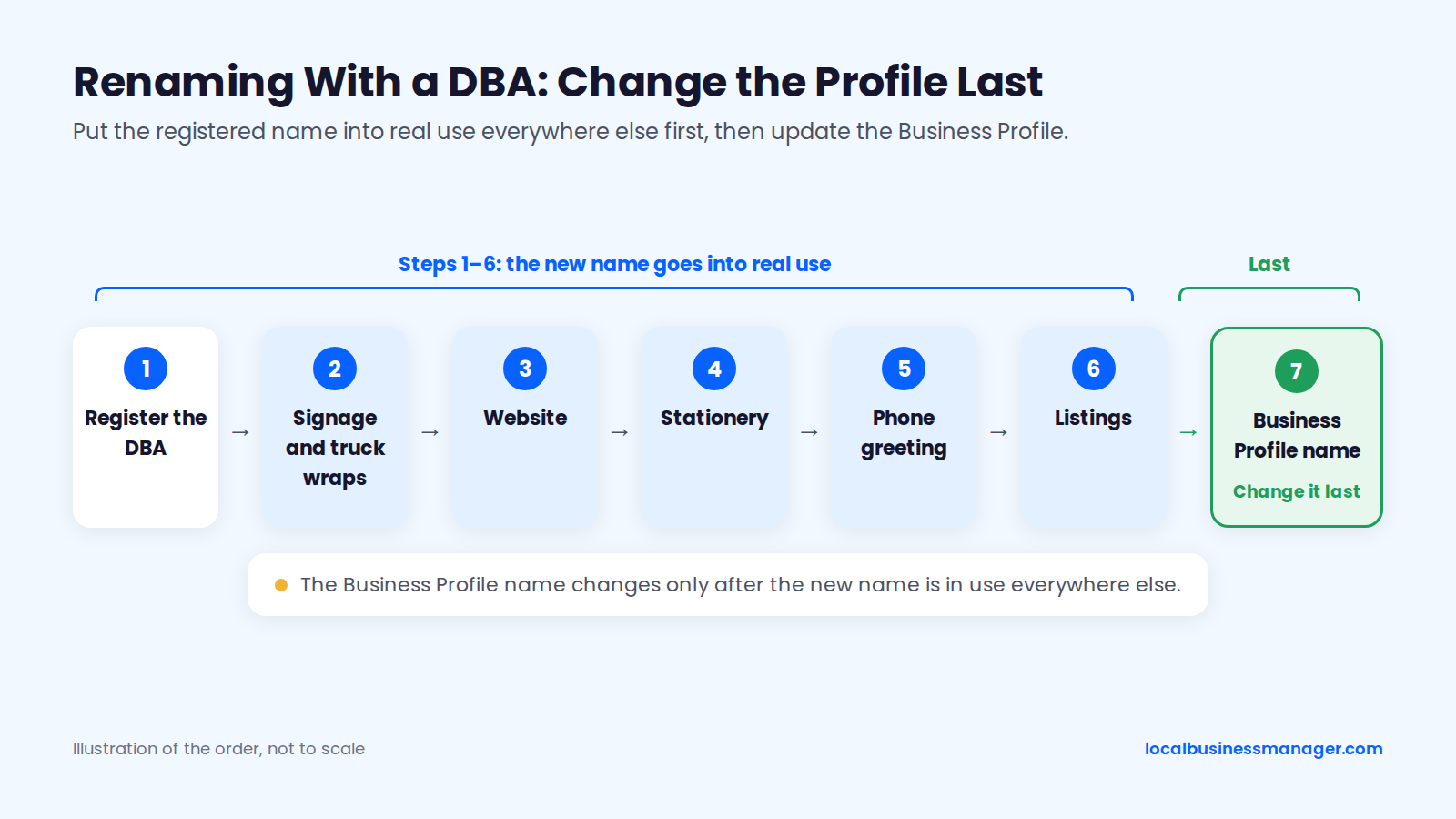
A compliant rename changes the real business first and the Business Profile last. I've taken many clients through the DBA process, and my sequence is:
- Register the DBA (assumed name).
- Use the new name everywhere the business appears: signage, website, stationery, phone greeting and other listings. For a plumbing company, signage includes the truck wraps.
- Change the Business Profile name last.
Plumbers need 3 extra safeguards:
- Check licensing rules before filing. Texas is one example: under 22 Tex. Admin. Code §367.10, from the Texas State Board of Plumbing Examiners, plumbing companies must show the company name and the Responsible Master Plumber (RMP) license number on both sides of every service vehicle. The same rule, adopted in 2018, requires the RMP of record and the company owner to make sure every ad seeking plumbing work shows the RMP's license number, whatever the media. Check your own state board's rules.
- Make the profile name change a single edit, with no other core edits that week, because Sterling Sky reports that edits can trigger automatic suspensions in spam-heavy categories.
- Keep the DBA certificate and photos of the wrapped vans ready for re-verification or an appeal.
Experts on the Local Search Forum (2025) say a DBA helps if a name edit triggers a suspension but won't prevent one, which is why every other asset changes before the profile.
Should Plumbers Run Local Services Ads Alongside Local SEO?
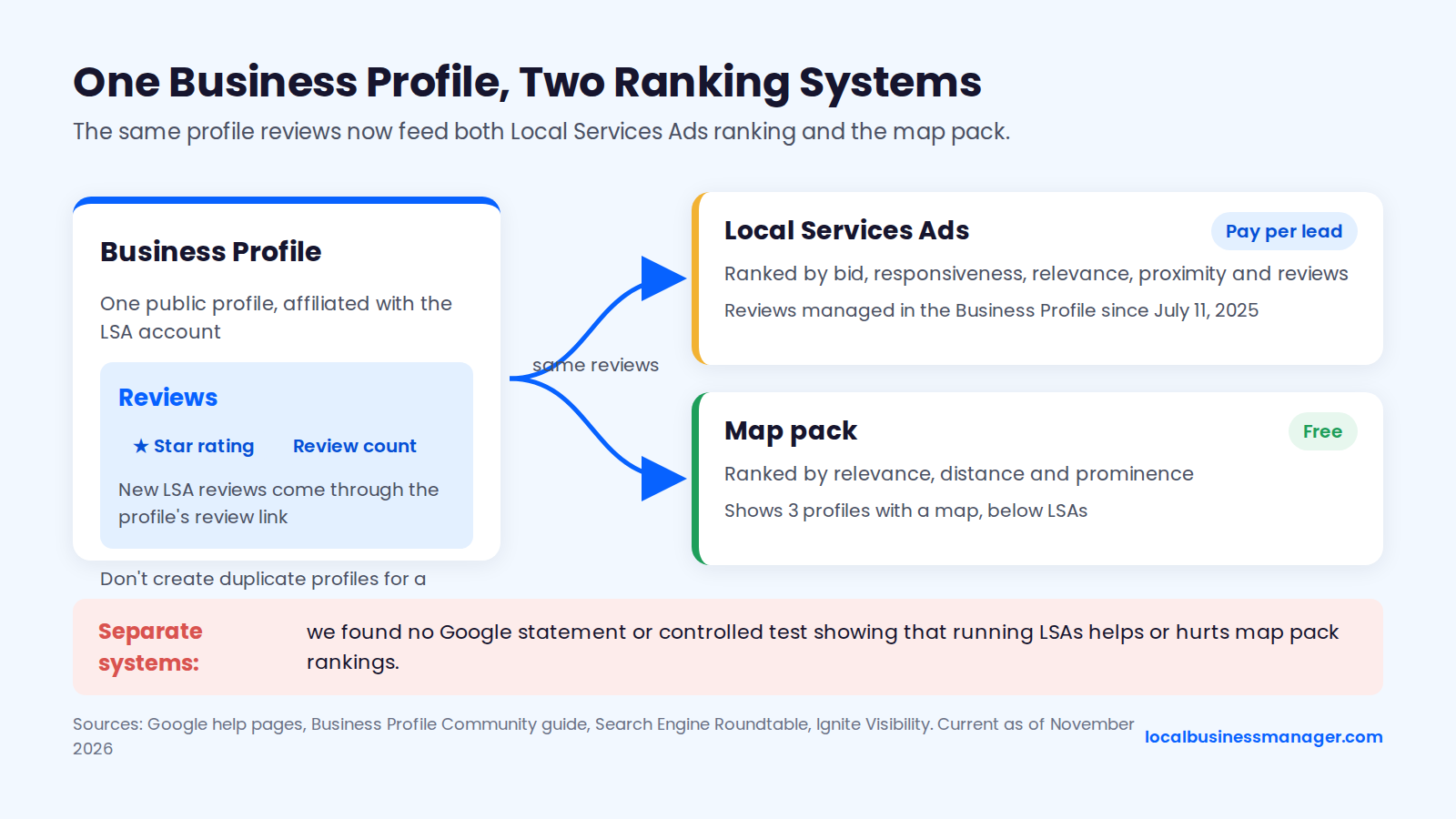
LSAs and the map pack are separate systems that now draw on the same Business Profile and reviews, and we found no Google statement or controlled test showing that running LSAs helps or hurts map pack rankings. The sections that follow compare the two, explain LSA ranking and recent changes, and give our suggestion on when to run both.
How Do LSAs Differ From the Map Pack and Organic Results?
Of the 3 places a plumber can appear, only LSAs charge per lead, and LSAs and the map pack now use the same Business Profile reviews. The comparison below is current as of November 2026, ordered by position on the results page, and draws on Google's help pages, Search Engine Roundtable's reports of Google emails, and agency write-ups by Ignite Visibility and Stryker Digital.
Result type | Where it shows | Cost model | Ranked by | Reviews used | Screening |
|---|---|---|---|---|---|
Local Services Ads | Top of many plumbing searches | Pay per lead | Bid, responsiveness, relevance, proximity, reviews | Business Profile reviews (since July 11, 2025) | Google Verified badge with license, insurance and background checks (reported) |
Map pack | Below LSAs, 3 profiles with a map | Free | Relevance, distance, prominence | Business Profile reviews | Profile verification |
Organic results | Below the map pack | Free | Google's general search ranking | Not published | None |
How Does LSA Ranking Work?
Star rating and review count can affect where a business ranks in LSAs, according to a 2026 guide on LSA affiliation published in Google's Business Profile Community. That's a community guide rather than a formal help article, and it also says businesses shouldn't create duplicate profiles to build a second set of reviews.
Search Engine Roundtable, quoting Google emails, reported 2 more changes:
- In March 2025, Google said a public Business Profile must be affiliated with the LSA account, and new LSA reviews come through the profile's review link.
- From July 11, 2025, LSA reviews are managed in the Business Profile and checked against Maps review policies.
Ignite Visibility's November 2026 write-up says the LSA auction weighs bid, responsiveness, relevance (service, location and bio), proximity and reviews, and that Google names no single factor as most important.
What Changed in LSAs Between 2024 and 2026?
Between 2024 and 2026, according to agency reports, LSAs replaced Google Guaranteed with Google Verified, ended manual lead disputes and out-of-area credits, and began moving into Google Ads. Check each change against Google's LSA help before relying on it:
- Stryker Digital: "Google Verified" replaced Google Guaranteed, Google Screened and License Verified in October 2025. The money-back guarantee ended for jobs booked after December 7, 2025. The badge still requires screening such as licensing, insurance and background checks.
- Footbridge Media: manual lead disputes ended in July 2024 in favor of automated credits. Credits for out-of-area and wrong-job-type leads were removed in early 2025.
- Footbridge Media: LSA is moving into Google Ads in phases, with plumbing in the first phase from August 2026.
Because out-of-area and wrong-job-type leads no longer earn credits, set LSA service areas and job types tightly.
When Does Running Both Make Sense?
Our suggestion, not a tested result: run both once every call is answered while the ads are live and reviews keep coming in. The 2 channels now share the profile's reviews, the Business Profile Community guide says star rating and review count can affect LSA ranking, and Ignite Visibility lists responsiveness among the auction's factors. We found no published data on whether a plumber should start LSAs before or after the profile ranks.
The only click-loss study is old and about lawyers: in December 2020, Sterling Sky studied 110 lawyer listings and found local pack click-through fell after LSAs launched, costing about 5.11 actions per month per listing on average. Beyond that, 4 practical questions decide it:
- Are the phones answered? LSAs reward responsiveness. If calls go to voicemail after 5 p.m., fix that before paying per lead.
- Is there a steady review flow? One set of reviews now feeds both channels, so the review routine below pays off twice.
- Can the business absorb lead costs it can't dispute? Out-of-area and wrong-job leads are no longer credited, per Footbridge Media.
- Can you measure the channels separately? Google's Performance data for the profile includes Google Ads activity, so track LSA leads on their own, or map pack calls will be credited to ads and the other way around.
What Pages Does a Plumbing Website Need?
A plumbing website needs a page for each core service, an emergency page, a small set of city pages with real local substance, Plumber schema markup, and trust details and technical basics where callers and Google look for them. Templates and examples for each follow.
One Page per Core Service
Each core service gets its own page, because "water heater installation" and "sewer line repair" are different searches with different buyers.
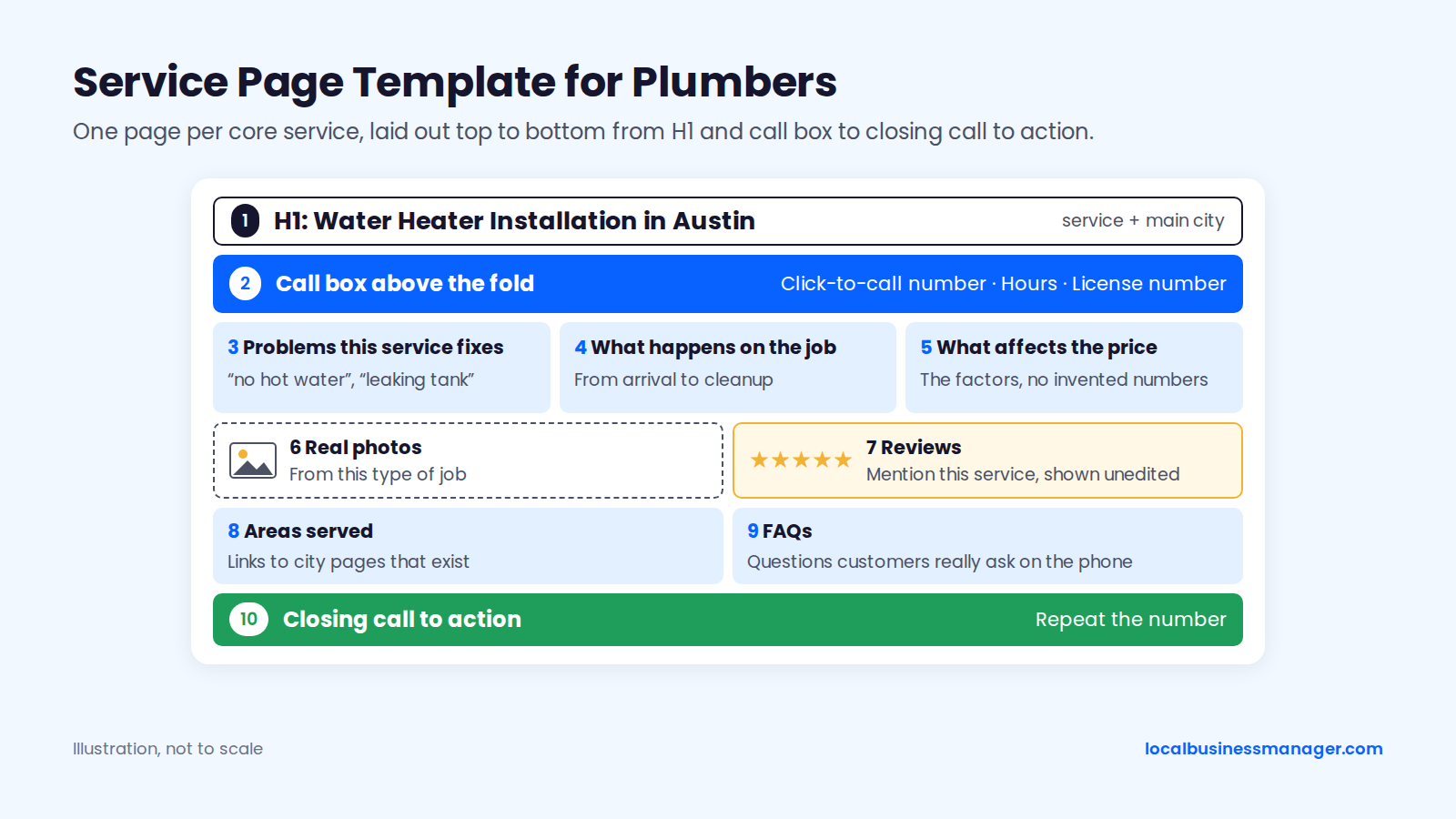
Service page template, section by section:
- Title tag and meta description: "[Service] in [City] | [Brand]", under about 60 characters; the description names the job, the area and how to call
- H1 with the service and main city, written naturally ("Water Heater Installation in Austin")
- A call box above the fold: click-to-call number, hours, license number
- Problems this service fixes, in the homeowner's words ("no hot water", "rusty water", "leaking tank")
- What happens on the job, from arrival to cleanup
- What affects the price: the factors, with no invented numbers
- Real photos from this type of job
- Reviews that mention this service, shown unedited
- Areas served, linking to city pages that exist
- FAQs customers really ask on the phone
- A closing call to action repeating the number
Write problem posts, such as frozen pipes or a leaking water heater, only when each one links to a matching service page.
The Emergency Page
The emergency page is the page a panicked homeowner lands on from a phone. Put the number at the top, then a short "what to do right now" box that helps whether or not they call. The electrical step follows FEMA's Ready.gov flood guidance and SafeElectricity.org.
"What to do right now" box:
- Find the main water shut-off valve and close it.
- Don't touch anything electrical while standing in water. Never try to turn off power at the breaker box if you'd have to stand in water to reach it; call your electric utility to shut off power at the meter instead.
- Move valuables and electronics out of the wet area.
- Take photos for your insurer.
- Call us: [number], answered [real hours].
Below the box, list the emergencies the company handles (burst pipes, sewer backups, no hot water, gas smell if licensed), the response area and how dispatch works. Keep it short. Nobody reads 2,000 words with water on the floor.
What Do Google's Spam Policies Say About City Pages?
City pages are allowed under Google's spam policies as long as they aren't doorways. Google's spam policies define doorway abuse as pages created to rank for specific, similar search queries.
Google's examples of doorway abuse include:
- Pages aimed at particular regions or cities that funnel users to one page
- Substantially similar pages that look more like search results than a clear site structure
Sites that break the policies may rank lower or drop out of results. Google publishes no limit on how many location pages a site can have.
How Many City Pages Should a Plumber Build?
Build city pages only for towns within a reasonable distance of the real base. That's Sterling Sky's advice, and it adds that a single-location business with hundreds of service-area pages usually makes no sense. We found no source that gives a minimum number of jobs per town or a typical page count per metro.
What the evidence shows on both sides:
- 2019, Google's John Mueller: responding to a plan for about 1,300 keyword-plus-city pages, he said it sounded like doorway pages and wasn't something he'd recommend.
- 2023, Sterling Sky: reported a service-area business whose 35 city pages shared about 84% of their content and still ranked and drove traffic.
- 2024, Sterling Sky: reported a manual action for thin content against a site with a very large number of location pages, and said having thousands of service-area or location pages raises the chance of a manual penalty.
- 2025, Sterling Sky: found that AI-generated city pages with nothing unique were crawled but not indexed.
To pick candidate towns, look at where the profile's and Search Console's data show demand, then keep only towns the business really serves. Towns that don't justify their own page go on a single areas-served page.
For businesses with several real offices, I link each office's profile to its own dedicated city page and put that office's local details on it.
City Page Template and the "Unique Enough?" Test
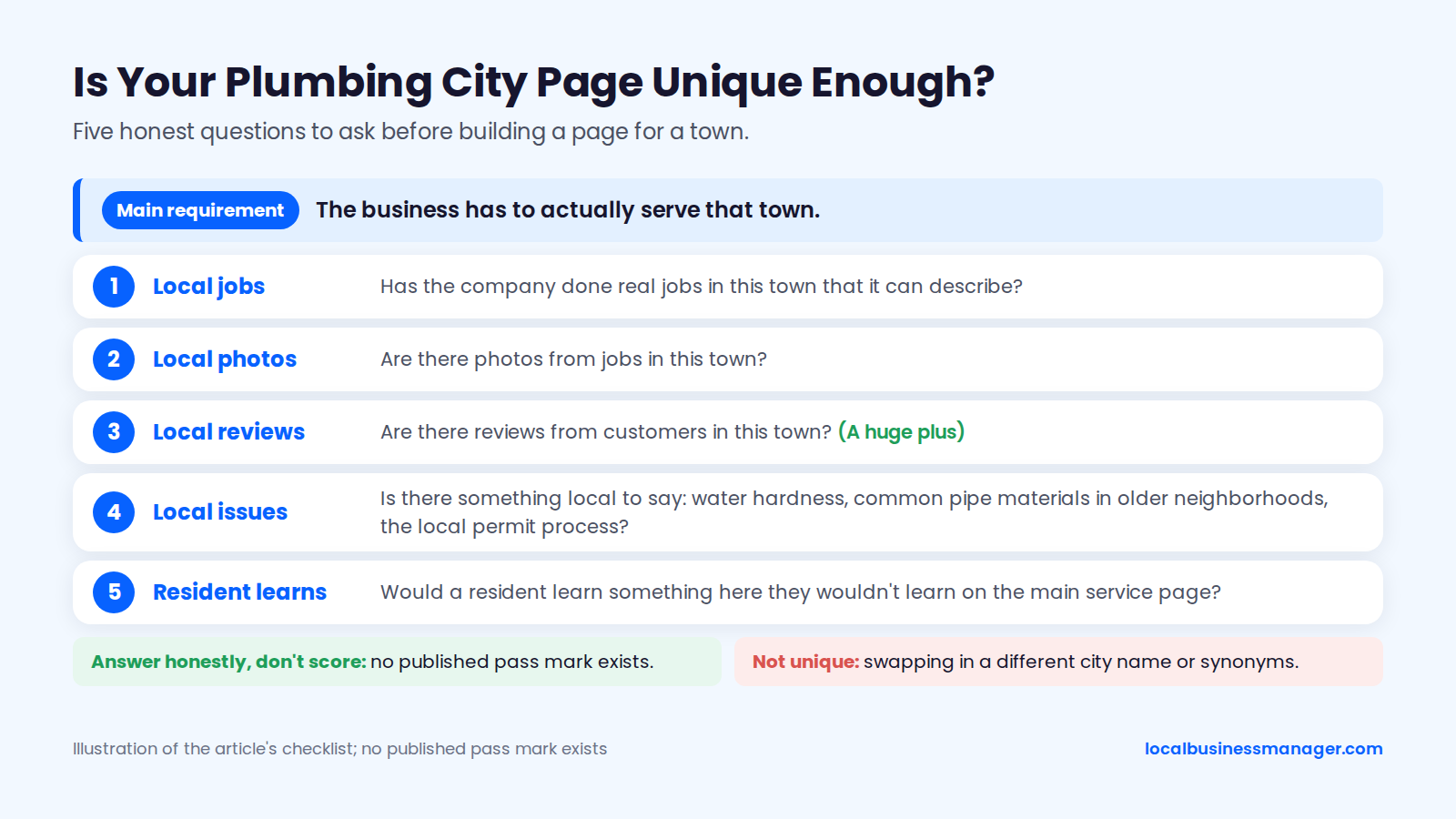
A city page earns its place when it holds facts that only apply to that town; Sterling Sky says swapping in a different city name or synonyms doesn't make content unique.
My rule: the business has to actually serve that town, and that's the main requirement. After that, case studies of jobs done there, job photos from there and reviews from customers there make the page stronger, and local reviews are a huge plus. No published pass mark exists, so answer these 5 questions honestly rather than scoring them:
- Has the company done real jobs in this town that it can describe?
- Are there photos from jobs in this town?
- Are there reviews from customers in this town?
- Is there something local to say: water hardness, common pipe materials in older neighborhoods, the local permit process?
- Would a resident learn something here they wouldn't learn on the main service page?
City page template:
- H1: service plus town ("Plumber in Round Rock")
- Call box with number and hours
- Jobs done locally, with neighborhoods and job types
- Local plumbing issues and permits
- Photos from local jobs
- Reviews from local customers
- Services offered in the town, linking to service pages
- Response area and dispatch details
Plumber Schema: A Copy-Ready Example
Mark up the home page or contact page with the schema.org Plumber type, using the same name, phone and hours as the Business Profile. Plumber is a schema.org subtype of HomeAndConstructionBusiness, which is itself a subtype of LocalBusiness.
The example below is for a service-area plumber with a hidden street address and 24/7 hours. Replace every value with real data, and remove the 24/7 hours if the phones aren't answered around the clock.
{
  "@context": "https://schema.org",
  "@type": "Plumber",
  "name": "Example Plumbing Co.",
  "url": "https://www.example.com/",
  "telephone": "+1-512-555-0100",
  "image": "https://www.example.com/images/service-van.jpg",
  "address": {
    "@type": "PostalAddress",
    "addressLocality": "Austin",
    "addressRegion": "TX",
    "postalCode": "78701",
    "addressCountry": "US"
  },
  "areaServed": [
    { "@type": "City", "name": "Austin" },
    { "@type": "City", "name": "Round Rock" },
    { "@type": "City", "name": "Pflugerville" }
  ],
  "openingHoursSpecification": [
    {
      "@type": "OpeningHoursSpecification",
      "dayOfWeek": ["Monday", "Tuesday", "Wednesday", "Thursday", "Friday", "Saturday", "Sunday"],
      "opens": "00:00",
      "closes": "23:59"
    }
  ],
  "sameAs": [
    "https://www.facebook.com/exampleplumbing",
    "https://www.yelp.com/biz/example-plumbing-austin"
  ]
}
Schema markup doesn't guarantee any special display: Google's general structured data guidelines say markup may not appear in results even when the Rich Results Test reports it as valid. Don't add review markup expecting stars either. Since September 2019, according to the Google Search Central Blog, Google doesn't show review stars for LocalBusiness or Organization types when the business controls the reviews itself, and that includes reviews a plumber marks up on its own site.
Validate the markup in Google's Rich Results Test before publishing, and update it whenever the profile's name, phone or hours change, so the two never disagree.
Click-to-Call, License Number and Trust Details
Put a tappable phone number at the top of every page of a plumbing site, ahead of any deep technical SEO work. The trust details below belong on every page, or one tap away:
- Click-to-call number in the header, using a
tel:link - License number. Some states require it in ads, as Texas does under the rule covered in the DBA section above. Check your state licensing board's advertising rules rather than assuming; this is marketing guidance, not legal advice.
- Insurance and bonding statement, if true
- Real team photos and names
- Service area, matching the Business Profile
Then cover a 4-point technical minimum:
- The whole site runs on HTTPS.
- Mobile speed is checked in PageSpeed Insights, with the slowest pages fixed first.
- An XML sitemap is submitted in Search Console.
- Search Console shows no critical crawl or indexing errors on service, emergency or city pages.
How Do Plumbers Get More Google Reviews Without Breaking the Rules?
Plumbers get more reviews by asking every customer the same way at the end of every job, through channels the customer agreed to. Google's policy changed on April 17, 2026, so many older review templates now break it. The rules come first, then timing, scripts and reply templates.
What Google and the FTC Allow
Google's Maps user-contributed content policy lets a business ask customers for reviews. It bans:
- Incentives of any kind: payment, discounts, free services
- Review gating: asking only happy customers, or discouraging negative reviews
- Pressure: pushing customers to review on the spot
- Staff quotas: having staff collect a set number of reviews (added April 17, 2026, as reported by PPC Land)
- Content requests: asking for reviews with specific content, including a staff member's name (also added April 17, 2026)
"Mention your tech by name" and "mention the water heater install" now break Google's policy. Ask for an honest review and let the customer write it.
Federal law adds its own bans. The FTC's rule on consumer reviews and testimonials (16 CFR Part 465) took effect October 21, 2024, according to Goodwin Law, allows civil penalties, and bans 4 practices:
- Fake reviews
- Paying for reviews of a particular sentiment
- Undisclosed reviews by insiders
- Hiding negative reviews
Don't let staff or family post reviews, and never edit a customer's words in a testimonial. Texting has its own rules under the TCPA:
- Consent: informational texts sent with an autodialer need prior express consent, and marketing texts need prior express written consent, per a 2026 Wipfli summary. No primary source we found settles which category a review request falls into, so text only customers who opted in.
- Opt-out: include one in every text.
- Revocation: honor opt-outs, which FCC rules have required since April 11, 2025, including for informational messages (Bryan Cave Leighton Paisner).
This is marketing guidance, not legal advice; have counsel confirm the setup.
When and How Often to Ask
Ask every customer at the same moment: when the job is finished and invoiced. Steady flow beats a big total, according to Sterling Sky's 2025 case study update, one agency's observation that Google hasn't confirmed. It found:
- Rankings rose when a listing went from 3 to 16 reviews, but not from 16 to 31.
- There was a bump from 9 to 10 reviews and none from 10 to 11.
- Under its "18-day rule," rankings can "fall off a cliff" if new reviews stop for about 3 weeks.
In personal-injury work, I found that a low review flow was one of the 2 most common reasons a firm missed the 3-pack. The other was an unoptimized business name. I see local SEO working the same way in every niche, so I'd expect plumbing to follow the same pattern.
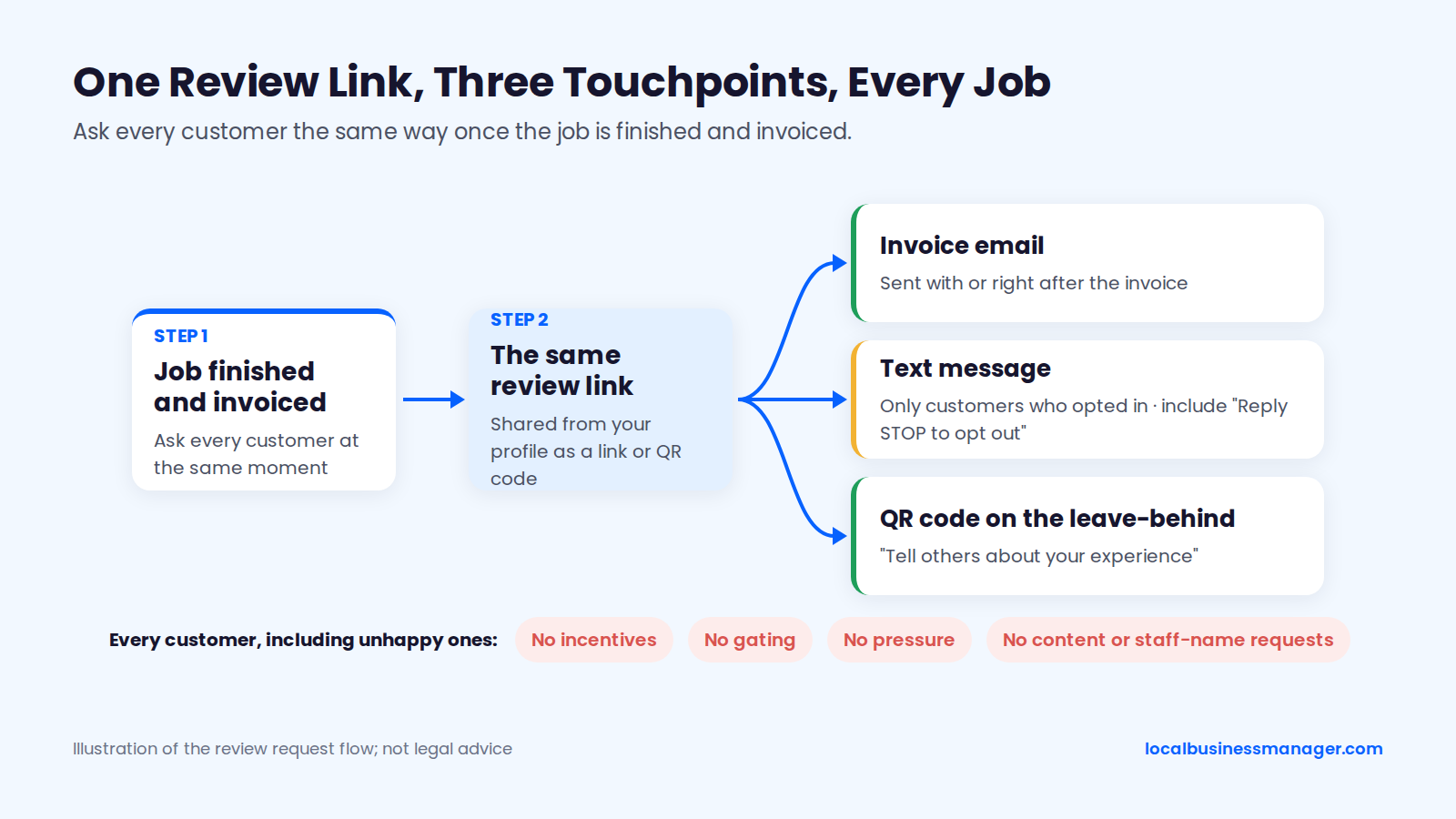
Build the ask into the job close so it happens without anyone remembering. Google's own "Tips to get more reviews" page recommends sharing the review link or QR code from the profile. 3 touchpoints cover every customer:
- The invoice email
- A text to customers who opted in
- A QR code on the leave-behind
Review Request Scripts: Text, Email and Invoice
Use these scripts for every customer, including the unhappy ones. None of them asks for specific content, stars or staff names, and none offers anything in return.
Text (only for customers who opted in to texts):
- "Hi [first name], it's [business name]. Thanks for having us out today. If you have a minute, we'd appreciate an honest review of your experience: [review link]. Reply STOP to opt out."
Email (sent with or right after the invoice):
- Subject: "How did we do, [first name]?"
- Body: "Thanks for choosing [business name] for your [job type]. Reviews help neighbors pick a plumber, and we read every one, good or bad. If you have 2 minutes, you can leave yours here: [review link]. If anything about the job wasn't right, reply to this email or call [number] and we'll make it right."
Invoice or leave-behind line:
- "Tell others about your experience: [short review link or QR code]. We read every review."
The email script offers to fix problems, and that's fine, as long as the review link goes to every customer regardless of their answer.
How to Reply: Templates for Good, Angry and Fake Reviews
Reply to every review, and within a week. In a local SEO software company's 2026 Local Consumer Review Survey, 89% of consumers said they expect owners to respond to reviews, and 81% expected a reply within a week. Never confirm private details about the customer's home or job in a public reply. More examples are in our guide on how to reply to Google reviews.
5-star review:
- "Thanks, [first name]. Glad everything's working again. We appreciate you taking the time to write this, and we're here if you ever need us."
Price dispute:
- "Thanks for the feedback, [first name]. We'd like to go through the invoice with you line by line. Please call [owner name] directly at [number] so we can talk it through."
Late arrival:
- "You're right, we arrived later than the window we gave you, and we're sorry. We've since [real change, e.g. added a dispatch text when the tech is 30 minutes out]. Thank you for telling us."
Missed appointment (no-show):
- "We're sorry we missed your appointment, [first name]. That shouldn't happen, especially when you'd planned your day around it. Please call [owner name] at [number] so we can get you rebooked at a time that works."
Suspected fake review:
- "We can't find a record of a job matching this review. If we've missed something, please call [number] so we can look into it."
Then flag the review through Google's own reporting process, and don't accuse the reviewer publicly.
Which Directories and Citations Matter for Plumbers?
Our short list for plumbers has 10 platforms, and accuracy on those matters more than volume. Wrong phone numbers and duplicates come first, and call tracking has to go in without leaving conflicting numbers across the web.
The Short List, in Check Order
The Business Profile comes first, then the 4 core platforms, then home-services and trade directories. This is our working order as of November 2026.
Platform | What it covers | What to check | Check order |
|---|---|---|---|
Google Business Profile | Map pack, Maps, LSA reviews | Name, phone, hours, categories, services | First |
Apple Business Connect | Apple Maps | Name, phone, hours, service area | Second |
Bing Places | Bing search and maps | Name, phone, hours, categories | Second |
Yelp | Yelp listing and reviews | Name, phone, hours, review replies | Second |
Facebook Page | Name, phone, hours, website link | Second | |
BBB | Business profile and complaints | Name, license, complaint responses | Third |
Nextdoor | Neighborhood recommendations | Name, phone, service area | Third |
Angi | Home-services marketplace | Name, phone, license details | Third |
Thumbtack | Local pros marketplace | Name, phone, services | Third |
Trade association and chamber | Member directories | Name, phone, website link | Third |
Accuracy Beats Volume
The listings that hurt a plumber are the wrong ones: an old phone number, an address from 2 moves ago, a duplicate left by a previous owner.
My approach is to fix every listing, and when hours are tight, I fix the most serious issues first: Critical, then High, Medium and Low. Here's a workable severity scale for plumbing listings, as we'd suggest it:
- Critical: a wrong phone number or a duplicate listing
- High: an old address
- Medium: wrong hours or a broken website link
- Low: formatting differences, such as "St" vs "Street"
Which Number Goes in the Primary Phone Field?
The common setup puts the call tracking number in the Business Profile's primary phone field. The reverse wouldn't track profile calls, because additional numbers aren't shown on Maps or Search, as a 2018 Local Search Forum thread reports.
2 versions of the setup are in use:
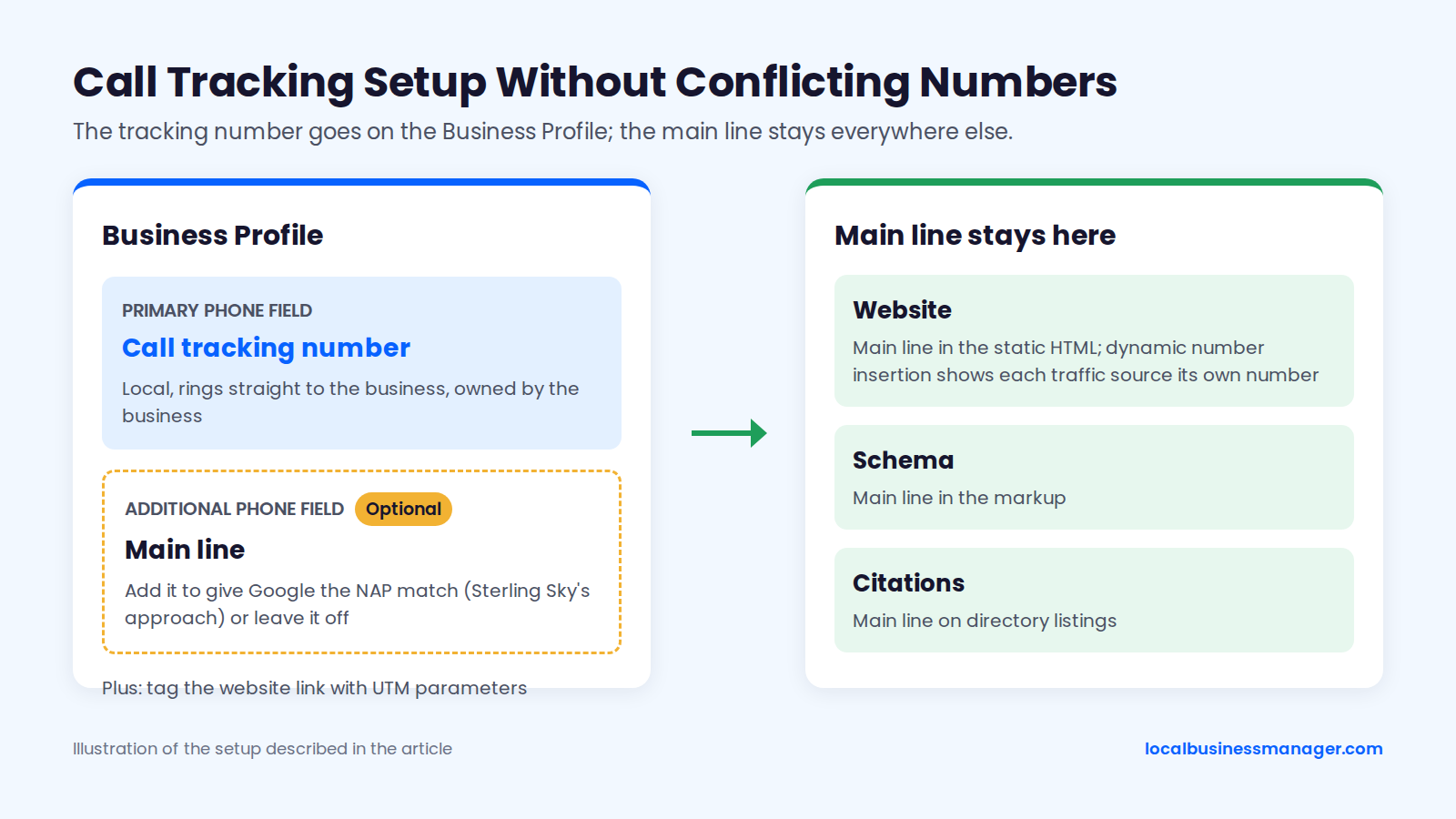
- Sterling Sky's approach (2020, repeated in a 2025 guide): tracking number as primary, with the main line moved to an additional phone field so Google can still match it to the website and citations. Google's help page confirms a profile can hold a primary number plus up to 2 more.
- My practice: tracking number as primary, with no additional number.
The trade-off is NAP matching. With my setup, the profile's only phone number differs from the main line on the website, schema and citations, and the additional-number step in Sterling Sky's approach exists to give Google that match. If you want the match back, add the main line as an additional number.
How to Set Up Call Tracking Step by Step
Call tracking on a plumber's profile takes 6 steps:
- Get a local tracking number that rings straight to the business and that the business owns.
- Put it in the profile's primary phone field.
- Decide whether to add the main line as an additional number (Sterling Sky's approach) or leave it off (mine), knowing the trade-off above.
- Keep the main line on the website's static HTML, the schema and the citations.
- Use dynamic number insertion on the website so each traffic source shows its own number without changing the page source.
- Tag the profile's website link with UTM parameters.
We found no published controlled test measuring how a primary-number swap affects rankings or suspension risk; the only evidence is anecdotal.
How Do Plumbers Earn Local Links?
Plumbers earn local backlinks from real relationships in their town: suppliers, associations, sponsorships and local news. No research we checked measures link value for plumbers specifically, so pick sources a homeowner might actually click.
Sources worth pursuing:
- Manufacturer and supplier pages: dealer or installer locators for the water heater, tankless and fixture brands the company installs
- Approved contractor lists: city, county or utility lists of approved or registered contractors, where they exist
- Trade associations: state and local plumbing contractor associations, which often list members
- Chamber of commerce: member directory listing
- Youth sports and school sponsorships: team pages and event programs
- Local news: offer expert comment when frozen pipes, water main breaks or drought rules hit the news
- Partner trades with real relationships: restoration companies, home inspectors, general contractors and property managers who genuinely refer work
- Community work: donated repairs for local nonprofits, which often get a thank-you page
A supplier request can be 3 lines: "We install [brand] water heaters across [area] and would like to be listed in your installer locator. Our license number is [number]. Happy to send anything you need to confirm it."
Avoid reciprocal link schemes, especially "I'll link to you if you link to me" swaps between plumbers in different cities.
How Do Plumbers Show Up in AI Answers?
Plumbers show up in AI answers by doing the same work that wins the map pack: a complete profile, real reviews, plain service pages and consistent listings. No study we checked measures what AI assistants or Google AI Overviews cite for plumbing searches specifically, so treat any precise figure you see with caution.
When a client asks "are we showing up in ChatGPT?", the useful answer is a list of work worth doing either way:
- A complete Business Profile with accurate categories, services and hours
- A steady flow of real reviews that describe real jobs in the customer's own words
- Service pages that state facts plainly: what the company does, where, when and under which license
- Consistent listings on the core platforms and trade directories
- City pages with real local substance, with more than a swapped city name
To check where a client stands, run a simple self-check:
- Ask ChatGPT and Google 2 or 3 real customer questions with each main town named, such as "who's a good emergency plumber in Round Rock?"
- Log which businesses are mentioned and which sources are cited.
- Repeat monthly, and expect answers to change from one run to the next.
In my law-firm work, I observed that paid legal directories helped firms get mentioned in AI Overviews. Whether trade directories do the same for plumbers hasn't been tested. Be wary of anyone selling an "AI ranking" service that skips the basics above.
How Do You Track Local SEO Results for a Plumber?
Track a plumber's local SEO on 3 things: rankings checked from many points across the service area, real calls and leads, and Business Profile and website activity. A single rank check from one address misleads both the client and the agency.
Why One Rank Check Misleads for a Service-Area Plumber
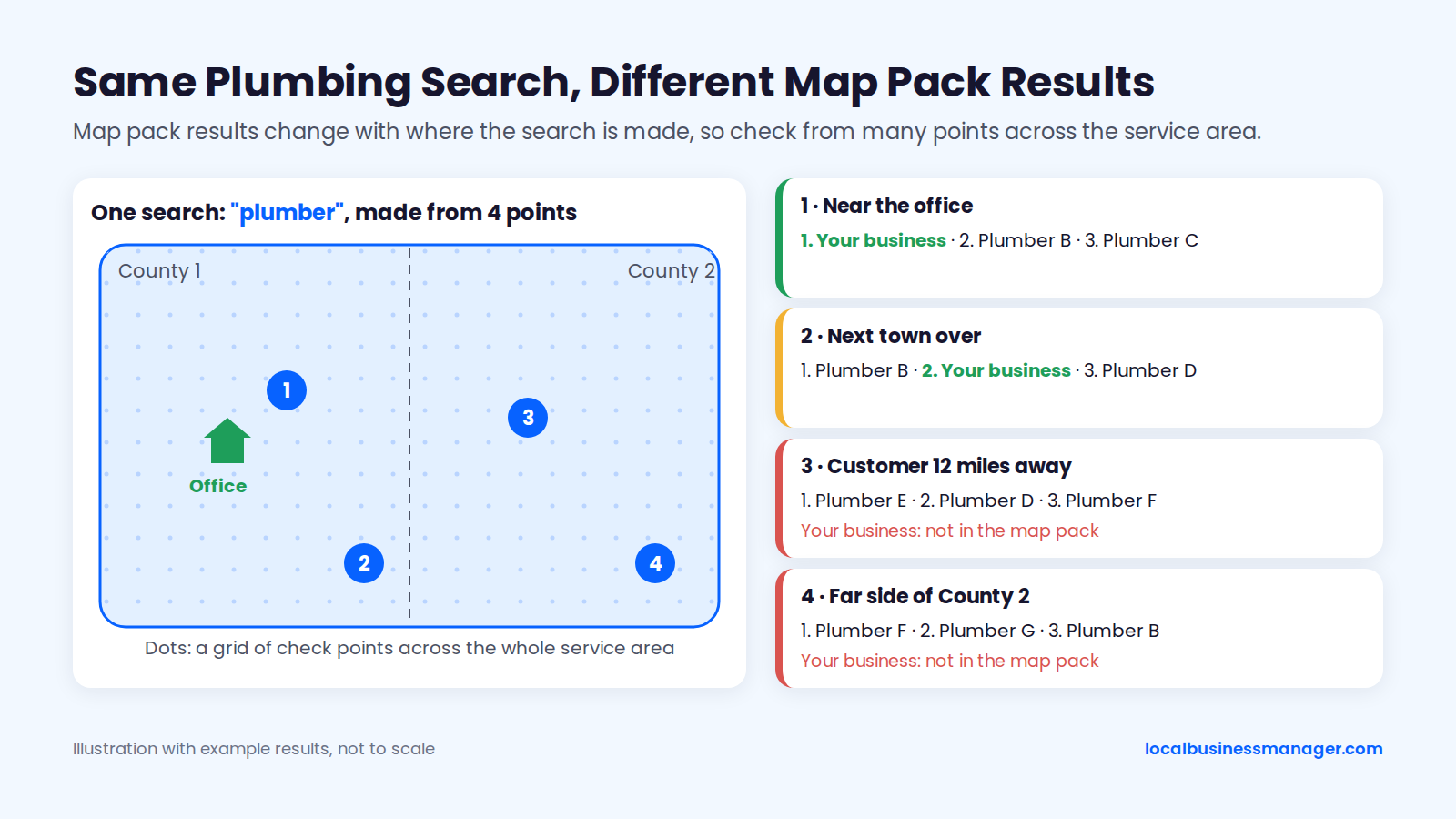
Map pack rankings change with where the search is made. A rank check from the office shows the results closest to the office, and a customer 12 miles away sees a different set. Google works out distance from the searcher's location, and Sterling Sky's 2024 analysis found results cluster around the searcher even in very large cities.
A service-area plumber covering 2 counties can rank first in one town and nowhere in the next. Check from a grid of points spread across the whole area.
My method:
- Run a first check to see where the business stands. My usual starting grid is 13 Ã 13 points, 0.5 miles apart.
- If the grid comes back mostly strong, widen the spacing to see how far the ranking reaches. If it's mostly weak, tighten it.
- Check at least once a month. Check daily only after an edit, when you want to see whether it produced a result.
I don't rely on single-point checks, and I treat an average rank number with caution right now. Results pages are volatile enough that one average is hard to read with confidence.
What to Say When a Client Calls Saying "We Dropped"
Before calling the client back, run Sterling Sky's 2025 ranking-drop checklist:
- Is the profile's pin outside the city border?
- Did the results page itself change: a one-box, a removed 3-pack, new spam listings?
- Is the profile being filtered?
- Was the primary category or the profile's website link edited, by anyone?
Add a check of the profile's edit history for name, address or hours changes.
Callback script:
- "Thanks for flagging it. Map rankings change with where the search is made, so a search from your house shows the plumbers closest to your house, and a customer across town sees a different list."
- "Today we checked your rankings from [number] points across your service area, reviewed every recent change to your profile and looked at whether Google changed the results page."
- "Here's what we found: [result]. Here's what we're doing about it: [action], and we'll check again on [date]."
GBP Performance, Search Console and Call Tracking
The profile's Performance report shows views, searches and interactions such as calls, direction requests and website clicks. Google counts a call each time someone taps the call button, and its data includes Google Ads activity. A "call" in Performance counts a tap on the call button, whether or not a conversation follows, as Sterling Sky's 2026 guide on interpreting Performance points out.
Fill the gaps with 3 tools:
- Call tracking: because Performance counts taps, real call numbers have to come from the tracking number on the profile.
- UTM parameters on the profile's website link. Sterling Sky's study of 78 profiles across 29 businesses found UTM tagging is the only way to separate local pack data from organic data in Search Console.
- GA4 linking: Sterling Sky's 2026 guide notes that profiles can now be linked to GA4.
Expect the sources to disagree. A Sterling Sky reader reported in April 2025 that UTM clicks and the profile's website-click counts didn't match.
What to Put in a Monthly Client Report
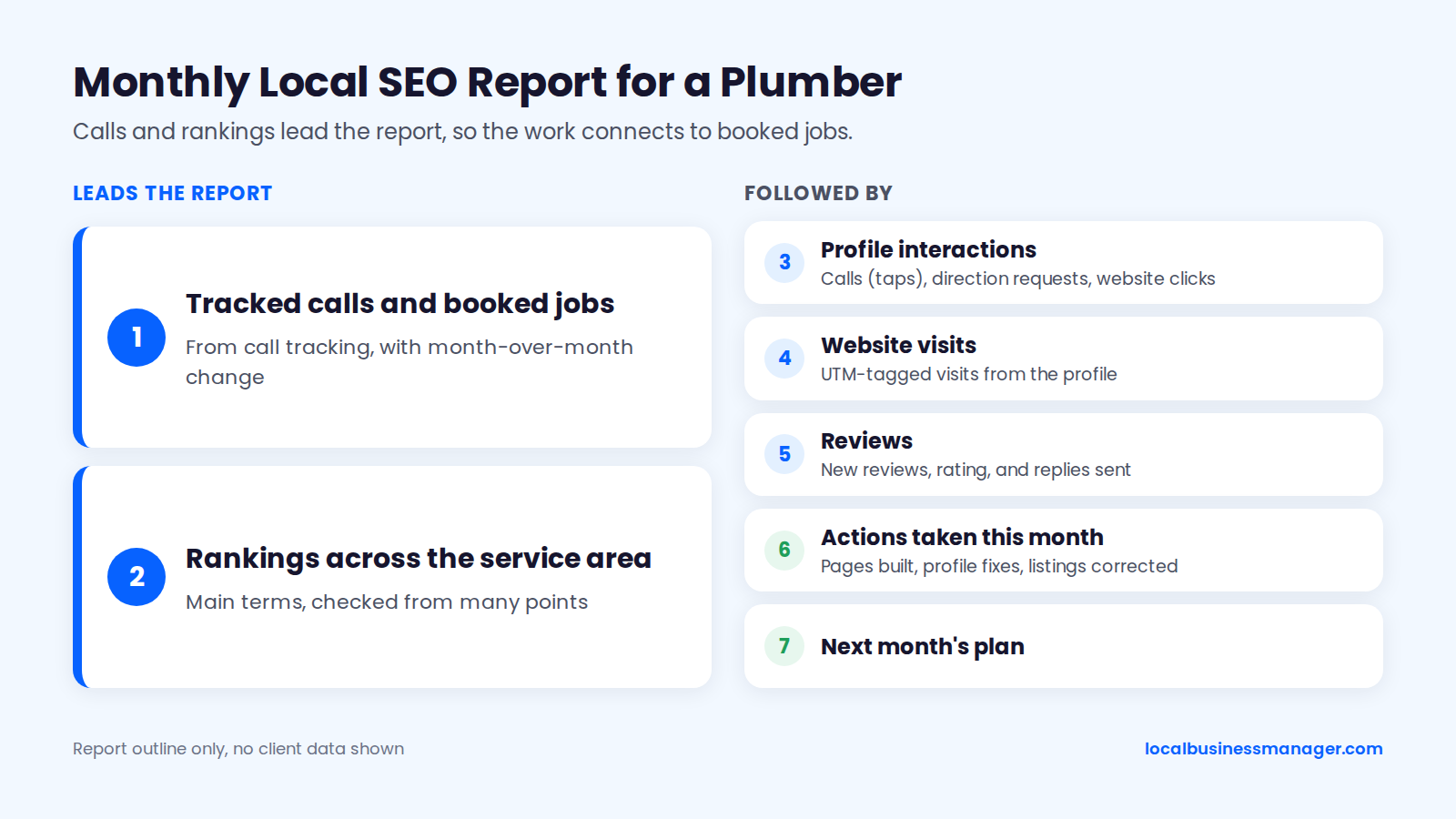
Calls and rankings lead my monthly reports. In a local SEO software company's 2023 Local Search Industry Survey, agencies named local pack rankings (54%), new leads (45%) and organic rankings (39%) as their top local SEO success metrics, while freelancers named local pack rankings (50%), phone calls (45%) and new leads (35%). The same company's agency survey, which carries no publication date, found budget cuts are the most common reason clients leave, so the report has to connect the work to booked jobs.
Monthly report outline:
- Tracked calls and booked jobs, from call tracking, with month-over-month change
- Rankings across the service area for the main terms, checked from many points
- Profile interactions: calls (taps), direction requests, website clicks
- UTM-tagged website visits from the profile
- Reviews: new reviews, rating, and replies sent
- Actions taken this month (pages built, profile fixes, listings corrected)
- Next month's plan
How Long Does Local SEO Take for Plumbers, and What Does It Cost?
There's no published timeline or price benchmark for plumber local SEO that we'd stand behind. What exists is evidence on which changes move fast, a few agencies' own published prices, a set of factors that drive cost, and a way to judge whether an engagement is worth paying for.
What Moves First and What Takes Longer
Relevance fixes move first. Prominence builds slowly. Sterling Sky's 2026 tests found that adding pre-defined services can lift related rankings within 24 to 72 hours. Reviews behave unevenly: Sterling Sky's 2025 data shows lifts at some steps and none at others.
My view, from competitive legal markets: it depends on what's already optimized. A single high-impact fix, such as getting the keyword into the Business Profile name through a properly registered DBA, can show ranking gains within about a month. Once the basics are done, further gains, for example from a strong review push, come gradually. We found no plumber-specific timeline for links and prominence, so don't promise one.
What Does Plumber SEO Cost?
Published prices from 2 agencies span $199 to $4,000 a month, and the low end isn't plumber-specific. iBoost advertises its general local SEO service from $199 to $299 a month, depending on which of its pages you read. Stackmatix's plumbing SEO guide says ongoing local SEO for plumbers typically runs $1,200 to $4,000 a month, with first-time website builds from $3,000 to $8,000.
Neither figure is a benchmark: an "affordable SEO for plumbers" package and a top-end retainer can include very different work, so compare each against the list in the next section. Plumber SEO cost depends on 5 things:
- Competition: expect a crowded metro, where competitors spend heavily on LSAs, to take more work than a small town.
- Service area size: more towns can mean more city pages, but only where real jobs justify them.
- Starting state: suspensions, duplicates or a bad name from a previous agency take time to unwind.
- Content needs: service pages, the emergency page and city pages with real local detail.
- Scope: whether LSA management, call tracking setup and reporting are included.
How to Choose the Best SEO Company for Plumbers: What to Expect and Red Flags
The best SEO agency for plumbers, whether you hire an agency, a consultant or a specialist, delivers the work below and avoids the red flags. Owners can use the lists to hire; agencies can use them to explain their own work to a client.
In my view, an engagement is only worth paying for if it delivers rankings for the main terms. That's the outcome to hold an agency to, which is different from an agency promising a guaranteed position up front. A good engagement includes:
- Business Profile audit and fixes: name, categories, services, hours, photos
- Service pages for each core job type, plus an emergency page
- City pages only where real local substance exists
- A compliant review routine: every customer, no incentives, opted-in texts only
- Accurate core and trade listings
- Call tracking and UTM tagging
- Rankings checked across the whole service area
- A monthly report led by calls and rankings
- The client as primary owner of the Business Profile
Red flags:
- Guaranteed rankings or a promised #1 spot by a date. Google says there is no way to request or pay for a better local ranking.
- Virtual offices, extra addresses or extra profiles for towns with no staffed location
- Mass city pages with only the town name swapped
- Review gating, incentives, or scripts telling customers what to write
- Keyword names added to the profile without the business actually using that name
- The agency owning the profile, website or tracking numbers instead of the business, so the rankings and call history leave with the agency
- Reports with no call data
Which Plumber Local SEO Mistakes Cost the Most?
Of the 8 common plumber local SEO mistakes below, 4 risk a suspension, 1 breaks review rules and 3 cost rankings or calls. This is our summary as of November 2026, drawn from the Google policies and studies cited in this guide, sorted with suspension risks first.
Mistake | Main risk | Fix |
|---|---|---|
Keyword name the business doesn't use | Suspension | Rename through a registered DBA, or revert to the real name |
Virtual office, PO box or coworking address | Suspension | Use the real base, hidden if customers don't visit |
Extra profiles for towns with no staffed location | Suspension | Keep 1 profile per real location |
Several core edits in the same week | Suspension | Make 1 core edit at a time |
Review gating or incentives | Breaks Google's review policy and the FTC rule | Ask every customer the same way, with no rewards |
Mass city pages with only the town swapped | Lower rankings or pages not indexed | Build fewer pages with real local substance |
Empty services list | Lost relevance | Build it from real job types |
24/7 hours with no one answering | Missed calls and weaker LSA responsiveness | List staffed hours only |
What Gets Plumber Profiles Suspended?
Plumber profiles get suspended over edits to core details, ineligible addresses, keyword names the business doesn't use, duplicate profiles and a few account-level problems. We found no reliable public data ranking these causes for plumbers; in my experience, name edits and address edits cause the most. Getting reinstated means fixing the problem first and appealing once.
Suspension Triggers and Compliant Fixes
Each trigger below comes from Sterling Sky's 2026 suspension guides, Google's help pages or a 2025 Local Search Forum thread, as of November 2026, paired with a compliant fix.
Trigger | Why it causes trouble | Compliant fix |
|---|---|---|
Edits to name or address | Edits can trigger automatic suspensions, especially in spam-heavy categories (Sterling Sky) | Change the real-world name or base first; make 1 core edit at a time |
Keyword name the business doesn't use | Breaks Google's real-world-name guideline | Rename properly through a DBA, or revert to the real name |
Ineligible address | Virtual offices, PO boxes and coworking desks aren't real bases | Use the real base, hidden if customers don't visit |
Duplicate or overlapping profiles | A 2025 Local Search Forum thread on a suspended garage-door company reports that 2 service-area profiles with overlapping areas aren't allowed | Keep 1 profile per real location; remove duplicates |
User-suggested edits | Public edits can change details and trigger review (Sterling Sky) | Check the profile weekly; reject wrong edits |
Suspended Google Ads account | Can lead to a profile suspension (Sterling Sky) | Resolve the Ads account issue |
New business, few verification signals | Newness is a listed cause (Sterling Sky) | Matching documents, website, signage and wrapped vans |
How to Get a Suspended Profile Reinstated
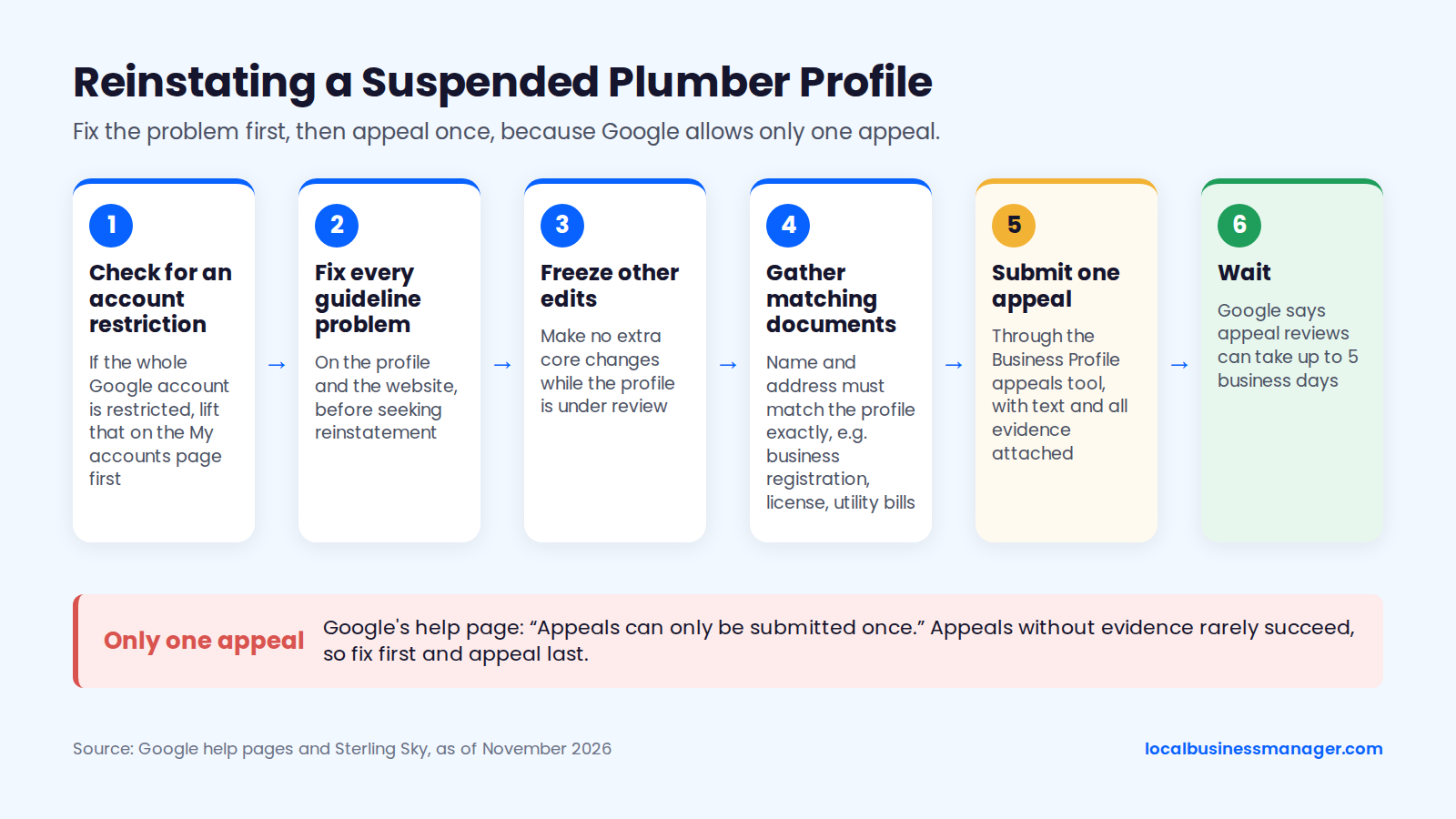
Reinstatement starts with fixing whatever broke the guidelines, and the appeal comes last, because Google allows only one. Google's help page on suspended profiles says plainly: "Appeals can only be submitted once." Search Engine Journal reports that appeals without evidence rarely succeed. Our guide to Business Profile suspensions and reinstatement covers appeals in more depth.
Steps:
- Check for an account restriction. If the whole Google account is restricted, lift that on the My accounts page before appealing the profile.
- Fix every guideline problem on the profile and the website, following Sterling Sky's advice to fix violations before seeking reinstatement.
- Freeze other edits. Make no extra core changes while the profile is under review.
- Gather documents whose name and address match the profile exactly. Google lists business registration, license or tax certificates and utility bills. In my experience, reinstatement usually needs documents such as the DBA, a lease agreement and photos of the office with signage, or a video recording of the storefront and office.
- Submit the single appeal through the Business Profile appeals tool, with text and all evidence attached.
- Wait. Google says appeal reviews can take up to 5 business days. A suspended profile must be reinstated before other content decisions can be appealed.
Plumber Local SEO Checklist: First 30 Days
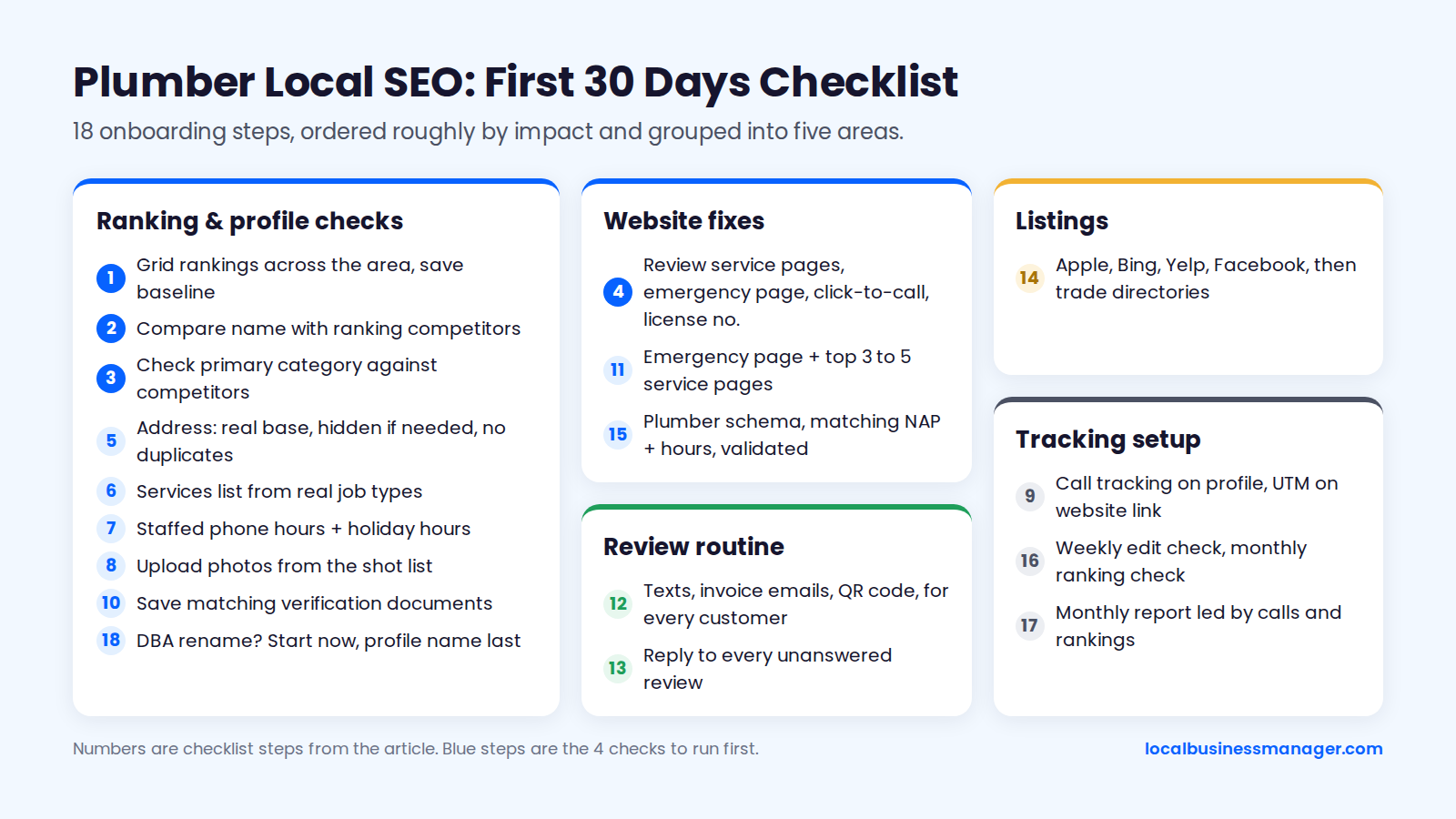
Use this checklist when onboarding a plumbing client or taking over your own profile. It's ordered roughly by impact, in our judgment, starting with the 4 checks I run first on any new local client: rankings across the area, the name, the primary category and the website.
- Check rankings for the main terms from a grid of points across the service area, and save the baseline.
- Compare the business name with the names of the competitors who rank.
- Check the primary category against what the ranking competitors use.
- Review the website: service pages, emergency page, click-to-call, license number.
- Fix the address setup: real base, hidden if no customers visit, no duplicates.
- Build the services list from real job types.
- Set hours to staffed phone hours and add holiday hours.
- Upload photos from the shot list.
- Set up call tracking on the profile and UTM tagging on the website link.
- Save verification documents that match the profile exactly.
- Build or fix the emergency page and the top 3 to 5 service pages.
- Start the review routine: opted-in texts, invoice emails and a QR code on leave-behinds, for every customer.
- Reply to every existing unanswered review.
- Correct the core listings: Apple, Bing, Yelp, Facebook, then trade directories.
- Add Plumber schema with matching name, phone and hours, and validate it.
- Schedule the weekly edit check and the monthly ranking check.
- Set up the monthly report, led by calls and rankings.
- If a DBA rename is planned, start the registration and asset changes now. The profile name changes last.
Plumber Local SEO FAQs
Short answers to the follow-up questions plumbing owners and agencies tend to ask once the setup above is done, each written to make sense on its own if you jump straight here.
What Are the Best Local SEO Tools for Plumbers?
Most of the essential local SEO tools for plumbers are free from Google: Business Profile Performance, Search Console, Google Analytics 4, the Rich Results Test and PageSpeed Insights. Beyond those, 3 kinds of paid tool are worth considering: a rank checker that tests rankings from many points across the service area, call tracking, and a way to send review requests to customers who opted in. Pick tools by whether they support the routines in this guide, not by feature counts.
Can a Plumber Do Local SEO Without Hiring an Agency?
Yes: the core work is profile setup, service pages, a review routine and accurate listings, and it needs time and care rather than special tools. The ongoing part is what takes the time: asking every customer, replying within a week, checking the profile for unwanted edits and building pages with real local detail. The 30-day checklist above is the place to start. If you hire help, use the red-flags list to screen candidates.
Do Business Profile Posts Help a Plumber Rank?
Posts are not a confirmed ranking factor, and the evidence that they move map rankings is weak. I still post 3 times a week for clients. In my view, regular posting signals to Google that the business is active. That's my practice and opinion; we found no published test that measures it. Seasonal topics fit plumbing well: frozen-pipe prevention, water heater flushing and sump pump checks before storm season.
Should a Plumber With a Showroom Show the Address?
Yes, if customers are actually served at that address during the listed hours. Hide it only if they aren't. Google's guidelines tell service-area businesses that don't serve customers at their location to hide the address. A showroom with staff who greet walk-ins is a customer location. A warehouse where the vans park overnight is not.
What to Do First
If you do one thing this week, open the profile and compare 3 fields with the businesses outranking it: the name, the primary category and the services list. After an area-wide ranking check, the name and primary category are the next things I look at on any new client, and comparing them costs nothing. When you're ready to run this across a roster of plumbing clients, join Local Business Manager early access.