Local SEO for HVAC Companies: How to Win the Map Pack in Every Season

Local SEO for HVAC contractors comes down to 4 things: set up the Google Business Profile the way the business really operates (usually as a service-area business), build one strong page per service, ask every customer for a review and plan the work a season ahead. HVAC adds emergency calls, weather swings and heavy spam to the usual local playbook.
I've ranked pages for home-service businesses in most of the common trades at agencies I worked for. This guide gives you the setup steps, review scripts, schema, a seasonal calendar and a client report template, and it explains how far from the office a profile can rank.
What Makes Local SEO Different for HVAC Companies?
Local SEO for HVAC contractors follows the same playbook as any local business, but 6 HVAC realities decide how you apply it, from emergency calls at night to the spam that crowds the map pack:
- Urgent, phone-first searches. Most HVAC owners know the pattern: no heat on a January night, a search on a phone, a call to whoever looks able to come. If nobody answers, the ranking produces no job. Route after-hours calls to a live answering service, or don't list those hours (see Step 3).
- 3 search intents. Breakdown, replacement and maintenance searches need different pages, calls to action and keywords (see the table below).
- Service-area setup. Most HVAC companies work at the customer's home, so the profile is usually a service-area business with the address hidden.
- Ads above the map. Local Services Ads can appear above the map pack, so the free listings start lower on the screen.
- Weather-driven demand. Searches and calls swing with heat waves and cold snaps, which is why clients panic in mild months.
- Spam pressure. Home services attract fake and keyword-stuffed listings. Google says it removed over 13 million fake Business Profiles in 2025, according to Search Engine Roundtable's report on Google's Maps safety report.
Which HVAC Keywords Should You Target?
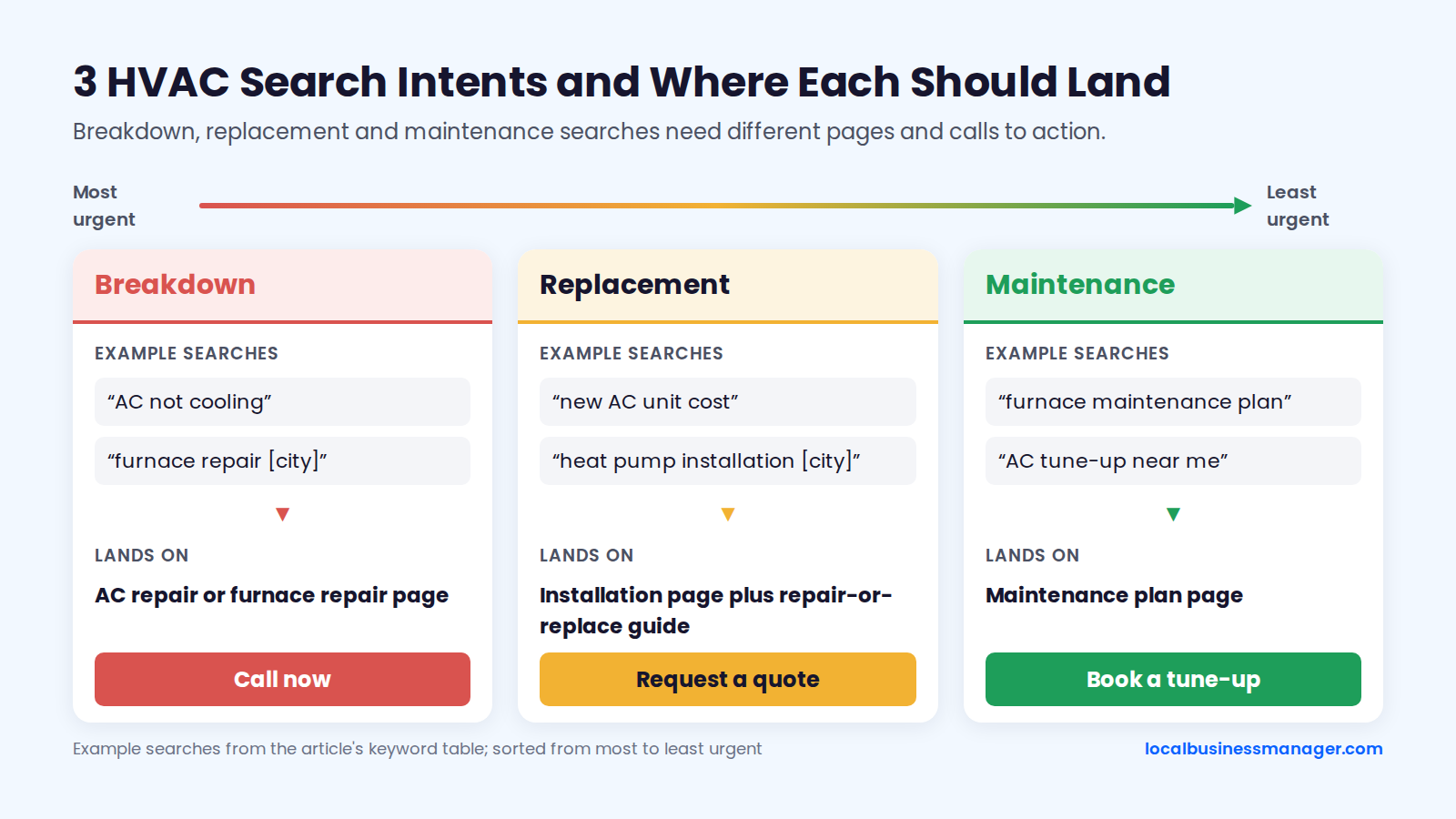
HVAC companies should target 3 keyword patterns for each service: symptom searches ("AC not cooling"), service plus city ("AC repair [city]") and service plus "near me". A breakdown search needs a phone number the homeowner can tap right away, while replacement and maintenance searches need pages that help the homeowner compare options or book a visit.
The table maps each intent to example keywords, the landing page and the profile element that supports it.
Intent | Symptom or need search | Service + city search | Landing page | Call to action | Profile element |
|---|---|---|---|---|---|
Breakdown | AC not cooling | furnace repair [city] | AC repair or furnace repair page | Call now | Services list and accurate hours |
Replacement | new AC unit cost | heat pump installation [city] | Installation page plus repair-or-replace guide | Request a quote | Services list and install photos |
Maintenance | furnace maintenance plan | AC tune-up near me | Maintenance plan page | Book a tune-up | Seasonal posts |
Where Do HVAC Leads Come From on a Google Results Page?
An HVAC search can send leads from 4 places on one results page: Local Services Ads, the map pack, the organic results and, on some queries, an AI Overview. Paid placement on Google comes from Local Services Ads or regular Google Ads; the map pack and organic results cost nothing per click.
The layout changes by query and device. A 2026 Local Services Ads guide from NextPhone, a vendor, places LSAs above both regular Google Ads and the map pack; that placement comes from the vendor, not from a Google statement.
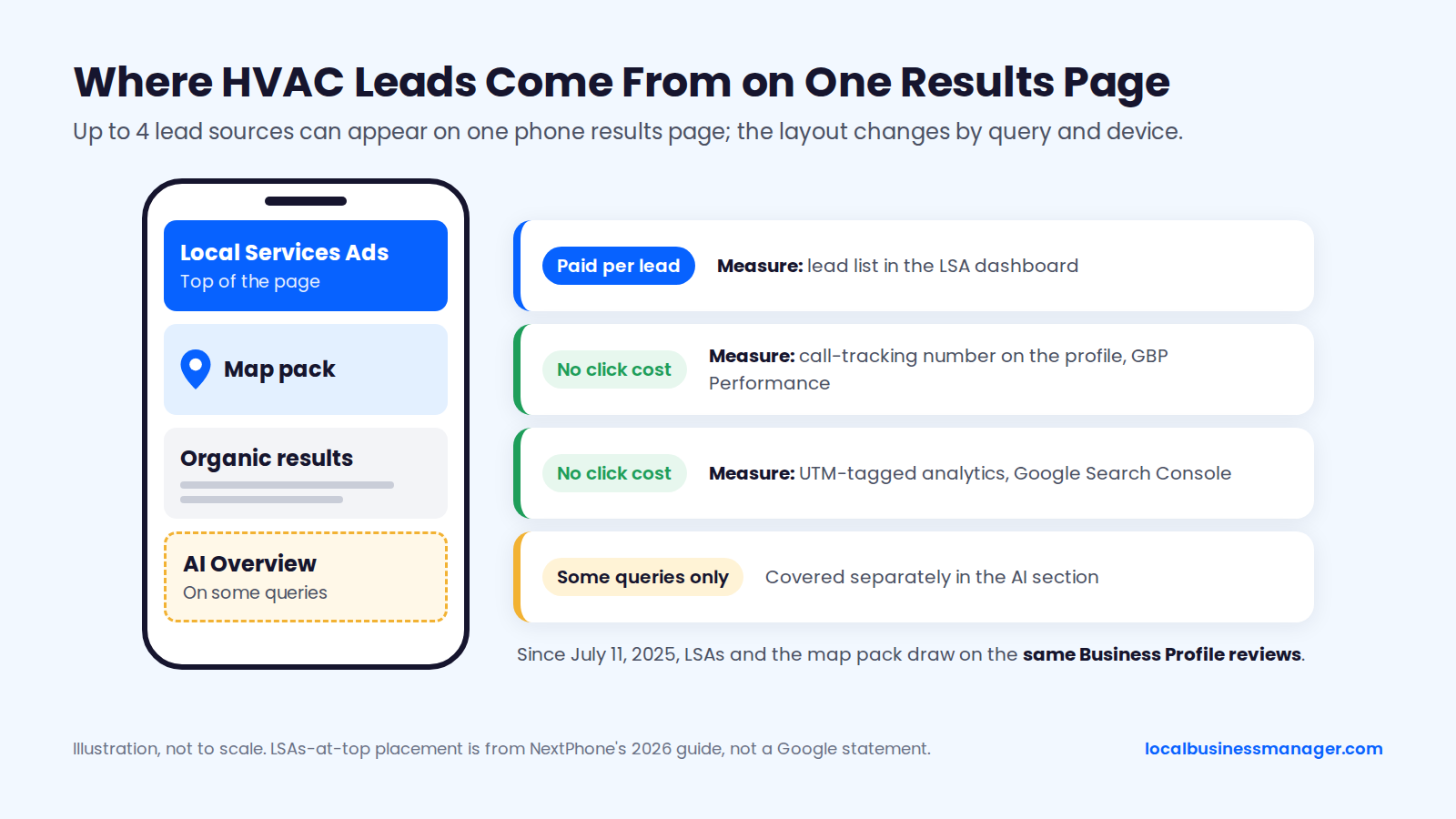
As of November 2026, Local Services Ads are the only one of the 3 main lead sources paid per lead, and since July 11, 2025 they draw on the same Business Profile reviews as the map pack, so review work now feeds both paid and free local results. In the table below, the pay model and the LSA ranking factors come from Google's Local Services Ads and Business Profile help pages; the map-pack and organic cells are practitioner judgment.
Lead source | How you pay | What you control | What holds it back | How to measure it |
|---|---|---|---|---|
Local Services Ads | Per lead | Budget, service types, response speed, profile and reviews | Distance from the searcher, few or low reviews, slow responses, low budget | Lead list in the LSA dashboard |
Map pack | No click cost | Profile setup, reviews, website, links | Distance from the verified address, weak name or category, spam competitors | Call-tracking number on the profile, GBP Performance |
Organic results | No click cost | Service pages, city pages, links, site speed | Thin or doorway pages, weak links | UTM-tagged analytics, Google Search Console |
What Changed With Local Services Ads Since 2024?
Since mid-2024, Google has changed how LSA leads are credited, where LSA reviews live and, according to agency reports, the badge itself.
- Automatic lead credits. Since July 2024, Google reviews all leads and credits the ones it judges invalid automatically, with no manual disputes, according to Google's Ads Liaison as reported by Search Engine Roundtable. PPC Land reported agency complaints about falling lead quality in early 2025.
- Shared reviews. Since July 11, 2025, LSA customer reviews are managed in Google Business Profile, and Google's Local Services help says star rating and review count can affect LSA ranking.
- The badge. As of November 2026, agency sources including Attractional Marketing and Stryker Digital report that Google replaced the Google Guaranteed badge with a single Google Verified badge and ended the money-back guarantee for jobs booked on or after December 7, 2025. Other 2026 HVAC guides still describe Google Guaranteed. Confirm the current badge and guarantee in Google's Local Services help center before you explain it to a client.
Google's own list of LSA ranking factors is proximity to the searcher, review score and count, how quickly and reliably the business responds to leads, an up-to-date Business Profile and enough budget. Missed calls can hurt the responsiveness score, according to Google's Local Services help as quoted in NextPhone's 2026 LSA guide.
Should an HVAC Company Run LSAs Alongside SEO?
No published study answers whether an HVAC company should run Local Services Ads alongside SEO, so it's a judgment call. Phone coverage comes first: responsiveness is one of Google's stated LSA ranking factors, and missed calls count against it.
Reporting comes second. LSA leads come from the LSA dashboard, while map-pack calls need a tracking number on the profile (covered in the tracking section below), so the client can see each channel on its own.
The only data on overlap is old and from another industry. In Sterling Sky's 2020 study of 110 law-firm listings, map-pack listings had a click-through rate of 3.03% when LSAs were present, and LSAs cost those listings about 5.1 actions per month on average.
How Should an HVAC Google Business Profile Be Set Up?
Set up an HVAC Google Business Profile (formerly Google My Business) exactly as the business operates, following Google's guidelines for representing your business. Start with a baseline check, ownership and verification, then decide the business type, categories, services, hours, photos and name. A 16-item checklist closes the section.
What Should You Check First on a New HVAC Client?
Before editing anything on a new local client, my practice is to check 4 things, in this order:
- How the business ranks across its whole area, using a grid of checkpoints rather than one address.
- The business name, compared with the names of the competitors who rank.
- The primary category.
- The website.
The rank-check section below describes the grid method; any tool that checks the same search from many points will do, and so will careful manual checks. The name and category checks map to Step 5 and Step 1 below.
Before You Start: Claim, Verify and Keep the Client as Owner
The business should own its profile, and the agency should be a manager on it. Google's help page on owners and managers says to add users under Business Profile settings > People and access, and only owners can add or remove users. Keep the client as owner and add the agency as a Manager.
Verification comes next. Comradeweb's HVAC local SEO guide says Google usually verifies by phone call, text, email or postcard, and Google's Business Profile Community verification guide adds that Google may offer video verification as a recorded video or a live video call. The methods offered depend on the business.
Service-Area Business or Storefront: Which One Is an HVAC Company?
Most HVAC companies are service-area businesses: the techs go to the customer, and customers don't come to the office. Google's guidelines say a service-area business should hide its address; an HVAC company with a staffed office or showroom that customers visit during business hours can show it as a storefront.
On a service-area profile, hide the street address and list up to 20 service areas within about 2 hours' drive of the base. Whole states and countries can't be service areas since a June 24, 2025 guideline change reported by PPC Land. Our guide to hiding the address on a service-area profile covers the full setup.
The ranking evidence on hiding the address is mixed:
- Sterling Sky's 2025 study of 8,186 HVAC, plumbing, locksmith, garage-door and lawn-care listings in 200 cities found that being a service-area business correlated with weaker "near me" rankings.
- In one Sterling Sky test, a profile lost rankings after hiding its address.
- A local SEO software company's 2024 analysis found showing or hiding the address didn't change rankings.
Those findings are correlations or single cases, and none changes the rule: an address customers don't visit can't be shown just to rank.
Step 1: Choose the Primary and Secondary Categories
My rule for the primary category is to pick what most of the ranking competitors use; for a shop with a roughly even heating and cooling split, the category most guides recommend is HVAC contractor. If Google is clearly rewarding a different category than the "logical" one in that market, I use the category Google rewards.
The primary category is the profile field practitioners rate highest for local ranking. In the 2026 Local Search Ranking Factors survey (47 local SEO practitioners scoring 187 factors, published November 2025), it ranked first for the local pack with a score of 227. Those scores are expert opinion, not measured weights, and Sterling Sky's December 2025 analysis also found the primary category carries more ranking weight than secondary ones.
Google's guidelines, as summarized by Sterling Sky, say to use as few categories as possible and pick the ones that complete the sentence "This business IS aâ¦". Published HVAC advice on the primary splits 3 ways:
- BizIQ and others recommend HVAC contractor for almost every heating-and-cooling company.
- Kaerae Marketing recommends Air conditioning contractor when most of the work is cooling, and HVAC contractor when the split is even.
- Contractor Strategy recommends switching between Air conditioning contractor in summer and Heating contractor in winter.
The category names below come from 2025 and 2026 guides, so confirm each one in the category selector before you set it. Our Google Business Profile categories guide covers the selector in more depth.
Category | Use as primary when | Use as secondary when |
|---|---|---|
HVAC contractor | Heating and cooling work is roughly even | Rarely needed; it's usually the primary |
Air conditioning contractor | Most of the work is cooling, or the shop is cooling-only | The company does meaningful AC work |
Heating contractor | Most of the work is heating | The company does meaningful heating work |
Furnace repair service | Only as a seasonal winter primary (see the next section) | Furnace repair is a core service |
Air conditioning repair service | Only as a seasonal summer primary (see the next section) | AC repair is a core service |
Should You Switch the Primary Category by Season?
Seasonal category switching has some practitioner support but no controlled test behind it. Sterling Sky published a 2025 example of an HVAC client that switched its primary category to Furnace repair service in winter and Air conditioning repair service in summer and saw higher seasonal visibility.
In a November 2025 Local Search Forum thread, one agency said it swapped about 60 profiles' primary categories seasonally, HVAC among the most common swaps, with mostly good results and no suspensions. It shared no ranking data.
The risk is re-verification or suspension. DAC Group reported a 2025 wave of re-verifications after small profile edits, including category changes, and Google has made no statement about seasonal category changes. If you test it:
- Test on one profile first.
- Change only the primary category, and log the date.
- Don't stack the change with a name or address edit in the same month.
Step 2: Add Services and a Plain Description
Add every service the company actually performs to the profile's services list, using the words customers search with rather than internal job codes. "AC repair" beats "cooling diagnostic visit"; "furnace replacement" beats "heating equipment changeout". Missing services are one of the problems I've inherited from previous agencies, along with duplicate listings, bad naming and no review campaigns.
A typical HVAC services list looks like this:
- AC repair
- AC installation and replacement
- Furnace repair
- Furnace installation and replacement
- Heat pump repair and installation
- Ductless mini-split installation
- AC tune-up and furnace tune-up
- Maintenance plans
- Indoor air quality (air purifiers, humidifiers, filtration)
- Emergency HVAC service, only if the company really offers it
Keep the services list and the website's service pages in step: every major service on the profile should have its own page (see the service page template below). For the business description, Hook Agency advises using relevant keywords naturally; write it as a plain summary of what the company does and where.
Step 3: Set Hours That Match Who Answers the Phone
Set the profile's hours to the hours a person actually answers the phone, not the hours the office is open. "Business open at time of search" scored 189 in the 2026 Local Search Ranking Factors survey, fifth among local-pack factors, so accurate hours matter for an emergency trade.
List 24/7 hours only when someone really picks up at 3 a.m. A 2025 suspension guide from a local SEO software company lists 24-hour hours among the triggers for automatic suspensions, and Superpath's 2025 HVAC article cites false 24/7 hours as an HVAC suspension trigger.
If the office closes or runs reduced hours, set special hours before each of these holidays:
- Memorial Day
- July 4
- Labor Day
- Thanksgiving
- Christmas
- New Year's Day
Google removed Business Profile chat and call history on July 31, 2024, so the phone is now the profile's main contact path.
Step 4: Add Real Photos and Short Videos
Upload real photos of the company's own trucks, technicians, finished installs and equipment, plus short videos of the team at work. These photos help a homeowner decide who to call. Photos won't satisfy a re-verification, though: Google's Business Profile Community verification guide says video verification asks for a real-time phone video showing the location, signage and proof of operations.
Skip geotagging, even though several HVAC guides still recommend it. Geotags in photos are not a confirmed ranking factor, and practitioners widely report that Google strips location data from uploaded images.
A workable photo routine for HVAC companies:
- Techs photograph each install before and after (no customer faces, house numbers or license plates).
- The office uploads a handful of the best ones each week.
- Stock images and other companies' photos never go on the profile.
Step 5: Decide on the Business Name
The business name on the profile must be the business's real-world name, as used consistently on its storefront, website and stationery and as known to customers, according to Google's guidelines. Adding service keywords or city names to a name the business doesn't use breaks that rule.
Name keywords pay off, which is why the rule gets broken so often. The 2026 Local Search Ranking Factors survey of 47 local SEO practitioners ranks keywords in the business name third for the local pack (score 223, up from 181 in 2023), and the same survey lists keyword names among the top suspension risk factors.
A 2026 study by a local SEO software company of more than 1.4 million listings in 17 industries found that any keyword in the name roughly doubled to quintupled top-3 local-pack rates in most industries, real estate excepted. That's a correlation, not proof of cause.
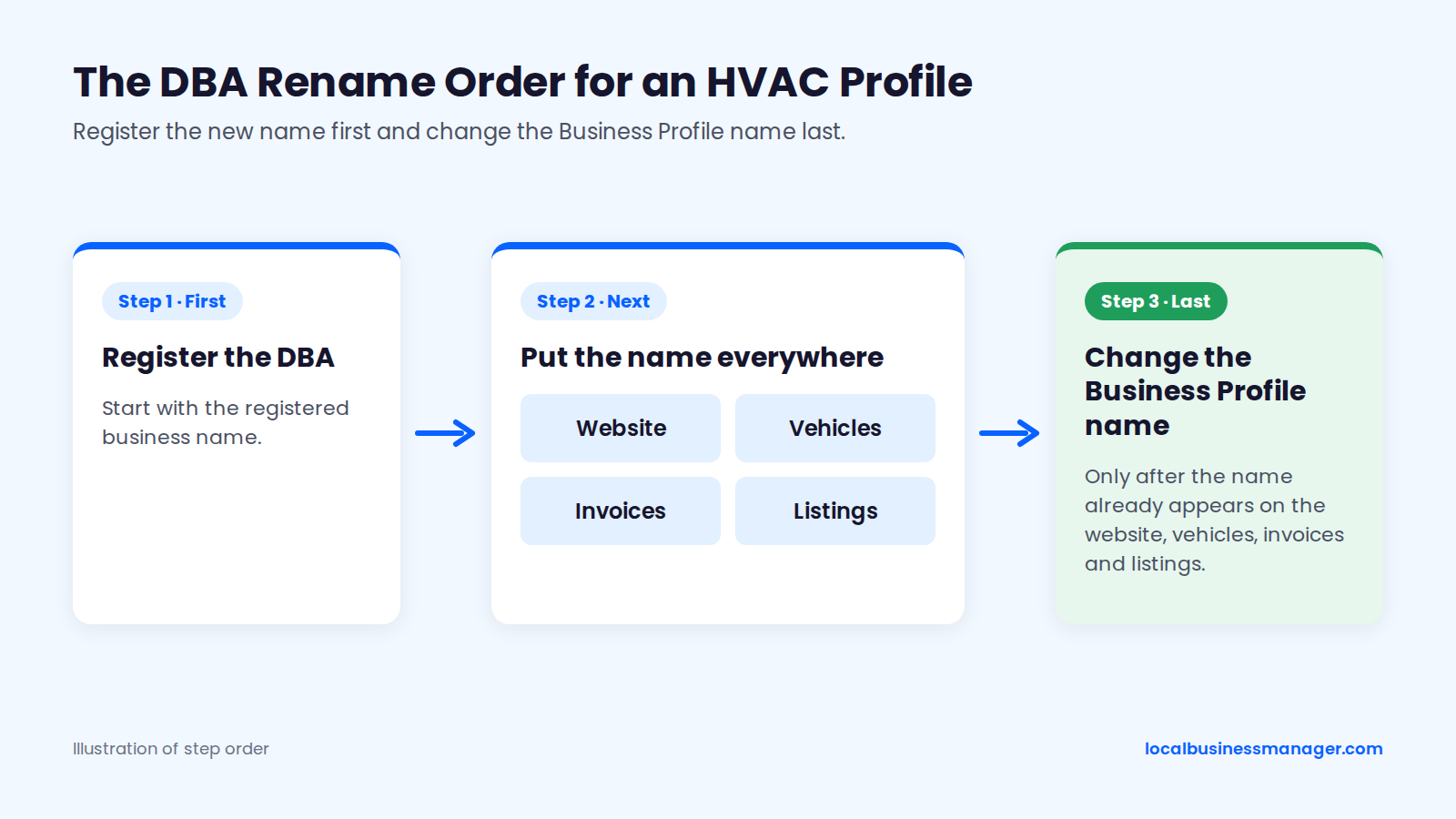
I recommend keyword names, but only one way: the keyword name becomes the company's actual name through a registered DBA (assumed name), used everywhere, before the profile changes. Sterling Sky's position is the same: a DBA or legal rebrand is the only compliant route, and Google compares the profile name with the website and signage.
I've taken many clients through this process. Name edits and address edits are also what I've seen cause the most suspensions, so the order of the steps matters. When the personal-injury firms I worked with missed the 3-pack, the cause was most often a business name that wasn't optimized and too little review flow, and I've found the method doesn't change by niche.
How to Change an HVAC Business Name Through a DBA
Changing to a keyword name compliantly takes 5 steps, in this order:
- Pick a name the company will genuinely trade under for years, not a keyword string (for example "Cedar Valley Heating & Cooling", not "Best AC Repair Cedar Valley Near Me").
- Register the DBA with the right office. According to the U.S. Small Business Administration, that is usually the county clerk or the state government (sometimes the city), depending on where the business is located, and a few states don't require DBA registration. Check the local rules or ask the client's accountant or attorney.
- Put the new name on everything customers see: website header, logo, invoices and estimates, vehicle wraps, uniforms, the phone greeting and other directory listings.
- Change the Business Profile name last, after step 3 is finished.
- Keep the evidence ready: the DBA filing, photos of vehicles and signage with the new name, and the website showing it.
A DBA document alone doesn't make a name compliant. Google judges the name the business really uses and can still challenge or suspend it; the DBA proves the name if Google asks.
Google's edit help, as reported in a marketing software company's 2026 verification guide, says a name change might require re-verification, and several 2026 guides say video is now the usual method. Video guides describe showing the name on a permanent fixture such as storefront signage.
How a service-area HVAC company with no storefront meets that isn't clearly documented. A 2026 Local Search Forum thread asked whether a DBA alone is enough or whether signage, vehicle wraps, the website and licenses must change too, and got no definitive answer, so put the new name on as many real-world fixtures as possible before the change.
The HVAC Profile Setup Checklist
Use this 16-item checklist on every new HVAC profile, storefront or service-area:
- Keep the business as owner and add the agency as a Manager.
- Verify the profile with the method Google offers, ready for video if asked.
- Confirm one profile per real, staffed location, and no duplicates.
- Service-area business: hide the address. Storefront: show it only if customers visit during business hours.
- Set up to 20 service areas within about 2 hours' drive of the base, with no states or countries.
- Choose the primary category based on what ranking competitors use.
- Add only secondary categories that complete "This business IS aâ¦".
- Add every real service in customers' words.
- Write a plain business description with keywords used naturally.
- Set hours to the hours a person answers the phone.
- List 24/7 hours only if the phone is answered around the clock.
- Add special hours for every holiday.
- Upload real photos of trucks, techs and installs, and add short videos.
- Check that the profile name matches the signage, vehicles and website exactly; if a keyword name is planned, follow the DBA steps and change the profile last.
- Add the website link with UTM tags (see the tracking section).
- Set the phone number per the call-tracking setup below.
How Far From Its Address Can an HVAC Company Rank?
An HVAC company usually ranks strongly in the map pack only within a few miles of its verified address. The service area setting draws an outline on the map but doesn't extend that reach. The sections below explain why, and what an agency can do about the towns that are out of range.
Why Rankings Fade With Distance
Map-pack rankings fade with distance because proximity to the searcher is one of the strongest local signals, and Sterling Sky's tests found it is measured from the address that verified the profile, not from the service area. The evidence comes from surveys and practitioner tests, not from Google:
- Proximity rates near the top. In the 2026 Local Search Ranking Factors survey of 47 local SEO practitioners, "proximity of address to the point of search" scored 225 and "physical address in city of search" scored 213, both among the top local-pack factors.
- The service area doesn't help. Sterling Sky tested it and found the service area has no effect on local rankings; Joy Hawkins reconfirmed that in 2022.
- The usual zone is small. A local SEO software company's 2024 analysis reached the same conclusion and described the usual ranking zone as a 1 to 5 mile circle around the address.
- New offices start tighter. Joy Hawkins of Sterling Sky said on the Juris Digital podcast that her team usually sees a brand-new office rank right away only for searchers within about a one-mile radius, based on grid-tracking tools. That's an observation from her work, not a Google rule.
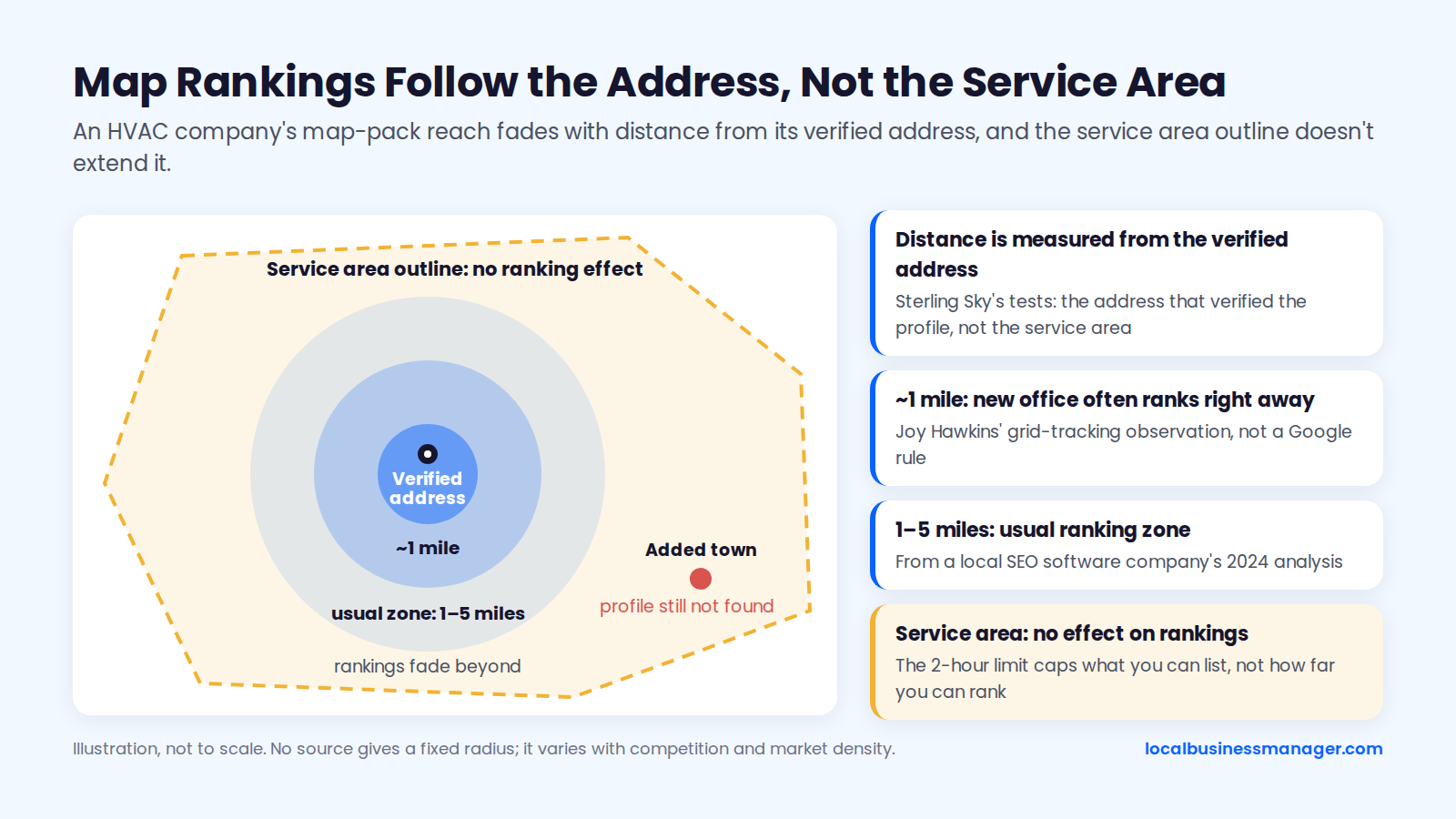
No source gives a fixed radius, and it varies with competition and market density. The 2-hour limit in Google's guidelines caps the service area you can list, not how far you can rank. Most agencies have had the client who added a town to the service area and still can't find the profile there; the tests above explain why.
Compliant Ways to Win More Towns
An HVAC company can reach towns beyond its map-pack radius in 5 compliant ways. No source found a test showing that anything other than a real address earns map-pack visibility in a town 20+ miles away, so treat the first 4 options as practitioner judgment that works mainly through organic results and ads:
- City pages for towns where the company does real work, built to pass the doorway test below. These compete in organic results, not the map pack.
- Reviews from customers in that town, collected the same way as every other review, by asking every customer.
- Links and mentions from organizations in that town, such as a supplier, a local sponsorship or a chamber of commerce.
- Paid channels, such as Local Services Ads or Google Ads targeted at those towns, accepting that LSA ranking also uses proximity.
- A real second location. Google's bar: a service-area business can list an office only if it's staffed during business hours. A coworking office qualifies only with clear signage, customers received during business hours and the company's own staff on site.
Never use a virtual office, a mailbox service or a coworking desk that doesn't meet those 3 conditions. Google's guidelines say virtual offices aren't eligible, and a mailing address in the far town puts the profile at risk of suspension.
What Should HVAC Service Pages and City Pages Contain?
HVAC websites need one page per service, a few supporting pages for replacement and maintenance searches and, at most, a small set of city pages that each prove real local work. Service pages carry the relevance; city pages are where sites get into trouble with Google's spam policies.
The Service Page Template
Build one page per major service. Typically that means 6 pages: AC repair, furnace repair, heat pump installation, ductless mini-split installation, maintenance plans and indoor air quality. Word count is not a ranking factor, and someone with a dead AC needs a fast answer and a phone number, not 3,000 words.
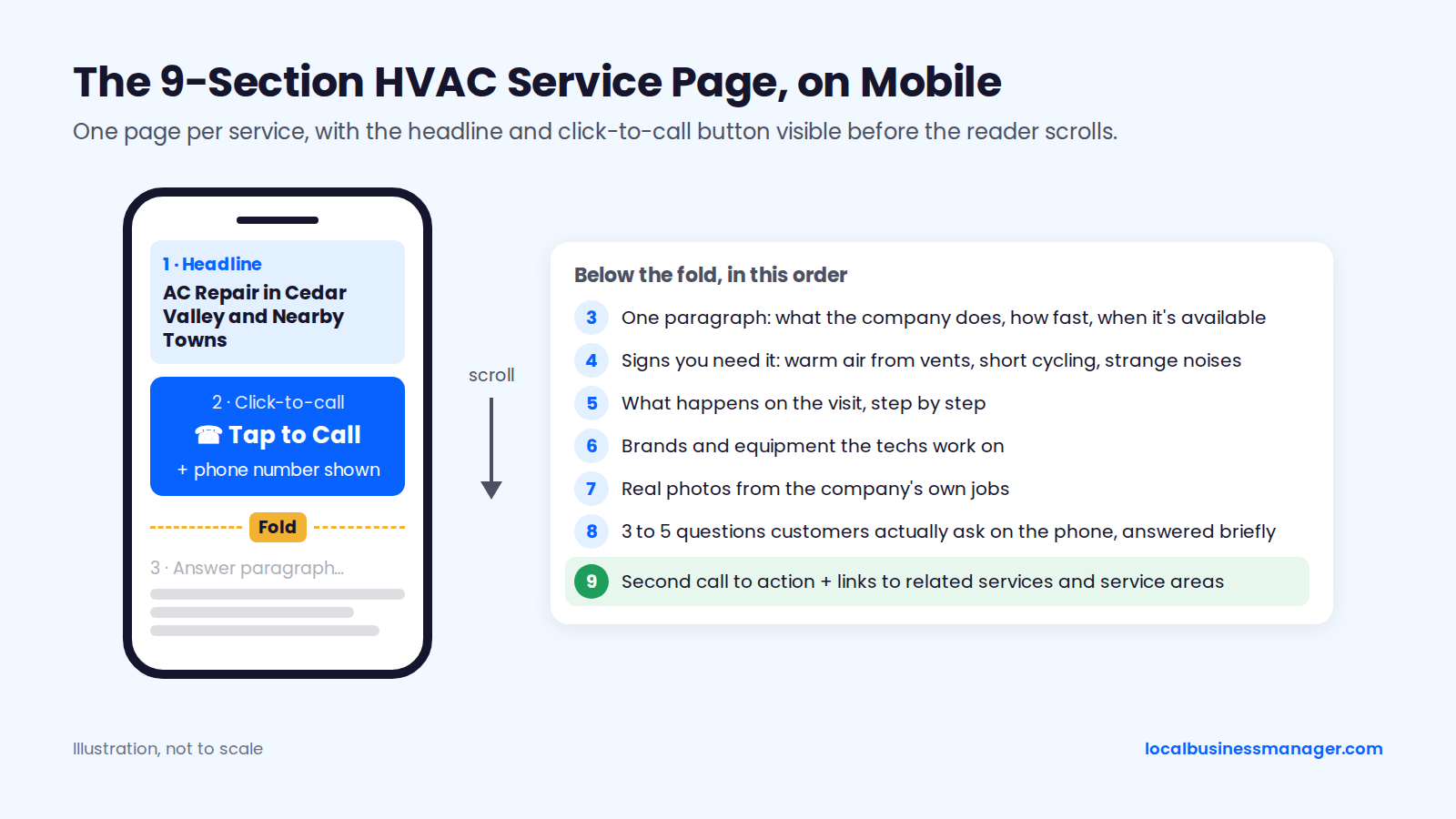
Each service page needs these 9 sections, in this order:
- A headline naming the service and the area served ("AC Repair in Cedar Valley and Nearby Towns").
- A click-to-call button and the phone number above the fold on mobile.
- One paragraph answering the main question: what the company does, how fast, and when it's available.
- Signs the customer needs this service (for example, warm air from vents, short cycling, strange noises).
- What happens on the visit, step by step.
- Brands and equipment the techs work on.
- Real photos from the company's own jobs.
- 3 to 5 questions customers actually ask on the phone, answered briefly.
- A second call to action plus links to related services and service areas.
Keep the pages fast on phones and test the call button on a real device. The rest of technical SEO for HVAC sites is basic hygiene: no duplicate city URLs, service pages indexed in Google Search Console and one H1 per page.
Which Pages Win Replacement and Maintenance Searches?
Replacement and maintenance searches need pages that help a homeowner decide, not just book. Once the service pages are live, add these supporting pages:
- A repair-or-replace guide for AC units and furnaces.
- An honest cost page explaining what drives the price of a new system.
- Heat pump vs furnace for the local climate.
- What a tune-up includes, step by step.
- Financing and rebates, only if the client has confirmed the programs apply.
How Many City Pages Is Too Many?
Google's spam policies give no number for city pages; they define the problem by purpose and similarity. The doorway abuse policy covers pages created to rank for specific, similar search queries, including substantially similar pages that are closer to search results than to a browseable hierarchy.
Since March 2024, the scaled content abuse policy on the same page also covers large numbers of low-value pages made mainly to manipulate rankings, however they're produced. What Google's staff and practitioners have said points to the number of pages as a bigger risk than how similar they are, though that rests largely on one 2023 case:
- In December 2019, Google's John Mueller said a plan for about 1,300 keyword-plus-city landing pages sounded like doorway pages, according to Search Engine Roundtable.
- In July 2021, Mueller said city pages for every city a business serves are doorway pages and that the problem is having a lot of them.
- Sterling Sky reported in 2023 that a site with more than 3,000 location pages got a manual thin-content action, even though people had written different text for each page.
- A separate Sterling Sky analysis found pages about 84% similar still ranked, and it recommends a shared template with 10% to 20% customized per city plus real local signals.
- Phil Rozek warned in 2017 against the 10 services à 10 cities = 100 pages approach.
Start with the towns where the client has done the most real jobs, and add pages only when there's something true to say.
The City Page Doorway Checklist
My test for a city page starts with one requirement: the business must actually serve that town, and I never build a page for a town it doesn't serve. After that, case studies of jobs done there, job photos from there and reviews from customers there make the page stronger; local reviews are a huge plus.
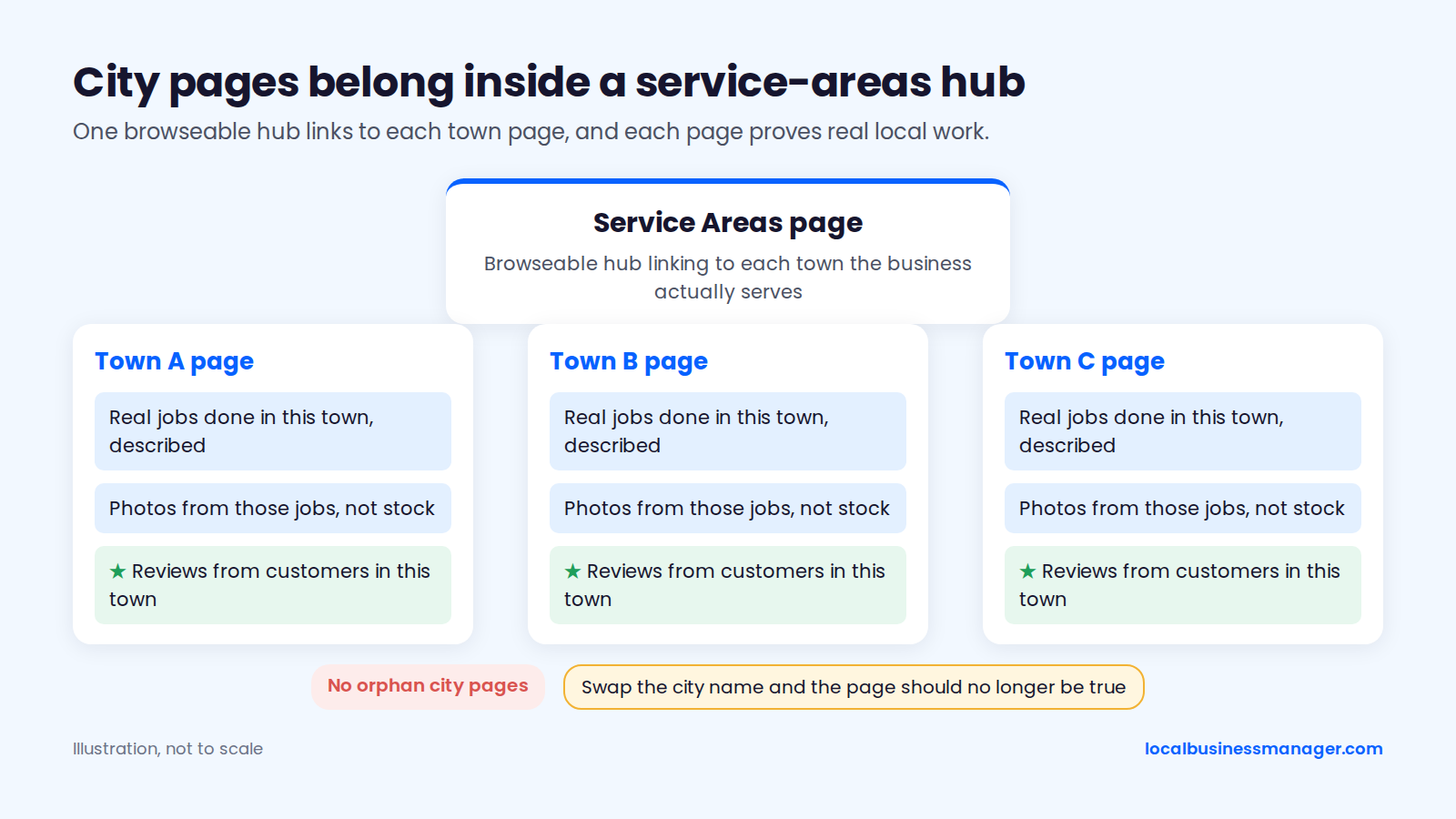
A city page is worth publishing only if it passes these 8 checks:
- The company has done real jobs in that town, and the page describes some of them.
- The page shows photos from those jobs, not stock images.
- It mentions local equipment or housing issues only if they're true for that town (older homes with boilers, a neighborhood of one builder's heat pumps).
- It covers local permits or utility rebates only if the client has confirmed they apply.
- It includes reviews from customers in that town, quoted with permission.
- A reader in that town learns something the main service page doesn't tell them.
- It sits inside a browseable structure (a service-areas page linking to each town), not as an orphan.
- If you swapped the city name for another one, the page would no longer be true.
How Do HVAC Companies Get More Google Reviews Without Breaking the Rules?
HVAC companies get more reviews by asking every customer at the end of every job with the same request. Google's prohibited and restricted content policy bans asking only happy customers for reviews and offering incentives for them. Since July 2025, those same reviews can also affect Local Services Ads ranking.
Review recency jumped in practitioner ratings, from #93 in 2023 to #11 in the 2026 Local Search Ranking Factors survey of 47 local SEO practitioners.
When and How Techs Should Ask
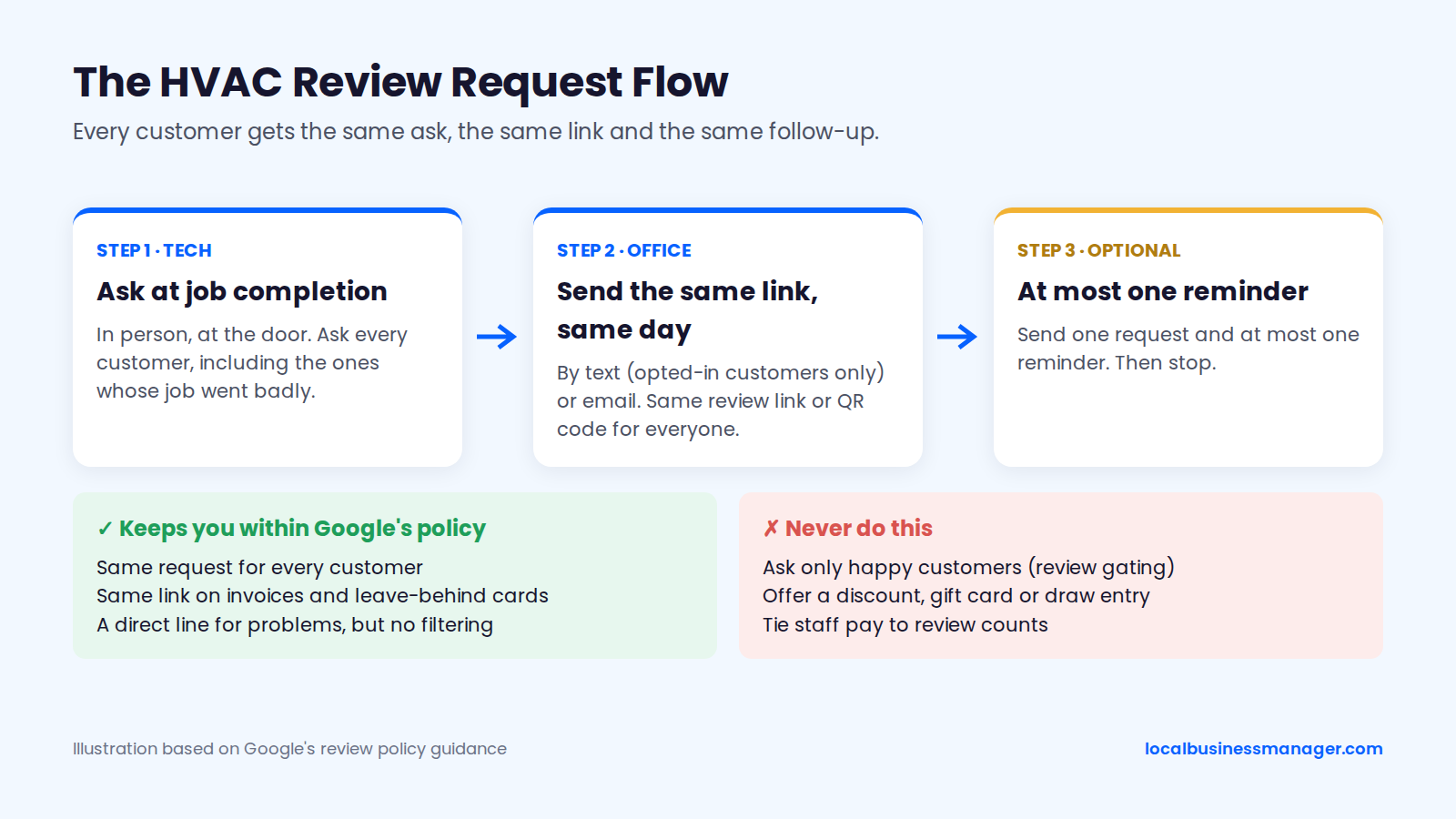
The tech should ask every customer at job completion, and the office should follow up the same day by text or email. Asking every customer keeps you within Google's policy, which bans selectively asking happy customers for reviews. "Ask your happy customers" still appears on many HVAC guides; that's review gating.
Put the same review link or QR code on invoices and on a leave-behind card, and use it for every customer. Every request follows the same rules:
- Ask every customer, including the ones whose job went badly.
- Never offer a discount, gift card or entry into a draw for a review.
- Don't tie staff pay to review counts.
- Text only customers who opted in to texts through the business's own consent form, and have the client's attorney check the consent wording against the FCC's Telephone Consumer Protection Act (TCPA) rules.
- Send one request and at most one reminder.
Review Request Scripts
Use these scripts as written, adjusting the bracketed parts.
At the door (tech, in person): "Thanks for having us out today. We're a local company, and reviews help other homeowners decide who to call. I'll have the office send you a link. If you have a minute, an honest review of today's visit would help us a lot."
Text (only to customers who opted in): "Hi [First name], it's [Company]. Thanks for having [Tech name] out today for your [service]. Would you share an honest review of the visit on Google? [Review link] Reply STOP to opt out."
Email subject: "How did today's [service] visit go?"
Email body: "Hi [First name], thanks for choosing [Company] for your [service] on [date]. We'd appreciate an honest review of the visit on Google. It takes about a minute: [Review link]. If anything wasn't right, reply to this email and [Owner name] will call you. Thanks, [Owner name], [Company]"
The email offers a direct line for problems but sends the same review link to everyone, so it isn't gating.
Replying to Negative HVAC Reviews
Reply to every negative review within a day or two, from a named person, without arguing or sharing the customer's private details. Our guide on how to reply to negative Google reviews covers the general rules; these templates cover the complaints HVAC companies see most.
No-heat or no-cooling complaint: "Hi [Name], I'm sorry you were without [heat/cooling], especially in this weather. I'm [Owner name], the owner, and I want to find out what went wrong with your service. Please call me directly at [number] so I can look into it today."
Price dispute: "Hi [Name], thanks for the feedback. [Only if true: We give a written price before any work starts.] I'd like to walk through the invoice with you and make sure everything was explained clearly. Please call me at [number]."
Tech no-show or late arrival: "Hi [Name], you're right to be frustrated. Missing an appointment window isn't acceptable to us. I've looked into it with our dispatch team and would like to make it right. Please call me at [number] so we can reschedule at a time that works for you."
Which Citations and Links Matter for HVAC Companies?
Start with the major platforms and the HVAC-specific sites your customers actually use, then add manufacturer and utility lists where the client genuinely qualifies. For links, earn them from real local relationships rather than buying them.
HVAC Citation Sources
Check that the business name, the real local phone number and the website match exactly on the sources below. The one exception is the profile's primary-phone field, which can hold a call-tracking number (see the tracking section).
- Google Business Profile
- Bing Places
- Apple Business Connect
- Yelp
- Better Business Bureau (BBB)
- Angi
- Nextdoor
- Manufacturer dealer locators where the client is an authorized dealer (for example Carrier, Trane or Lennox)
- Utility rebate programs' participating-contractor lists, where the client qualifies (verify each program)
- The local chamber of commerce
Keep the tracking number off every other citation. A Local Search Forum thread reported a profile's tracking number spreading to other directories. If citations already disagree, a citation audit sorts out which to fix first.
Local Links Worth Earning
The best HVAC links come from businesses the client already works with:
- Equipment suppliers and distributors with dealer or contractor pages
- Builders and remodelers the company subcontracts for
- Realtors and property managers who send repeat work
- Local sponsorships (youth sports, school events, charity drives)
- Community or neighborhood association pages
- Trade associations the company belongs to
A sponsorship is a real local relationship; paying for links isn't. Paid link inserts on unrelated blogs and guest posts written mainly for the link are the pattern Google's link spam policy targets, even though some HVAC guides still call it ethical link building.
Which Schema Should an HVAC Website Use?
An HVAC website should use the HVACBusiness type from schema.org on its homepage or contact page. The name, service areas and hours should match the Business Profile, and the telephone should be the real local number shown on the website. Schema describes the business for search engines; it is not a confirmed local-pack ranking factor.
This JSON-LD block for a service-area HVAC company uses schema.org property names as of November 2026. Paste it inside a <script type="application/ld+json"> tag on the homepage or contact page and replace every example value with the client's real details.
{
  "@context": "https://schema.org",
  "@type": "HVACBusiness",
  "@id": "https://www.example-hvac.com/#business",
  "name": "Cedar Valley Heating & Cooling",
  "url": "https://www.example-hvac.com/",
  "telephone": "+1-555-555-0123",
  "image": "https://www.example-hvac.com/images/service-truck.jpg",
  "areaServed": [
    { "@type": "City", "name": "Cedar Valley, IA" },
    { "@type": "City", "name": "Marion, IA" }
  ],
  "openingHoursSpecification": [
    {
      "@type": "OpeningHoursSpecification",
      "dayOfWeek": ["Monday", "Tuesday", "Wednesday", "Thursday", "Friday"],
      "opens": "07:00",
      "closes": "19:00"
    }
  ],
  "sameAs": ["https://www.facebook.com/example-hvac"]
}
Before publishing, check the block against the profile:
- Name and hours: "name" matches the profile name exactly, and "openingHoursSpecification" has one entry per set of days with the same hours on the profile.
- Service areas: "areaServed" has one City entry per town in the profile's service areas. Add an "address" property only if the profile shows a street address.
- Phone and ID: "telephone" is the real local number on the website, not the profile's tracking number, and "@id" stays the same wherever the business is marked up.
Don't add FAQ markup expecting rich results either. Google limited FAQ rich results to well-known government and health sites in August 2023 and removed them in May 2026, so as of November 2026 FAQ markup produces none for any site. Keep FAQs on the page for readers.
How Should HVAC Marketing Follow the Seasons?
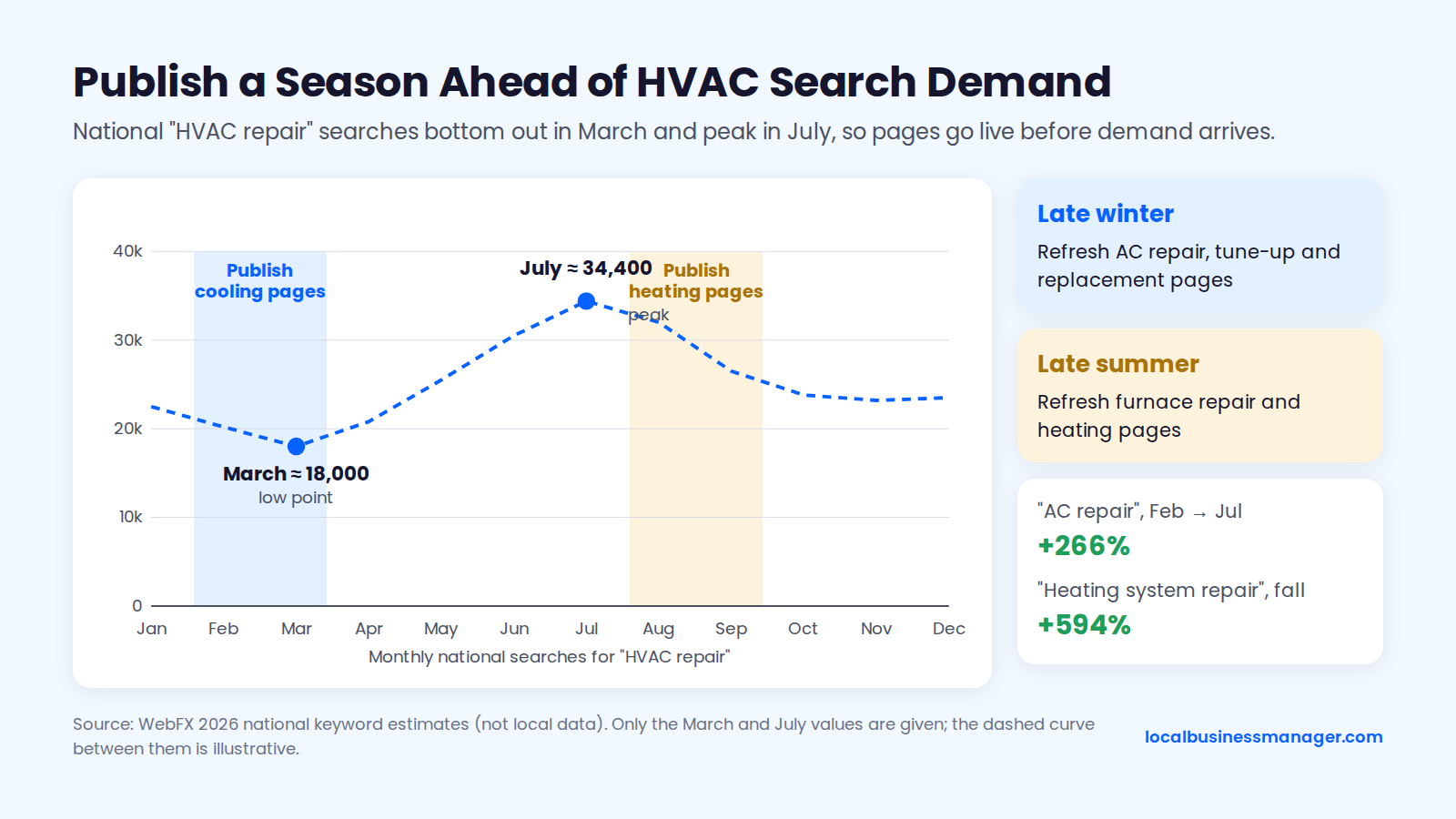
HVAC local SEO should run one season ahead: publish and refresh cooling pages in late winter and heating pages in late summer, so they're indexed before demand arrives. The calendar below turns the seasonal swings into a monthly plan for posts, pages, profile tasks and reporting.
In 2026 keyword-tool estimates published by the agency WebFX (national monthly search-volume estimates for individual keywords, not local data), "HVAC repair" searches peaked in July at about 34,400 a month and bottomed out in March at about 18,000. "AC repair" rose 266% from February to July, and "heating system repair" jumped 594% in fall.
I post on the profiles I manage 3 times a week. The evidence that posts help rankings is weak, but in my view regular posting signals to Google that the business is active, and a seasonal calendar makes 3 posts a week easy to fill.
As of November 2026, this calendar suits HVAC companies in markets with both a heating and a cooling season; shift it for warmer or colder climates.
Month | GBP posts | Website work | Profile tasks | Report note |
|---|---|---|---|---|
January | No-heat emergency availability, furnace repair | Refresh furnace replacement and heat pump pages | Check hours after the holidays | Compare with January last year, not December |
February | Maintenance plan sign-ups, spring tune-up booking | Refresh AC repair and AC tune-up pages | Upload winter job photos | "AC repair" searches start rising toward July (WebFX) |
March | Spring AC tune-ups | Update AC replacement and ductless pages | Review services list for anything missing | March is the low point for "HVAC repair" searches (WebFX) |
April | AC tune-ups, indoor air quality | Add city pages for towns with the most completed jobs | Check categories against ranking competitors | Compare with April last year |
May | AC check before the first hot week | Indoor air quality page refresh | Set Memorial Day special hours | Note any edits made, for later comparison |
June | Emergency AC availability, extended hours | Answer common phone questions on AC pages | Set July 4 special hours; confirm after-hours phone coverage | "AC repair" searches still rising toward the July peak (WebFX) |
July | Emergency AC repair, heat-wave tips | Light updates only; techs are busy | Make sure every job gets a review request | Peak month for "HVAC repair" searches (WebFX) |
August | AC repair, early furnace tune-up booking | Refresh furnace repair and heating pages | Upload summer job photos | Compare with August last year |
September | Fall furnace tune-ups | Heating pages live and linked from the homepage | Set Labor Day special hours | Heating repair searches climb in fall (WebFX) |
October | Furnace safety checks, heat pump installs | Heat pump and replacement content | Check for profile edits after the busy season | Show the shift from cooling to heating demand |
November | No-heat emergency availability | Answer common heating questions | Set Thanksgiving special hours | Compare with November last year |
December | Holiday hours, emergency heat | Plan next year's page updates | Set Christmas and New Year special hours | Year-over-year summary for the client |
The Seasonal "We Dropped" Client Script
When a client calls in a mild month saying "we dropped", show this month's rankings next to calls compared with the same month last year. Mild weather lowers views and calls even when rankings haven't moved, so the first job is separating demand from position.
Walk the client through it in this order:
- "Let's check whether we dropped or whether demand dropped. Those need different fixes."
- "Here are your rankings across the service area this month next to last month. [Show them.] If they held, your position is the same."
- "Here are calls compared with the same month last year, not last month. [Show them.] This is the number that tells us how the season compares."
- "In national keyword estimates published by WebFX, 'HVAC repair' searches in March run at about half of July's."
- "Here's what we're doing so you're ahead when demand comes back: [the next season's pages, review flow, posts]."
If rankings really did fall, say so and move to the suspension and spam checks below.
How Do HVAC Companies Show Up in AI Overviews and AI Answers?
HVAC companies give themselves the best chance in AI answers by keeping their business facts identical everywhere and writing service content that answers questions directly. No published study measures what gets HVAC companies into AI answers specifically, so treat this section as reasoning, not proof.
Google's AI Overview for "local seo for hvac", captured in November 2026 while researching this guide, listed claiming and verifying the profile, consistent name, address and phone, defined service areas, specific services, project photos and reviews. It also told readers to "actively request reviews from satisfied local clients", which is the selective solicitation Google's own review policy prohibits, so ask every customer instead.
For AI answers and voice search, the work overlaps with everything above:
- Consistent facts. The same name, phone, hours and services on the profile, the website, Bing Places, Apple Business Connect and the major directories.
- Answer-first service content. Each service page opens with a plain answer to the main question (what's included, how fast, which areas).
- Full-question answers. For voice and conversational searches, answer the full questions customers ask on the phone ("Why is my AC blowing warm air?") in each service page's questions block.
- Reviews that describe the work. Ask every customer the same way, and never script or edit what they write.
- Real mentions. Being listed by suppliers, manufacturers and local organizations gives AI tools more independent sources that agree.
A simple monthly check is to ask Google's AI Mode or ChatGPT for the best HVAC company in each of the client's main towns and note in the report whether the business is named.
How Should an Agency Track and Report HVAC Local SEO?
Agencies should track HVAC local SEO by calls first, then rankings measured across the service area, because Google's own profile metrics can't separate SEO from ads or show which calls connected. The setup below covers call tracking, UTM tags, multi-point rank checks and a monthly report template.
Call Tracking on the Profile
Use a call-tracking number as the profile's primary phone, forwarding to the business's own line, so you count real calls instead of Google's button taps. In Google's Performance report, a "call" is a tap on the call button, not a connected call, and the data includes actions from Google Ads as well as organic results. Google removed call history from profiles on July 31, 2024.
The undercount can be large. A 2018 Sterling Sky test, reported second-hand, found profile insights captured only about 30% to 50% of real calls. Third-party summaries of Google's guidelines say a tracking number must connect to that business location, be controlled by the business, not redirect callers to other businesses, and not be premium-rate. Check the current wording on Google's guidelines page.
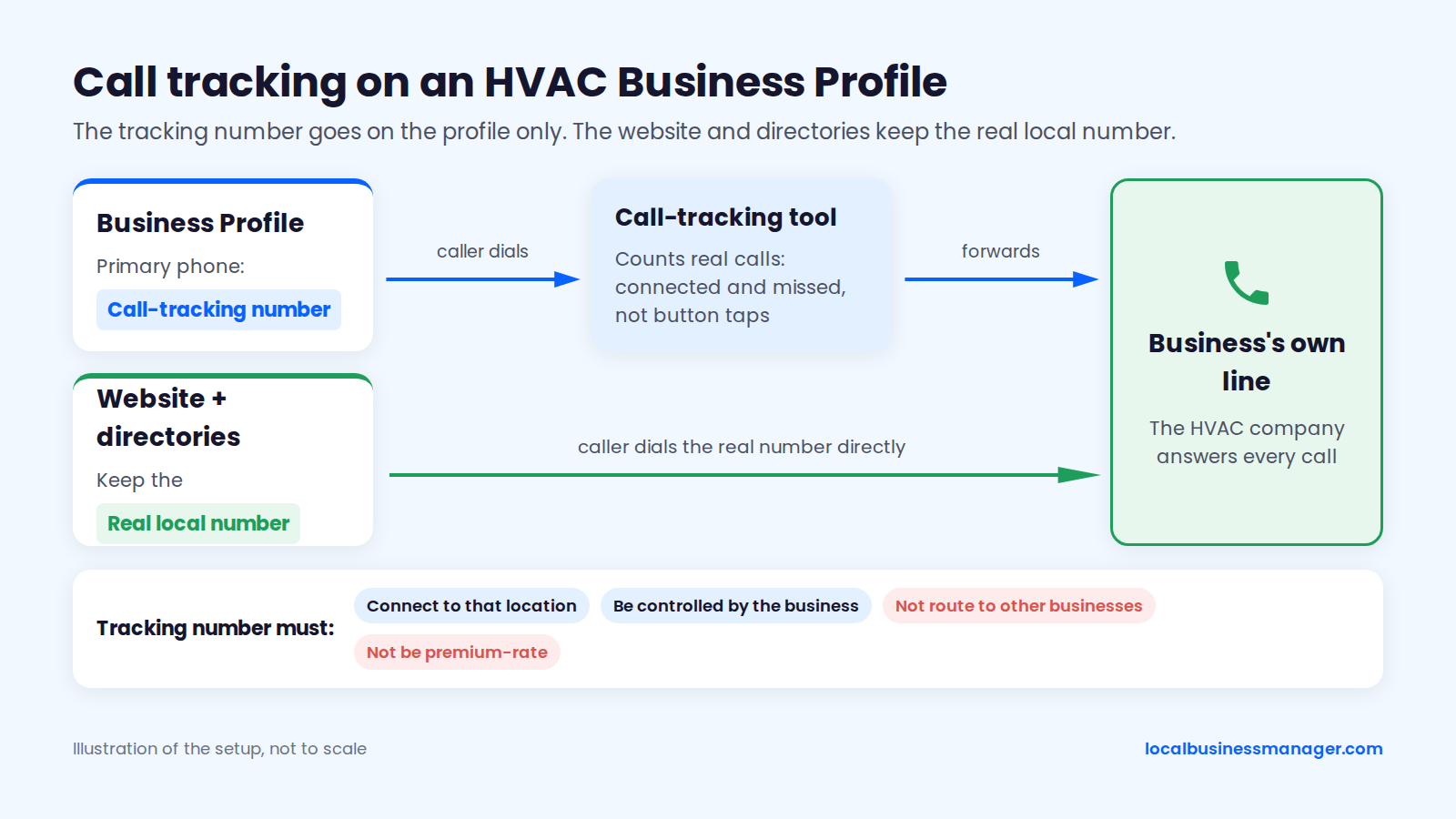
Tracking number as primary is my practice, and I don't add a secondary number. Most practitioner guides, Sterling Sky's among them, add the real local number in the Additional phone field so Google can match it to the website and citations. Either way, keep the real number on the website and directories, and never use a number from a lead-gen service that routes calls to several businesses.
UTM Tags on the Profile Link
Tag the profile's website link with UTM parameters so profile clicks show up separately from other organic traffic in analytics:
- Build the URL:
https://www.example-hvac.com/?utm_source=google&utm_medium=organic&utm_campaign=gbp-listing - Paste it into the profile's website field.
- If the profile has an appointment link, tag it the same way with
utm_campaign=gbp-appointment. - In analytics, report sessions, calls from the website and form fills for that campaign each month.
For multi-location companies, add the location to the campaign name (for example "gbp-listing-marion"). To attribute website calls from profile visitors, use dynamic number insertion in the client's call-tracking tool, and keep the real local number in the schema and on the directories.
Rank Checks From Across the Service Area
Checking rankings from a single point misleads, because map-pack results change with the searcher's location. A client checking from his kitchen sees one answer; a homeowner 4 miles away sees another. I don't use single-point checks for that reason.
A grid check runs the same search from many points across the area and shows where the business ranks at each one. My method: run one scan first just to learn how the business ranks, then adjust. A typical first scan is 13 Ã 13 points with 0.5 miles between them. If the grid comes back mostly in the top positions, widen the spacing to see how far the ranking reaches; if it comes back mostly out of the top positions, tighten it.
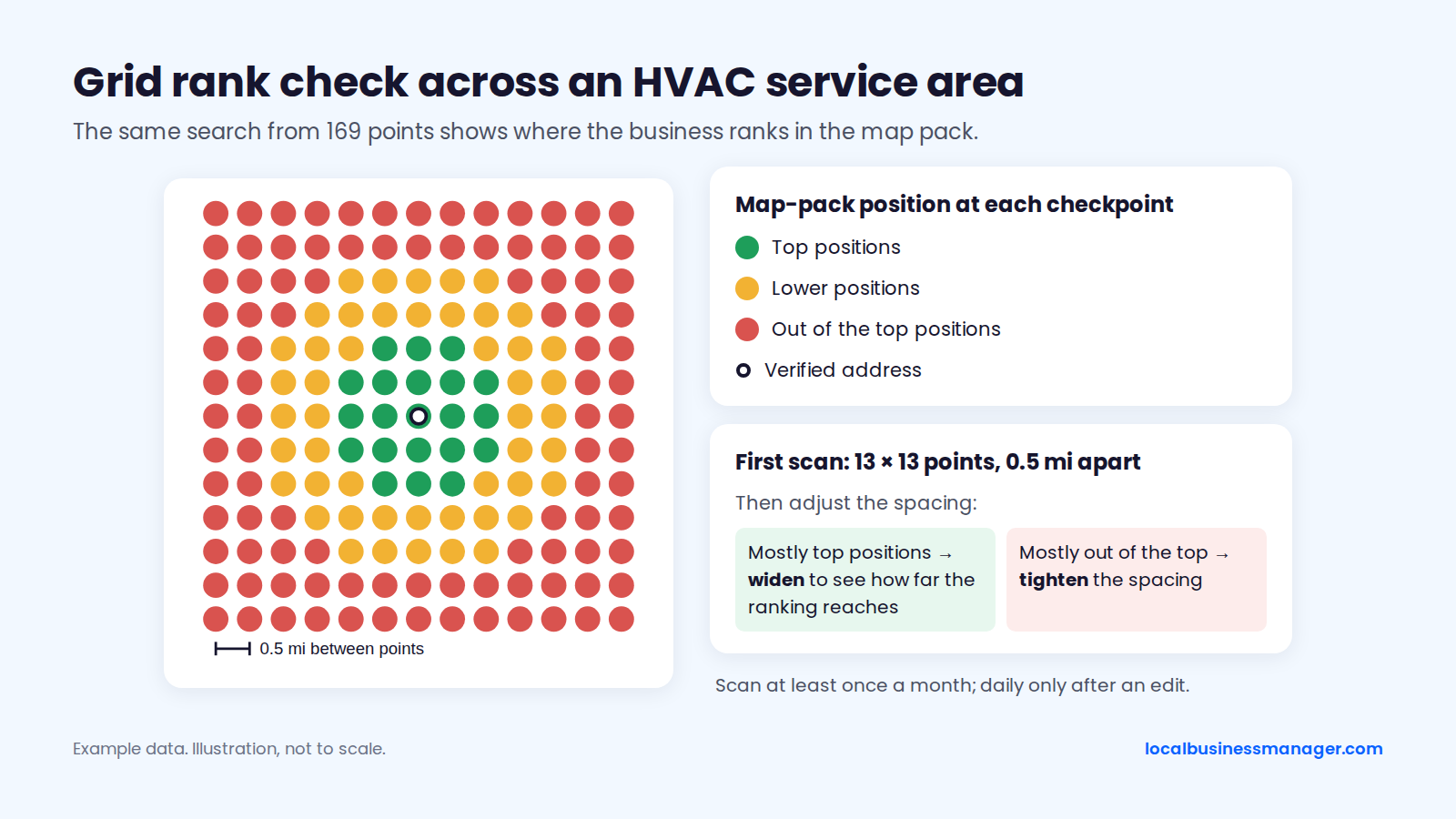
In my view, agencies should scan at least once a month, and daily scans make sense only after an edit, to see whether the change produced a result. I also think a single average-rank number is misleading on its own today: Google is fighting scrapers, including AI scrapers, by mixing results, which makes the results page very volatile, so an average can make sense but is hard to read with confidence.
The Monthly HVAC Client Report
I lead every monthly client report with calls and rankings, then show what explains them. Most sections below compare with the same month last year so a seasonal dip doesn't read as a drop. For the general version, see our monthly local SEO client report template.
In a local SEO software company's 2023 Local Search Industry Survey, agencies rated local-pack rankings (54%) and new leads (45%) as their top success metrics, ahead of Google organic rankings (39%) and Business Profile metrics (32%).
Report section | What to show | Data source | Compare against |
|---|---|---|---|
Calls from the profile | Connected calls, missed calls | Call-tracking number on the profile | Same month last year |
Rankings across the area | Grid results for the main 3 to 5 terms | Multi-point rank checks | Last month and same month last year |
LSA leads, if running | Leads, credited leads, cost | LSA dashboard | Same month last year |
Website leads | Calls and form fills from the profile link | UTM-tagged analytics, dynamic number insertion | Same month last year |
Profile actions | Website clicks, direction requests, call taps | GBP Performance | Same month last year |
Reviews | New reviews, rating, replies sent | Business Profile | Last month |
Work completed | Pages, posts, profile edits, links | Agency task log | Plan for the month |
Next month | Seasonal priorities from the calendar | Agency plan | Not applicable |
The thing every engagement must deliver, in my view, is rankings for the client's main terms; the report should make it obvious whether that's happening.
How Should Multi-Location HVAC Companies Set Up Profiles?
A multi-location HVAC company should have one Business Profile per staffed location, and none for towns without one. Google's guidelines give a service-area business one profile for its central office with a service area set, and Sterling Sky's 2026 list of suspension causes includes duplicate profiles, service-area duplicates among them.
My rule for multi-office profiles: each office's profile links to its own dedicated city page on the website, not the homepage, and that page carries the relevant local details for that office. A few more settings follow from Google's rules and the suspension evidence:
- Give each profile its own phone number. A 2025 suspension guide from a local SEO software company lists one phone number shared across several profiles as a suspension trigger.
- Set categories and services per office, so each profile lists only what that office actually does.
- Set hours per office to when that office's phone is answered, as in Step 3.
Google's exact wording on service-area businesses with several staffed branch offices couldn't be confirmed for this guide, so check the live guideline page before setting up a second profile.
What Gets HVAC Profiles Suspended, and What Can You Do About Spam Competitors?
Most suspension triggers for service-area trades like HVAC involve the address, the name, duplicate profiles or recent edits. The sections below cover the common triggers, what to do when a profile is suspended, and how to report fake competitor listings, which works with mixed results.
Common Suspension Triggers
Edits themselves can trigger a suspension. Sterling Sky (2026) says editing a profile can trigger an automatic suspension, especially in spam-heavy categories such as locksmiths and garage door companies, and that profiles are sometimes suspended with no edits at all. A 2025 guide from a local SEO software company calls automatic sweeps the most common cause and notes that a June 2019 sweep targeted high-risk categories including plumbers.
Sources most often name locksmiths, garage door companies and plumbers as the high-spam categories; HVAC is inferred to be similar, but no study counts HVAC suspensions. Superpath's 2025 HVAC article, a secondary source, cites 3 HVAC triggers:
- A street address shown on a service-area profile
- False 24/7 hours
- A suspended manager account
On addresses, Google's guideline covers virtual offices and the one-profile-plus-service-area structure; whether showing a street address on a service-area profile causes suspension comes from secondary sources. Google also doesn't say what triggered a particular suspension. Run this 9-point suspension-risk checklist before and after any change:
- The address is a real, staffed location, not a virtual office, PO box or mailbox service.
- A service-area profile hides its address unless customers visit, and its service area stays within about 2 hours' drive.
- There's only one profile per location, with no old duplicates.
- The name matches the signage, vehicles and website, and any keyword name went through the DBA steps.
- Hours are true, including 24/7 claims.
- The phone number isn't shared with another profile.
- Name, address and primary category edits aren't stacked together.
- Every manager account on the profile is in good standing.
- The evidence folder is ready: DBA, lease, photos of signage and vehicles.
My routine for catching problems early: every week, check the name, attributes, services and other fields for edits by Google or third parties. Every month, check rankings and the post schedule.
What to Do When a Profile Is Suspended
Appeal a suspended profile through Google's Business Profile appeal tool, with documents that prove the business is real. Google's help page on suspended profiles says supporting evidence is optional. Restricted manager accounts are appealed separately from the My accounts page, more than 10 locations can be appealed in bulk, and a denied appeal can get a further review with new evidence.
Work through it in order, and see our Google Business Profile suspension and reinstatement guide for more detail:
- Confirm the status with Google's verification status tool, which a Local Search Forum moderator recommends for telling suspended, disabled and re-verification cases apart.
- Undo nothing in a panic, and make no further edits.
- Gather documents that show the business name and address. Steady Demand notes every document must show both. In my experience, reinstatement usually needs the DBA, a lease agreement and photos of the office with signage, or a video of the storefront and office.
- File the appeal and keep a dated record of everything sent.
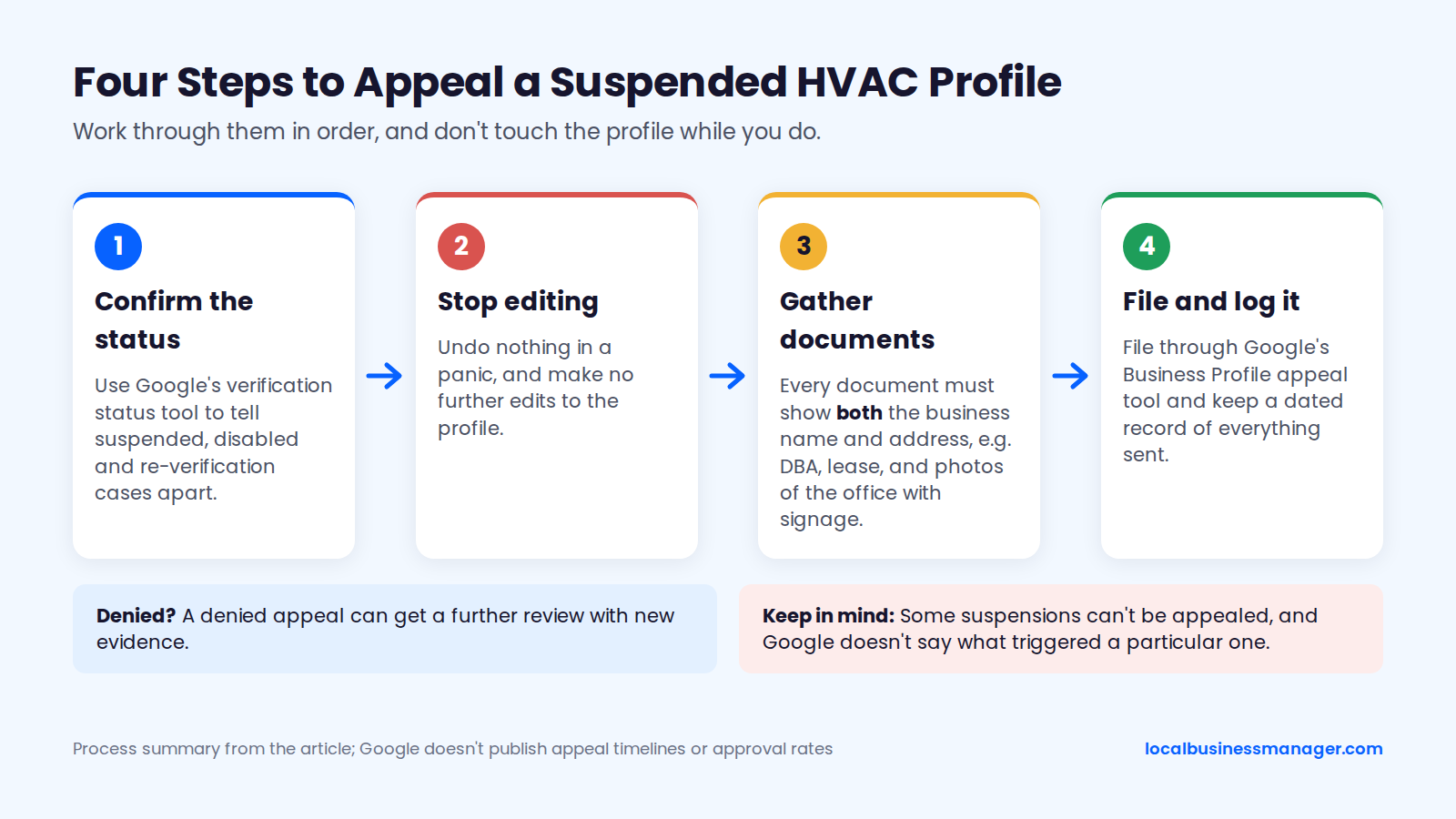
Google doesn't publish appeal timelines or approval rates, and Steady Demand notes some suspensions can't be appealed.
Reporting Fake HVAC Listings
Report fake or keyword-stuffed competitor listings first with "Suggest an edit" on Maps, then escalate through Google's Business Redressal Complaint Form. The form covers misleading information in a listing's name, phone number or website. Google won't process incomplete forms and doesn't promise to tell you the outcome.
Report only a listing you can show is false or misleading, and gather the evidence first:
- The listing's URL, CID or Place ID
- Dated screenshots of the listing
- The competitor's website or signage showing its real name
- Street View or photos showing that a listed address is not a staffed business
- A short, dated timeline of what you've seen
Expect mixed results. In Sterling Sky's 2019 test of 50 keyword-stuffed listings it reported, 60% got a warning, 20% were partially suspended and 20% were severely suspended. In a 2026 Local Search Forum thread, one member had absurd names corrected but no luck with typical keyword stuffing, and another noted businesses can change the name back. No published study measures how often a successful report improves the reporting business's rankings.
How Long Does HVAC Local SEO Take?
Published agency ranges put HVAC local SEO at 3 to 6 months for early movement and 6 to 12 months for steadier lead growth, and profile fixes can move map-pack rankings faster than website work. No honest agency can promise a fixed date.
Hook Agency's guide "HVAC SEO in 2026: 10 Strategies" says most HVAC companies see early movement in 3 to 6 months and steadier lead growth after 6 to 12 months, and that Google Business Profile fixes can move map-pack rankings faster than website SEO. RS Gonzales's guide to choosing an HVAC SEO company says most HVAC SEO takes about 6 months to produce steady leads, and longer if the site is new or has few reviews.
In my experience, a single high-impact fix, such as getting the service keyword into the business name through a DBA, can show ranking gains within about a month. Once the basics are done, further gains, for example from a strong review push, come gradually. The timeline depends on 4 things:
- What's already optimized on the profile and the website
- How dense and competitive the market is
- How many reviews the profile and its competitors have
- The website's history
Sterling Sky's 2026 test shows how large the name-keyword effect can be, not how fast it appears: adding a keyword to a profile name improved rankings sharply, and removing it reversed the gain. Sterling Sky notes that adding keywords this way breaks Google's name rule and can get the profile suspended, so read it as evidence of the effect, not as a method.
What Drives the Cost of HVAC Local SEO?
HVAC local SEO costs depend mostly on how many staffed locations the company has and how competitive its market is, then on how much page, rename and ads work the plan includes. Before comparing packages, check which of these 5 cost drivers each one covers:
- Number of staffed locations: each location needs its own profile, phone, categories and reporting.
- Market competition: denser markets need more reviews, pages and links to move.
- Service and city pages to build: each page needs real jobs, photos and local detail.
- A DBA rename: signage, vehicles, website and listings all change before the profile.
- Local Services Ads management: adds budget, lead review and separate reporting.
What Should You Ask Before Hiring an HVAC SEO Agency?
Ask how the agency measures calls, who owns the profile, how it handles towns outside the map-pack radius and how it changes names or categories. A good answer to each sticks to the compliant methods in this guide:
- How will you measure calls, not just taps? A good answer: a call-tracking number on the profile, compared with the same month last year.
- Will we stay owner of our Business Profile? A good answer: yes; the agency is added as a Manager and the business keeps ownership.
- What's your plan for towns outside our radius? A good answer: city pages for towns you really serve, reviews, local links or ads, never a virtual office.
- How do you handle name or category changes? A good answer: a registered DBA before any name change, one edit at a time, evidence kept ready.
Does Local SEO Still Work for HVAC Companies With AI Overviews?
Yes. As of November 2026, the map pack and organic results still appear on HVAC searches, with an AI Overview on some queries. The profile, reviews and pages that earn a map-pack spot are the work covered in this guide, and Local Services Ads now draw on the same Business Profile reviews. No published study measures how much AI Overviews reduce HVAC calls, so track calls from the profile month by month with the report template above rather than guessing.
How Much Does Local SEO Cost for an HVAC Company?
As of November 2026, two agencies ranking for this search publish prices from $195 a month to $3,750 a month, and the plans cover very different work. SEO Bubbles' month-to-month general local SEO plans run $195 (Starter, no guarantee), $495 (Pioneer) and $995 (Blast Off); none is HVAC-specific. Hook Agency publishes $3,750 a month for its Local SEO + AEO plan, which bundles AI-answer work with local SEO. Compare what each plan covers against the cost drivers above.
What Should HVAC Contractors Look For in a Local SEO Agency?
Look for an agency that reports calls and service-area rankings every month and never guarantees a ranking. Red flags include profiles for towns without a staffed office, keyword names without a registered DBA, paid link inserts, promises of FAQ rich results from schema and geotagging sold as a service. Each one breaks a Google policy or rests on a myth covered above, and the questions in the previous section test an agency on the first call.
Start With a Grid Scan, the Name and the Category
If you take on an HVAC client this month, scan their rankings across the service area, then compare their business name and primary category with the profiles outranking them. That's the order I check every new local client in.
If you manage Business Profiles for HVAC clients across many locations, Local Business Manager is in early access for agencies: join the early-access list.