Google Business Profile Optimization Checklist: What Moves Rankings, What Doesn't

Most Google Business Profile ranking gains come from a few fields: the primary category, an honest location or service-area setup, a steady flow of reviews, and the website page the profile links to. Most of the rest of the profile (formerly Google My Business) helps people choose you once they've found you, and a few edits can get the profile suspended.
The checklist gives you the order to work in, a ranking, conversion or risk label on every item, templates to copy, and a weekly, monthly and quarterly routine to keep the profile healthy.
What Does Google Business Profile Optimization Actually Change?
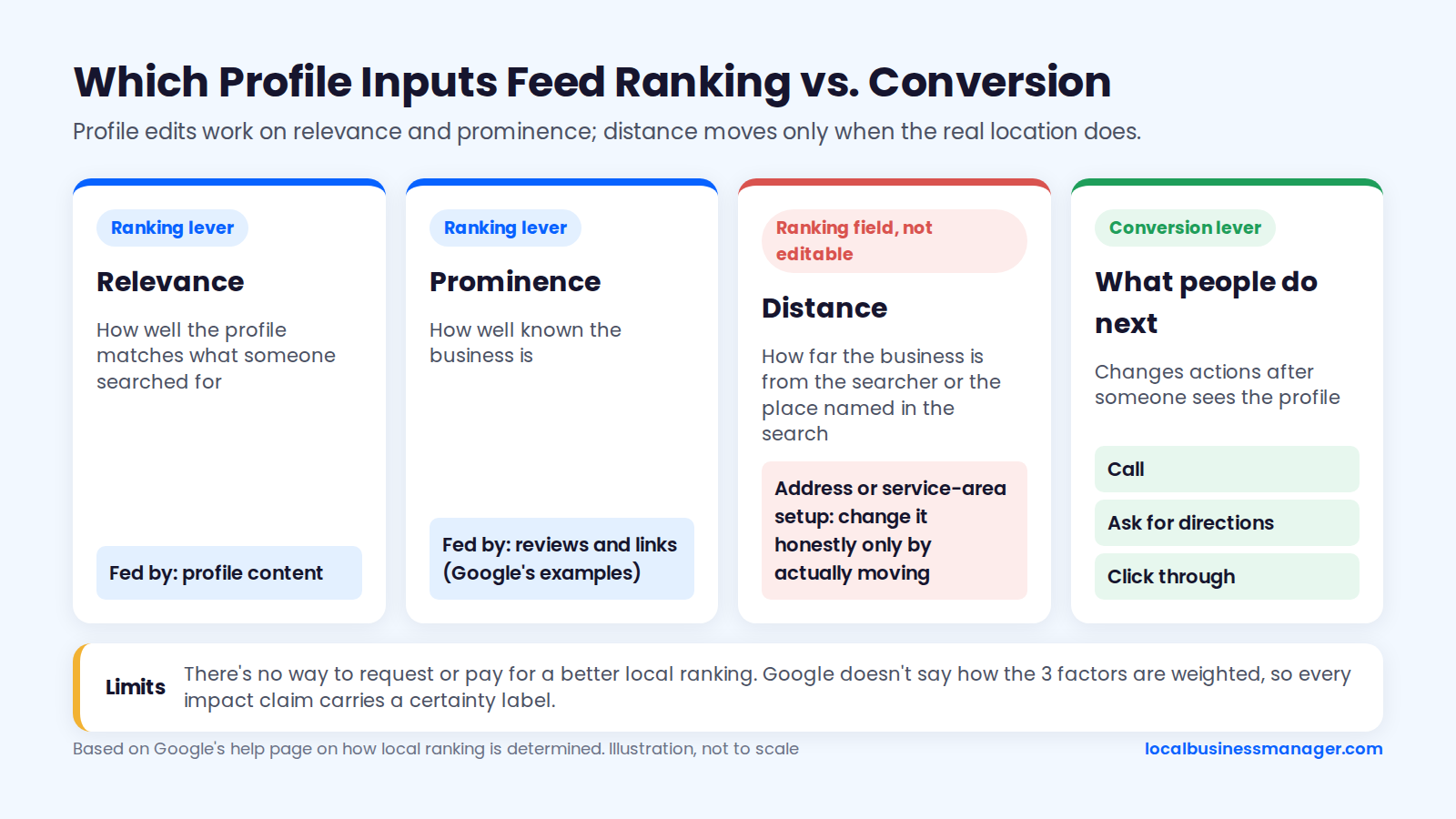
Profile edits work on relevance and prominence, and distance only changes when the business's real location changes. Google defines distance as how far each business is from the person searching, so editing profile content doesn't move the business closer to anyone. That's the first limit to explain to a client. Every item below carries a label for what it affects and how solid the evidence is.
Relevance, Distance and Prominence in Google's Words
Google says local results are based mainly on relevance, distance and prominence, in its help page on how Google determines local ranking. Relevance is how well a profile matches what someone searched for. Distance is how far the business is from the searcher or from the place named in the search.
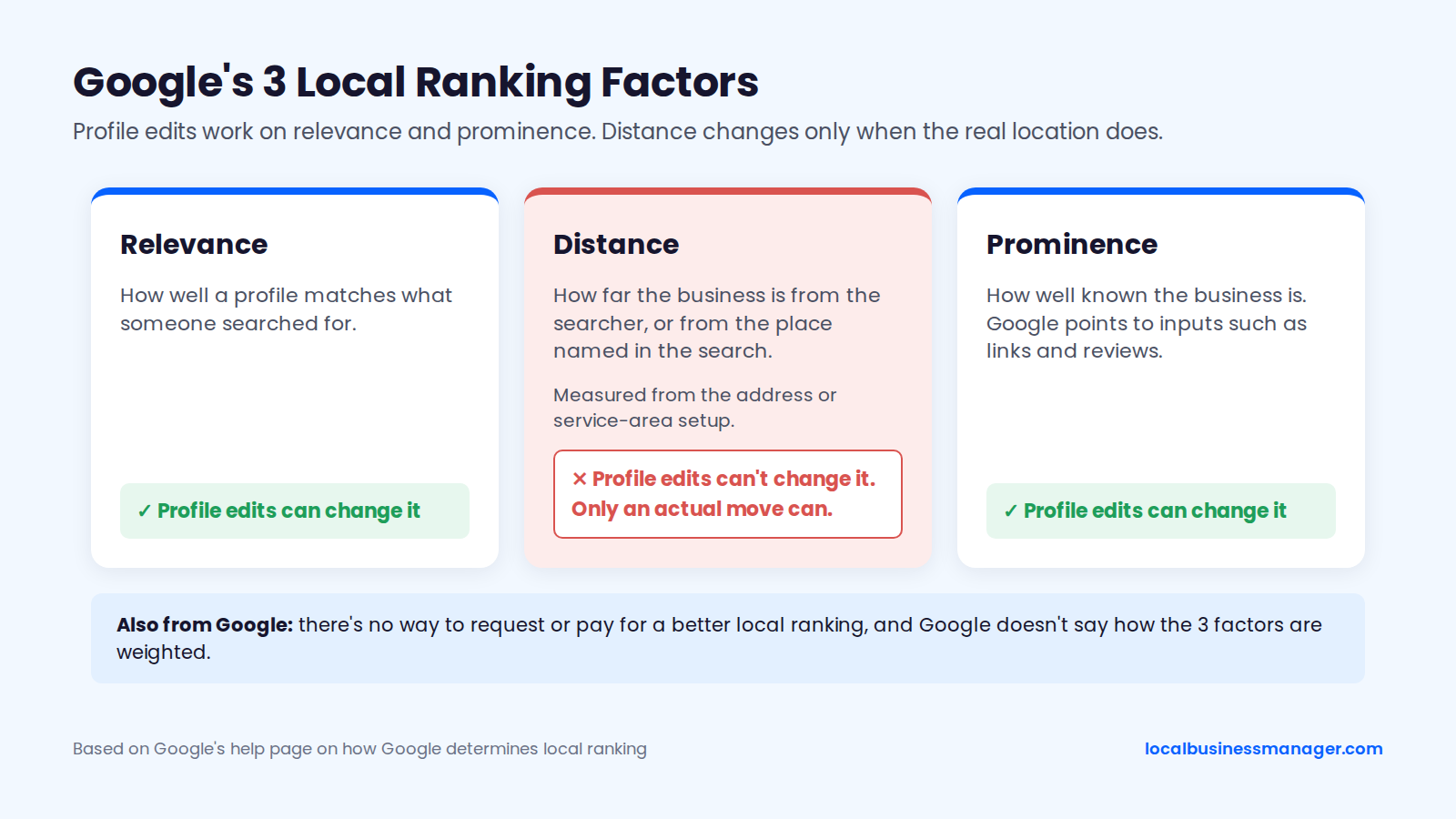
When a search doesn't name a location, Google calculates distance from what it knows about the searcher's location. Prominence is how well known the business is, and Google points to information such as links and reviews as inputs. The address or service-area setup decides where distance is measured from, which is why the checklist labels it a ranking field. You can only change it honestly by actually moving.
The same page says there's no way to request or pay for a better local ranking. Google doesn't say how the 3 factors are weighted, and its wording isn't consistent either. The page says local results are "mainly based on relevance, distance, and popularity," but the heading and definition for the third factor use "Prominence." That vagueness is why every impact claim in this checklist carries a certainty label.
Ranking Levers, Conversion Levers and Suspension Risks
Every item in this checklist gets 1 or more of 3 impact labels:
- Ranking lever: evidence suggests it changes where the profile appears in the map pack.
- Conversion lever: it changes what people do after they see the profile (call, ask for directions, click through).
- Suspension risk: editing it carelessly can trigger re-verification or a suspension.
Each impact claim also carries 1 of 5 certainty levels:
- Google confirms: stated in Google's help pages or policies.
- Study or survey: correlation data or expert opinion, often published by a company that sells local SEO software.
- Practitioner tests: small published tests or widely shared observations from local SEOs.
- Not confirmed by Google: no Google statement or published test shows a ranking effect, so the label rests on what customers see.
- My opinion: my view or practice from 15+ years in SEO, Google Ads and Business Profile work, including close to 100 US personal-injury firms in Houston, Denver, Los Angeles and New York.
The Master Checklist at a Glance
The checklist covers 13 fields: 8 with a ranking label, listed first, and 5 that mainly affect conversions. Each row gives what to do, the impact label, the certainty behind it, the policy risk and how often to revisit the field. The labels draw on Google's help pages, the 2026 Local Search Ranking Factors survey (47 local search experts, published November 2025) and published practitioner tests, as of November 2026.
The review frequencies are a suggested starting routine, not a Google rule. The policy-risk levels are an editorial rating that matches the suspension table further down.
Field | What to do | Impact label | Certainty | Policy risk | Review frequency |
|---|---|---|---|---|---|
Primary category | Match the category ranking competitors use for the main service | Ranking | Study or survey | Medium | Quarterly |
Business name | Use the real-world name; keyword names only through a DBA the business really uses | Ranking and suspension risk | Study or survey, practitioner tests | High | Only when the real name changes |
Address or service area | Real, staffed address; hide it if customers aren't served there | Ranking and suspension risk | Google confirms | High | Only when something changes |
Reviews | Ask every customer the same way; reply to all (law firms: follow ABA Formal Opinion 496) | Ranking and conversion | Google confirms (reviews feed prominence); practitioner tests (recency, text) | High | Weekly |
Additional categories | Add the relevant ones for real services, none as keywords | Ranking | Practitioner tests | Low | Quarterly |
Services | Add services that match real work | Ranking | Practitioner tests | Low | Quarterly |
Website link | Point to the most relevant page, tagged with UTMs | Ranking and conversion | Practitioner tests | Low | Quarterly |
Hours and special hours | Real hours; holiday hours set ahead of time | Ranking and conversion | Study or survey | Low | Before each holiday |
Phone | The call-tracking number, as the only number | Conversion | My practice | Low | Only when it changes |
Description | Written for customers, within Google's description rules | Conversion | Not confirmed by Google | Low | When services change |
Products and attributes | Fixed-price offers; only attributes that are true | Conversion | Not confirmed by Google | Low | Quarterly |
Photos and videos | Real photos of work, team and premises | Conversion | Study or survey | Low | Monthly |
Google Posts | Updates, offers and events | Conversion | Practitioner tests | Low | 3 times a week (my practice) |
Before You Edit Anything: A Quick Profile Audit
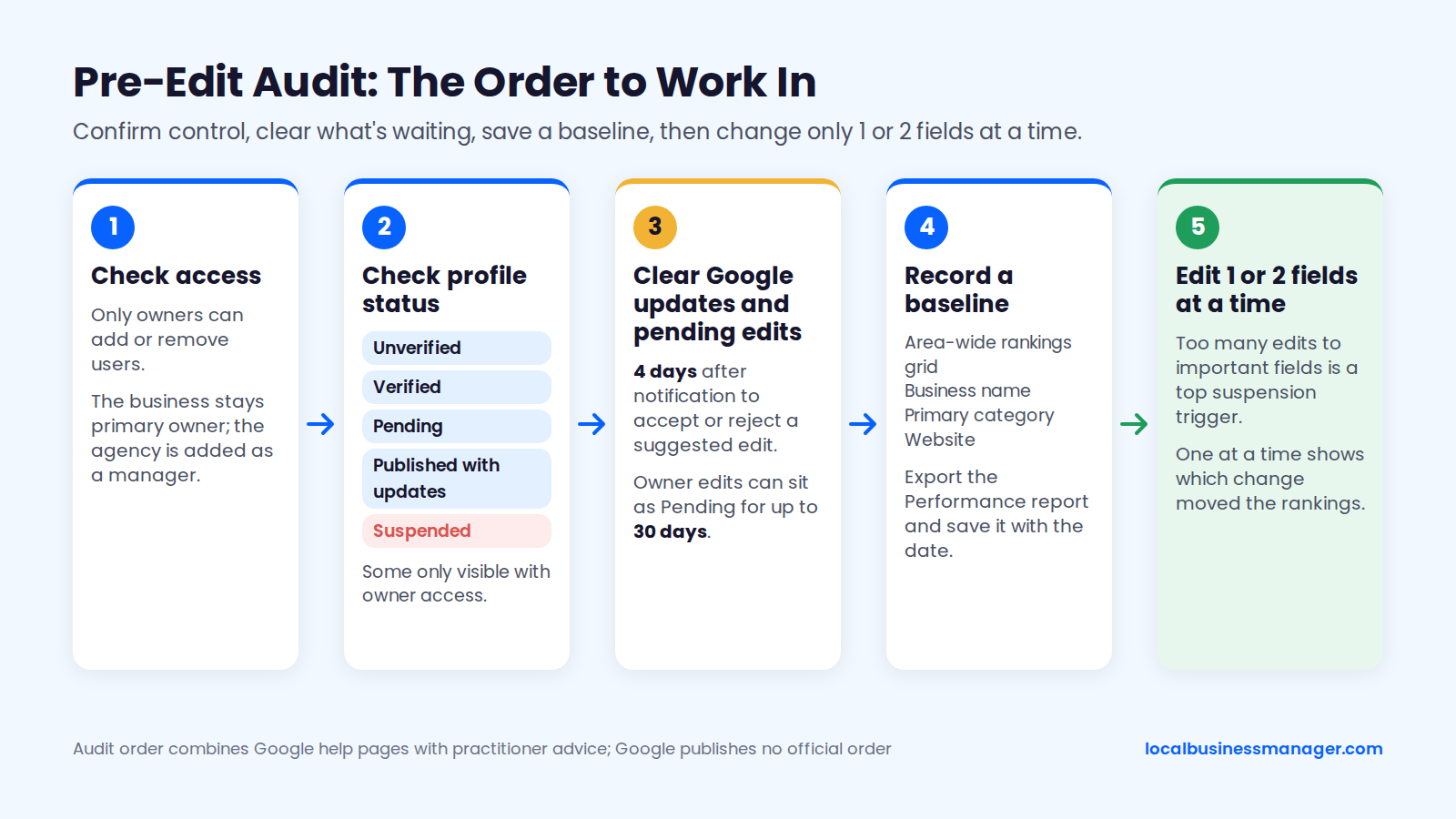
Optimizing a Google Business Profile starts before the first edit, with a check of who controls the profile and a saved baseline to measure against. Google publishes no audit order, so this one combines its help pages with practitioner advice. It ends with a template to copy into the client's onboarding doc.
Claim and Verify the Profile
A profile has to be claimed and verified before any of this checklist applies. If the business has no profile yet, or has one nobody has claimed, start in Google Business Profile Manager at business.google.com. Search for the business there, then claim it or create a new profile.
Google decides which verification methods a given business can use. Depending on the business, Google may offer verification by:
- Phone or text
- Video recording
- Live video call
- Postcard
If someone else already owns the verified profile, verification isn't the route. Use the ownership request described in the next section.
Check Ownership and Manager Access
Access comes first because only owners can add or remove users, and only the primary owner can transfer primary ownership, according to Google's help page on owners and managers. New owners can't manage users or transfer primary ownership for their first 7 days. If someone else owns the verified profile, the business has to file an ownership request through business.google.com/add.
Confirm the profile's status too. Branded Agency's 2026 audit guide lists 5 states to check for. Some of them are only visible to someone with owner access, so a public-only audit isn't enough:
- Unverified
- Verified
- Pending
- Published with updates
- Suspended
The business should stay the primary owner, with the agency added as a manager. Getting a profile back from a former agency or ex-employee depends on the person. In my experience it has taken anything from immediately to a week or two.
Record a Baseline Before Changing Anything
A baseline lets you prove later which change did what. When I take on a new local client, I check 4 things, in this order:
- Rankings across the whole area, using a grid of search points rather than one address.
- The business name, compared with the names of the businesses that rank.
- The primary category.
- The website.
Then export the Performance report. Google's help page says the report shows views, searches and interactions from both organic search and Google Ads, and you can download data for several profiles at once. Save the export with the date, so the "before" numbers exist when the client asks what changed.
Check Google Updates and Pending Edits
Google can change a profile on its own, based on user reports and licensed data. Google's help page on Google updates gives owners 4 days after notification to accept or reject a suggested edit, and some edits are applied without prior review. Owner edits can also sit as "Pending" for up to 30 days, so clear anything still waiting before you add more.
Then plan the edits so they go in one at a time, which also tells you later which change moved the rankings. Sterling Sky lists too many edits to important fields as a top suspension trigger, because Google uses that pattern to guard against hijacked profiles. In October 2022, Joy Hawkins named personal-injury attorneys among the spam-prone categories and advised making only 1 or 2 edits at a time.
Pre-Edit Audit Template
Copy this into the client's onboarding doc and fill it in before the first edit. It also covers the 4 problems I most often inherit from previous agencies: duplicate listings, bad naming, no review campaign, and no services or products set up on the profile.
- Primary owner: name and email (should be the business, not a freelancer).
- Managers: every person and agency listed, with a note on who should be removed.
- Profile status: verified, unverified, pending, published with updates, or suspended.
- Google updates: any suggested edits waiting, with the date each was flagged.
- Pending owner edits: what, and since when.
- Duplicates: any second profile for the same location found on Maps.
- Current name, primary category and additional categories: exactly as shown.
- Services and products: set up, partly set up, or empty.
- Review requests: who asks customers for reviews today, how and when.
- Address or service area setup: shown or hidden, and whether customers visit.
- Website link and booking link: current URLs and whether they carry UTM tags.
- Baseline: Performance report export date, plus rankings across the area on the same date.
- Planned edits: listed in order, 1 or 2 at a time, with dates.
Core Fields Checklist: Name, Categories, Location, Hours, Phone, Website
These 6 fields include the factors experts rate highest and the 2 edits, name and address, that cause the most suspensions I see. The 2026 Local Search Ranking Factors survey put the primary category, keywords in the name, an address in the searched city and open hours among its top 6 local pack factors. Work through them in order, one high-risk change at a time.
Business Name: The Real-World Rule
Google's guidelines for representing your business on Google require the profile name to match the business's real-world name, as used consistently on its storefront, website and stationery and as customers know it. Adding keywords that aren't part of that name breaks the guideline and can get the profile suspended.
The rule matters because the name carries real ranking weight, and the same evidence that shows the reward also flags the risk:
- Expert survey: the 2026 Local Search Ranking Factors survey rated keywords in the business name the #3 local pack factor (223 points, up from 181 in 2023).
- Correlation study: a local SEO software company's September 2026 study of more than 1.4 million listings across 17 industries found that exact- or partial-match keywords in the name correlate with top-3 visibility in every industry tested except real estate.
- Practitioner test: in Sterling Sky's tests, adding a keyword to a business name often raised rankings within hours, and removing it dropped them back.
- Risk: the 2026 Local Search Ranking Factors survey lists keyword names among the top suspension risk factors.
The DBA Route for Keyword Names
I recommend keyword names, but only when the keyword name becomes the business's actual name. I've taken many clients through this process, and the order is what keeps it inside Google's rules:
- Law firms: check your state bar's trade-name rule first (see the next section).
- Register the DBA (assumed name) with your state.
- Put the exact name on the signage, website, stationery, invoices and phone greeting.
- Update the other listings and directories so they show the same name.
- Change the Business Profile name last.
- Keep the DBA filing, business license and a dated photo of the signage on file.
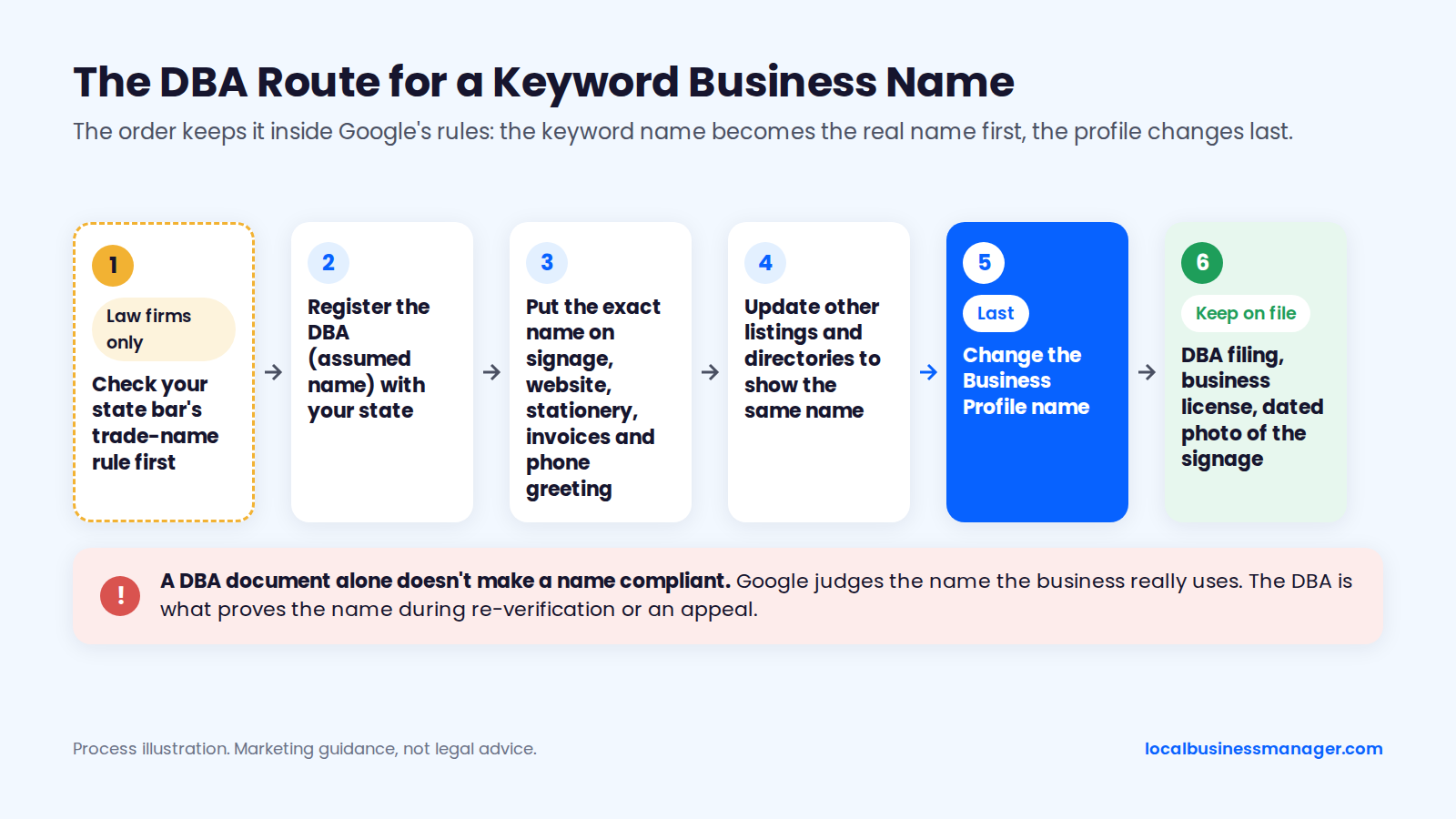
A DBA document alone doesn't make a name compliant. Google's guidelines never mention DBAs, and the "DBA makes it compliant" view is practitioner consensus, not a Google statement. Google judges the name the business really uses, and it can still challenge the name or suspend the profile. The DBA is what proves the name when Google asks during re-verification or an appeal.
Appending keywords to a name the business doesn't use breaks Google's name guideline, with or without a DBA.
Extra Rules for Law Firm Trade Names
A law firm's trade name must also clear bar rules before the DBA is filed. Under ABA Model Rule 7.1, Comment 5, a firm name is misleading if it implies a connection with a government agency or a public legal aid organization. A trade name with a geographic term may need a statement that the firm isn't a public legal aid group.
State rules go further:
- New York: Rule 7.5(b) says a lawyer in private practice shall not practice under a trade name, so the DBA route is closed.
- Other states: Texas, Kentucky, New Jersey and Rhode Island are among the states that restrict trade names or require bar approval for them, and the details differ by state.
This is marketing guidance, not legal advice. Check your state bar's current rule before filing anything.
When personal-injury firms miss the 3-pack, the 2 causes I see most often are a business name that isn't optimized and too few new reviews coming in.
Primary and Additional Categories
Experts rate the primary category as the strongest field you control. The 2026 Local Search Ranking Factors survey rated it the #1 local pack factor (227 points, up from 193 in 2023), and rated an incorrect primary category the #2 negative factor (214 points).
A profile can have 1 primary category and up to 9 additional ones, 10 in total, according to a local SEO software company's category guide. Google's guidelines say to use the fewest categories that describe the core business, as specific as possible but still representative, and never to use categories only as keywords. The published evidence on changing categories is thinner than most advice suggests:
- Sterling Sky's tests found that adding relevant additional categories caused no "dilution". Those tests changed additional categories only, not the primary.
- Sterling Sky says category changes should show in rankings within 48 hours.
- Some Local Search Forum members suggest checking 1 to 2 weeks after a primary change instead.
- One Local Search Forum member reported that a primary category change triggered re-verification.
My rule for the primary category: use what most of the ranking competitors use. If Google is clearly rewarding a different category than the "logical" one, I go with the one Google rewards.
Primary-Category Research Worksheet
Use this worksheet once per location, and again each quarter:
- Write down the money keyword (the search that brings the most valuable jobs).
- Search it from 3 or 4 points across the service area, not only from the office.
- Record the category shown for each business in the 3-pack and the next 7 Maps results.
- Count which primary category appears most often among the top results.
- Check that it completes the sentence "This business is a _" for your client.
- Add additional categories for the other real services, one per service line.
- Make 1 category change at a time, note the date, then recheck after 48 hours and again after 2 weeks.
For personal-injury firms, legal-marketing guides recommend "Personal Injury Attorney" over the generic "Law Firm". That's marketing advice with no published data behind it, so let the worksheet decide.
For attorney profiles, I'd give each attorney a different primary category from the firm's so they don't compete with each other. That's my intended approach, not something I've tested yet.
Address vs Service Area
A profile's address must be a real location where the business operates. A Google Product Expert's suspension guide on Google's community forum lists P.O. boxes, unverifiable addresses and duplicate listings as suspension triggers. The Product Expert guide also warns against virtual offices and coworking spaces unless the business permanently staffs them.
If customers aren't served at the address (a plumber working from home, for example), hide the address and set the service areas instead.
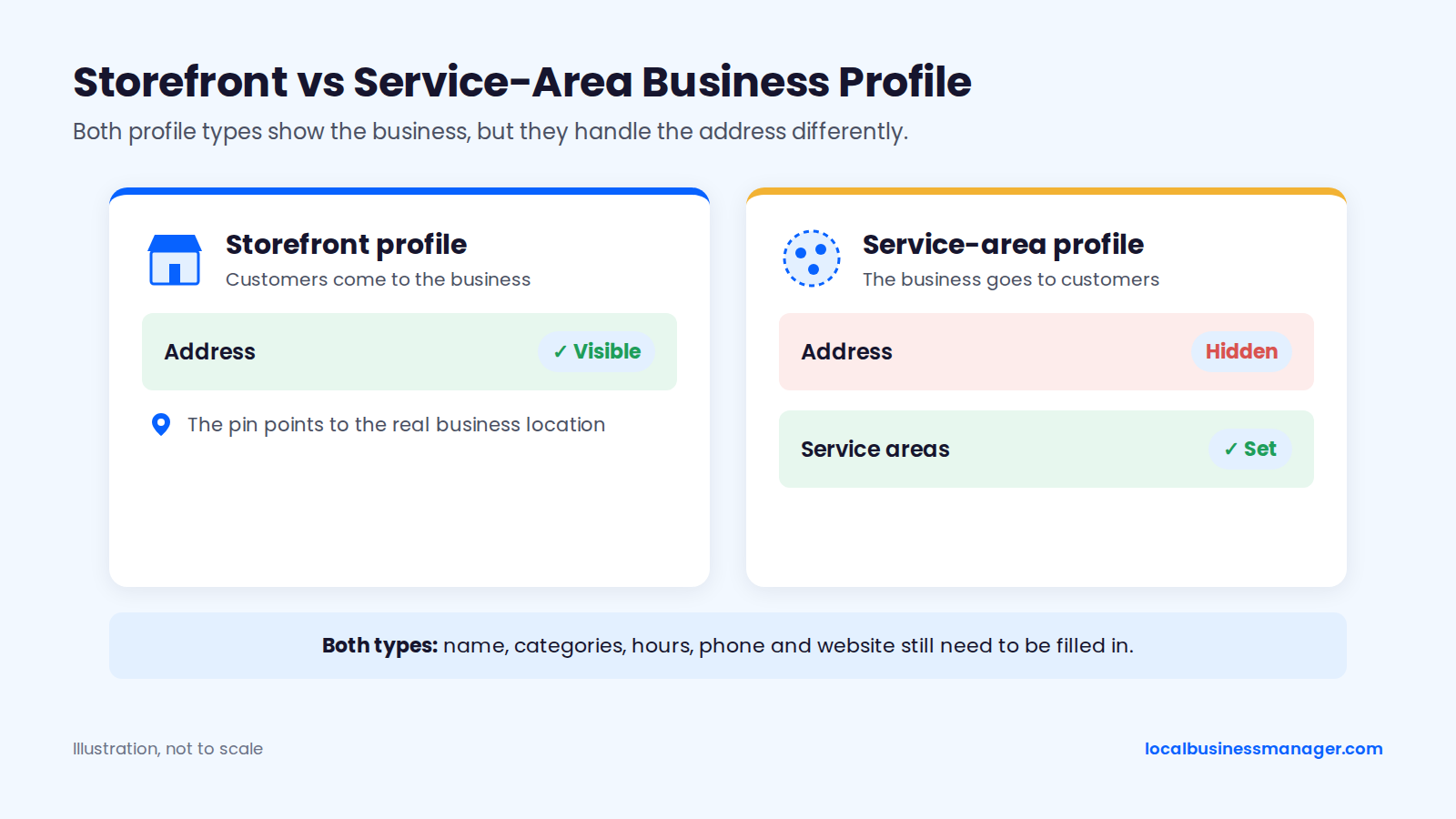
List only the areas the business actually serves. Google's help page on managing service areas allows up to 20, says the whole area should sit within about 2 hours' drive of where the business is based, and says not to add countries or states.
Sterling Sky's 2025 study of 8,186 businesses for "near me" searches found that hiding the address correlated negatively with ranking. Showing an address customers can't visit would still break Google's guidelines, so the finding doesn't change the setup: keep that address hidden.
Hours and Special Hours
Set the real hours, and set special hours before every holiday. The 2026 Local Search Ranking Factors survey rated "open at the time of the search" among the top 6 local pack factors, with 189 points, so experts rate accurate hours as a ranking factor as well as a conversion lever.
Don't stretch the hours to look open more often, as some ranking guides suggest. A short hours routine covers it:
- Regular hours that match when the doors are open and the phones are answered.
- Special hours set 1 to 2 weeks before each holiday, so the profile doesn't show "open" on a day the phones go to voicemail.
- A weekly check for Google and user edits to the hours, as covered in the audit section.
Phone Number
I put the call-tracking number in the profile's primary phone field and don't add a secondary number. That's my practice: the profile shows one number, and every call from it gets counted. Keep the number consistent with what the website and major listings show, or make sure the tracking number forwards to the main line.
Google's bulk-upload help page says each business needs a website or a primary phone number, so the phone field is one of the profile's basic requirements. Why a tracking number matters for reporting is covered in the client report section.
Website and Booking Links With UTM Tags
Tag every link on the profile so profile traffic shows up separately in GA4. Without tags, clicks from the profile blend into general Google organic traffic. Google's bulk-upload help page says the URL must be complete and no longer than 256 characters.
UTM template (replace the domain and the location name):
- Website link:
https://example.com/?utm_source=google&utm_medium=organic&utm_campaign=gbp-[location]&utm_content=website - Booking link:
https://example.com/book/?utm_source=google&utm_medium=organic&utm_campaign=gbp-[location]&utm_content=booking - Naming rule: lowercase, hyphens instead of spaces, one campaign value per location.
Which page the website link points to is a ranking question too, covered in the landing-page section under prominence.
Profile Content Checklist: Description, Services, Products, Attributes
These fields mostly help conversions, with services as the exception. Fill them in completely and accurately, and don't stuff them with keywords. Services are the one field here with published ranking tests. The description, products and attributes are written for customers.
Description
Google has not confirmed the description as a ranking factor, so write it for customers. Google's help page on editing your Business Profile says the description can't be longer than 750 characters and should focus on the business itself, not on promotions, prices or sales. The same guidelines exclude URLs and HTML.
Description template (under 750 characters, most important information first):
- Who you are, what you do and where.
- The 3 to 5 main services, in plain words.
- One true detail that sets you apart (licensing, warranty, how quotes work).
- The areas served.
- How to get in touch or book.
Worked example (a fictional plumber, under 750 characters):
Northside Plumbing is a licensed plumbing company serving homeowners and small businesses in [City] and the surrounding [County] area. We handle water heater repair and replacement, drain cleaning, leak detection, sewer line repair and fixture installation. Every job starts with a written quote before work begins, and our vans carry common parts so most repairs are finished in one visit. We serve [City], [Town], [Town] and [Town], with emergency service available. Call to book a visit, or use the booking link on this profile to pick a time.
Services
Services are the content field with the best ranking evidence. In Sterling Sky's 2022 retest, adding Google's pre-defined services improved rankings for relevant keywords within 24 to 72 hours, although a 2019 test had found no effect.
Structure them by service line. Pick Google's suggested service where one matches, add custom services for real work Google doesn't list, and write one plain sentence for each. Example for a plumber:
- Drain cleaning: kitchen, bathroom and main-line drains cleared, with camera inspection on request.
- Water heater repair and replacement: tank and tankless units, same-week installation.
- Leak detection: slab, wall and ceiling leaks located before any opening up.
- Sewer line repair: spot repairs and full replacement.
For a personal-injury firm, the same structure applies by case type: car accident claims, truck accident claims, workers' compensation claims.
Products and Attributes
Fill in products and attributes for customers. Google's local ranking page advises filling in complete business information for relevance. Products work well for fixed-price packages (a drain-cleaning special, a maintenance plan) because they show a clear offer on the profile.
For attributes, set only the ones that are true for the business, from the options Google shows for its category. An attribute that isn't true (an accessibility feature the office doesn't have, say) misleads exactly the customers who rely on it. Attributes are also among the fields I check weekly for edits, because Google and third parties can change them without the owner noticing.
Photos and Videos: What to Upload and How Often
Upload real images of the work, the team and the premises on a regular schedule; in published tests, geotags and keyword filenames didn't move rankings. Experts in the 2026 Local Search Ranking Factors survey treat photos as a conversion factor. Google's photo guidelines set the file format and size requirements, so check them before a bulk upload.
Shot List by Business Type
A good shot list shows the customer what they'll actually get. Start with these:
- Trades (plumbers, HVAC, roofers, pest control): branded vans, the team in uniform, before-and-after shots of finished jobs, equipment being installed, the office or shop if customers visit.
- Law firms: the office exterior with signage, the reception area, attorney headshots, the team, the building entrance and parking.
- Storefront businesses: the exterior from the street, the entrance, the interior, the staff, the products or services in use.
- Video: a 30-second walk-through of the office or a job site, filmed on a phone.
Stock photos and AI-generated images don't show the real business, so leave them out. Office photos with visible signage also double as evidence if the profile ever needs reinstating.
Do Geotags or Keyword Filenames Help?
No: in Sterling Sky's tests, adding geotags to photos had no measurable effect on local pack or organic rankings. The test covered photos uploaded to Business Profiles and photos on business websites, and neither moved rankings. The same test found that Google strips geotags from photos when they're uploaded to a Business Profile.
Joel Headley, quoted by Sterling Sky in that write-up, said geotagging "wouldn't matter since the tagging is happening upon upload." Keyword filenames fare no better: Sterling Sky's 2020 test found no measurable ranking increase from keywords in image filenames.
How Do You Get More Reviews Without Breaking Google's Rules?
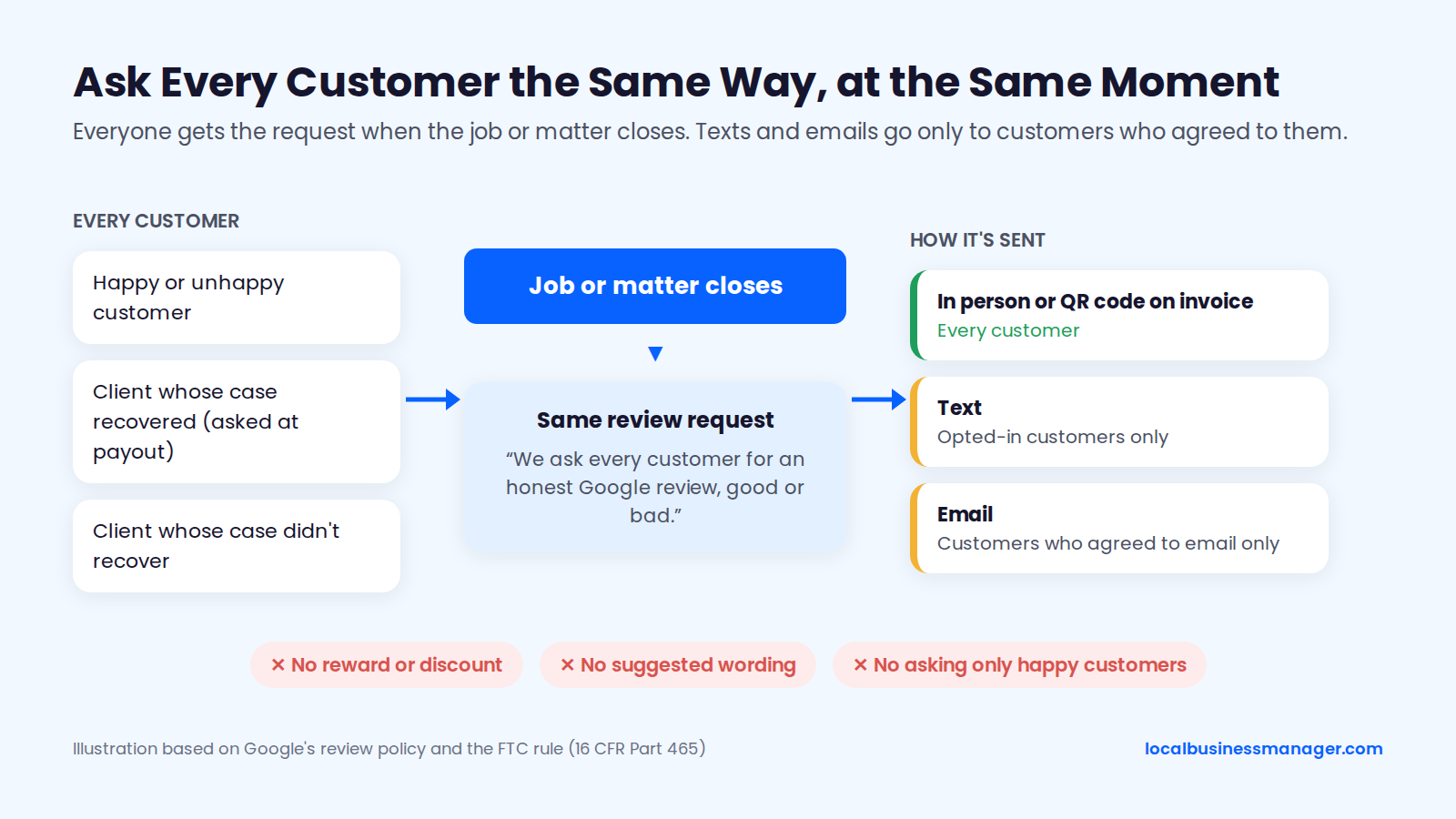
Ask every customer at the same point in the job, without offering a reward or suggesting what to write. Google's local ranking page lists reviews among the information that feeds prominence, and Google's policy and the FTC's rule both limit how you ask.
On the ranking side, Sterling Sky's 2025 tests found a slight boost when a business reached 10 reviews. Sterling Sky's study of 8,186 businesses found that reviews gained this month mattered more than total count, and reviews with text counted more than reviews without. The 2026 Local Search Ranking Factors survey moved review recency from #93 in 2023 to #11.
What Google and the FTC Prohibit
Google's prohibited and restricted content policy bans offering incentives such as payment, discounts or free services for a review, or for changing or removing one. Under the same policy, a business must not:
- Post reviews based on a conflict of interest, such as reviews by owners or employees.
- Require or pressure people to leave a review while they're on the premises.
- Ask reviewers to include specific content, which rules out "please mention drain cleaning in [City]".
Asking only happy customers is review gating, which this checklist never recommends.
The FTC's rule on consumer reviews (16 CFR Part 465) took effect on October 21, 2024. It bans:
- Incentives that depend on a positive review or a particular sentiment.
- Undisclosed reviews by insiders.
- Managers asking employees to get reviews from relatives, in certain cases.
- Suppressing reviews based on their sentiment.
For law firms, ABA Model Rule 7.2(b) adds a third layer: a lawyer may not give anything of value for recommending the lawyer's services.
A Compliant Review-Request Script
Ask at the moment the job or matter closes, every time, for every customer. For personal-injury clients who recovered, the matter closes at payout, so that's when I ask them. A client whose case didn't recover gets the same request when their matter closes. Asking only clients who got paid would be selective solicitation.
Text and email requests go only to customers who agreed to receive them. Copy and adapt these:
- In person: "Thanks for trusting us with this. We ask every customer for an honest Google review, good or bad. Can I send you the link?"
- Text (opted-in customers only): "Hi [First name], it's [Name] from [Business]. Your [job/matter] is complete. We ask every customer for an honest review on Google: [review link]. Reply STOP to opt out."
- Email (customers who agreed to receive email only): Subject "How did we do?" Body: "Hi [First name], your [job/matter] with [Business] is complete. We ask every customer to share an honest review on Google. It takes about a minute: [review link]. Thank you, [Name]."
To get the link, open the Business Profile and select Read reviews, then Get more reviews. Google gives a direct review link to copy or a QR code, according to its help page as reported by Search Engine Roundtable. Printing that QR code on every invoice or receipt is a practical way to make sure every customer gets the same request.
Review Reply Templates
Reply to every review, quickly, and write for the next customer reading it (law firms follow the bar rules in the next section). Google's help page says replies are posted publicly and the reviewer is notified. The customer can still change the review after reading the reply. No Google source sets a response time.
We found no published test showing that keywords in owner replies improve local rankings, so leave them out. Personalize each template with a detail from the review:
- 5 stars: "Thanks, [Name]. We're glad the [specific job] went smoothly and that [detail they mentioned] made a difference. We appreciate you taking the time to write this."
- 3 stars: "Thanks for the honest feedback, [Name]. You're right that [issue they raised] wasn't up to our standard. We've [specific fix]. If you'd like to talk it through, call [manager] at [number]."
- 1 star: "[Name], we're sorry about [issue]. We'd like to make this right. Please call [manager] directly at [number] so we can look into it."
- Suspected fake (not for law firms): "We can't find a record of anyone by this name as a customer. If we've missed something, please contact us at [number] so we can help." Then flag the review through Google.
Be wary of anyone promising to delete reviews for a fee. Ask exactly what they'll do that you can't do yourself through Google's own reporting.
Law Firms: Replies and Bar Rules
Law firms face stricter limits on replies than other businesses. ABA Formal Opinion 496 (January 13, 2021) says client confidentiality under Rule 1.6 still applies when replying to online reviews. A negative review doesn't permit a lawyer to disclose client information, and lawyers should seriously consider not responding at all. A lawyer may invite the reviewer to get in touch privately.
That conflicts with generic "reply to everything" advice. If a firm does reply to a negative review, keep it to an invitation to talk privately:
- Law firm, negative review: "We take all feedback seriously. Please contact our office at [number] so we can speak with you directly."
Never confirm or deny that the reviewer was a client, never mention the case, and don't use the suspected-fake template, because it states who is or isn't a client. Check your state bar's guidance as well, since some states have their own opinions on reviews.
Do Google Posts Help Rankings?
Published tests found no measured ranking effect from Google Posts. In Sterling Sky's July 2021 test, adding Posts to 3 listings had no measurable impact on local pack rankings, though Sterling Sky still recommends posts for conversions. The 2026 Local Search Ranking Factors survey ranked post frequency and post quantity #186 and #187 of 187 local organic factors.
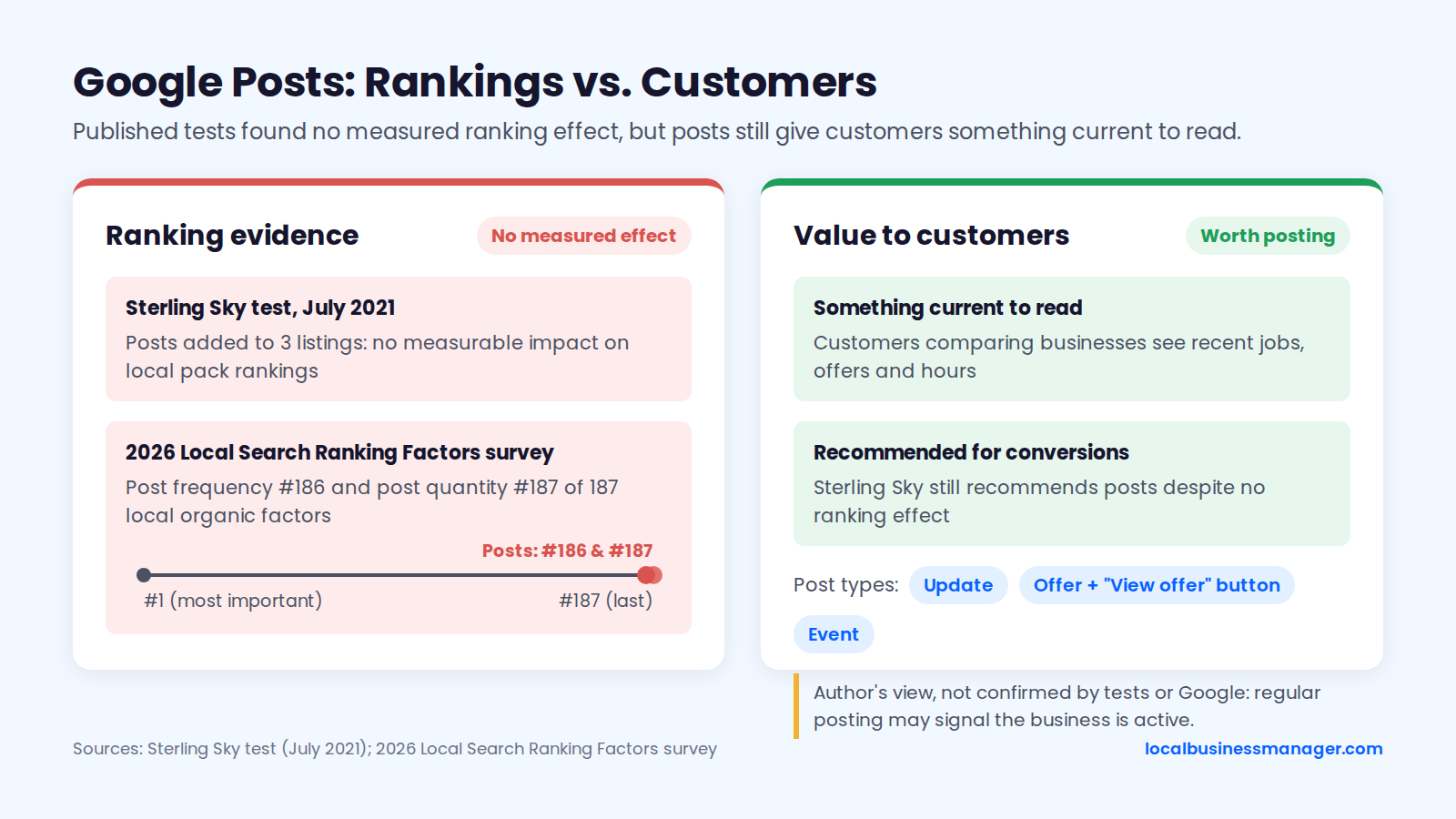
Google's help page on creating posts lists 3 post types: Update, Offer and Event. An offer needs a title and start and end dates and times, and Google adds a "View offer" button automatically. The same page says posts older than 6 months are archived unless a date range is set, and tells businesses to avoid auto-generated or distracting content.
I post 3 times a week for clients. My view, which no test has confirmed and Google hasn't stated, is that regular posting signals to Google that the business is active, and it gives customers something current to read. Post ideas that work for service businesses:
- A finished job, with a before-and-after photo.
- A seasonal reminder (furnace checks, gutter cleaning, spring pest control, storm damage inspections).
- A real offer with an end date.
- A new team member or a new service.
- Holiday hours, posted the week before.
Which Profile Features Are Gone or Being Replaced?
3 features that older guides still recommend were shut down or replaced between March 2024 and December 2025: Business Profile websites, chat, and Q&A. Guides that still tell you to set these up are working from features that no longer exist in their old form.
The dates below come from Google Business Profile Help's July 2024 page on chat and call history, Google's announcement on Business Profile websites as reported by Search Engine Journal in January 2024, and PPC Land's December 2025 report of a Google Product Specialist's announcement in the Business Profile Help Forum. The table is sorted oldest first, as of November 2026.
Feature | What changed | When | What to do instead |
|---|---|---|---|
Business Profile websites | Turned off; visitors were sent to the Business Profile until June 10, 2024 | March 2024 | Link the profile to the business's own website |
Chat and call history | New chats stopped after July 15, 2024; chat and call history removed | July 31, 2024 | Use the phone number and the website's contact or booking links |
Q&A | Q&A API ended November 3, 2025; an AI-powered "Ask" button was announced as the replacement | December 3, 2025 | Put FAQs on the website, in services and in the description |
Seeding and answering your own Q&A questions is no longer a task. Put FAQ content where you control it instead:
- The website's service pages, with the questions for each service on its own page.
- The profile's services, with a plain sentence for each.
- The profile description, for the 1 or 2 questions every customer asks.
Prominence Beyond the Profile: Website, Links and Citations
Google points to links and reviews as inputs to prominence, and links in particular live off the profile. The page the profile links to, the links pointing at the website and consistent listings elsewhere all support the profile, starting with the landing page.
The Landing Page Your Profile Links To
Google gives no ranking advice on homepage versus location page; its bulk-upload help only requires a complete URL. Of 3 published single-site cases, reported by Sterling Sky and on the Local Search Forum, 2 favored a dedicated page and 1 favored the homepage. The table is sorted by year:
Case | Year | Setup | Result |
|---|---|---|---|
Local Search Forum split test, about 40 locations | 2019 | Location pages tested against the homepage | Location-page links reduced profile views; the poster judged the homepage better for that site |
Sterling Sky test, New York City personal-injury firm | 2020 | Non-ranking practitioner profile moved from the homepage to a bus-accident page | Local pack visibility improved |
Sterling Sky report, personal-injury firm's Staten Island profile | 2025 | Profile pointed at a Staten Island page | Sharp ranking gains within a month |
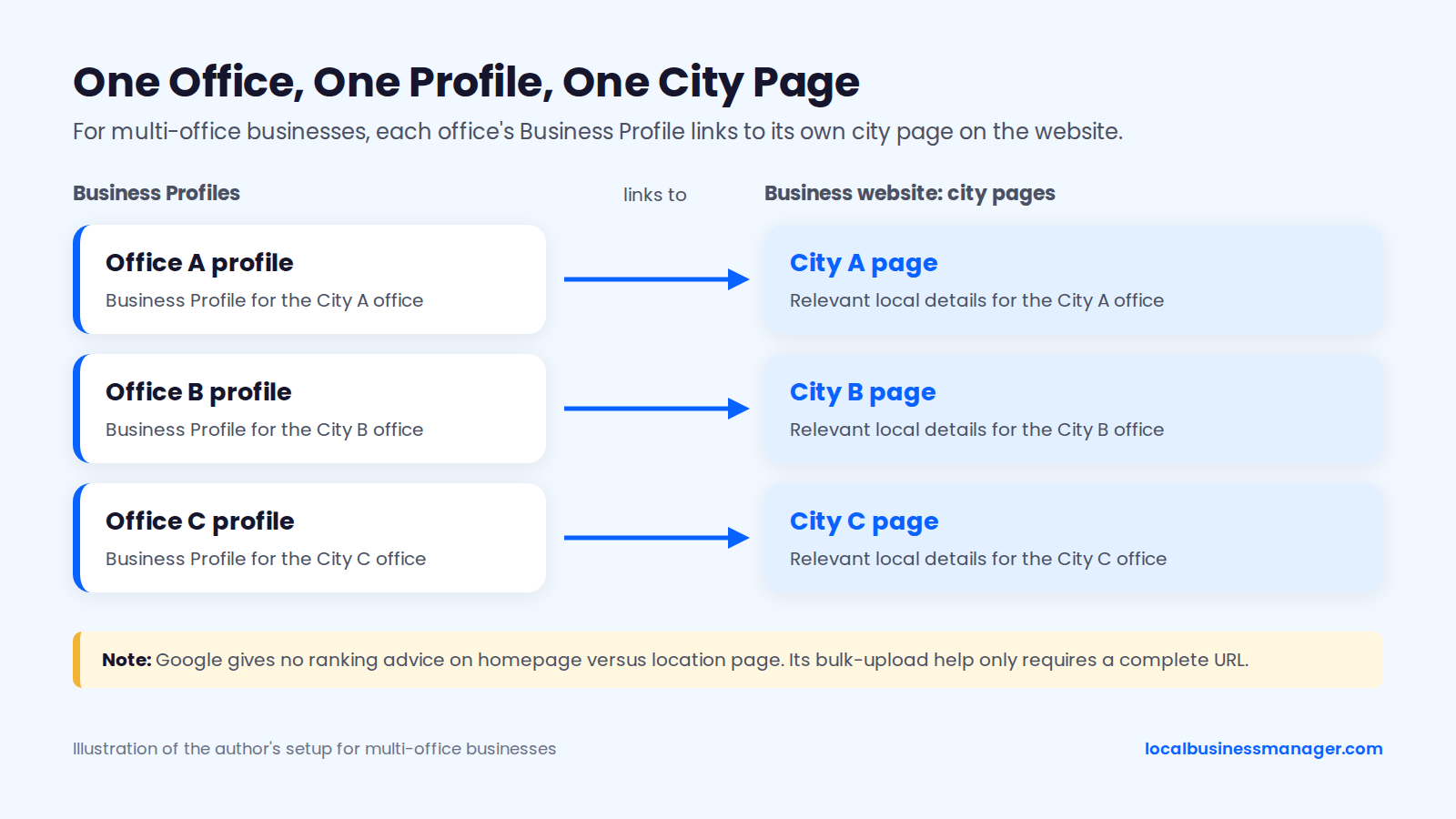
My setup for multi-office businesses: each office's profile links to its own city page, and that page carries relevant local details for that office.
Links and Local Mentions
Links feed prominence, according to Google, so earn links the business can explain:
- Local sponsorships (youth sports, charity events).
- Trade associations, chambers of commerce and licensing bodies.
- Local news coverage of real work or community involvement.
- Suppliers and partners the business genuinely works with.
Skip bought link packages and private link networks. Google Search Central's spam policies list buying or selling links for ranking purposes as link spam. Link building is the one task I've outsourced. I've never outsourced profile naming or category selection.
In my observation, some paid legal directories bring law firms cases directly, and they also help the firm get mentioned in AI Overviews.
Citations and NAP Consistency
Citations are the business's name, address and phone on other sites, and they should match the profile. The Product Expert suspension guide lists duplicate listings as a suspension trigger, so duplicates are a risk as well as a mess. Names matter most after a DBA rename: according to a July 2026 practitioner guide, a rejected name change usually means Google can't find the new name on the website, citations or records.
The groups to cover:
- Major platforms: Apple Maps, Bing, Yelp and Facebook.
- Data aggregators: a local SEO software company's guide says the main US data aggregators' networks reach platforms such as Apple Maps.
- Industry directories: legal directories for law firms, trade directories and the chamber of commerce for everyone else.
My approach is to fix all of them: the Business Profile, the data aggregators, the major platforms and, for law firms, the legal directories. When hours are tight, fix the most serious issues first and work down from critical to low.
The Monthly GBP Maintenance Routine
A Business Profile needs a weekly edit check, a monthly ranking and reporting cycle, and a quarterly review of categories and content. No Google source sets these cadences, so the table marks where each one comes from. An agency can bill this routine and an owner can follow it.
The table is sorted from weekly to quarterly, and the Basis column shows whether each cadence is my routine, a Google deadline or a suggested starting point.
Task | Frequency | Basis | Why it matters | In the client report |
|---|---|---|---|---|
Check name, categories, attributes, services and hours for edits | Weekly | My routine | Google and users can change fields; some edits apply without review | Only if something changed |
Act on Google's suggested-edit notifications | Within 4 days of notice | Google's deadline | Owners have 4 days to accept or reject | Only if something changed |
Reply to new reviews | Weekly at minimum, ideally daily | Suggested starting point | Replies are public and the reviewer is notified | Yes |
Publish posts | 3 times a week | My routine | Fresh content for people comparing businesses | Yes |
Check rankings across the service area | Monthly | My routine | Shows real visibility, not one spot | Yes, leads the report |
Check the post schedule for the coming month | Monthly | My routine | Keeps posting steady | No |
Export the Performance report | Monthly, after the 5th | Suggested starting point | The searches metric can take up to 5 days to update | Yes, calls lead it |
Upload new photos | Monthly | Suggested starting point | Keeps the profile current | Yes |
Set special hours | Before each holiday | Suggested starting point | Prevents "open" on closed days | No |
Re-run the category worksheet | Quarterly | Suggested starting point | Ranking competitors change categories | Only if changed |
Review services, description and products | Quarterly | Suggested starting point | Services carry ranking evidence | Only if changed |
Audit users, citations and landing-page UTMs | Quarterly | Suggested starting point | Removes stale access, duplicates and broken tracking | Yes, as a summary |
What Goes in the Client Report
Calls and rankings lead my monthly report. A proper SEO engagement has to deliver rankings for the client's main terms, so show them first, measured across the service area.
Be careful with the call number. Sterling Sky notes that the Performance report's "Calls" metric counts call-button clicks, not completed calls. Sterling Sky recommends combining Business Profile data with GA4, Search Console, call tracking and CRM data. A call-tracking number on the profile records the calls that actually connect.
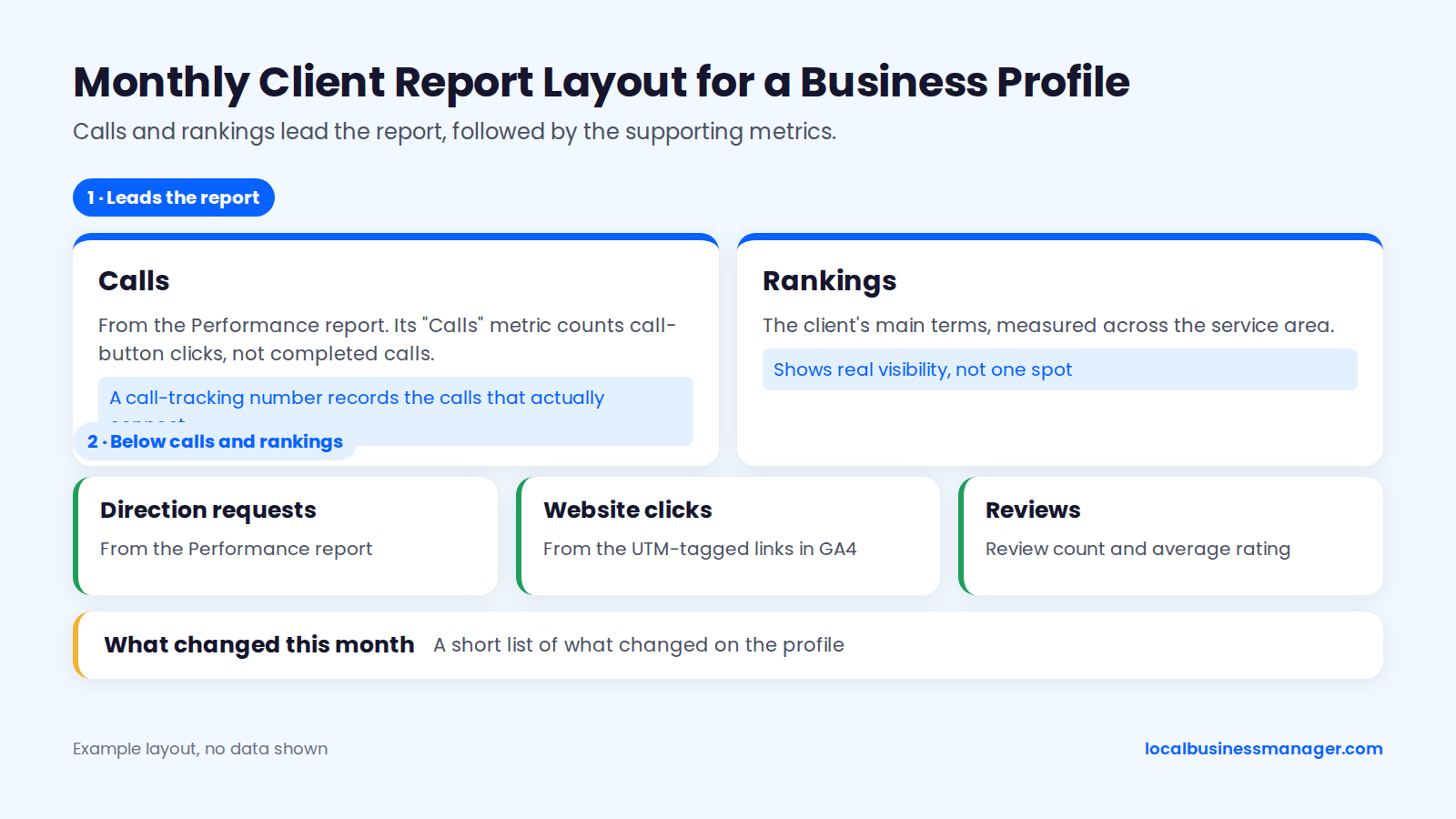
Below calls and rankings, add:
- Direction requests from the Performance report.
- Website clicks from the UTM-tagged links in GA4.
- Review count and average rating.
- A short list of what changed on the profile this month.
Multi-Location Consistency Checks
For multi-location businesses, the routine adds one cross-location check each month. The Performance report can be downloaded for several profiles at once, according to Google's help page, which makes it practical to put every location side by side in one sheet and spot the weak ones.
Each month, check that every location has:
- The same hours structure, with holiday hours set ahead of time for that location.
- The intended primary category and services.
- A website link to its own city page, with the right UTM campaign value.
- No duplicate profile picked up since the last check.
How Do You Measure Whether Optimization Worked?
Measure in 2 places: the Performance report and GA4 for customer actions, and rankings checked from many points across the service area. The baseline from the audit is what makes the comparison honest, and it's also your answer when a client is convinced they dropped.
Performance Report Metrics
The Performance report shows views, searches and interactions, combining organic search and Google Ads, according to Google's help page on Business Profile performance. Interactions cover the actions that matter: calls, direction requests and website clicks.
The same report shows the search terms people used to find the business. That search data updates at the start of each month and can take up to 5 days to appear, so send monthly reports after about the 5th. Compare the terms with the primary category and services: if the searches bringing views don't match the money keyword, re-run the category worksheet.
Add the GA4 view for the UTM-tagged links:
- Filter by source "google" and medium "organic".
- Narrow it to your "gbp-[location]" campaign.
- Check which pages profile visitors reached and whether they booked or filled in a form.
How Should You Check Rankings Across a Service Area?
Rank must be checked from many points, because distance changes the result. The 2026 Local Search Ranking Factors survey rated proximity to the searcher the #2 local pack factor (225 points, up from 176 in 2023). Joy Hawkins wrote in October 2026 that ranking #1 near the office and #7 a few blocks away is normal.
Sterling Sky's research found that Google clusters local pack results tightly around the search location. Incognito mode doesn't fix this: it removes search-history personalization, but your location still shapes the results.
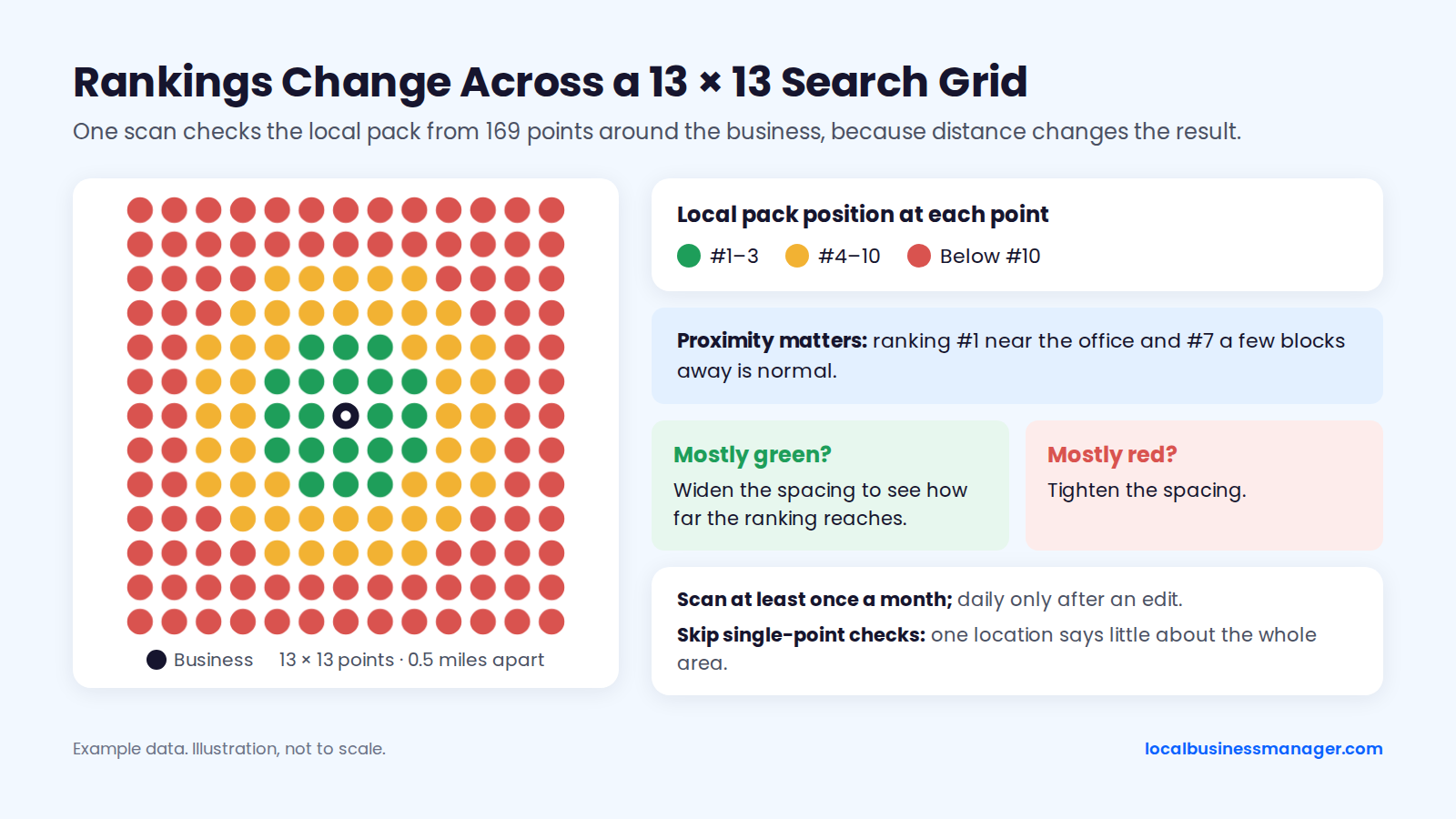
My method is a grid of search points. The first scan is usually 13 Ã 13 points spaced 0.5 miles apart. If it comes back mostly green, I widen the spacing to see how far the ranking reaches; if it's mostly red, I tighten it.
For agencies, I recommend scanning at least once a month, and daily only after an edit, to see whether it produced a result. I don't use single-point checks, because one location says little about how a business ranks across its area. I also read average rank with caution right now: Google has been mixing and reshuffling results, which makes the results page very volatile, so the full grid tells you more than one average.
The "We Dropped" Client Script
When a client calls about a drop, check the location first and the profile second. The most likely cause of a "drop" seen from home is where they searched from. Work through these steps on the call:
- "Where were you when you searched?" (Home, office, phone or laptop.)
- "Google ranks local results partly on distance. From your kitchen, you're seeing what someone at your house sees, not what customers across town see."
- "Here's the scan from across the whole area, on the same date as last month's." Share the grid or the multi-point results.
- "Here's what customers actually did this month: calls, direction requests and website visits from the profile."
- If the area-wide check also shows a real drop: "I'm checking whether anything changed on the profile, including edits by Google, plus categories and competitors. I'll come back to you by [day]."
Then check the profile for edits, pending changes, suspension notices and new competitors before the follow-up.
Which Optimization Mistakes Get Profiles Suspended?
Name edits and address edits cause the most suspensions I see. Google doesn't publish what counts as "too many" edits or edits made "too quickly", so the warnings come from Google's help pages, a Product Expert guide and practitioners.
Of the 8 situations in the table, 6 are rated high risk and listed first. The risk levels are an editorial rating based on the source named in each row, not a Google scale.
Situation | Risk level | Source of the warning | Safer alternative |
|---|---|---|---|
Adding keywords the business doesn't really use to the name | High | Google's name guideline; keyword names among top suspension risks in the 2026 Local Search Ranking Factors survey | Register a DBA, use it everywhere, change the profile last |
Changing the address | High | My experience; Google says updated details can prompt re-verification | Change it only for a real move, with lease and signage photos ready |
P.O. box, virtual office or unstaffed coworking desk | High | Google Product Expert suspension guide | Use a real staffed location, or set up as a service-area business |
Duplicate profiles for one location | High | Google Product Expert suspension guide | Find and remove duplicates during the audit |
Review gating or incentives | High | Google's review policy; FTC rule 16 CFR Part 465 | Ask every customer the same way, with no reward |
Name change after verification | High | Google's help page says it may require verifying again | Change the name only when the real-world name changed |
Many core edits at once | Medium | Sterling Sky; Joy Hawkins (2022) | Make 1 or 2 edits at a time, spaced out |
Primary category change | Medium | Local Search Forum report of re-verification | Change only after the worksheet, and on its own |
Google's verification help page says re-verification requests are likely caused by recently updated business details, and verification reviews can take up to 5 business days. Sterling Sky adds 2 more triggers: user reports, weighted by the reporter's trust level, and a suspension on another Google product linked to the same account.
What Reinstatement Usually Takes
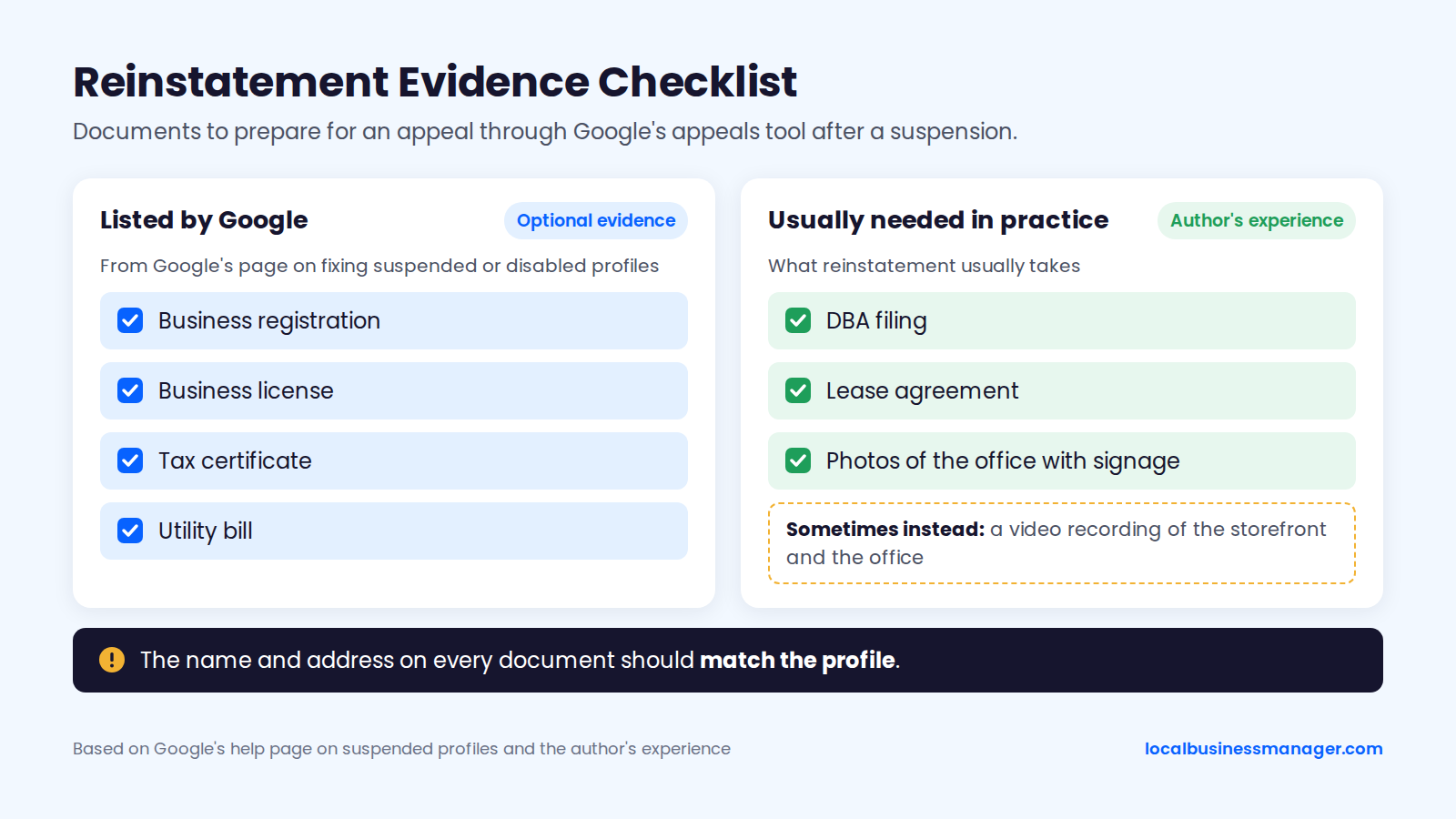
Reinstatement goes through Google's appeals tool, with documents that match the profile. Google's page on fixing suspended or disabled profiles lists optional evidence: business registration, a business license, tax certificates and utility bills. The name and address on them should match the profile.
The Product Expert guide distinguishes 2 kinds of suspension:
- Soft suspension: the profile stays live but can't be edited.
- Hard suspension: the profile is removed from Search and Maps.
In my experience, reinstatement usually needs documents: the DBA filing, a lease agreement and photos of the office with its signage. Sometimes Google asks for a video recording of the storefront and the office instead.
FAQs
Is Google My Business the Same as Google Business Profile?
Yes: Google Business Profile is the current name for what used to be called Google My Business, or GMB. Many agencies and clients still use the old name, but it's the same profile. The fields, policies and ranking factors in this checklist apply whichever name you use.
Can I Optimize My Google Business Profile Myself?
Yes, a business owner can do every step in this checklist with Google's own dashboard and a spreadsheet. The parts that need the most care are the risky ones: name changes, address changes and category switches. Make those one at a time, after the audit, with a baseline recorded. Keep the business as primary owner even if you later hire an agency, and add the agency as a manager.
How Much Does It Cost to Optimize a Google Business Profile?
Cost depends on how much work the profile needs, so quotes vary widely. The main drivers are the number of locations, cleanup (duplicates, citations, an old keyword name), how many reviews the business needs to catch up on, and reporting. A DBA filing also carries a government filing fee. Ask any provider to price one-time setup and ongoing management separately, and to list which tasks each covers.
How Long Does GBP Optimization Take to Show Results?
It depends on what's already been done: a single high-impact fix can show gains within about a month, while later gains, such as from a strong review push, come gradually. That's my experience; nobody can guarantee a timeline. Published tests show some fields act faster. Sterling Sky reports category changes showing within 48 hours, and pre-defined services moved rankings within 24 to 72 hours in its 2022 retest.
How Do I Connect My Google Business Profile With Google Ads?
Link them from Google Ads: open linked accounts, choose your Business Profile, select Link, then Done. Those steps come from Google Ads Help's page "Link your Google Business Profile to Google Ads", which is worth opening as you go, because menu labels change. Once ads run, the Performance report counts views and interactions from Google Ads alongside organic search, according to Google's help page on Business Profile performance. Keep that in mind when you report profile results to a client who also runs ads.
Does Google Business Profile Information Appear in AI Answers?
The safest approach is to keep the profile, the website and the citations accurate and consistent, so anything that reads them finds the same facts. That means the same name, address, phone, hours and services everywhere the business is listed. For law firms, my observation is that some paid legal directories also help the firm get mentioned in AI Overviews.
Where to Start This Week
Run the profile audit and the category worksheet before you touch the name. Those 2 steps tell you whether the profile has a ranking problem or a distance problem, and that decides everything else on this list. If you manage profiles for a roster of clients, join the Local Business Manager early access list.