Do Google Reviews Help SEO? What Google Confirms and What It Doesn't

Yes, Google reviews help local SEO. Google says review count and review score factor into local ranking, so reviews can move a business in the map pack and on Google Maps, but Google hasn't documented them as a ranking factor for regular organic results.
I was Head of SEO at a legal-marketing agency and ranked close to 100 US personal-injury law firms. If you run local SEO for clients, you've probably had the "we got more reviews, why didn't we move?" call, and this post is built to answer it.
Below, I label each review signal by its evidence, then give you a way to set a client's review target and request and reply templates that stay inside Google's rules.
Do Google Reviews Help SEO?
Google reviews help rankings in the local pack and on Google Maps, but Google documents no direct effect on regular organic results. So "do reviews help local SEO?" gets a confirmed yes, and "do reviews lift my website's blue links?" gets an unproven maybe.
As of November 2026, Google confirms a review ranking effect on 2 of the 7 surfaces and features below: the local pack and Google Maps. The table draws on Google's Business Profile help pages, Search Central documentation, news coverage and industry blogs. It's sorted by how directly Google documents the effect.
Search surface | Effect of Google reviews | Evidence level |
|---|---|---|
Local pack (the 3-pack) | Review count and rating factor into ranking | Google confirms |
Google Maps results | Review count and rating factor into local ranking | Google confirms |
Star rich results on your own site | No stars for reviews of your own business since September 2019 | Google confirms |
AI review summaries in Maps | Review text feeds the "summarized with Gemini" summaries | Reported by 9to5Google and Search Engine Roundtable (October 2024) |
Maps minimum-rating filter | Searchers can hide businesses below a chosen rating | Reported by industry blogs (2025 to 2026) |
AI Overviews and chat assistants | Effect on being named is unmeasured | Expert survey opinion only |
Regular organic results | No documented direct effect | Not documented by Google |
What Does Google Officially Say About Reviews and Local Ranking?
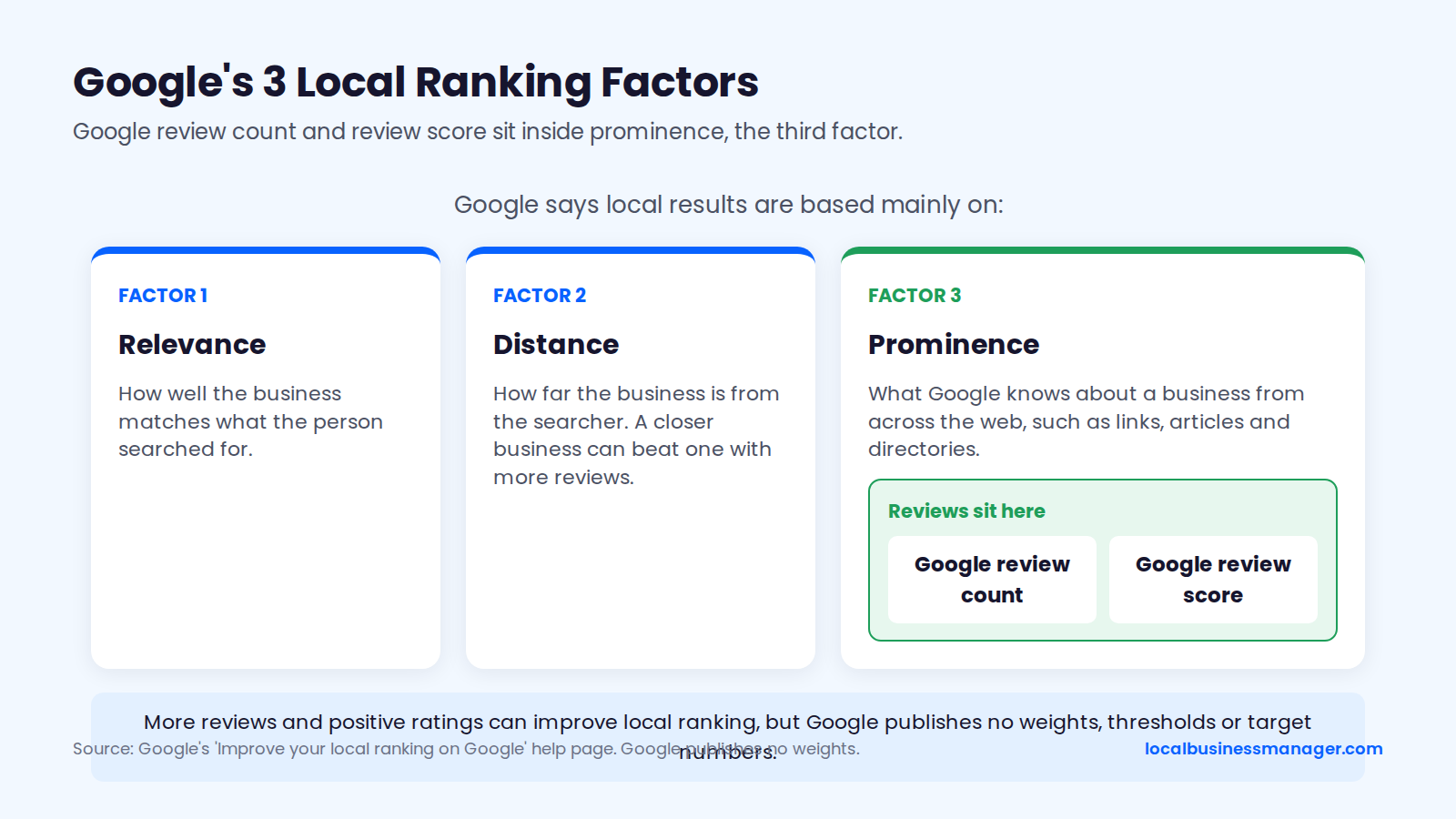
Google says local results are based mainly on relevance, distance and prominence, and it puts reviews under prominence. Google's guide to improving local ranking says more reviews and positive ratings can help a business's local ranking, and it names Google review count and review score as the review factors.
The same guide says prominence also draws on what Google knows about a business from across the web, such as links, articles and directories, so reviews share that group with links, press mentions and directory profiles.
Google's documentation is silent on 4 review topics that most articles present as ranking factors:
- Recency: how new the latest reviews are.
- Velocity: how many reviews arrive each month.
- Keywords in review text: services, case types or neighborhoods that customers mention.
- Owner replies: Google's local ranking tips advise responding to reviews because it shows you value your customers and their feedback; they name no ranking effect.
Google also publishes no weights, thresholds or target review counts. If someone quotes an exact review weight "from Google", ask for the page.
Which Review Signals Affect Local Rankings?
Only 2 of the 6 review signals people argue about, review count and average rating, are named by Google as local ranking inputs. The other 4 are recency, review length and photos, keywords in review text, and owner replies. Those rest on an expert survey, a few small agency tests, or nothing published at all.
The table labels each signal by evidence as of November 2026, sorted from strongest to weakest. Its sources are Google's help pages, the 2026 Local Search Ranking Factors survey (47 local search experts ranking 187 factors, published November 2025) and Sterling Sky's field tests.
Review signal | What Google says | 2026 survey rank (local pack) | Practitioner tests | What to do |
|---|---|---|---|---|
Review count | Named as a ranking factor | 9th (Google reviews with text) | Gain from 3 to 16 reviews, none from 16 to 31 | Close the gap to the local top 3 |
Average rating | Named as a ranking factor | 6th | Not isolated in any published test | Earn it; answer complaints |
Recency and steady flow | Not documented | 11th (recency) | Monthly reviews beat a stalled total | Ask every customer, every month |
Review length and photos | Not documented | Not ranked in our sources | Reviews with text had a stronger impact | Let customers write what they want |
Keywords in review text | Not documented; requesting specific content breaks policy | 36th | No gain in 2 small tests | Never script wording |
Owner replies | Advised for customer trust | Not in the top factors | No controlled test published | Reply to show customers you value feedback |
Review Count
Review count is one of the 2 review signals Google names as a local ranking factor. The 2026 Local Search Ranking Factors survey puts the number of Google reviews with text 9th of 187 local pack factors (score 170), a rank that reflects what experts believe rather than measured rankings.
Sterling Sky's tests, run by Joy Hawkins, are the closest thing to measurement. In 2022, a listing gained ranking going from 3 to 16 reviews but saw no meaningful gain from 16 to 31. In the April 2025 retest, 3 businesses each saw a small Maps lift going from 9 to 10 reviews, and the boost didn't continue past that point.
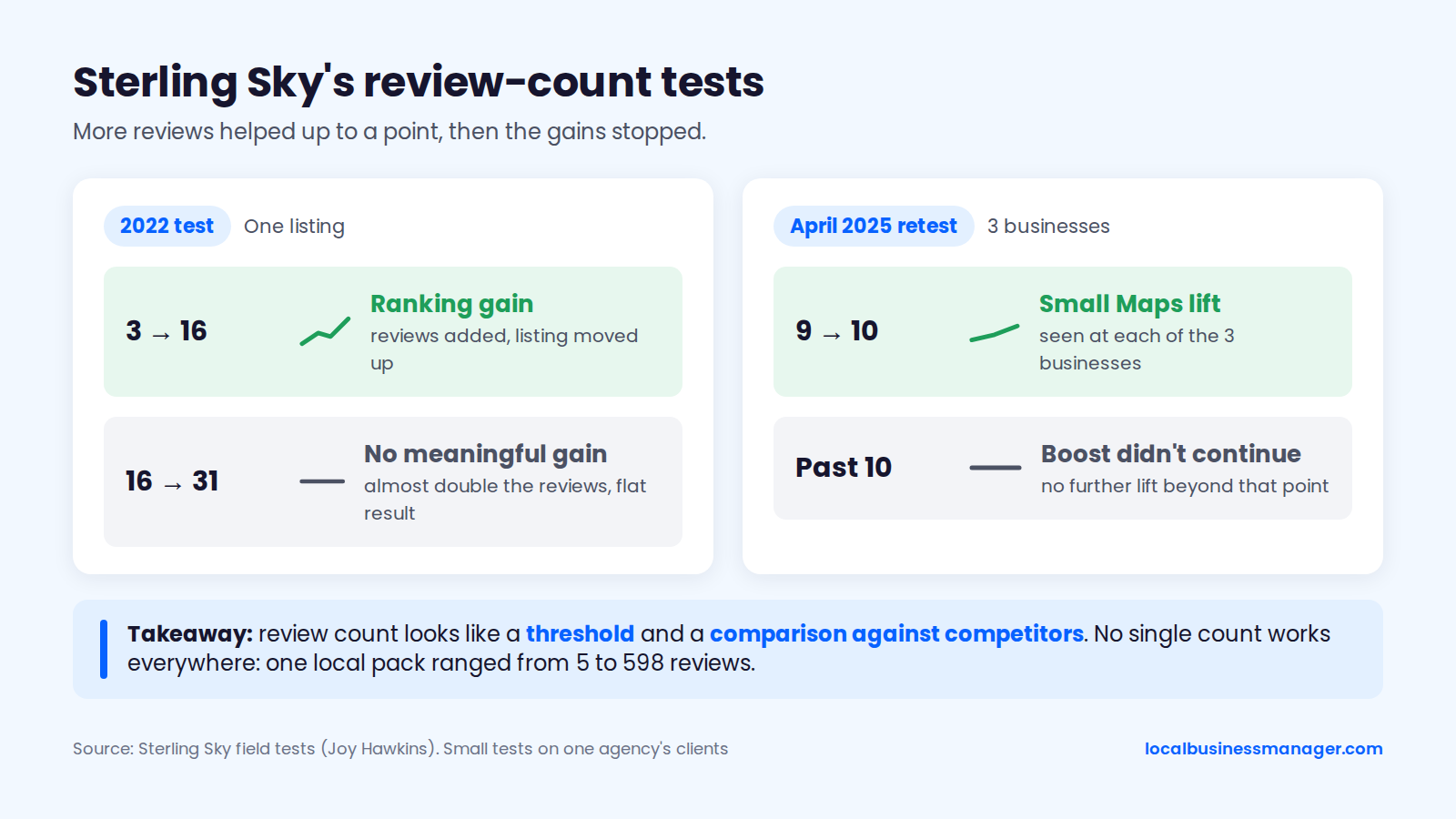
Hawkins also pointed to one local pack where listings ranged from 5 to 598 reviews, so no single count works everywhere. These are small tests on one agency's clients, but they suggest review count works as a threshold and a comparison against competitors.
Average Star Rating
Average star rating is the second review signal Google names: its local ranking guide lists review score next to review count. Survey respondents placed a high numerical Google rating (4 to 5 stars) 6th of 187 local pack factors (score 181).
No published test separates rating from count as a ranking input, so nobody can tell you how many positions a move from 4.3 to 4.6 is worth. No source shows a business needs a perfect 5.0 either; compare the client's rating with the ratings of the top 3 you record in the benchmark below. Rating clearly matters for clicks and for the Maps minimum-rating filter (both covered in the risks section), and only 2 levers move it without breaking policy:
- Better service, with complaints answered and fixed.
- An ask that reaches every customer, which gives the average a bigger and more representative base.
Recency and Steady Flow of Reviews
Google's documentation says nothing about review recency or velocity as ranking inputs. The survey's experts still ranked review recency 11th of 187 local pack factors (score 164), and 2 Sterling Sky findings point the same way, with caveats:
- A 2022 case: a client's rankings slipped after it stopped asking for reviews and recovered once new reviews came in. Search Engine Roundtable noted the result was not statistically significant.
- The 2025 "near me" study of 8,186 businesses in 200 cities: reviews earned in the current month mattered more than the total count. The study also described a dental client getting 60+ reviews a month that lost rankings after an 18-day stop.
Google doesn't document velocity, and no published controlled test isolates it, so treat it as something practitioners observe rather than a confirmed factor.
Keywords in Review Text
Keywords in review text have no confirmed ranking effect, and asking customers to include them breaks Google's policy. Google Maps' prohibited and restricted content policy says merchants soliciting reviews should not "request that specific content be included." PPC Land reported that on April 17, 2026, Google added clauses banning merchants from directing staff to solicit a set number of reviews or reviews with specific content, such as staff names.
Miriam Ellis has noted that this wording could be read broadly enough to restrict any content-specific prompt. That would plausibly include a case type like "truck accident" or a neighborhood name. The ranking evidence is thin and negative:
- Sterling Sky's keyword test: keyword-rich reviews added to an 18-review profile brought no ranking gain, and for one phrase rankings got worse.
- Sterling Sky's second test: a made-up word in reviews showed no effect.
- The 2026 survey: keywords in native Google reviews ranked 36th of 187 for the local pack.
- One local SEO software company's own ranking data: almost no measurable effect, which the company called too small to act on.
Owner Replies
Owner replies have no documented ranking effect. Google's help page on managing reviews presents replying as a way to show customers you value their feedback. Its local ranking tips advise responding for the same reason, without calling replies a ranking factor.
No controlled public test shows replies moving map pack rankings. One local SEO software company compared the 2026 survey's factors with its own ranking data and found that replying to reviews did not affect local rankings. That finding is correlation from a vendor's own data.
Review Photos and Length
Review photos and review length have no documented ranking role in Google's help pages. The only related evidence is about text: Sterling Sky's near-me study found that reviews with text had a stronger impact, and the survey factor ranked 9th counts Google reviews with text specifically. We found no published test of photo reviews or long reviews as ranking inputs.
Given Google's rule against requesting specific content, keep the ask open ("tell us about your experience") and let customers decide whether to add a photo or a long story.
How Much Do Reviews Matter Compared With Proximity and Categories?
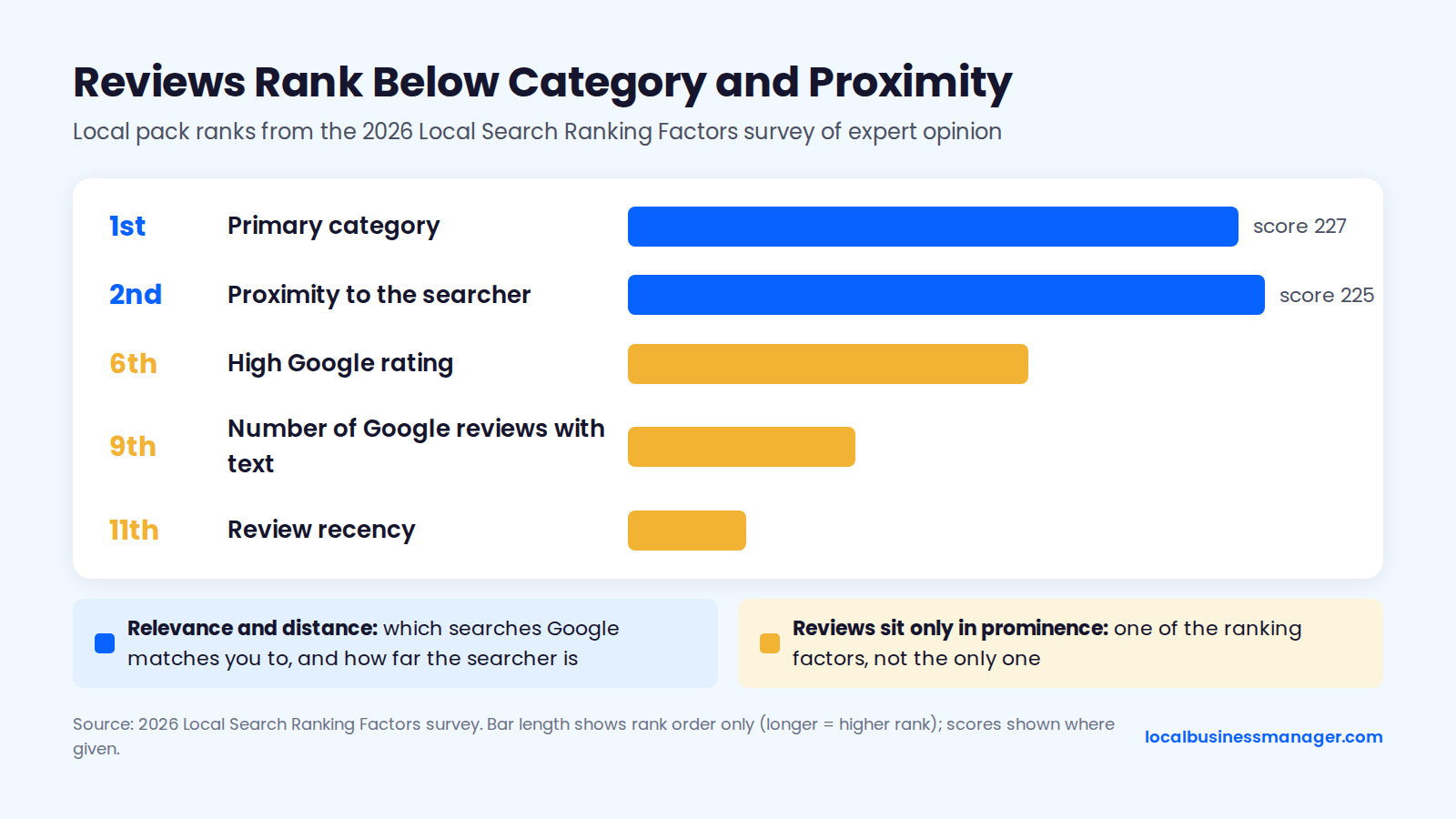
Expert opinion ranks Google reviews below the primary category and the searcher's distance. The 2026 Local Search Ranking Factors survey puts primary category 1st (score 227) and proximity to the searcher 2nd (225), against 9th for review count and 11th for recency. The sections below explain why, then give a script for the client call.
Can More Reviews Beat Distance?
Google publishes no weights, so nobody outside Google can say how far reviews can carry a profile. What Google does document is that reviews sit only in prominence: they don't change which searches Google matches a profile to (through its primary category and services) or how far the searcher is from the business. The survey experts' ranks point the same way, and Joy Hawkins of Sterling Sky puts it plainly: reviews are "one of the ranking factors, not the only ranking factor."
Among businesses already in contention, review volume does show up as a difference. SearchLab Digital's 2025 Google Business Profile Report (Personal Injury Edition) studied 3,200 PI law firm profiles across 20 US cities and found that firms ranked #1 averaged 40% more reviews than firms ranked #10. My own practice adds 3 points:
- Name and review flow come up most. In my experience, the 2 most common reasons a personal-injury firm misses the 3-pack are a business name that isn't optimized and too little review flow. A keyword name only works when it's the name the business really uses, registered as a DBA first and used everywhere before the profile changes. It still carries a risk: the 2026 Local Search Ranking Factors survey lists keyword names among the top suspension risk factors.
- Category follows the competitors. For the primary category, I pick what most of the ranking competitors use.
- Timing differs by fix. In my experience, a single high-impact fix like the name can show ranking gains within about a month; once the basics are done, gains from a strong review push come gradually.
A Script for the Client Conversation
Use this when a client says "we got 30 new reviews and didn't move." Fill in the brackets from your benchmark (see the next section), and say it in this order:
- "Reviews count, and Google says so, but they're one of 3 groups of factors, alongside relevance and distance."
- "Your new reviews moved you closer to the businesses above you. They didn't change how far searchers are from your office or which searches Google matches you to."
- "Right now the top 3 average [X] reviews and you're at [Y], so we're closing that gap at about [Z] a month."
- "In parallel we're fixing [category, name or website item]."
- "Every month I'll show you the review gap and your rankings across your whole area, so you can see both move."
Do Google Reviews Help Organic Rankings and AI Answers?
Google reviews have no documented effect on regular organic rankings, and their effect on AI answers is mostly unmeasured. Two things are documented: reviews of your own business can't earn stars on your site's search results, and Google Maps now summarizes review text with AI.
Regular Organic Results
Google has never documented reviews as a ranking factor for regular organic results. Review keywords also score far lower for organic results in expert opinion: the 2026 Local Search Ranking Factors survey ranked keywords in native Google reviews 107th of 187 factors for local organic results, against 36th for the local pack.
The usual case for an organic effect is indirect: strong reviews win more clicks and brand searches, and that helps the site. Google hasn't confirmed that chain. The customer side is better documented in a local SEO software company's 2026 Local Consumer Review Survey of 1,002 US adults, published in February 2026:
- 97% of consumers read reviews for local businesses.
- 41% said they "always" read them when browsing for businesses, up from 29% in 2025.
Review Stars and Schema on Your Own Site
Review markup on your own business's site won't earn star ratings in search results. In September 2019, Google classed reviews of a LocalBusiness or Organization shown on that business's own site as "self-serving" and stopped showing review stars for them, whether the reviews sit directly in the markup or come through an embedded third-party widget, as Google's 2019 announcement on review rich results explains.
Google reviews embedded on your own site fall under the same rule and won't earn review stars. Google's review snippet guidelines also say ratings must be sourced directly from users, and they tell sites not to aggregate reviews or ratings from other websites.
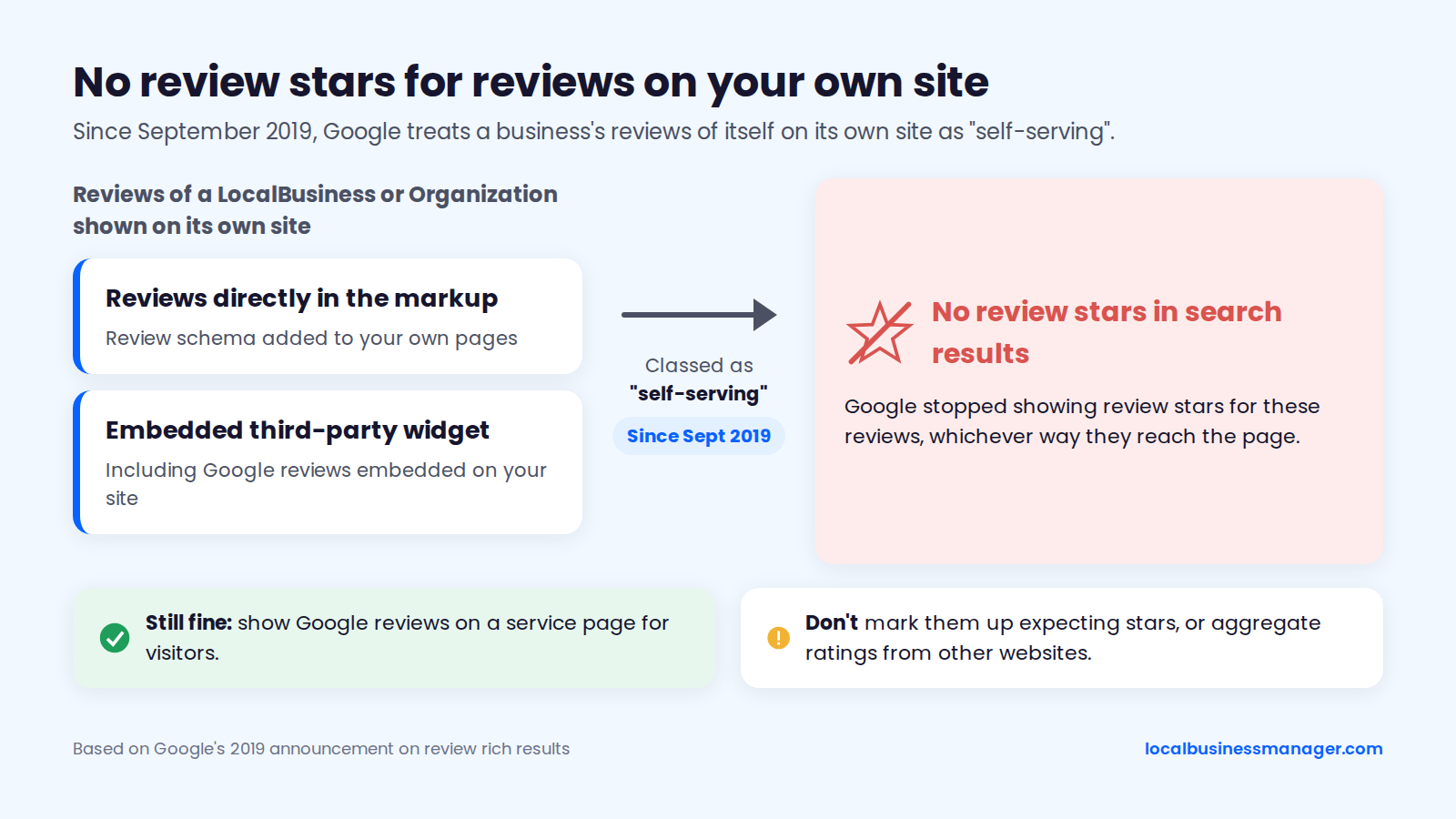
You can still show Google reviews on a service page for visitors; just don't mark them up expecting stars.
AI Overviews, Maps Review Summaries and Chat Assistants
Google Maps shows AI review summaries labelled "summarized with Gemini" on place listings. 9to5Google and Search Engine Roundtable reported that Google added the feature in the US in October 2024, so review text feeds what searchers read about a business before they open individual reviews.
Whether reviews change how often a business is named in AI Overviews or chat assistants is unmeasured in any source we could verify. The 2026 survey's experts rated review factors differently for AI search visibility than for the local pack:
- Authority of the third-party sites where reviews appear: about 21st of 187 for AI visibility, against near the bottom for the local pack.
- Number of third-party reviews: about 34th for AI visibility.
- Keywords in native Google reviews: 53rd for AI visibility.
When a client asks "are we showing up in ChatGPT?", the honest answer is that no source we could verify has measured a reviews-to-AI effect, and the placements above are expert opinion. A steady flow of Google reviews and real profiles on the review sites customers use cover the signals those experts rated, without promising a result.
How Many Google Reviews Do You Need?
No fixed number of Google reviews guarantees a map pack spot, and Google publishes no target. The useful number is the gap between a client and the businesses already ranking for its main keyword. The method below turns that gap into a target and a monthly pace.
How to Benchmark Against the Top 3
My goal for a client is to match the average review count of the top 3 map pack results, and ideally get as many reviews as possible. The 6 steps below are a general way to measure that gap; the newest-review date, the 30-day count and the monthly pace in steps 3, 5 and 6 are planning additions, not a report of my own practice.
- Pick the main keyword. Use the search that brings the most calls, such as "plumber" or "personal injury lawyer".
- Check the map pack from several points across the service area, not just the office address. I don't use single-point checks, because one location says little about how a business ranks across its area. A grid scan or manual checks from several neighborhoods both work.
- Record 3 numbers for each of the top 3 businesses: review count, average rating and the date of the newest review.
- Average the 3 review counts. That's the target. Subtract the client's count to get today's gap.
- Count each competitor's reviews from the last 30 days. This shows how fast the target is moving.
- Set a monthly pace. Divide the gap, plus the competitors' expected growth, by the number of months you have.
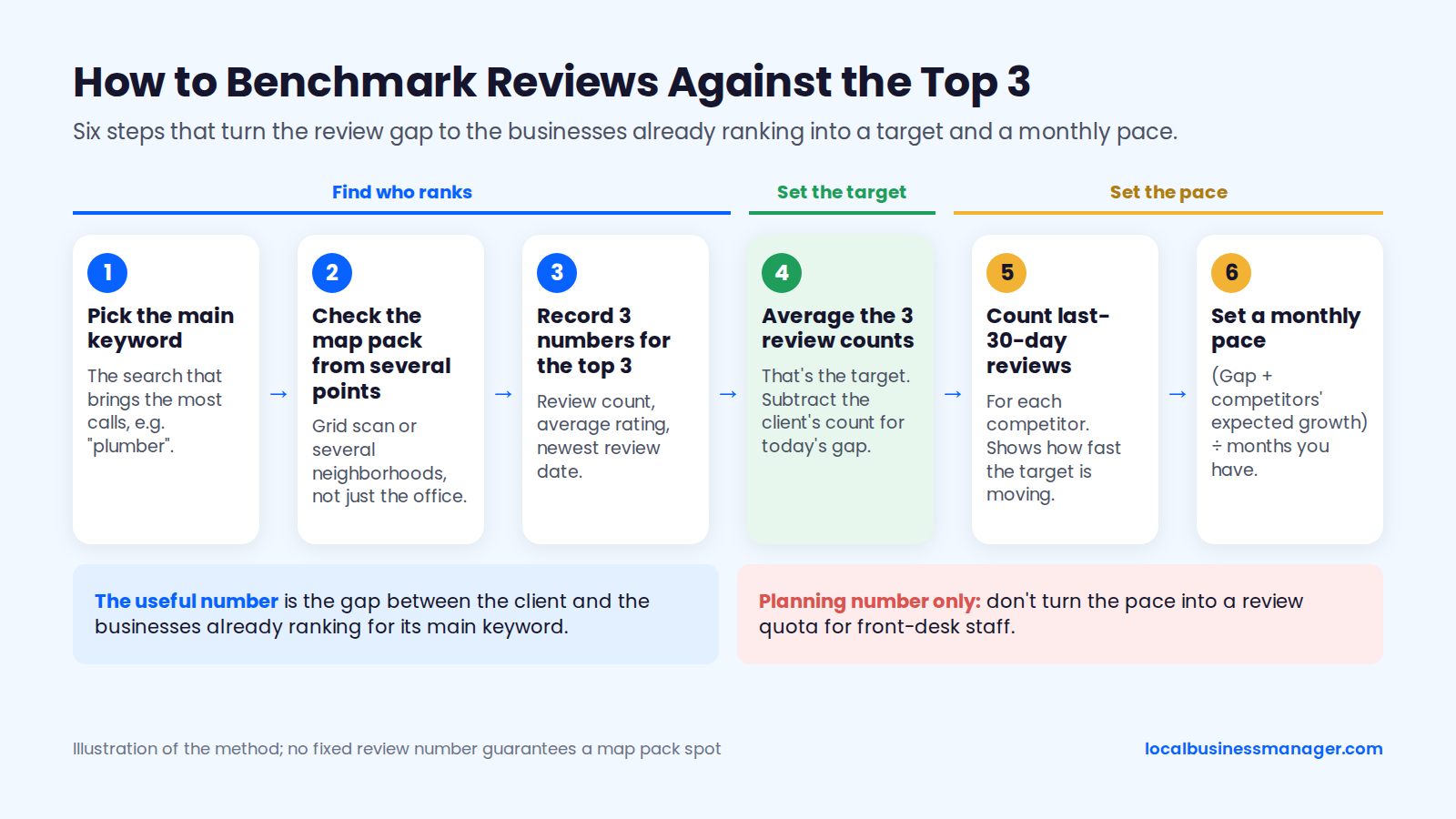
The review-count tests above came from a few low-competition listings, and real packs vary far more, as the 5-to-598 pack and the SearchLab PI data show. In a competitive market, the gap to the businesses actually ranking is the number to work from.
Keep the monthly pace as an agency planning number. Google's policy bars merchants from directing staff to solicit a set number of reviews (one of the staff clauses covered above), so don't turn the pace into a quota for front-desk staff.
Worked Example: A Plumber's Review Target
In this hypothetical example, a plumber with 47 reviews needs about 10 new reviews a month to reach the top 3's average within a year. The numbers are illustrative and come from no real client, and the table is sorted by review count.
Business (hypothetical) | Google reviews | Average rating | Newest review |
|---|---|---|---|
Competitor B | 141 | 4.6 | 7 days ago |
Competitor C | 117 | 4.9 | 2 days ago |
Competitor A | 96 | 4.8 | 3 days ago |
The client | 47 | 4.7 | 35 days ago |
The calculation:
- Top 3 average today: (141 + 117 + 96) ÷ 3 = 118 reviews.
- Gap today: 118 â 47 = 71 reviews.
- The 3 competitors added 12 reviews between them in the last 30 days, so their average grows by about 4 a month. In 12 months, the target is about 118 + 48 = 166.
- Gap over 12 months: 166 â 47 = 119 reviews, or about 10 a month.
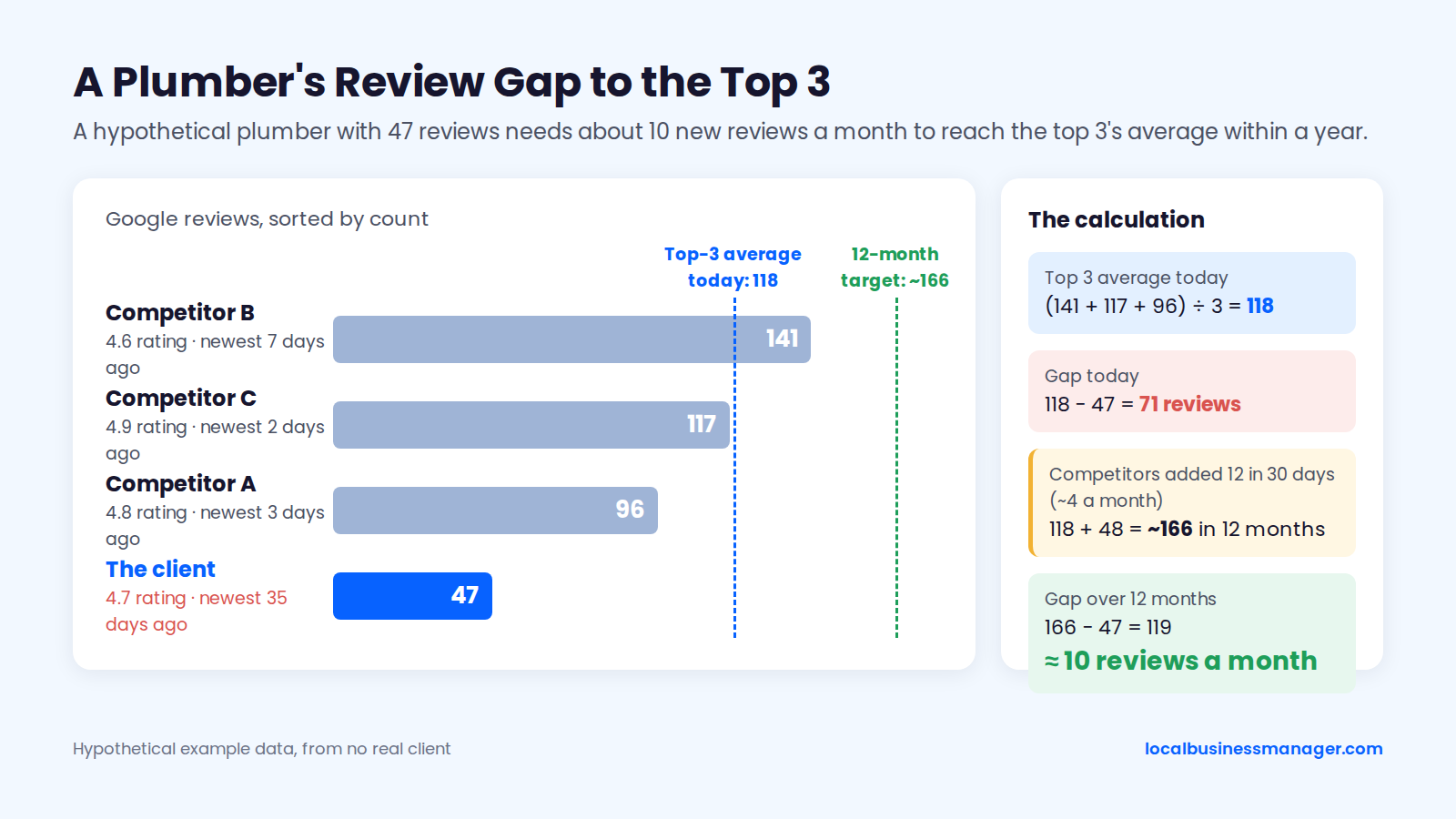
Read the newest-review column next to the count. The recency evidence above favors this month's reviews over the total, and this client's last review is 35 days old while every competitor has one from the past week.
Can Reviews Hurt Your Rankings or Your Profile?
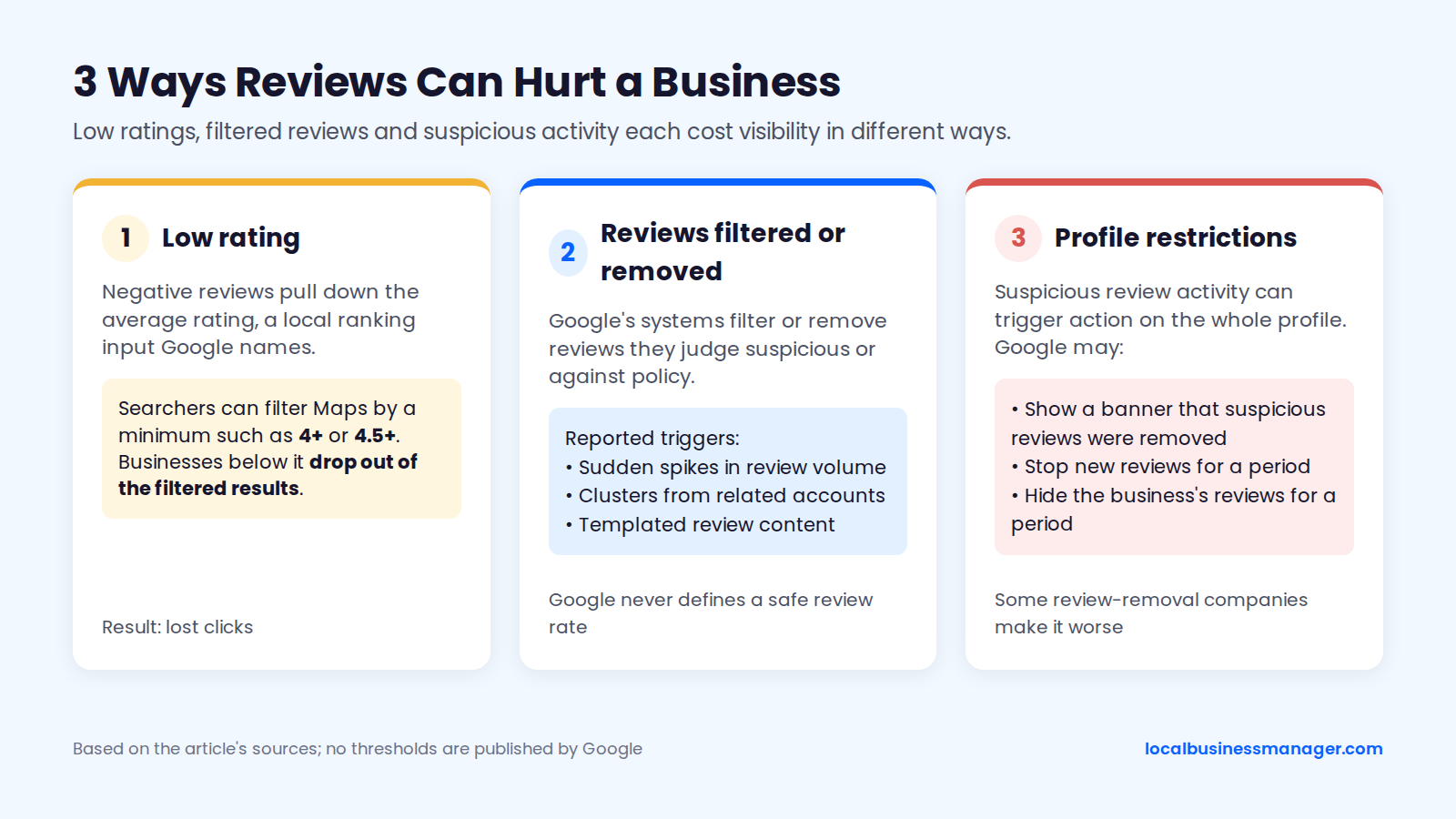
Reviews can hurt in 3 ways. A low rating drops a business out of filtered Maps results and costs clicks. Reviews can be filtered or removed. And suspicious review activity can trigger Google restrictions on the whole profile, which some review-removal companies make worse.
Negative Reviews and Low Ratings
Negative reviews pull down the average rating, which Google names as a local ranking input, though nobody has measured how many positions a drop costs. A low rating can also cost visibility when searchers filter Google Maps by a minimum star rating. Industry blogs from 2025 and 2026, including one from Plum Direct Marketing, report that searchers can set a minimum such as 4+ or 4.5+, and businesses below that rating drop out of the filtered results.
The customer effect is better documented. The same February 2026 Local Consumer Review Survey counted how star ratings shape the choice of a local business:
- 92% of consumers say star ratings affect their choice.
- 68% said they'll only use a business rated 4+ stars, up from 55% in 2025.
In 2017, practitioners on the Local Search Forum and at Workshop Digital also reported that local packs for searches with "best", "top" or "highly rated" showed only businesses rated 4.0 or higher. Blogs still repeat that cutoff, but nobody has published a fresh test of it in 2025 or 2026.
No source measures how many calls a business loses below 4.0. There's also no evidence that a "balanced" mix of good and bad reviews helps rankings, so don't engineer the mix: reply to criticism and fix what it points at.
Do Google Reviews Get Deleted? Why Reviews Disappear
Google reviews can disappear when Google's systems filter or remove reviews they judge suspicious or against policy. A Product Expert in Google's Business Profile Community, who is a volunteer and not Google staff, lists "numerous reviews in a very short span of time" as one reason reviews get hidden, and points to Google's help page on missing or delayed reviews.
Thrive Agency reported waves of disappearing reviews in late 2025 and again in 2026, and named 3 triggers:
- Sudden spikes in review volume.
- Clusters of reviews from related accounts.
- Templated review content.
Google never defines a spike or a safe review rate. Most documented cases involve fake or coordinated reviews, and no reliable public test shows genuine reviews filtered only because of a legitimate burst, such as a wave of thank-yous after a big case settles. Asking each customer as their job finishes spreads reviews across the month instead of bunching them; if you email past customers who agreed to hear from you, email all of them, not only the happy ones.
What Google Does When It Detects Fake Reviews
When Google detects suspicious review activity, its Maps Consumer Alerts policy says it may take 3 actions: show a banner saying suspicious reviews were removed, stop new reviews for a period, or hide the business's reviews for a period. Sterling Sky has seen Google temporarily turn off reviews after an unusual number of coordinated negative reviews, and says no guaranteed number or threshold triggers this.
To report a review that breaks policy, first sign in to the Google Account linked to the profile and find the profile, as Google's "Find your business on Google" help page describes. Google's "Report inappropriate reviews on your Business Profile" page then gives these 4 steps:
- Open your Business Profile and select Read reviews.
- Select Report (the flag icon) next to the review.
- Choose the reason, for example Spam or Profanity.
- Select Send report.
Google's Reviews Management Tool, linked from the same help page, lets you check a report's status and make a one-time appeal on eligible reviews, up to 10 at a time. Google removes reviews that break policy, and an unfair review isn't the same thing. If a profile gets a wave of fake 1-star reviews, report each one, appeal the eligible ones and keep asking real customers; answering with fake positives only adds a second violation.
Review-Removal Companies: Red Flags
A review-removal company can't make Google remove a review that doesn't break policy. Watch for these 6 red flags:
- It guarantees removal of a specific review, or promises a removal rate.
- It asks for your Google password or a shared login, instead of a manager role you can remove.
- It offers to "bury" bad reviews with new positive ones. Those are fake reviews under Google's policy and the FTC's rule.
- It won't say which Google policy each review breaks.
- It contacts reviewers to pressure them into deleting their reviews.
- It can't explain what it does beyond the report flag and the Reviews Management Tool.
Ask these 5 questions before hiring one:
- Which Google policy does each of these reviews break, in your view?
- What exactly will you submit, and through which Google channel?
- What access do you need, and can I remove it when you're done?
- What happens if Google declines both the report and the appeal?
- Will you contact any reviewer, and if so, how?
How Do You Get More Google Reviews Without Breaking Google's Rules?
Ask every customer, the same way, with no reward and no suggested wording, using the review link and QR code built into the Business Profile. The templates below follow that rule, and the checklist at the end lists what gets reviews removed.
Get Your Review Link and QR Code From the Business Profile
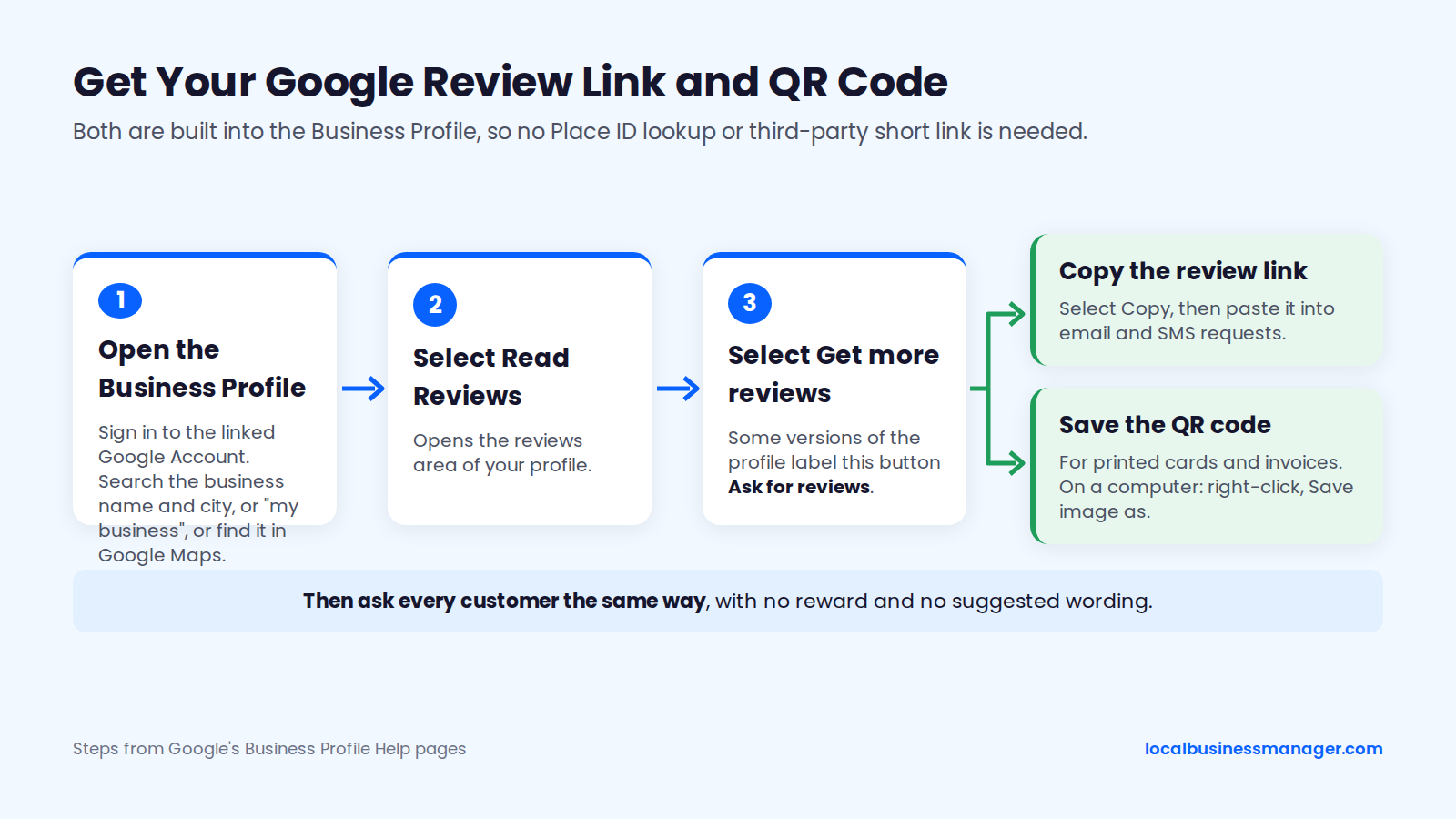
The Business Profile has a review link and QR code built in, so there's no need for a Place ID lookup or a third-party short link. Google's Business Profile Help pages "Find your business on Google" and "Create a Google link or QR code to request reviews" give these 4 steps:
- Sign in to the Google Account linked to the profile. Find the profile by searching Google for the business name and city (or "my business"), or by searching for it in Google Maps.
- Select Read Reviews, then Get more reviews. Some versions of the profile label this button Ask for reviews.
- Select Copy to copy the review link.
- Save the QR code image for printed cards and invoices. On a computer, right-click it and choose Save image as.
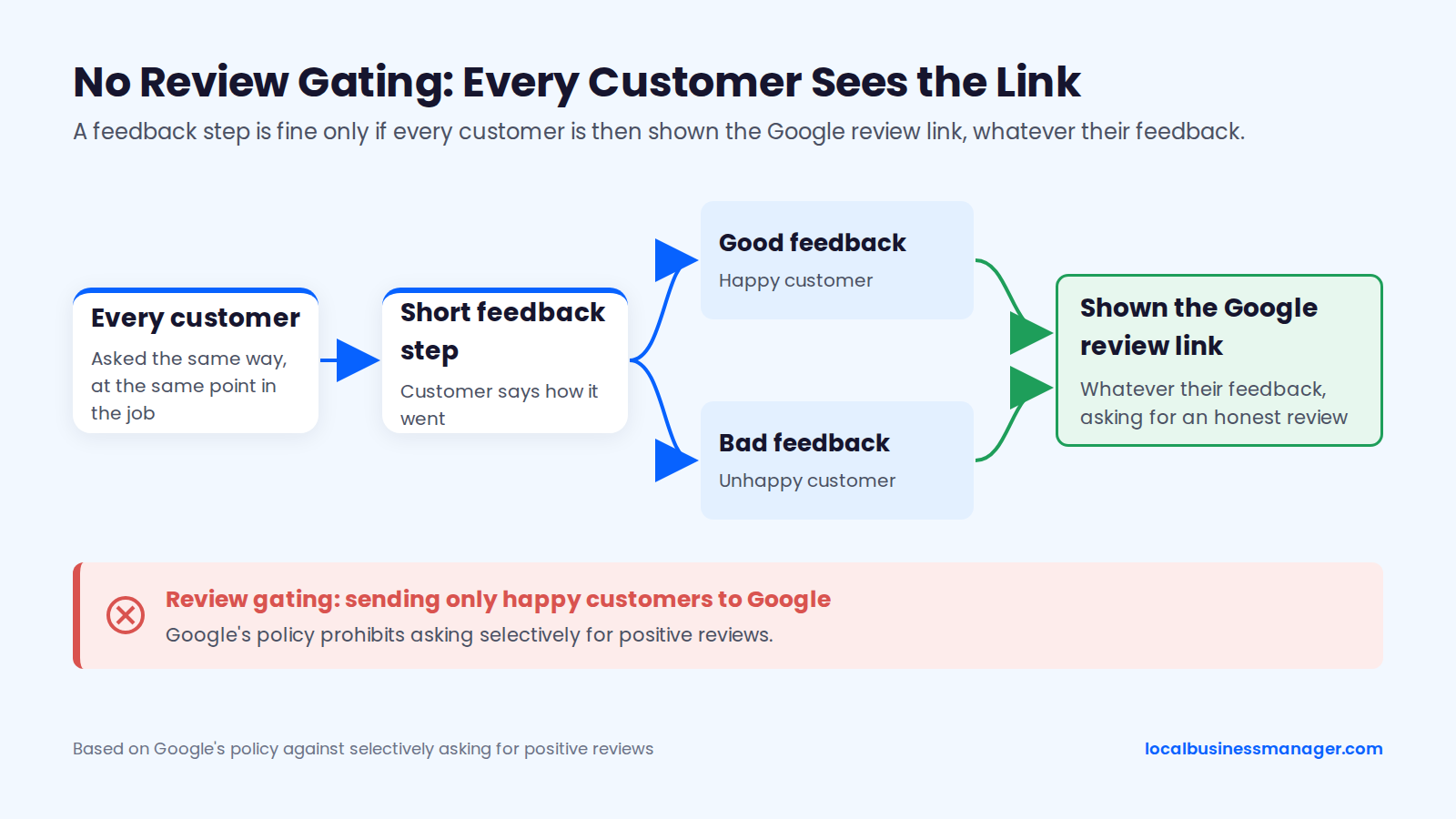
Some request flows, including the one I use, send customers to a short feedback step first. In that kind of flow, every customer must then be shown the Google review link, whatever their feedback. Sending only happy customers to Google is review gating, and Google's policy prohibits asking selectively for positive reviews.
What to Say: Email, SMS and In-Person Templates
These 4 templates ask for an honest review, request no rating and suggest no wording. Send them at the same point, such as when the job is done or the matter closes, to every customer who agreed to hear from the business. Texts go only to customers who opted in to receive texts.
- Email (customers who agreed to email contact). Subject: "How did we do, {first name}?" Body: "Hi {first name}, thanks for choosing {Business}. If you have a minute, we'd appreciate an honest Google review about your experience: {review link}. Reviews help other people in {city} choose who to call. Thank you, {your name}"
- SMS (opted-in customers only, about 160 characters with a short name and link). "Hi {first name}, thanks for choosing {Business}. Would you share your experience in a Google review? {review link} Reply STOP to opt out"
- In person. "Thanks for trusting us with this. Would it be okay if we sent you our Google review link later? An honest review, good or bad, helps us a lot."
- QR card or invoice. "How did we do? Scan to leave a Google review. Honest feedback helps us improve and helps your neighbors choose."
Personal-injury firms should ask every client the same way when their matter closes. For clients who recovered money, that moment comes after payout. Asking only at payout would mean asking only winning clients, which is selective solicitation. Law firms should also check their state bar's advertising rules before running review requests.
What Google and the FTC Prohibit
Google's Maps content policy and the FTC's 2024 rule rule out the most common shortcuts. Use this checklist with every client.
Do:
- Ask every customer the same way, at the same point in the job.
- Email or text only customers who agreed to hear from you.
- Let customers write whatever they want, in their own words.
Don't:
- Offer discounts, gifts, contest entries or any other reward for a review. Google's review policy prohibits incentivized reviews.
- Ask only happy customers, or route only happy customers to Google.
- Request specific content, such as keywords, service names, staff names or neighborhoods.
- Give staff a review quota, or ask them to solicit reviews with specific content (the staff clauses covered above).
- Require or pressure customers to leave a review while they're on the premises, which Google's Maps content policy rules out.
- Write, buy or post fake reviews, including reviews by owners or staff.
The FTC's final rule banning fake reviews and testimonials, announced in August 2024, bans fake reviews and reviews that misrepresent the reviewer's experience. It also bans incentives conditioned on a review expressing a particular sentiment.
Yelp is stricter than Google. Yelp's content guidelines say businesses should never ask customers to write reviews, so run the ask-every-customer process for Google only.
Should You Reply to Every Google Review?
Yes, reply to every review, positive and negative, as a service to customers: Google frames replies as a way to show customers you value their feedback and makes no ranking claim. Law firms and healthcare providers are the exception, covered below.
Customers notice replies. In the February 2026 Local Consumer Review Survey, 37% of consumers counted an owner reply among the most important review factors when choosing a local business, 32% expected a reply by the next day and 81% within a week.
Reply Templates
My practice is that the agency writes and posts all replies, and the client doesn't approve each one. For law firms and healthcare providers, agree the reply policy with the client before anything is posted, because of the confidentiality rules in the next section. If you draft replies with AI, a person still reads and approves every reply before it goes live.
Leave service and city keywords out of replies. No controlled test shows keywords in replies affecting rankings, and Google's reply guidance makes no ranking claim. The 4 templates below are for businesses outside law and healthcare:
- Positive. "Thanks, {first name}. We're glad everything went smoothly, and we appreciate you taking the time to write this. {Name}, {role}"
- Negative. "{First name}, I'm sorry this wasn't the experience you expected. I'd like to understand what happened and make it right. Please call me directly at {number} or email {email}. {Name}, {role}"
- Suspected fake or not a customer. "We take every review seriously, but we can't find a record of a customer matching this name or description. If we've missed something, please contact {name} at {number} so we can look into it." Then report it with the flag if it breaks policy.
- Issue resolved. "Thank you for giving us the chance to fix this, {first name}. We're glad it's sorted, and we appreciate you letting us know."
Once a problem is fixed privately, you can let the customer know they're welcome to update their review if they want to. Don't ask for a particular rating, and never tie anything to the change.
Replies for Law Firms and Other Regulated Businesses
Law firms should reply with no client information at all. Don't confirm the reviewer was a client, and don't mention the matter. ABA Model Rule 1.6 covers confidentiality. ABA Formal Opinion 496 (January 13, 2021) says a negative online review is not a "controversy" under Rule 1.6(b)(5), so a lawyer may not disclose information relating to the representation when responding.
The opinion says lawyers should seriously consider not responding at all. If they do respond, they may invite the reviewer to contact them privately. We found no source that addresses positive reviews directly, but as a caution, a thank-you reply could be read as confirming the reviewer was a client, so check your state bar's rules and opinions before setting a firm's reply policy, or decide not to reply. This is marketing guidance and isn't legal advice.
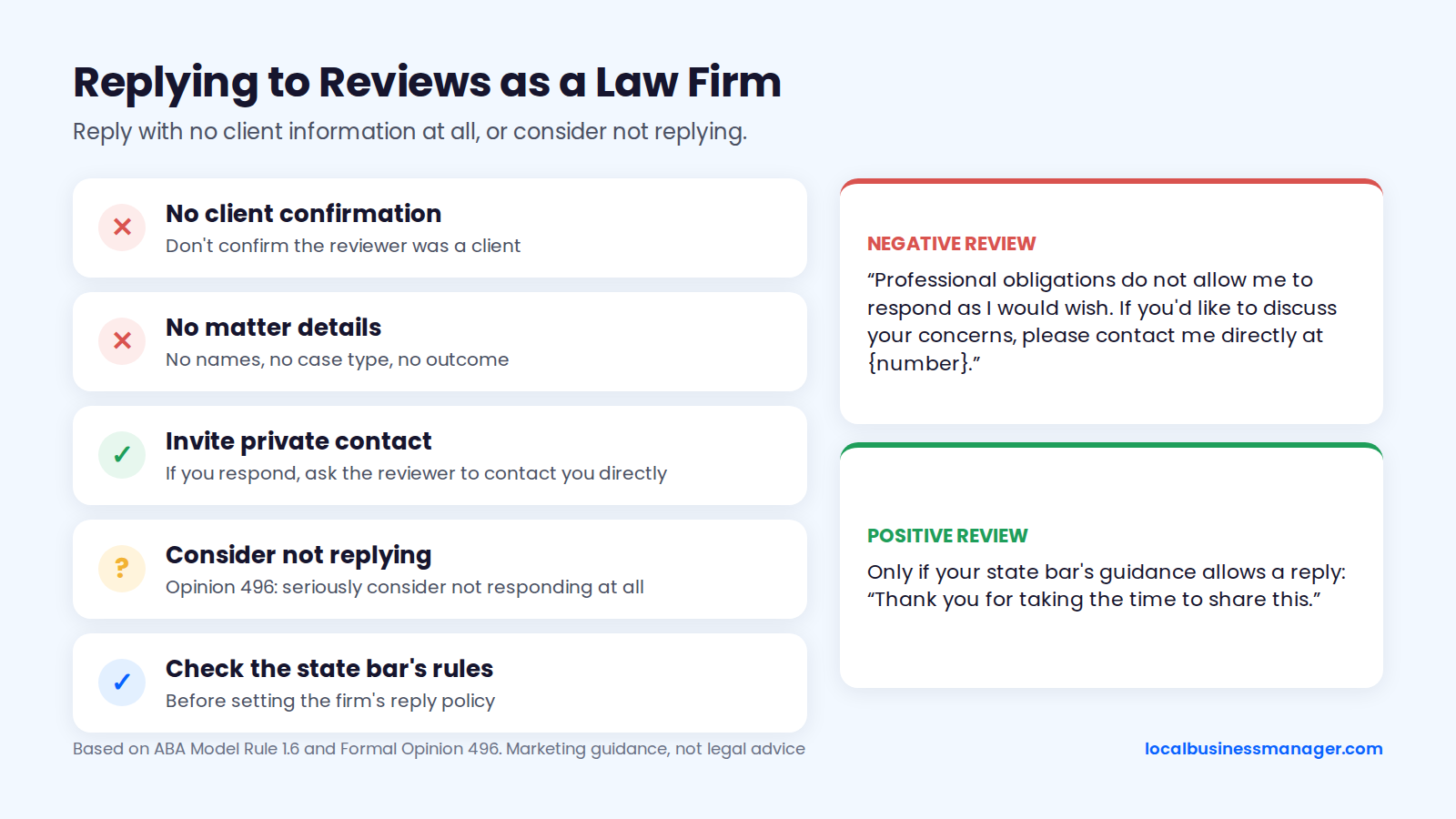
- Negative review, law firm. "Professional obligations do not allow me to respond as I would wish. If you'd like to discuss your concerns, please contact me directly at {number}." (The first sentence is the wording suggested in the Tennessee Bar Association's summary of Opinion 496.)
- Positive review, law firm. Only if your state bar's guidance allows a reply: "Thank you for taking the time to share this." No names, no case type, no outcome.
- Healthcare and other regulated businesses. Even a thank-you can confirm that someone was a patient or customer, and the "not a customer" template above does the same in reverse. Check the privacy rules that apply to the business, such as HIPAA for US healthcare providers, before replying at all, and consider not replying.
Do Yelp, Facebook and Industry-Site Reviews Help Google Rankings?
Google hasn't documented reviews on Yelp, Facebook or industry sites such as Avvo as local ranking signals. Its local ranking guide counts directory information toward prominence but names only Google review count and score as review factors. Reviews elsewhere still matter for trust and referrals, and possibly for AI answers.
The expert view matches Google's silence: the 2026 survey put third-party ratings and third-party review counts near the bottom of its 187 local pack factors. Joy Hawkins of Sterling Sky has said that only Google reviews affect rankings. Third-party reviews still earn some effort for 3 reasons:
- They can show up on Google. Google has shown ratings from sites like Facebook and Yelp in a "Reviews from the web" section of the local Knowledge Panel, according to Search Engine Land's 2022 coverage. Businesses can't control whether it appears, and we haven't verified how the section displays as of November 2026.
- Customers check several sites. The February 2026 Local Consumer Review Survey found that the average consumer uses 6 review sites when choosing a local business.
- Industry directories can bring business. In my observation, some paid legal directories bring cases, and they also help a firm get mentioned in AI Overviews.
How Do You Measure Whether Reviews Are Moving Rankings?
Measure reviews and rankings side by side every month, and judge reviews by the gap to the top 3 and the monthly flow. Then check whether rankings across the service area moved, without crediting every change to reviews.
Metrics to Track
These 7 metrics show whether reviews are doing their job:
- New Google reviews this month, the flow the recency evidence points to.
- Review count against the top-3 average, the benchmark gap from the method above.
- Average rating, which Google names as a ranking input.
- Date of the newest review, to catch a stalled flow early.
- Reply rate and average reply time.
- Local pack positions across the service area, checked from many points across the area.
- Calls, website clicks and direction requests from the Business Profile's Performance data, as labelled in your dashboard.
Given the review-count tests above, lifetime review count tells a client little once a business is past the early stage, so the gap to the top 3 and the monthly flow are the review numbers worth reporting. In my experience, average rank is misleading on its own right now because Google is mixing results to fight scrapers and AI scrapers, which makes the results page very volatile, so don't credit or blame reviews for a single month's move.
What to Show the Client Each Month
In my monthly reports, calls and rankings lead. Copy this block into your monthly local SEO report:
- Reviews and rankings, {Month Year}
- Calls from the profile: {n} (last month: {n})
- Map pack positions for {main keyword} across the service area: {summary}
- New Google reviews this month: {n} (planned pace: {n} a month)
- Review count: {n} vs top-3 average {n} (gap: {n})
- Average rating: {x.x}
- Newest review: {date}
- Replies: {n} of {n} reviews answered, average reply time {n} days
- Other changes this month: {category, name, website or link work}
- Next month: {one action}
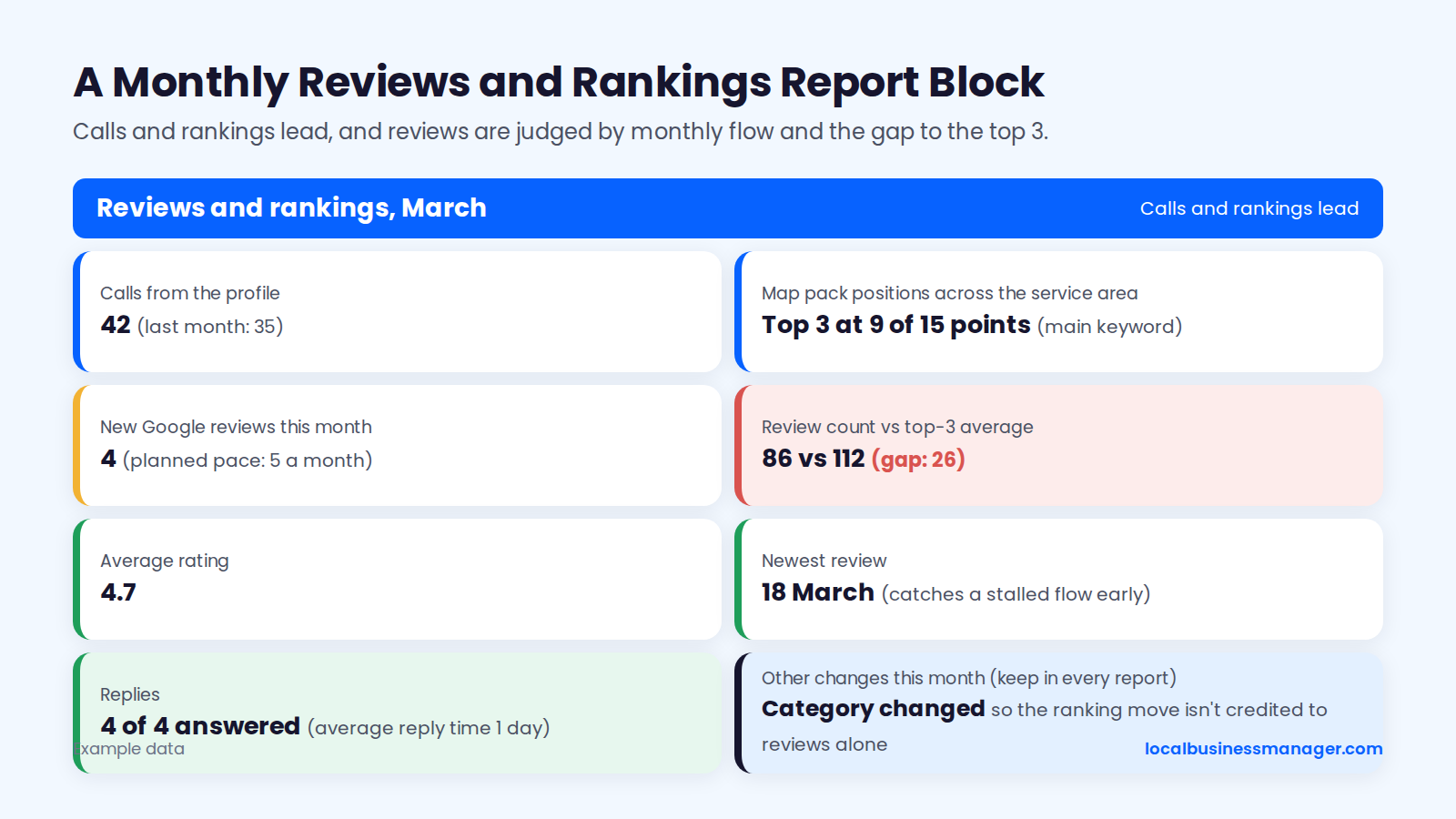
Keep the "other changes" line in every report: if the category changed in the same month rankings moved, nobody can credit that move to reviews alone.
Frequently Asked Questions
A 4.7 and a 5.0 both clear the 4-star line most consumers use, reviewing other businesses brings no documented ranking benefit, and in my experience a reinstated profile keeps its reviews. The details follow.
Is a 4.7 Rating Better Than a 5.0?
No published evidence shows that either one ranks or converts better. The 2026 Local Search Ranking Factors survey treats 4 to 5 stars as one factor ("high numerical Google rating", 6th of 187 for the local pack), and the 68% consumer threshold in the February 2026 consumer survey is 4+ stars, which both clear. The more useful comparison is review count and newest-review date against the top 3.
Is There Any Benefit to Leaving Reviews on Google?
For customers, yes: a review helps other people choose a business and tells the business what to keep or fix. For a business, Google documents no ranking benefit from reviewing other businesses. Reviews of your own business by owners or staff break Google's policy, so the only reviews worth having are honest ones from real customers.
Will a Profile Suspension Wipe Out Our Reviews?
Not in my experience: I've never lost reviews when a suspended profile was reinstated. Treat that as my experience, not a promise; rankings have also come back when we acted fast. Reinstatement usually needs documents, such as the DBA, the lease agreement and photos of the office with its signage, or a video recording the storefront and office, so gather them and submit the appeal promptly.
Where I'd Start This Week
Pull the top 3 for a client's main keyword from several points across their area, write down each competitor's count and newest-review date, and set an ask that reaches every customer. That gap number gives the client a target they can watch shrink. When you're ready to look at tools for agency work, join the Local Business Manager early access list.